







Understanding MultiMediaCard (MMC) and Its Role in Storage Technology
What is MMC card and how it works
The MultiMediaCard (MMC) is a type of flash memory storage device that was first introduced as a compact and portable solution for storing digital data. If you’re wondering what is MMC card, it is essentially a solid-state memory format designed for devices like digital cameras, smartphones, and embedded systems.
An MMC card operates using NAND flash memory, which allows it to store data even when power is removed. Compared to traditional storage methods, this makes it highly reliable and efficient. The memory mmc card is known for its slim form factor and low power consumption, which made it popular in early mobile devices.
Another important concept is multimedia card mmc, which refers to the same technology but emphasizes its use in storing multimedia files such as photos, videos, and music. Over time, MMC technology has evolved, leading to newer formats like embedded MMC (eMMC), which is widely used in modern smartphones and tablets.
⚠️Warning: Although MMC cards are still supported in some devices, they are largely outdated and may not be compatible with newer hardware.
MMC Card vs SD Card: Key Differences Explained
Comparing mmc card sd card performance and compatibility
When comparing mmc card sd card, many users find it confusing due to their similar appearance. However, there are significant differences in performance, speed, and compatibility.
The sd mmc card slot found in older devices often supports both formats, but modern devices are primarily optimized for SD cards. While MMC cards use a simpler interface, SD cards offer higher data transfer speeds and better security features.
One key difference lies in speed. MMC cards typically have slower read/write speeds compared to SD cards, which limits their performance in high-demand applications like HD video recording. In contrast, SD cards support advanced speed classes, making them more suitable for modern usage.
Another factor is compatibility. When choosing between sd or mmc card, SD cards are generally the better option due to widespread support. However, MMC cards can still be useful in legacy devices that specifically require them.
⚠️Warning: Inserting an unsupported card into a device may result in data corruption or failure to read the card.
Types of MMC Cards and Their Evolution
Standard MMC and reduced-size versions
Over the years, several types of MMC cards have been developed to meet different technological needs. The original MMC card was relatively large compared to modern standards, but it paved the way for smaller and more efficient designs.
Reduced-size MMC (RS-MMC) was introduced to accommodate smaller devices like early smartphones. These cards maintained compatibility with standard MMC slots using adapters, making them versatile for users.
Another variation is the dual-voltage MMC, which supports both 1.8V and 3.3V operation, improving energy efficiency. These improvements allowed the memory mmc card to remain relevant during its peak usage period.
Introduction to embedded MMC (eMMC)
A major advancement in MMC technology is embedded MMC (eMMC). Unlike removable cards, eMMC is integrated directly into a device’s motherboard. This design improves reliability and performance while reducing physical wear and tear.
Today, embedded MMC (eMMC) is commonly used in smartphones, tablets, and laptops as a primary storage solution. It combines the MMC interface with advanced flash memory management, offering faster speeds and better durability compared to traditional MMC cards.
⚠️Warning: Data stored on eMMC cannot be removed physically like a standard MMC card, making recovery more complex if damage occurs.
Common Uses of MMC Cards in Modern and Legacy Devices
Devices that still support multimedia card mmc
Although MMC cards are no longer mainstream, they are still used in certain legacy systems. Older digital cameras, MP3 players, and early mobile phones often rely on the multimedia card mmc format for storage.
Industrial equipment and embedded systems may also use MMC technology due to its simplicity and reliability. In these environments, compatibility and stability are often more important than speed.
The mmc card sd card compatibility in some devices allows users to switch between formats, although this is becoming increasingly rare in modern hardware.
Role of sd or mmc card in data storage history
The sd or mmc card debate reflects the evolution of portable storage technology. MMC cards played a foundational role in the development of flash storage, influencing the design of SD cards and other formats.
Even though SD cards have largely replaced MMC cards, understanding MMC technology helps users better appreciate how modern storage solutions evolved. It also provides insight into compatibility issues that may arise when dealing with older devices.
Why MMC Cards Are Becoming Obsolete
Limitations of memory mmc card technology
One of the main reasons MMC cards are becoming obsolete is their limited performance. Compared to newer storage formats, the memory mmc card offers slower data transfer speeds and lower storage capacities.
Additionally, MMC cards lack the advanced features found in SD cards, such as higher speed classes and improved error correction. This makes them less suitable for modern applications that require high-speed data processing.
Another limitation is availability. As manufacturers shift focus to newer technologies, MMC cards are becoming harder to find in the market.
Shift toward faster storage solutions like SD and eMMC
The rise of SD cards and embedded MMC (eMMC) has significantly reduced the demand for traditional MMC cards. These newer technologies offer better performance, higher capacity, and improved reliability.
For example, eMMC storage is now widely used in smartphones and laptops, replacing removable storage in many cases. This shift reflects the growing need for faster and more efficient data handling.
⚠️Warning: Continuing to rely on outdated MMC cards may increase the risk of data loss due to hardware failure or limited compatibility.
Common Causes of Data Loss on MMC Cards
Physical damage and improper handling issues
Data loss on a MultiMediaCard (MMC) can often be traced back to physical damage. Since an MMC card is a small and delicate storage device, it is vulnerable to bending, cracking, or connector wear. Frequent insertion and removal from devices can also degrade the metal contacts, leading to read errors.
Improper handling is another major factor. For example, removing the memory mmc card while data is still being written can corrupt files or even damage the file system. Exposure to extreme temperatures, moisture, or magnetic fields can also affect performance and data integrity.
In older devices that support sd mmc card formats, improper slot usage may also cause damage. For instance, forcing a card into an incompatible slot can lead to permanent hardware failure.
⚠️Warning: Never remove an MMC card while data transfer is in progress, as this can cause irreversible file corruption.
Logical errors and file system corruption
How formatting and malware affect multimedia card mmc
Logical issues are another common cause of data loss in a multimedia card mmc. These problems are not related to physical damage but instead involve the software or file system.
Accidental formatting is one of the most frequent issues. Users may mistakenly format their mmc card sd card, thinking it is empty or corrupted. While formatting does not immediately erase data, it makes files inaccessible without recovery tools.
File system corruption can also occur due to sudden power loss, system crashes, or improper ejection. This can result in the card appearing empty or prompting users to reformat it.
Malware infections are another risk, especially when the sd or mmc card is used across multiple devices. Viruses can hide, delete, or encrypt files, making them inaccessible.
⚠️Warning: Avoid using the same MMC card across multiple unknown devices to reduce the risk of malware infection.
How to Recover Data from MMC Card: Step-by-Step Methods
Method 1: Use Pandaoffice Drecov for professional recovery
One of the most effective ways to recover lost data from a MultiMediaCard (MMC) is by using a professional recovery tool like Pandaoffice Drecov. This method is suitable for recovering deleted, formatted, or corrupted files from an MMC card.
Test Environment:
- OS: Windows 11
- Device: Laptop with card reader
- Card Type: 32GB memory mmc card
- Data Loss Scenario: Accidental deletion
Steps:
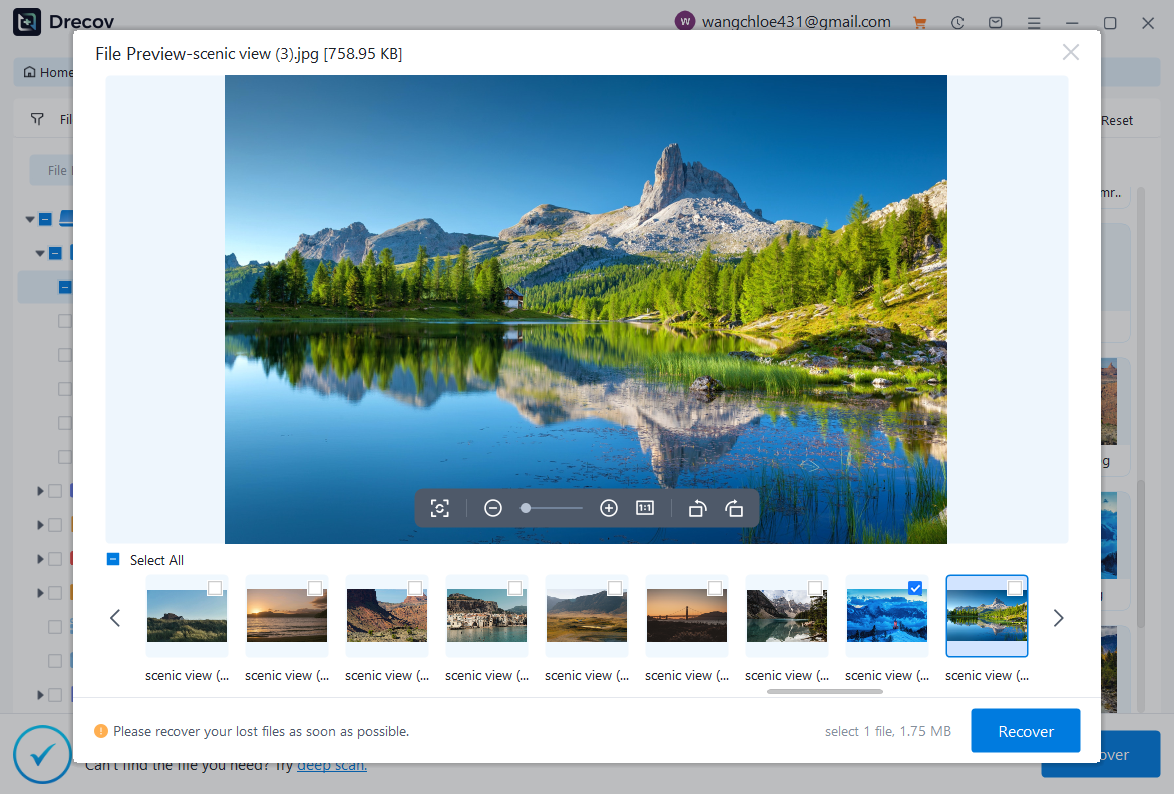
- Install and launch Pandaoffice Drecov on your computer.
- Insert the mmc card sd card into a compatible card reader.
- Select the MMC card from the list of available drives.
- Run a deep scan to locate lost files.
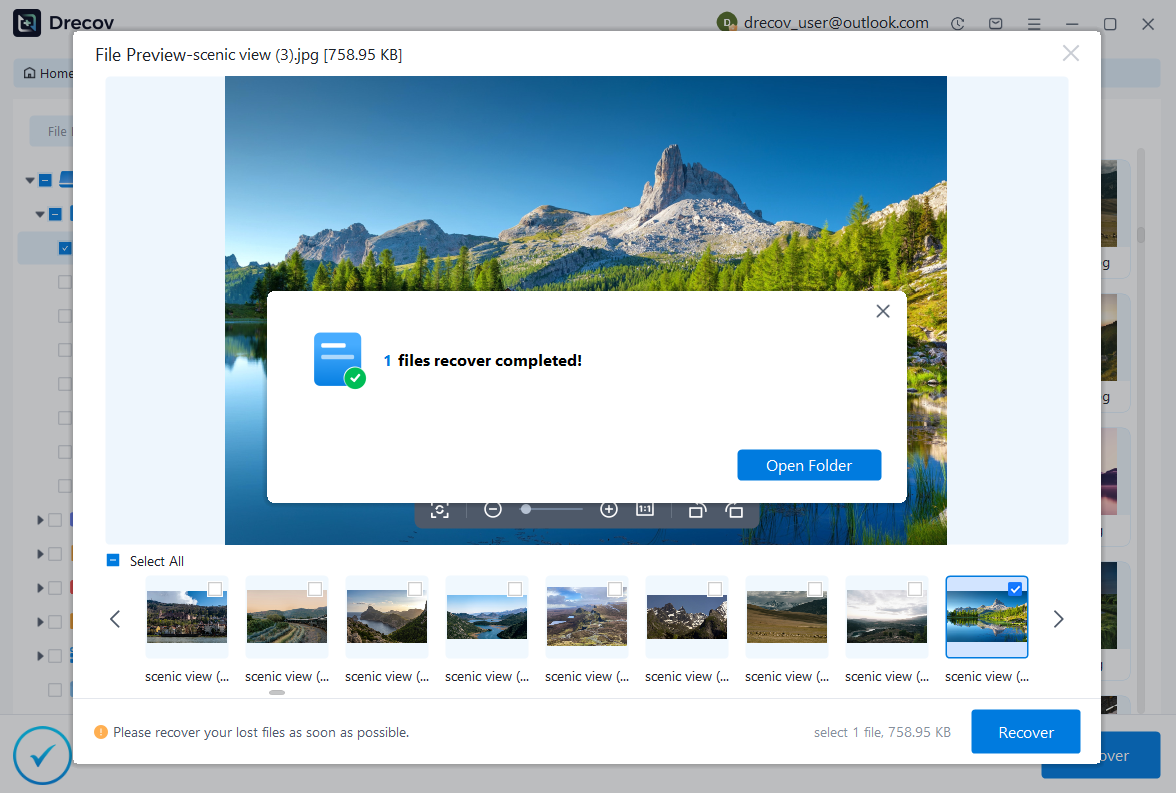
- Preview recoverable data such as photos, videos, and documents.
- Save the recovered files to a different storage location.

Why Choose PandaOffice Drecov?
PandaOffice Drecov is a versatile and reliable solution for recovering a wide range of lost or inaccessible files. Whether you need audio recovery, video recovery, or excel recovery files, PandaOffice Drecov provides fast and efficient results, ensuring your important data is safely restored.
For creative professionals, it supports file recovery Illustrator projects, allowing designers to retrieve unsaved or accidentally deleted artwork without compromising file integrity. Businesses and individuals can also benefit from its restore Windows previous date feature, which helps recover documents or spreadsheets that were lost due to system errors or accidental deletions.
When external storage devices fail, such as a Lacie hard drive not showing up, PandaOffice Drecov can detect and restore files from these drives, ensuring you do not lose critical data. Even deleted files in the recycle bin can be recovered using its advanced recycle bin recovery software capabilities.
Additionally, the software supports recovering data from lost partitions, making lost partition recovery straightforward and reliable. Its intuitive interface allows users to perform audio recovery, video recovery, and excel recovery effortlessly, even for large or complex files.
With PandaOffice Drecov, you get a professional, all-in-one recovery solution that covers nearly every type of file and storage scenario. Its robust algorithms, combined with easy-to-use tools, make it the go-to choice for anyone who wants to restore lost or corrupted data quickly and securely.
This method is highly efficient and supports various file formats. It is especially useful when dealing with severe logical errors or accidental deletion.
⚠️Warning: Do not save recovered files back to the same MMC card, as this may overwrite existing data.
Method 2: Recover data using built-in system tools
If you prefer not to use third-party software, built-in system tools can sometimes help recover data from a memory mmc card, especially in cases of minor errors.
Test Environment:
- OS: Windows 10
- Device: Desktop PC
- Card Type: Standard MMC card
- Data Loss Scenario: File system error
Steps:
- Insert the sd mmc card into your computer.
- Open “This PC” and locate the MMC card.
- Right-click and select “Properties.”
- Navigate to the “Tools” tab and click “Check.”
- Allow the system to scan and fix errors automatically.
This method helps repair file system issues and may restore access to hidden or corrupted files. However, it is not effective for recovering permanently deleted data.
Method 3: Restore from backup or cloud storage
Another reliable method is restoring data from backups. If you regularly back up your files, you can easily recover lost data from a multimedia card mmc without using recovery tools.
Test Environment:
- OS: macOS Ventura
- Device: MacBook
- Card Type: MMC card
- Data Loss Scenario: Accidental formatting
Steps:
- Connect your backup storage device or access your cloud account.
- Locate the backup folder containing MMC data.
- Select the files you want to restore.
- Copy them back to your computer or a new storage device.
This method is the safest and fastest, provided that a backup exists. It completely avoids the risks associated with data recovery processes.
Method 4: Use command-line recovery techniques
Advanced users can attempt recovery using command-line tools. This method is useful for fixing logical errors in a mmc card sd card.
Test Environment:
- OS: Windows 11
- Device: Laptop
- Card Type: 16GB MMC card
- Data Loss Scenario: Corrupted file system
Steps:
- Insert the sd or mmc card into your system.
- Open Command Prompt as administrator.
- Type:
chkdsk X: /f(replace X with the MMC card drive letter). - Press Enter and wait for the process to complete.
This method can repair file system issues and recover inaccessible data. However, it requires caution, as incorrect commands may worsen the situation.
⚠️Warning: Only use command-line tools if you are familiar with them, as improper use may lead to data loss.
FAQ About MMC Cards
Is MMC card still used today?
Although the MultiMediaCard (MMC) is largely outdated, it is still used in certain legacy devices and industrial systems. Modern devices have mostly replaced it with SD cards and embedded MMC (eMMC).
Can I use MMC card in SD slot?
In some cases, an MMC card can be used in an SD slot if the device supports sd mmc card compatibility. However, this is not guaranteed for all devices.
What is the difference between eMMC and MMC card?
The main difference is that embedded MMC (eMMC) is built into the device, while a traditional MMC card is removable. eMMC also offers better performance and reliability.
Is data recovery possible for damaged MMC cards?
Yes, data recovery is possible depending on the type of damage. Logical issues are easier to fix, while physical damage may require professional services.
Conclusion: Key Takeaways About MMC Card Technology
Summary of what is MMC card and its relevance
Understanding what is MMC card helps users better manage legacy storage devices and avoid compatibility issues. The MultiMediaCard (MMC) played a crucial role in the evolution of portable storage, even though it has been largely replaced by newer technologies.
While MMC cards are no longer widely used, they still appear in older devices and specialized systems. Knowing the differences between mmc card sd card formats and modern storage options can help you make informed decisions.
Best practices for handling memory mmc card safely
To protect your data, always handle your memory mmc card carefully. Avoid improper ejection, maintain backups, and use reliable recovery methods when needed.
As technology continues to evolve, solutions like embedded MMC (eMMC) and SD cards will dominate the market. However, understanding MMC technology remains valuable, especially when dealing with legacy devices or recovering important data.
⚠️Warning: Always back up important data regularly to prevent permanent loss, regardless of the storage device used.





