
Professional Data Recovery Solution
PandaOffice Drecov – Professional-Grade Video Data Recovery Solution

10,000+Users

98.7% Success Rate

10 MinAvg. Time
4.9/5
Rating
Trusted By The World Over 21+ Years

reasons for loss
Ever Faced These Frustrations?
PandaOffice Drecov provides a comprehensive video data recovery solution to meet all your recovery needs
Deleted

Accidentally Deleted Videos
You hit delete on important clips, emptied the Recycle Bin, and now they’re gone—seemingly for good.
Corrupted Memory Cards
The SD card in your camera is fried, and all those precious videos on it are unreadable.

Corrupted
Broken

Broken Videos
Your videos won’t play, show format errors, or are cut off mid-play—ruining irreplaceable moments.
Formatting

Accidental Formatting
You mistakenly formatted a hard drive partition, wiping every video stored on it.
File System Errors
Your USB drive or external hard drive demands formatting before use—threatening to erase all your videos.

Errors
Disconnection

Sudden Disconnection
A device unplugged mid-transfer left your videos corrupted or vanished entirely.
Features
PandaOffice Drecov Video Recovery – Your Ultimate Lifesaver
We use advanced data recovery solutions to deep-scan storage devices, retrieving videos lost for any reason. Whether it’s accidental deletion, formatting, or device damage—we make recovery effortless.

Works with multiple devices
Computers,,cameras, memory cards, USB drives, and more.
Recovers all major formats
MP4, AVI, MOV, WMV, FLV, MKV, and beyond.

3 simple steps
no tech expertise needed.

100% safe & secure
Read-only mode ensures zero secondary damage to your original data.
Solution
PandaOffice Drecov’s Video
Recovery Solutions
No matter why your videos went missing, we’ve got a tailored fix to bring them back.


Computer Video Recovery
Works with NTFS, FAT32, exFAT, and other file systems

Video Repair Feature
Supports MP4, AVI, MOV, MKV, and more

Camera Video Recovery
Gets back lost videos from camera storage (SD cards, CF cards)

Reason
Why Choose Our Video Recovery?
Understand various hard drive data loss situations and find the right hard drive data recovery solution for you.

Professional
10 years of data recovery experience—proven, reliable tech.

All Types
Recovers 200+ video formats—covers every type you use.

All Scenarios
Works for all devices and loss scenarios—no exceptions.


Free Preview
check video quality before you recover.

Best Service
Professional video recovery service with fast response, secure handling, and reliable support.

Safe Payment
Secure payment service with encrypted transactions, data protection, and safe checkout guarantee.
3 Steps
to Recover Your Videos
PandaOffice Drecov simplifies the recovery process—get back lost files in just 3 steps
setp 1
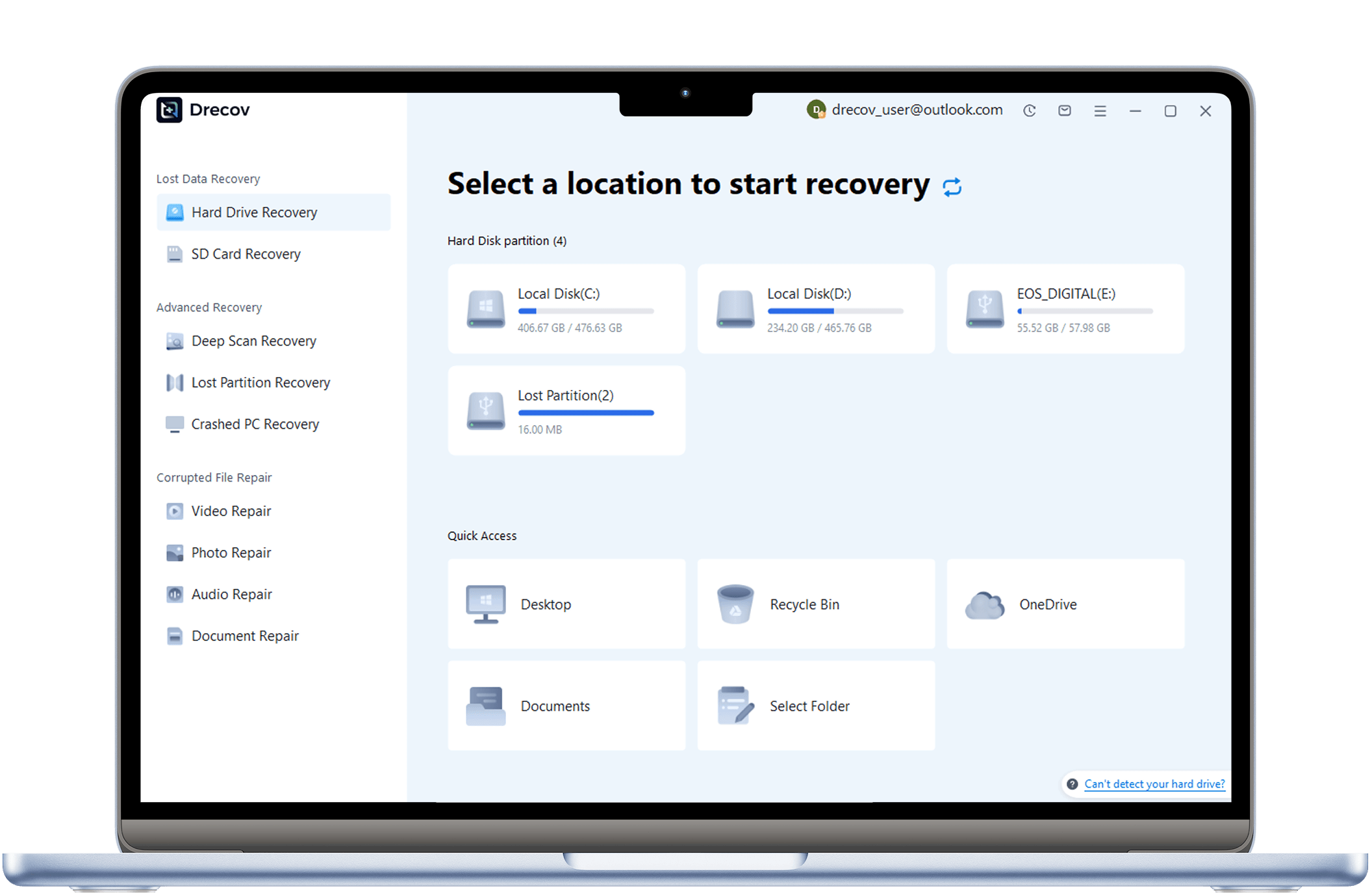
Download, Install & Connect SD Card
Launch PandaOffice Drecov and select “SD Card Recovery”.
Step 2
Scan for SD Card
Connect your video-containing device to your computer, pick it in the software, and click “Start Scan”.

Step 3
Preview & Recover Videos
After scanning, preview the found videos, select the ones you need, click “Recover”, and choose a save location.

Expert Video Recovery Tutorials
PandaOffice Drecov experts share pro tips to solve video loss issues and master recovery skills.

The Definitive 2026 Guide: How to Recover Videos Using Windows File Recovery
This comprehensive guide provides professional techniques on how to recover videos using Windows File Recovery. It covers essential command-line workflows, file system analysis, and advanced tips to ensure successful data restoration for all video formats.

Your Definitive Guide on How to Recover Video Files
Facing the panic of suddenly losing priceless footage? This essential guide solves the stressful problem of How to Recover Video Files that have been accidentally deleted, corrupted, or wiped clean.

A Self-Help Guide to Recovering Lost Videos
Losing a video does not always mean it is gone forever. This article explains the technical reasons why deleted videos can often be recovered and highlights the importance of acting quickly to prevent data overwriting.
What Users
Are Saying
See how others recovered videos with PandaOffice Drecov

Alex Carter
Designer

“I accidentally deleted important family videos from my SD card, and I thought they were gone forever. The video recovery service worked perfectly and restored all my MP4 files in just minutes. The process was simple and the results were amazing!”
Recovery Scenario: Accidentally deleted videos from an SD card.
Recovered: MP4 video files (fully playable)

Lily Thompson
College Student
“My camera SD card was formatted by mistake, and all my client footage disappeared. The deep scan feature recovered most of my MOV and AVI files in high quality. This service truly saved my project!”
Recovery Scenario: Camera SD card was mistakenly formatted
Recovered: MOV and AVI video files (HD quality)

Mia Wilson
Marketing Specialist
“After a system crash, I lost several important business presentation videos. The recovery service restored my MP4 and MKV files quickly and securely. All recovered videos worked perfectly. Highly recommended!”
Recovery Scenario: System crash caused loss
Recovered: MP4 and MKV video files (fully editable and playable)