







Understanding TF Memory Card vs MicroSD Basics
What Is a TF Memory Card and How It Works
A TF (TransFlash) memory card is a type of removable flash memory originally introduced by SanDisk. It was later renamed microSD after being adopted by the SD Association, but the term TF is still widely used today. Essentially, a TF card and a microSD card are physically and functionally the same in most modern contexts.
The primary purpose of a TF card is to provide portable storage for small electronic devices such as smartphones, cameras, drones, and gaming consoles. These cards are compact, lightweight, and capable of storing large amounts of data despite their small size.
When discussing tf memory card vs microsd, many users are surprised to learn that there is no major hardware difference in modern versions. However, naming conventions, compatibility labeling, and branding can still create confusion.
TF cards operate using flash memory technology, which allows for fast read/write speeds and durability compared to traditional storage media. This makes them ideal for storing photos, videos, apps, and documents.
⚠️Warning: Using low-quality TF cards may lead to faster data corruption or unexpected failures.
What Is a Micro SD TF Memory Card
A micro SD TF memory card refers to the same storage format under two naming systems. While TF was the original name, microSD became the industry standard after standardization.
Today, when comparing tf memory card vs micro sd, it’s important to note that:
- Both share identical dimensions
- Both use the same connectors
- Both are compatible with the same devices
MicroSD cards are typically categorized by capacity types such as:
- microSD (up to 2GB)
- microSDHC (up to 32GB)
- microSDXC (up to 2TB)
These classifications determine storage capacity and file system compatibility.
In everyday usage, manufacturers may label cards as TF or microSD depending on market preference. However, functionally they are interchangeable.
This is why the term tf memory card vs microsd often leads to confusion, even though the difference is mostly historical rather than technical.
Key Differences Between TF Memory Card and MicroSD
TF Memory Card vs Micro SD: Are They Really Different?
When analyzing tf memory card vs micro sd, the reality is that differences are minimal in modern devices. The main distinction lies in branding and historical development rather than performance or compatibility.
Originally, TF cards were developed before microSD standards were finalized. Once standardized, the same technology was rebranded as microSD.
Key similarities include:
- Identical physical size (15mm × 11mm × 1mm)
- Same data transfer interfaces
- Compatibility with the same card readers and devices
Differences may appear in:
- Labeling (TF vs microSD)
- Manufacturer branding
- Packaging and marketing
From a technical standpoint, both perform the same tasks and can be used interchangeably without any issues.
This means that when choosing between tf memory card vs microsd, users should focus on storage capacity, speed class, and brand reliability instead of the name itself.
Performance, Compatibility, and Usage Comparison
Although the names differ, performance depends on specifications such as speed class and storage type rather than whether the card is labeled TF or microSD.
Speed classifications include:
- Class 10
- UHS-I / UHS-II
- Video Speed Classes (V30, V60, etc.)
These ratings determine how fast data can be read or written.
Compatibility is also identical. Devices that support microSD cards will support TF cards as well. This includes smartphones, tablets, cameras, and gaming devices.
When comparing micro sd tf memory card options, users should prioritize:
- Read/write speed
- Storage capacity
- Brand quality
- Device compatibility
⚠️Warning: Using a card with insufficient speed may cause recording errors or lag in high-resolution video devices.
Common Problems with TF Memory Cards
Why TF Cards Become Corrupted or Unreadable
Despite their reliability, TF cards are still vulnerable to data loss and corruption. Understanding these risks is essential when dealing with tf memory card vs microsd issues.
Common causes include:
- Improper ejection from devices
- Virus or malware infections
- File system corruption
- Physical damage
- Interrupted data transfers
Corruption can make files inaccessible or cause the card to appear empty. In some cases, the device may not recognize the card at all.
These issues affect both TF and microSD cards equally, reinforcing that tf memory card vs micro sd differences do not impact reliability.
⚠️Warning: Continuing to use a corrupted card can worsen data loss and reduce recovery chances.
Signs Your Micro SD TF Memory Card Is Failing
Recognizing early warning signs can help prevent permanent data loss.
Common symptoms include:
- Files disappearing अचानक
- Slow read/write speeds
- Error messages when accessing files
- Card not recognized by devices
- Frequent disconnections
These signs indicate potential failure, requiring immediate action.
If you notice these issues, stop using the card and begin recovery steps. The sooner you act, the higher the chance of successful recovery.
Understanding these risks helps users better manage their micro sd tf memory card and avoid irreversible damage.
Effective Methods to Recover Data from TF Cards
Method 1: Recover TF Card Data Using Pandaoffice Drecov
Test Environment:
- Windows 11 PC
- 128GB TF card (microSDXC)
- Accidentally deleted photos and videos
Steps:
- Install Pandaoffice Drecov on your computer
- Insert the TF card using a card reader
- Launch the software and select the TF card
- Run a deep scan to search for lost files
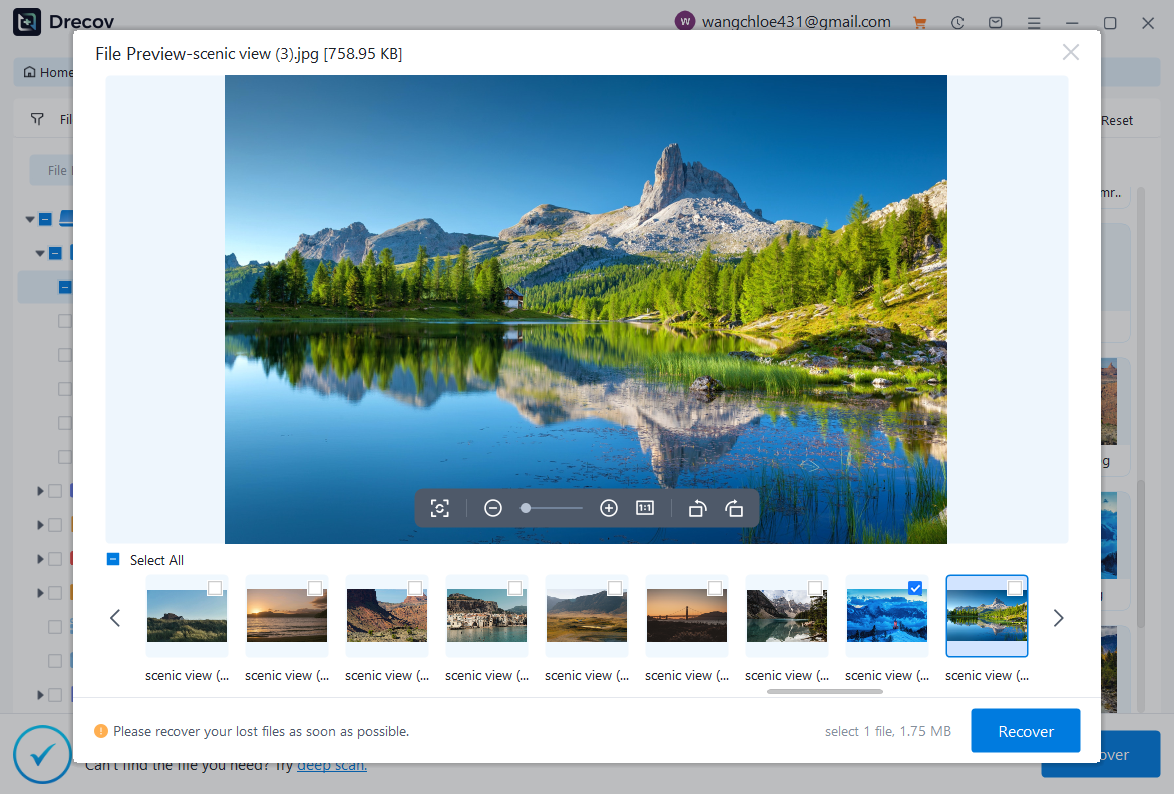
- Browse and preview recoverable files
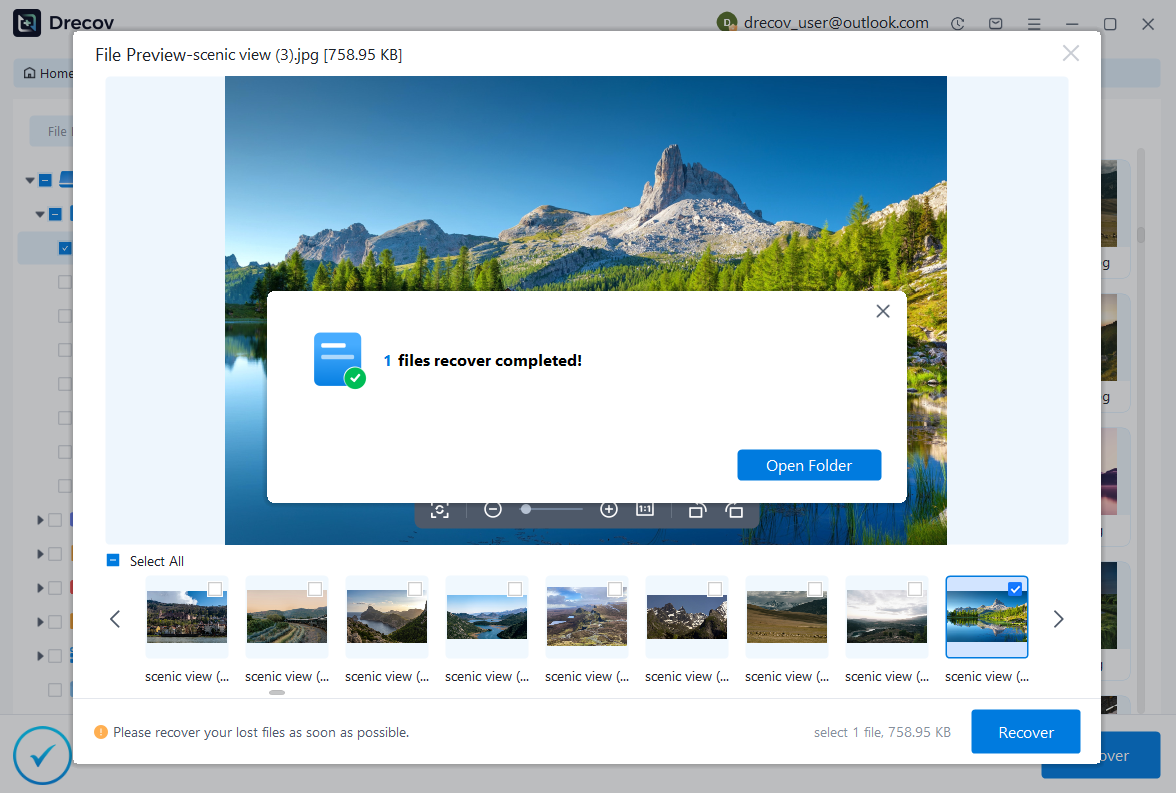
- Select files and restore them to a different location
Pandaoffice Drecov is designed to recover deleted, formatted, or inaccessible files from TF cards and other storage devices. It supports multiple file formats and provides a structured view of recoverable data.

Why Choose PandaOffice Drecov?
PandaOffice Drecov is a versatile and reliable solution for recovering a wide range of lost or inaccessible files. Whether you need audio recovery, video recovery, or excel recovery files, PandaOffice Drecov provides fast and efficient results, ensuring your important data is safely restored.
For creative professionals, it supports file recovery Illustrator projects, allowing designers to retrieve unsaved or accidentally deleted artwork without compromising file integrity. Businesses and individuals can also benefit from its restore Windows previous date feature, which helps recover documents or spreadsheets that were lost due to system errors or accidental deletions.
When external storage devices fail, such as a Lacie hard drive not showing up, PandaOffice Drecov can detect and restore files from these drives, ensuring you do not lose critical data. Even deleted files in the recycle bin can be recovered using its advanced recycle bin recovery software capabilities.
Additionally, the software supports recovering data from lost partitions, making lost partition recovery straightforward and reliable. Its intuitive interface allows users to perform audio recovery, video recovery, and excel recovery effortlessly, even for large or complex files.
With PandaOffice Drecov, you get a professional, all-in-one recovery solution that covers nearly every type of file and storage scenario. Its robust algorithms, combined with easy-to-use tools, make it the go-to choice for anyone who wants to restore lost or corrupted data quickly and securely.
The scanning process detects both recently deleted and deeply hidden files, making it suitable for various data loss scenarios.
⚠️Warning: Always save recovered files to another drive to avoid overwriting data.
Method 2: Use CHKDSK to Fix TF Card Errors
Test Environment:
- Windows 10 system
- 64GB TF card showing errors
Steps:
- Insert the TF card into your PC
- Open Command Prompt as administrator
- Type: chkdsk X: /f (Replace X with your drive letter)
- Press Enter and wait for the process to complete
CHKDSK scans the card for file system errors and attempts to repair them. This method is useful when the card is accessible but behaving abnormally.
While it may not recover deleted files directly, it can restore access to existing data.
Method 3: Restore Data from Backup or Cloud Storage
Test Environment:
- Android phone with cloud sync enabled
- Deleted media files
Steps:
- Open your cloud storage app
- Navigate to the Trash or backup section
- Locate deleted files
- Restore them to your device
This method is simple and effective if backups exist. It works independently of tf memory card vs microsd differences.
⚠️Warning: Backup retention periods may limit recovery options.
Method 4: Assign a New Drive Letter to the TF Card
Test Environment:
- Windows 11 PC
- 32GB TF card not दिखाई in File Explorer
Steps:
- Insert the TF card into your computer
- Right-click “This PC” and select “Manage”
- Go to Disk Management
- Locate the TF card (usually marked as removable)
- Right-click and choose “Change Drive Letter and Paths”
- Assign a new drive letter and confirm
Sometimes a TF card is not visible because it lacks a proper drive letter. This method helps the system recognize and display the card correctly.
This issue is unrelated to tf memory card vs microsd, as both use identical system recognition processes.
Once the drive appears, you can access files or proceed with further recovery steps if needed.
Method 5: Format the TF Card to Fix Severe Corruption
Test Environment:
- Windows 10 system
- 128GB TF card showing “format required” error
Steps:
- Insert the TF card into your computer
- Open File Explorer and locate the card
- Right-click and select “Format”
- Choose file system (FAT32 or exFAT)
- Click “Start” to begin formatting
Formatting can fix severe corruption issues and make the card usable again. However, it erases all data stored on the card.
After formatting, recovery software can still scan the card to retrieve lost files, depending on whether data has been overwritten.
Method 6: Use Diskpart to Repair TF Card Issues
Test Environment:
- Windows 11 system
- TF card not accessible
Steps:
- Open Command Prompt as administrator
- Type
diskpartand press Enter - Enter the following commands: list disk
select disk X
clean
create partition primary
format fs=exfat quick - Exit Diskpart and check the card
Diskpart is a powerful tool that can fix partition issues on TF cards. It is useful when the card becomes completely unreadable.
However, this method erases all data, so it should be used only when other recovery options fail.
Frequently Asked Questions About TF Memory Card vs MicroSD
Is There Any Real Difference Between TF Memory Card vs MicroSD?
In modern usage, there is virtually no difference between tf memory card vs microsd. Both refer to the same physical storage format.
The term TF originated earlier, while microSD became the standardized name. Today, they are interchangeable in terms of:
- Size
- Compatibility
- Performance
When choosing a card, users should focus on specifications like speed class and storage capacity rather than the name.
Which Is Better: TF Memory Card vs Micro SD?
When comparing tf memory card vs micro sd, neither is inherently better because they are technically identical.
The deciding factors should include:
- Brand reputation
- Storage capacity
- Speed rating
- Device compatibility
A high-quality microSD or TF card will perform better than a low-quality one, regardless of naming.
Can You Recover Data from a Damaged Micro SD TF Memory Card?
Yes, data can often be recovered from a damaged micro sd tf memory card, depending on the type of damage.
- Logical damage (corruption, deletion): High recovery success
- Physical damage: May require professional repair
Using recovery software and proper methods increases the chances of retrieving lost files.
Why Does My TF Card Show as Empty?
A TF card may appear empty due to:
- File system corruption
- Hidden files
- Virus infection
- Improper formatting
In such cases, data may still exist but is not visible. Recovery tools or system commands can help restore access.
⚠️Warning: Do not save new files to an “empty” card, as this may overwrite hidden data.
Conclusion: Key Takeaways on TF Memory Card vs MicroSD
Understanding the Relationship Between TF and MicroSD
The debate around tf memory card vs microsd is largely based on naming rather than functionality. Both refer to the same storage technology, meaning users can use them interchangeably without concern.
Understanding this helps eliminate confusion when purchasing or troubleshooting storage devices.
Best Practices for Using Micro SD TF Memory Cards
To maintain performance and prevent data loss:
- Always eject cards safely
- Avoid using low-quality cards
- Regularly back up important data
- Use appropriate speed classes for your device
- Keep cards free from viruses and malware
These practices ensure long-term reliability regardless of whether the card is labeled TF or microSD.
Final Thoughts on Data Recovery and Prevention
While recovery methods can restore lost files, prevention remains the most effective strategy. Regular backups and careful handling significantly reduce the risk of data loss.
If issues arise, acting quickly and using the right recovery methods can make a significant difference.
Understanding micro sd tf memory card functionality and recovery techniques empowers users to manage their data safely and efficiently.





