







What Is a CF Card and Its Role in Digital Storage
Understanding What Is a CF Card
A CF card, short for CompactFlash card, is a type of removable storage widely used in professional photography, videography, and industrial electronics. When people ask what is a CF card, they are referring to a robust, high-speed memory device that stores digital content like images, videos, and other data.
CF cards come in multiple variants, including CF Express Type B, CFAST, and traditional CF flash card formats. They are known for durability, fast read/write speeds, and large storage capacities, making them ideal for high-end cameras, drones, and other devices requiring rapid data transfers.
A CF card vs SD card comparison often highlights that CF cards are physically larger but typically offer better performance, higher durability, and support for professional-grade equipment.
⚠️Warning: Inserting a CF card into an incompatible device can damage both the card and the hardware.
CF Card Variants: Flash CF Card, CF Express Type B, and CFast
Understanding the types of CF cards is important for proper use:
- Flash CF card: The standard format for traditional CompactFlash, widely used in older cameras.
- CF Express Type B: A newer high-speed variant, designed for 4K/8K video recording and burst photography.
- CFAST: A modern derivative of CF cards, faster than traditional CF, compatible with select professional cameras.
Knowing the differences helps users choose the right card for their device and workload.
When selecting a pc cf card reader, it’s crucial to confirm compatibility with the specific CF variant. Not all readers support every type.
Common Issues with CF Cards
Why CF Cards Fail or Become Corrupted
Even durable CF cards can encounter problems. Understanding the causes helps in preventing data loss and preparing for recovery.
Common issues include:
- Accidental deletion of files
- File system corruption
- Physical damage to card pins
- Power interruptions during data writing
- Malware or virus attacks
These problems can affect CF flash card, CF Express Type B, and CFAST cards alike.
⚠️Warning: Continued use of a corrupted CF card can overwrite recoverable data.
Signs Your CF Card Needs Recovery
Users should look for these warning signs:
- Device cannot recognize the card
- Files appear missing or corrupted
- Slow read/write speeds
- Error messages such as “Card Error”
- Device prompts formatting
Early recognition of these issues increases the likelihood of successful recovery.
Effective Methods to Recover Data from CF Cards
Method 1: Use Pandaoffice Drecov for CF Express Type B Recovery
Test Environment:
- Windows 11 PC
- 256GB CF Express Type B card
- Files accidentally deleted during video shoot
Steps:
- Install Pandaoffice Drecov on your computer
- Connect the CF card via a compatible PC CF card reader
- Launch the software and select the card
- Run a deep scan to locate lost files
- Preview and select files for recovery
- Save recovered data to a different storage location

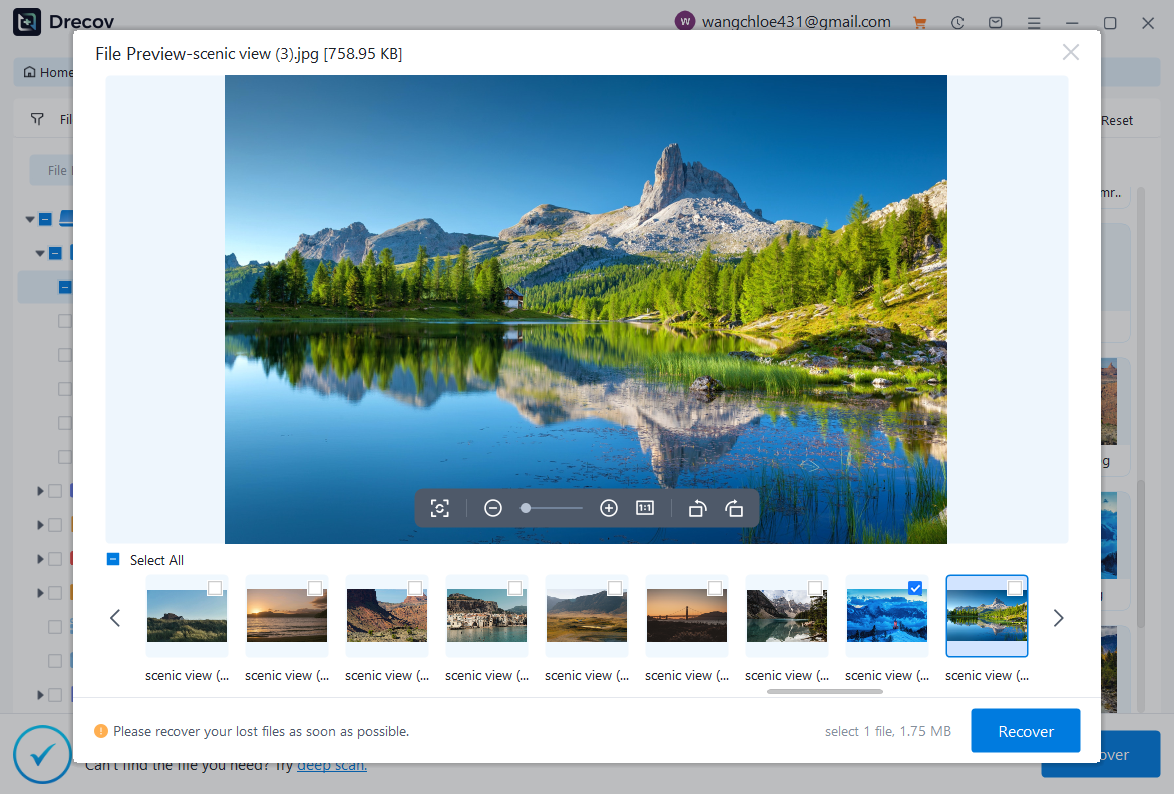
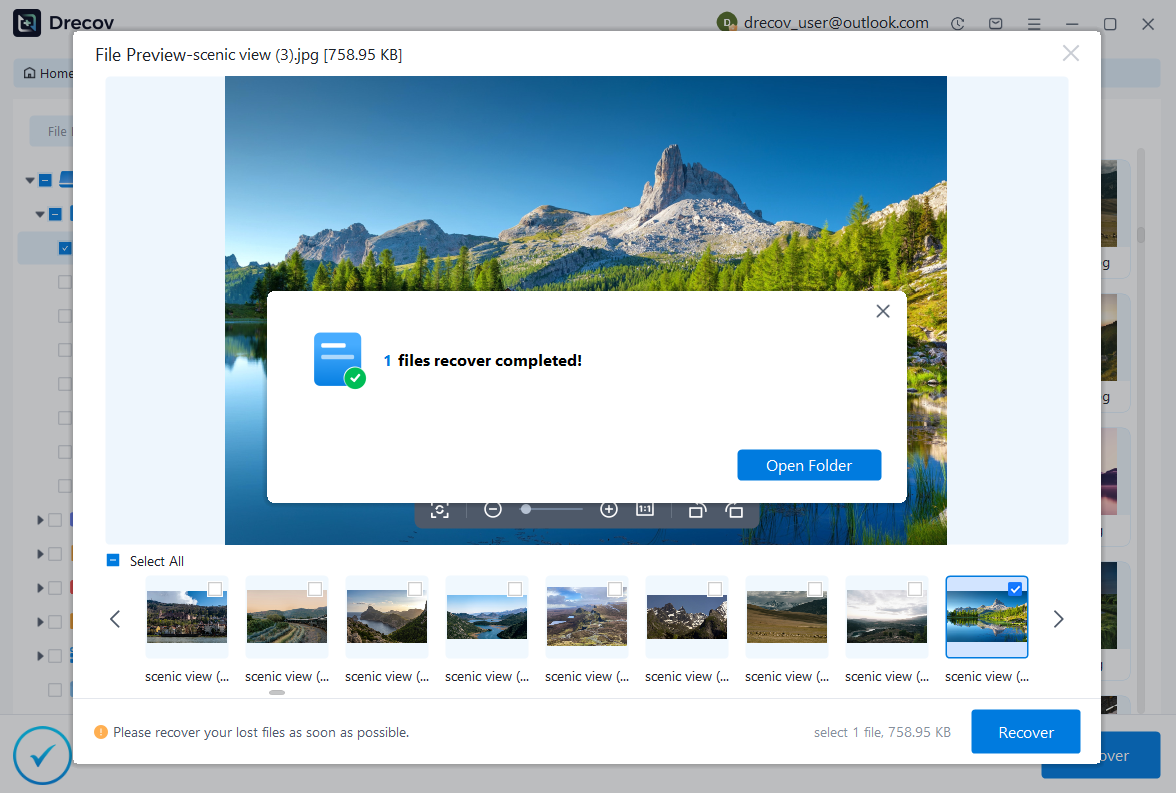
Why Choose PandaOffice Drecov?
PandaOffice Drecov is a versatile and reliable solution for recovering a wide range of lost or inaccessible files. Whether you need audio recovery, video recovery, or excel recovery files, PandaOffice Drecov provides fast and efficient results, ensuring your important data is safely restored.
For creative professionals, it supports file recovery Illustrator projects, allowing designers to retrieve unsaved or accidentally deleted artwork without compromising file integrity. Businesses and individuals can also benefit from its restore Windows previous date feature, which helps recover documents or spreadsheets that were lost due to system errors or accidental deletions.
When external storage devices fail, such as a Lacie hard drive not showing up, PandaOffice Drecov can detect and restore files from these drives, ensuring you do not lose critical data. Even deleted files in the recycle bin can be recovered using its advanced recycle bin recovery software capabilities.
Additionally, the software supports recovering data from lost partitions, making lost partition recovery straightforward and reliable. Its intuitive interface allows users to perform audio recovery, video recovery, and excel recovery effortlessly, even for large or complex files.
With PandaOffice Drecov, you get a professional, all-in-one recovery solution that covers nearly every type of file and storage scenario. Its robust algorithms, combined with easy-to-use tools, make it the go-to choice for anyone who wants to restore lost or corrupted data quickly and securely.
Pandaoffice Drecov supports recovery from CF Express Type B, Flash CF card, and CFAST media, making it suitable for professional data retrieval scenarios.
⚠️Warning: Do not save recovered files back to the same CF card to avoid overwriting data.
Method 2: Use Disk Utility Tools to Repair File System
Test Environment:
- Windows 10 system
- 128GB CF flash card showing file system errors
Steps:
- Insert the CF card into the PC CF card reader
- Open the Disk Management or equivalent utility
- Locate the CF card and check for errors
- Run the “Check and Repair” function to fix file system corruption
This method is useful when the CF card is recognized but files are inaccessible due to logical errors. It does not recover deleted data but restores the card’s functionality.
Method 3: Recover from Backups or Cloud Storage
Test Environment:
- CF card used in professional DSLR
- Deleted photos and videos synced to cloud
Steps:
- Access your cloud storage account
- Locate the backup or deleted file section
- Restore the required files to a local or external drive
This method is simple, fast, and ensures file safety. It is independent of CF card vs SD card distinctions, as recovery relies on backup copies rather than the card itself.
⚠️Warning: Backup retention times may limit recovery options.
Method 4: Recover Files Using Command-Line Tools
Test Environment:
- Windows 11 PC
- 64GB CF flash card unreadable in File Explorer
Steps:
- Insert the CF card into a PC CF card reader
- Open Command Prompt as administrator
- Type the following commands: chkdsk X: /f /r
attrib -h -r -s *.* /s /d ReplaceX:with the drive letter of your CF card. - Press Enter and wait for the scan to complete
Command-line tools can fix minor file system errors and recover hidden files. This method is suitable when the card is detected but files are inaccessible.
Method 5: Format CF Card for Fresh Use
Test Environment:
- DSLR camera
- 128GB CF flash card showing repeated errors
Steps:
- Insert the CF card into the camera or PC CF card reader
- Choose the format option in the camera menu or via Disk Management
- Select an appropriate file system (FAT32, exFAT)
- Confirm and start formatting
Formatting resets the card’s file system, improving stability. Important: Recover data first using Pandaoffice Drecov or backups to prevent permanent loss.
⚠️Warning: Formatting erases all stored data.
Method 6: Use a Professional CF Card Reader for Access
Test Environment:
- Windows 10 PC
- 256GB CF Express Type B card
Steps:
- Connect the CF card to a PC CF card reader that supports its variant
- Ensure the reader’s drivers are updated
- Access the card via File Explorer or recovery software
Using a proper CF card reader ensures compatibility, especially for newer formats like CF Express Type B. Incompatible readers may cause errors or fail to recognize the card.
Frequently Asked Questions About CF Cards
What Is a CF Card Used For?
A CF card is primarily used for high-speed storage in:
- Professional cameras and camcorders
- Audio recording devices
- Industrial machinery requiring robust memory
It is preferred for tasks needing fast write speeds and high durability.
CF Card vs SD Card: What Are the Differences?
While both store data, key differences include:
| Feature | CF Card | SD Card |
|---|---|---|
| Physical size | Larger | Smaller |
| Speed | Higher (pro models) | Varies |
| Durability | Very high | Moderate |
| Device compatibility | Professional cameras | Consumer devices |
Understanding CF card vs SD card helps select the right media for your device.
Can CF Flash Cards Be Recovered After Data Loss?
Yes, lost or deleted files on CF flash card and CF Express Type B cards can often be recovered. Success depends on:
- Type of damage (logical vs physical)
- Overwriting of deleted data
- Proper recovery tools like Pandaoffice Drecov
Logical errors and accidental deletions have a high recovery success rate.
Why Do CF Cards Fail Frequently?
Common causes of CF card failure include:
- Improper removal from devices
- Power interruptions during writing
- Physical damage to pins or connectors
- Using cards across incompatible devices
Regular maintenance and using quality PC CF card readers can reduce failure rates.
⚠️Warning: Frequent errors may indicate the card is nearing end-of-life.
Conclusion: Key Takeaways on CF Cards
Understanding What Is a CF Card
A CF card is a robust, high-performance storage solution designed for professional-grade devices. Knowing the differences between flash CF card, CF Express Type B, and CFAST allows users to choose the right media.
Best Practices for CF Card Maintenance
- Use compatible devices and readers
- Avoid removing cards during data transfer
- Backup important data regularly
- Use formatting and recovery tools carefully
- Monitor card health and replace worn cards
By following these steps, users can extend the lifespan of their CF flash card and protect critical data.
Final Thoughts on CF Card Recovery
Data loss on a CF card is not always permanent. With the right recovery tools, proper handling, and backups, users can restore files safely. Choosing the correct card type and maintaining it properly ensures reliable performance for professional and personal use.





