







Understanding the IDE Hard Drive: Definition and Basics
What is an IDE hard drive and how it works
An IDE hard drive (Integrated Drive Electronics) is one of the earliest types of storage devices used in personal computers. It integrates the controller directly into the drive itself, simplifying communication between the motherboard and the storage unit. Unlike modern drives, IDE uses a parallel interface, which means multiple bits of data are transferred simultaneously through ribbon cables.
These drives were widely used in desktops and laptops before the introduction of SATA technology. Despite being considered outdated today, many legacy systems still rely on them. Understanding how an IDE drive operates is essential when attempting to recover data from an IDE hard drive, as the recovery process often involves compatibility challenges.
One key feature is the use of jumper settings, which determine whether the drive acts as a master or slave device. This configuration can affect detection during recovery attempts. Additionally, IDE drives are more sensitive to cable orientation and power supply issues compared to newer drives.
⚠️ Warning: Incorrect jumper settings may prevent the system from recognizing the drive, potentially complicating recovery efforts.
Differences between ATA IDE hard drive and IDE PATA hard drive
The terms ATA IDE hard drive and IDE PATA hard drive are often used interchangeably, but there are subtle distinctions worth noting. ATA (Advanced Technology Attachment) refers to the standard interface, while PATA (Parallel ATA) describes the data transfer method used by older IDE drives.
An ATA IDE hard drive emphasizes the interface standard, which defines how the drive communicates with the system. Meanwhile, an IDE PATA hard drive highlights the parallel transmission method, where multiple data bits are transferred simultaneously through a 40- or 80-wire ribbon cable.
In practical terms, both refer to the same generation of drives, but understanding the terminology helps when searching for compatible adapters or tools. For example, modern systems no longer include IDE ports, so users often rely on IDE-to-USB converters to access these drives.
These distinctions become important when learning how to recover data from an IDE hard drive, as compatibility between hardware and recovery tools plays a major role in success.
Common use cases and legacy systems
Although largely replaced by newer technologies, IDE drives still exist in older desktops, industrial systems, and archived storage setups. Many users encounter them when retrieving files from old computers or backup drives that were never migrated.
Typical use cases include accessing archived business data, recovering personal files from legacy PCs, or restoring information from discontinued systems. In such scenarios, an ide pata hard drive may be the only storage medium containing critical data.
One challenge is that modern motherboards rarely support IDE connections, requiring additional hardware such as PCI IDE controllers or USB adapters. This adds complexity when attempting to recover data from ide hard drive devices.
Moreover, these drives are more prone to failure due to age. Mechanical wear, degraded magnetic surfaces, and outdated firmware can all contribute to data loss risks.
⚠️ Warning: Powering on an old IDE drive repeatedly can worsen physical damage and reduce recovery success rates.
Why Data Loss Happens on IDE Hard Drives
Physical damage and hardware aging issues
Physical damage is one of the most common reasons data becomes inaccessible on an IDE hard drive. Since many of these drives are over a decade old, their internal components are often subject to wear and tear. The spinning platters, read/write heads, and motor mechanisms degrade over time, increasing the likelihood of failure.
Common signs include clicking noises, slow performance, or the drive not spinning up at all. These symptoms often indicate mechanical issues that require careful handling. Attempting DIY fixes without proper tools can make recovery more difficult.
Aging also affects the magnetic surface of the platters, where data is stored. Over time, data integrity can degrade, leading to unreadable sectors. This makes it harder to recover data from ide hard drive devices using standard software methods.
Environmental factors such as heat, dust, and humidity can further accelerate deterioration. Drives stored improperly for long periods are especially vulnerable.
⚠️ Warning: Opening a hard drive outside a cleanroom environment can permanently destroy the data.
Logical errors such as corruption and formatting
Not all data loss is caused by hardware failure. Logical issues are another major factor affecting ata ide hard drive devices. These include accidental deletion, file system corruption, virus attacks, and improper formatting.
For example, a sudden power outage can interrupt data writing processes, leading to corrupted file systems. Similarly, formatting a drive without backup can make files appear lost, even though they may still exist on the disk.
Logical errors are generally easier to address compared to physical damage. Specialized recovery software can scan the drive and reconstruct lost files, making it possible to recover data from an ide hard drive without professional intervention.
However, continued use of the drive after data loss can overwrite recoverable data. This significantly reduces the chances of successful recovery.
Improper handling and connection problems
Handling and connection issues are often overlooked causes of data loss in ide pata hard drive systems. Because IDE drives rely on ribbon cables and jumper settings, even small mistakes can prevent proper detection.
Loose cables, incorrect pin alignment, or damaged connectors can make the drive inaccessible. Additionally, using incompatible adapters may result in unstable connections or incomplete data transfer.
When learning how to recover data from an ide hard drive, ensuring proper hardware setup is critical. A stable connection is the foundation for any recovery attempt.
Another common issue is insufficient power supply. IDE drives require both data and power connections, and inadequate power can cause the drive to malfunction or disconnect unexpectedly.
⚠️ Warning: Forcing connectors into the wrong orientation can bend pins and permanently damage the drive.
How to Recover Data from an IDE Hard Drive (Step-by-Step Methods)
Method 1: Use PandaOffice Drecov for IDE data recovery
Test Environment:
Windows 10 PC, IDE-to-USB adapter, 160GB ATA IDE hard drive with deleted files.
One of the most effective ways to recover data from an IDE hard drive is by using dedicated recovery software like PandaOffice Drecov. This method is suitable for logical data loss scenarios such as deletion, formatting, or corruption.
Start by connecting your ata ide hard drive to a modern computer using an IDE-to-USB adapter. Once the system detects the drive, install and launch PandaOffice Drecov. The software will display all connected storage devices.
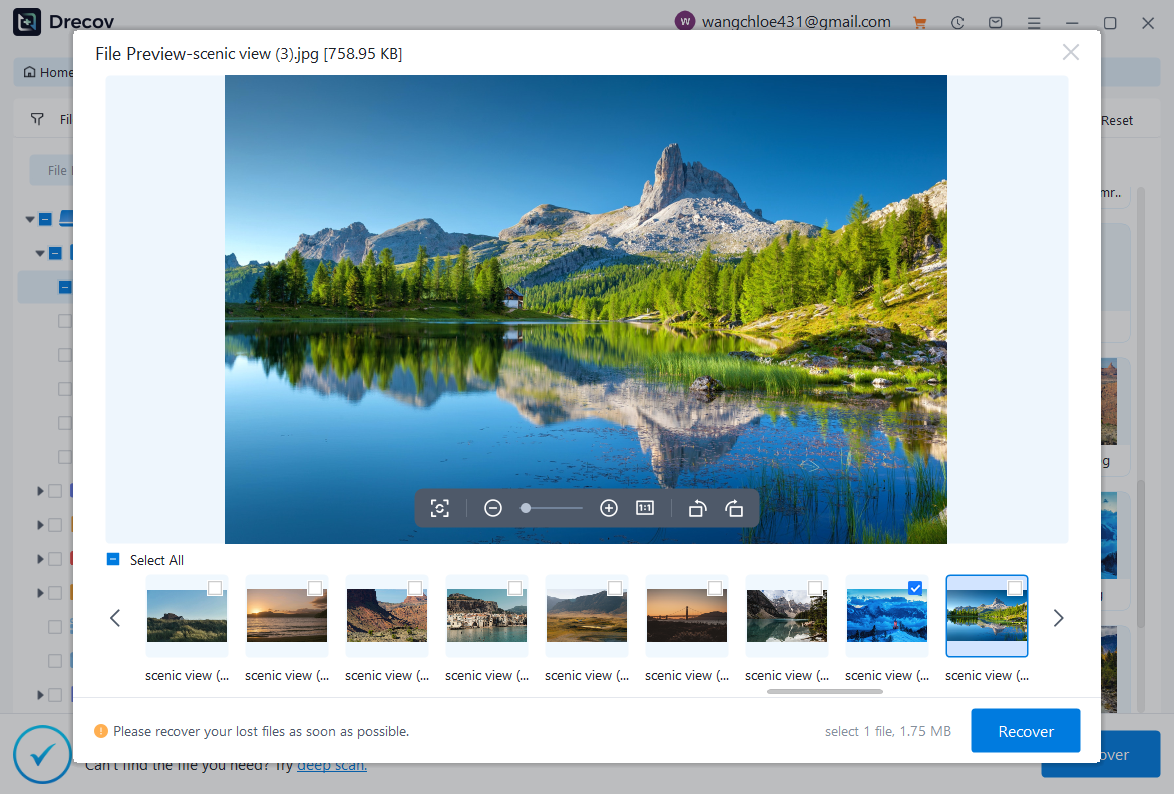
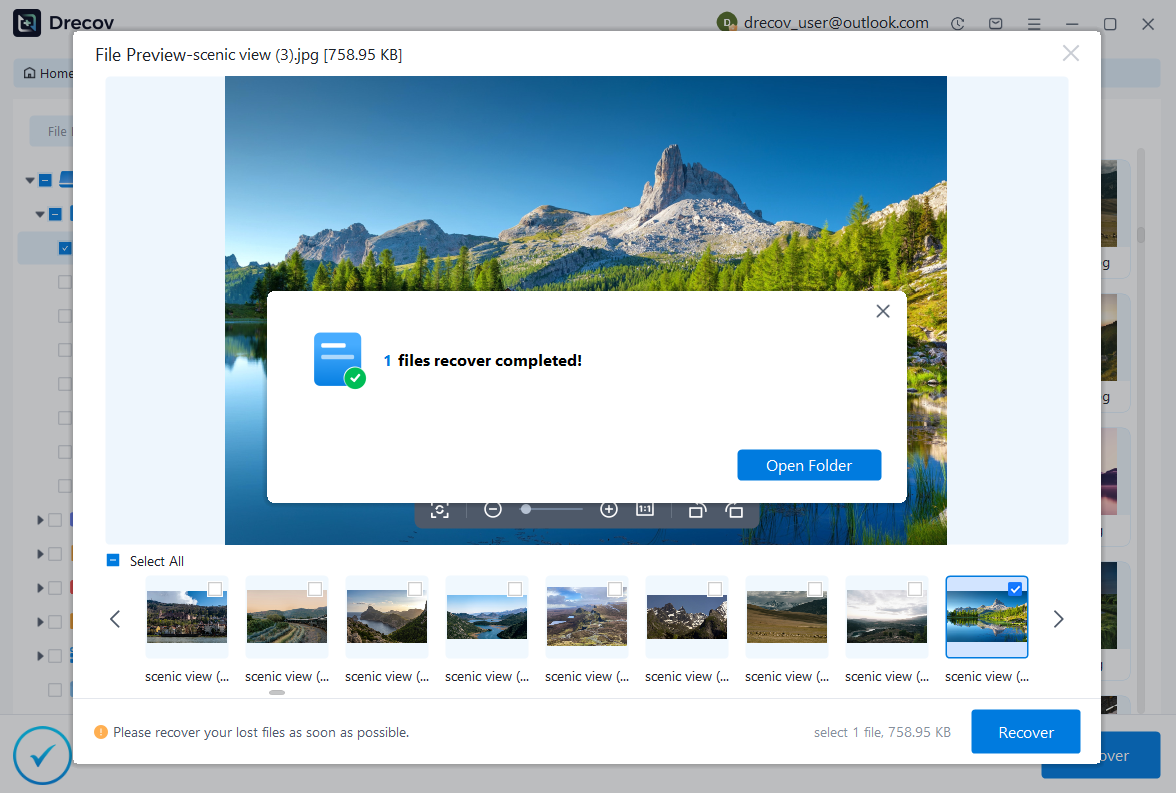
Select the IDE drive and initiate a deep scan. This process analyzes the disk sector by sector to locate recoverable files. After scanning, you can preview files and choose which ones to restore.
Save the recovered files to a different storage device to avoid overwriting data. This method is user-friendly and does not require advanced technical knowledge.

Why Choose PandaOffice Drecov?
PandaOffice Drecov is a versatile and reliable solution for recovering a wide range of lost or inaccessible files. Whether you need audio recovery, video recovery, or excel recovery files, PandaOffice Drecov provides fast and efficient results, ensuring your important data is safely restored.
For creative professionals, it supports file recovery Illustrator projects, allowing designers to retrieve unsaved or accidentally deleted artwork without compromising file integrity. Businesses and individuals can also benefit from its restore Windows previous date feature, which helps recover documents or spreadsheets that were lost due to system errors or accidental deletions.
When external storage devices fail, such as a Lacie hard drive not showing up, PandaOffice Drecov can detect and restore files from these drives, ensuring you do not lose critical data. Even deleted files in the recycle bin can be recovered using its advanced recycle bin recovery software capabilities.
Additionally, the software supports recovering data from lost partitions, making lost partition recovery straightforward and reliable. Its intuitive interface allows users to perform audio recovery, video recovery, and excel recovery effortlessly, even for large or complex files.
Method 2: Connect IDE drive via USB adapter and extract files
Test Environment:
Windows 11 laptop, USB 3.0 IDE adapter, functional IDE PATA hard drive.
If the drive is still operational, you can directly access files by connecting it to a computer. This method works well when there is no severe corruption or hardware failure.
Begin by attaching the ide pata hard drive to a USB adapter and plugging it into your computer. Once recognized, the drive should appear in File Explorer.
You can manually browse folders and copy important files to another storage device. This is the simplest approach to recover data from ide hard drive systems when data is still accessible.
However, if files are missing or inaccessible, additional recovery methods may be required.
Method 3: Recover data using CMD utilities
Test Environment:
Windows 10 desktop, built-in Command Prompt, partially corrupted IDE hard drive.
If your IDE hard drive is detected but files are inaccessible or corrupted, using built-in command-line tools can be a practical solution. This method is especially useful for fixing file system errors before attempting deeper recovery.
Start by connecting the ata ide hard drive properly to your computer. Once detected, open Command Prompt with administrator privileges. Use the chkdsk command followed by the drive letter and parameters such as /f and /r. This will scan the disk for errors and attempt repairs.
For example:chkdsk E: /f /r
This process checks for bad sectors and recovers readable data from damaged areas. In some cases, previously inaccessible files may become visible again after the repair process.
However, this method has limitations. It does not recover deleted files and may overwrite certain data structures during repair.
⚠️ Warning: Avoid interrupting the CHKDSK process, as this can lead to further corruption.
Method 4: Seek professional recovery services
Test Environment:
Severely damaged IDE PATA hard drive, not recognized by BIOS, physical clicking noise present.
When software-based solutions fail, professional data recovery services become the most reliable option. This method is recommended for physically damaged ide pata hard drive devices or drives that are completely unresponsive.
Recovery specialists use advanced tools and cleanroom environments to safely access internal components. They can repair or replace damaged parts and extract data directly from the platters. This significantly increases the chances of recovering critical files.
Although this option can be expensive, it is often the only way to recover data from an ide hard drive in severe cases. Costs typically depend on the level of damage and the complexity of recovery.
Before choosing a service provider, ensure they have experience with legacy drives like IDE systems. Not all modern recovery labs specialize in older hardware.
⚠️ Warning: Avoid unverified repair services, as improper handling can permanently destroy your data.
Frequently Asked Questions About IDE Hard Drives and Data Recovery
Can you recover data from a failed IDE hard drive?
Yes, it is often possible to recover data from an IDE hard drive, even if it has failed. The success rate depends on whether the failure is logical or physical. Logical failures, such as deleted files or corrupted partitions, are usually recoverable using software tools.
Physical failures, on the other hand, require specialized equipment and expertise. Issues like damaged read/write heads or motor failure cannot be fixed with standard tools. In such cases, professional recovery services are necessary.
It is important to stop using the drive immediately after failure. Continued operation can worsen the damage and reduce recovery chances.
Is IDE data recovery different from SATA recovery?
The process of how to recover data from an IDE hard drive is similar in principle to SATA recovery, but there are key differences in hardware compatibility. IDE drives use parallel interfaces and require specific connectors, while SATA drives use modern serial connections.
Because most modern systems lack IDE ports, additional adapters are needed. This adds complexity and potential points of failure during recovery.
In terms of software, many recovery tools support both IDE and SATA drives. However, the condition and age of IDE drives often make recovery more challenging.
What tools are needed to access an ATA IDE hard drive today?
To access an ata ide hard drive, you will typically need an IDE-to-USB adapter or an external enclosure designed for IDE drives. These tools allow you to connect the drive to modern computers.
Additional tools may include power adapters, jumper configuration guides, and data recovery software. Having the correct setup is essential for successful data access and recovery.
In some cases, a PCI IDE controller card can be installed in a desktop computer to provide a direct connection. This method offers more stable performance compared to USB adapters.
Final Thoughts on IDE Hard Drive Recovery
Key takeaways and prevention tips
Recovering data from an IDE hard drive may seem challenging due to its outdated technology, but it is still entirely possible with the right approach. Whether you are dealing with an ata ide hard drive or an ide pata hard drive, understanding the type of failure is the first step toward recovery.
For logical issues, software solutions provide an accessible and effective way to restore lost files. For hardware-related problems, professional services offer the best chance of success. Choosing the right method depends on the condition of the drive and the importance of the data.
Preventive measures can also make a significant difference. Regular backups, proper storage conditions, and careful handling can extend the lifespan of legacy drives and reduce the risk of data loss.
⚠️ Warning: Always store recovered data on a different device to avoid overwriting important files.
In summary, learning how to recover data from an IDE hard drive requires a combination of technical understanding and careful execution. By following the methods outlined above, you can improve your chances of successfully retrieving valuable data from older storage devices.





