







What Happens When You Use DBAN to Clean the Hard Drive
Understanding How DBAN Permanently Erases Data
Using a dban hard drive tool is one of the most thorough ways to clean the hard drive. DBAN (Darik’s Boot and Nuke) is specifically designed to overwrite existing data multiple times, making traditional recovery extremely difficult. When you perform a dban wipe hard drive, the software replaces all existing data with random patterns.
Unlike simple deletion or formatting, DBAN doesn’t just remove file references—it actively destroys the data itself. This is why businesses and individuals use a dban hard drive eraser when disposing of or repurposing storage devices.
However, many users run DBAN accidentally or without fully understanding the consequences. After a dban erase hard drive, files, partitions, and system structures are all removed, leaving the drive appearing completely empty.
⚠️ Warning: Once a dban hard drive wipe is completed, standard recovery methods may no longer work effectively.
Is Data Recovery Possible After DBAN Hard Drive Wipe
Can You Recover Data After a DBAN Erase Hard Drive Process
The possibility of recovery after a dban erase hard drive depends on several factors. Since DBAN overwrites data, the chances of restoring files are significantly lower than with normal deletion. However, recovery may still be possible under certain conditions.
If the wipe process was interrupted or incomplete, some sectors may remain untouched. In such cases, specialized tools might help recover data after dban wipe hard drive operations. Additionally, if only a single overwrite pass was used, traces of original data may still exist.
On the other hand, multiple overwrite passes drastically reduce recovery success. The more times the drive is overwritten, the harder it becomes to retrieve any usable data.
Factors That Affect DBAN Hard Drive Recovery Success
Several variables influence whether recovery is possible:
- Number of overwrite passes used
- Type of storage device (HDD vs SSD)
- Whether the wipe process completed successfully
- Time elapsed after the wipe
- Any new data written to the drive
For example, SSDs behave differently due to wear-leveling, which can sometimes leave fragments recoverable. However, traditional HDDs that undergo a full dban hard drive wipe are much harder to recover.
⚠️ Warning: Writing new data to the drive after DBAN significantly reduces recovery chances.
How to Recover Data After DBAN Hard Drive Wipe
Method 1 – Attempt Recovery with Professional Software
Test Environment:
- Operating System: Windows 11
- Drive Type: HDD (single-pass DBAN wipe)
- Scenario: Partial overwrite, no new data written
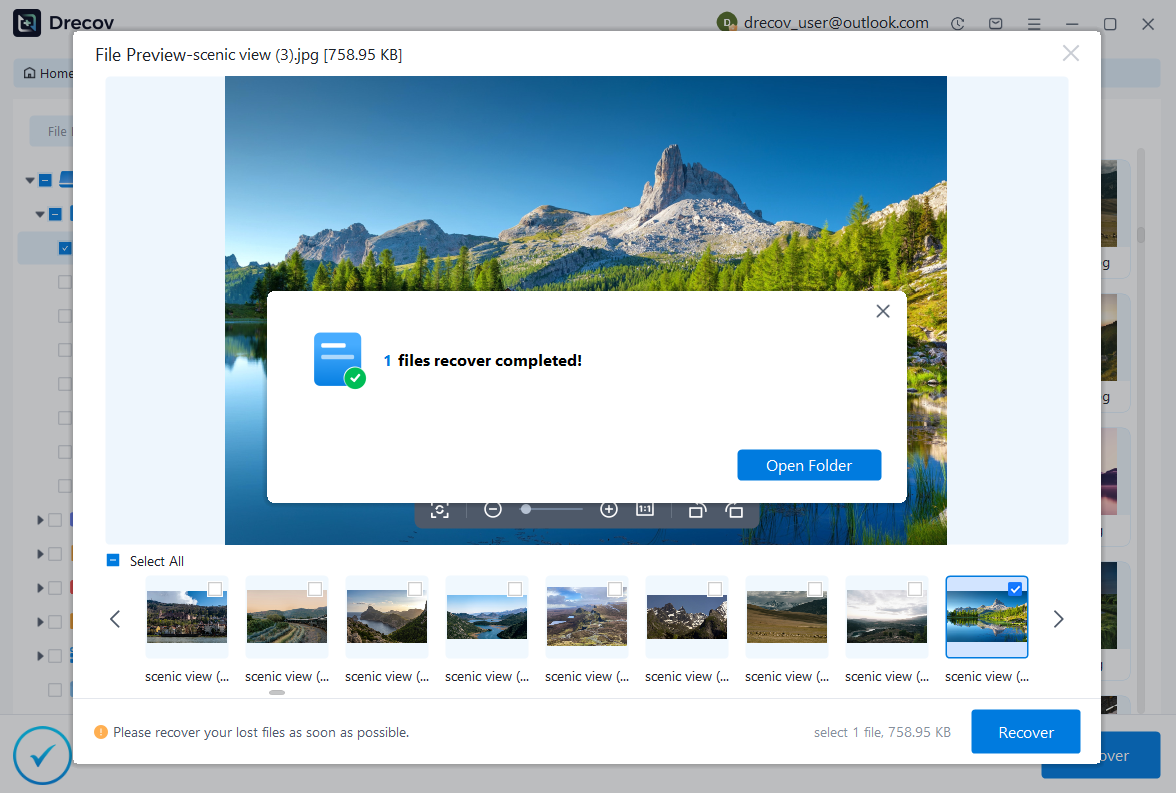
Even after using a dban hard drive eraser, recovery software may still detect residual data fragments. PandaOffice Drecov is designed to scan deeply and identify recoverable sectors.
Steps:
- Install PandaOffice Drecov on a separate system.
- Connect the wiped drive to the computer.
- Launch the software and select the affected disk.
- Perform an advanced deep scan.
- Review and preview found files.
- Save recovered data to another storage device.


Why Choose PandaOffice Drecov?
PandaOffice Drecov is a versatile and reliable solution for recovering a wide range of lost or inaccessible files. Whether you need audio recovery, video recovery, or excel recovery files, PandaOffice Drecov provides fast and efficient results, ensuring your important data is safely restored.
For creative professionals, it supports file recovery Illustrator projects, allowing designers to retrieve unsaved or accidentally deleted artwork without compromising file integrity. Businesses and individuals can also benefit from its restore Windows previous date feature, which helps recover documents or spreadsheets that were lost due to system errors or accidental deletions.
When external storage devices fail, such as a Lacie hard drive not showing up, PandaOffice Drecov can detect and restore files from these drives, ensuring you do not lose critical data. Even deleted files in the recycle bin can be recovered using its advanced recycle bin recovery software capabilities.
Additionally, the software supports recovering data from lost partitions, making lost partition recovery straightforward and reliable. Its intuitive interface allows users to perform audio recovery, video recovery, and excel recovery effortlessly, even for large or complex files.
This method works best when the dban wipe hard drive process was incomplete or used minimal overwrite passes. It offers a practical way to attempt file recovery after dban hard drive wipe.
⚠️ Warning: Do not install recovery tools on the wiped drive itself.
Method 2 – Restore Data from Backup Sources
Test Environment:
- Operating System: Windows 10
- Backup Type: Cloud + external backup
- Scenario: Full DBAN wipe completed
If you used DBAN intentionally to clean the hard drive, backups are often the only reliable recovery option.
Steps:
- Access your backup platform (cloud or external drive).
- Locate the latest backup version.
- Restore files to a new or formatted drive.
This method bypasses the need for complex recovery attempts after a dban erase hard drive operation and ensures data integrity.
Method 3 – Check for Residual Partitions Using Disk Tools
Test Environment:
- Operating System: Windows 11
- Tool: Disk Management
- Scenario: Drive appears unallocated
After a dban hard drive wipe, the system may show the drive as unallocated. In rare cases, traces of partitions may still exist.
Steps:
- Open Disk Management.
- Locate the wiped drive.
- Check for hidden or partially intact partitions.
- Attempt to assign a drive letter if possible.
While this method does not guarantee recovery, it can sometimes reveal accessible areas of the drive that were not fully erased.
Method 4 – Use Data Carving Techniques
Test Environment:
- Operating System: Linux-based recovery system
- Drive Type: HDD
- Scenario: Deep-level recovery attempt
Data carving is an advanced technique that scans raw sectors for recognizable file signatures. This method ignores file system structures and attempts to rebuild files based on patterns.
Steps:
- Boot into a recovery-focused operating system.
- Use data carving tools to scan the drive.
- Identify file fragments based on signatures.
- Reconstruct files manually where possible.
This approach is useful when traditional recovery fails after a dban wipe hard drive, but results may be incomplete or fragmented.
⚠️ Warning: Data carving requires technical expertise and may not restore full file structures.
Method 5 – Analyze the Drive with Hex Editors
Test Environment:
- Operating System: Windows 11
- Tool: Hex editor software
- Scenario: Advanced manual inspection
A hex editor allows users to view raw data stored on a drive. After a dban hard drive wipe, this method can help identify whether any original data patterns remain.
Steps:
- Connect the wiped drive to a working computer.
- Open a hex editor tool.
- Scan the drive for recognizable file signatures.
- Extract identifiable fragments manually.
This method is highly technical and is typically used by advanced users. While it may not fully recover data from crashed hard drive, it can sometimes help retrieve data from crashed hard drive fragments that survived incomplete wipes.
Method 6 – Use Previous System Images or Restore Points
Test Environment:
- Operating System: Windows 10
- Backup Type: System image
- Scenario: OS-level backup available
If you created system images before using DBAN to clean the hard drive, you may be able to restore the entire system.
Steps:
- Connect your backup storage device.
- Boot into recovery mode.
- Select “Restore from system image.”
- Choose the appropriate backup file.
- Complete the restoration process.
This method is often overlooked but can be highly effective if backups exist. It eliminates the need to attempt complex recovery after a dban erase hard drive.
Method 7 – Attempt Recovery via Forensic Tools
Test Environment:
- Operating System: Linux forensic toolkit
- Drive Type: HDD
- Scenario: Deep forensic-level scan
Forensic recovery tools are designed to analyze storage devices at a very deep level. These tools may identify data remnants even after a dban hard drive eraser process.
Steps:
- Boot into a forensic recovery environment.
- Load the wiped drive.
- Perform a sector-by-sector analysis.
- Extract any recoverable data fragments.
This method is often used in legal or investigative contexts. While success is rare after a full dban hard drive wipe, it remains one of the most advanced options available.
⚠️ Warning: Forensic recovery tools require expertise and may not produce usable files.
Frequently Asked Questions About DBAN Hard Drive Wipe Recovery
Can data be recovered after a DBAN wipe hard drive process?
In most cases, data recovery is extremely difficult after a complete dban wipe hard drive. However, if the process was interrupted or used minimal overwrite passes, partial recovery may still be possible.
Is DBAN safe to use for cleaning a hard drive?
Yes, DBAN is a reliable tool to clean the hard drive when you want to permanently erase data. It is widely used for secure data destruction.
What should I do if I accidentally used DBAN on the wrong drive?
Stop using the drive immediately. Avoid writing new data and attempt recovery using specialized tools. Acting quickly increases the chances to recover data after dban wipe hard drive.
Does DBAN completely destroy all data?
In most cases, yes. A full dban erase hard drive process with multiple passes makes recovery nearly impossible. However, certain edge cases may still allow limited recovery.
Key Precautions When Using DBAN Hard Drive Eraser
Double-Check Before You Start the Wipe
Always verify the target drive before initiating a dban hard drive wipe. Selecting the wrong drive can lead to irreversible data loss.
Understand the Level of Data Destruction
Different wipe methods provide different levels of security. Higher levels mean lower chances of recovery after a dban erase hard drive.
Avoid Interrupting the Wipe Process
Interrupting DBAN midway may leave the drive in an inconsistent state. While this might increase recovery chances, it can also make the drive unstable.
Use DBAN Only When Necessary
DBAN should only be used when you are certain that the data is no longer needed. It is not intended for routine file deletion.
⚠️ Warning: Using DBAN without proper understanding can lead to permanent and irreversible data loss.
Conclusion: What You Need to Know About DBAN Hard Drive Recovery
Recovering data after a dban hard drive wipe is one of the most challenging scenarios in data recovery. Because DBAN is designed to permanently clean the hard drive, it significantly reduces the chances of retrieving lost files.
While some methods—such as using recovery software, backups, or forensic tools—may offer limited success, the reality is that a properly executed dban hard drive eraser process leaves little to recover. The best strategy is always prevention: backing up data before performing any wipe operation.
If you ever find yourself needing to recover data after dban wipe hard drive, act quickly and avoid further use of the device. Even though success is not guaranteed, the right approach can sometimes help retrieve data from crashed hard drive scenarios caused by incomplete wipes.
Ultimately, understanding how DBAN works and using it responsibly will help you avoid data loss and ensure that your storage devices are managed safely and effectively.
Why People Use DBAN Hard Drive Wipe in the First Place
Security Reasons for Using DBAN Hard Drive Eraser
The main reason users choose a dban hard drive eraser is data security. Simply deleting files does not completely remove them, making them potentially recoverable. DBAN ensures that sensitive data cannot be retrieved.
Common use cases include:
- Selling or donating old computers
- Disposing of storage devices
- Removing confidential business data
- Preparing drives for reuse
By performing a dban erase hard drive, users ensure that no recoverable traces remain.
Common Mistakes When Using DBAN
Many data loss situations occur due to improper use of DBAN, such as:
- Selecting the wrong drive for wiping
- Not backing up important files beforehand
- Misunderstanding the permanence of DBAN
- Interrupting the wipe process
These mistakes often lead users to search for ways to recover data after dban hard drive wipe, even though recovery may be limited.
Best Practices Before You Clean the Hard Drive with DBAN
Always Create a Backup First
Before using DBAN to clean the hard drive, ensure that all important data is backed up. This step is critical because recovery after a full wipe is uncertain.
Verify the Target Drive Carefully
Double-check the drive you are about to erase. Mistakenly wiping the wrong drive is a common and costly error.
Understand the Wipe Method You Choose
DBAN offers multiple wiping methods with varying levels of security. Choosing a multi-pass overwrite increases security but reduces recovery chances.
⚠️ Warning: Higher security wipe methods make dban hard drive wipe recovery nearly impossible.
Why DBAN Makes Data Recovery Extremely Difficult
A dban hard drive process is specifically engineered to eliminate any trace of previous data. Unlike standard deletion, which only removes file references, DBAN actively overwrites every sector. This means that once you perform a dban wipe hard drive, the original data patterns are replaced with new ones.
The effectiveness of a dban hard drive eraser lies in its overwrite algorithms. These algorithms write random or predefined data sequences across the disk, making it nearly impossible for conventional recovery tools to reconstruct the original files.
However, recovery is not always entirely impossible. In rare cases where the wipe process was interrupted or improperly executed, some sectors may remain untouched. These untouched areas provide a small window for potential recovery attempts.
Differences Between HDD and SSD in DBAN Wipe Scenarios
The type of storage device plays a major role in recovery outcomes after a dban erase hard drive operation.
- HDDs (Hard Disk Drives):
Traditional spinning disks are more predictable. When a full dban hard drive wipe is completed, recovery chances are extremely low because all sectors are overwritten sequentially. - SSDs (Solid State Drives):
SSDs use wear-leveling technology, which distributes data across memory cells. This means that even after a dban wipe hard drive, some original data fragments might remain in inaccessible areas.
Despite this, SSD recovery is still highly uncertain. The internal mechanisms of SSDs often make it harder to recover data after dban wipe hard drive compared to other data loss scenarios.
⚠️ Warning: Running DBAN on SSDs may not guarantee complete erasure due to how SSD controllers manage data.






