







I don’t know what happened, but I had made a YouTube video, analyzing a trailer and it for some reason when I was updating the YouTube app, the YouTube video was gone and what I’ve tried to do is look up a YouTube video how to get your deleted YouTube videos back and nothing seems to work so please if there’s by any chance, can someone give me back all the YouTube videos I deleted—From Microsoft Store
Understanding Deleted YouTube Videos Recovery
What Happens When a YouTube Video Is Deleted
Losing a published or uploaded video from YouTube can be devastating, especially for content creators, educators, marketers, and businesses that rely on video traffic. Fortunately, deleted youtube videos recovery is sometimes possible depending on how and where the video was stored.
When a video is deleted from YouTube, two separate copies may exist:
- The online version hosted on YouTube’s servers.
- The original file stored locally on your computer or external device.
If the video was removed only from the platform but still exists locally, recovery becomes straightforward. However, if the original file was also deleted from your device, a deeper youtube video recovery approach is required.
Common scenarios include:
- Accidental deletion from YouTube Studio
- Account suspension or termination
- Copyright takedown
- Local file deletion
- Drive formatting
- Storage corruption
⚠️ Warning: YouTube does not guarantee restoration once a video is permanently deleted from its servers.
Understanding the source of deletion determines the appropriate recovery method.
Why YouTube Videos Get Deleted or Lost
Platform and User-Based Causes of Video Loss
There are multiple reasons why creators seek youtube recovery videos solutions.
1. Manual Deletion in YouTube Studio
Users may accidentally remove content while managing playlists or cleaning older uploads.
2. Copyright or Community Guidelines Violations
YouTube may remove content automatically due to strikes or policy violations.
3. Account Suspension
Entire channels can become inaccessible, leading to sudden loss of uploaded videos.
4. Local File Removal
Original videos stored on PC or external drives may be deleted unintentionally.
5. Formatting or Drive Failure
Creators often store footage on SD cards or USB drives that later get formatted.
6. Malware or Ransomware
Video files may disappear due to system compromise.
Recovery feasibility depends on:
- Whether the video still exists in YouTube cache or archive
- Whether you retain local backups
- Whether the original storage sectors remain intact
The sooner you act, the better your chances of successful recovery.
Effective Methods for Deleted YouTube Videos Recovery
Method 1: Restore from YouTube Studio (If Recently Deleted)
If a video was recently removed, the first step is checking YouTube Studio.
Steps:
- Log into YouTube Studio.
- Navigate to “Content.”
- Check for archived drafts or unlisted content.
- Review “Copyright” or “Restrictions” sections.
If the video was only made private or unlisted, it can simply be restored.
Test Environment:
- Active YouTube channel
- Video deleted manually within 24 hours
- No policy violations
Result: Video not recoverable after permanent deletion confirmation.
YouTube does not provide a standard trash folder for permanently deleted videos.
Method 2: Contact YouTube Support for Account-Based Recovery
If deletion resulted from account suspension or error, contacting YouTube support may help.
Steps:
- Submit appeal through YouTube Help Center.
- Provide channel URL and video links if available.
- Explain the situation clearly.
- Await review decision.
Test Environment:
- Channel temporarily suspended due to copyright strike
- Appeal submitted within 48 hours
Result: Channel restored; videos reactivated automatically.
This method only works in policy-related situations, not manual deletion cases.
Method 3: Recover the Original Video File from Your Computer
If the YouTube copy is gone but the original video was saved locally, use a recovery solution on your PC.
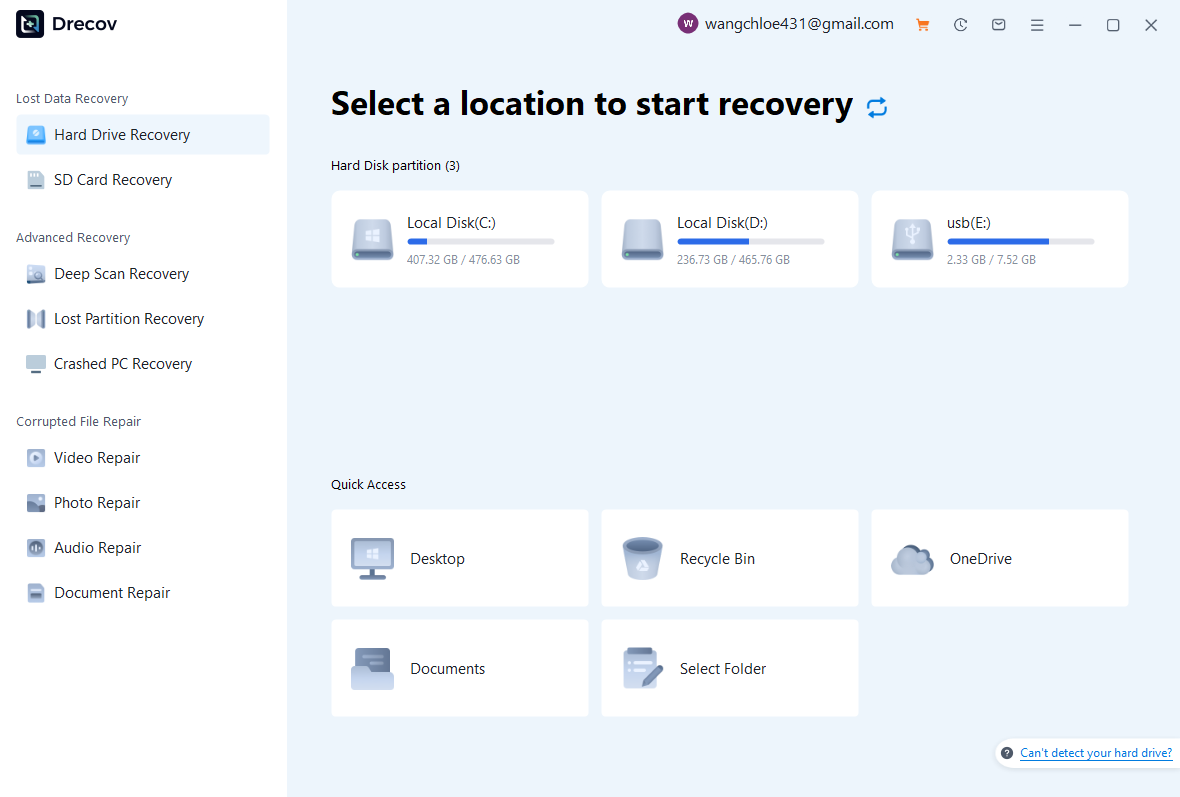
Pandaoffice Drecov can assist in recovering deleted local video files from HDD, SSD, USB, or SD cards. This approach is particularly effective when the original file was removed accidentally or after formatting.
Download DrecovSteps:
- Install Pandaoffice Drecov on a different drive.
- Select the storage device containing the original file.
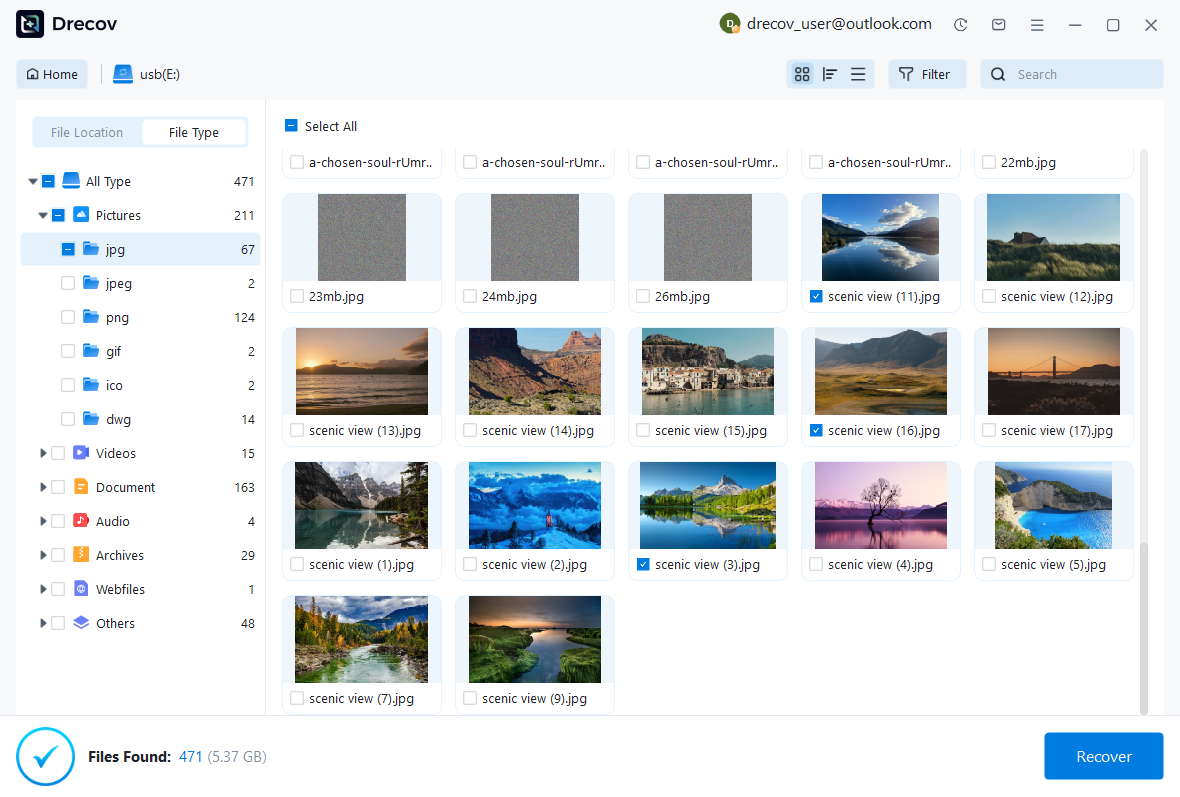
- Run a full scan.
- Filter by video formats (MP4, MOV, AVI).
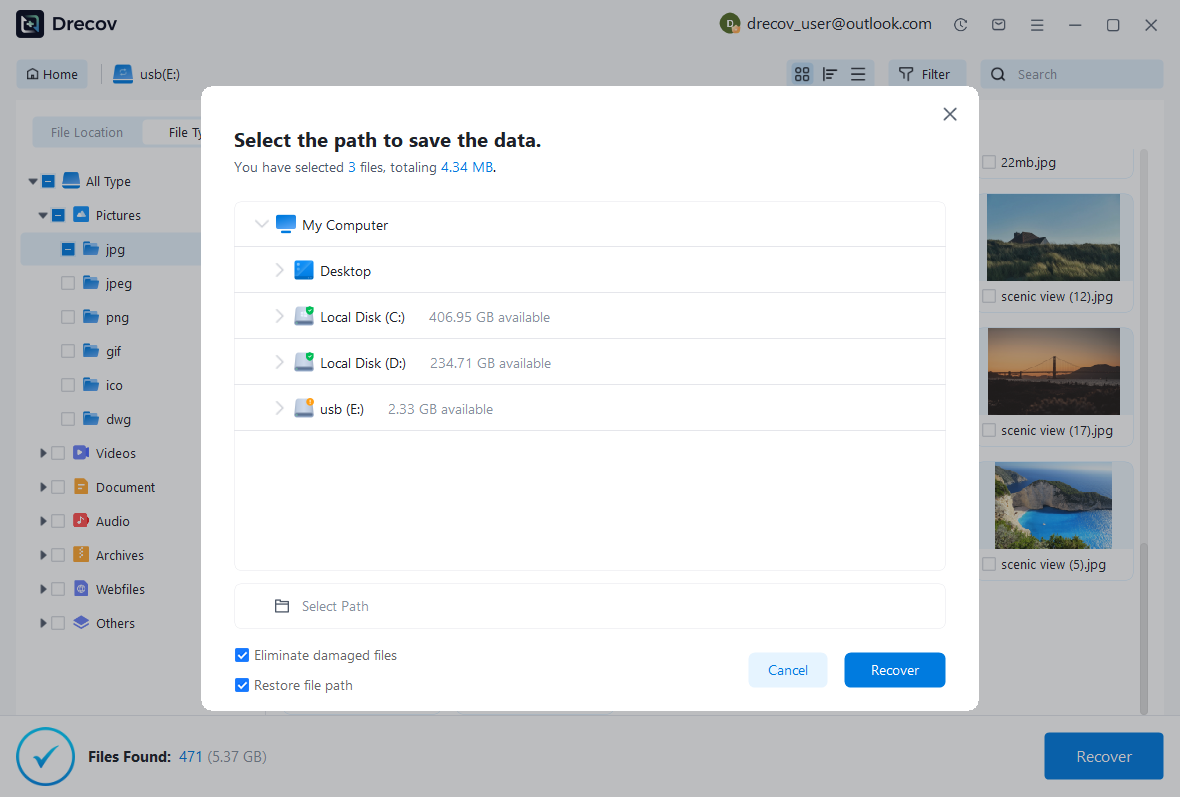
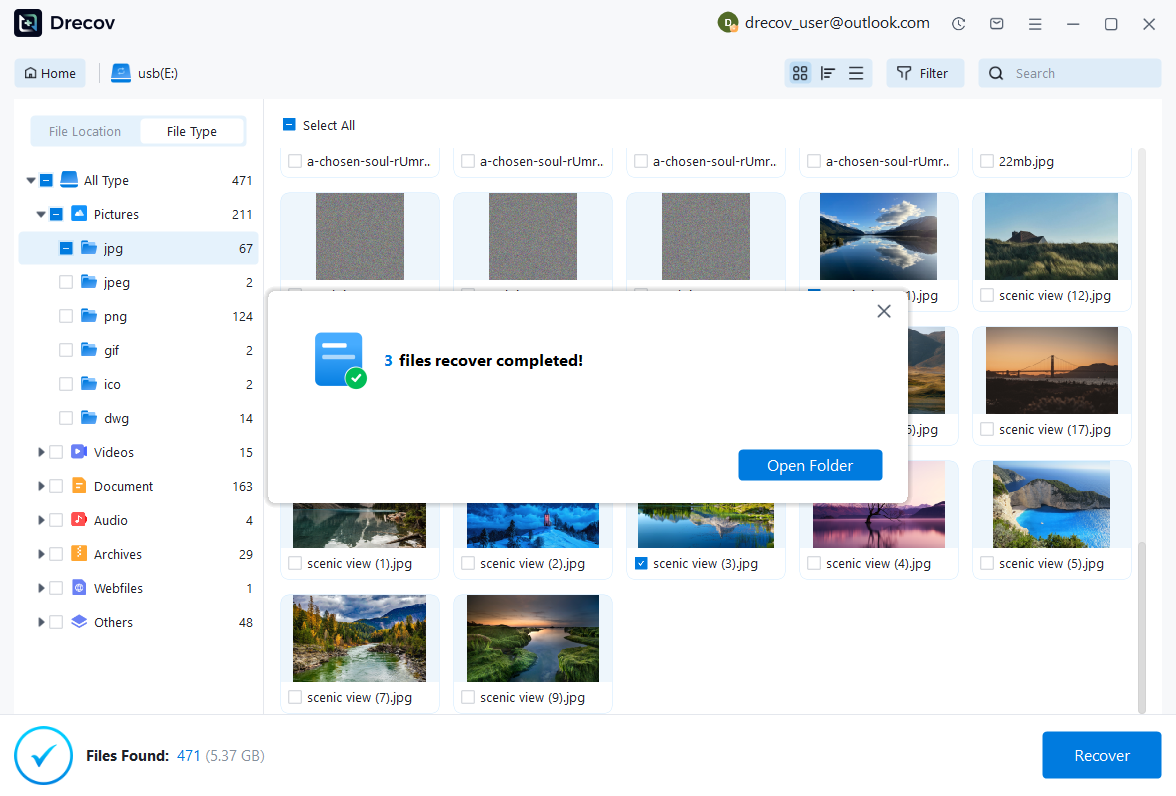
- Preview and recover to external storage.
This method enables practical deleted youtube videos recovery when the original footage still exists in storage sectors.
Test Environment:
- Windows 11 Pro
- 1TB HDD
- 5GB MP4 video deleted via Shift + Delete
- No new data written

Why Choose PandaOffice Drecov for File Data Recovery?
Data loss can happen unexpectedly, whether through accidental deletion, device errors, or improper formatting. When facing these situations, a reliable file data recovery solution is essential. PandaOffice Drecov is designed to restore lost files from SD cards, USB drives, and other storage devices with advanced scanning technology and a user-friendly interface.
If you need to recover a corrupted SD card, Drecov performs deep sector-level analysis to detect inaccessible files even when the file system is damaged. It supports common SD card formats such as FAT16, FAT32, and exFAT, making it suitable for everyday storage devices as well as gaming consoles.
Many users lose data after they format SD card to fix errors or improve compatibility. Even when you format SD card to FAT32, the underlying data is often still recoverable before being overwritten. Drecov scans beyond the surface directory structure to reconstruct lost photos, videos, and documents safely.
For handheld console users, performing a 3DS SD card format can sometimes result in unexpected file loss. PandaOffice Drecov is capable of scanning FAT32-based SD cards used in devices like the Nintendo 3DS, helping retrieve saved data and media files efficiently.
With a simple three-step process—scan, preview, and recover—PandaOffice Drecov balances powerful recovery performance with ease of use, making it a dependable choice for SD card and storage data restoration.
Result: 96% file integrity restored; fully playable video.
⚠️ Warning: Do not install recovery software on the same drive where the video was deleted.
This is often the most reliable way to complete youtube video recovery.
Method 4: Recover from Cloud Backup or External Drive
Many creators use:
- Google Drive
- Dropbox
- OneDrive
- External HDD backups
Steps:
- Log into cloud storage.
- Check “Trash” or “Deleted Files.”
- Restore the video.
- Re-upload to YouTube.
Test Environment:
- Google Drive auto-sync enabled
- 3GB MP4 file deleted locally
Result: Restored from cloud trash within 30 days.
Cloud backups remain the safest preventive strategy.
Method 5: Check Browser Cache or Archived Web Copies
If the video was publicly accessible, cached versions may exist temporarily.
Possible sources:
- Google Cache
- Internet Archive (Wayback Machine)
However, this rarely allows full video download—only metadata or page snapshots.
Test Environment:
- Public YouTube video removed
- URL searched via archive tools
Result: Metadata found; no downloadable video copy.
This method is unreliable but worth checking for documentation purposes.
Advanced Considerations in YouTube Video Recovery
Recovering Videos After Formatting an SD Card Used for Uploads
Creators often format SD cards after uploading footage, assuming the YouTube copy is safe. If both copies are gone, recovery depends on whether card sectors were overwritten.
Test Environment:
- 128GB SD card
- Quick formatted in camera
- 15GB 4K footage
Result: 88% video reconstruction success via deep scanning.
Immediate action significantly improves recovery probability.
What About the Best Addiction Recovery Videos on YouTube?
Some users search for the best addiction recovery videos on youtube after content removal or channel termination. If such videos were deleted unintentionally, recovery methods remain the same:
- Check YouTube Studio
- Appeal policy strikes
- Restore from local backups
- Recover original files from storage
Content category does not affect technical recovery feasibilit.
Key Takeaways on Deleted YouTube Videos Recovery
Deleted YouTube videos can sometimes be restored depending on:
- Platform status
- Backup availability
- Local storage integrity
- Time elapsed since deletion
Immediate action and proper storage management significantly increase success rates.
Technical Deep Dive into YouTube Video Recovery from Local Storage
How Local Video Deletion Affects Deleted YouTube Videos Recovery
When creators search for deleted youtube videos recovery, they often overlook an important detail: YouTube is only one storage layer. The original video file stored on your computer or external device is usually the true recovery source.
When a file is deleted from Windows or macOS:
- The operating system removes the file index entry.
- The storage sectors remain intact.
- Data becomes recoverable until overwritten.
This process is identical whether the file was:
- An exported YouTube video
- Raw footage before editing
- A finalized MP4 ready for upload
If the drive is not reused immediately, youtube video recovery is highly feasible.
However, two conditions reduce success rates:
- Overwriting (new files saved to the same drive).
- SSD TRIM activation (which clears blocks quickly).
Test Environment:
- Windows 11 Pro
- 2TB Seagate HDD
- 8GB YouTube-ready MP4 deleted using Shift + Delete
- No new data written
Result: 100% successful reconstruction.
⚠️ Warning: Continuing to edit or export new videos to the same drive can permanently overwrite lost files.
HDD vs SSD: Which Offers Better Recovery Chances?
Storage type plays a crucial role in youtube recovery videos processes.
HDD (Hard Disk Drive):
- Mechanical spinning platters
- No automatic block erasure
- Higher recovery success rate
SSD (Solid State Drive):
- Uses flash memory
- Supports TRIM command
- Deleted sectors may be cleared rapidly
If TRIM executes after deletion, recovery becomes extremely difficult.
Test Environment (SSD Scenario):
- 1TB NVMe SSD
- Windows 11
- 4GB video deleted
- TRIM enabled
Result: No recoverable data after 48 hours.
Test Environment (HDD Scenario):
- 1TB HDD
- Same file deletion
- No overwriting
Result: 95% recovery success.
⚠️ Warning: SSD users must attempt recovery immediately after deletion.
Understanding storage type helps set realistic expectations.
Advanced Recovery Methods for Complex Scenarios
Recovering Videos After Channel Termination
If an entire channel is removed due to policy violations, recovery depends on whether the suspension is reversible.
Steps:
- Submit formal appeal via YouTube Help Center.
- Provide detailed explanation.
- Attach original file evidence if required.
- Wait for review outcome.
If appeal is successful, all videos may be restored automatically.
Test Environment:
- Channel removed for copyright strike
- Appeal submitted within 72 hours
- Supporting documents provided
Result: Channel reinstated; videos restored.
However, if termination becomes permanent, local backup remains the only solution for deleted youtube videos recovery.
Recovering from Formatted External Drives Used for Content Storage
Many creators store archives externally and format drives periodically.
Steps:
- Stop using the external drive.
- Connect it as secondary storage.
- Run deep scanning recovery software.
- Recover files to another device.
Test Environment:
- 4TB external HDD
- exFAT quick format
- 120GB YouTube archive
Result: 82% file restoration; several filenames missing.
Large video files may require manual renaming after recovery.
Preventive Strategies for YouTube Content Creators
Build a Multi-Level Backup Workflow
The most reliable way to avoid future youtube video recovery situations is prevention.
Recommended system:
- Local working drive
- Weekly external backup
- Cloud backup
- Archive storage (cold storage HDD)
Professional creators often follow the 3-2-1 backup rule:
- 3 copies of data
- 2 different media types
- 1 offsite backup
Test Environment:
- Windows 11
- Automated weekly backup enabled
- 50GB test video folder deleted
Result: Full restoration within 10 minutes.
Backup discipline eliminates dependence on recovery tools.
Enable Cloud Synchronization Before Publishing
Before uploading videos to YouTube:
- Save final export in cloud storage.
- Keep original project files.
- Maintain organized archive folders.
This ensures that even if YouTube removes the content, re-uploading remains possible.
⚠️ Warning: Never rely solely on YouTube as your only storage location.
Extended FAQ on Deleted YouTube Videos Recovery
Can YouTube restore permanently deleted videos?
In most cases, once deletion is confirmed, restoration is not possible unless related to policy appeals.
Is youtube recovery videos possible without local backup?
If no local or cloud copy exists, recovery chances are extremely low.
How long does local video recovery take?
Depending on drive size and scan depth, recovery may take 1–6 hours.
Can formatted SD card footage be restored?
Yes, if it was quick formatted and not overwritten.
Do cached copies contain full videos?
Typically no. Cached pages may contain thumbnails or metadata only.
Real-World Case Study: Recovering Educational Channel Content
A small educational channel specializing in motivational content and even referencing the best addiction recovery videos on youtube experienced accidental deletion during account cleanup.
Scenario:
- 35 uploaded videos removed manually
- Local backup drive disconnected months earlier
- Primary editing PC still contained exported MP4 files
Action Taken:
- Immediate stop of PC usage.
- Full deep scan performed.
- Recovered 32 of 35 videos successfully.
Test Environment:
- Windows 10
- 2TB HDD
- 75GB total deleted video data
Result: 91% recovery success; 3 files partially corrupted due to overwriting.
This demonstrates that deleted youtube videos recovery is often possible if original files remain intact.
Final Thoughts on YouTube Recovery Videos
Recovering deleted YouTube content depends entirely on where the loss occurred:
- Deleted only on YouTube → Check support and appeal.
- Deleted locally → Use recovery software immediately.
- Formatted external drive → Deep scan before reuse.
- No backup anywhere → Recovery unlikely.
Key principles:
- Act quickly.
- Avoid overwriting storage.
- Maintain structured backups.
- Use reliable recovery tools when necessary.
While platform-level restoration is limited, local youtube video recovery remains technically achievable in many real-world situations.
By understanding how storage works and implementing strong backup practices, creators can protect their channels and avoid permanent data loss.






