







Recover Lost World Cup Photos and Videos After Accidental Deletion
Major sporting events create countless unforgettable memories. During the FIFA World Cup, fans often use cameras, smartphones, and other recording devices to capture exciting goals, celebrations, stadium experiences, and personal moments. However, these valuable files can sometimes disappear because of accidental deletion, storage errors, formatting issues, or unexpected device problems.
Learning how to Recover Lost World Cup Photos and Videos can help fans restore important memories without panic. Whether the files were stored on a digital camera, SD card, external drive, or computer, there are several recovery methods available depending on the situation.
Many users assume that deleted photos and videos are permanently removed immediately. In reality, when files are deleted from a storage device, the original data may remain available until new information overwrites that space. This means quick action can improve the possibility of successful recovery.
The recovery process usually begins with simple solutions, such as checking backup locations or recently deleted folders. If those options are unavailable, specialized recovery tools may help scan storage devices and locate missing media files.
⚠️Warning: Stop taking new photos or recording additional videos on the affected storage device after losing important files. New data may overwrite deleted content and make recovery more difficult.
Why World Cup Photos and Videos Are Valuable Digital Memories
World Cup-related photos and videos are more than ordinary files. They often capture once-in-a-lifetime experiences, including attending matches, celebrating victories with friends, recording fan events, or preserving personal travel memories.
For many football supporters, these files represent emotional connections to important moments. A short video of a winning goal, a photo from inside a stadium, or a recording of a family celebration can become a valuable personal archive.
Modern cameras and recording devices allow users to capture high-quality images and videos with large file sizes. While this improves visual quality, it also means losing a single folder can result in hundreds or even thousands of important files disappearing at once.
The risk of losing World Cup media files increases when users frequently transfer data between cameras, SD cards, computers, and mobile devices. Mistakes during file transfer, accidental formatting, or removing storage devices incorrectly can cause unexpected data loss.
Because these memories are difficult to recreate, understanding recovery options before problems happen is important. Having knowledge of backup methods and recovery solutions can help fans protect their football memories during major events.
Why World Cup Photos and Videos Get Lost from Cameras and Storage Devices
Although cameras and storage devices are designed to save digital content safely, different situations can cause photos and videos to become inaccessible. During large events such as the World Cup, users often take hundreds of pictures and record long videos, increasing the possibility of storage-related problems.
Understanding the causes of data loss can help users choose the correct recovery method. Some problems are caused by user mistakes, while others result from hardware failures or software errors.
Digital cameras commonly use SD cards, microSD cards, or other memory storage devices. These small storage products are convenient but can be affected by corruption, physical damage, or file system errors.
When important football photos or videos disappear, users should avoid immediately formatting the device or attempting random repairs. Incorrect operations may reduce the chances of restoring lost files.
Common Reasons Behind Missing Football Event Photos and Videos
One of the most common causes of lost World Cup photos and videos is accidental deletion. Users may mistakenly select the wrong files while organizing their camera storage or transferring recordings to a computer.
Another frequent issue is accidental formatting. Camera users sometimes format an SD card when they receive an error message or when preparing the card for new recordings. If the card contains valuable football memories, formatting can make files appear unavailable.
File transfer interruptions can also lead to missing media. For example, removing an SD card while copying files, disconnecting a camera during transfer, or experiencing a computer crash may damage the file structure.
Storage device corruption is another possible reason. SD cards and camera memory devices have limited lifespans, and repeated use may eventually cause reading problems or unexpected errors.
⚠️Warning: If a camera or SD card shows unusual behavior, such as disappearing files, repeated error messages, or slow performance, avoid continuing to use it until important files are secured.
How Camera Storage Problems Affect Important Media Files
Camera storage problems can affect both photos and videos in different ways. Some users may notice that files completely disappear, while others may find that videos cannot open or photos appear damaged.
Large video files are especially vulnerable because they require more storage space and take longer to write. A sudden interruption during recording can create incomplete or corrupted video files.
Memory cards used frequently for high-resolution photography and video recording may experience performance issues over time. Factors such as insufficient storage space, improper removal, and repeated formatting can contribute to file system problems.
When a storage device becomes unreadable, the files may still exist physically on the device even though the operating system or camera cannot display them. In these cases, specialized recovery methods may help locate and restore the hidden data.
For users who regularly capture important events, using reliable storage practices and maintaining backups can significantly reduce the risk of losing valuable memories.
How to Recover Lost World Cup Photos and Videos
When World Cup photos and videos disappear, users should first identify where the files were stored and what caused the loss. Different situations require different approaches, and starting with simple recovery options can sometimes solve the problem quickly.
The recovery process may involve checking deleted file locations, restoring from backups, or using specialized software designed to search storage devices for missing media.
Before attempting recovery, users should avoid writing new files to the affected device. This is especially important for cameras and SD cards because new recordings may replace deleted data.
The following methods cover common situations where football photos and videos become lost.
Check Recycle Bin and Recently Deleted Folders
For users who transferred World Cup photos and videos to a computer before deletion, checking the Recycle Bin is one of the easiest recovery methods.
When files are deleted from a Windows computer, they are often moved temporarily to the Recycle Bin instead of being removed immediately. Users can open the folder, locate the missing photos or videos, and restore them to their original location.
Some cameras and mobile devices also include recently deleted folders. These folders may store removed media files for a limited period before permanent deletion.
Test environment description:
- Device: Windows 11 desktop computer
- Storage location: Internal SSD
- File types: JPEG photos and MP4 football videos
- Data loss situation: Files accidentally deleted during organization
This method works best when files were recently deleted and the deletion occurred through normal file management operations. However, if the Recycle Bin was emptied or files were deleted directly from external storage devices, another recovery method may be required.
Checking these locations should always be the first step because it is quick, free, and does not require additional software.
Restore World Cup Media Files from Backup Services
Backups provide another reliable way to recover missing football photos and videos. Many users automatically synchronize camera files with cloud platforms or external storage devices without realizing it.
Services such as cloud storage, external hard drives, and backup applications may contain previous versions of deleted files. If a backup exists, users can restore their World Cup photos and videos without scanning the original storage device.
Test environment description:
- Device: Windows laptop
- Backup source: External hard drive and cloud storage folder
- File types: Camera images and recorded match videos
- Data loss situation: Original SD card files accidentally removed
Regular backups are especially useful for major events because they protect important files before problems occur. Users who travel for football matches or record large amounts of content should consider creating multiple copies of important media.
However, backup recovery depends entirely on whether files were previously copied or synchronized. If no backup exists, users may need to explore other recovery options.
Recover Deleted World Cup Photos Using Windows File Recovery
For users who accidentally delete World Cup photos or videos from a Windows computer, Microsoft provides a command-line recovery tool called Windows File Recovery. This utility is available through the Microsoft Store and can help recover deleted files from internal drives, external drives, USB devices, and memory cards.
Windows File Recovery supports several file systems, including NTFS, FAT, and exFAT, which are commonly used by computers and camera storage devices. It provides different recovery modes depending on the condition of the storage device.
Test environment description:
- Operating system: Windows 11
- Storage device: Internal HDD
- File types: JPEG football photos and MP4 match clips
- Data loss situation: Files permanently deleted after emptying Recycle Bin
The tool works through Command Prompt commands, so it may require more technical knowledge compared with graphical recovery applications. Users need to specify the source drive, destination location, and recovery mode before starting the scan.
Although Windows File Recovery can be useful for certain situations, it may not always find recently deleted camera files, especially when dealing with formatted SD cards or complex file system damage.
For users who prefer a simpler interface, another recovery method may provide a more convenient experience.
Restore Lost Camera Photos with PhotoRec
PhotoRec is a free and open-source recovery program designed to recover lost files from various storage devices. It supports many file formats, including photos, videos, documents, and archive files.
Unlike traditional file recovery tools that depend heavily on the existing file structure, PhotoRec uses file signature scanning to locate recoverable data. This makes it useful when storage devices are formatted, corrupted, or no longer display normal folders.
Test environment description:
- Operating system: Windows 10
- Storage device: 64GB SD card from a digital camera
- File types: RAW images, JPEG photos, MP4 videos
- Data loss situation: SD card accidentally formatted before a football event
PhotoRec can scan memory cards, hard drives, and USB storage devices. During recovery, users select the file types they want to search for and choose a separate destination folder for recovered files.
One limitation is that recovered files may not keep their original names or folder structures. Users may need to manually organize recovered photos and videos after the process finishes.
For photographers and football fans who store large collections of images on camera cards, PhotoRec provides a free option when basic recovery methods do not work.
Recover World Cup Videos from Backup and Cloud Services
Before using recovery software, users should check whether their missing World Cup photos and videos exist in backup locations. Many modern devices automatically synchronize photos with cloud platforms or backup applications.
Common backup solutions include Google Photos, OneDrive, and external hard drive backups. If automatic synchronization was enabled before deletion, users may be able to restore missing files without scanning the original storage device.
Test environment description:
- Device: Windows laptop
- Backup source: OneDrive cloud folder
- File types: Camera photos and recorded football videos
- Data loss situation: Original files deleted from local storage
For example, users who imported camera photos to a computer with cloud backup enabled may find previous copies available online. Some services also provide recently deleted folders where removed files remain temporarily.
However, backup recovery only works if files were previously uploaded or synchronized. If no backup exists, users will need to use another recovery method.
Creating backups before major sporting events is one of the simplest ways to protect valuable memories.
Recover Deleted Media Files with PandaOffice Drecov
For users who need a dedicated Windows recovery solution, PandaOffice Drecov can help recover deleted photos and videos from different storage devices, including hard drives, SSDs, external drives, and memory cards.
This type of recovery approach is useful when files are missing because of accidental deletion, formatting, partition problems, or storage errors. The software can scan storage devices, identify recoverable files, and allow users to preview available data before restoration.
Test environment description:
- Operating system: Windows 11
- Storage device: External SSD
- File types: MP4 football recordings and JPEG images
- Data loss situation: Match videos accidentally deleted during file cleanup
The recovery process is designed to be straightforward. Users can connect the affected storage device, start scanning, preview detected files, and recover selected items to another location.
Steps:
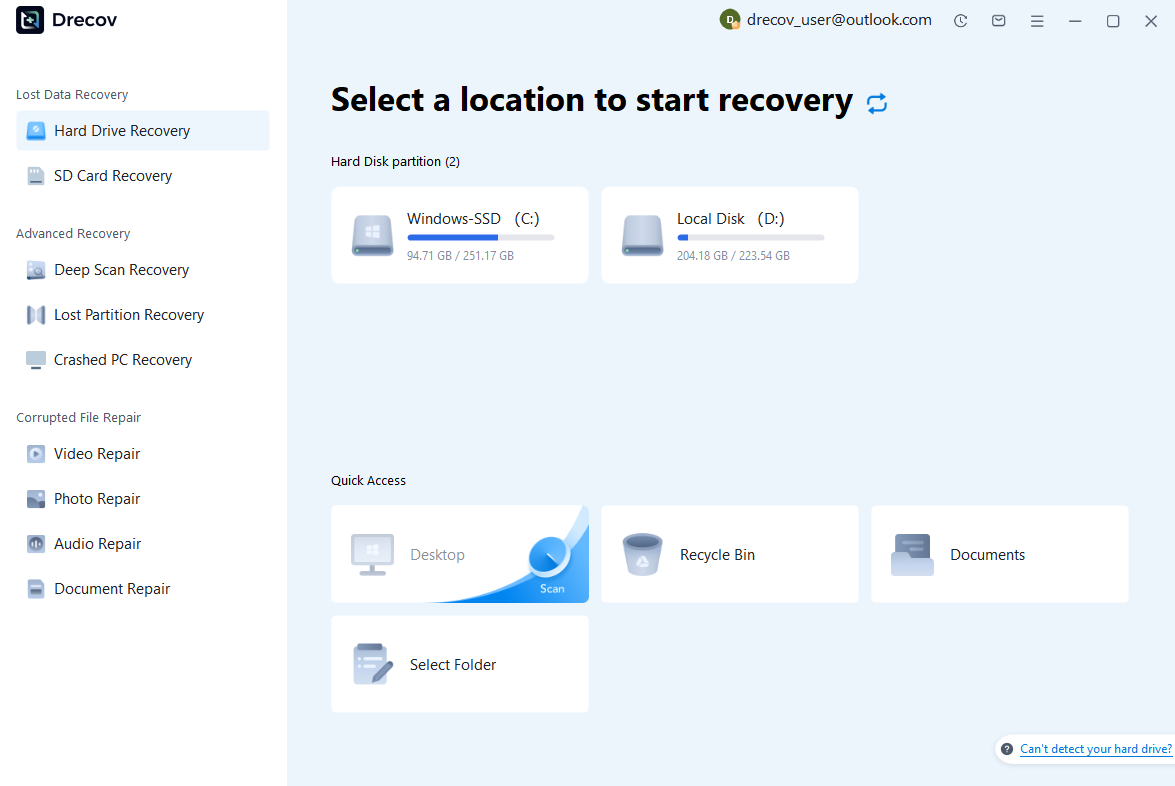
Step 1: Connect the Drive / USB)
Connect your device (SD card, HDD/SSD, or USB drive) to your computer and launch PandaOffice Drecov. Select the target device and start the scan. The software will perform a quick scan and deep scan to detect lost or deleted data.
Step 2: Locate and Preview Lost Files
After scanning, browse the detected files and use the preview feature to check recoverable data. You can preview documents (Word, Excel, PDF), photos, and videos to ensure file integrity before recovery.

Step 3: Recover and Save to a New Location
Select the files you want to restore and click recover. Save all recovered data to a different drive or location (not the original device) to avoid overwriting lost data.

To avoid losing valuable football memories in the future, fans should regularly back up important recordings and screenshots to another storage device or cloud service. Creating backups before major sporting events can help protect important moments from accidental loss.
Some questions you may be interested in:
how to format a hard drive windows 11
how to recover deleted drafts in outlook
what is healthy recovery partition
how to make steam not open on startup
Saving recovered files to a different drive is recommended because writing data back to the same storage device may overwrite other recoverable files.
For football fans who save large collections of match recordings, stadium photos, and personal event memories, having a reliable recovery option can help reduce the impact of accidental file loss.
How to Prevent Losing Important World Cup Photos and Videos Again
Recovering lost files can restore valuable memories, but prevention remains the most effective strategy. During major sporting events, users often create hundreds of photos and videos, making proper file management increasingly important.
Create Multiple Backups for Camera Media Files
Keeping only one copy of important World Cup photos and videos creates unnecessary risk. If the original SD card fails or files are accidentally deleted, all memories may disappear.
A better approach is following the 3-2-1 backup principle:
- Keep three copies of important files;
- Store them on two different types of storage;
- Keep one copy in another location.
Users can combine external hard drives, cloud storage services, and personal computers to create a safer backup system.
Protect SD Cards and Camera Storage Devices
Proper handling of camera storage devices can prevent many common data loss situations.
Users should avoid removing SD cards while cameras are recording, avoid using damaged memory cards, and transfer files before the storage becomes completely full.
Formatting should only happen after confirming that important photos and videos have been backed up.
⚠️Warning: If a camera displays errors or asks to format an SD card unexpectedly, do not format it immediately. Formatting may remove access to important files.
Frequently Asked Questions About Recovering World Cup Photos and Videos
Can Deleted Camera Photos and Videos Be Recovered?
Yes. Deleted photos and videos may still be recoverable if new data has not overwritten the storage space.
The recovery possibility depends on factors such as deletion time, storage usage after deletion, and the condition of the device.
What Is the Best Camera Data Recovery Software?
The best camera data recovery software depends on the user’s situation.
For simple Windows deletions, Windows File Recovery may help. For formatted memory cards, PhotoRec can be useful. Users who prefer a more user-friendly recovery process, dedicated recovery applications such as PandaOffice Drecov provide another option.
How Long Can Deleted Videos Be Recovered?
There is no exact time limit. Deleted videos may remain recoverable for days, months, or even longer if the storage space has not been overwritten.
The sooner users stop using the device and begin recovery, the higher the possibility of restoring lost files.
Conclusion: Keep Your World Cup Memories Safe
World Cup photos and videos preserve unforgettable football experiences, from exciting goals and stadium celebrations to personal moments shared with family and friends.
When these files disappear, users can try different recovery methods depending on their situation. Built-in tools such as Windows File Recovery, open-source solutions like PhotoRec, backup services, and dedicated recovery software can all help recover missing media files.
The best protection is combining recovery knowledge with good storage habits. Regular backups, careful SD card management, and avoiding unnecessary formatting can prevent many common problems.
By preparing before important events and knowing how to respond after accidental deletion, football fans can keep their favorite World Cup memories safe for years to come.






