








Recover Ardour session state and recorded sources together
To recover Ardour sessions, identify whether the missing component is a session state, an audio source, an edit, or a plugin-dependent mix. A session file can describe regions and routing while the recordings live elsewhere in the session structure. A snapshot preserves another state but shares source data. Therefore, finding a snapshot does not automatically mean that every recording needed by it survived.
Record the session folder, Ardour version, audio sample rate, and a distinctive region or mix change. Also note the last successful recording and save. A newly recorded take may exist even if the latest arrangement state did not save. Conversely, an intact arrangement can point to a missing source. These cases need separate checks and recovery sources.
Preserve the entire session before testing
Close Ardour and copy the complete surviving session folder, including its source and state files. Keep an untouched copy and use another copy for inspection. If the session references external media, preserve those paths and files too. A folder copy can look complete while still relying on recordings that were never copied into it.
The workflows below use existing session features and surviving backups without requiring a separate recovery utility. Ardour distribution and support arrangements can differ, so use an installation you are entitled to run. Do not describe access to a particular build as universally free merely because the project provides open source code.
Native route 1: inspect an available crash recovery state
- Preserve the session folder before repeated reopening or saving.
- Open the intended session with the compatible Ardour installation.
- Inspect any offered recovery of an interrupted or pending session state.
- Save an accepted candidate as a clearly named new snapshot or working state.
Ardour can retain state information useful after an interrupted session. The exact candidate depends on what survived and the configuration in use. A recovery prompt is an opportunity to inspect that state, not proof that the final edit and recording both reached persistent storage. Compare a known region position and a recent mixer change before accepting it.
Keep the previous saved state available
An interrupted candidate can contain useful late edits while another saved snapshot holds a more stable earlier mix. Preserve both. Do not overwrite the earlier state as soon as one recovery candidate opens. Compare their sources, edits, and routing first so you can choose a useful milestone without discarding an alternative that may contain another missing detail.
If the application reports missing sources during recovery, record the exact filenames and paths. The session state may be readable while its audio remains unavailable. Resolve those source questions separately. Repeatedly saving the recovered state cannot manufacture the missing recordings, and it can make the candidate’s original condition harder to understand.
Native route 2: open a useful existing snapshot
- Locate the session’s available snapshots in the normal interface.
- Preserve the current state before switching to an older snapshot.
- Open the candidate and compare the incident-specific edits or mix.
- Save the accepted result under a distinct snapshot name.
A snapshot provides another saved state within the session. It shares the session’s underlying data rather than duplicating every recording into an independent archive. This makes snapshots useful for arrangement or mix rollback, but it also means source deletion can affect several snapshots. Keep the shared source files while comparing states.
Understand which state receives later saves
Ardour offers snapshot workflows that either keep you working on the current version or switch to the new version. Read the choice carefully when preserving a recovery milestone. The decision affects which state later saves update. Use clear names and confirm the active snapshot before making additional edits, so a useful reference does not change unintentionally.
Compare region placement, gain, automation, routing, and plugin state where relevant. A snapshot with the correct track names can still predate the mix decision you need. Keep an audio reference and inspect a distinctive passage. If you manually reproduce a later change, record that as a reconstruction rather than claiming the earlier snapshot contained it.
Native route 3: restore a complete session backup or archive
- Locate an existing full session copy or supported session archive.
- Preserve the original candidate and restore a working copy elsewhere.
- Open the session and inspect any missing-source reports.
- Compare recordings, relevant snapshots, routing, and a reference passage.
A complete session folder can preserve the state and the media needed for continued work. An archive may have a narrower scope depending on the export options. For example, a space-saving archive can exclude unused audio or preserve only a particular state. Inspect the actual candidate rather than assuming every archive contains all alternate takes and snapshots.
Check external sources before calling the backup complete
If media remained outside the session folder, a simple folder copy may not include it. Use the supported consolidation or sharing workflow where appropriate and verify the result. A session that works on the original machine can still fail elsewhere because it silently reads an external recording. Test from the planned recovery location with those dependencies understood.
Keep unused takes until the accepted recovery no longer needs them. During ordinary production, cleanup can reduce storage, but recovery has a different priority. An apparently unused source may contain the only surviving performance or support an older snapshot. Do not run source cleanup on the only preserved session while you are still comparing candidates.
Native route 4: locate surviving recorded audio
- Read the missing-source information and identify the expected recording.
- Search the preserved session and legitimate external recording locations.
- Match the candidate by content, duration, channels, and recording context.
- Reconnect through the supported workflow and compare region alignment.
A recording can survive even when the latest session state is missing or a path changed. Preserve the original audio before importing or trimming it. A filename alone is weak evidence when several takes have similar names. Listen to a distinctive phrase and compare technical properties to identify the intended source.
Reconnect the performance without guessing its position
If the session still contains region placement information, verify that the reconnected source plays at the expected position. If only raw recordings survive, reconstruction may require aligning takes using a slate, reference mix, or other evidence. Record those decisions. Importing a sound file does not automatically restore the original edits, fades, or comp arrangement.
Check channel interpretation as well. A stereo source, a mono take, and two separate channel files can require different handling. Listen to the relevant channels independently and together. A waveform that looks plausible can still contain the wrong take or swapped source relationship, so rely on the audible performance and session context.
Diagnose silence before restoring the arrangement
Check transport state, track mute and solo conditions, routing, audio device setup, and master output. A complete session can produce no audible output because of the environment. Test an appropriate known source separately if necessary. Keep system playback troubleshooting distinct from restoring missing session content, so a device configuration change does not lead to an unnecessary rollback.
Follow the signal path
Start at the affected source and observe whether signal reaches its track, buses, and output. An unavailable plugin or changed routing can interrupt playback despite intact media. Correct only understood settings in a working copy, then compare the reference passage. Do not rebuild every track when one shared bus explains the symptom.
If regions show missing-source indicators or fail to produce signal at the source stage, return to media investigation. If source signal exists but the output remains silent, inspect routing and processing. This staged approach narrows the problem and preserves the distinction between intact recordings and an incomplete or incompatible mix environment.
Recover edits without discarding alternate takes
A session can contain several performances while the visible arrangement uses only selected regions. Inspect playlists and available source material through the normal interface. The desired take may still exist even if it no longer occupies the current timeline. Preserve the current arrangement before switching or copying material from another state.
Compare a comp at meaningful boundaries
For a vocal or dialogue comp, listen across edit boundaries and compare the intended phrase. Check fades, overlap, timing, and any gain changes. A restored set of regions can still produce clicks or an unintended word transition if the edit relationships differ. Use a reference mix where available and record any boundary you reconstruct manually.
Do not trim or consolidate the only surviving source while exploring alternatives. Work with copied session material and preserve full recordings. A later discovery may require audio outside the current region boundaries. Keeping the original performance intact preserves options that a destructive source edit could remove permanently.
Inspect automation and plugin dependencies
A mix depends on more than fader positions. Compare automation mode, parameter curves, routing, plugin availability, and relevant presets. A session can open with placeholders or unavailable processing that changes the sound. Preserve the original state before substituting plugins or saving through a reduced configuration that may no longer represent the earlier mix.
Test the important passage in context
Listen to a section where the missing processing mattered, such as a fade, effect send, or gain ride. Then inspect the corresponding automation data. If you recreate the sound with a different plugin, document the substitution. An audible approximation can support delivery without proving that the original plugin state and editing controls survived.
Also compare project sample rate and the intended audio setup before judging pitch or timing differences. Environmental changes can affect playback independently of source recovery. Keep the original files unchanged and inspect the session’s technical context. A rushed resample or export can create a new derivative that obscures what the recovered source actually contained.
Use rendered output as a reference with limits
A stereo mix can preserve the audible result of a milestone, while stems can preserve more isolated material. Neither necessarily contains the original region edits, routing, or plugin parameters. Keep rendered output unchanged and use it to compare arrangement and sound. If the source session is absent, label any new project built around those files as a reconstruction.
Verify stem alignment before rebuilding
Compare start positions, duration, sample rate, and any leading silence. Stems that begin at different musical locations need deliberate alignment. A group of files that sound correct individually can produce the wrong arrangement when imported at the same position without evidence. Use the reference mix or recorded timing information to establish their intended relationship.
If only a final mix survives, identify the practical recovery goal. It may satisfy listening or delivery while offering little editing flexibility. Preserve that useful result without describing it as a restored multitrack session. Then document which tracks, edits, or alternate takes remain unavailable for future production work.
Work through an interrupted recording example
Suppose a session crashes after a new take and before you save the latest arrangement. Preserve the entire folder, inspect the offered recovery state, and compare the new recording’s presence. If the audio source survives but its region placement does not, retain the recording and reconstruct placement from a slate or known session context in a separate working state.
Compare audio and state milestones independently
An older snapshot may provide stable routing and plugins while the newer source directory contains the take you need. Test that combination carefully on a copy, preserving the original candidates. Compare the performance and alignment with a trusted reference. Record the manual placement rather than claiming the older snapshot automatically restored the later recording session.
Once the accepted arrangement works, export a short passage covering the recovered take and its transitions. Then listen to the wider session for missing sources or processing. This checks the immediate repair and the surrounding production context, which may depend on shared buses, alternate playlists, or session-wide settings.
Verify the session as an independent restore
Open a copied session from its intended location and inspect representative tracks, recordings, snapshots, and processing. Export the deliverable you actually need and compare it independently. A successful editor launch does not prove that all audio exists or that the final mix reproduces correctly. Use the incident-specific passage as a repeatable acceptance test.
Keep the accepted source set intact
Preserve full recordings, the accepted session state, and any necessary legitimate plugin context. Add a short note identifying reconstructed edits and unresolved dependencies. A tested copy should not rely on a temporary recovery folder or the old external path. Resolve those dependencies before treating the session as ready for handoff.
Inventory an Ardour session by state and source
List each candidate session state alongside the recordings and external files it needs. A snapshot can describe a valid arrangement while its shared audio is missing. An intact recording folder can preserve performances while the final comp is absent. The inventory makes these different strengths visible before you decide which candidate to promote to the accepted session.
Identify a diagnostic recording passage
Choose a passage with a distinctive performance, edit boundary, and mix change. Record its approximate session position and source identity. Compare that same passage across candidates. A session with familiar track names can still use an older take, while a newer pending state can preserve the right performance but lack a later processing decision.
Include another passage from a different recording period. This helps expose a backup that includes early takes but omits the last recording session. File counts can support the comparison, but they do not establish that the correct performance survived. Listen to the actual content and compare the session’s source relationships.
Understand why snapshots are not independent media copies
Snapshots preserve alternate session states while sharing underlying data. This is efficient for arrangement and mix comparisons, but it means deleting a source can affect multiple snapshots. Preserve the full session and external media before cleanup. Do not assume that keeping several snapshot names provides several independent copies of every recording.
Compare a snapshot with a complete archive
A complete preserved session folder can include more source material than a space-saving archive. An archive may intentionally omit unused media or alternate states. Inspect the options and actual contents of the existing candidate. If the recovery goal includes an alternate take, an archive optimized only for the current arrangement may not contain it.
This distinction also matters when handing the session to another engineer. A snapshot file alone may describe the mix but leave the recipient without the audio. Test the copied session from its planned location and inspect missing-source messages. A successful transfer requires the state and its dependencies, not simply a file with the expected session name.
Recover recorded sources before editing them
Preserve full-length recordings in their original form before importing, trimming, or normalizing them. The visible region may use only part of a source, and another snapshot may need a different section. Keeping the whole recording gives you options for reconstruction and verification that a trimmed derivative would remove.
Match a take through audible evidence
Use a spoken slate, distinctive phrase, instrument entrance, or other content marker to identify a take. Compare duration and channel properties as supporting evidence. Two recordings can have similar names and lengths while containing different performances. A careful listen prevents you from reconnecting an incorrect take that happens to fit the missing filename.
If exact region placement is unavailable, align a copied source using reliable timing evidence. Record the alignment method and any uncertainty. A manually placed take can make the session usable while leaving the original edit history unknown. Keep that limitation separate from the successful recovery of the recording itself.
Inspect playlists and alternate arrangements deliberately
A performance may survive in a playlist or source list without appearing in the active arrangement. Inspect the relevant alternatives through the supported interface before assuming deletion. Preserve the current state first. Switching to another arrangement can reveal useful material, but it can also change what later saves update if you do not track the active state.
Compare comp boundaries with the source
Listen across the start and end of a recovered region, including fades and overlaps. A region can reference the correct take while beginning at the wrong syllable or transient. Compare the intended phrase and surrounding rhythm. If you rebuild the boundary manually, record it as an edit you reconstructed from evidence.
Keep an unprocessed source reference when evaluating a comp. Processing can conceal or exaggerate a boundary problem. First verify the performance and timing, then compare the mix. This separates source recovery from artistic decisions and makes it easier to identify why a reconstructed passage differs from an earlier reference export.
Compare automation as part of the session state
A mix snapshot can preserve automation that changes over time, not just static control positions. Inspect a known gain ride, send change, or plugin parameter movement. Compare the relevant mode and the actual audible passage. A fader sitting at the expected value at one instant does not prove the full automation curve survived.
A change on a shared bus can affect several tracks. If many recovered tracks sound different in the same way, inspect shared processing and routing before altering each track separately. Correct one understood cause in a working copy and compare the diagnostic passage again. This keeps the repair focused and avoids introducing unrelated mix changes.
When a plugin is unavailable, preserve its original saved state and document any substitute. A new processor may support delivery without matching the original parameter response. Keep the accepted recovery and later creative revision as separate milestones so a future engineer can see where exact restoration ended and approximation began.
Check a session archive against the recovery goal
If the goal is final delivery, the current arrangement and required sources may be enough. If the goal is continued editing, you may also need alternate takes, snapshots, and processing context. State that goal before discarding unused material. An archive that is complete for one purpose can be incomplete for another.
Verify an independent restore
Open a copied session from its intended location and test the diagnostic passages, alternate material you need, and the final export. Confirm that no source depends on an old external path or temporary recovery directory. This provides evidence that the preserved set can reproduce useful work outside the original environment.
Retain the untouched source candidates until the independent test passes. Add a short record of the accepted state, recording sources, reconstructed edits, plugin substitutions, and known gaps. That record helps another engineer continue the production without confusing a playable partial recovery with a fully restored historical session.
When storage recovery can help Ardour sessions
PandaOffice Drecov may help retrieve deleted local session files, snapshots, complete backups, or recorded sources from readable storage. It cannot recreate an unsaved edit that left no persistent state or derive every original track from a stereo mix. Prefer surviving state and media routes first, and minimize writes where deleted session components may still remain.
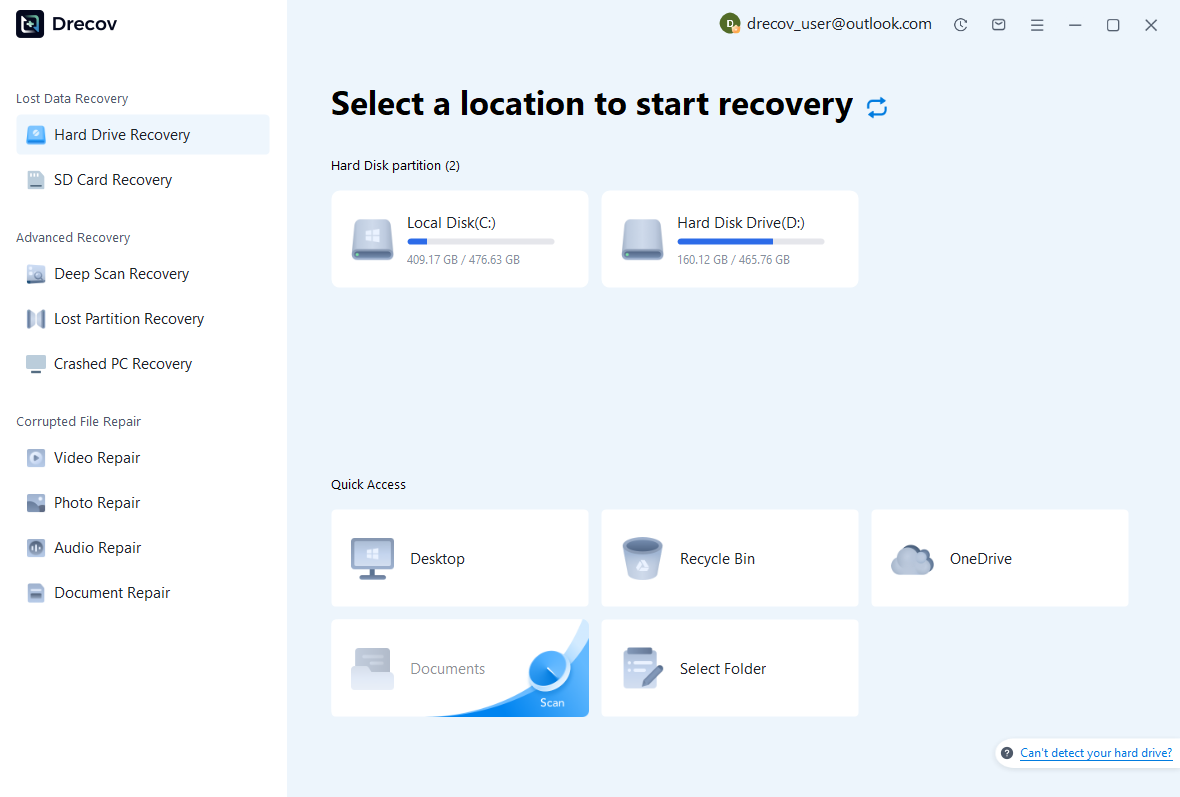
Step 1: identify state and recording locations
Choose the drive or partition that held the session folder, archive, or external recording sources. Record the target component for each search. Keep recovered output on other healthy storage. If the source repeatedly disconnects or reports hardware read failures, assess the device condition before proceeding with a routine software scan.
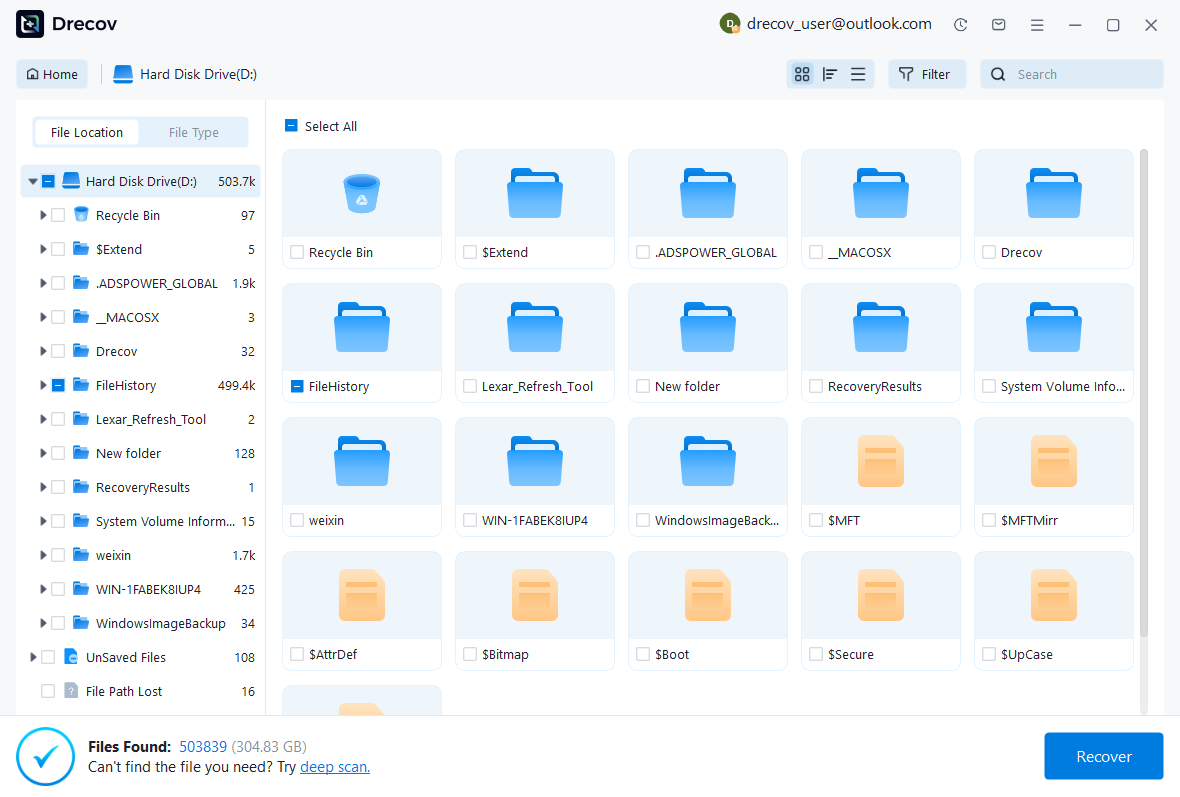
Step 2: compare state and source candidates
Inspect available paths, names, dates, sizes, and supported previews. Preserve plausible session states and full recording candidates as separate sets. A playable recording does not prove that its edits and routing survived. Likewise, a session file can contain useful structure while pointing to missing audio, so keep both questions visible.
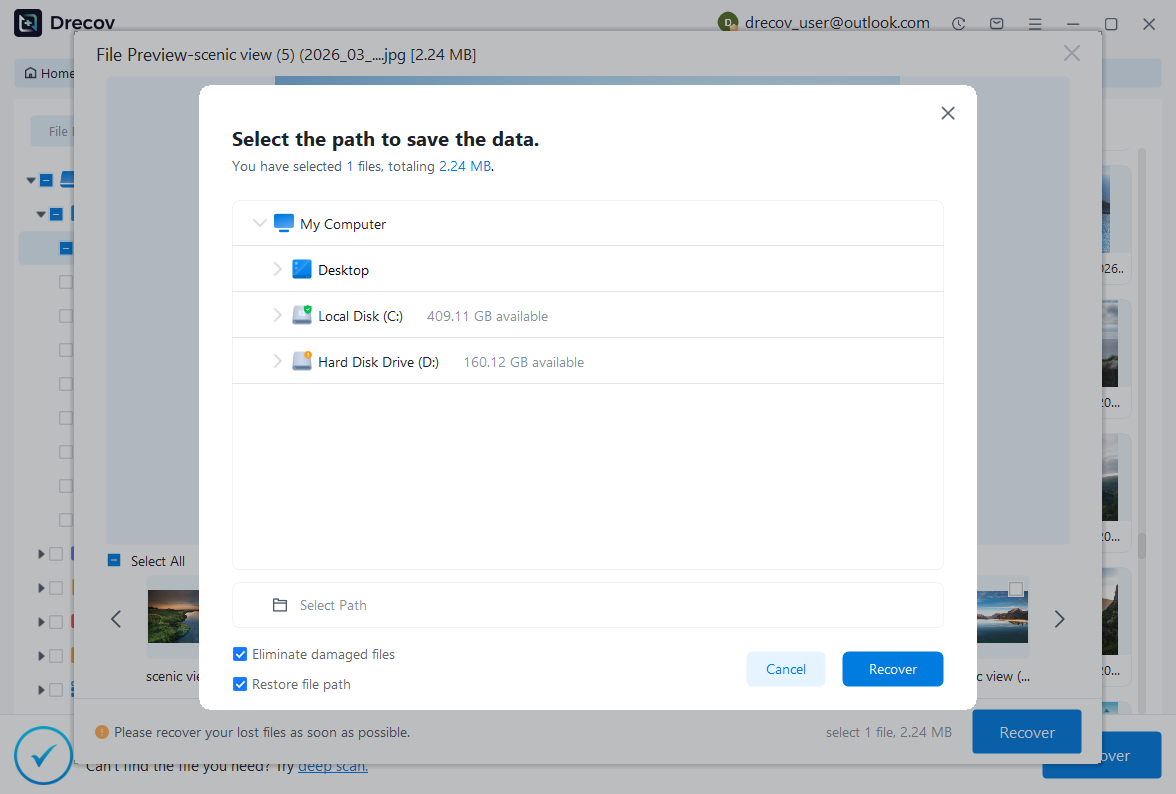
Step 3: restore elsewhere and test the session
Recover selected files to a separate destination and retain untouched originals. Open a copied session through the appropriate Ardour version, reconnect verified sources, and inspect regions, fades, playlists, automation, and routing. Export and compare the incident passage. Record manually reconstructed placement or substituted processing before accepting the recovered production state.
Preserve a session that can reproduce its sound
Keep the accepted session, full source recordings, relevant snapshots, and a reference export with a brief recovery record. Test a copied restore from its planned location. This preserves a practical route back to the editable production instead of depending solely on a mix file that cannot explain its original tracks and decisions.
Related recovery resources
Explore the relevant recovery options: Hard drive recovery, External hard drive recovery.
For another recovery case and its practical checks, read the related recovery guide.
Check the vendor guidance for the installed version: official recovery documentation 1, official recovery documentation 2, official recovery documentation 3, official recovery documentation 4.