







Recover the Natron node graph and its source footage
To recover Natron projects, preserve both the .ntp document and the image sequences or other sources used by its Read nodes. A project can retain the node graph while footage paths become unavailable. A rendered sequence can preserve final pixels while losing editable masks and parameters. Identify which component is missing before replacing files or rebuilding the composite.
Record the Natron version, project location, frame range, frame rate, format, and a distinctive processed frame. Also note the last node or parameter change before the incident. A project that opens with black output may have a missing input, an out-of-range frame, or an interrupted graph connection rather than a deleted composition.
Preserve the surviving graph before troubleshooting
Copy the current project, existing versioned saves, and relevant source folders to a separate recovery location. Keep one untouched set. If Natron still displays useful work, save it under a new project name before closing the session. Preserve a reference render where practical, but keep it separate from the editable project and source footage.
Avoid clearing caches or repeatedly resaving the only project while you are still identifying the missing component. Cached pixels can provide a clue, but they are not a guaranteed full project backup. Start with native project candidates and actual source files, then investigate derived data only with its limits understood.
Native route 1: save an available autosave recovery
- Preserve existing project and autosave candidates before repeated launches.
- Open the appropriate Natron installation and inspect any recovery offer.
- Compare the node graph and a known recent parameter change.
- Save the accepted candidate as a new ordinary .ntp project.
Natron’s autosave behavior depends on preferences and surviving data. Its settings include an autosave trigger delay and an option for projects that have never been saved. If the relevant option was not active or no data survives, enabling it afterward cannot recreate the missing session. Compare actual candidate content rather than assuming the latest change was protected.
Account for the timing of autosave
Natron’s documented autosave behavior can defer saving while a render is in progress. Therefore, an interrupted render does not guarantee that the most recent graph changes reached an autosave. Preserve the previous saved project too. A candidate may recover an earlier useful state while omitting the adjustment made just before the interruption.
After saving the recovered candidate under a new name, reopen a copy and compare the same frame and parameter. This checks that the accepted state persists outside the recovery session. Keep the original autosave untouched where possible until the ordinary saved project proves usable with its required sources.
Native route 2: open an existing versioned project save
- Inspect the project directory for existing saved version candidates.
- Preserve them before saving the current project again.
- Open a copied candidate using the supported project workflow.
- Compare nodes, parameters, expressions, and the intended frame result.
Natron’s Save versions preference can retain earlier saved versions beside the project. The actual naming and count depend on the application version and settings. Inspect the files that genuinely exist rather than assuming every project has a complete history. Preserve their original names in your recovery record before preparing a copied candidate for testing.
Compare content rather than suffix order alone
A numbered candidate can represent an earlier save, but the suffix alone does not prove which useful edits it contains. Compare the graph and a distinctive output frame. Keep several plausible milestones if one has the correct mask while another contains a later color adjustment. Save any accepted combination as a new working project.
A copied backup that fails to open should remain unchanged while you inspect another candidate. Record the exact error and the Natron version used. Changing extensions or editing the native project text without understanding the structure can create additional damage. Prefer a valid surviving milestone and document any manual reconstruction separately.
Native route 3: reconnect original Read node sources
- Identify the Read node that reports an unavailable or incorrect source.
- Locate the original footage or image sequence in preserved storage.
- Correct the path in a copied project and verify sequence interpretation.
- Inspect representative frames through the downstream graph.
A moved source folder can break a project without deleting its node graph. Reconnecting the original input can restore the composite when the graph and parameters survive. Match the actual footage, sequence numbering, dimensions, and channel content. Another clip with a similar name can load successfully while producing the wrong composition.
Preserve frame numbering and range
A sequence can contain gaps, a different starting number, or padding that differs from another candidate. Check the filename pattern and inspect the first, middle, last, and incident-specific frames. A single visible frame does not establish that the entire source range survived. Record missing frames and avoid silently replacing them with repeated images.
Also compare the source’s format and alpha channel. An input that reconnects at the wrong dimensions or with different transparency can alter masks, merges, and transforms downstream. Use a known reference frame and inspect the affected nodes. A path that no longer reports an error is only the beginning of source verification.
Native route 4: salvage output with explicit graph limits
- Preserve existing rendered frames, preview movies, and any intermediate outputs.
- Identify their frame range, resolution, channels, and processing stage.
- Create a separate reconstruction project if no useful native graph survives.
- Document which editable decisions remain unavailable.
A rendered sequence can preserve useful final imagery or an intermediate stage of the composite. It does not automatically restore the nodes, masks, keyframes, or expressions that produced it. Use it as a deliverable, reference, or replacement input according to its actual contents. Label a new graph built around rendered pixels as reconstruction rather than original project recovery.
Inspect the entire needed range
A render interrupted near the end may leave valid earlier frames and missing later ones. Compare filenames and open representative images independently. A directory containing many files does not prove the required range is complete. Record the first and last valid frames and any gaps before deciding whether the sequence can support delivery or further compositing.
If the output contains flattened color and alpha only, do not assume it includes every intermediate channel or layer needed for later edits. Inspect the actual channels in an appropriate viewer. A useful final image can still limit changes to lighting, masking, or individual elements that were combined earlier in the graph.
Diagnose black output through the node chain
Start with the Read node and inspect a known valid frame. Then follow the intended connection through transforms, masks, merges, and the output. A disconnected input, disabled node, or range mismatch can produce black output while the project data remains intact. Test one understood condition at a time in the working copy.
Check frame context before changing parameters
Confirm the current frame lies within the source and project ranges. A valid sequence can appear empty outside its available frames. Compare the intended time mapping and any offset operation. Reconnecting the right source at the wrong frame relationship can create a plausible but temporally incorrect composite, so inspect motion or a distinctive event across several frames.
Also inspect the viewer connection separately from the render output. The viewer may show a different node than the one feeding the final Write node. A correct preview therefore does not prove the deliverable path is correct. Compare both routes before declaring the project repaired or starting a long render.
Inspect masks and animation after graph recovery
A recovered project can contain the expected nodes while keyframes or mask shapes differ from the final version. Compare a frame where the mask was distinctive and another where the subject moved. Inspect the actual parameter or shape animation rather than judging one static preview. Recovery should preserve the behavior needed across the relevant shot.
Compare boundaries where errors become visible
Look at object edges, motion transitions, occlusions, and any frame where a mask changes direction. These locations reveal incomplete animation more readily than a simple middle frame. If you recreate a mask manually from a reference render, record that work. A visually acceptable replacement does not prove the original control points and keyframe timing returned.
Preserve a native milestone before making creative corrections during review. You may choose to improve the mask, but save that as a later version. This keeps the accepted recovery comparable with its sources and helps separate original loss from changes introduced while finishing the shot.
Preserve plugin and expression dependencies
A Natron graph can depend on particular OpenFX plugins, legitimate plugin versions, scripts, or expressions. A missing dependency can prevent a node from behaving as before even when the project opens. Record the required environment and preserve any existing custom resources. A recovered .ntp file does not automatically supply external software or its license access.
Avoid replacing unknown nodes immediately
Keep the original graph unchanged before substituting a missing effect. A replacement can make the project render while changing the image or discarding parameters the original plugin might read later. Test substitutes in a working copy and document them. If the legitimate original dependency becomes available, retain an untouched source that still contains its saved state.
Inspect expressions and linked parameters that cross node boundaries. A node rename or missing reference can affect several downstream values. Compare the intended relationship rather than manually setting each output to a convenient constant. A fixed value can hide an error on one frame while breaking animation across the rest of the sequence.
Verify format, channels, and color interpretation
A source can load correctly but produce different output because the project format, channels, or color interpretation changed. Compare the accepted candidate with the intended delivery settings and an earlier reference. Inspect both RGB appearance and alpha where relevant. A visually correct viewer image may still export with an unwanted channel arrangement or transparency result.
Compare a controlled sample render
Render a short, representative range to a separate output directory. Open the files independently and compare dimensions, frame numbering, channels, and appearance. This tests the actual Write node path rather than relying solely on the viewer. Keep those test outputs separate from original recovered frames so their origin remains clear.
If a reference movie uses different display processing, account for that before adjusting the recovered graph to match it. A color mismatch can arise from viewing context rather than lost grading values. Preserve the native candidate and identify the source of the difference before making broad color changes that alter the recovered composition.
Work through a moved image sequence example
Suppose a project opens after a storage move, but the final composite is black. Preserve the project and inspect the first Read node at a known valid frame. Locate the original sequence, compare its filename pattern, and reconnect it in the copied graph. Then inspect the downstream mask and merge operations across a short range.
Check timing as well as visibility
If the subject appears but the mask misses it, compare frame offsets and sequence start numbers before redrawing the mask. The original animation may still be correct for the old source timing. Restoring that relationship can solve the problem without reconstructing every keyframe. Test a distinctive motion event and the range boundaries before accepting the fix.
Next inspect the Write node and render a small sample. A corrected viewer connection can hide an unchanged or disconnected output path. Compare the sample files independently and record any missing frames. Only then start the longer final render from the accepted working project.
Work through a lost recent node change
If a crash removes a newly adjusted effect, compare the autosave and existing versioned saves with the previous native milestone. Identify the actual parameter difference and its visual consequence. One candidate may contain the new effect while another preserves a better mask. Keep both and combine only understood differences in a separate recovery project.
Use references without inventing historical values
An earlier output can show the intended appearance, but it rarely proves the exact parameter values that created it. If you rebuild the effect by eye, record that as reconstruction. Keep the recovered native values and the reconstructed version separately so a reviewer can distinguish evidence from a creative approximation.
After the chosen state works, test a few frames where the effect changes meaningfully. A parameter that matches on one frame can behave differently over time because of keyframes or linked controls. Inspect the animation and render a short range rather than accepting a single attractive still as proof of complete project recovery.
Test the project from its planned location
Open a copied accepted project with its required sources organized in the intended storage location. Inspect whether any Read node, script, or plugin still depends on a temporary recovery path. Compare a known frame and render a short sample. A graph that works only while an old folder remains mounted has an unresolved dependency.
Keep a practical handoff record
Record the native project version, source sequence patterns, frame range, required plugins, and any reconstructed nodes. Preserve a reference render and the accepted project separately from original candidates. This gives another compositor enough context to continue the shot and understand which parts are exact recovered state and which parts were rebuilt.
Build a Natron shot checklist before comparing candidates
Record the source sequence pattern, first and last required frames, frame rate, project format, and a distinctive visual event. Add the important mask or effect change from the incident. Use this checklist for autosaves, versioned projects, and reconstructed graphs. It makes the comparison repeatable and prevents one attractive preview frame from standing in for the whole shot.
Choose frames that expose different failures
Include an early frame, a late frame, a frame with significant motion, and a frame where a mask or effect changes. These samples test range, timing, animation, and source continuity. A static middle frame can look correct even when the sequence starts at the wrong number or the mask fails as soon as the subject moves.
If an output sequence contains gaps, record the exact missing range and inspect neighboring frames. Do not silently duplicate a frame to make the directory look complete. A repeated frame may be an acceptable deliberate delivery repair in some contexts, but it is a new editorial choice and should remain distinct from recovery of the original image.
Compare saved graph state with source availability
A project candidate may contain every node while its Read paths point to unavailable storage. Another candidate may load the sources but predate the latest effect. Record those outcomes separately. This helps you identify whether the next step is path repair, a different native milestone, or controlled reconstruction from surviving visual evidence.
Trace a single image through the graph
Start from a known valid source frame and inspect successive processing stages. Note where the image first differs from the expected result. A disconnected merge input or incorrect mask relationship can explain the failure without requiring a project rollback. Correct one understood condition in a copied graph, then rerun the same frame comparison.
If the source itself fails to open independently, preserve it and inspect another candidate. A native graph cannot repair truncated image data merely by changing a Read node. Keep input recovery and compositing-state recovery separate so you do not overwrite useful node information while trying to solve a damaged source file.
Inspect image sequence identity beyond the directory name
Compare filename padding, frame numbers, resolution, channels, and a distinctive event in the footage. Two folders can share a shot name while containing different renders or processing stages. Reconnecting the wrong sequence can remove a missing-file warning but create subtle timing or color differences. Use content evidence to establish the intended source.
Check offsets before rebuilding animation
If a roto shape no longer follows the subject after reconnection, inspect frame offsets and sequence start numbers first. The mask may still be correct for the original timing. Redrawing it immediately can waste work and hide the path mismatch. Compare a recognizable motion event across several frames before deciding that the original animation data is lost.
Also inspect the project and output frame ranges independently. A source can be valid beyond the range chosen by a Write node, or a Write node can request frames the source does not contain. Record the intended delivery range and test its boundaries explicitly. A successful central sample does not establish full-range rendering.
Preserve plugin state before making substitutions
An unavailable OpenFX effect can leave an otherwise intact graph unable to reproduce the earlier image. Identify the legitimate plugin and compatible version before replacing it. Keep the original project unchanged. A substitute may make the graph render while losing parameter behavior or processing that becomes important in a later frame.
Compare substitutes against a reference range
If a replacement is necessary, test it over the same diagnostic frames rather than matching one still. Record the new node and the parameters you chose. A close visual approximation can support continued production without proving that the original effect state returned. Keep the reference render and original graph available for later review.
Expressions and linked controls require similar attention. A renamed node can break a relationship even when both nodes survive. Inspect the intended link and repair it deliberately in a working copy. Setting a convenient constant may hide the error on one frame while removing animation or interaction elsewhere in the shot.
Validate the actual Write output
The viewer and the Write node can follow different graph connections. Inspect the output node’s input, filename pattern, format, channels, and range before rendering. Then write a short sample to a new folder and open those files independently. This tests the deliverable path instead of assuming that a correct viewer display guarantees correct output.
Keep new tests separate from recovered renders
Use a clearly named test directory so you can distinguish original surviving frames from new renders created during recovery. Mixing them can obscure which source supplied a valid frame and whether a gap truly existed. Preserve original output names and dates in an untouched copy while you evaluate the new graph’s result.
Compare transparency and edges in an appropriate viewer, not only the RGB image against a dark background. A composite can look plausible while the alpha channel differs from the intended delivery. Record which channels and viewing context you checked so the acceptance result matches the next production step’s actual requirements.
Handoff a reproducible compositing milestone
Keep the accepted .ntp project, original sequence patterns, required legitimate dependencies, and a reference render with the shot checklist. Open a copied project from its planned location and render the diagnostic frames again. This reveals temporary paths or external assumptions that the original machine may have hidden during the first successful recovery.
State the remaining limits precisely
List missing frames, reconstructed masks, substituted effects, and any source you could not verify. A partially restored composite can still be valuable, but the next compositor needs to know where exact recovery ends. Clear limits prevent later work from treating a rebuilt effect or flattened intermediate as if it preserved the original editable controls.
Finally, preserve the accepted native milestone separately from subsequent creative revisions. A new grading decision or improved mask should receive its own version. This keeps the recovery traceable to its sources and gives you a stable comparison point if later renders differ from the reference or reveal another missing dependency.
When storage recovery can help Natron projects
PandaOffice Drecov may help retrieve deleted local .ntp files, versioned saves, original source sequences, or rendered frames from readable storage. It cannot recreate unsaved node changes that never reached disk or infer every original mask and parameter from final pixels. Prefer surviving graph candidates and source reconnection first, and minimize writes where deleted files may remain.
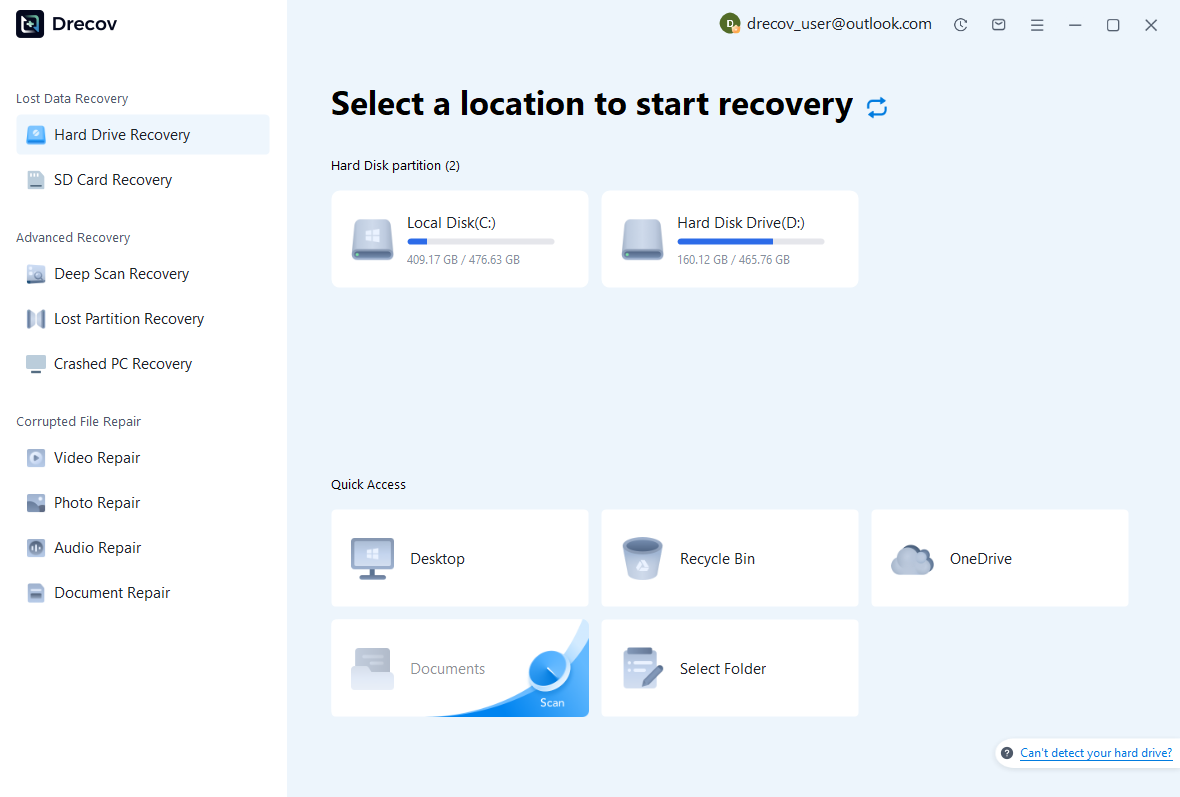
Step 1: identify project and sequence storage
Choose the drive or partition that held the native project, autosave data, source sequence, or rendered output. Record which component each search targets. Keep recovery output on other healthy storage. If the source repeatedly disconnects or reports hardware read failures, assess that condition before proceeding with a routine software recovery scan.
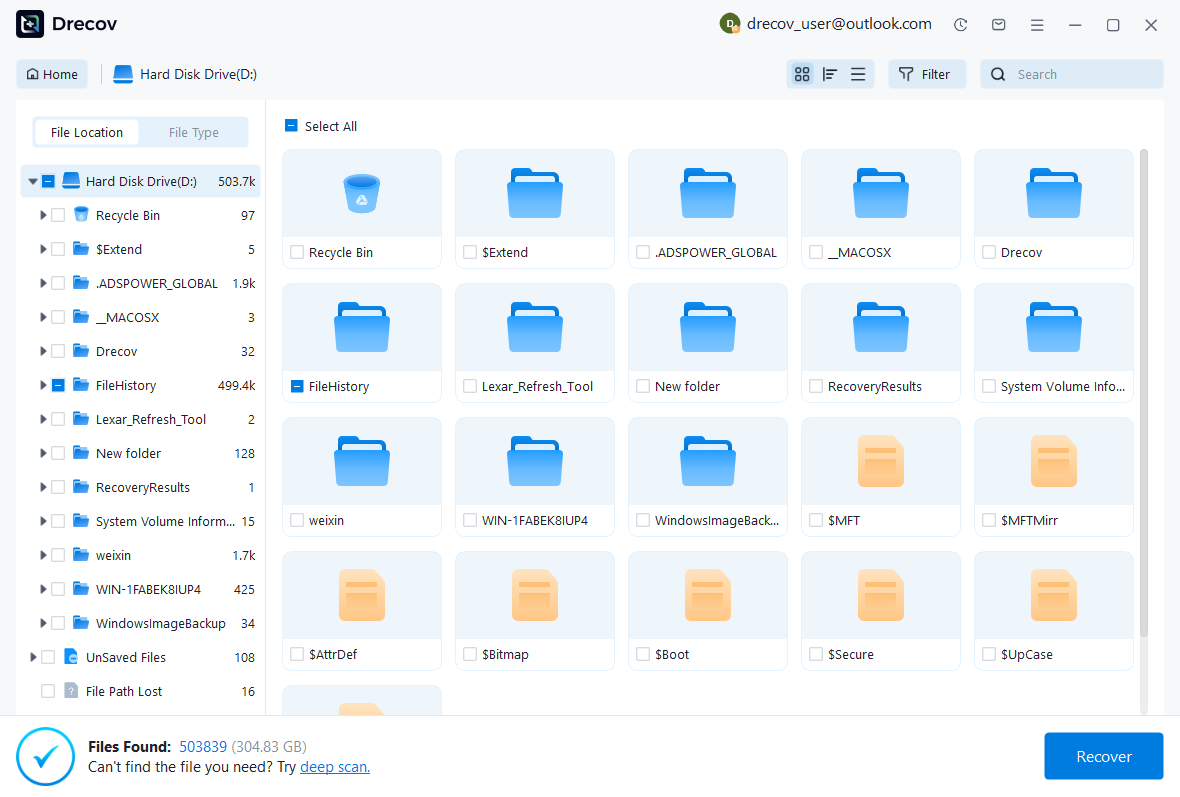
Step 2: compare graph and frame candidates
Inspect available paths, names, sizes, dates, and supported previews. Preserve plausible project milestones and image sequences separately without merging unrelated versions. A visible rendered frame does not establish that the editable graph survived. Likewise, a project file can contain useful nodes while its inputs remain missing, so keep both checks explicit.
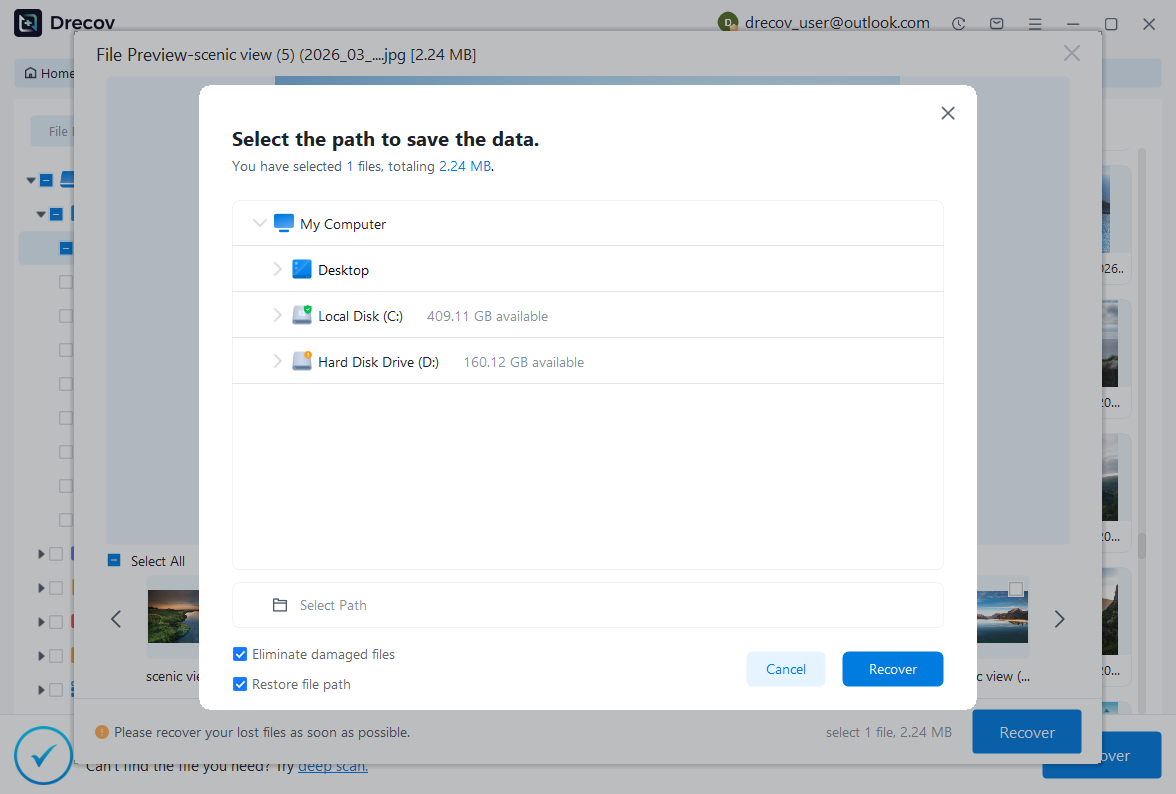
Step 3: restore elsewhere and render a sample
Recover selected files to a separate destination and retain untouched originals. Open a working project in the appropriate Natron environment, reconnect verified sources, and inspect nodes, masks, animation, channels, and timing. Render a representative range to a new folder and review it independently. Record reconstructed effects and missing frames before accepting the composite for continued production.
Preserve a renderable and editable milestone
Keep the accepted native graph, required source sequences, dependency record, and a reference render together in the recovery plan. Test a copied project from its intended location. This preserves a practical route back to the composite’s editable decisions, rather than relying only on an output image that cannot reveal how the shot was built.
Related recovery resources
Explore the relevant recovery options: Hard drive recovery, External hard drive recovery.
For another recovery case and its practical checks, read the related recovery guide.
Check the vendor guidance for the installed version: official recovery documentation 1, official recovery documentation 2, official recovery documentation 3.