







Understanding Nikon Camera Photo Loss and Recovery Possibilities
Common Reasons Nikon Camera Photos Are Deleted or Lost
Nikon cameras are widely used by photography enthusiasts and professionals because of their excellent image quality, reliable performance, and support for high-resolution photography. Whether users capture travel memories, family moments, wildlife scenes, or professional projects, the photos stored on Nikon cameras often have significant value.
However, digital photos stored on Nikon cameras are not completely protected from accidental loss. One of the most common causes of photo loss is accidental deletion. While reviewing images on the camera display, users may mistakenly select important pictures and remove them. In some cases, photographers may delete files when trying to quickly free up space on the memory card.
Formatting the SD card is another frequent reason for losing Nikon camera photos. Many users format memory cards to prepare them for new shooting sessions or fix storage errors, but this operation removes the existing file structure and makes previous images unavailable through normal camera functions.
Other situations that may cause missing photos include SD card corruption, interrupted file transfers, camera errors, and improper removal of the memory card. For example, removing the SD card while the camera is saving photos may damage the file system and prevent images from appearing correctly.
Although deleted photos may seem permanently erased, the actual image data may still remain on the memory card for a period of time. When a photo is deleted, the camera usually marks the storage space as available instead of immediately removing every piece of data. Until new files overwrite that space, recovery may still be possible.
⚠️Warning: Stop taking new photos or recording videos after accidental deletion. New data may overwrite the deleted images and make recovery more difficult.
Can Deleted Nikon Camera Photos Be Recovered
Many Nikon camera users ask, “can i recover deleted photos from my nikon camera?” The answer depends on how the photos were deleted and whether the storage space has been reused.
When a photo is deleted from a Nikon camera SD card, the camera does not usually erase the image data instantly. Instead, the file system removes the reference that tells the camera where the photo is stored. The actual image information may remain on the memory card until new data replaces it.
This means deleted Nikon photos may still be recoverable if users stop using the SD card quickly. However, the recovery possibility is affected by several factors:
- How much new data has been written after deletion
- Whether the memory card has been formatted
- The physical condition of the SD card
- The recovery method being used
For example, if a user accidentally deletes several Nikon photos and immediately removes the SD card, the chances of recovery are usually better compared with continuing to use the card for new photography.
Users who want to recover deleted photos from nikon camera should avoid actions that write new information to the storage device. Taking additional pictures, transferring large files, or formatting the card again may overwrite the deleted image data.
The type of Nikon camera and storage method also influence recovery results. Most Nikon cameras save photos on SD cards, which can often be removed and connected directly to a computer for scanning. This makes memory card recovery more accessible compared with internal storage devices.
Although no recovery method can guarantee success in every situation, acting quickly and selecting an appropriate recovery approach can significantly improve the chances of retrieving lost photos.
Methods to Recover Deleted Photos From Nikon Camera
Restore Nikon Camera Photos From Existing Backups
Check Previous Copies of Nikon Camera Images
Before using recovery tools, users should first check whether copies of their Nikon photos already exist in other locations. Backup recovery is usually the safest and simplest method because it does not require scanning the original storage device.
Many photographers transfer photos from their Nikon camera to a computer after shooting. These transferred images may still be available in folders, photo management applications, or external storage devices. Checking these locations can save time and avoid unnecessary recovery operations.
Common places where Nikon camera photos may have been backed up include:
- Computer photo folders
- External hard drives
- USB storage devices
- Cloud backup services
- Editing software libraries
Some photographers automatically copy images after connecting their camera to a computer. If this backup process was completed before the photos were deleted, restoring the lost images may only require copying them back to another location.
Test environment:
- Camera type: Nikon digital camera
- Storage source: SD card
- Lost files: JPEG and RAW photos
- Recovery method: Existing backup verification
Backup recovery is especially useful for professional photographers who regularly organize their files. Maintaining multiple copies of important images can prevent permanent loss caused by accidental deletion or memory card failure.
However, not every user creates backups before losing photos. Many casual photographers store images only on the Nikon camera memory card, meaning accidental deletion may require additional recovery methods.
If no backup is available, users can move to SD card recovery methods that analyze the memory card directly and search for remaining image data.
Recover Deleted Nikon Photos From SD Card
Scan Nikon Camera Memory Card for Lost Images
Most Nikon cameras store photos on removable SD cards. When images are deleted, formatted, or become inaccessible, recovering data from the memory card is often one of the most effective approaches.
Unlike internal phone storage, SD cards can usually be removed from the camera and connected directly to a computer. This allows recovery software to analyze the card without requiring the camera system itself to operate.
The general recovery process includes:
- Remove the SD card from the Nikon camera.
- Connect the card to a computer using a card reader.
- Select the memory card as the recovery target.
- Scan for deleted photos.
- Preview available images.
- Save recovered files to another storage location.
Test environment:
- Camera type: Nikon DSLR camera
- Storage device: SD memory card
- Lost data: Deleted camera photos
- Connection method: SD card reader connected to Windows PC
During scanning, recovery software searches the memory card for remaining file information. It may detect JPEG images, RAW files, and other camera-created formats depending on the condition of the storage device.
Preview functionality is an important part of the recovery process because it allows users to check whether images are complete before restoring them. This prevents wasting storage space on damaged or unusable files.
For users searching how to recover deleted photos from nikon camera sd card, stopping card usage immediately is one of the most important steps. Every new photo taken after deletion may overwrite existing data and reduce recovery possibilities.
Users should also avoid saving recovered images back to the same SD card. Using another storage location helps protect remaining recoverable files.
Use PandaOffice Drecov to Recover Nikon Camera Photos
Restore Lost Nikon Images From SD Cards With Recovery Software
When Nikon camera photos are deleted or become inaccessible, dedicated recovery software can help search for remaining image data on the storage device. This is especially useful when backups are unavailable and traditional methods cannot restore the missing files.
PandaOffice Drecov is a Windows-based data recovery solution designed to help users recover lost photos from storage devices, including SD cards, HDDs, SSDs, and USB drives. For Nikon camera users, the software can be used with removable memory cards to search for deleted or missing images.
The recovery process is designed to be simple:
Step 1: Connect the Drive / USB)
Connect your device (SD card, HDD/SSD, or USB drive) to your computer and launch PandaOffice Drecov. Select the target device and start the scan. The software will perform a quick scan and deep scan to detect lost or deleted data.
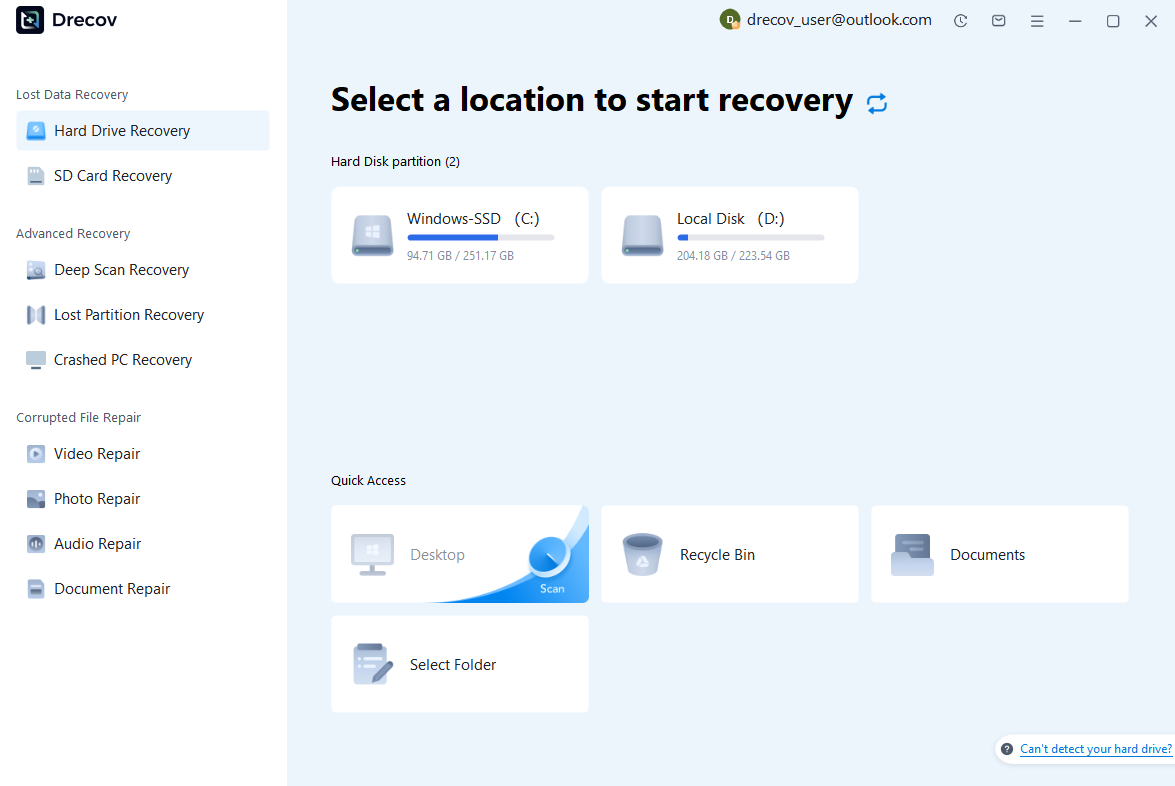
Step 2: Locate and Preview Lost Files
After scanning, browse the detected files and use the preview feature to check recoverable data. You can preview documents (Word, Excel, PDF), photos, and videos to ensure file integrity before recovery.

Step 3: Recover and Save to a New Location
Select the files you want to restore and click recover. Save all recovered data to a different drive or location (not the original device) to avoid overwriting lost data.

Some questions you may be interested in:
how to format a hard drive windows 11
how to recover deleted drafts in outlook
what is healthy recovery partition
how to make steam not open on startup
Test environment:
- Camera type: Nikon digital camera
- Storage device: SD card
- Lost files: Deleted JPEG and RAW photos
- Recovery platform: Windows computer
The preview function allows users to check available images before completing recovery. This is helpful when the SD card contains a large number of files because users can select only the photos they need.
Compared with complicated recovery procedures, PandaOffice Drecov provides a more straightforward workflow for users who need to restore lost Nikon camera photos.
However, recovery results depend on the condition of the memory card and whether deleted files have already been overwritten. Acting quickly after photo loss remains one of the most important factors in improving recovery success.
Tips to Improve Nikon Camera Photo Recovery Success Rate
Stop Using the SD Card After Losing Photos
When photos disappear from a Nikon camera, one of the most important actions is to stop using the memory card immediately. Many users continue taking new pictures because they assume deleted images are already gone. However, new files may overwrite the storage space where the deleted photos are located.
A memory card does not usually remove deleted photos instantly. Instead, the camera marks the storage area as available for future use. Until new information is written to that location, the original image data may still exist and can potentially be detected by recovery tools.
To improve the possibility of successful recovery, users should:
- Remove the SD card from the Nikon camera
- Avoid capturing new photos or videos
- Do not copy additional files to the memory card
- Avoid formatting the card again
- Do not use repair tools before attempting recovery
This is especially important for users who want to recover deleted photos from nikon camera after accidental deletion. Every additional operation performed on the SD card creates a possibility of changing the storage structure.
For example, if a photographer accidentally deletes wedding photos from a Nikon camera and continues shooting for several hours, the new images may replace parts of the deleted files. In this situation, even advanced recovery methods may only find partial images.
Test environment:
- Camera type: Nikon DSLR camera
- Storage device: SD card
- Data loss situation: Accidental photo deletion
- Recommended action: Stop using the memory card before recovery
Quick action is one of the most important factors affecting recovery results. Removing the SD card and protecting it from additional changes gives recovery software the best opportunity to locate remaining image data.
Avoid Overwriting Deleted Camera Images
Preventing overwriting is another important step when trying to restore lost Nikon photos. Many failed recovery attempts happen because users unknowingly replace deleted files with new data.
When an SD card shows available storage space after deleting photos, that space does not necessarily mean the old images have disappeared permanently. Instead, it means the camera can use that area to store new files.
Several actions can overwrite deleted Nikon photos:
- Taking new pictures
- Recording videos
- Formatting the memory card
- Installing files onto the storage device
- Using camera repair functions
To avoid these problems, users should remove the memory card and connect it to a computer only when they are ready to begin recovery.
Another important practice is choosing the correct destination when restoring recovered photos. Recovered images should always be saved to another storage device, such as a computer hard drive or external drive. Saving files back to the same SD card may overwrite other photos that are still recoverable.
For users researching how to recover deleted photos from nikon camera for free, basic precautions such as stopping usage and checking backups can sometimes help recover images without additional tools. However, when no backup exists, specialized recovery software may provide better results.
Frequently Asked Questions About Nikon Camera Photo Recovery
Can I Recover Deleted Photos From My Nikon Camera?
Understanding the Possibility of Nikon Photo Restoration
Many Nikon camera users wonder whether deleted pictures can be restored after accidental removal. The answer depends on the condition of the memory card and whether new data has replaced the deleted files.
When photos are deleted from a Nikon camera SD card, the camera usually removes the file information rather than immediately destroying every part of the image data. If the storage space has not been overwritten, recovery may still be possible.
The recovery possibility is higher when users:
- Stop using the SD card immediately
- Avoid taking new pictures
- Do not format the memory card again
- Use appropriate recovery methods
For users asking can i recover deleted photos from my nikon camera, checking backups should always be the first step. If no backup exists, scanning the SD card with recovery software may help locate missing images.
However, recovery is not guaranteed in every situation. If the memory card has been heavily used after deletion or has serious physical damage, some photos may no longer be recoverable.
The best way to improve recovery chances is to act quickly after discovering missing images and avoid any activity that writes new information to the SD card.
How Do I Recover Deleted Photos From Nikon Camera SD Card?
Recovering Lost Images From Nikon Memory Cards
Most Nikon cameras store photos on SD cards, making memory card recovery one of the most common solutions for missing images.
The basic process involves removing the SD card from the camera and connecting it to a computer using a card reader. Recovery software can then scan the card and search for deleted photos.
The general steps include:
- Remove the SD card from the Nikon camera.
- Connect the card to a Windows computer.
- Select the memory card for scanning.
- Wait for the scan to identify recoverable files.
- Preview detected photos.
- Save recovered images to another location.
Test environment:
- Camera model: Nikon digital camera
- Storage media: SD card
- Lost files: Camera photos
- Recovery device: Windows computer with card reader
Users should avoid saving recovered files back to the original memory card because this may overwrite other recoverable data.
For photographers searching how to recover deleted photos from nikon camera sd card, the most important factors are acting quickly and choosing a safe recovery method.
How to Recover Deleted Photos From Nikon Camera for Free?
Using Available Free Methods Before Professional Recovery
Some users want to know how to recover deleted photos from nikon camera for free without purchasing recovery software. In certain situations, free methods may help restore lost pictures.
The first option is checking existing backups. Photos may already exist on computers, external storage devices, or cloud services if automatic synchronization was enabled.
Another option is checking whether the camera or memory card was recently connected to another device where images were copied. Many photographers transfer pictures immediately after shooting and may forget that duplicate copies exist.
Free recovery options may work best when:
- Photos were backed up previously
- The SD card was not heavily used after deletion
- The missing files were recently removed
However, free methods have limitations. If photos were deleted without any backup, professional recovery software may provide a more complete scanning capability.
Users should also be careful with unknown free recovery applications because some tools may provide limited results or create additional risks for damaged storage devices.
The safest approach is to first protect the SD card, check available backups, and then choose a suitable recovery solution based on the situation.
Final Thoughts on Recovering Deleted Nikon Camera Photos
Choosing the Best Recovery Method for Nikon Images
Losing important photos from a Nikon camera can be frustrating, especially when the images contain valuable memories or professional photography work. Fortunately, deleted photos are not always permanently lost. With the right approach, many missing images can still be restored.
The first step after discovering photo loss is protecting the SD card. Stopping new data from being written helps prevent deleted files from being overwritten and improves the possibility of successful recovery.
Users should begin with simple solutions, such as checking backups or previously transferred copies. If no backup exists, SD card recovery methods can help search for remaining photo data.
Understanding how to recover deleted photos from nikon camera requires choosing the correct method based on the cause of data loss. Accidental deletion, formatting, and memory card errors may require different recovery approaches.
For photographers who frequently capture important images, creating regular backups and using reliable memory cards are essential habits. Prevention reduces the risk of losing valuable photos, while recovery knowledge provides a solution when unexpected problems occur.
Whether users need to recover deleted photos from nikon camera after accidental deletion or restore images from a damaged SD card, acting quickly and following safe recovery practices can significantly improve the chances of getting important pictures back.
By combining proper storage management, regular backups, and suitable recovery methods, Nikon camera users can better protect their photography collections and recover lost images when necessary.






