







Understanding Canon Rebel T3i Photo Loss and Recovery Possibilities
Why Photos Disappear From Canon EOS Rebel T3i Cameras
The Canon EOS Rebel T3i is a popular DSLR camera used by photography enthusiasts and professionals to capture high-quality images. With its reliable performance and support for interchangeable lenses, many users store thousands of important memories, travel photos, and creative projects on their camera memory cards. However, photos stored on the camera are not completely protected from accidental loss.
One of the most common reasons users lose canon rebel t3i photos is accidental deletion. While reviewing pictures on the camera screen, users may accidentally select and remove important images. In some cases, photographers may delete files while trying to free up storage space for new shooting sessions.
Formatting the SD card is another frequent cause of photo loss. Camera users often format memory cards to improve performance or prepare them for new projects, but formatting removes the existing file structure and makes previous pictures unavailable through normal camera operations.
Other situations that can lead to missing images include SD card corruption, interrupted file transfers, camera errors, and improper removal of memory cards. For example, removing the card while the camera is saving images may damage the file system and prevent photos from appearing.
Although deleted photos may seem permanently removed, the actual image data may still remain on the memory card. When a photo is deleted, the camera usually marks the storage space as available instead of immediately destroying the file information. Until new data replaces that space, recovery may still be possible.
⚠️Warning: Stop taking new photos immediately after accidental deletion. New pictures may overwrite deleted image data and reduce the chance of successful recovery.
Can Deleted Canon Rebel T3i Photos Be Recovered
Many Canon camera users assume that deleted pictures are permanently lost once they disappear from the camera gallery. However, this is not always true. The possibility of recovery depends on how the SD card stores information and whether the deleted files have already been replaced by new data.
When a photo is deleted from a Canon EOS Rebel T3i memory card, the camera removes the file reference but usually does not erase every piece of image data immediately. The storage area containing the deleted photo remains available until another file uses that space.
This means users may still be able to recover deleted images if they stop using the memory card quickly. Recovery success is affected by several factors, including:
- The amount of new data written to the SD card
- The condition of the memory card
- Whether the card was formatted
- The type of recovery method used
For users searching for canon rebel recover deleted photos, the first priority should be protecting the memory card from further changes. Continuing to use the same card for new photography sessions can overwrite the deleted files.
Professional recovery tools work by scanning the storage device and searching for remaining file information. Instead of relying only on visible folders, these tools analyze the memory card structure to locate image data that is no longer accessible through the camera.
However, recovery is not guaranteed in every situation. If the original photo information has been completely overwritten or the SD card has serious physical damage, the chances of restoration may be limited.
Understanding how deletion works helps users choose the correct recovery approach and avoid actions that could make photo recovery more difficult.
Methods to Recover Deleted Photos From Canon EOS Rebel T3i
Recover Canon Rebel T3i Photos From Camera SD Card Backup
Before using recovery software, users should first check whether copies of their photos exist in other locations. Many photographers transfer camera images to computers, external hard drives, or cloud storage after shooting. These backups may provide the easiest way to restore missing pictures.
If photos from a Canon EOS Rebel T3i were previously copied to another device, users can simply transfer them back without performing complicated recovery operations.
Common backup locations include:
- Computer photo folders
- External storage devices
- Cloud backup services
- Photography editing software libraries
Checking backups is especially useful because it avoids unnecessary changes to the SD card. Recovery attempts usually involve scanning storage media, while restoring from a backup does not affect the original card.
Test environment:
- Camera model: Canon EOS Rebel T3i
- Storage source: Camera SD card
- Lost files: JPEG and RAW photographs
- Recovery approach: Existing backup verification
For photographers who regularly transfer images after shooting, backup recovery is often the fastest solution. Many professional users follow the “backup before formatting” approach to reduce the risk of permanent data loss.
However, not every user creates backups. Casual photographers may store all images only on the camera memory card, meaning accidental deletion or formatting can create a serious problem.
If no backup is available, users may need to move to other recovery methods that can scan the SD card directly.
Recover Deleted Canon Rebel T3i Photos Using Photo Recovery Software
When backups are unavailable, photo recovery software can help search for deleted images from the Canon EOS Rebel T3i memory card. These tools analyze the SD card and attempt to locate image files that are still stored but no longer visible.
The general recovery process usually includes connecting the camera SD card to a computer through a card reader, selecting the storage device, scanning for missing files, previewing detected photos, and saving recovered images to another location.
Test environment:
- Camera model: Canon EOS Rebel T3i
- Storage device: SD card
- Lost data type: Deleted camera photos
- Connection method: SD card reader connected to Windows computer
Using a card reader is usually recommended because it allows recovery software to access the memory card directly. Connecting the camera itself may not always provide the same level of storage access.
During scanning, recovery software searches for image information based on file structures and remaining storage data. It may detect JPEG files, RAW images, and other camera-generated formats depending on the condition of the memory card.
The preview function is an important part of the recovery process. Before saving recovered images, users can check whether photos are complete and usable. This prevents unnecessary recovery of damaged or incomplete files.
Users should always save recovered photos to another storage location. Saving files back to the original SD card may overwrite other recoverable images.
For users researching how to recover deleted photos from canon rebel, using dedicated recovery software is often one of the most effective options when no backup exists.
Use PandaOffice Drecov to Restore Canon Camera Photos
For Windows users who need a straightforward way to recover lost camera images, PandaOffice Drecov provides a practical recovery option. The software is designed to help restore deleted photos from storage devices such as SD cards, HDDs, SSDs, and USB drives.
Since Canon EOS Rebel T3i cameras store photos mainly on SD cards, users can remove the memory card and connect it to a Windows computer for scanning. PandaOffice Drecov can search the storage device for missing images and allow users to preview available files before recovery.
The recovery process is designed to be simple:
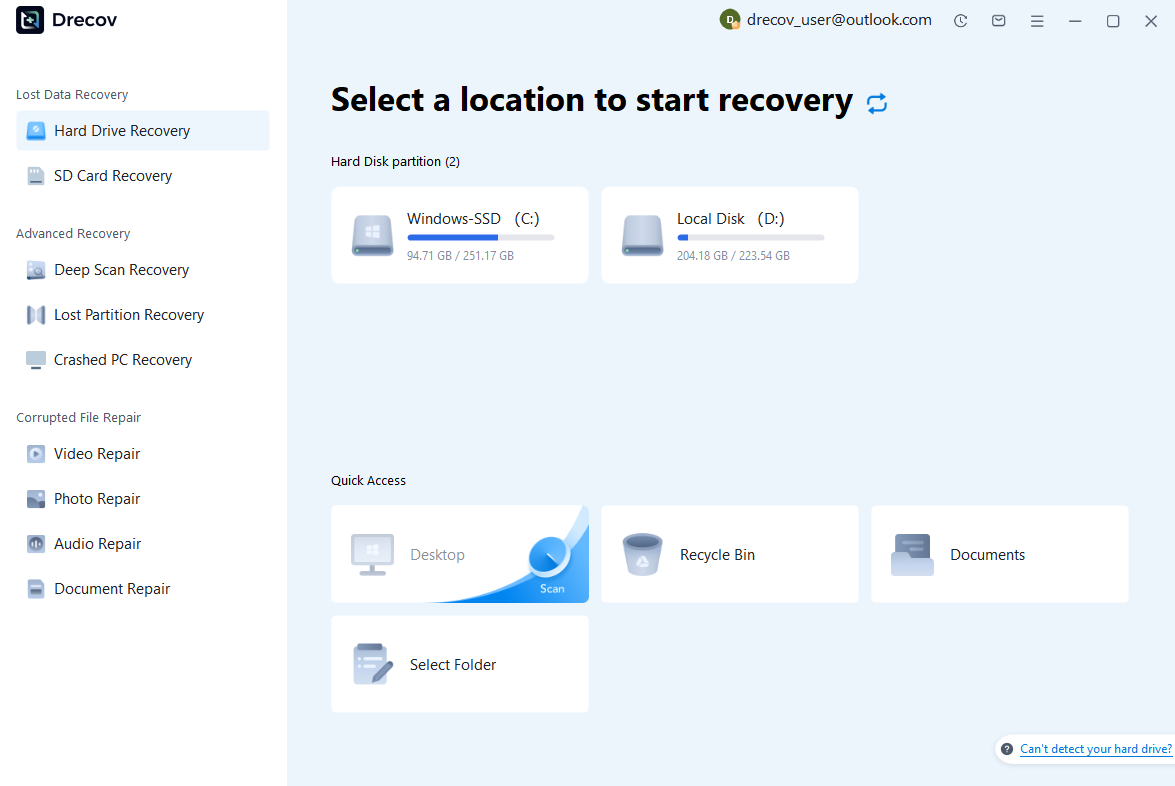
Step 1: Connect the Drive / USB)
Connect your device (SD card, HDD/SSD, or USB drive) to your computer and launch PandaOffice Drecov. Select the target device and start the scan. The software will perform a quick scan and deep scan to detect lost or deleted data.
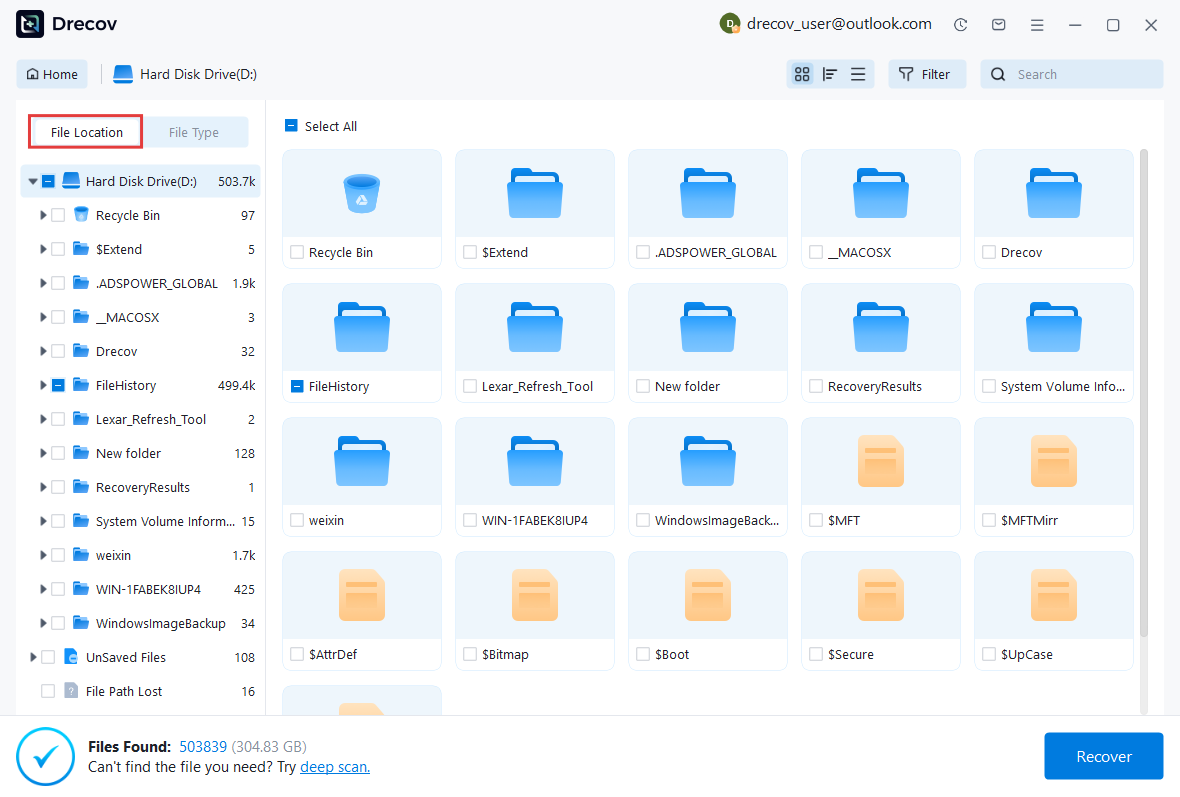
Step 2: Locate and Preview Lost Files
After scanning, browse the detected files and use the preview feature to check recoverable data. You can preview documents (Word, Excel, PDF), photos, and videos to ensure file integrity before recovery.
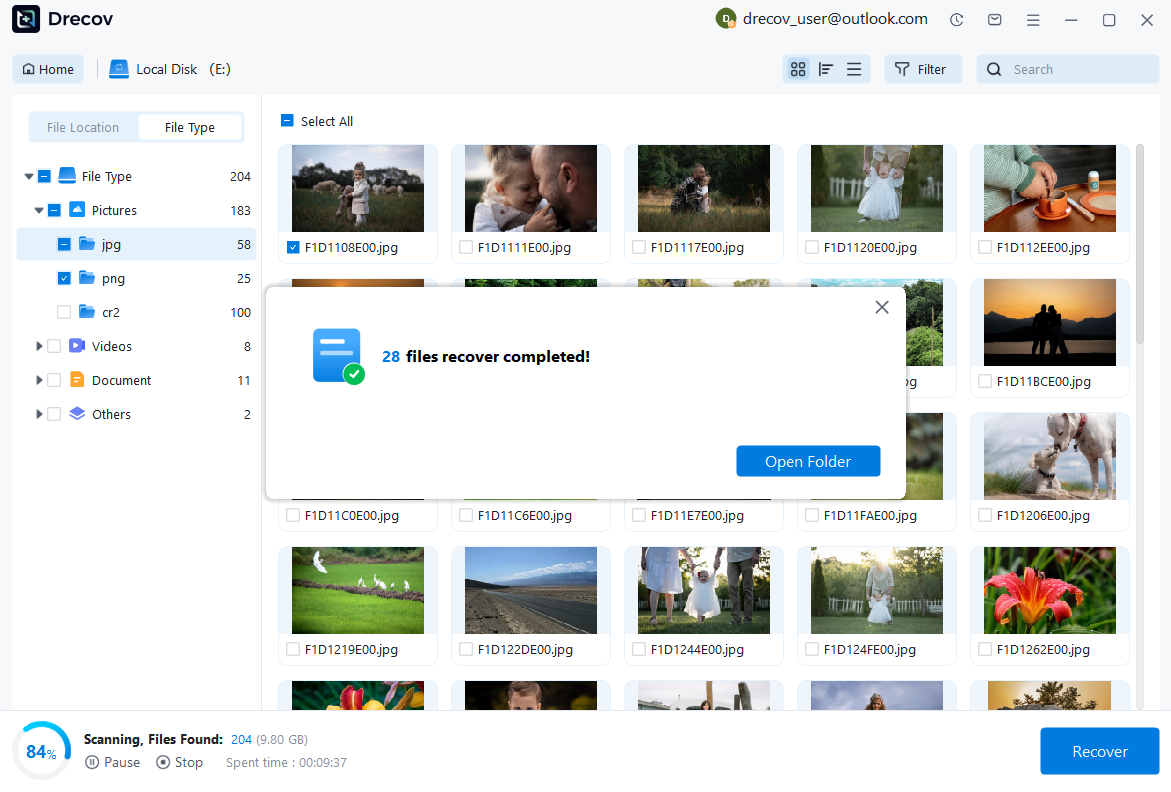
Step 3: Recover and Save to a New Location
Select the files you want to restore and click recover. Save all recovered data to a different drive or location (not the original device) to avoid overwriting lost data.
Some questions you may be interested in:
how to format a hard drive windows 11
how to recover deleted drafts in outlook
what is healthy recovery partition
how to make steam not open on startup
Test environment:
- Camera model: Canon EOS Rebel T3i
- Storage device: SD card
- Lost files: Deleted JPEG photos
- Recovery platform: Windows computer
The preview feature helps users identify whether important images can be restored before completing the recovery process. This is useful for photographers who may have hundreds or thousands of pictures stored on a memory card.
Compared with complicated recovery procedures, PandaOffice Drecov focuses on providing an easier workflow for users who need to recover lost photos without advanced technical knowledge.
However, recovery results still depend on the condition of the SD card and whether deleted files have been overwritten. Acting quickly after photo loss remains one of the most important steps for improving recovery chances.
How to Prevent Losing Canon Rebel T3i Photos Again
Create Regular Backups of Camera Images
Recovering deleted photos can be helpful when unexpected data loss occurs, but creating regular backups is still the most effective way to protect valuable camera images. Photographers often spend significant time capturing important moments, and losing those files can be difficult to recover if no backup exists.
For Canon EOS Rebel T3i users, developing a backup routine can greatly reduce the risk of permanent photo loss. After transferring images from the camera, users should consider saving copies in multiple locations instead of relying only on the SD card.
Common backup methods include:
- Copying photos to a computer hard drive
- Saving images to an external storage device
- Using cloud storage services
- Creating duplicate copies before editing or deleting files
A good backup strategy follows the 3-2-1 backup principle: keep three copies of important files, store them on two different types of storage media, and keep one copy in a separate location.
For professional photographers, backing up RAW files is especially important because these files contain original image information that may be difficult to recreate. Even if edited versions are stored elsewhere, keeping original canon rebel t3i photos provides additional protection.
Users should also organize backup files properly. Creating folders based on shooting dates, events, or projects makes it easier to locate specific images when needed.
While recovery tools can help in emergency situations, backups provide a safer solution because they prevent data loss before it happens. A consistent backup habit reduces dependence on recovery methods and protects valuable memories from accidental deletion, formatting, or device failure.
Use SD Cards Correctly to Protect Photos
The SD card is one of the most important components in a Canon EOS Rebel T3i photography workflow. Since the camera stores captured images directly on the memory card, improper handling can increase the risk of photo loss.
Many SD card problems occur because users remove the card while the camera is writing data. When the camera is saving photos or recording files, interrupting the process may damage the file structure and make images inaccessible.
To reduce the chance of losing photos, users should follow several practices:
- Safely remove SD cards from computers
- Avoid switching memory cards while the camera is active
- Do not continue using a card that shows errors
- Format cards using the camera instead of unfamiliar devices
- Replace old or damaged memory cards
Formatting a memory card regularly can help maintain performance, but users should always confirm that important photos have been backed up before formatting.
Another useful practice is using reliable memory cards with sufficient capacity. Extremely full cards may increase the chance of errors, especially during continuous shooting sessions.
If a Canon Rebel T3i memory card begins showing warning messages, missing folders, or unreadable files, users should stop writing new data immediately. Continuing to capture new images may overwrite existing files and reduce recovery possibilities.
⚠️Warning: Never format an SD card immediately after receiving a camera error message if it contains important photos. Check for possible recovery options first.
Proper SD card management helps photographers avoid many common situations that require canon rebel recovering deleted photos solutions.
Frequently Asked Questions About Canon Rebel T3i Photo Recovery
How Can I Recover Deleted Photos From Canon EOS Rebel T3i?
Choosing the Correct Recovery Method for Missing Camera Images
When photos are deleted from a Canon EOS Rebel T3i, the best recovery method depends on whether a backup exists and the condition of the SD card.
The first step is to check whether the photos were previously copied to another location, such as a computer, external drive, or cloud storage service. If a backup exists, restoring the images is usually the safest option.
If no backup is available, users can remove the SD card from the camera and connect it to a computer. Photo recovery software can then scan the card and search for deleted images that are still available.
The possibility of successful recovery depends on several factors:
- How long ago the photos were deleted
- Whether new photos were taken afterward
- Whether the SD card has physical damage
- Whether the files were overwritten
Users should avoid taking additional photos after deletion because new camera data may replace the deleted files.
For photographers searching how to recover deleted photos from canon eos rebel t3i, acting quickly and choosing an appropriate recovery method are the most important steps.
Can I Recover Photos After Formatting a Canon SD Card?
Restoring Images From a Formatted Camera Memory Card
Formatting an SD card removes the visible file structure, making photos unavailable through the camera interface. However, formatting does not always erase every piece of image data immediately.
If the formatting process was quick formatting and no new photos have been saved afterward, recovery may still be possible. Recovery software can scan the card and search for remaining image information.
The recovery possibility depends on:
- The type of formatting performed
- The amount of new data written afterward
- The condition of the SD card
After formatting a Canon camera SD card, users should stop using it immediately. Continuing to capture new images can overwrite the original photos.
Photographers should also avoid repeatedly formatting the same memory card because additional operations may make recovery more difficult.
Why Cannot My Camera Find Deleted Photos?
Understanding Missing Images on Canon Rebel T3i
A Canon Rebel T3i camera may fail to display photos for several reasons. The images may have been deleted, the SD card may have file system problems, or the camera may not recognize the storage media correctly.
Common causes include:
- Damaged SD card file structure
- Incorrect camera settings
- Memory card errors
- Accidental deletion
- Unsupported file conditions
If the camera cannot display photos but the SD card is still detected by a computer, users may be able to recover the images through scanning tools.
However, if the SD card has physical damage or severe corruption, normal recovery methods may not work.
Before attempting repairs or formatting, users should first consider whether the missing images are important and whether recovery should be attempted.
Final Thoughts on Recovering Canon Rebel T3i Photos
Choosing the Right Recovery Method for Lost Camera Images
Losing photos from a Canon EOS Rebel T3i can be frustrating, especially when the images contain important memories or professional photography work. Fortunately, deleted images are not always permanently lost. With the right approach, users may still have a chance to restore missing files.
The first step after discovering photo loss is to stop using the SD card. Preventing new data from being written helps protect the remaining image information and improves recovery possibilities.
For users with available backups, restoring photos from saved copies is the simplest solution. When backups are unavailable, recovery software can provide another option by scanning the memory card and searching for recoverable images.
Understanding how to recover deleted photos from canon rebel requires knowing the cause of data loss and selecting the appropriate recovery method. Accidental deletion, formatting, and SD card errors each require different approaches.
For future protection, photographers should maintain regular backups, use reliable memory cards, and handle storage devices carefully. Prevention is always better than recovery, but having a recovery plan can provide additional protection when unexpected problems occur.
Whether users need to canon rebel recover deleted photos after accidental removal or restore images from a formatted memory card, acting quickly and using safe recovery practices can greatly improve the chance of retrieving valuable pictures.






