







GIF files have become one of the most popular formats for sharing animations, reactions, tutorials, and short visual content online. Many users store GIF images on their computers, smartphones, external drives, and memory cards. However, accidental deletion, storage errors, system crashes, or formatting operations can cause important GIF files to disappear unexpectedly.
When this happens, users often search for solutions to recover deleted GIF files and restore their lost animated images. Unlike simple image formats, GIF files may contain multiple frames and important animation data, making successful recovery dependent on the condition of the storage device and how quickly recovery is attempted.
In many cases, deleted GIF files are not immediately removed from storage. The operating system usually marks the space occupied by the file as available for new data. If that space has not been overwritten, recovery may still be possible.
This guide explains different methods for recover deleted gifs, including checking temporary folders, restoring backups, and using professional recovery methods when GIF files are removed from storage devices. Whether the files were deleted accidentally or lost after a device problem, selecting the correct recovery method can improve the chances of restoring them successfully.
⚠️Warning: Stop saving new files to the storage device after deleting GIF images. New data may overwrite the deleted file information and make recovery more difficult.
Why GIF Files Are Deleted and Whether They Can Be Restored
GIF files can disappear for many different reasons. Some losses happen because of user mistakes, while others are caused by software problems or hardware issues. Understanding the reason behind the deletion helps determine which recovery method is most suitable.
One of the most common causes is accidental deletion. Users may remove a folder containing GIF animations while cleaning storage space or organizing downloaded files. In other situations, GIF files may disappear after emptying the recycle bin or using permanent deletion shortcuts.
Storage device problems are another major cause of GIF loss. External hard drives, USB flash drives, SD cards, and SSDs may develop file system errors that prevent users from accessing stored images. Formatting a device without creating a backup can also remove large collections of GIF files.
Application-related issues may also lead to GIF loss. Some editing tools, messaging applications, or download managers may remove temporary GIF files when clearing cache data.
Although deleted GIF files may appear permanently lost, the actual data may still exist on the storage device. The possibility of recovering deleted gif files depends on whether the original storage space has been reused.
How Deleted GIF Files Remain Recoverable
When a GIF file is deleted, the operating system usually removes the information that tells the computer where the file is stored. The actual file content, including animation frames, may remain untouched until new data replaces it.
This process is why recovery tools can sometimes find deleted GIF images even after users cannot see them in normal folders. The storage device still contains parts of the original file, allowing specialized scanning methods to identify and rebuild the lost data.
Several factors affect GIF recovery success:
- The amount of new data written after deletion.
- The type of storage device.
- The time between deletion and recovery.
- Whether the device has been formatted.
- The condition of the storage media.
For example, deleting GIF files from a USB drive and immediately stopping use of the drive creates better recovery conditions than continuing to download large files onto it.
The file system also affects recovery results. Different devices use different systems to organize stored information, and severe file system damage may make recovery more challenging.
Users should also avoid installing recovery applications on the same drive where GIF files were deleted. Installation files can overwrite the missing data and reduce the possibility of restoration.
Methods to Recover Deleted GIF Files
Different GIF deletion situations require different recovery approaches. Some users may only need to restore files from temporary locations, while others may need deeper scanning methods for storage devices.
Before selecting a recovery solution, consider where the GIF files were stored and what happened after deletion. A file deleted from a computer folder requires a different approach compared with GIF images removed from an external storage device.
The following methods explain practical ways to restore lost GIF files, beginning with simple built-in solutions and moving toward advanced recovery options.
Restore Deleted GIF Files from the Recycle Bin
The first place to check after accidentally deleting GIF images is the computer’s Recycle Bin. When files are removed normally on Windows, they are often moved to this temporary location instead of being immediately erased.
This method is the easiest way to restore GIF files because it does not require additional software or technical knowledge. Users only need to open the Recycle Bin, locate the missing GIF images, and choose the restore option.
The restored files will usually return to their original folder automatically. This method works best when the deletion happened recently and the Recycle Bin has not been emptied.
However, this solution has limitations. If users have permanently deleted the GIF files, used the Shift + Delete shortcut, or emptied the Recycle Bin, the files will no longer appear there.
In addition, GIF files deleted from external devices such as USB drives or memory cards usually bypass the Recycle Bin completely. In these cases, users need alternative recovery methods.
Test Environment
Operating System: Windows 11
Device Type: Desktop computer
File Location: Local Pictures folder
Deletion Situation: GIF files deleted normally without emptying Recycle Bin
During testing, deleted GIF images were successfully restored because they were still available in the Recycle Bin.
Recover Deleted GIF Images from Previous Backups
Backup copies provide another reliable way to restore missing GIF files. Users who regularly create backups may already have another version of their deleted animations stored in a different location.
Windows backup features, external backup drives, and cloud synchronization services can preserve copies of files before deletion occurs. Restoring from these sources is usually safer than attempting direct recovery because the original files are retrieved from an existing copy.
Common backup locations include:
- Windows File History.
- External backup drives.
- Cloud synchronization folders.
- Manual archive folders.
To restore GIF files from a backup, users should locate the folder where the files were originally stored and check available previous versions.
This method works only when a backup was created before the GIF files disappeared. If no backup exists, the deleted files cannot be restored through this approach.
Regular backups are especially useful for users who manage large collections of GIF animations. Creating multiple copies reduces the risk of permanent file loss caused by accidental deletion or device failure.
Test Environment
Operating System: Windows 10
Backup Method: Windows File History
File Type: Animated GIF images
Deletion Situation: GIF folder deleted after previous backup creation
The test confirmed that deleted GIF files could be restored from an earlier backup version without scanning the storage device.
Recover Deleted GIF Files from Storage Devices Using Recovery Software
When GIF files are deleted from SD cards, USB drives, external hard drives, or internal storage devices, backup methods may not be available. In this situation, recovery software can scan the storage device and search for remaining file information.
Unlike normal file browsing, recovery scanning examines the storage structure to locate deleted files that are no longer visible to the operating system.
The general recovery process includes:
Step 1: Connect the Drive / USB)
Connect your device (SD card, HDD/SSD, or USB drive) to your computer and launch PandaOffice Drecov. Select the target device and start the scan. The software will perform a quick scan and deep scan to detect lost or deleted data.
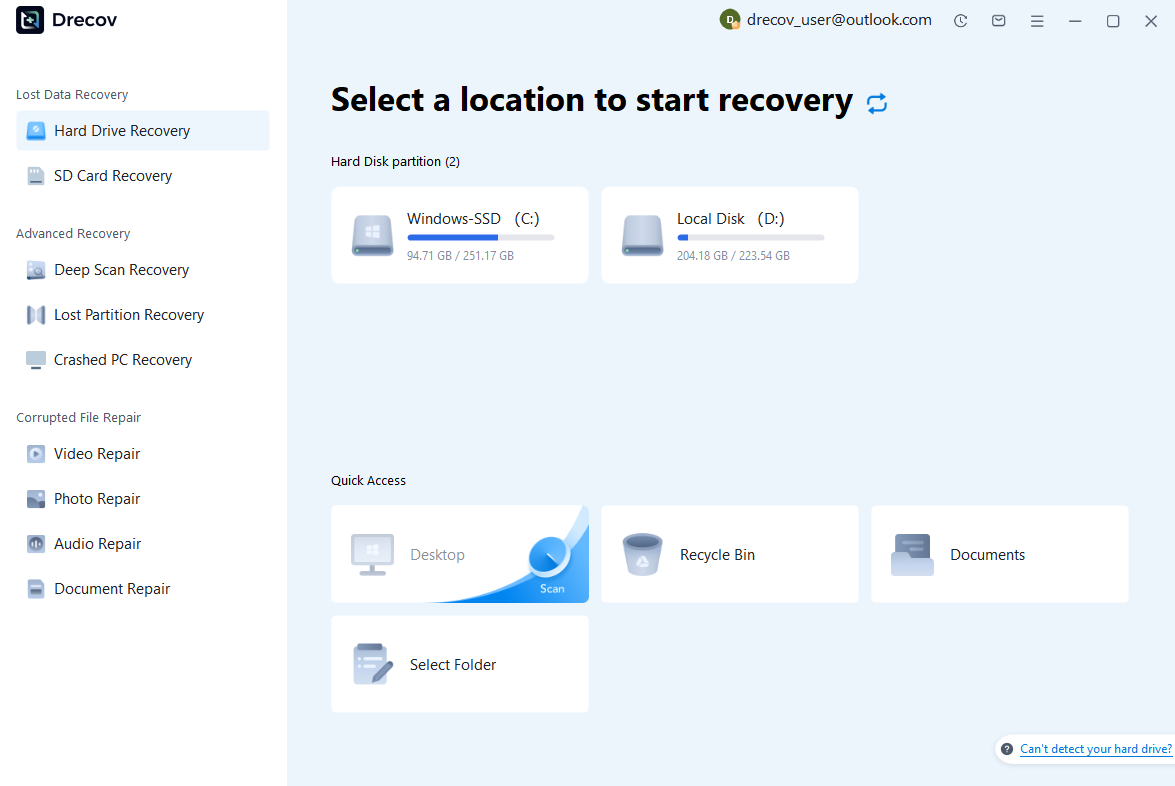
Step 2: Locate and Preview Lost Files
After scanning, browse the detected files and use the preview feature to check recoverable data. You can preview documents (Word, Excel, PDF), photos, and videos to ensure file integrity before recovery.

Step 3: Recover and Save to a New Location
Select the files you want to restore and click recover. Save all recovered data to a different drive or location (not the original device) to avoid overwriting lost data.

Some questions you may be interested in:
how to format a hard drive windows 11
how to recover deleted drafts in outlook
what is healthy recovery partition
how to make steam not open on startup
For users who need recover deleted gifs from physical storage devices, this method provides a better chance of finding files that are no longer accessible.
PandaOffice Drecov is a Windows-based recovery solution that can help users scan storage devices such as SD cards, hard drives, and SSDs. It supports file preview before recovery, allowing users to confirm whether the detected GIF files are available before restoring them.
Test Environment
Operating System: Windows 11
Storage Device: 128GB USB flash drive
File Type: GIF animation files
Deletion Situation: GIF folder accidentally removed from USB storage
During testing, the recovery scan detected deleted GIF files that had not been overwritten by new data.
⚠️Warning: Recover restored files to a different storage location. Saving them back to the original device may overwrite other deleted GIF data.
Recover Deleted GIF Files from Cloud Storage Services
Many users store GIF animations in cloud platforms to save space on their computers or access files across multiple devices. When GIF files are deleted from a cloud account, they may not disappear immediately. Most cloud storage services provide temporary recovery areas where deleted files remain available for a specific period.
Checking cloud storage trash folders should be one of the first steps when trying to restore missing GIF images. These folders work similarly to a computer recycle bin by keeping removed files before permanent deletion.
The recovery process usually includes:
- Open the cloud storage website or application.
- Access the deleted files or trash section.
- Search for the missing GIF images.
- Select the files and choose the restore option.
This method is useful because it does not require additional recovery software. Users can restore files directly from their online accounts if the deletion happened recently.
However, cloud recovery has some limitations. Deleted files are usually stored only temporarily. Once the retention period expires, the cloud service may permanently remove the GIF files.
Cloud recovery also depends on whether synchronization was enabled before the deletion. If GIF images existed only on a local device and were never uploaded, cloud services cannot help restore them.
For important GIF collections, combining cloud backups with local backups provides better protection against accidental deletion.
Test Environment
Operating System: Windows 11
Cloud Service Type: Online storage platform
File Type: Animated GIF files
Deletion Situation: GIF images deleted from synchronized folder
During testing, deleted GIF files were restored successfully because they remained available in the cloud platform’s deleted items section.
Restore Deleted GIF Files from Browser and Application Cache
Sometimes deleted GIF files may still exist temporarily inside browser or application cache folders. Many websites and applications store downloaded images locally to improve loading speed and provide a smoother user experience.
For example, when users view GIF animations on websites or social platforms, browsers may save temporary copies of those files. If the original GIF file was deleted from the computer, cached versions may provide another possible recovery source.
Common locations where temporary GIF copies may exist include:
- Browser cache folders.
- Messaging application folders.
- Download history directories.
- Temporary system folders.
However, cache recovery is not always successful. Temporary files are often automatically cleaned by browsers or applications, and cached data may not contain the complete original GIF file.
Users should also be careful when accessing temporary folders because modifying system cache files incorrectly may cause application problems.
This method is mainly useful when GIF files were recently viewed or downloaded. It is not a replacement for professional recovery methods when files were permanently deleted from storage devices.
Test Environment
Operating System: Windows 10
Browser: Google Chrome
File Source: Web-based GIF content
Deletion Situation: Downloaded GIF removed from the original folder
The test found temporary copies of recently viewed GIF content inside browser cache folders.
Recover GIF Files After Accidental Formatting
Formatting is one of the most serious situations that can cause GIF file loss. Users may accidentally format an SD card, USB drive, or external hard drive while preparing the device for another purpose.
After formatting, the file system structure is recreated, making existing GIF files invisible. However, in many cases, the actual file data remains stored on the device until new information overwrites it.
The possibility of recovering deleted gif files after formatting depends on the type of formatting performed and whether the device has been reused.
Quick formatting usually removes file references while leaving much of the original data available. Full formatting performs deeper operations that can significantly reduce recovery possibilities.
When attempting recovery after formatting:
- Stop using the formatted device immediately.
- Connect the device to a computer.
- Perform a complete storage scan.
- Check detected GIF files.
- Save recovered files elsewhere.
Users should avoid formatting the device again because additional changes may destroy remaining recoverable data.
Test Environment
Operating System: Windows 11
Storage Device: 64GB SD card
File System: exFAT
Deletion Situation: SD card formatted accidentally before backup
During testing, deleted GIF files were detected because the SD card had not been used after formatting.
⚠️Warning: Do not copy new files to a formatted storage device before recovery. New data may permanently replace deleted GIF information.
Improve the Success Rate When Recovering Deleted GIF Files
Successful GIF recovery depends not only on the selected method but also on the actions taken after deletion. Many users unintentionally reduce recovery chances by continuing to use the affected device.
When GIF files disappear, follow these recommendations:
- Stop using the storage device immediately.
- Avoid downloading new files.
- Do not install software on the affected drive.
- Save recovered files to another location.
- Preview files before restoring them.
Another important factor is choosing the correct recovery method. If GIF files were deleted from an online platform, checking the deleted folder or cloud backup is usually the fastest solution. If the files disappeared from an SD card, USB drive, or hard disk, a scanning-based recovery method is more appropriate.
Users should also avoid unreliable recovery websites that claim instant restoration of all deleted files. Many browser-based services cannot access local storage devices deeply enough to locate deleted data.
Regular backups are the most effective way to prevent permanent GIF loss. Keeping copies on multiple storage locations ensures that accidental deletion or device failure does not remove important animations forever.
How to Prevent GIF File Loss in the Future
Although recovery methods can help restore missing GIF files, prevention remains the best strategy. Creating reliable backup habits reduces the risk of losing valuable animated images.
Users who frequently download or create GIF collections should consider maintaining copies in different locations.
Recommended protection methods include:
- Backing up important GIF folders regularly.
- Using cloud synchronization services.
- Keeping copies on external drives.
- Organizing files into separate folders.
- Avoiding unnecessary formatting operations.
Storage devices should also be maintained properly. USB drives, SD cards, and external hard drives can fail unexpectedly due to physical damage, improper removal, or file system corruption.
Always safely eject external devices before disconnecting them. Sudden removal during file transfer may damage the file structure and cause GIF files to become inaccessible.
For users who create professional content or maintain large animation libraries, automated backup solutions provide additional protection. A scheduled backup system ensures that recent GIF files are copied without requiring manual action every time.
Frequently Asked Questions About Recovering Deleted GIF Files
Can Permanently Deleted GIF Files Be Recovered?
Yes, permanently deleted GIF files may still be recoverable if the original storage data has not been overwritten.
When files are deleted, the operating system usually removes access information rather than immediately destroying the actual content. Recovery tools can sometimes locate the remaining file information and rebuild the deleted files.
However, recovery success depends on several conditions, including storage usage after deletion, device condition, and recovery timing.
If new files have replaced the deleted GIF data, the original animations may no longer be available.
How Long Do Deleted GIF Files Remain Recoverable?
There is no fixed recovery time because it depends on how the storage device is used after deletion.
A deleted GIF file may remain recoverable for days, weeks, or even longer if the storage space is not reused. However, a single large download or file transfer can overwrite the deleted data immediately.
For this reason, users should begin recovery as soon as possible after discovering missing files.
The sooner the recovery process starts, the better the chance of restoring complete GIF animations.
Can I Recover Deleted GIF Files Without Backup?
Yes, it is possible to restore deleted GIF files without a backup in some situations.
If the files were deleted from a storage device and the data has not been overwritten, recovery software may locate the remaining information.
However, backup recovery is usually easier because it restores existing copies instead of searching for deleted data.
Users should always create regular backups to avoid depending on recovery methods after unexpected file loss.
Final Thoughts on Recovering Deleted GIF Files
GIF files can disappear because of accidental deletion, formatting errors, device problems, or software issues. Although losing animated images can be frustrating, deleted files are not always permanently gone.
The best recovery method depends on where the GIF files were stored. Checking the Recycle Bin, cloud storage, and backup copies should be the first steps because these methods are simple and safe.
When GIF files are deleted from SD cards, USB drives, external hard drives, or internal storage, recovery requires a different approach. Stopping device usage and using proper scanning methods can improve the possibility of restoring lost animations.
Whether users need to recover deleted GIF, restore files from backups, or handle more complex cases of recover deleted gifs, acting quickly is the most important factor.
By combining careful storage management, regular backups, and appropriate recovery methods, users can reduce the risk of permanent GIF loss and protect their important digital content in the future.






