







Picasa was once a popular photo management application that helped users organize, edit, and share digital pictures. Although the software is no longer actively supported, many users still have old photo collections managed through Picasa albums.
Over time, users may need to remove unwanted images, clean up old albums, or organize their photo libraries. Duplicate pictures, outdated images, and unnecessary files can make photo management more difficult. Learning how to delete pictures from Picasa correctly helps users maintain a cleaner collection while avoiding accidental loss of important memories.
Many users search for questions such as how can i delete pictures from picasa, how do i delete pictures from picasa, or how do you delete pictures from picasa because the deletion process can be confusing. Picasa provides different removal options depending on whether users want to remove images only from an album or permanently delete the actual files from storage.
Before deleting pictures, it is important to understand where the images are stored and how Picasa manages photo locations. Removing an image from an album does not always mean the original file has been deleted from the computer.
This guide explains different ways to remove Picasa pictures, how to avoid accidental deletion, and how to recover lost photos if important files are removed by mistake.
Understanding Picasa Photo Deletion and How It Works
What Happens When You Delete Pictures from Picasa
Before learning how to delete a picture from Picasa, users should understand what happens when an image is removed. Picasa does not always delete the original photo immediately because it works as a photo organizer rather than a traditional file manager.
When users remove a picture from a Picasa album, the image may only be removed from that specific collection. The original file can still remain in the folder where it was stored on the computer.
However, choosing the delete option may remove the actual image file from the storage location. This difference is important because deleting the wrong way can result in permanent data loss.
For example, a user may organize vacation photos into different Picasa albums. Removing a photo from one album may simply hide it from that collection, while deleting the file removes the image completely.
Understanding these differences helps users choose the correct option based on their needs.
Test environment:
- Operating system: Windows 10
- Application tested: Picasa photo manager
- Storage location: Internal hard drive
- File formats: JPG and PNG images
Users should always confirm whether they want to remove a photo from Picasa only or delete the original file permanently.
⚠️Warning: Before deleting any important picture, create a backup copy. Some deletion actions may remove files from the computer permanently.
Reasons Users Need to Remove Photos from Picasa
There are many reasons why users may want to remove pictures from Picasa. Over time, photo libraries often become crowded with unnecessary files, making it harder to locate important images.
One common reason is removing duplicate pictures. When photos are imported from cameras, smartphones, or external storage devices multiple times, the same images may appear repeatedly.
Another reason is privacy. Users may want to remove personal pictures from old albums before sharing computers or transferring photo collections to another person.
Storage management is also important. Large photo collections can occupy significant disk space, especially when high-resolution images are stored.
Some users also remove outdated or poor-quality photos. Blurry pictures, accidental screenshots, and unwanted images can make a collection difficult to organize.
Test environment:
- Computer system: Windows 11
- Photo library size: 8,000+ images
- Storage device: SSD
- Photo sources: Camera, smartphone, and downloaded images
Knowing why photos need to be removed helps users choose the safest deletion method. In some cases, removing pictures from albums is enough, while other situations require permanent file deletion.
Things to Know Before Deleting Picasa Pictures
Before performing any deletion action, users should check where their pictures are stored. Picasa displays images from folders on the computer, but the application itself may not contain separate copies of those files.
This means that deleting an image from Picasa can affect the original file depending on the option selected.
Users should also check whether the picture exists in other albums or folders. A single image may appear in multiple Picasa collections while using only one original file.
Creating backups is another important step. If users accidentally remove the wrong picture, having another copy makes recovery much easier.
Test environment:
- Operating system: Windows 10/11
- Photo manager: Picasa
- Backup device: External HDD
- Image collection: Personal photo archive
Careful preparation reduces the risk of losing valuable images. Taking a few minutes to review files before deletion can prevent permanent mistakes.
Methods to Delete Pictures from Picasa
Delete a Picture from Picasa Using the Application
The easiest way to remove an image is through the Picasa application itself. This method allows users to manage pictures directly from the photo library interface.
To begin, open Picasa and locate the album or folder containing the unwanted picture. Select the image that needs to be removed and choose the appropriate removal option.
Users should carefully check whether they want to remove the picture only from the current album or delete the actual file. These options produce different results.
If the goal is simply to organize albums, removing the picture from the album may be enough. The original image remains stored on the computer.
If the image is no longer needed anywhere, deleting the file may be the correct choice.
Test environment:
- Operating system: Windows 10
- Software: Picasa desktop application
- Image location: Local photo folders
- File type tested: JPG photos
For users searching how to delete a picture from Picasa, using the application interface is usually the most straightforward method.
However, always review the deletion option before confirming the action.
Remove Multiple Photos from Picasa Albums
When managing a large photo collection, deleting images one by one can be inefficient. Picasa allows users to select multiple pictures and remove them together.
This method is useful when cleaning old albums or removing groups of unwanted images.
Users can select several pictures while holding the appropriate keyboard key and then apply the removal action. Before confirming deletion, review the selected files carefully.
Bulk deletion saves time but requires extra attention because removing the wrong group of images may affect many files at once.
Test environment:
- System: Windows 11
- Application: Picasa
- Album size tested: 500+ photos
- Storage: Internal SSD
For users learning how do i delete pictures from picasa, managing multiple selections can make large-scale cleanup much faster.
⚠️Warning: When deleting multiple photos, confirm the selected images before proceeding. Large-scale deletion mistakes are harder to reverse.
Methods to Delete Pictures from Picasa
Delete Picasa Pictures Through File Storage Locations
Another way to remove images managed by Picasa is to delete them directly from their original storage folders. Since Picasa works by indexing existing pictures on a computer, the files are usually stored in regular folders rather than inside the application itself.
Users can open Windows File Explorer, locate the folder where the pictures are stored, and remove unwanted files manually. This method can be useful when users want to permanently delete images from their computer instead of only removing them from Picasa albums.
Before deleting files from storage locations, users should verify that the selected pictures are the correct ones. A photo displayed in Picasa may be connected to a folder containing many other important images.
This method is especially helpful when users have already stopped using Picasa but still need to manage the old photo collection.
Test environment:
- Operating system: Windows 11
- File management tool: Windows File Explorer
- Photo source: Picasa image folders
- Storage device: Internal HDD
When users search for how to delete pictures from Picasa, deleting directly from the original folder is one possible solution. However, this approach should be used carefully because it removes the actual file from storage.
⚠️Warning: Deleting images directly from Windows folders may bypass Picasa organization features and can permanently remove files if no backup exists.
How to Delete Pictures from Picasa Without Losing Important Files
Check Photo Locations Before Removing Images
Before performing any deletion, checking the location of photos is an important safety step. Picasa usually displays images from folders already stored on the computer, which means deleting a picture may affect the original file.
Users can check photo locations through Picasa folder information or by opening the image properties in Windows. Understanding where each image is stored helps prevent accidental deletion of important files.
For example, a user may see the same picture in multiple Picasa albums. These are not necessarily separate copies. Removing the image from storage may affect every album that uses the same file.
Reviewing file locations is especially important for large collections where photos are organized across multiple folders.
Test environment:
- Computer system: Windows 10
- Photo manager: Picasa
- Storage type: Internal SSD
- Image library: Multiple photo folders
A careful review process ensures users only remove unwanted pictures while keeping valuable memories safe.
For users wondering how can i delete pictures from picasa without losing important files, checking the original location is one of the most important steps.
Create Backups Before Deleting Picasa Pictures
Creating a backup before removing photos is one of the safest ways to protect important memories. Even careful users can accidentally select the wrong image or delete a file they later need.
A backup allows users to restore original photos if something goes wrong during cleanup.
Users can copy important photo folders to an external hard drive, USB storage device, or another secure location before starting deletion.
For large collections, it is recommended to create a complete backup rather than only saving selected images. This ensures that all important files are protected.
Test environment:
- Original storage: Windows computer hard drive
- Backup device: External SSD
- Photo collection: Personal image archive
- File formats: JPG, PNG, JPEG
A backup-first approach makes photo management safer and gives users more confidence when removing unnecessary pictures.
Remove Only Unwanted Photos From Picasa Albums
Sometimes users do not need to permanently delete images. They may only want to clean up albums and remove pictures that are no longer relevant.
In this situation, removing photos from Picasa albums instead of deleting the original files is a safer option.
For example, users may create temporary albums for sharing or organizing events. After the project is complete, they can remove selected images from those albums while keeping the original pictures stored on the computer.
This approach is useful for users who want better organization without risking permanent deletion.
Test environment:
- Operating system: Windows 10/11
- Application: Picasa
- Album type: Personal photo collections
- Image storage: Local folders
Understanding the difference between album removal and file deletion helps users choose the correct action.
Recover Deleted Picasa Pictures When Files Are Lost
Restore Deleted Picasa Photos with PandaOffice Drecov
Sometimes users accidentally remove important pictures while cleaning their Picasa collections. A photo may be deleted because it was mistakenly identified as unnecessary or removed during a large-scale cleanup process.
When this happens, recovering the original image should be the first priority. Avoid adding new files to the same storage device because new data may overwrite deleted photo information.
PandaOffice Drecov is a Windows-based data recovery solution designed to help users restore lost files from supported storage devices. It can scan storage locations, find recoverable pictures, and assist users in restoring deleted image files.
Recovering the original photo provides a better result than trying to recreate the image from lower-quality copies or screenshots.
The recovery process generally includes:
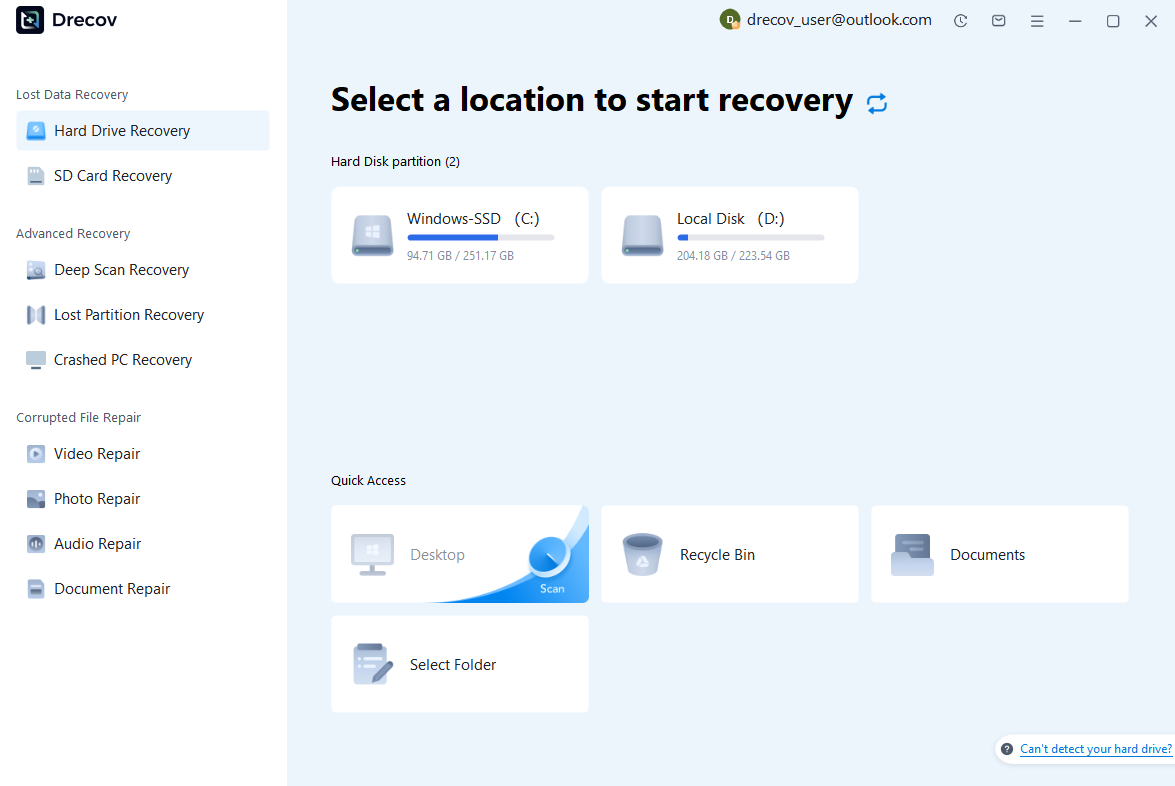
Step 1: Connect the Drive / USB)
Connect your device (SD card, HDD/SSD, or USB drive) to your computer and launch PandaOffice Drecov. Select the target device and start the scan. The software will perform a quick scan and deep scan to detect lost or deleted data.
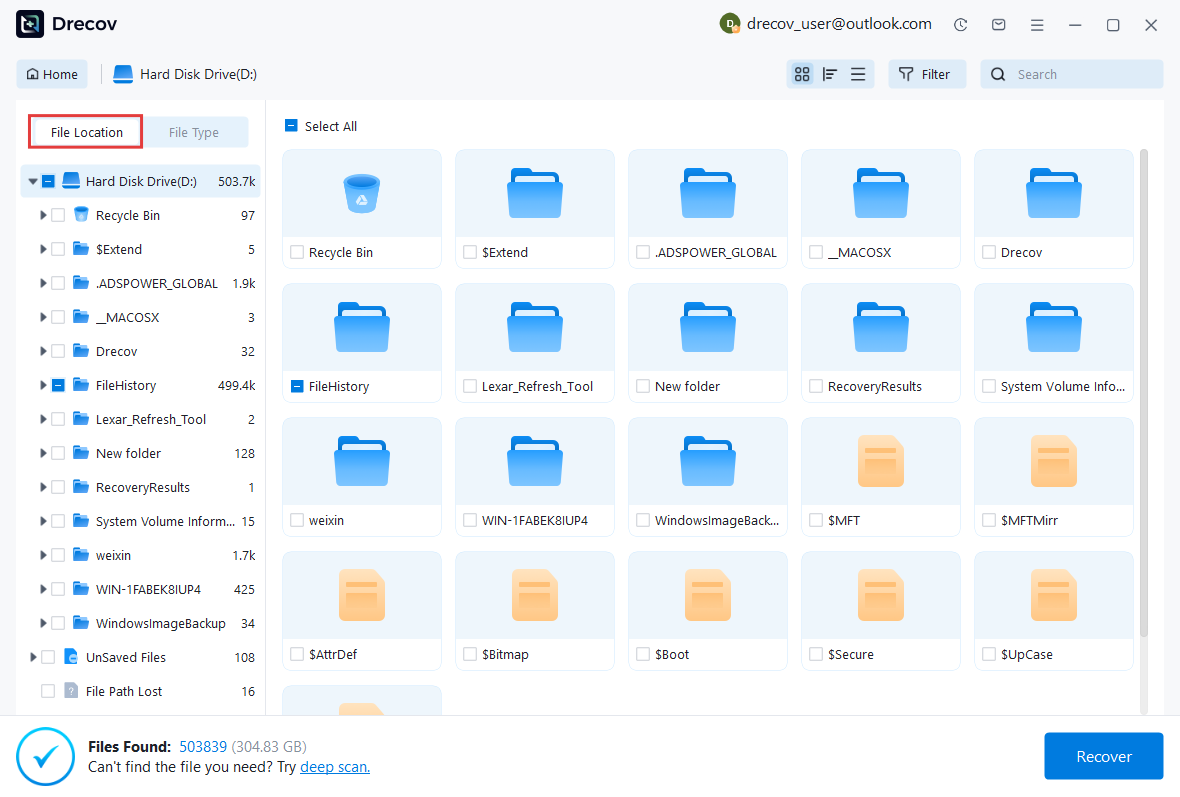
Step 2: Locate and Preview Lost Files
After scanning, browse the detected files and use the preview feature to check recoverable data. You can preview documents (Word, Excel, PDF), photos, and videos to ensure file integrity before recovery.
Step 3: Recover and Save to a New Location
Select the files you want to restore and click recover. Save all recovered data to a different drive or location (not the original device) to avoid overwriting lost data.

Some questions you may be interested in:
how to format a hard drive windows 11
how to recover deleted drafts in outlook
what is healthy recovery partition
how to make steam not open on startup
Test environment:
- Operating system: Windows 10/11
- Storage devices: HDD, SSD, USB drive, and SD card
- File formats tested: JPG, PNG, and camera photos
- Recovery destination: Separate storage location
⚠️Warning: Stop using the affected storage device immediately after accidental deletion. Continued use may overwrite recoverable files.
After restoring lost images, users can reorganize their Picasa collections and create a safer photo management workflow.
Recover Pictures Removed Accidentally From Storage Devices
If photos were deleted directly from folders used by Picasa, recovery may still be possible depending on the storage condition.
When a file is deleted from a computer, the operating system usually removes the file reference rather than immediately destroying all data. The original information may remain available until new files overwrite that space.
The recovery process involves scanning the storage device and identifying available photo data.
Test environment:
- Computer system: Windows 11
- Storage source: Internal hard drive
- Deleted content: Digital photos
- Recovery goal: Restore original image files
Users should avoid formatting the storage device or saving additional files before attempting recovery.
A quick response increases the possibility of successfully restoring accidentally deleted pictures.
Prevent Accidental Photo Loss in Picasa Collections
Organize Picasa Photo Libraries Properly
A well-organized photo library reduces the need for unnecessary deletion and helps users avoid mistakes.
Instead of storing thousands of images in random folders, users can create a clear structure based on dates, events, or categories.
For example, family photos can be separated by year, while professional images can be stored according to project names.
Test environment:
- Operating system: Windows 11
- Photo collection: Large personal archive
- Storage method: Folder-based organization
A clear structure makes it easier to identify unwanted images and prevents accidental removal of important files.
Maintain Regular Photo Backups
Regular backups protect photos from accidental deletion, hardware failure, and storage problems.
Users should keep copies of important images on separate devices. External drives and cloud storage can provide additional protection.
A backup system ensures that even if pictures are removed from Picasa by mistake, another copy remains available.
Test environment:
- Backup device: External HDD
- Original storage: Computer SSD
- Photo types: Personal and archived images
Regular backups are one of the most effective ways to protect digital memories.
Manage Imported Pictures Carefully
Many duplicate and unwanted photos are created during repeated imports from cameras and smartphones.
Before importing new images, users should check existing folders to avoid copying the same files multiple times.
Creating a consistent import process helps maintain a cleaner photo library.
Test environment:
- Devices: Smartphone and digital camera
- Transfer method: USB connection
- Computer system: Windows 10/11
Good import habits reduce future cleanup work and make photo management easier.
Frequently Asked Questions About Deleting Pictures from Picasa
How Can I Delete Pictures from Picasa Without Removing Original Files
Many users want to organize their Picasa albums but do not want to permanently remove pictures from their computers. In this situation, the safest approach is to remove images only from the Picasa album instead of deleting the original files stored on the hard drive.
Picasa works as a photo management tool that displays images from existing folders. It does not usually create separate copies of every picture. Therefore, removing an image from a specific album may only change how the photo appears inside Picasa while keeping the original file unchanged.
Before deleting anything, users should check which option they are selecting. Removing a photo from an album and deleting the actual image file are two completely different actions.
For users searching how can i delete pictures from picasa without losing important photos, understanding this difference is essential. If the purpose is only to clean up albums or improve organization, removing photos from the album is usually the better choice.
Keeping original files allows users to reorganize their collections while protecting valuable memories from accidental deletion.
How Do I Delete Pictures from Picasa Permanently
If users want to completely remove images from their computer, they need to delete the original photo files instead of only removing them from Picasa albums.
The process depends on where the pictures are stored. If the images are located in regular folders on the computer, users can remove them through Windows File Explorer. If the pictures are managed directly through Picasa, users can select the unwanted images and choose the appropriate deletion option.
Before permanently deleting photos, it is recommended to review the selected files carefully. Some images may look unnecessary but could contain important memories, higher-quality versions, or edited copies.
For users wondering how do i delete pictures from picasa, creating a backup before permanent deletion is a smart precaution. A backup provides a way to restore files if the wrong images are removed.
Permanent deletion can help free storage space and simplify photo management, but it should always be performed carefully.
How Do You Delete Pictures from Picasa Without Accidentally Losing Important Photos
When managing a large collection of Picasa images, accidental deletion is one of the most common concerns. Users may remove the wrong file because multiple photos look similar or because they do not understand how Picasa manages image locations.
A safer deletion process starts with reviewing the selected pictures before confirming removal. Check the image preview, file name, folder location, and date information to make sure the photo is no longer needed.
Creating a backup before cleanup is another effective way to prevent permanent mistakes. If an important image is deleted accidentally, the backup copy can restore the original file.
Users should also avoid deleting entire folders unless they are completely certain that all images inside are unnecessary.
For people searching how do you delete pictures from picasa, taking extra time to verify files before deletion is more important than quickly removing large numbers of images.
A careful approach helps users maintain an organized photo library while protecting valuable pictures.
Can Deleted Picasa Pictures Be Recovered
Yes, deleted Picasa pictures may still be recoverable in many situations. When a photo is removed from a computer, the operating system usually marks the storage space as available instead of immediately destroying all image data.
The deleted picture may remain on the storage device until new files overwrite that space. This means recovery chances are usually higher when users stop using the affected drive immediately after accidental deletion.
The possibility of recovering deleted images depends on several factors, including how long ago the files were removed, whether new data has been written, and the condition of the storage device.
If important pictures are deleted by mistake, users should avoid copying new files or installing unnecessary programs on the same drive. Taking quick action can improve the possibility of restoring lost photos.
Recovery tools can help scan storage devices and locate deleted image files that are still available. After recovering important pictures, users should create a better backup and organization system to prevent future loss.
⚠️Warning: Avoid saving new data to the storage device where photos were deleted, as new files may overwrite recoverable image information.
Conclusion: The Safest Way to Delete Pictures from Picasa
Learning how to delete pictures from Picasa allows users to manage their photo collections more effectively while reducing the risk of accidental data loss. Although Picasa is no longer actively updated, many users still rely on existing Picasa libraries to organize older photo collections.
Before removing images, it is important to understand the difference between deleting a photo from a Picasa album and permanently deleting the original file. Removing an image from an album may only change the organization, while deleting the file removes the picture from the computer storage.
For users who only want to improve album organization, removing selected images from Picasa may be enough. If the goal is to free storage space, permanently deleting unnecessary photos can help reduce clutter.
However, large-scale cleanup should always be performed carefully. Creating backups before deletion provides extra protection and allows users to restore files if mistakes happen.
If important photos are accidentally deleted during the cleanup process, PandaOffice Drecov can help Windows users recover lost image files from supported storage devices.
Maintaining organized folders, creating regular backups, and managing imported photos carefully can reduce future photo loss. By following a safe deletion process, users can remove unwanted Picasa pictures while keeping their valuable memories protected.






