







Overview of Stellar Photo Recovery and Its Target Users
Understanding Stellar Photo Recovery and Common Photo Loss Situations
Digital photos are an important way to preserve personal memories, creative projects, and professional work. However, image files stored on SD cards, cameras, hard drives, and external storage devices can become inaccessible due to accidental deletion, formatting errors, file system corruption, or unexpected device failures.
When photos disappear, many users search for reliable recovery solutions that can help locate and restore lost files. Stellar Photo Recovery is a specialized recovery application designed to retrieve deleted, missing, or inaccessible photos, videos, and audio files from various storage devices.
The software is mainly focused on multimedia recovery scenarios. It can help users recover images from memory cards, internal drives, external storage devices, and digital cameras. This makes it a potential choice for photographers, content creators, and everyday users who need to restore important pictures.
The tool is also associated with the previous product name stellar phoenix photo recovery, which many users still use when searching for information about the software. Over time, the application has added more recovery capabilities, broader file format support, and improved scanning features.
Unlike basic file restoration tools that only check recently deleted items, professional recovery applications analyze storage data at a deeper level. They attempt to identify remaining file information even when normal folders or file names are no longer available.
For users searching for professional software photo recovery solutions, understanding the features, limitations, and practical performance of a recovery tool is important before choosing the right option.
⚠️Warning: After losing important photos, avoid saving new files to the same storage device. New data may overwrite the deleted images and make recovery more difficult.
Key Features and Functions of Stellar Photo Recovery
Support for Different Photo Formats and Storage Devices
A recovery tool’s compatibility with different file formats and storage devices directly affects its usefulness. Since cameras, smartphones, and computers may store images in different formats, recovery software needs broad support to handle various situations.
Stellar Photo Recovery supports recovery from commonly used storage devices, including internal hard drives, external hard drives, USB flash drives, SD cards, and digital camera memory cards. This allows users to attempt recovery regardless of where their photos were originally stored.
The software supports popular image formats such as JPEG and PNG while also offering support for professional camera formats. RAW image recovery is especially valuable for photographers because RAW files contain original image information captured directly from camera sensors.
Many professional photographers rely on RAW formats because they provide greater flexibility during editing. Losing these files can be a serious problem, especially when the images cannot be recreated.
In addition to image formats, the software is designed to handle different data loss situations. It can help recover photos after accidental deletion, formatting, inaccessible storage, or file system problems.
However, users should understand that compatibility alone does not guarantee successful recovery. The final result depends on factors such as whether deleted data has been overwritten and whether the storage device is physically damaged.
For users comparing the top photo recovery software options, wide device support and format compatibility are two important features to consider before making a decision.
Advanced Scanning Technology for Lost Images
The scanning ability of recovery software determines how effectively it can locate missing files. Different data loss situations require different scanning methods, which is why advanced recovery tools usually provide multiple scanning options.
Stellar Photo Recovery includes scanning technology designed to search storage devices for lost images. Quick scanning is suitable for situations where files were recently deleted and the storage structure remains relatively intact. It can quickly locate files that still have recognizable information.
For more complicated cases, deep scanning provides a more detailed analysis. This method searches the storage device sector by sector and attempts to identify image files based on their internal structures.
Deep scanning is especially useful when dealing with formatted memory cards, corrupted partitions, or situations where the original folder structure has disappeared.
The scanning process may take longer depending on the storage capacity and the amount of available data. Larger drives usually require more time because the software needs to analyze more storage space.
One advantage of advanced scanning is that it does not rely only on visible folders. Even if the operating system cannot display the deleted photos, recovery software may still detect traces of the original files.
However, scanning results depend on the condition of the storage device. If new data has already replaced the deleted photos, recovery software may only find incomplete files or fail to locate them.
For users who need a professional phoenix photo recovery software solution, advanced scanning capability is one of the key features that separates professional tools from simple recovery applications.
Preview Function Before Recovering Files
Preview functionality is an important feature that helps users determine whether lost photos can be successfully restored before completing the recovery process.
When scanning a storage device, recovery software may discover a large number of files. Some may be complete images, while others may be damaged or partially recovered data. Without a preview option, users may waste time recovering files that cannot be opened.
Stellar Photo Recovery provides a preview feature that allows users to check detected images before saving them. This makes the recovery process more efficient because users can select only the photos they actually need.
For photographers and users with large photo collections, preview capability is especially helpful. Instead of recovering thousands of files and checking them manually afterward, users can identify important images during the recovery process.
The preview feature can also help evaluate recovery quality. If an image appears correctly in the preview window, there is a higher possibility that the recovered file will be usable. However, heavily damaged files may not display properly even if they are detected.
Another advantage is that preview helps reduce unnecessary storage usage. Users can avoid restoring duplicate files or unwanted images, saving both time and disk space.
Although preview cannot repair severely corrupted photos, it provides valuable information before recovery begins. This feature is now considered an important part of modern recovery software because it gives users more control over the restoration process.
Recovery Support for Professional Camera Files
Professional photographers often store their work in RAW formats because these files preserve more image details and provide greater editing flexibility. However, RAW files can also be more difficult to recover compared with standard image formats.
Stellar Photo Recovery focuses on multimedia recovery and provides support for various camera image formats. This makes it suitable for users who need to restore photos from DSLR cameras, mirrorless cameras, and other professional photography equipment.
Camera memory cards can experience problems for many reasons, including accidental formatting, interrupted file transfers, improper removal, or unexpected errors during shooting. In these situations, recovery software may help locate missing photographs that are no longer visible.
The ability to recover RAW images is one of the features that makes professional recovery tools different from basic undelete applications. Photographers often need to restore original files rather than compressed copies because RAW files contain important editing information.
However, RAW recovery success depends on the condition of the memory card and whether the original data has been overwritten. If the card continues to be used after photo loss, the chances of complete recovery may decrease.
For photographers, using reliable recovery software together with regular backups is the best approach to protecting valuable images. Recovery tools can help in unexpected situations, but they should not replace proper data protection practices.
Performance and User Experience Analysis of Stellar Photo Recovery
Installation Process and Interface Design
The overall user experience of recovery software depends heavily on how easy it is to install, navigate, and complete the recovery process. A powerful recovery tool may still be difficult for users if the interface is confusing or requires advanced technical knowledge.
Stellar Photo Recovery provides a relatively straightforward installation process. After installation, users can access the main recovery functions through a clear interface that guides them through selecting storage locations, starting scans, previewing files, and saving recovered data.
The software is designed for different types of users. Beginners can follow the basic recovery workflow without needing detailed technical knowledge, while more experienced users can explore advanced scanning options for complicated recovery situations.
The interface organizes recovery steps in a logical order. Users typically begin by choosing the type of data they want to recover, selecting the storage device, and starting the scanning process. After the scan is complete, the software displays available files and allows users to preview selected images before recovery.
Compared with some command-line recovery utilities, graphical recovery applications provide a more comfortable experience for everyday users. The visual interface reduces the learning curve and makes the recovery process easier to understand.
However, users should note that advanced recovery functions may still require some understanding of storage devices and file systems. For example, choosing the correct drive and recovery location is important to avoid accidental data overwriting.
Overall, the software provides a user-friendly experience for most recovery scenarios, making it accessible to both beginners and users who need more advanced recovery features.
Scanning Speed and Recovery Results
Scanning speed is an important factor when evaluating recovery software because storage devices can contain thousands of files and large amounts of data. A recovery tool needs to balance detailed analysis with reasonable processing time.
Stellar Photo Recovery offers different scanning options that allow users to choose between faster searches and more comprehensive analysis. Quick scans usually complete faster and are suitable for recently deleted photos, while deeper scans require more time but can search for files that are harder to locate.
The actual scanning speed depends on several factors, including storage capacity, device condition, connection speed, and the amount of stored data. Smaller memory cards may finish scanning relatively quickly, while large external hard drives can require significantly more time.
During recovery, the software attempts to identify image files by analyzing available storage information and file structures. This approach allows it to find photos even when normal file browsing methods cannot access them.
Recovery results can vary depending on the condition of the device. If photos were recently deleted and no new data has been written, the recovery possibility is generally higher. In contrast, overwritten or severely damaged files may not be restored completely.
Compared with basic recovery utilities, professional tools generally provide more detailed scanning options and better support for complex data loss situations.
For users comparing top photo recovery software, scanning performance should be evaluated together with recovery accuracy, supported file types, and ease of use rather than speed alone.
Recovery Quality and File Integrity
Successful recovery is not only about finding deleted files but also about restoring images that can actually be opened and used. A recovery application may detect many files, but the quality of those recovered images determines its real effectiveness.
Stellar Photo Recovery focuses on restoring multimedia files while maintaining the original quality whenever possible. The software attempts to recover complete image data instead of only retrieving file names or folder information.
The preview function plays an important role in evaluating recovery quality. Users can check whether detected photos appear correctly before completing the recovery process. This helps identify files that may be damaged or incomplete.
For standard image formats such as JPEG and PNG, recovery quality is often influenced by whether the original storage space has been overwritten. If the file data remains intact, recovered images may open normally without noticeable issues.
RAW image recovery can be more complicated because professional camera files contain more complex structures. The condition of the memory card and the amount of damage can affect whether recovered files remain fully usable.
Users should also consider where recovered files are saved. Restoring images to the same device where data loss occurred may overwrite other recoverable files.
⚠️Warning: Always save recovered photos to a different storage location. Recovering files back to the original drive can reduce the chance of restoring additional lost data.
Overall, recovery quality depends on both software capability and the condition of the storage device. Even advanced recovery applications cannot restore data that has already been permanently overwritten.
Overall Experience for Different User Groups
Different users have different expectations when choosing recovery software. A casual user who accidentally deletes family photos may need a simple recovery process, while professional photographers may require advanced support for valuable image files.
For beginners, Stellar Photo Recovery provides a guided workflow that reduces complexity. Users do not need extensive technical knowledge to start scanning and searching for lost images. The preview feature also helps beginners avoid recovering unnecessary or damaged files.
For photographers and creative professionals, support for RAW formats and camera storage devices is one of the most important advantages. Professional users often need to recover original image files rather than compressed versions, making format support a key consideration.
Businesses and content creators may also benefit from advanced scanning features because they often store large amounts of important visual content on external drives or memory cards.
However, users should consider their specific recovery needs before choosing any tool. Basic photo loss situations may not require advanced software, while serious data loss cases may require more powerful recovery features.
As one of the available software photo recovery solutions, Stellar Photo Recovery provides a balance between professional capabilities and user accessibility.
For users who prefer a simpler Windows recovery solution, PandaOffice Drecov is another option designed to help restore lost photos from common storage devices. It provides an easier recovery workflow for users who need to recover deleted images without complicated settings.
Advantages and Disadvantages of Stellar Photo Recovery
Main Benefits of Using Stellar Photo Recovery
Stellar Photo Recovery offers several advantages that make it suitable for users dealing with different types of photo loss situations. Its focus on multimedia recovery allows it to handle many common image recovery needs.
One major advantage is broad format support. The software can work with standard image formats as well as professional camera files, making it useful for both everyday users and photographers.
Another benefit is its compatibility with different storage devices. Users can attempt recovery from SD cards, hard drives, USB drives, and other storage media where photos may have become inaccessible.
The scanning options provide flexibility. Users can choose faster scans for simple deletion cases or deeper scans for more complicated situations such as formatting or file system problems.
The preview feature is also valuable because it allows users to verify files before recovery. This improves efficiency and reduces the risk of saving unnecessary data.
Additional advantages include:
- Supports professional image formats
- Designed specifically for multimedia recovery
- Provides an easy-to-follow recovery process
- Works with various storage devices
- Helps recover photos from different data loss scenarios
For users searching among the top photo recovery software choices, these features make Stellar Photo Recovery a tool worth considering, especially when recovering important images from cameras or storage devices.
Limitations Users Should Consider Before Choosing
Although Stellar Photo Recovery provides many useful recovery features, it also has some limitations that users should understand before choosing the software.
The first limitation is that recovery success cannot be guaranteed in every situation. If deleted photos have already been overwritten or the storage device has serious physical damage, the software may not be able to restore the missing files.
Another consideration is scanning time. Deep scanning provides more detailed results but may take longer, especially when analyzing large storage devices.
For users who only need occasional recovery of recently deleted pictures, some advanced features may be unnecessary. A simpler recovery tool could be enough for basic situations.
The software may also require users to understand basic recovery concepts, such as selecting the correct storage device and saving recovered files safely. Beginners should carefully follow instructions to avoid further data loss.
Before choosing recovery software, users should evaluate factors such as:
- Type of lost data
- Importance of the missing photos
- Storage device condition
- Required recovery features
Understanding these limitations helps users make a better decision and choose a solution that matches their specific needs.
PandaOffice Drecov: A Simple Alternative for Windows Photo Recovery
For users who are looking for a simpler way to recover lost photos on Windows, PandaOffice Drecov offers a practical recovery solution. The software is designed to help restore deleted or missing images from various storage devices, including SD cards, hard drives, SSDs, and USB drives. It supports common photo loss situations such as accidental deletion, formatted storage, and inaccessible files.
One of the advantages of PandaOffice Drecov is its easy-to-follow recovery process:
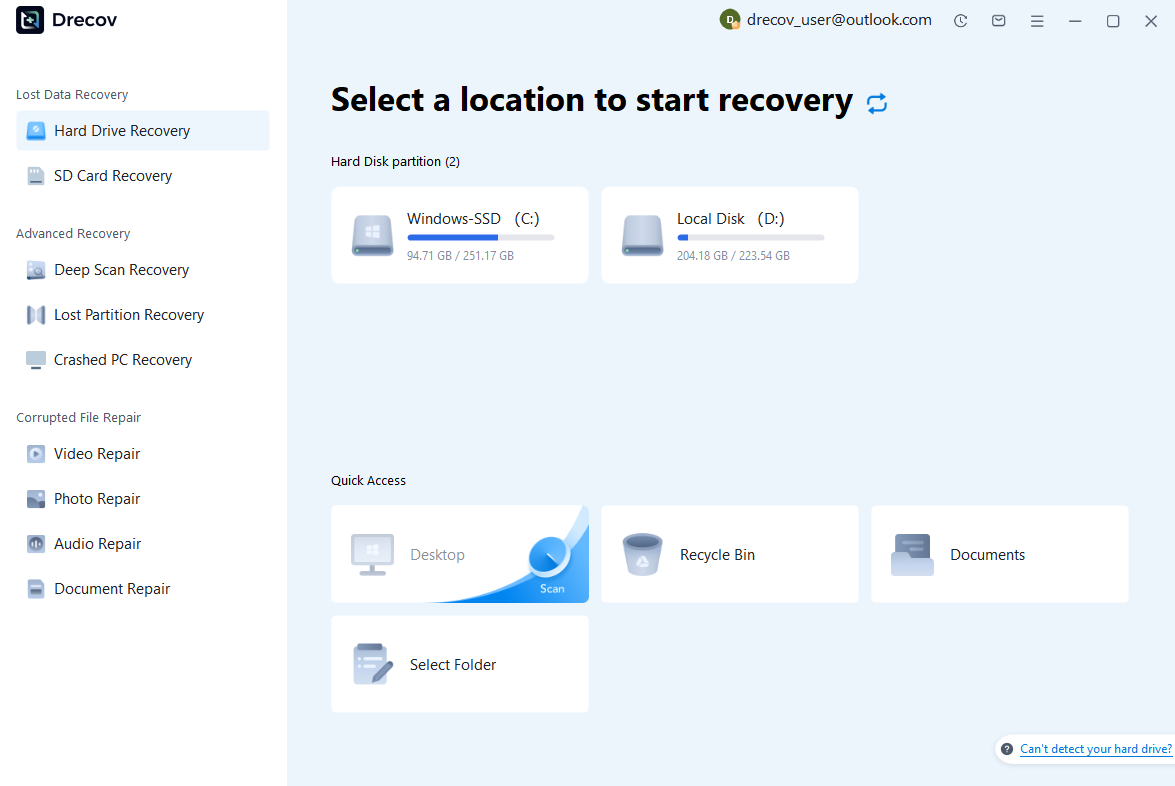
Step 1: Connect the Drive / USB)
Connect your device (SD card, HDD/SSD, or USB drive) to your computer and launch PandaOffice Drecov. Select the target device and start the scan. The software will perform a quick scan and deep scan to detect lost or deleted data.
Step 2: Locate and Preview Lost Files
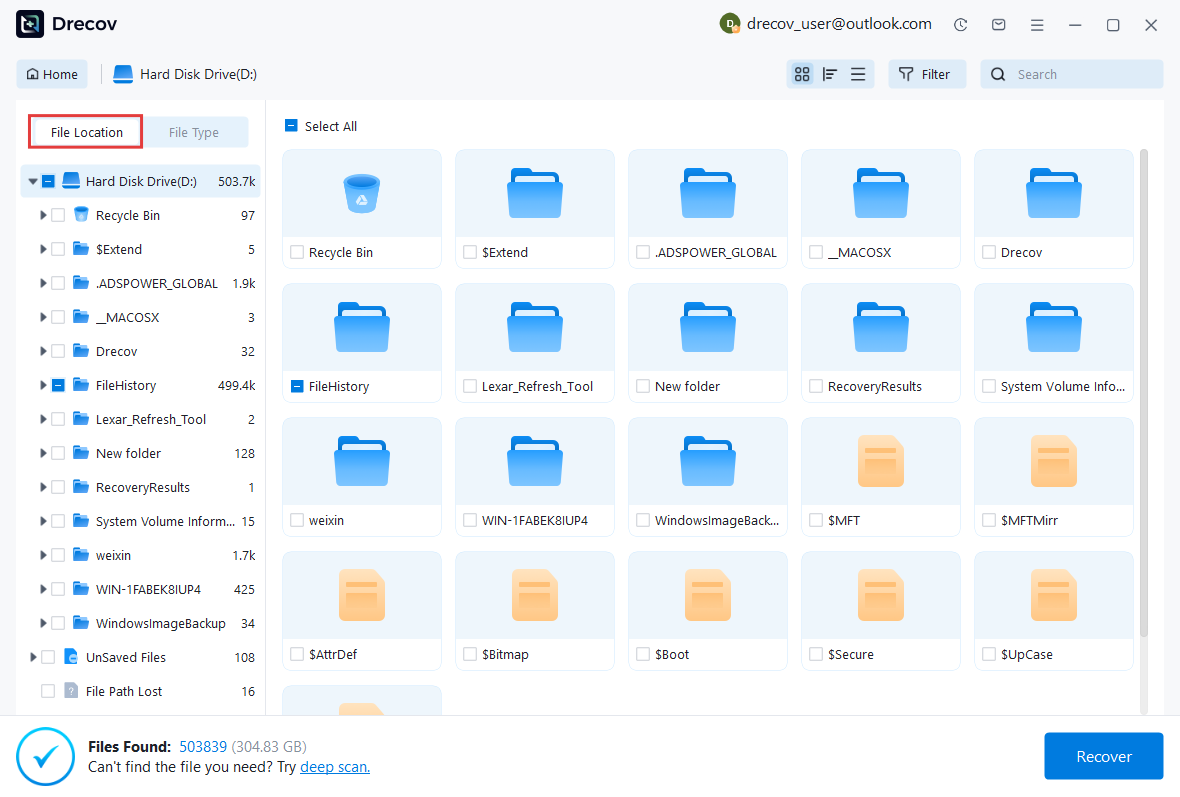
After scanning, browse the detected files and use the preview feature to check recoverable data. You can preview documents (Word, Excel, PDF), photos, and videos to ensure file integrity before recovery.
Step 3: Recover and Save to a New Location
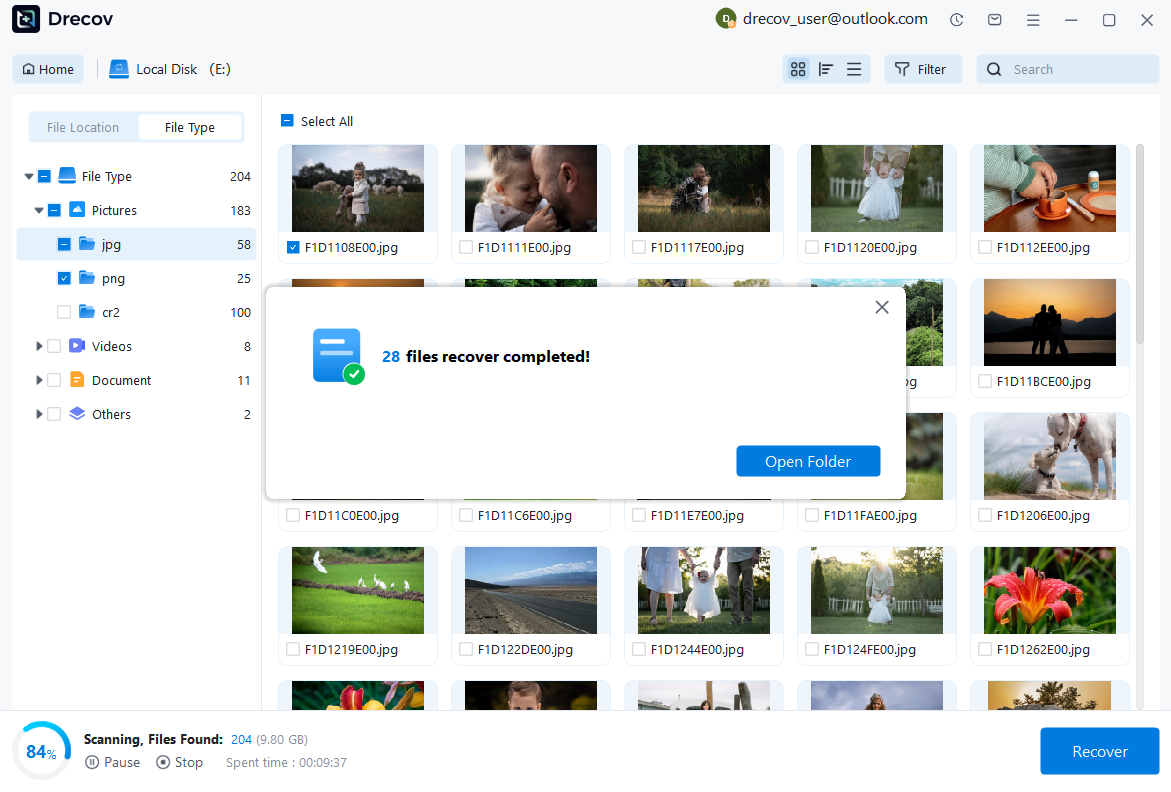
Select the files you want to restore and click recover. Save all recovered data to a different drive or location (not the original device) to avoid overwriting lost data.
Some questions you may be interested in:
how to format a hard drive windows 11
how to recover deleted drafts in outlook
what is healthy recovery partition
how to make steam not open on startup
Compared with complex recovery methods that require advanced technical knowledge, PandaOffice Drecov focuses on providing a straightforward experience for everyday Windows users. It can be a suitable option for users who need reliable photo recovery without dealing with complicated settings or recovery procedures.
Frequently Asked Questions About Stellar Photo Recovery
Is Stellar Photo Recovery Safe to Use?
Understanding Data Security During the Recovery Process
Many users worry about whether recovery software is safe because the wrong operation may cause additional data loss. In general, recovery applications are designed to read storage devices and search for existing data rather than modify the original files during scanning.
Stellar Photo Recovery follows a non-destructive recovery approach. The software scans the selected storage device to locate missing photos and allows users to preview available files before recovery. The recovered images are then saved to another location selected by the user.
To improve safety during the recovery process, users should follow several basic practices:
- Avoid saving new files to the affected storage device.
- Do not install recovery software on the drive where photos were lost.
- Save recovered files to a different hard drive or external storage device.
- Avoid repeated formatting or repair operations before recovery.
The safety of any recovery process also depends on how users operate the software. Incorrectly selecting a drive or saving restored files to the same location may reduce the possibility of recovering additional data.
For users comparing software photo recovery options, choosing a tool with preview features and a clear recovery workflow can help reduce unnecessary risks.
⚠️Warning: Recovery software cannot repair physically damaged storage devices. If a hard drive makes unusual sounds or a memory card is physically broken, continued operation may make the problem worse.
Can Stellar Photo Recovery Recover Deleted Photos From SD Cards?
Restoring Images From Cameras and Memory Cards
SD cards are widely used in digital cameras, drones, and other devices, but they are also vulnerable to accidental deletion, formatting, and file corruption. Many users look for recovery tools when important images disappear from a memory card.
Stellar Photo Recovery supports photo recovery from different types of memory cards, including SD cards commonly used in digital cameras. The software can search for deleted images even when they are no longer visible through normal file browsing.
The recovery process generally involves connecting the SD card to a computer, selecting the card as the target storage device, and starting a scan. After the scan completes, users can review detected images and choose which files to restore.
The success rate depends on several factors:
- Whether new photos have been saved after deletion
- The physical condition of the SD card
- The type of formatting performed
- Whether the original image data remains available
If an SD card is accidentally formatted, users should stop using it immediately. Taking additional photos or transferring new files may overwrite the deleted images.
For photographers, memory card recovery is especially important because professional cameras often store high-value RAW files. Having recovery software available can provide an additional option when unexpected photo loss occurs.
Is Stellar Photo Recovery Better Than Free Recovery Tools?
Comparing Professional Recovery Features With Basic Solutions
Free recovery tools can be useful for simple situations, such as recently deleted photos from a healthy storage device. However, professional recovery applications usually provide more advanced features for complicated data loss scenarios.
One advantage of Stellar Photo Recovery is its focus on multimedia files. It is designed specifically for recovering photos, videos, and audio files rather than handling only general document recovery.
Compared with many free tools, professional recovery software often provides:
- More advanced scanning options
- Support for additional image formats
- Better compatibility with camera files
- Preview functions before recovery
- Improved handling of formatted storage devices
However, free tools may still be suitable for users who only need basic recovery. If a few recently deleted photos need to be restored and the storage device is functioning normally, a simpler solution may be enough.
The right choice depends on the importance of the lost data. Users recovering valuable professional photographs, business images, or irreplaceable memories may prefer a more advanced solution.
When comparing the top photo recovery software available, users should consider recovery capability, ease of use, supported devices, and the specific type of data loss instead of focusing only on price.
What Should I Do If Photo Recovery Software Cannot Find My Files?
Possible Reasons Recovery Results Are Empty
Sometimes users complete a scan but cannot find the missing photos they expected to recover. This situation does not always mean recovery is impossible. Several factors may affect the scanning results.
One common reason is data overwriting. When deleted photos are replaced by new files, the original image information may no longer exist on the storage device.
Another possible reason is selecting the wrong storage location. Users may accidentally scan a different drive or partition that does not contain the lost photos.
Storage device problems can also affect results. Severe corruption, physical damage, or controller failures may prevent recovery software from accessing the stored data correctly.
If recovery software cannot find the expected files, users can try:
- Running a deeper scan option
- Checking whether the correct storage device was selected
- Connecting the device directly instead of using unstable adapters
- Avoiding further use of the storage device
Users should also understand that recovery software works by finding existing data remnants. It cannot recreate files that have already been completely destroyed.
Final Thoughts on Stellar Photo Recovery Review
Choosing the Right Photo Recovery Solution for Your Needs
After reviewing the features, performance, advantages, and limitations of Stellar Photo Recovery, it is clear that the software is designed for users who need a specialized solution for restoring lost images.
Its major strengths include support for multiple image formats, compatibility with different storage devices, advanced scanning options, and preview capabilities. These features make it suitable for recovering photos from SD cards, hard drives, USB drives, and camera storage.
For photographers and professionals, support for RAW image formats can be especially valuable because these files often represent important original work. For everyday users, the guided recovery process makes it easier to search for deleted or inaccessible pictures without requiring advanced technical knowledge.
However, users should remember that no recovery software can guarantee success in every situation. Recovery results depend on factors such as how the data was lost, whether new files have overwritten the storage space, and the physical condition of the device.
Before starting recovery, users should stop using the affected storage device and avoid actions that may overwrite lost data. Choosing a suitable recovery tool and following safe recovery practices can significantly improve the chances of restoring important photos.
For users who need professional multimedia recovery, stellar photo recovery remains one of the recognized options in the market. For Windows users looking for a simpler recovery workflow, PandaOffice Drecov also provides a practical alternative for recovering lost photos from common storage devices.
The best recovery solution depends on individual needs, but selecting reliable software and acting quickly after data loss are the most important steps in protecting valuable images.





