







Modern wearable devices have changed the way people capture daily moments, and snap spectacles are one of the examples that combine smart technology with hands-free photography. These glasses allow users to record photos and videos from a first-person perspective, making it easier to save unique experiences without holding a smartphone or camera.
However, like other digital devices, files created by smart glasses can be lost due to accidental deletion, storage errors, transfer failures, or device problems. Losing important memories recorded through spectacles by snap can be frustrating, especially when those photos and videos are not backed up elsewhere.
Understanding how storage works and knowing the right recovery methods can improve the chances of getting lost files back. Whether files disappear during transfer, become inaccessible on a storage device, or are removed accidentally, proper recovery steps can help restore valuable media.
This guide explains the causes of data loss, available recovery methods, and practical solutions for Snap Spectacles file recovery. It also covers how to protect future recordings and avoid common mistakes that may permanently damage lost files.
⚠️Warning: When files are missing from your smart glasses or storage device, avoid recording new content immediately. New data may overwrite deleted files and reduce recovery possibilities.
Understanding Snap Spectacles and Their Media Storage System
Smart glasses such as spectacles snap are designed to capture photos and videos quickly from the user’s viewpoint. Unlike traditional cameras, these devices focus on convenience by allowing users to record content through built-in cameras without using their hands.
The captured media files usually need to be transferred to another device for viewing, editing, sharing, or long-term storage. During this process, files may be temporarily stored inside the device or associated storage before being moved to a smartphone, computer, or cloud service.
Because these files are digital data, they can be affected by many of the same problems that impact regular cameras, smartphones, and memory cards. A failed transfer, interrupted connection, corrupted storage area, or accidental deletion can make important videos and images unavailable.
When users experience missing files, understanding where the content was originally stored is the first step toward recovery. Different storage locations require different recovery approaches. For example, files deleted from a removable storage device may be recoverable through scanning software, while files removed from synchronized applications may require checking backup sources.
Test Environment:
- Device type: Smart glasses with built-in camera
- Content tested: Photos and short video recordings
- Transfer method: Wireless connection to smartphone
- Computer system: Windows 11 PC
- Storage analysis: External media device
Knowing how snap spectacle devices handle media storage helps users choose the correct recovery method instead of performing unnecessary operations.
How Snap Spectacles Capture and Save Photos and Videos
The main purpose of spectacles by snap is capturing visual content directly from the user’s perspective. The built-in cameras record images and videos, which can later be transferred for viewing or editing.
During normal use, users may create hundreds of files over time. These files can include personal memories, travel recordings, creative projects, or short clips intended for sharing. Because smart glasses are often used during active situations, files may sometimes be affected by unexpected events such as interrupted transfers or device shutdowns.
The exact storage process depends on the specific model and connected application environment. In many cases, content is transferred through a companion app before being saved permanently to a phone or computer. If the transfer process is interrupted, users may notice incomplete files, missing videos, or content that does not appear correctly.
Another possible issue occurs when users clear storage to create space for new recordings. Removing older files without creating backups can result in permanent data loss if the files are no longer available through synchronization services.
Test Environment:
- Device: Smart glasses camera device
- Operating scenario: Daily photo and video capture
- Transfer destination: Smartphone storage
- Issue simulated: Interrupted media transfer
- Operating system: Windows computer for file inspection
Before attempting recovery, users should identify whether the missing content disappeared from the glasses, the connected phone, or another storage location.
Common Reasons for Losing Files from Snap Spectacles
Data loss from smart glasses can happen for different reasons. Although wearable devices are designed to be reliable, digital storage is still vulnerable to accidental operations, software problems, and hardware issues.
One of the most common causes is accidental deletion. Users may remove files while organizing their media library or cleaning storage space. In some cases, an incorrect selection can delete multiple photos and videos at once.
Another frequent problem is transfer failure. When moving recordings from the glasses to another device, unstable connections or interrupted processes may prevent files from being copied correctly. Users may believe the transfer completed successfully, only to discover that some videos are missing later.
Storage corruption is another possible cause. If the storage area containing recorded content becomes damaged, files may no longer appear normally. The device may display errors, request formatting, or fail to recognize stored media.
⚠️Warning: If a device asks you to format storage after detecting an error, do not immediately confirm the action. Formatting may remove important file information needed for recovery.
Understanding the cause of file loss is important because different situations require different solutions. A deleted file, corrupted storage device, and failed transfer may all appear similar but require different recovery approaches.
Recovering Deleted Photos and Videos from Snap Spectacles Storage
When photos or videos disappear from smart glasses, the first step is checking whether the files still exist in connected devices or backup locations. Many users recover missing content simply by reviewing synchronized folders, application libraries, or previously saved copies.
Before using recovery tools, users should disconnect the affected storage device from unnecessary operations. Avoid recording new videos, transferring large files, or installing applications that may write new information to the storage area.
If the lost content is stored on removable media, recovery software can scan the device and search for deleted files. These tools analyze the storage structure and locate remaining file information that has not been overwritten.
For successful recovery, recovered files should always be saved to a different storage location. Saving restored data back to the original device may overwrite other recoverable files.
Test Environment:
- Device: Smart glasses media storage
- Lost files: JPEG photos and MP4 videos
- Recovery source: External storage device
- Recovery destination: Windows computer drive
- File condition: Recently deleted data
The sooner recovery actions are performed after data loss, the higher the possibility of restoring complete photos and videos.
Using Different Methods for Snap Spectacles File Recovery
When files captured by smart glasses become unavailable, users can try several recovery approaches depending on where the data was lost. The best method depends on whether the problem involves accidental deletion, failed synchronization, storage corruption, or device errors.
Before starting any recovery process, users should identify the original storage location of the missing files. Photos and videos may exist in different places, including the smart glasses storage area, connected mobile devices, computers, or backup platforms. Checking these locations first can sometimes solve the problem without additional tools.
If files cannot be found through normal methods, recovery solutions can help analyze storage devices and locate remaining data. Deleted files are not always immediately removed from storage. Instead, the system usually marks their space as available, allowing specialized recovery software to search for file fragments that remain.
Different recovery methods have different requirements. Some approaches involve checking synchronized content, while others require connecting storage devices to a computer for deeper scanning. Users should always avoid writing new files to the affected storage before recovery because new data can replace the lost information.
Test Environment:
- Device: Smart glasses with captured media files
- Lost content: Photos and video clips
- Storage source: External storage media
- Recovery computer: Windows 11 desktop
- Recovery condition: Files deleted within 24 hours
Choosing the correct recovery method based on the situation can improve the chance of restoring valuable recordings.
Checking Backup Locations and Connected Devices for Missing Files
Before using recovery software, users should first check available backup locations and connected devices. Many missing files are not permanently deleted but are simply stored in another location after synchronization.
For example, users may have transferred content from their snap spectacles to a smartphone but forgotten that the files were saved in a different folder. Checking the phone gallery, file manager, application storage, and computer folders can help locate missing recordings.
Cloud synchronization services may also contain previous copies of photos and videos. If automatic backup was enabled, users may be able to restore files without performing a storage scan.
Another useful step is reconnecting the smart glasses and repeating the transfer process. Sometimes a failed connection prevents files from appearing correctly, while the original recordings remain available on the device.
Test Environment:
- Device: Smart glasses camera system
- Connected device: Android smartphone
- Transfer method: Wireless synchronization
- Problem tested: Missing transferred videos
- Recovery approach: Backup and folder verification
This method works best when files disappeared during transfer rather than after permanent deletion. If the content is missing from all connected devices and backups, users may need a deeper recovery solution.
Recovering Files from Storage Devices Used with Snap Spectacles
Many smart wearable devices rely on internal storage or external storage accessories to save digital content. When files are deleted or become inaccessible, scanning the storage device can help locate recoverable data.
The recovery process usually involves connecting the storage device to a Windows computer and performing a detailed scan. The software analyzes the storage structure, identifies file information, and displays recoverable photos and videos.
During scanning, users may find files with original names, while some damaged files may appear without complete information. Preview functions can help determine whether the content is still usable before recovery.
Users should prepare another storage location before starting the recovery process. Recovered files should not be saved back to the same device because doing so may overwrite additional lost data.
Test Environment:
- Device: Smart glasses storage media
- Storage capacity: 128GB
- Lost file types: JPG images and MP4 videos
- Computer: Windows 10 laptop
- Connection: USB card reader
This method is suitable for situations involving accidental deletion, formatting errors, or corrupted file structures. However, severely damaged storage hardware may require professional assistance.
Recovering Lost Media Files with PandaOffice Drecov
When traditional methods cannot locate missing recordings, users can try a dedicated file recovery tool. PandaOffice Drecov is designed to help Windows users recover lost files from storage devices such as SD cards, SSDs, external drives, and other compatible media.
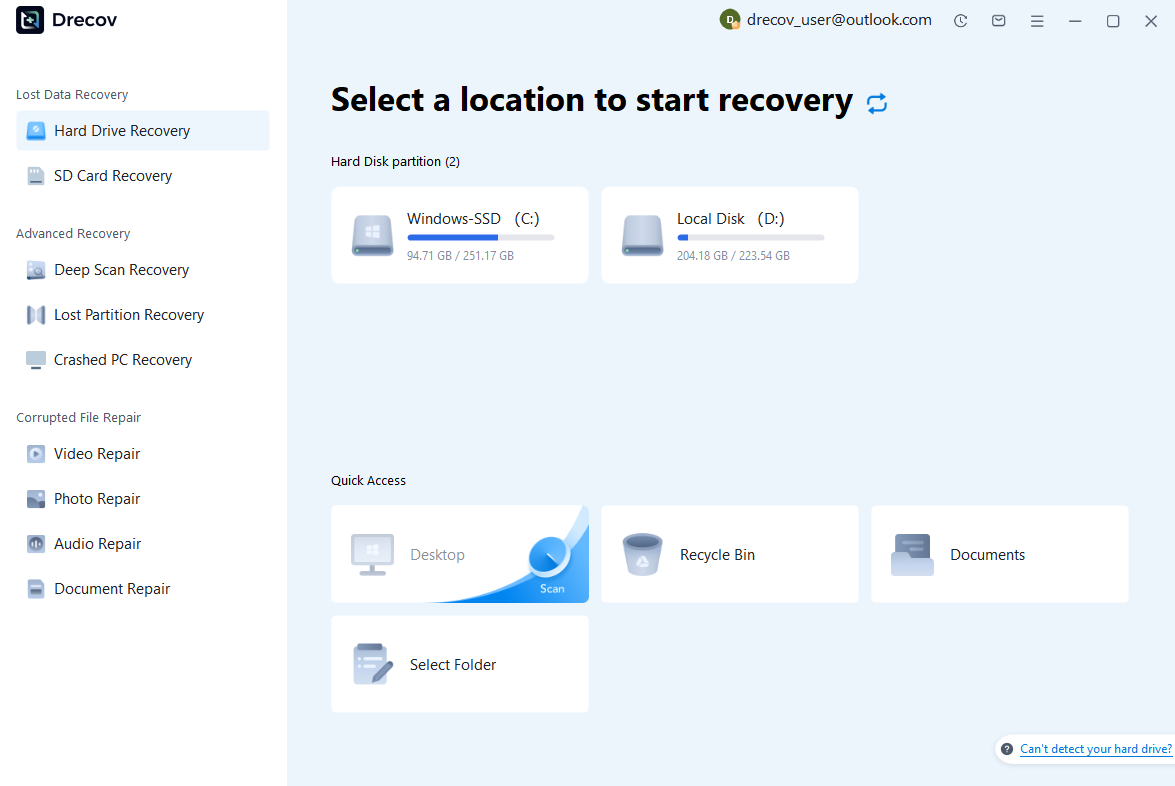
Step 1: Connect the Drive / USB)
Connect your device (SD card, HDD/SSD, or USB drive) to your computer and launch PandaOffice Drecov. Select the target device and start the scan. The software will perform a quick scan and deep scan to detect lost or deleted data.
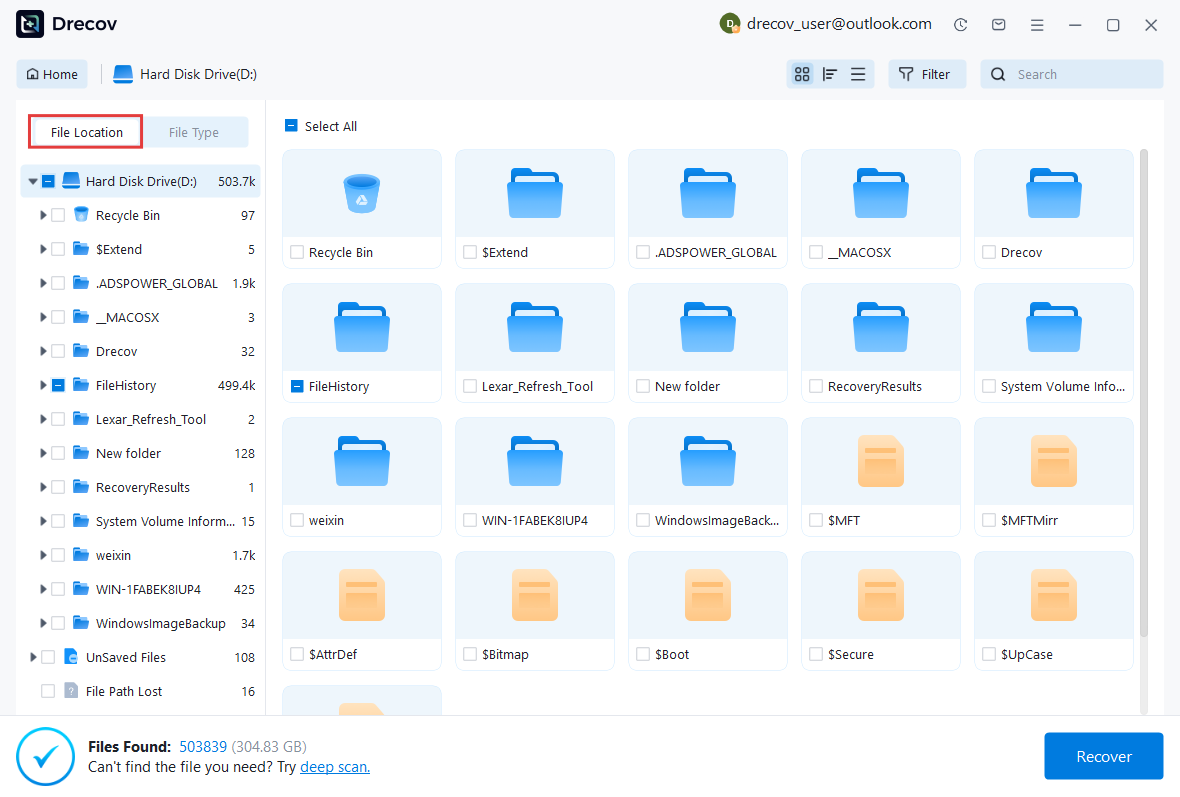
Step 2: Locate and Preview Lost Files
After scanning, browse the detected files and use the preview feature to check recoverable data. You can preview documents (Word, Excel, PDF), photos, and videos to ensure file integrity before recovery.
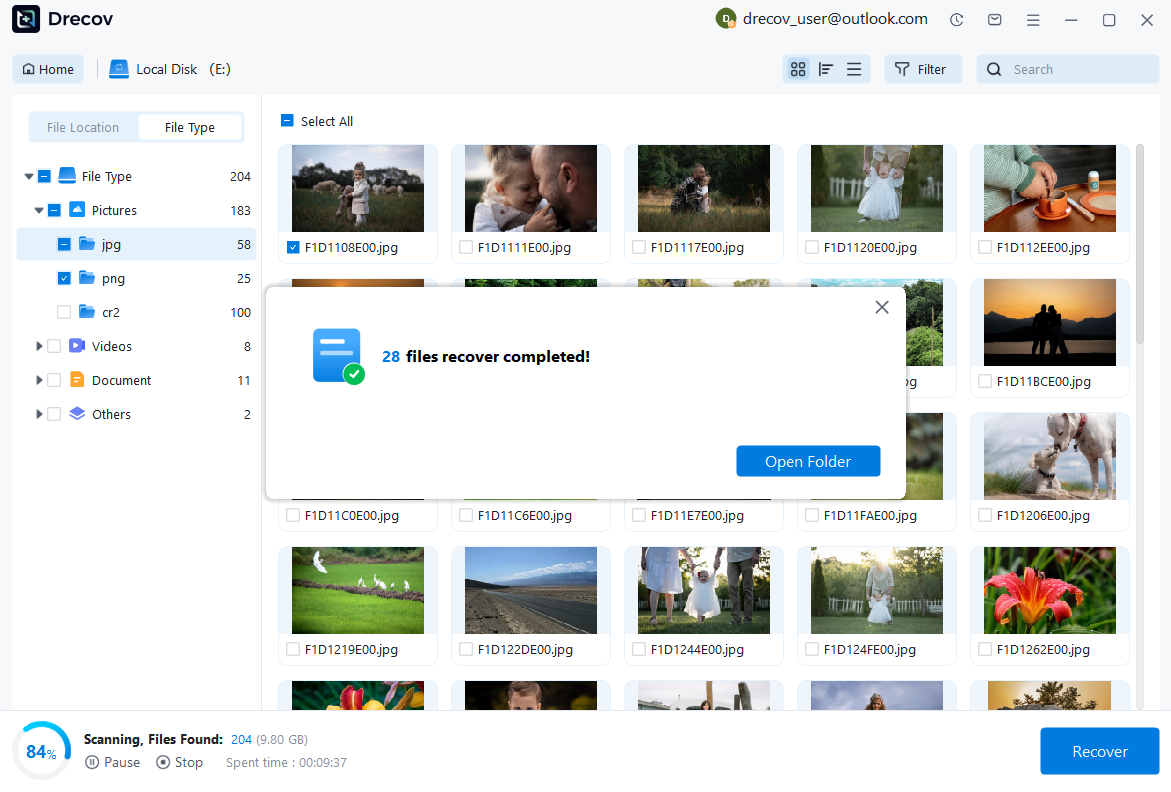
Step 3: Recover and Save to a New Location
Select the files you want to restore and click recover. Save all recovered data to a different drive or location (not the original device) to avoid overwriting lost data.
Some questions you may be interested in:
how to format a hard drive windows 11
how to recover deleted drafts in outlook
what is healthy recovery partition
how to make steam not open on startup
Test Environment:
- Device: Smart glasses storage device
- Storage type: External SD card
- Computer system: Windows 11
- Recovery software: PandaOffice Drecov
- Recovered files: Photos and MP4 videos
PandaOffice Drecov provides a practical recovery option for users who need to restore lost media files from compatible storage devices while using a Windows computer.
Preventing Future Data Loss from Snap Spectacles
Recovering lost files can be successful in many situations, but preventing data loss is always the better approach. Creating regular backups and following safe file management practices can reduce the risk of losing important recordings.
One effective habit is transferring photos and videos regularly instead of allowing large amounts of content to remain only on the smart glasses. Moving files to a computer or external storage creates an additional copy that can protect against device problems.
Users should also avoid removing storage devices during file transfers. Disconnecting a device while data is being written can damage file structures and make recordings inaccessible.
Keeping storage devices healthy is another important factor. Avoid filling storage completely, regularly check for errors, and replace unreliable storage media when necessary.
Test Environment:
- Device: Smart glasses recording system
- Backup method: Computer and external drive backup
- Storage management: Regular file organization
- Transfer method: Stable USB connection
A consistent backup routine ensures that even if a recovery situation occurs later, important memories remain available.
Creating Reliable Backups for Spectacles Snap Photos and Videos
Backing up content from spectacles snap devices should become part of regular maintenance. Since smart glasses are often used for capturing unique moments, losing those recordings can be especially disappointing.
Users can create backups by transferring files to multiple locations. For example, important videos can be stored on a computer, external hard drive, or another secure storage platform.
It is also helpful to organize files by date or event. Proper organization makes it easier to locate specific recordings and reduces the chance of accidentally deleting important content.
Another recommendation is checking backup files periodically. A backup is only useful if the stored copies remain accessible and complete.
Test Environment:
- Device: Smart glasses camera
- Backup destination: External SSD
- File types: Images and videos
- Backup frequency: Weekly transfer schedule
Regular backups provide additional protection against accidental deletion, storage failure, and unexpected device problems.
Frequently Asked Questions About Snap Spectacles File Recovery
Can Deleted Files from Snap Spectacles Be Recovered?
Deleted files from smart glasses may be recoverable depending on the condition of the storage device. When files are removed, the storage system often marks the space as available instead of immediately destroying the data.
Recovery success depends on several factors, including how much new data has been written afterward and whether the storage device has physical damage.
Users should stop using the affected device as soon as possible after discovering missing files. Avoid recording new videos or transferring additional content until recovery attempts are completed.
Test Environment:
- Device: Smart glasses storage media
- Deleted content: Photos and videos
- Recovery timing: Shortly after deletion
- Storage condition: No new data written
Quick action can significantly improve the possibility of restoring lost recordings.
Do Snap Spectacles Save Files Without a Phone Connection?
The way spectacles by snap store content depends on the specific model and usage environment. Some recordings may remain temporarily stored on the device before being transferred, while others may require synchronization through connected applications.
If files are not visible on a smartphone, users should check whether the transfer process was completed successfully.
Test Environment:
- Device: Smart glasses system
- Connection status: Smartphone disconnected
- Checked content: Recent recordings
- Verification method: Device and application review
Understanding the storage process helps users identify where missing files may still exist.
Final Thoughts on Snap Spectacles File Recovery
Losing photos and videos from smart glasses can be frustrating, especially when those files capture important personal memories. However, understanding how storage works and choosing the correct recovery method can improve the chances of restoring missing content.
Whether files disappear because of accidental deletion, transfer problems, or storage errors, users should begin with simple solutions such as checking backups and connected devices. If those options do not work, professional recovery software can help analyze storage devices and locate recoverable files.
For successful Snap Spectacles file recovery, the most important steps are acting quickly, avoiding new data writes, and saving recovered files to a separate location. These practices help protect remaining data and improve recovery results.
At the same time, creating regular backups remains the most effective way to prevent future data loss. By maintaining organized storage habits and keeping multiple copies of important recordings, users can continue enjoying their snap spectacle devices without worrying about losing valuable photos and videos.





