







Recover the Scribus Layout and Its Publication Resources
To recover Scribus layouts, preserve the native SLA document and identify which publication components are missing. The layout can describe text frames, page structure, and references to images without supplying every external resource. A PDF proof can preserve appearance while omitting editable stories and linked originals. Decide whether your recovery needs the native publication or a documented reconstruction from output.
Record the Scribus version, document path, expected page count, and a distinctive page or paragraph. Also note whether the incident followed a crash, an overwrite, or a folder move. An unavailable image, missing text, and unreadable native document require different investigations. Preserve the actual files before experimenting with recovery or conversion.
Keep the Publication Folder Intact
Copy the surviving SLA, related images, existing collected copies, and available backup candidates to a separate recovery directory. Preserve relative paths and keep an untouched source set. A layout that opens on the original computer may still depend on resources elsewhere, so inspect the actual document relationships instead of assuming its folder is complete.
If Scribus remains open with useful content, save a separate native copy before closing it. Export a reference proof when practical, but keep it distinct from the editable source. The proof can help compare text flow and page appearance. It does not automatically contain the full original images, editable frame structure, or every resource required for continued layout work.
Native Route 1: Open an Existing Autosave Document
- Locate the autosave candidates used by the original document and installation.
- Preserve the original candidate and open a working copy.
- Compare the affected page, text, and linked image references.
- Save the accepted layout under a new native filename.
Scribus can preserve automatic-save material according to its settings and version. Inspect the actual files rather than assuming the feature protected every recent edit. A candidate may predate the final changes. Enabling autosave after the loss cannot recreate work that never reached a surviving document.
Compare Content at the Incident Page
Inspect a distinctive paragraph and an important object on the page that changed. Then compare a later page, because text flow can carry changes beyond the immediate edit. A familiar opening page does not prove that the recovered layout contains the latest publication. Keep useful candidates separately until you understand their differences.
After saving the accepted candidate, reopen a copy and compare the same page. This establishes that the recovery now exists as an ordinary native document. Preserve the original autosave until the working file and its required resources pass inspection. A successful open does not guarantee the images and fonts needed by the final publication are available.
Native Route 2: Inspect a Surviving Emergency Save
- Preserve the original document and any emergency-save candidate left by the interrupted session.
- Copy the candidate to a separate test location.
- Open it through a compatible Scribus workflow without overwriting the original.
- Compare its actual publication state and save an accepted copy separately.
Scribus can attempt an emergency save when certain failures occur. This is conditional protection, not a guarantee that every crash produces a complete readable file. Candidate naming and behavior can differ by version. Use the actual surviving source and installed documentation rather than treating a filename pattern as proof of recovery.
Keep a Failed Candidate for Comparison
If the candidate will not open, retain its exact file and error message. Compare another coherent backup before manually editing document internals. A version issue, a missing dependency, and damaged SLA content can produce different problems. Repeated speculative changes to the only candidate can obscure the original evidence without restoring the layout.
If an emergency candidate opens but lacks a recent change, preserve it as a useful earlier milestone. Another source may contain the missing paragraph or image. Combine only verified differences in a separate working document and record those decisions. A useful hybrid layout should remain distinguishable from an exact historical save.
Native Route 3: Restore an Existing Collected Publication
- Locate a previously created collected project or complete publication backup.
- Preserve its original directory and restore a working copy elsewhere.
- Open the native layout and inspect its actual linked resources.
- Compare pages, text flow, images, and the intended production milestone.
An existing collected copy can provide resources that a lone SLA references externally. Its completeness depends on what the collection process actually included. Inspect images and required legitimate font availability rather than assuming the package contains everything. An older collected publication may be coherent and useful while omitting later editorial changes.
Compare the Package Against the Recovery Goal
If the goal is final output, the collected milestone may be sufficient after verification. If the goal is continued editing, inspect original image quality, linked files, and text structure too. A package that supports one proof can still lack material needed for later revisions. Record those limits before replacing a richer surviving source set.
Keep any original full-resolution images separately when available. A publication can display a lower-quality derivative that looks adequate in a small preview. Test the intended output and inspect effective source quality. A visible image frame alone does not establish that the original photographic or illustration asset survived.
Native Route 4: Reconnect Original Linked Images
- Identify an unavailable image frame and its stored source reference.
- Locate the legitimate original image in preserved storage.
- Correct the reference through supported Scribus controls in a working copy.
- Compare crop, scale, resolution, and the page’s final appearance.
A moved image can leave the layout intact while its frame appears empty or incomplete. Reconnecting the correct source can restore useful access without rebuilding the publication. Match content and source quality, not only filename. A similarly named image from another issue can load successfully while showing the wrong artwork.
Preserve Relative Folder Relationships
If many images moved together, compare the original and new directory structure before changing every frame individually. Restoring a coherent folder relationship can resolve several references consistently. Then inspect representative pages from different folders. A single successful reconnection does not prove all linked resources returned.
If an original is genuinely missing, preserve its reference and investigate another backup or authoritative source. A PDF proof can show the intended appearance but may not supply the same editable or full-quality image. Label any extracted or recreated substitute according to its actual limits rather than describing it as a recovered original.
Diagnose Text That Seems to Have Disappeared
Inspect the relevant story, linked text frames, and overflow indicators in a working document. Text can remain in the source while no longer fitting the visible frame. A font substitution or changed frame dimension can move content to another page. Search a distinctive phrase before concluding that the manuscript itself was deleted.
Compare Story Content and Page Flow
Check the actual text and its path through linked frames. A page with an empty-looking frame may receive content from another source or an altered chain. Preserve the original candidate before reconnecting frames or changing dimensions. A view or flow repair is different from restoration of missing source text.
If text truly is absent, compare a native backup or another legitimate editorial source. A PDF can support reconstruction, but review line breaks, punctuation, and special characters carefully. Record reconstructed paragraphs and preserve the reference so a later editor can distinguish direct source recovery from re-entry based on output.
Check Fonts before Rewriting the Layout
A recovered document can reflow because the expected font is unavailable or substituted. Compare the legitimate font environment and the document’s reported choices. Do not compensate immediately by changing frame sizes or deleting text. The source content may be intact while the environment changes its appearance.
Compare a Distinctive Paragraph
Choose a paragraph with recognizable line endings and an important heading or caption. Compare the recovered layout with a trusted proof under the intended font setup. A matching page count alone is insufficient: content can shift between frames while the total remains the same. Inspect the actual text and its relationship to adjacent objects.
If you intentionally substitute a font, record that as a post-recovery design change. It can support continued work while changing line breaks and page appearance. Keep the original native candidate untouched so the publication can return to its legitimate original font context if that resource becomes available later.
Compare master-page use, numbering, section boundaries, and repeated page elements relevant to the publication. A recovered document can display familiar pages while using a different structural milestone. Include a page with a section change or unusual layout in the acceptance sample rather than checking only the simplest opening spread.
Follow References to Their Targets
Inspect important internal references, bookmarks, or navigation elements when the document uses them. A readable label can remain while its target changes or disappears. Test the actual output where those relationships matter. Record manually rebuilt navigation separately from directly restored structure so the accepted publication remains understandable.
Also compare objects that depend on page relationships, such as an anchored or linked element. A source candidate can contain the object while placing it differently after reflow. Check meaning and placement together. This prevents a visually plausible layout from hiding a broken relationship important to the publication’s use.
Use a PDF Proof as Evidence with Clear Limits
A PDF can preserve text and appearance from an earlier publication milestone. It does not automatically recreate the SLA’s editable frame structure, styles, or full original resources. Preserve the proof unchanged and compare its actual date and content. A file named approved may still predate a late correction you need.
Reconstruct Only What the Proof Establishes
Use visible text, geometry, and images as references, and mark uncertain details. A proof cannot reveal every hidden object or source resolution. If you rebuild a page manually, record that reconstruction and compare it with other authoritative editorial material. The result can be useful without pretending that the original native page structure returned.
For a long document, prioritize the pages and features affected by the incident. Then broaden the review to a representative sample. A single matching spread does not establish that all text and resources survived. Keep known gaps visible so the accepted recovery supports informed continued work rather than an unsupported completeness claim.
Work through a Crash During Page Revision
Suppose Scribus closes after you replace an image and revise a caption. Preserve the saved SLA and surviving autosave or emergency candidates. Compare the changed page and the next page’s text flow. Save the best native candidate separately, then reconnect the verified image source and inspect its crop and scale.
Check a Real Output Sample
Export a small appropriate proof or the intended document output to a new location and inspect it independently. Compare text, images, and the incident correction. This tests the production path rather than relying only on an editor preview. Keep new test output distinct from the original proof used as recovery evidence.
Work through Missing Images after Relocation
If the layout opens after a project move but image frames are unavailable, preserve it and inspect the stored paths. Locate the original image folder and restore a coherent relationship or verified references. Then inspect representative pages, including a heavily cropped image and a source from another folder.
Preserve the Accepted Source Set
Once the layout works, create an appropriate complete publication copy through the supported workflow. Inspect what it actually contains and retain required legitimate resources. Reopen a copied project from its planned location and check the incident page. This catches reliance on temporary recovery paths before the layout returns to production.
Build a Scribus Publication Recovery Inventory
List the SLA document, automatic and emergency candidates, collected copies, images, legitimate font context, and PDF proofs. Record which milestone each source represents. This inventory prevents an intact proof from being mistaken for a complete editable publication and helps identify where a native candidate still depends on external resources.
Choose a Layout-Specific Acceptance Sample
Select the incident page, a later page affected by text flow, an important image, and a distinctive paragraph. Include a structural feature such as numbering or a master-page element if the publication uses it. A familiar cover alone cannot establish that the interior text and resources survived in the intended state.
Use the same sample for every candidate and reconstruction. Record what each one actually contains rather than ranking them by file size or timestamp. A smaller native file can preserve the latest text, while a larger older copy may contain different embedded or referenced material without the correction you need.
Distinguish Autosave and Emergency Sources
Automatic saving and an attempted emergency save have different preconditions. Preserve the actual candidates before repeated application launches or resets. A file with a reassuring name does not guarantee a complete readable layout. Inspect it through a compatible Scribus environment and compare the incident page before accepting the source.
Keep a Stable Original During Testing
Use working copies for opening, conversion, or any supported recovery procedure. Preserve the original candidate and error message when a file fails. A missing resource differs from unreadable native structure, and version compatibility can create another failure. Keeping those observations distinct helps select an appropriate next source without speculative internal edits.
If an emergency source opens but lacks one recent paragraph, retain it as a useful milestone. Another editorial source can supply that specific content. Record any reconstruction and keep it separate from directly restored native information so the accepted publication remains reviewable.
Trace Text through Linked Frames
A missing-looking paragraph may remain in the story but no longer fit in its visible frame. Inspect the relevant story and frame chain before replacing the document. A changed font or frame geometry can shift text beyond the page you expected. Search a distinctive phrase and compare the actual source content.
Check the Next Page after a Local Repair
Restoring one frame relationship or paragraph can affect later pages. Compare the page after the incident and another section boundary. A correct local appearance does not establish that the full story flows properly. Use the actual text and intended frame relationships, not just the total page count, as the acceptance evidence.
If text must be reconstructed from output, preserve the proof and review symbols, punctuation, and line-end artifacts. Record the new text as reconstruction. A visually similar paragraph can contain editorial differences that matter to the publication, so do not treat a successful text import as proof of exact historical wording.
Reconnect Images through Source Identity and Quality
Use a distinctive visual detail to identify the original image, then compare dimensions, crop, and effective quality in the layout. A similar filename can refer to another issue or a lower-resolution derivative. The absence of a missing-link warning is only the beginning of verification, not proof that the intended original returned.
Preserve Crop and Placement Context
A replacement source with different bounds can alter the visible crop while the frame stays in the same position. Compare the incident page with a trusted proof and inspect the actual image settings. Preserve the native candidate before making broad geometry changes, because the path or source identity may explain the discrepancy without rebuilding the layout.
When only a proof-derived image survives, record its quality and extraction limits. It can support a partial reconstruction while lacking the original resolution or editable artwork. Keep the reference and reconstructed source clearly labeled so another designer understands what the accepted publication can support.
Diagnose Font Substitution before Changing Text
An unavailable font can reflow an otherwise intact story. Compare the legitimate font setup and the document’s reported substitution. Do not shrink text or remove paragraphs just to regain the expected page count before understanding the cause. That would change content to compensate for an environment issue rather than recover the intended design.
Compare Line Endings in a Distinctive Paragraph
Choose a paragraph with recognizable wording and inspect its wrapping under the intended font context. Then check a caption or heading. These samples reveal reflow that a broad page overview can miss. If a deliberate substitute is necessary, record it as a new design decision and inspect downstream pages after the change.
Keep the original native source unchanged so the layout can return to its earlier legitimate environment if the required resource becomes available. A useful substitute can keep production moving while remaining different from exact restoration of the original typographic state.
Evaluate a Collected Copy Against Its Actual Scope
An existing collected publication can preserve useful resources, but inspect what it actually contains. Check representative images and the required source quality. Some external dependencies or later changes may be absent. A coherent older package can still be valuable while failing a goal that requires the latest editable publication and every full-quality resource.
Test the Copy from Its Planned Location
Open a working copy with its directory structure intact and inspect the acceptance pages. Identify any remaining external path. A package that works on the original machine can still rely on a source outside its folder. Resolve those dependencies before treating the collected copy as an independent restore.
If you reconstruct a missing resource from another legitimate source, record that substitution. Keep the original package for comparison. The accepted publication may combine several sources, but its recovery record should make that combination clear rather than implying every component came from one intact historical package.
Compare Structural Features Alongside Appearance
Inspect numbering, sections, master-page use, repeated elements, and navigation that matter to the publication. A recovered file can display the expected text while using another structural milestone. Include an unusual page or section transition in the sample. These features often reveal differences that ordinary body text does not.
Verify Output Relationships Directly
Where the publication uses internal navigation or references, follow an important target in the actual output. A readable label can survive while its destination changes. Record manually rebuilt relationships separately from recovered native structure. This makes the accepted layout assessable for the task it needs to perform, not merely for its visual similarity.
If a page was rebuilt from a PDF, keep uncertain hidden structure explicit. A proof can show appearance without revealing every object relationship. The reconstruction can be useful, but a polished page should not silently imply that its original editable internals returned exactly.
Create a Real Publication Restore Test
Reopen a copied accepted layout from the planned location, inspect the incident and downstream pages, and export an appropriate proof to a new directory. Review text flow, images, typography, and required output features independently. This tests practical production use rather than relying solely on the current editor preview.
Preserve an Editorial Handoff with Known Limits
Keep the accepted native layout, full required resources, trusted proof, and a short record of reconstructed paragraphs or objects. List unresolved dependencies clearly. Another designer can then continue from a known milestone and distinguish exact recovery from deliberate reconstruction without guessing which of several similarly named files is authoritative.
When Storage Recovery Can Help Scribus Files
PandaOffice Drecov may help retrieve deleted local SLA documents, existing automatic or emergency saves, collected copies, and linked resources from readable storage. It cannot recreate unsaved text that no source preserved or infer every editable frame from a PDF. Prefer coherent native candidates first and reduce writes where deleted publication files may remain.
Step 1: Identify Layout and Resource Storage
Choose the drive or partition that held the native document, configured recovery data, collected publication, or original images. Record which component each search targets. Keep recovered output on other healthy storage. Assess repeated disconnections or hardware read failures before continuing with a routine software recovery scan.
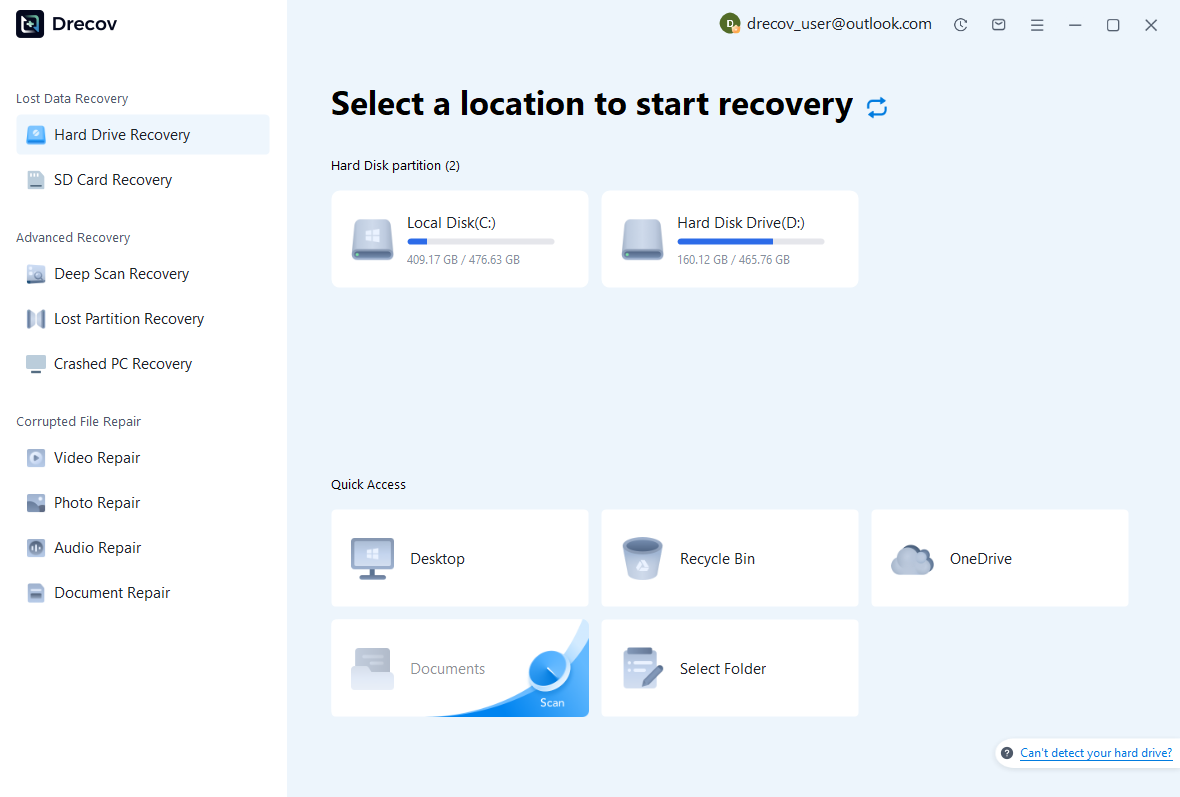
Step 2: Compare Native and Resource Candidates
Review available paths, names, dates, sizes, and supported previews. Preserve coherent layout milestones with their original context instead of merging unrelated files immediately. A readable PDF does not establish that editable native structure survived. Likewise, an SLA can contain useful layout information while linked images remain unavailable.
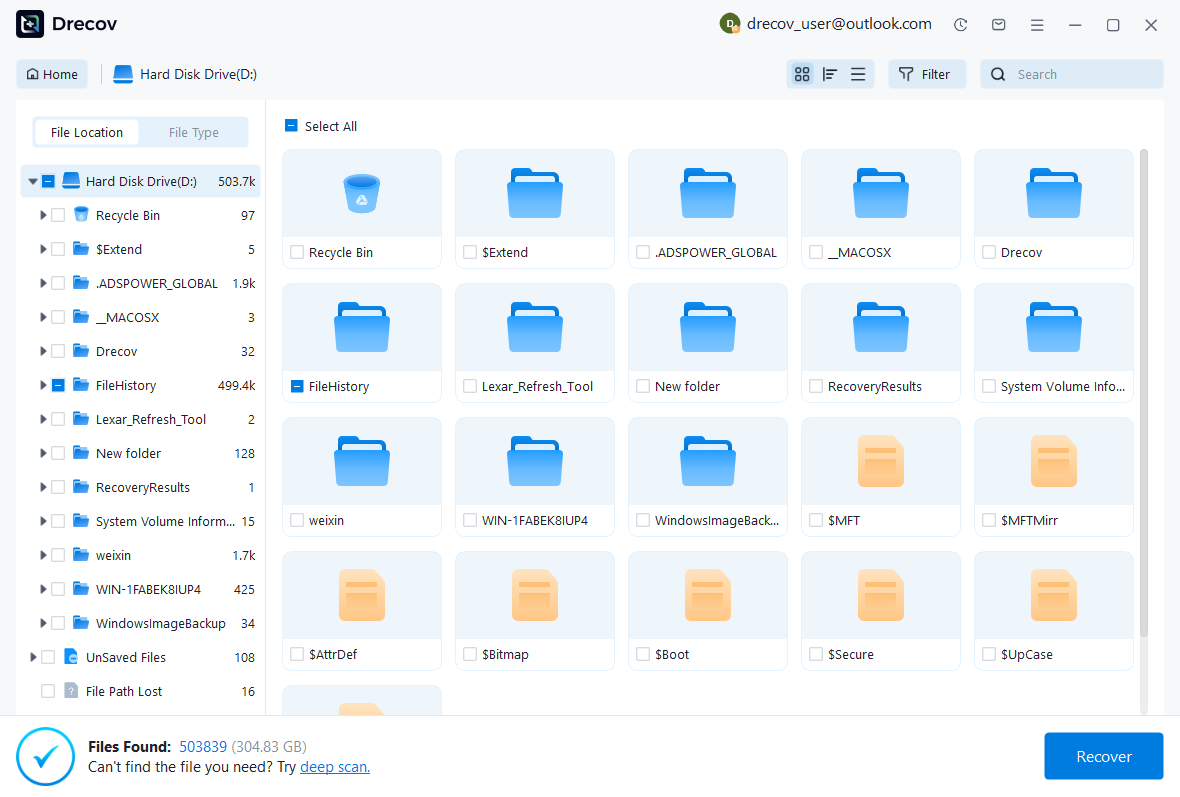
Step 3: Restore Elsewhere and Validate the Publication
Recover selected files to a separate destination and retain untouched originals. Open a working native candidate in the appropriate Scribus environment, reconnect verified images, and inspect text, flow, fonts, pages, and output. Record reconstructed objects and unresolved resources before accepting the publication for continued editing.
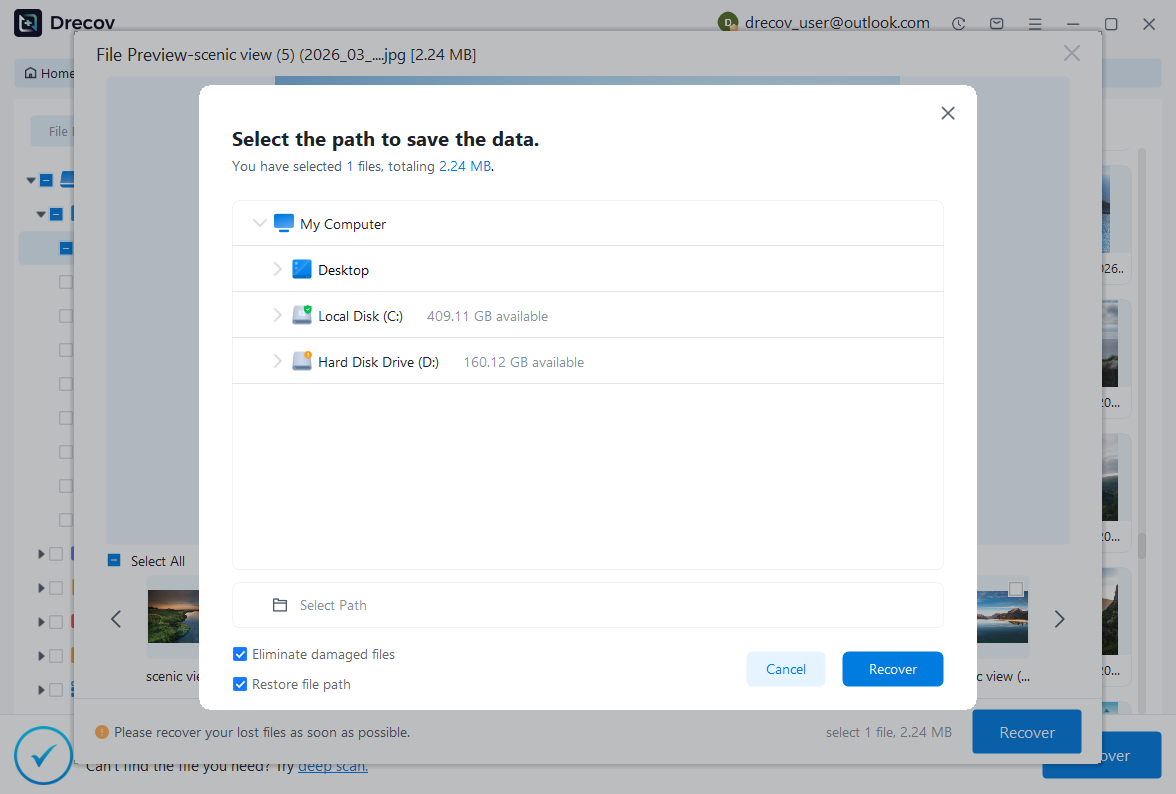
Keep a Testable Editable Publication
Preserve the accepted native layout, required resources, a trusted proof, and a short recovery record. Test a copied restore with the incident page and a representative section. This provides a practical return point for publication work rather than depending only on output that cannot reproduce its original editing structure.
Related Recovery Resources
Explore the relevant recovery options: Hard drive recovery, External hard drive recovery.
For another recovery case and its practical checks, read the related recovery guide.
Check the vendor guidance for the installed version: official recovery documentation 1, official recovery documentation 2, official recovery documentation 3.