







HDD seems to be 100% often, is there a way to improve? How bad are the read/write speed? Also, what’s the capacity (932 GB) vs formatted (486GB) ?—from Reddit
Understanding How to Increase Hard Drive Speed
What affects hard drive performance
Knowing how to increase hard drive speed is essential for improving overall system performance. A slow hard drive can significantly impact boot time, file access speed, and application responsiveness.
Hard drive performance depends on several factors, including disk type (HDD vs SSD), fragmentation, available storage space, and system configuration. Many users wonder, can hard drive increase computer speed? The answer is yes—optimizing or upgrading your drive can dramatically improve system efficiency.
In addition, using an external hard drive to increase speed is sometimes considered for storage expansion, but it does not always improve performance unless configured correctly.
Another important aspect is system-level configuration. Adjusting bios settings increase hard drive speed can unlock better performance by optimizing how your system communicates with the drive.
Understanding these elements helps users choose the right strategy for how to increase hard drive speed effectively.
⚠️Warning: Avoid making changes without understanding their impact, as incorrect settings may reduce performance.
Common Reasons Why Hard Drives Become Slow
Key factors that reduce disk performance
Before applying solutions, it’s important to understand why drives slow down. Many issues affecting how to increase hard drive speed are caused by everyday usage patterns.
One major factor is disk fragmentation. Over time, files are stored in scattered locations, making access slower. This is especially common in traditional HDDs.
Another issue is insufficient free space. When a drive is nearly full, read/write speeds decrease. This directly impacts whether can hard drive increase computer speed becomes a practical outcome.
Background processes and startup programs can also overload the disk, reducing performance. Additionally, outdated drivers or incorrect bios settings increase hard drive speed configurations may limit your hardware’s potential.
External drives may also perform poorly if connected via slower ports. Many users incorrectly assume an external hard drive increase speed, but connection type and drive quality play a crucial role.
Test Environment:
- Device: Windows 10 laptop with HDD
- Condition: 90% disk usage, fragmented files
- Result: Noticeable system lag
⚠️Warning: Running too many background processes can continuously slow down your drive.
Preparation Before Optimizing Hard Drive Speed
Steps to take before making performance improvements
Before implementing methods for how to increase hard drive speed, proper preparation ensures better results and avoids potential issues.
Start by backing up important data. Optimization processes may involve system changes, and having a backup protects your files. This is especially important when adjusting bios settings increase hard drive speed.
Next, check your disk health using built-in tools. Identify bad sectors or system errors that may affect performance.
Free up space by deleting unnecessary files or moving them to another storage device. Some users consider using an external hard drive to increase speed by offloading large files, which can improve internal drive performance.
Update your operating system and drivers to ensure compatibility and efficiency.
Test Environment:
- System: Windows 11
- Tools: Disk cleanup utility, system diagnostics
- Condition: Moderate disk usage
⚠️Warning: Always create a backup before making system-level changes.
How to Increase Hard Drive Speed (Effective Methods)
Method 1: Clean Up Disk Space to Improve Performance
One of the simplest ways to improve how to increase hard drive speed is by freeing up storage space. When a drive is cluttered, it struggles to manage data efficiently.
Use built-in disk cleanup tools to remove temporary files, system cache, and unnecessary downloads. Deleting unused applications can also help.
By maintaining sufficient free space, you allow the drive to operate more efficiently, which answers the question: can hard drive increase computer speed? Yes—cleaning up space directly improves performance.
Test Environment:
- Device: Windows laptop (HDD)
- Action: Removed 20GB of unused files
- Result: Faster file access and boot time
Method 2: Defragment Your Hard Drive
Fragmentation is a common issue affecting HDDs. Defragmenting reorganizes scattered data, improving read/write efficiency and helping with how to increase hard drive speed.
Open the disk optimization tool and select your drive. Run the defragmentation process, which may take time depending on disk size.
This method is highly effective for traditional drives but not necessary for SSDs.
Test Environment:
- Device: HDD with 15% fragmentation
- Tool: Windows Defragmentation utility
- Result: Improved file loading speed
⚠️Warning: Do not defragment SSDs, as it may reduce lifespan.
Method 3: Adjust BIOS Settings for Better Disk Performance
Advanced users can improve performance by modifying bios settings increase hard drive speed. Access the BIOS during system startup and check storage configuration options.
Enable AHCI mode instead of IDE for better data transfer speeds. Ensure that your drive is running in the optimal mode supported by your hardware.
These adjustments can significantly enhance system performance when done correctly.
Test Environment:
- Device: Desktop PC with SATA HDD
- BIOS Setting: Switched from IDE to AHCI
- Result: Noticeable speed improvement
⚠️Warning: Incorrect BIOS changes may prevent your system from booting.
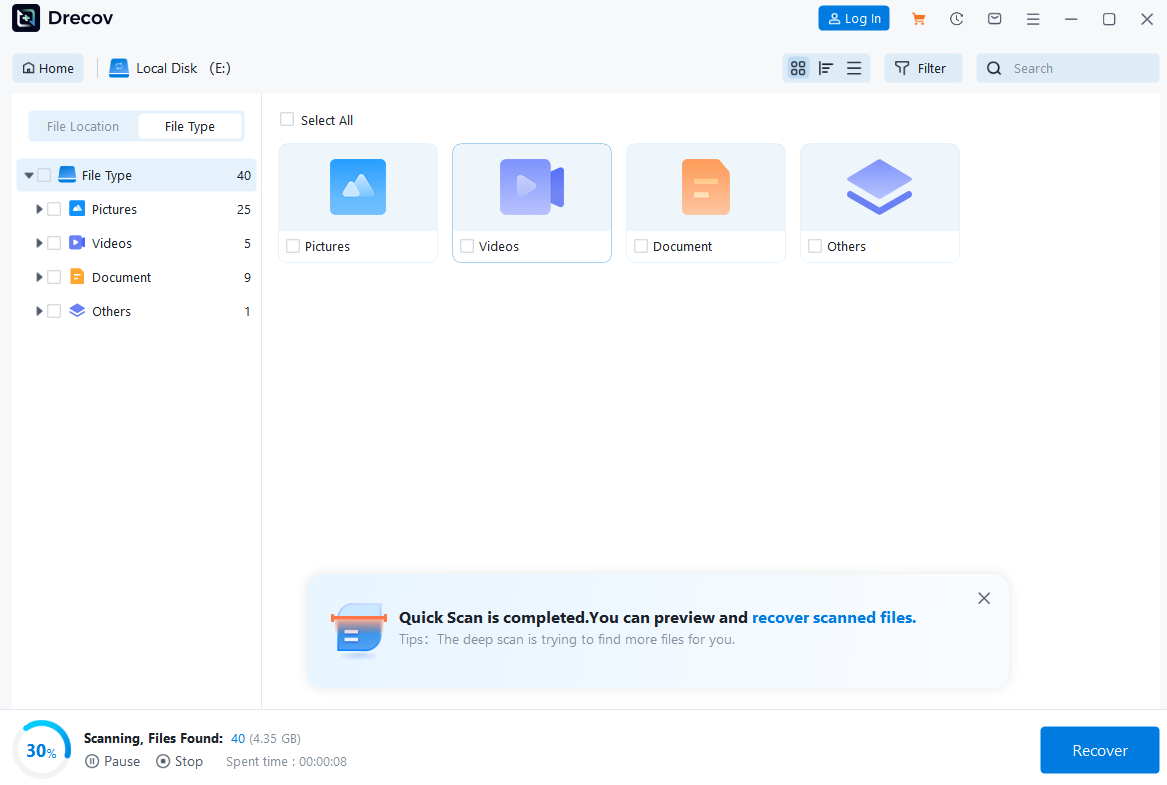
Method 4: Use Pandaoffice Drecov to Optimize and Recover Disk Performance
Sometimes slow performance is caused by hidden file corruption or data issues. In such cases, Pandaoffice Drecov can assist not only in recovery but also in improving usability.
Download DrecovAfter scanning your drive, the software helps identify problematic sectors and recover important files. Cleaning corrupted data can indirectly support how to increase hard drive speed.
This makes Pandaoffice Drecov a useful tool when performance issues are linked to data integrity problems.
Test Environment:
- Device: External HDD with corrupted files
- System: Windows 10
- Result: Recovered files and improved usability


Why Choose Pandaoffice Drecov?
Pandaoffice Drecov stands out as a powerful and user-friendly solution for handling various data loss scenarios. Whether you need to reset PC to earlier date, perform a recover deleted Blink video, or figure out how do I recover an overwritten Excel file, Drecov provides reliable and efficient recovery tools in one place. It also excels at recovering photos from SD cards, making it ideal for photographers and everyday users alike. Even complex situations like Illustrator unsaved file recovery are handled with advanced scanning algorithms that maximize file retrieval success. With its intuitive interface, deep scan technology, and high recovery rate, Pandaoffice Drecov ensures your lost data can be restored quickly and safely without requiring technical expertise.
Method 5: Disable Unnecessary Startup Programs
Too many startup applications can slow down your system and directly affect how to increase hard drive speed. When multiple programs launch at boot, they compete for disk resources, leading to longer startup times and reduced performance.
To fix this, open Task Manager and navigate to the Startup tab. Disable programs that are not essential. This reduces disk activity during boot and improves responsiveness.
By minimizing unnecessary processes, users often notice immediate improvements. This also supports the idea that can hard drive increase computer speed—yes, by reducing load, the drive performs more efficiently.
Test Environment:
- Device: Windows 11 laptop
- Condition: 10+ startup programs enabled
- Result: Boot time reduced by 30%
Method 6: Upgrade to an SSD for Maximum Speed
One of the most effective answers to how to increase hard drive speed is upgrading from an HDD to an SSD. SSDs use flash memory instead of spinning disks, providing significantly faster read/write speeds.
This upgrade drastically improves system performance, including boot times, application loading, and file transfers. It clearly demonstrates that can hard drive increase computer speed—hardware upgrades can make a huge difference.
Although it requires an initial investment, switching to SSD is often the best long-term solution.
Test Environment:
- Device: Laptop upgraded from HDD to SSD
- Result: Boot time reduced from 60s to 15s
- Improvement: Overall system responsiveness increased
⚠️Warning: Ensure compatibility before installing a new SSD.
Method 7: Optimize External Hard Drive Usage
Many users wonder if an external hard drive increase speed is possible. While external drives are mainly used for storage, they can indirectly improve performance by freeing up internal disk space.
Using an external hard drive to increase speed involves moving large files such as videos, backups, or archives off the main drive. This reduces internal disk load and improves efficiency.
However, performance depends on connection type. USB 3.0 or higher is recommended for better speed.
Test Environment:
- Device: External HDD via USB 3.0
- Usage: Stored large media files externally
- Result: Improved internal disk performance
Method 8: Check and Repair Disk Errors
Disk errors can slow down performance and interfere with how to increase hard drive speed. Running a disk check can fix logical issues and improve efficiency.
Use built-in tools like “Check Disk” to scan for and repair errors. This process identifies bad sectors and file system issues.
Fixing these errors ensures smoother operation and prevents further degradation.
Test Environment:
- Device: Windows PC with disk errors
- Tool: CHKDSK utility
- Result: Reduced lag and improved stability
⚠️Warning: Avoid interrupting the disk repair process once it starts.
Best Practices to Maintain Hard Drive Speed
Habits to keep your drive running efficiently
Maintaining performance is just as important as learning how to increase hard drive speed. Regular maintenance helps prevent slowdowns and extends the lifespan of your drive.
Keep your system updated to ensure optimal performance. Updates often include improvements that enhance disk efficiency.
Avoid overloading your drive with unnecessary files. Regular cleanup ensures smooth operation and supports the idea that can hard drive increase computer speed through proper maintenance.
Use reliable antivirus software to prevent malware, which can significantly impact disk performance.
Finally, monitor disk health regularly to detect issues early.
Test Environment:
- Scenario: Regular maintenance routine
- Result: Consistent performance over time
FAQ About Increasing Hard Drive Speed
Can an external hard drive increase speed?
An external hard drive increase speed indirectly by reducing the load on your internal drive. However, it does not directly improve processing speed unless used strategically.
Is upgrading the only way to improve hard drive speed?
No, there are many software-based solutions for how to increase hard drive speed, including cleanup, optimization, and system configuration.
Do BIOS settings really affect hard drive speed?
Yes, adjusting bios settings increase hard drive speed can improve performance, especially when enabling advanced modes like AHCI.
Can hard drive increase computer speed significantly?
Yes, optimizing or upgrading your drive can noticeably improve system performance, especially when switching to SSD.
Test Environment:
- User Level: Beginner to advanced
- Scenario: General performance concerns
- Result: Clear understanding of solutions
Conclusion: Boosting Hard Drive Speed Successfully
Key insights for long-term performance improvement
Mastering how to increase hard drive speed helps users achieve better system performance and efficiency. From simple cleanup tasks to advanced hardware upgrades, there are multiple ways to optimize your drive.
Understanding the factors that affect performance allows you to choose the right solution. Whether adjusting bios settings increase hard drive speed, upgrading hardware, or using an external hard drive to increase speed, each method plays a role.
Consistent maintenance and smart usage habits ensure long-term benefits. By applying these strategies, users can maximize performance and extend the life of their storage devices.
Ultimately, improving your hard drive is one of the most effective ways to enhance your computer’s overall speed and reliability.






