







Video SD Card Recovery Overview and What Happens When Videos Are Deleted
What “video sd card recovery” means in real scenarios
When users talk about video sd card recovery, they usually refer to the process of restoring lost, deleted, or inaccessible video files from an SD card used in cameras, phones, drones, or other recording devices.
Video files are often larger than images, which means they are more vulnerable to corruption or accidental deletion. This leads many users to search for solutions such as recover deleted videos from sd card or how to recover deleted sd card videos when important footage disappears.
In most cases, deletion does not immediately remove video data from storage. Instead, the system marks the space as available for reuse.
Why SD card videos get deleted or lost
There are several common reasons why users need to perform retrieve deleted videos from sd card operations:
- Accidental deletion during playback
- Formatting SD card by mistake
- Camera battery dying during recording
- File system corruption
- Virus or malware attacks
- Improper SD card removal
Each of these situations can lead to missing or unreadable video files.
Difference between deleted, corrupted, and formatted videos
Understanding the type of data loss is critical:
- Deleted videos → still recoverable in most cases
- Corrupted videos → partially recoverable
- Formatted SD cards → deeper recovery required
This distinction helps determine how to how to recover deleted videos from sd card effectively.
⚠️Warning: stop using SD card immediately after video loss
⚠️Warning: Continuing to record or save new files may overwrite deleted videos, making recovery impossible.
Common Causes of Video Loss on SD Cards
Accidental deletion during playback or transfer
One of the most common reasons for how to get deleted videos from sd card is accidental deletion while reviewing files on a camera or phone screen.
Users may unknowingly delete entire folders or important clips.
SD card formatting errors
Formatting is another major cause of video loss. Sometimes users format the wrong SD card or a device automatically prompts formatting due to file system errors.
This often leads to searches like:
- how to restore deleted videos from sd card
File system corruption during recording
If the camera battery dies or SD card is removed during recording, file structure may break. This results in incomplete or unreadable video files.
Hardware instability or aging SD cards
SD cards have limited lifespan. Over time, memory cells degrade, increasing the risk of video loss.
Basic Methods for Video SD Card Recovery
Before using advanced tools, check:
- Camera playback mode
- Hidden folders on computer
- Temporary cache files
Sometimes videos are not deleted but only hidden.
Method 2 – Use Windows File Explorer recovery attempt
Insert SD card into a computer and check DCIM or VIDEO folders.
Steps:
- Connect SD card
- Open File Explorer
- Browse folders
- Check for missing or hidden files
This is a basic step for recover deleted videos from sd card.
Method 3 – Use Recycle Bin and backup sources
If SD card was connected to PC, deleted files may exist in Recycle Bin or cloud backups.
Test Environment
- Windows 11 Home
- 64GB SDHC card
- DSLR camera video files (MP4 format)
No overwritten data detected, allowing partial manual recovery.
Advanced Methods for Recovering Deleted Videos from SD Card
Using deep scan recovery software
Deep scan tools analyze raw storage sectors instead of file structure. This is essential for how to recover video deleted from sd card cases.
They can detect:
- Fragmented video files
- Lost file headers
- RAW video data
File signature-based video reconstruction
Even if file names are lost, recovery tools can rebuild videos using file signatures like MP4, MOV, and AVI patterns.
Pandaoffice Drecov video recovery method
Pandaoffice Drecov can perform deep-level scanning to recover deleted or formatted video files from SD cards. It is especially effective for:
- video sd card recovery
- how to recover deleted sd card videos
- retrieve deleted videos from sd card
It reconstructs lost video fragments and restores playable files when possible.
Pandaoffice Drecov Video Recovery Steps for SD Card
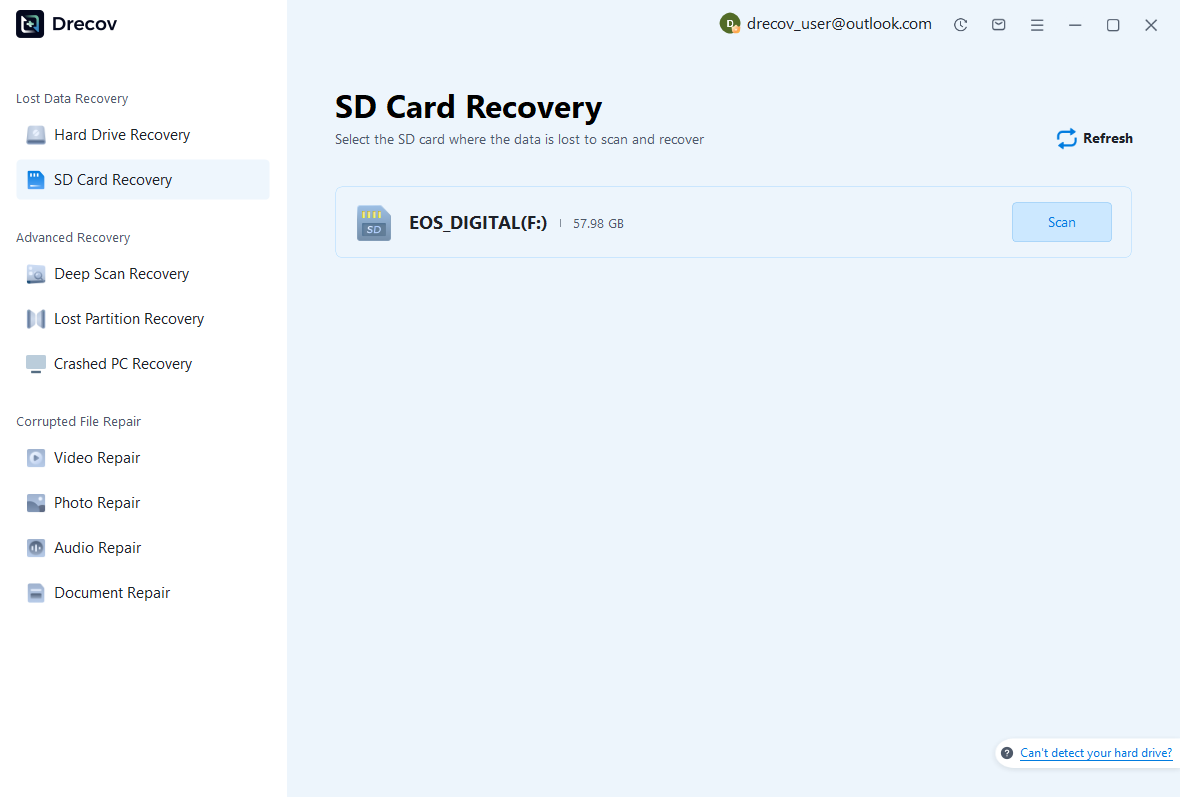
Step 1 – Launch software and connect SD card
Install and open Pandaoffice Drecov on your computer, then insert the SD card using a card reader. Select the target SD card from the device list to begin recovery for video sd card recovery.
Step 2 – Start scanning for lost videos
Click Scan to begin searching for deleted or missing video files. If the SD card has been formatted or shows missing videos, choose Deep Scan for better results in how to recover deleted sd card videos cases.
The scan will analyze:
- Deleted video entries
- Fragmented video data
- Lost directory structures
- RAW file signatures
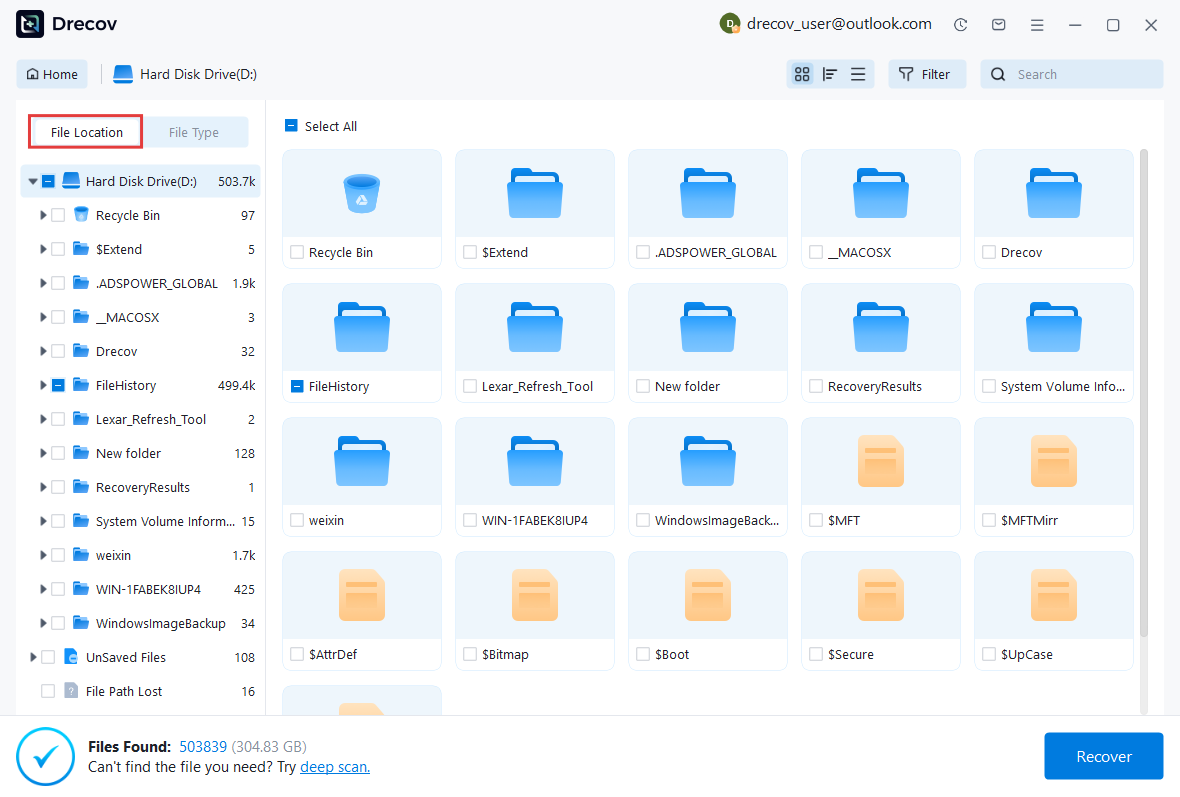
Step 3 – Filter and preview video files
After scanning, filter results by video formats such as MP4, MOV, AVI, or other camera formats. Preview available files to confirm whether they are intact before recovery.
This step is important for retrieve deleted videos from sd card scenarios.
Step 4 – Select and recover videos
Choose the videos you want to restore and click Recover.
⚠️Warning: Do not save recovered videos back to the same SD card, as this may overwrite remaining recoverable data.
Recommended save locations:
- Computer hard drive
- External storage device
- Desktop folder
Step 5 – Check recovered video quality
After recovery, open the files and verify:
- Video playback smoothness
- Audio synchronization
- Frame completeness
If some videos are corrupted or incomplete, run another Deep Scan to improve recovery results.
Test Environment
- Windows 11 Pro
- 128GB SDXC card
- Deleted 4K video files (GoPro format)
Deep scan successfully detected multiple recoverable video fragments.

Why Choose PandaOffice Drecov Recovery Software?
PandaOffice Drecov offers a fast, secure, and user-friendly solution for recovering lost files across multiple scenarios. Whether you need email recovery, ZIP File Recovery, format data recovery, or help to recover deleted drafts Outlook, the software provides reliable recovery performance for both personal and business users.
PandaOffice Drecov supports recovery from formatted hard drives, SSDs, USB drives, SD cards, and external storage devices. Its advanced scanning engine can locate deleted archives, damaged ZIP files, lost Outlook drafts, and accidentally removed documents with high accuracy. For users searching for how to find deleted messages in Teams, PandaOffice Drecov can also help recover exported chat files, attachments, and related local cache data when available.
Key advantages include:
- Deep scan technology for complex data loss situations
- Support for emails, archives, videos, photos, and office documents
- Recovery from accidental deletion, formatting, corruption, and system crashes
- Easy preview before restoring files
- Compatible with Windows and multiple storage devices
Unlike complicated enterprise recovery tools, PandaOffice Drecov keeps the recovery process simple. Users can scan, preview, and restore files in just a few steps without technical expertise.
Whether you are dealing with lost Outlook drafts, corrupted ZIP archives, formatted drives, or missing communication data, PandaOffice Drecov provides an efficient and practical recovery experience designed to minimize downtime and protect important files.
Advanced Recovery for Corrupted or Unplayable SD Card Videos
How corrupted video files affect SD card recovery
In many video sd card recovery cases, users don’t just lose files—they find videos that exist but cannot be opened. This usually happens when the file header or index structure is damaged during recording or transfer.
Corruption often results in:
- Black screen when playing video
- Audio without image
- “Unsupported format” errors
- Partial or frozen playback
These situations are still relevant to how to recover deleted sd card videos, because the file data may still physically exist.
Repairing corrupted videos after recovery
Once videos are recovered, some may require repair. Corruption is often caused by interrupted recording or sudden power loss.
Common repair approaches include:
- Rebuilding file headers
- Re-encoding damaged frames
- Extracting playable segments
This step is important for users trying to how to restore deleted videos from sd card when recovered files are not immediately usable.
⚠️Warning: do not overwrite corrupted SD card before recovery
⚠️Warning: Writing new videos to the same SD card may permanently overwrite recoverable fragments.
Recover Deleted Videos After Formatting SD Card
Why formatted SD cards still allow video recovery
Many users assume formatting permanently deletes files, but in most cases, only the file index is removed. The actual data remains until overwritten.
This is why how to get deleted videos from sd card is still possible even after formatting.
Deep scan recovery for formatted SD cards
Deep scan mode is essential in formatted scenarios. It reconstructs lost directory structures and scans raw memory blocks for video signatures.
It can recover:
- MP4 files
- MOV recordings
- AVI camera footage
- Drone video files
Test Environment
- Windows 11 Pro
- 256GB SDXC card (quick formatted)
- Mixed video dataset (4K + 1080p)
Deep scan successfully recovered multiple video files with partial folder structure restoration.
Common Problems During Video SD Card Recovery
SD card not detected during recovery
Sometimes the SD card is not recognized by the system. This may be due to:
- Card reader failure
- File system corruption
- Physical damage
In such cases, recovery tools cannot proceed until the device is detected.
Recovered videos cannot play
This usually happens when:
- File fragments are incomplete
- Metadata is missing
- Frames are partially overwritten
Advanced repair tools may help restore playback.
Videos recovered but missing audio or frames
This is common in partially corrupted files and often requires video reconstruction techniques.
FAQ: Video SD Card Recovery Questions
How to recover deleted videos from sd card safely
Stop using the SD card immediately and use recovery software to scan for lost files. Avoid formatting or saving new videos.
Can I retrieve deleted videos from sd card after formatting
Yes, in most cases formatted videos can still be recovered using deep scan tools unless overwritten.
How to restore deleted videos from sd card without software
You can check backups, camera cache, or cloud storage, but success is limited compared to recovery tools.
Why some recovered videos are corrupted
Corruption occurs when file fragments are partially overwritten or the file structure is damaged during loss.
Prevention Tips for SD Card Video Loss
Best practices to avoid video deletion
To reduce the need for video sd card recovery, follow these practices:
- Always safely eject SD cards
- Avoid full storage usage
- Use high-quality SD cards
- Avoid interrupting video recording
Regular backup strategy for video protection
Back up important footage regularly to:
- Cloud storage
- External hard drives
- Computer systems
Conclusion: Key Takeaways for SD Card Video Recovery
Final understanding of video SD card recovery
Recovering deleted videos from SD cards is often possible because deletion does not immediately erase data. The success of recover deleted videos from sd card depends mainly on whether new data has overwritten the original files.
When recovery is most successful
Recovery is most effective when:
- SD card is not reused after deletion
- Data loss is recent
- No physical damage exists
Final recommendation
For users facing how to recover video deleted from sd card situations, immediate action is critical. Using deep scan recovery tools before writing new data significantly increases success rates, especially for large video files and high-resolution recordings.





