







The Evolution of Ultra-Compact Flash Memory Storage
Ultra-compact storage expanders have permanently redefined how mobile ecosystems, portable consoles, action cameras, and smart surveillance devices handle local binary files. These microscopic storage units rely on high-density vertical flash architectures to pack massive datasets into layouts no larger than a human fingernail. While these design leaps provide unparalleled physical convenience, the structural density creates unique operational challenges. When high-density sectors fail, deploying a robust micro sd card recovery software becomes the immediate defensive line for recovering missing data assets.
The foundational design of microscopic flash blocks makes them distinct from traditional mechanical disks. Instead of moving magnetic components, these modules rely on intricate electronic logic gates that control the flow of electrons through insulated silicon barriers. When these electronic barriers degrade, dedicated parsing routines must isolate the blocks to extract hidden hex code. Understanding these technical dynamics helps users select the best tool to resolve memory faults safely.
How File Allocation Structures Break Down in Tiny Media
The data storage architecture of miniature cards is vulnerable to unexpected structural collapse. Logical partition problems often happen due to abrupt voltage shifts or cutting off read-and-write pathways mid-cycle. One primary catalyst for loss is a corrupted Master Boot Record, which makes the host device see the partition table as raw, unformatted space. Another frequent error is directory desynchronization, which detaches the file name pointer from its physical storage location on the chip.
Additionally, fine micro-particles or minor scratches on the copper contact tracks can block standard hardware interfaces from reading data lines correctly. When an operating system encounters these physical or logical faults, it drops the connection to safeguard the environment. Using an advanced microsd card recovery application allows a recovery engine to bypass standard operating system file restrictions, communicating directly with the hardware controller to pull out raw disk blocks before they corrupt further.
⚠️Warning: Do not format or write new data to a storage card showing errors; doing so overwrites the vacant allocation tables and causes permanent data loss.
Technical Prerequisites for Successful Solid-State Data Retrieval
Core Evaluation Metrics for Advanced Digital Carving Engines
Selecting an effective micro sd card recovery utility requires checking its raw file carving performance. File carving is an advanced technique where the software bypasses file system structures completely, reading the raw data sectors directly to identify unique header and footer signatures (such as recognizing a JPEG via its standard binary marker strings). The quality of these carving algorithms dictates whether the program can piece together fragmented data blocks scattered across different storage areas.
A reliable micro sd card recovery program should use a dual-tier scanning setup. The fast scan layer performs an agile directory sweep to find recently deleted files in a few seconds, while the deep architecture layer performs a comprehensive block-by-block deep scan. This deeper analysis is vital for recovering data from cards that have suffered severe logical crashes or accidental formatting.
Cross-Platform Compatibility and File Extension Support
Modern digital asset pipelines run across multiple operating systems, making cross-platform compatibility a key requirement for restoration tools. A robust application setup must run smoothly on both Windows and macOS machines, parsing common flash file systems like FAT32, exFAT, and NTFS without throwing system conflicts or error loops.
Additionally, the software must feature wide file format support. It needs to read standard documents alongside highly complex professional file types, such as camera raw images and advanced multi-channel video containers. This broad format support ensures comprehensive file recovery across different mobile and professional media devices.
Comprehensive Evaluation of Premium MicroSD Restoration Methods
Method 1: Pandaoffice Drecov Advanced Solution Suite
Test Environment: Windows 11 Enterprise, Intel Core i7 Processor, 32GB RAM, SanDisk Extreme 128GB MicroSDXC Card (exFAT formatted).
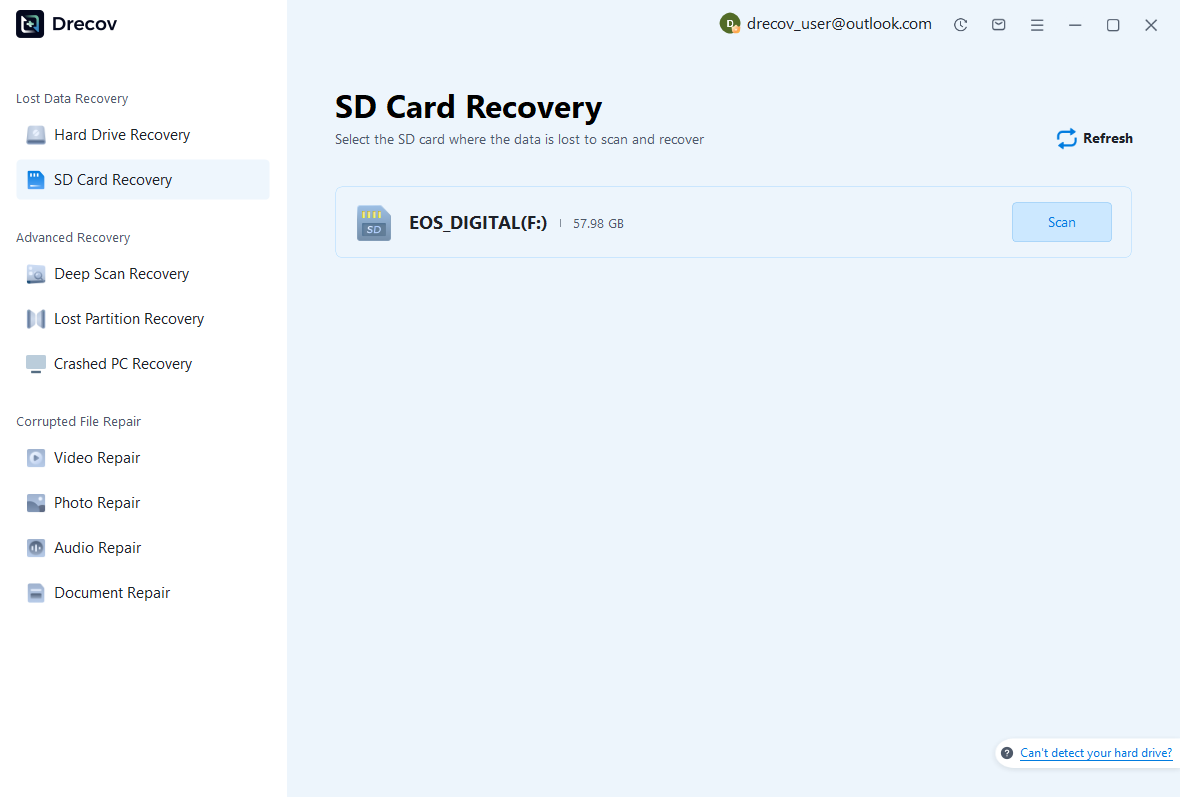
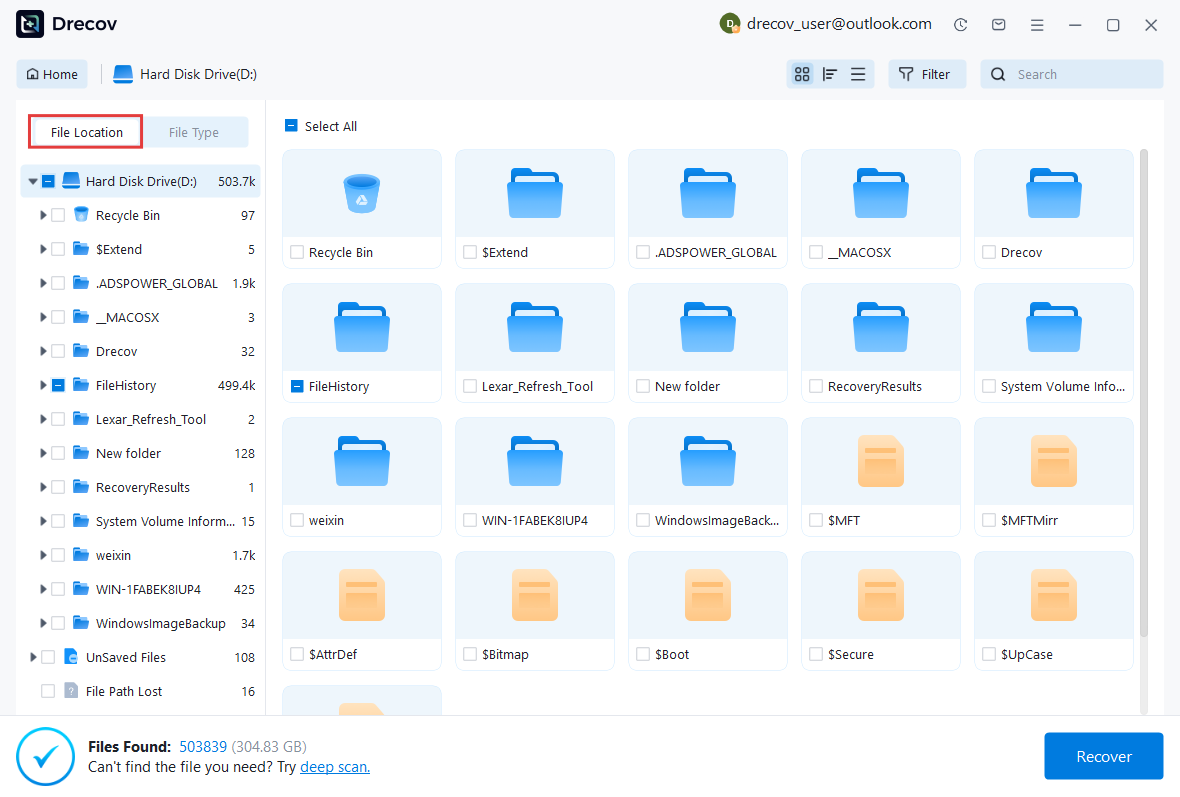
Pandaoffice Drecov offers an exceptionally refined, modern recovery platform built explicitly for high-density flash storage media. It features an advanced deep scanning engine optimized to handle highly fragmented media files. By using a unique data block reconstruction algorithm, it can locate, align, and piece back together fractured data streams, making it an excellent choice for rescuing ultra-high-definition video files and high-resolution camera images.
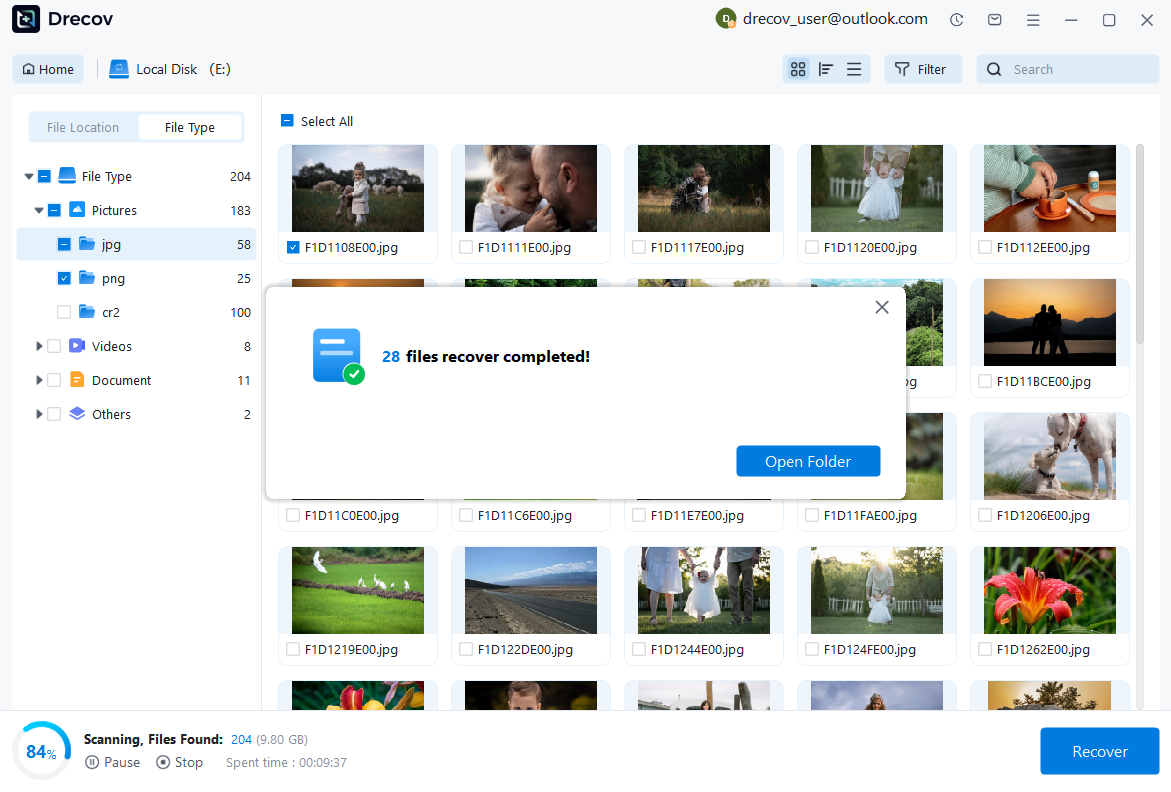
The utility includes an intuitive, guided interface that simplifies complex partition parsing for users of all technical backgrounds. It bypasses standard operating system locks to read raw storage sectors directly, providing real-time file previews while the scan runs.
Pros:
- Highly effective at reassembling fragmented video file structures.
- Minimal system memory usage during intense deep scanning routines.
- Clear, modern user workflow reduces operational errors.
Cons:
- Deep sector parsing can take longer on high-capacity storage configurations.
Why Choose PandaOffice Drecov Recovery Software?
PandaOffice Drecov offers a fast, secure, and user-friendly solution for recovering lost files across multiple scenarios. Whether you need email recovery, ZIP File Recovery, format data recovery, or help to recover deleted drafts Outlook, the software provides reliable recovery performance for both personal and business users.
PandaOffice Drecov supports recovery from formatted hard drives, SSDs, USB drives, SD cards, and external storage devices. Its advanced scanning engine can locate deleted archives, damaged ZIP files, lost Outlook drafts, and accidentally removed documents with high accuracy. For users searching for how to find deleted messages in Teams, PandaOffice Drecov can also help recover exported chat files, attachments, and related local cache data when available.
Key advantages include:
- Deep scan technology for complex data loss situations
- Support for emails, archives, videos, photos, and office documents
- Recovery from accidental deletion, formatting, corruption, and system crashes
- Easy preview before restoring files
- Compatible with Windows and multiple storage devices
Unlike complicated enterprise recovery tools, PandaOffice Drecov keeps the recovery process simple. Users can scan, preview, and restore files in just a few steps without technical expertise.
Whether you are dealing with lost Outlook drafts, corrupted ZIP archives, formatted drives, or missing communication data, PandaOffice Drecov provides an efficient and practical recovery experience designed to minimize downtime and protect important files.
Method 2: Recuva Data Recovery Performance Review
Test Environment: Windows 10 Professional, AMD Ryzen 5 Processor, 16GB RAM, Kingston Canvas Select 64GB MicroSDHC Card (FAT32 formatted).
Recuva is a lightweight, widely accessible recovery application built primarily for Windows file structures. It is highly efficient for fast recovery tasks where the underlying folder directories are still partially intact after an accidental deletion. The software uses a straightforward wizard interface that guides users through quick target selections based on common file groups like images, music, or documents.
It also supports a portable execution setup, meaning the program can run directly from an external USB drive without installing new data on the host computer’s hard drive, preventing accidental file overwriting.
Pros:
- Offers a completely free, unrestricted usage option for standard files.
- Portable configuration options prevent accidental data overwriting.
- Rapid scanning speeds during standard directory pointer sweeps.
Cons:
- Lacks a native application version for macOS environments.
- Lower success rates when dealing with severely corrupted raw partitions.
Method 3: EaseUS Data Recovery System Testing
Test Environment: macOS Sonoma, Apple M2 Silicon Chip, 16GB Unified Memory, Lexar Professional 64GB MicroSDXC Card (exFAT formatted).
EaseUS Data Recovery provides a highly automated, polished scanning platform across both Windows and Mac operating systems. The software automatically scans connected external drives and can easily parse complex directory tracks while retaining original file names and folder structures upon recovery.
The software features an advanced filter menu that lets users quickly sort through scanned files by extension type, creation date, or size, significantly cutting down the time needed to locate specific files within massive datasets.
Pros:
- Clean, intuitive user interface design that minimizes mistakes.
- Preserves original nested folder configurations accurately.
- Stable scanning execution across both major operating platforms.
Cons:
- The free version has a strict data limit before requiring a commercial license.
Method 4: Disk Drill Architecture Assessment
Test Environment: macOS Ventura, Apple M1 Chip, 8GB Unified Memory, PNY Elite-X 32GB MicroSDHC Card (FAT32 formatted).
Disk Drill is well-regarded for its advanced binary scanning capabilities and clean interface layout on both Windows and macOS. The tool uses non-destructive read protocols to scan storage blocks safely, protecting unstable media from extra wear. It allows users to save active scanning progress to a session file, so you can pause and resume long deep scans without losing progress.
The software also includes extra preventative utilities like drive health monitoring and data protection vaults designed to track storage status and protect against future data loss.
Pros:
- Seamlessly saves, pauses, and resumes lengthy scanning sessions.
- Integrated disk health tracking tools offer helpful early warnings.
- High recovery success rate when reconstructing raw digital photo profiles.
Cons:
- Requires notable system memory allocation during deep sector carving.
Method 5: PhotoRec Command-Line Diagnostics
Test Environment: Ubuntu Linux 22.04 LTS, Intel Core i5 Processor, 16GB RAM, Samsung EVO Plus 128GB MicroSDXC Card (exFAT formatted).
PhotoRec is a highly powerful, open-source data recovery application that relies entirely on a text-based command-line interface. By ignoring existing file system structures completely, the engine relies strictly on signature-based data carving, searching raw storage blocks for known file headers to recover files from unformatted or severely corrupted media cards.
Because it operates independently of high-level OS storage managers, it runs reliably across Windows, macOS, and Linux systems. While the text interface has a steeper learning curve, its underlying recovery engine is exceptionally powerful.
Pros:
- Open-source, entirely free utility with no file size limitations.
- High success rates on corrupted, unmapped, or raw storage volumes.
- Exceptionally lightweight operational footprint with fast scan execution.
Cons:
- Lacks a graphical user interface and visual file preview options.
- Does not preserve original file names or folder paths.
Method 6: Stellar Data Recovery Evaluation
Test Environment: Windows 11 Home, AMD Ryzen 7 Processor, 16GB RAM, Toshiba Exceria 64GB MicroSDXC Card (exFAT formatted).
Stellar Data Recovery offers a highly structured, reliable utility designed to extract missing files from formatted, damaged, or encrypted flash memory volumes. The software features specialized code sequences tailored to parse BitLocker-encrypted drives and custom file signatures. Its clean interface allows users to easily toggle specific data categories on or off before starting a scan.
The program includes an integrated file preview utility that supports multimedia formats, allowing users to verify file integrity prior to extraction.
Pros:
- Native capability to scan and recover data from encrypted partitions.
- Advanced, accurate file previews for video and image files.
- Highly structured sorting filters simplify large data management.
Cons:
- Deep scanning modules require substantial time on high-capacity media.
Method 7: MiniTool Power Data Recovery Review
Test Environment: Windows 10 Home, Intel Core i3 Processor, 8GB RAM, SanDisk Ultra 32GB MicroSDHC Card (FAT32 formatted).
MiniTool Power Data Recovery is engineered to offer targeted, sector-specific scans across varied hardware configurations. The software features an optimized scanning layout that allows users to target specific folders or logical locations, saving time when a full drive scan isn’t necessary. It parses raw partition blocks smoothly and shows clear status indicators during operation.
The user interface uses clean iconography and provides simple checkboxes for batch file exporting. Its recovery engine works reliably when retrieving files lost to accidental deletion, partition damage, or system crashes.
Pros:
- Allows targeting specific folders to reduce overall scanning times.
- Clear visual indicators for partition health and scan progress.
- Reliable stability on older Windows operating system configurations.
Cons:
- The user interface layout feels dated compared to newer alternatives.
Method 8: Wise Data Recovery Suite Operations
Test Environment: Windows 11 Pro, Intel Core i5 Processor, 16GB RAM, Kingston Canvas Go 64GB MicroSDXC Card (exFAT formatted).
Wise Data Recovery prioritizes speed and efficiency, utilizing a highly optimized search algorithm that parses file allocation tables in seconds. The application is exceptionally compact, requiring minimal storage space for installation and low system resources during operation. It is best suited for quickly recovering recently deleted files before they are overwritten.
The software uses a straightforward color-coded system to indicate the recovery feasibility of found files, helping users quickly assess the likelihood of a successful restoration. While its deep scan mode is more basic than some competitors, its quick scan speed is top-tier.
Pros:
- Fast scanning speeds for standard data deletions.
- Low system resource usage and small installation footprint.
- Simple color-coded indicators show file health and recovery chances.
Cons:
- Deep sector carving capabilities are limited on corrupted media.
Method 9: iCare Data Recovery Assessment
Test Environment: Windows 10 Enterprise, Intel Core i7 Processor, 16GB RAM, Transcend Premium 128GB MicroSDXC Card (exFAT formatted).
iCare Data Recovery provides a simple, direct approach to partition reconstruction and file retrieval. It features dedicated recovery profiles for different data loss scenarios, such as accidental deletion or formatted drives. The utility scans block clusters safely, reading data without altering or overwriting any existing blocks on the source drive.
It works efficiently on low-spec hardware configurations, using minimal processing power while maintaining stable data stream connections. It is an effective option for recovering standard files from storage cards that show raw partition errors.
Pros:
- Read-only scanning engine ensures no data is altered during recovery.
- Simple, direct workflow tailored for straightforward recovery tasks.
- Performs reliably on older computer systems with limited resources.
Cons:
- Lacks advanced video file reassembly features for fragmented media.
Method 10: Puran File Recovery Application
Test Environment: Windows 11 Pro, AMD Ryzen 3 Processor, 8GB RAM, Lexar Platinum 16GB MicroSDHC Card (FAT32 formatted).
Puran File Recovery is a lightweight utility focused on raw file parsing and custom directory rebuilding. It features a straightforward interface that exposes advanced scanning options, such as full cluster scans and custom sector searches, directly on the main screen. The software operates entirely ad-free and can be run as a portable application.
Its data carving engine can identify lost partitions and restore files based on binary headers, making it a reliable choice for older or corrupted storage media.
Pros:
- Light, fully portable application with zero background processes.
- Advanced cluster search options are easily accessible.
- Completely free for personal use with no artificial data caps.
Cons:
- The interface layout is dated and lacks modern visual styling.
- Development has paused, meaning no updates for newer file systems.
Frequently Asked Questions and Scientific Insights
Demystifying Micro-Storage Technical Realities
A common question when working with legacy portable media setups is whether a specialized mini sd card recovery software is required for slightly larger historic card types. Physically, miniSD cards use the exact same underlying NAND flash memory architecture and logic controllers as modern MicroSD devices. Because of this structural match, modern data carving applications can read and restore missing data blocks from miniSD cards just as easily, provided you use an appropriate physical hardware adapter to connect the media to your computer.
Another frequent question is whether software can restore files after a full format operation. If the drive underwent a quick format, the data sectors stay intact while only the index framework is cleared, allowing software tools to find and rebuild the data. However, a full format writes zeros across every sector, permanently erasing the data blocks and making software-based recovery impossible.
⚠️Warning: Never use cheap, unverified card readers when trying to recover unstable media; poor internal components can cause power surges that permanently fry the memory chip.
Core Specifications Comparison Matrix
| Software Product Name | Free Capability Limit | Primary Platform Support | Optimized Use Case Target |
|---|---|---|---|
| Pandaoffice Drecov | Evaluation Limitation | Windows Only | Fragmented High-Bitrate Media |
| Recuva | Unrestricted Free Tier | Windows Only | Fast Local File Deletions |
| EaseUS Data Recovery | Up to 2 GB Total | Windows / macOS | Directory Hierarchy Preservation |
| Disk Drill | 500 MB (Windows) | Windows / macOS | Raw Camera Photo Profiles |
| PhotoRec | Unrestricted Open Source | Win / Mac / Linux | Severely Corrupted Volumes |
| Stellar Recovery | Up to 1 GB Total | Windows / macOS | Encrypted Partition Parsing |
| MiniTool Suite | Up to 1 GB Total | Windows Only | Specific Directory Targets |
| Wise Data Recovery | Quick Scan Free Tier | Windows Only | High-Speed Index Searches |
| iCare Recovery | Unrestricted Basic Tier | Windows Only | Low-Resource Hardware Systems |
| Puran File Engine | Unrestricted Free Tier | Windows Only | Custom Cluster and Sector Searches |
Strategic Summary and Protective Maintenance Protocols
Ensuring Optimal Data Extraction Conditions
To achieve the highest possible recovery success rate when using a micro sd card recovery tool, users must follow a strict isolation protocol. The moment a deletion error or format prompt is noticed, the memory card must be immediately removed from the host camera, smartphone, or card reader. This prevents background system tasks from writing hidden log files or metadata onto the card and overwriting your lost data.
When configuring your chosen software scan, always set the recovery output directory to a separate local hard drive or cloud volume, never back onto the same memory card. Saving files back to the source card during a live recovery will cause the software to overwrite its own data sectors, ruining the recovery.
⚠️Warning: Do not run multiple scanning applications at the same time on the same storage card; this causes hardware read conflicts and can wear out unstable flash memory chips.
Proactive Maintenance and Data Preservation Routines
While having access to powerful recovery applications provides an excellent safety net, maintaining a disciplined backup schedule is the most effective defense against permanent data loss. Keeping identical, updated file duplicates across cloud storage platforms and independent local backup drives eliminates single points of failure.
Additionally, always use your operating system’s safe ejection protocols before physically pulling a card from its slot to prevent interrupted write cycles. Because NAND flash memory naturally degrades over time from repetitive write cycles, replacing heavily used memory cards every few years is a wise investment to protect your critical digital assets.
⚠️Warning: Avoid exposing flash memory devices to extreme temperatures or static electricity, as electrical shorts can fry the internal controller chip and cause permanent data loss.





