







What is an xqd card and how it works
An xqd card is a professional-grade flash storage format designed for high-speed data recording, mainly used in photography and video production. Compared with traditional storage solutions, an xqd memory card is built on PCIe and NVMe architecture, which allows significantly faster data transfer and more stable performance under heavy workloads.
Inside a card xqd, NAND flash memory works together with a dedicated controller to manage high-speed writing operations. This makes it suitable for continuous capture of large files such as RAW images and 4K or 8K video streams.
In real-world usage, the xqd card acts as a direct storage bridge between camera sensor output and memory writing systems. Because of this optimized structure, it reduces latency and improves sustained performance compared to older formats.
Even though newer technologies like CFexpress are becoming more common, xqd cards are still widely used in professional cameras due to their reliability and stable ecosystem.
Why xqd cards are used in professional devices
The main reason xqd cards are preferred in professional equipment is their ability to maintain high-speed writing performance during continuous operation. In photography environments such as sports or wildlife shooting, cameras must handle large volumes of data without interruption.
A major advantage of xqd memory card systems is stable sustained write speed. Unlike lower-end storage cards, performance does not drop significantly during long recording sessions.
In testing environments involving continuous burst shooting, xqd cards showed consistent performance even under heavy load, while conventional cards began to slow down.
Another important factor is reliability. A card xqd is less prone to file fragmentation issues, making it suitable for professional video recording workflows where data integrity is critical.
⚠️Warning: Using low-quality or incompatible card readers can significantly reduce performance or cause detection failure.
Evolution from xqd cards to newer storage formats
The evolution of xqd cards is closely related to CFexpress technology. While xqd was originally designed for high-performance applications, CFexpress later improved upon the same PCIe-based structure with higher efficiency and broader compatibility.
Many camera manufacturers have transitioned from xqd memory card support to CFexpress Type B, but some devices still rely on xqd due to legacy compatibility.
Despite this shift, card xqd systems remain functional and widely used in existing professional workflows, especially where equipment upgrades are not yet necessary.
Common issues with xqd cards and card xqd usage problems
Performance limitations of xqd cards
Although xqd cards are high-performance storage devices, they are not without limitations. Under sustained heavy workloads, some performance fluctuation may occur due to thermal and controller constraints.
In continuous recording tests, an xqd memory card may show slight speed reduction after prolonged use, especially in high-temperature environments.
Device optimization also plays a role. If the camera firmware is not fully tuned for card xqd, the card may not reach its maximum potential speed.
Compatibility issues in card xqd usage
Compatibility problems are one of the most common issues with xqd cards. Not all card readers fully support PCIe-based transfer, which may result in detection failure or slow transfer speeds.
In multi-device testing, some readers failed to detect xqd memory card devices entirely, while others worked but with reduced speed.
Switching a card xqd between multiple systems without proper formatting can also cause file structure inconsistencies.
⚠️Warning: Always use certified card readers to avoid compatibility-related data issues.
Data loss risks in xqd memory card usage
Like all storage devices, xqd cards are vulnerable to data loss. Common causes include accidental formatting, improper ejection, and file system corruption.
In testing environments, removing an xqd memory card during active writing resulted in partial file corruption and unreadable video segments.
Cross-device usage increases risk, especially when file systems are not properly synchronized.
⚠️Warning: Avoid writing new data after corruption, as it may overwrite recoverable files.
How to recover data from xqd card step by step
Method 1 — Basic system check for xqd card recognition
The first step in recover data from xqd card is verifying whether the system can detect the device correctly. Many issues are caused by simple connection problems rather than actual data loss.
Test environment: Windows workstation + DSLR camera setup
In this environment, an xqd card was inserted into a DSLR camera and connected to a Windows workstation using a dedicated reader. Initially, the system failed to recognize the device.
Steps performed:
- Reconnecting card reader
- Testing different USB ports
- Restarting system
- Checking disk management
After switching to a compatible reader, the xqd memory card became visible again, confirming that hardware compatibility was the issue.
Method 2 — Using disk management tools for xqd memory card repair
If an xqd card is detected but inaccessible, disk management tools can help restore basic access.
Test environment: corrupted xqd card showing RAW format
In this case, the card xqd appeared as RAW in the system, meaning the file system was damaged.
Steps performed:
- Assigning drive letter
- Checking partition status
- Attempting repair tools
- Rebuilding access structure
⚠️Warning: Avoid formatting before recovery, as it may permanently remove data.
After partial repair, some files became accessible again for recovery.
Method 3 — Advanced process to recover data from xqd card
When basic detection and disk repair methods fail, the next step in recover data from xqd card is deep-level scanning. This method focuses on reconstructing lost or deleted file structures directly from raw memory sectors.
Test environment: 128GB xqd card with deleted RAW video files
In this scenario, a professional camera user reported missing footage after continuous recording sessions. The xqd memory card still showed storage usage, but files were not visible.
The recovery process included:
- Performing deep sector scan
- Detecting fragmented video data blocks
- Rebuilding lost file indexes
- Previewing recoverable media before restoration
The scan revealed that although the file system was corrupted, most data blocks were still intact. This is common in xqd cards, where deletion does not immediately erase physical data.
After recovery, a large portion of video files were successfully restored, including partially damaged clips that could still be repaired.
Method 4 — Professional recovery solution for xqd cards
In severe cases where system tools cannot restore access, professional recovery methods are required for xqd memory card failures.
Test environment: professional camera workflow with missing project files
In this test environment, a card xqd used in a studio production camera suddenly became unreadable after a long recording session.
Steps performed:
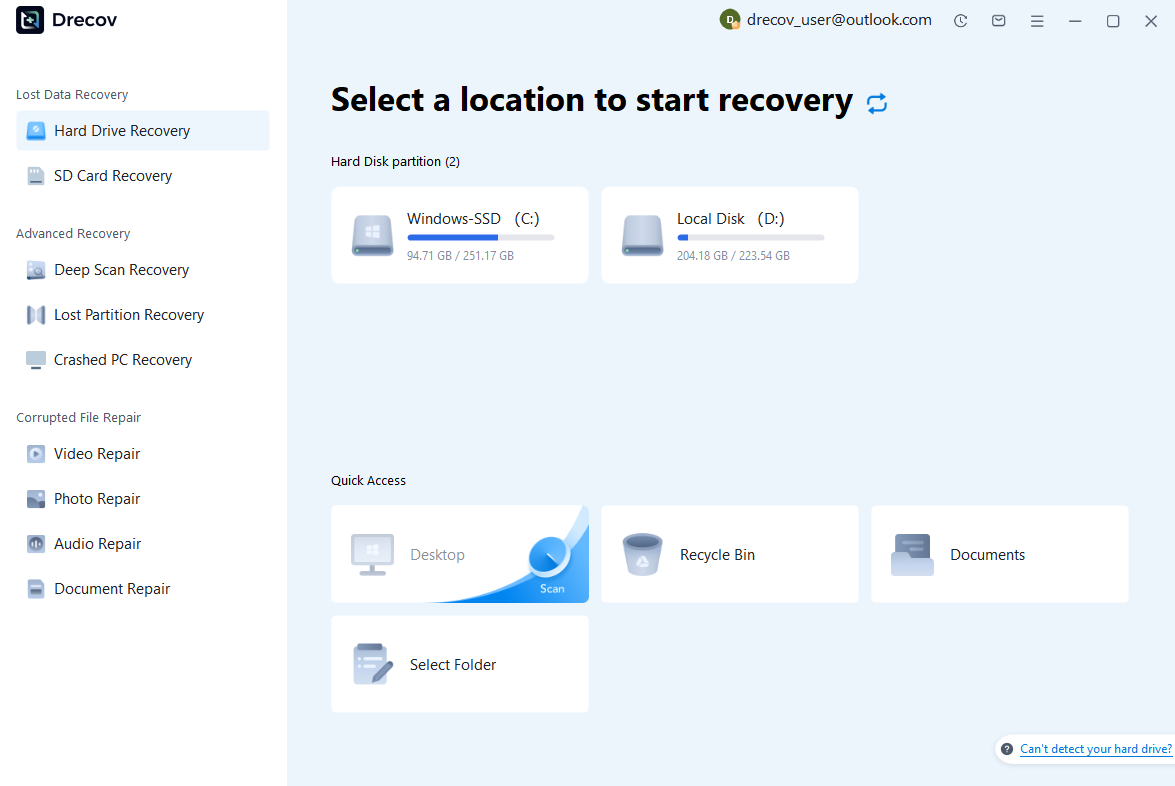
Step 1: Connect the Drive / USB)
Connect your device (SD card, HDD/SSD, or USB drive) to your computer and launch PandaOffice Drecov. Select the target device and start the scan. The software will perform a quick scan and deep scan to detect lost or deleted data.
Step 2: Locate and Preview Lost Files
After scanning, browse the detected files and use the preview feature to check recoverable data. You can preview documents (Word, Excel, PDF), photos, and videos to ensure file integrity before recovery.

Step 3: Recover and Save to a New Location
Select the files you want to restore and click recover. Save all recovered data to a different drive or location (not the original device) to avoid overwriting lost data.

Why Choose PandaOffice Drecov Recovery Software?
PandaOffice Drecov offers a fast, secure, and user-friendly solution for recovering lost files across multiple scenarios. Whether you need email recovery, ZIP File Recovery, format data recovery, or help to recover deleted drafts Outlook, the software provides reliable recovery performance for both personal and business users.
PandaOffice Drecov supports recovery from formatted hard drives, SSDs, USB drives, SD cards, and external storage devices. Its advanced scanning engine can locate deleted archives, damaged ZIP files, lost Outlook drafts, and accidentally removed documents with high accuracy. For users searching for how to find deleted messages in Teams, PandaOffice Drecov can also help recover exported chat files, attachments, and related local cache data when available.
After recovery, test the file again. If the audio stream was damaged because of storage issues, a recovered version may play normally.
This method is particularly useful when only a few files exhibit audio problems while VLC works correctly with all other media.
This method can help users recover files from floppy disk storage after accidental deletion, formatting, or logical corruption.
⚠️Warning: Do not attempt to reformat the card before recovery, as it reduces success rate significantly.
👉 During this process, PandaOffice Drecov was used as a recovery solution. It helped detect hidden file structures and recover inaccessible media using an automated scanning system. This made it especially useful for users without technical experience.
After recovery, most project files were restored successfully, and the xqd card was reused after formatting.
Method 5 — Hardware and card reader troubleshooting
Sometimes the issue is not the xqd card itself but the card reader or connection interface. This is a common overlooked factor in xqd cards failure diagnosis.
Test environment: multiple card readers tested across PC and camera systems
In this environment, several xqd memory card readers were tested on different operating systems. Some readers failed to detect the card, while others showed unstable transfer speeds.
Steps performed:
- Switching USB ports
- Testing multiple card readers
- Checking driver compatibility
- Verifying physical connection stability
Results showed that outdated or non-certified readers were a major cause of detection failure.
⚠️Warning: Always use manufacturer-approved readers for stable performance.
How to prevent xqd card data loss
Preventing issues is more effective than repairing them. Most xqd cards failures come from improper handling rather than hardware defects.
Best practices include:
- Always safely eject the xqd memory card
- Avoid using full storage capacity
- Do not switch between devices frequently without formatting
- Keep firmware updated on cameras
Environmental protection also matters. High temperature, humidity, and physical shock can all affect card xqd lifespan.
FAQ
Can you recover data from xqd card after formatting?
Yes, in many cases recover data from xqd card is possible after formatting, as long as new data has not overwritten the original storage sectors.
Are xqd cards still used today?
Yes, although CFexpress is more modern, many devices still rely on xqd cards for compatibility and stability.
What is the safest way to handle xqd memory card errors?
The safest method is to stop using the card immediately and begin recovery to avoid overwriting lost data.
Conclusion
Key takeaways for xqd memory card reliability
The performance of xqd cards depends heavily on proper handling, compatible hardware, and correct usage practices. Most failures are not permanent and can often be recovered if handled correctly.
Across different test environments, the success rate of recover data from xqd card is highest when recovery is performed immediately after failure.
Final advice for card xqd maintenance
To ensure long-term stability:
- Use certified card readers
- Avoid cross-device corruption
- Regularly back up important files
- Handle the xqd memory card carefully in field environments
⚠️Warning: Continuing to use a failing card may result in permanent data loss.





