







You usually cannot retrieve and view your current Yahoo password from Yahoo, but you can regain access through Yahoo Sign-in Helper or check a saved password in a browser or password manager on a device you own. Start with recovery phone, backup email, account key, trusted devices, and saved-password checks. Do not use third-party tools that claim they can reveal Yahoo, Snapchat, or Facebook passwords.
This guide explains safe Yahoo password recovery and separates it from Snapchat, Facebook, and Word document password questions. It also covers recovering missing email attachments or local files after account access returns.
Quick Decision Table For Yahoo Password Recovery
| Situation | Safe Action | Risk To Avoid |
|---|---|---|
| Need Yahoo account access | Use Yahoo Sign-in Helper | Do not trust password reveal tools |
| Password may exist on your computer | Check your own password manager | Do not export the whole vault casually |
| Recovery phone is unavailable | Use backup email or account support | Do not keep guessing codes |
| Word document password issue | Use the document owner password or backup copy | Do not confuse document protection with Yahoo recovery |
| Attachments disappeared | Check mailbox folders and local downloads | Do not overwrite the source drive |
Can Yahoo Retrieve Your Current Password
Yahoo normally protects accounts by letting users reset access after verification rather than showing the current password. This is expected behavior. A reset still solves the access problem when the user proves ownership.
A saved password manager entry may reveal a Yahoo password on a device you own. Confirm the domain, username, and date before using it. Old saved entries may fail after a previous reset.
Searches such as how do you find out your Snapchat password and how I know my Facebook password belong to each platform’s official recovery process. Yahoo cannot reveal those passwords.
Method 1: Use Yahoo Sign-In Helper
Best For: owners who cannot sign in to Yahoo Mail.
Tool Used: Yahoo Sign-in Helper, recovery phone, backup email, account key, and trusted device prompts.
Steps
- Open Yahoo Sign-in Helper.
- Enter the Yahoo email address or recovery phone.
- Choose an available verification method.
- Enter the code from recovery phone or backup email.
- Create a new password when Yahoo offers reset.
- Update the password on mail apps and saved devices.
Risk Level: Low when you use Yahoo’s official page.
Method 2: Check Saved Yahoo Passwords
Best For: users who may have saved the password on their own device.
Tool Used: Chrome, Edge, Firefox, iCloud Keychain, Windows Credential Manager, or a password manager.
Steps
- Open the password manager on a trusted device.
- Search for Yahoo or mail.yahoo.com.
- Authenticate with device password, biometric, or master password.
- Check the username and domain.
- Try the saved password if it looks current.
- Update stale entries after reset.
Risk Level: Low when you check only your own saved passwords.
Method 3: Recover Missing Yahoo Attachments
Best For: users who regained Yahoo access but cannot find files.
Tool Used: Yahoo Mail search, Trash, Archive, Downloads, cloud backup, and local file recovery.
Steps
- Search Yahoo Mail by sender, subject, file type, and date.
- Check Trash, Archive, Spam, and custom folders.
- Download important attachments to a computer.
- Search local Downloads and Documents folders.
- Scan accessible storage if local files disappeared.
- Save recovered files to another drive.
Risk Level: Low when recovered files go to another drive.
Recover Lost Files After Access Returns
When This Recovery Method Applies
Use this method only after you regain lawful access to the account, computer, encrypted drive, or storage device. PandaOffice Drecov does not find or break passwords. It can help when files disappeared from an accessible drive, SD card, external disk, or decrypted storage after account recovery, password reset, BitLocker changes, or file deletion.
Best For: downloaded attachments, PDFs, images, archives, and documents from accessible Windows storage.
Tool Used: PandaOffice Drecov.
Test Environment:
Operating System: Windows 11
Storage Type: Accessible Windows drive, external storage, or removable storage
Problem Scenario: Yahoo attachments or local downloads missing after account recovery
Tool Used: PandaOffice Drecov
Steps
- Confirm that Windows can open the target storage after password reset, account recovery, decryption, or device repair.
- Stop saving new files to the same storage source.
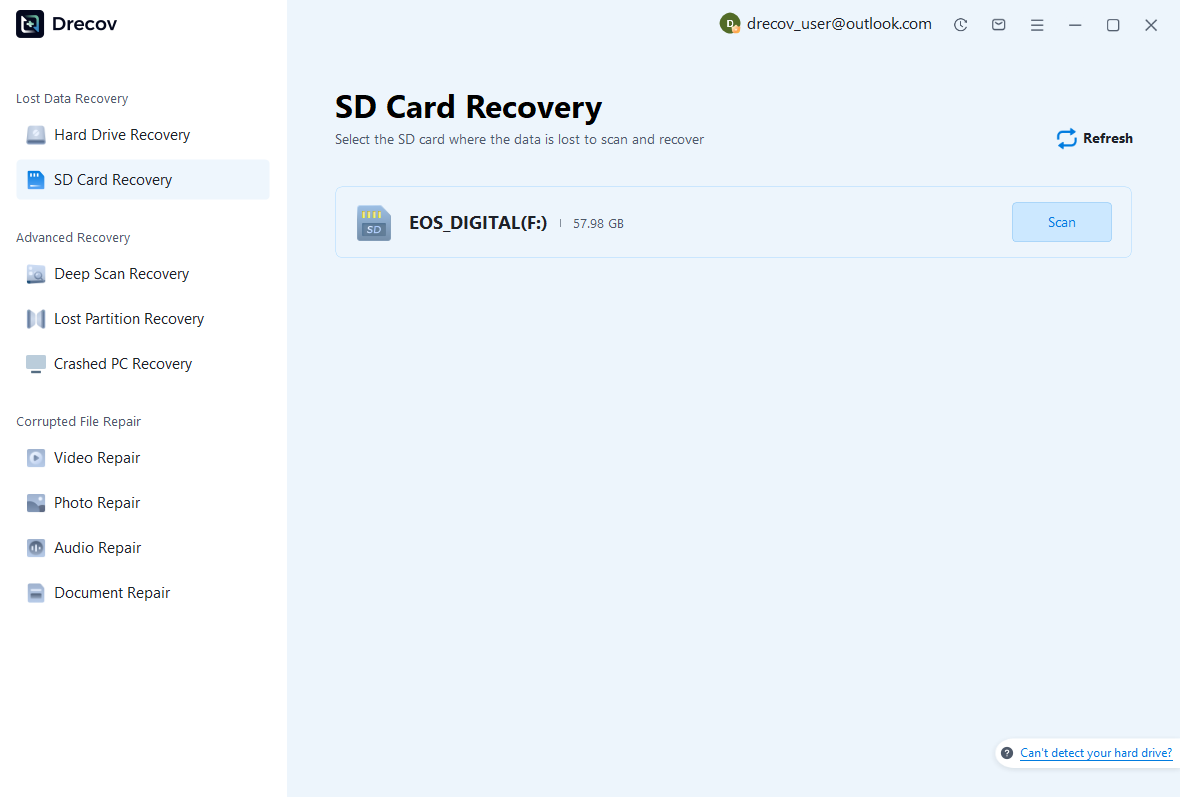
- Open PandaOffice Drecov and choose the drive, partition, SD card, or external storage device that lost files.
- Start the scan and wait for quick scan and deep scan results.
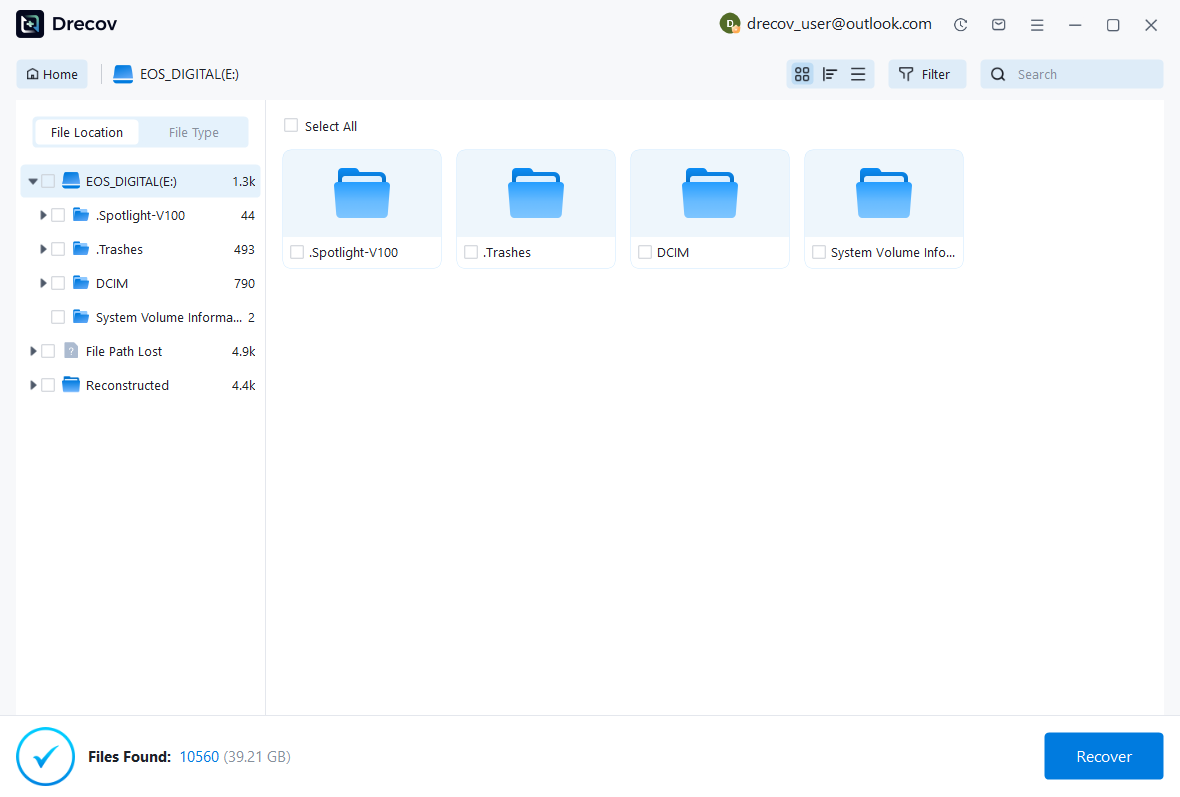
- Filter by documents, images, videos, archives, downloads, or original folders.
- Preview important files before recovery.
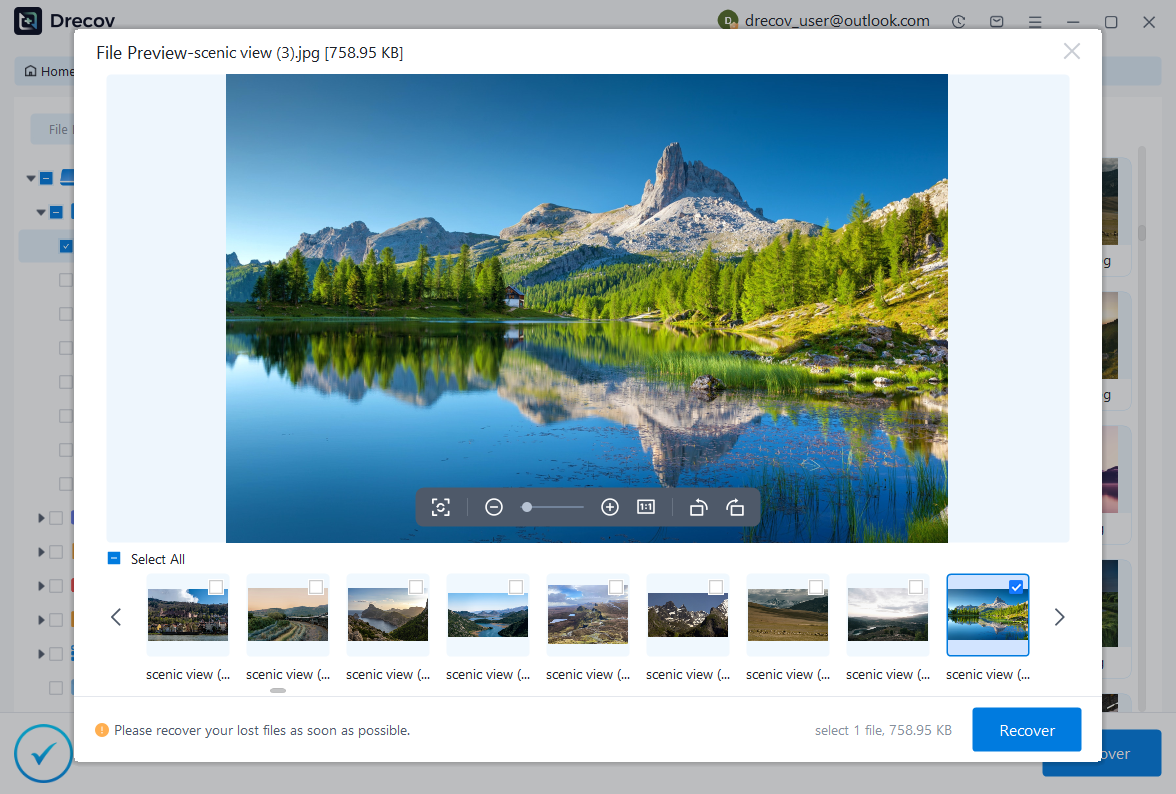
- Recover selected files to another drive, not back to the source storage.
- Open recovered files before deleting scan results or changing the original device.
Risk Level: Low when you save recovered files away from the source storage and avoid new writes during recovery.
Related Password Questions
Snapchat Password Searches
Snapchat password recovery belongs to Snapchat. Use recovery phone, email, and official support prompts.
A Yahoo recovery page cannot reveal a Snapchat password. Keep each account workflow separate.
Word Document Password Removal
A Word document password protects a file or editing settings. Open the document with the legitimate password before removing protection.
When the Word file disappeared, recover the file from backups or storage before working on the password.
Facebook Password Questions
Facebook protects accounts through official reset and identity verification. It will not reveal someone else’s password.
Check saved passwords only on devices and password managers you control.
Safe Password And Recovery Workflow For Yahoo password recovery
Confirm Ownership And Permission
A password recovery workflow must start with ownership. Work only on accounts, computers, files, drives, and devices that you own or have permission to manage. This point matters for how do i retrieve my yahoo password because password searches often mix personal recovery, business devices, social accounts, document protection, and encrypted drives.
Write down the account, file, or drive that needs access. A Yahoo mailbox, Snapchat account, Windows computer, BitLocker drive, ZIP file, memory stick, and Instagram account all use different recovery paths. Treating them as one problem leads to unsafe advice and wasted time.
The practical goal is to regain access through official channels, protect the files, and prevent another lockout. A reliable article should not promise to reveal someone else’s password or bypass encryption. It should explain what can get solved, what needs a recovery key or reset, and where file recovery fits after access returns.
Use Official Recovery Before Tools
Official recovery channels give the safest path for Yahoo, Snapchat, Microsoft, Instagram, YouTube, Gmail, Facebook, and similar accounts. Use the provider’s recovery page, trusted devices, backup email, phone verification, authenticator prompts, or recovery codes. Avoid third-party tools that claim they can reveal passwords for online accounts.
For BitLocker, official recovery means the recovery key, saved password, startup key, Microsoft account key record, or organization administrator key escrow. For documents and archives, official recovery means owner records, saved passwords, unprotected backups, or the document creator’s help.
When a provider offers only reset, accept that design. Most services do not show the current password because showing it would weaken account security. A reset can still restore access when the user proves ownership.
Check Saved Passwords On Your Own Devices
Browsers and password managers may hold saved passwords. Chrome, Edge, Firefox, Safari, iCloud Keychain, Windows Credential Manager, and dedicated password managers can help when you own the device and can authenticate locally. Check the domain, username, and date before relying on any saved entry.
Do not export an entire password vault unless you understand the risk. Exported password files need strong protection and quick deletion after use. In most cases, viewing one saved entry or using official reset gives a safer result.
Saved passwords can getcome stale. A password manager may show an old Yahoo, Snapchat, Instagram, or Microsoft password that no longer works. After a successful reset, update the saved entry on every device.
Separate Access Recovery From File Recovery
Access recovery and file recovery are related but not identical. Password recovery opens an account, document, computer, or drive. File recovery finds missing data after the storage becomes accessible. A tool that recovers deleted files does not reveal social media passwords, and a password reset does not restore every deleted local file.
When the file disappeared, recover the file first from backups, Trash, email attachments, cloud storage, external drives, or accessible storage scans. After you have the file, solve the password problem with the legitimate owner method.
When the drive remains locked or encrypted, unlock it first through the recovery key or password. File recovery software needs readable storage. It cannot scan meaningful files from a locked encrypted volume.
Protect Data Before Reset, Decryption, Or Repair
Before reset or repair, copy visible files and check backups. Account resets can change sync behavior. BitLocker decryption changes drive protection. Phone resets can remove local app data. Document repair can overwrite a damaged file. A careful backup prevents the fix from becoming a new loss.
Use the least invasive method first. Check saved passwords, recovery pages, recovery keys, Trash, Recycle Bin, File History, OneDrive, and email attachments before formatting or reinstalling. When a command line appears in the workflow, verify the target account, file, or drive letter first.
Save recovered files to another healthy drive. Do not write recovered data back to the device that lost files until verification finishes.
Verify Access And Create A Better Backup
Recovery ends only after the target works. Sign in to the account, open the mailbox, unlock the drive, open the document, or test the recovered file. A successful reset screen does not prove that the needed files still exist.
After verification, create a durable backup. Use a password manager for unique passwords, store recovery keys outside encrypted drives, keep recovery emails current, and export recovery codes for important accounts. Test the backup from another device before trusting it.
Good prevention turns a stressful how do i retrieve my yahoo password case into a fixable routine next time. The user should know where passwords live, where recovery keys live, and where important files have a second copy.
Detailed Troubleshooting Notes
Identify The Prompt Before Acting
Different prompts need different fixes. Browser sign-in prompts point to online accounts. Windows login prompts point to local or Microsoft account recovery. BitLocker recovery screens point to drive encryption. ZIP or Word document prompts point to file-level protection. Memory stick encryption prompts may involve BitLocker To Go or another encryption tool.
For how do i retrieve my yahoo password, the safest move is to copy the exact prompt into notes. Include the account email, device name, drive letter, file name, recovery key ID, or service name. That small note helps you choose the correct recovery route.
A wrong diagnosis creates unnecessary risk. Resetting a computer cannot reveal a Yahoo password. Changing an Instagram password cannot unlock a BitLocker drive. Running file recovery cannot find a Snapchat password.
Watch For Lockout And Sync Risks
Repeated guesses can trigger account lockouts, suspicious activity checks, or longer verification delays. Slow down when a service warns about too many attempts. Use official recovery prompts and accurate account information instead of guessing variations.
Sync can also create surprises. After a password reset, email apps, phone apps, cloud storage clients, and browser profiles may stop syncing until the new password is entered. Update trusted devices after the account opens again.
For encrypted drives, decryption can take time and needs stable power. Interrupting the process can lead to access problems or file system checks. Back up first and keep the device powered.
Use A Clean Recovery Destination
Every file recovery attempt needs a clean destination. Create a folder on a healthy drive and use names such as Recovered Documents, Recovered Attachments, or Recovered Drive Files. This avoids confusion between source files, scan results, repaired copies, and newly downloaded files.
Keep original recovered names until you verify the content. After verification, create readable names and a second backup. This habit helps when multiple versions of a PDF, ZIP file, photo, or Office document appear.
Do not save recovery output to the same drive or memory stick that lost data. New writes can overwrite files that a deeper scan might still recover.
Verify The Real Target
Opening an account is not the same as recovering the data. Check the mailbox, attachment, cloud folder, chat history, saved file, encrypted drive, or document that caused the problem. The target decides whether the recovery succeeded.
For documents, open the file in the correct app and check the latest edits. ZIP archives need extraction and a quick test of the extracted files. BitLocker drives need folder checks and date checks after unlock. Online accounts need a review of recovery email, phone, security settings, and active sessions.
When the target file remains missing after access returns, move into file recovery. Search backups first, then scan accessible storage if needed.
Document The New Recovery Setup
After solving the problem, write a short recovery note. Include the account recovery email, password manager location, BitLocker key storage, document owner, and backup path. Keep the note in a secure place, not inside the only protected drive or account.
Use unique passwords for each account. Reuse turns one password problem into many. A password manager can remember strong passwords and reduce the temptation to store them in unsafe text files.
The best how do i retrieve my yahoo password solution gives the user immediate access and a safer system. That means official recovery, verified files, updated security settings, and a backup that someone can actually find later.
Real-World Case Examples For Yahoo password recovery
Case 1: Access Returns But The Needed File Is Missing
A common recovery story starts with a password problem and ends with a missing-file problem. The user resets an account, unlocks a drive, or opens a computer, then notices that an attachment, document, photo, or archive no longer appears. At that point, the password issue has ended and the file recovery issue begins.
Handle this case with a calm order. Search cloud Trash, Recycle Bin, downloads, email attachments, version history, and backup folders first. Then copy visible folders to a safe destination. Use a recovery scan only when the storage opens and the file still does not appear.
For how do i retrieve my yahoo password, this distinction keeps the solution honest. Password recovery restores access. File recovery restores missing content. The article should guide the reader through both without pretending that one tool solves every part.
Case 2: The User Has Several Similar Passwords
Many users keep several password variations in memory. They may remember the old Yahoo password, a Snapchat password, a Windows sign-in password, or a document password, but not the one that fits the current prompt. Repeated guessing can create account lockouts or suspicious activity checks.
Use records instead of guesses. Check a password manager, browser saved passwords, recovery emails, key records, printed notes, or administrator-approved systems. When a service offers reset, use the reset flow after identity verification instead of trying every old password.
After recovery, replace scattered memory-based habits with a password manager. Use clear names for each entry so Yahoo, Snapchat, Microsoft, BitLocker, PDF, ZIP, and computer login records do not blend together again.
Work devices and shared files need more caution than personal accounts. A company may manage BitLocker keys, Microsoft accounts, device encryption, browser profiles, shared folders, and document permissions. Changing passwords or encryption settings without approval can break access for other users.
Contact the administrator when the device belongs to work or school. Provide the error text, key ID, device name, account email, and file location. Ask for a data-preserving recovery path before reset or replacement.
For shared documents, ask the owner for an unlocked copy or updated permission. Do not try to remove protection from files you do not own. Safe collaboration recovery protects both access and trust.
Case 4: The Only Copy Is On A Problem Drive
The riskiest situation appears when the only copy lives on the same drive, memory stick, phone, or computer that has the password or access problem. In that case, avoid destructive fixes. Do not format, reinstall, reset, clean, or overwrite the storage until you copy what you can.
Use read-only checks first. List folders, check account sync, locate recovery keys, and confirm backup status. When the drive opens, copy important folders before deeper repair. If files disappeared, scan the accessible storage and recover to another drive.
This careful approach may feel slower, but it protects the remaining recovery chance. A fast reset can create a larger problem than the original forgotten password.
Final Checklist Before You Stop
Access Checklist
- Confirm that the account, file, computer, or drive belongs to you or your organization.
- Use the official recovery page, recovery key, owner password record, or administrator process.
- Check saved passwords only on devices and password managers you control.
- Stop repeated guesses when the service warns about lockouts.
- Record the final working recovery path for future use.
File Safety Checklist
- Copy visible files before reset, repair, decryption, or cleanup.
- Check Recycle Bin, Trash, File History, OneDrive, email attachments, and cloud backups.
- Scan only accessible storage when files remain missing.
- Save recovered files to another healthy drive.
- Open recovered files before deleting scan results.
Prevention Checklist
- Store account passwords in a password manager.
- Save BitLocker keys and recovery codes outside protected storage.
- Keep recovery phone numbers and backup emails current.
- Test backups from another device.
- Review the how do i retrieve my yahoo password recovery path after the problem is solved.
This checklist gives Yahoo password recovery a practical finish. The user should regain access, protect files, verify recovery results, and leave with a stronger recovery setup than before.
Related Recovery Guides
When the missing item is a TikTok draft or deleted social video, this TikTok video recovery guide covers app-specific checks outside normal password recovery.
For Adobe Illustrator documents, use this Illustrator file recovery guide to handle project files, autosaves, and desktop recovery paths.
If recovered files need a Mac external drive and that drive does not appear, this LaCie hard drive not showing up on Mac guide can help you prepare a safe destination.
When Windows restore points or rollback affect the recovery plan, read how to restore a computer to an earlier date on Windows before changing the computer that may still hold backups.
FAQ
Can Yahoo Show My Current Password?
Usually no. Yahoo normally lets you reset access after verification instead of showing the current password.
How Do I Retrieve My Yahoo Password Without Phone?
Use backup email, account key, trusted devices, or Yahoo support options when available.
Can File Recovery Help With Yahoo Passwords?
It cannot recover the password, but it can help recover downloaded attachments after account access returns.
Conclusion
For how do I retrieve my Yahoo password, use Yahoo Sign-in Helper or a saved password manager entry on a device you own. Reset access safely, update mail apps, and recover missing attachments from Yahoo Mail, backups, or accessible storage.





