







Understanding Ring Video Storage and Recovery Options
How Ring Stores Recorded Videos
Ring devices have become one of the most popular smart security solutions for homes and businesses. Whether you use a Ring Video Doorbell or a Ring Camera, recorded footage is typically stored in the cloud through a Ring Protect subscription. This cloud-based storage system allows users to access recordings remotely from smartphones, tablets, and computers.
Unlike traditional CCTV systems that save footage directly on local storage devices, Ring relies heavily on cloud servers. This design improves accessibility and security but also creates unique challenges when videos are accidentally deleted.
Many users ask whether it is possible to recover deleted Ring video files after removal. The answer depends on how the deletion occurred, whether backups exist, and how much time has passed since the footage disappeared.
Ring videos may be removed because of accidental deletion, subscription expiration, account synchronization issues, or retention policy limitations. Understanding where recordings are stored is the first step toward determining recovery possibilities.
For users concerned about lost security footage, acting quickly significantly improves the chances of retrieving important recordings before they are permanently removed.
Why Deleted Ring Footage Matters
Security recordings often contain valuable information. Homeowners may need footage to investigate package theft, suspicious activity, vehicle damage, or property incidents. Businesses may also rely on surveillance recordings for operational monitoring and evidence collection.
When a recording disappears unexpectedly, many users immediately wonder, “Can you recover deleted Ring videos?” The urgency is understandable because deleted footage may contain information that cannot be recreated.
Unlike ordinary photos or personal videos, surveillance recordings often serve as evidence. Missing footage can affect insurance claims, police investigations, and dispute resolution. Therefore, knowing recovery options before an emergency occurs can save valuable time.
Ring’s cloud infrastructure provides convenience but also means users have limited direct access to storage architecture. As a result, recovery methods differ significantly from traditional file restoration techniques used on local hard drives or memory cards.
Understanding available recovery strategies helps users respond appropriately when recordings are accidentally removed or become inaccessible.
⚠️ Warning: Avoid repeatedly modifying account settings after discovering missing footage. Additional synchronization actions may complicate troubleshooting.
Accidental Deletion by Account Owners
One of the most common causes of missing footage is accidental user deletion. Ring’s mobile application allows users to remove recordings manually. During routine account maintenance, users may unintentionally delete clips they later realize are important.
In some cases, multiple family members share account access. A recording may disappear because another authorized user deleted it without realizing its significance. Shared account environments often increase the risk of accidental removal.
Because cloud-based storage systems process deletion commands quickly, recovery opportunities may become limited after the removal is completed. This is why many users search for solutions on how to recover deleted Ring videos immediately after discovering the loss.
Maintaining clear user permissions and educating all account members about deletion risks can help prevent future incidents. Organizations using Ring devices for commercial security purposes should also establish policies regarding video retention and deletion authority.
Test Environment
- Device: Ring Video Doorbell Pro 2
- Mobile App Version: Latest Release
- Account Type: Ring Protect Plus
- Deletion Type: Manual User Removal
Prompt action after accidental deletion offers the best chance of identifying available recovery options.
Retention Period Expiration and Subscription Issues
Ring recordings are retained only for a limited period. Depending on regional policies and subscription settings, videos may automatically expire after reaching their retention limit. Once the retention period ends, recordings are generally removed from cloud storage.
Subscription-related issues can also contribute to missing footage. If a Ring Protect plan expires or billing problems occur, recording availability may change. Users may discover that previously accessible clips are no longer visible in their event history.
This situation often leads to questions such as how to retrieve deleted Ring videos after automatic removal. Unfortunately, retention expiration differs from accidental deletion because the content may have already been purged from active storage systems.
Users can reduce future risks by regularly exporting important recordings and monitoring subscription status. Proactive backups remain one of the most effective ways to avoid permanent loss.
Test Environment
- Device: Ring Spotlight Cam
- Subscription: Ring Protect Basic
- Retention Setting: Default Cloud Storage
- Scenario: Expired Video Retention Window
⚠️ Warning: Do not assume cloud recordings remain available indefinitely. Always verify your account’s retention settings.
Methods to Recover Deleted Ring Videos
Method 1: Check the Ring Event History Immediately
The first recovery step should always be reviewing the Event History section inside the Ring application. Occasionally, users believe footage is missing when it has simply been filtered, archived differently, or displayed under another device category.
Open the Ring app and navigate to Event History. Review all available events within the relevant date range. Confirm that device filters, motion categories, and timeline settings are configured correctly.
Some users mistakenly overlook recordings because they search under the wrong camera or account. Verifying account credentials and connected devices can quickly resolve apparent data loss situations.
This method is particularly effective when the issue involves synchronization delays rather than actual deletion. Refreshing the application and signing out before logging back in may also help restore visibility of recently recorded events.
Test Environment
- Device: Ring Stick Up Cam
- App Platform: Android 15
- Internet Connection: Wi-Fi 6
- Issue Type: Missing Event History Entry
Although this approach may seem simple, it frequently resolves cases where users initially believe footage has been permanently deleted.
Method 2: Contact Ring Support for Account-Level Assistance
If recordings recently disappeared, contacting Ring Support should be your next step. Support representatives may be able to investigate account activity, subscription status, synchronization issues, and cloud storage behavior.
When submitting a support request, provide detailed information including:
- Device model
- Approximate recording date
- Account email address
- Time of deletion
- Subscription plan
The more information available, the easier it becomes for support personnel to evaluate the situation.
Many users asking can you recover deleted Ring videos discover that support teams can clarify whether footage was manually deleted, automatically removed, or affected by another account-related issue.
While support cannot guarantee recovery of permanently erased content, they may identify solutions unavailable through the mobile application alone.
Test Environment
- Device: Ring Floodlight Cam
- Subscription: Ring Protect Pro
- Support Method: Online Ticket
- Issue: Recent Missing Video Clip
Prompt communication improves the likelihood of obtaining useful information regarding the missing footage.
Method 3: Search for Downloaded or Exported Copies
Many Ring users forget that they previously downloaded important recordings to a local device. Before assuming the footage is permanently lost, check all computers, smartphones, tablets, and external drives associated with the account.
When users export videos from Ring, the files are typically saved in standard download folders. Depending on the operating system, they may also be stored in cloud-synchronized directories such as OneDrive, Google Drive, Dropbox, or iCloud Drive. Reviewing these locations can often reveal copies that were saved weeks or months earlier.
Start by searching for MP4 files using the approximate recording date. If multiple family members have access to the account, ask whether they downloaded the footage independently. Businesses should also check centralized storage systems where security recordings may have been archived.
For users researching how to retrieve deleted Ring videos, local copies often provide the fastest solution because no cloud recovery process is required. Even if the original cloud recording has been removed, a downloaded copy remains fully usable.
Test Environment
- Device: Ring Video Doorbell 4
- Export Format: MP4
- Storage Locations Checked:
- Windows Downloads Folder
- OneDrive Backup Folder
- External SSD
- Recovery Result: Video Found in Archived Folder
This method is particularly effective for users who routinely save important recordings after security events occur.
Method 4: Recover Deleted Exported Videos from Mobile Devices
If a Ring video was downloaded before deletion, it may still be recoverable from the device used for exporting. Smartphones and tablets often retain deleted files temporarily in recycle bins, recently deleted albums, or application-specific trash folders.
For Android devices, users should check:
- Gallery Trash
- Google Photos Bin
- File Manager Recycle Bin
- SD Card Storage
For iPhone users, review:
- Recently Deleted Album
- Files App Deleted Folder
- iCloud Drive Recovery Options
If the exported video was accidentally removed from the device, restoration may be possible before the temporary retention period expires.
This approach differs from cloud-based Ring recovery because the target file is a locally stored copy. Users looking for how to recover Ring deleted videos frequently overlook mobile storage recovery opportunities.
Test Environment
- Device: iPhone 15 Pro
- Exported File Size: 45 MB
- Deletion Time: 10 Days Earlier
- Recovery Location: Recently Deleted Folder
⚠️ Warning: Avoid recording new videos or installing large applications on the affected device. New data may overwrite deleted files and reduce recovery success rates.
Method 5: Use Pandaoffice Drecov to Recover Deleted Exported Ring Videos
When exported Ring recordings have been permanently removed from a computer, external drive, memory card, or USB storage device, specialized recovery software may help retrieve them.
Pandaoffice Drecov is designed to scan storage devices for deleted files and locate recoverable video content. If a Ring recording was previously downloaded and later deleted, the software may identify recoverable fragments before they are overwritten by new data.
The recovery process typically involves:
Step 1: Connect the Drive / USB)
Connect your device (SD card, HDD/SSD, or USB drive) to your computer and launch PandaOffice Drecov. Select the target device and start the scan. The software will perform a quick scan and deep scan to detect lost or deleted data.
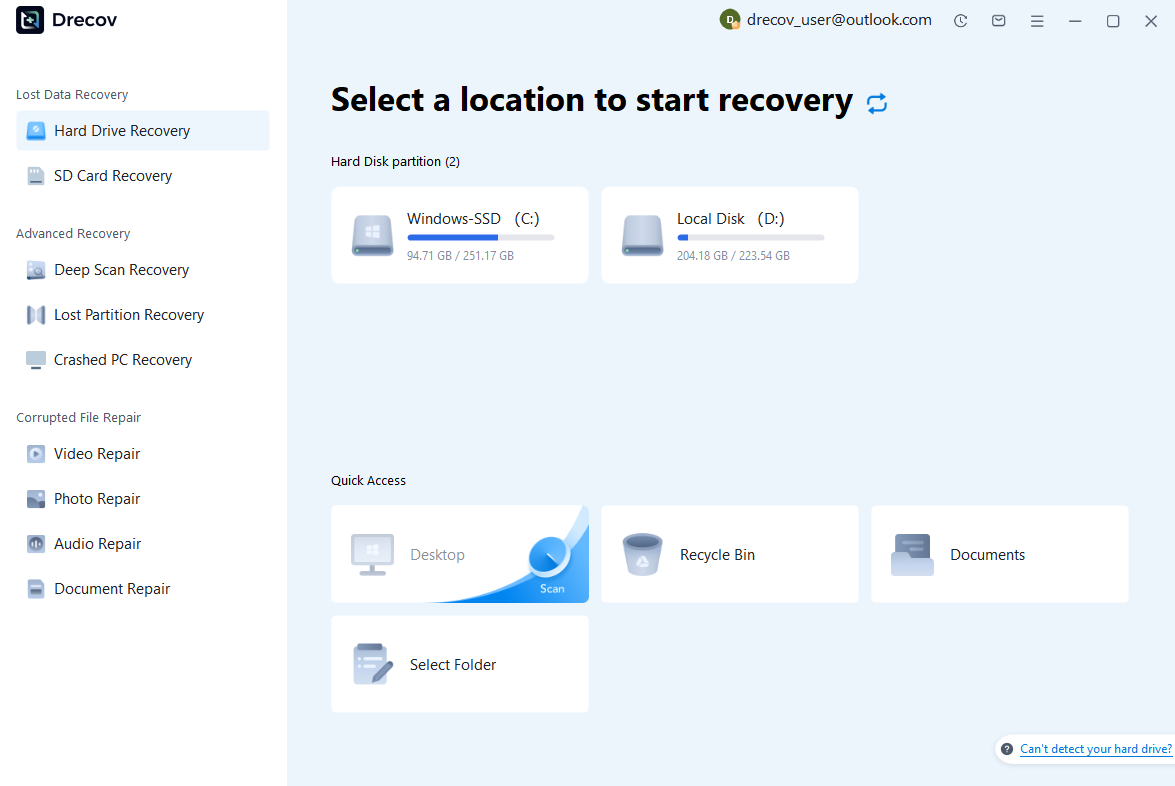
Step 2: Locate and Preview Lost Files
After scanning, browse the detected files and use the preview feature to check recoverable data. You can preview documents (Word, Excel, PDF), photos, and videos to ensure file integrity before recovery.

Step 3: Recover and Save to a New Location
Select the files you want to restore and click recover. Save all recovered data to a different drive or location (not the original device) to avoid overwriting lost data.

Why Choose PandaOffice Drecov Recovery Software?
PandaOffice Drecov offers a fast, secure, and user-friendly solution for recovering lost files across multiple scenarios. Whether you need email recovery, ZIP File Recovery, format data recovery, or help to recover deleted drafts Outlook, the software provides reliable recovery performance for both personal and business users.
PandaOffice Drecov supports recovery from formatted hard drives, SSDs, USB drives, SD cards, and external storage devices. Its advanced scanning engine can locate deleted archives, damaged ZIP files, lost Outlook drafts, and accidentally removed documents with high accuracy. For users searching for how to find deleted messages in Teams, PandaOffice Drecov can also help recover exported chat files, attachments, and related local cache data when available.
After recovery, test the file again. If the audio stream was damaged because of storage issues, a recovered version may play normally.
This method is particularly useful when only a few files exhibit audio problems while VLC works correctly with all other media.
This method can help users recover files from floppy disk storage after accidental deletion, formatting, or logical corruption.
Users seeking ways to recover deleted Ring videos often find this method useful when cloud copies are no longer available but local exports once existed.
The key factor is timing. The sooner recovery begins after deletion, the greater the likelihood that file sectors remain intact.
Test Environment
- Operating System: Windows 11 Pro
- Storage Device: 512GB SSD
- File Type: Downloaded Ring MP4 Video
- Deletion Time: 7 Days Prior
- Recovery Result: Successfully Restored Video
This method should be viewed as a recovery option for exported files rather than a direct method of accessing Ring’s cloud storage.
Ring supports shared access through family members and authorized users. In many households, several people can view recordings and manage devices. Because of this, missing footage may not always indicate permanent deletion.
Review all shared users associated with the account. Ask whether another user:
- Downloaded the video
- Archived screenshots
- Saved a local copy
- Changed account settings
- Deleted the recording unintentionally
Organizations using Ring cameras across multiple departments should also verify whether administrators exported the footage to internal storage systems.
Sometimes users searching can you recover deleted Ring videos discover that the recording was never truly lost. Instead, another authorized user downloaded the file before it disappeared from cloud storage.
Checking account activity and shared-user actions can eliminate unnecessary recovery efforts and quickly identify alternative sources of the missing footage.
Test Environment
- Device: Ring Indoor Cam
- Shared Users: 4
- Account Type: Ring Protect Plus
- Recovery Source: Downloaded Copy Stored by Family Member
This approach is especially valuable for households and businesses with multiple authorized users.
Best Practices to Prevent Future Ring Video Loss
Create Regular Video Backups
Prevention remains more effective than recovery. Users who routinely save critical recordings significantly reduce the risk of permanent loss.
Establish a backup schedule for important footage, especially recordings related to security incidents, deliveries, property monitoring, or business operations. Export videos and store them in multiple locations whenever possible.
Recommended backup locations include:
- External SSDs
- NAS devices
- Cloud storage platforms
- Enterprise backup systems
Maintaining multiple copies protects against accidental deletion, hardware failure, and account-related issues.
Test Environment
- Backup Frequency: Weekly
- Storage Method: Local SSD + Cloud Archive
- Retention Period: 12 Months
- Data Loss Incidents: None
Organizations handling security-sensitive recordings should include video retention policies within broader data management procedures.
Monitor Subscription and Retention Settings
Many lost recordings result from misunderstandings regarding retention periods. Users should regularly review account settings and understand exactly how long recordings remain available.
Retention periods vary depending on account configuration and regional policies. Knowing when footage will expire allows users to export important clips before automatic removal occurs.
Regularly verify:
- Subscription status
- Billing information
- Storage retention duration
- Device recording settings
These simple checks can prevent many situations where users later search for how to recover deleted Ring videos after content has already expired.
⚠️ Warning: Important evidence should be downloaded immediately rather than relying solely on cloud retention periods.
Frequently Asked Questions About Ring Video Recovery
Can You Recover Deleted Ring Videos After Permanent Removal?
The answer depends on how the deletion occurred. If the footage was exported before deletion, recovery may be possible from local devices or backups. If the cloud recording was permanently removed and no copies exist, recovery becomes significantly more difficult.
How to Recover Deleted Ring Videos Without a Backup?
Start by reviewing Event History, contacting Ring Support, checking shared-user accounts, and searching for downloaded copies. If exported videos were deleted locally, file recovery software may help restore them.
How Long Does Ring Keep Recordings?
Retention periods vary by account settings and region. Users should consult their Ring account configuration to verify current storage duration and expiration policies.
How to Retrieve Deleted Ring Videos from a Phone?
Check Recently Deleted folders, photo trash bins, file manager recycle bins, and cloud backup services linked to the device. Exported videos are often recoverable if the deletion occurred recently.
Can Ring Support Restore Deleted Recordings?
Support may investigate account-related issues and explain what happened to the footage. However, successful restoration depends on the specific circumstances surrounding the deletion and storage status.
Conclusion
Losing surveillance footage can be stressful, particularly when the recording contains important evidence or security information. Fortunately, several approaches may help users recover deleted Ring video files depending on how the loss occurred.
The recovery process should begin with simple steps such as checking Event History, reviewing account settings, and contacting Ring Support. Users should also search for downloaded copies, inspect mobile-device storage, and review shared-user accounts. When exported videos have been deleted locally, specialized recovery solutions such as Pandaoffice Drecov may provide an additional opportunity to restore lost files.
Understanding the differences between cloud-based recordings and locally stored exports is essential when evaluating recovery options. The faster users act after discovering missing footage, the greater the likelihood of successful recovery.
Most importantly, prevention is the best defense. Regular backups, exported archives, and proper retention management can help ensure that valuable security recordings remain available whenever they are needed. By following the strategies outlined in this guide, users can better protect their surveillance data and respond effectively when video loss occurs.





