







The artificial intelligence landscape moves at a breathtaking pace. As we navigate through 2026, the buzz surrounding OpenAI’s latest release has reached a fever pitch. However, a common frustration has emerged among power users and casual enthusiasts alike: the issue of chatgpt 5 not showing up. You log in, expecting the cutting-edge reasoning of the 5.4 series, only to find yourself staring at an older interface.
This guide is designed to act as your definitive roadmap. We will explore why the ChatGPT 5 Pro option not appearing in model selector occurs and, more importantly, how to secure your data and optimize your digital environment using tools like PandaOffice Drecov data recovery software. Whether you are facing a software glitch or a regional rollout delay, we have the solutions you need.
What Is ChatGPT 5 and Why Everyone Wants It
Let’s be honest—whenever a new version of AI drops, curiosity spikes like crazy. That’s exactly what happened with ChatGPT 5. People rushed to log in, eager to explore faster responses, smarter reasoning, and better conversational flow. But instead of seeing it, many users were greeted with… the same old interface. Frustrating, right?
So what’s the deal? Why is something so hyped not even visible for a large number of users?
ChatGPT 5 represents a major leap in AI capability, promising improved accuracy, deeper contextual understanding, and fewer hallucinations compared to earlier versions. Some reports even suggest noticeable improvements in productivity and decision-making use cases across industries. But here’s the catch: just because it exists doesn’t mean everyone gets instant access.
This situation is actually more common than you might think. Tech companies rarely release major updates to everyone at once. Instead, they roll things out slowly—almost like opening floodgates one inch at a time.
Key Features of ChatGPT 5
ChatGPT 5 isn’t just a minor upgrade—it’s more like switching from a bicycle to a sports car. Users who already have access to the 5.3 and 5.4 iterations report:
- Faster response times: The “Instant” model provides near-immediate feedback.
- Improved reasoning capabilities: The “Thinking” model handles complex logic with ease.
- Better context memory: Expanded token windows (up to 400k for Pro users) allow for massive document analysis.
- More accurate outputs: A significant reduction in “AI hallucinations” compared to GPT-4.
These upgrades make it especially attractive for professionals, developers, and content creators. But again, availability is the real bottleneck.
Why It Feels “Missing” for Many Users
Here’s the tricky part: ChatGPT 5 may actually exist in the system, but your account simply hasn’t been granted access yet. That creates the illusion that it’s “not showing up,” when in reality, it’s just not enabled for you. Furthermore, as of March 2026, OpenAI has retired older “5.0” and “5.1” variants in favor of GPT-5.3 Instant and GPT-5.4 Thinking. If you are looking for the original “GPT-5” label, you might miss it because the names have evolved.
Why ChatGPT 5 Is Not Showing Up
Understanding the “why” is the first step toward the “how” of fixing it. Several factors influence whether the latest model appears in your dashboard.
Phased Rollout Strategy
The biggest reason is surprisingly simple: gradual rollout. Companies like OpenAI release new models in phases to avoid overwhelming servers and to fix bugs early. Not every user sees the update at the same time, even if they’re using the same app or website. Think of it like a new Windows update—some people get it instantly, while others wait days or even weeks.
Subscription Plan Limitations
Another major factor is your subscription tier. Many advanced AI features are first released to premium users. If you’re on a free plan, you might not see the high-end versions of ChatGPT 5 immediately.
| Plan Type | Access to ChatGPT 5 (2026 Status) |
| Free | Limited messages with GPT-5.3 Instant. |
| Plus / Go | Full access to GPT-5.3 and GPT-5.4 Thinking. |
| Pro / Business | Priority access + GPT-5.4 Pro with research-grade logic. |
This tiered approach ensures that paid users receive benefits first, while free users get access later. If you are on a standard Plus plan, the ChatGPT 5 Pro option not appearing in model selector is actually expected behavior, as the “Pro” model is often reserved for higher-tier subscribers.
Regional Availability Issues
Location matters more than you might think. Some regions receive updates earlier due to local infrastructure, data privacy regulations (like GDPR in Europe), or testing priorities. If your friend in the United States already has the 5.4 Thinking model and you don’t, it’s not personal—it’s just geography.
Platform Differences (App vs Web)
Here’s something that catches a lot of people off guard: ChatGPT 5 may appear on one platform but not another. Because the iOS App Store, Google Play Store, and web browsers have different update cycles, you might see the new model on your phone but find it missing on your desktop.
Common Technical Reasons
Sometimes the issue isn’t OpenAI’s rollout—it’s your own local environment.
Cache and Browser Issues
Old cache files can prevent new features from appearing. It’s like trying to watch a new movie with outdated glasses—you just won’t see it clearly. Your browser might be “remembering” the old version of the site, effectively hiding the new model selector.
Account Sync Problems
If you’re logged into multiple devices, your account might not sync properly. This can result in inconsistent access across platforms. Occasionally, a session “hangs,” and the server doesn’t realize you are eligible for the new model until you refresh the connection.
Usage Limits and Model Switching
Even if you do have access, usage limits might temporarily switch you to a smaller model. In 2026, many plans have a “Thinking” limit. Once reached, the system may hide the 5.4 option to prevent errors, making it seem like it disappeared.
How to Fix ChatGPT 5 Not Showing Up
If you are tired of waiting, there are several steps you can take to troubleshoot and potentially force the model to appear.
Quick Fix Checklist
Before you dive into deep technical changes, try these quick fixes:
- Refresh the page: A simple
Ctrl + F5(Hard Refresh) can clear temporary browser glitches. - Log out and log back in: This forces the server to re-verify your subscription status.
- Check for App Updates: Go to your App Store and ensure you are on the latest build.
- Try Incognito Mode: This bypasses all extensions and cache to see if the model appears in a “clean” environment.
Step-by-Step Troubleshooting Guide
If the quick fixes failed, follow these detailed steps:
Step 1: Verify Subscription Status
Navigate to your account settings. Ensure your payment has processed and your plan is listed as “Plus,” “Pro,” or “Team.” If there is a payment failure, the system will downgrade you to the Free tier, where GPT-5.4 is often hidden.
Step 2: Check the “Configure” Menu
In the 2026 version of ChatGPT, many models are now hidden inside a Configure or Settings menu to reduce interface clutter. Click the model selector at the top, then look for a gear icon or “Advanced Settings” to toggle the visibility of the Pro or Thinking models.
Step 3: Clear Browser Cache and Data
If you are on Chrome, go to Settings > Privacy and Security > Clear Browsing Data. Select “Cookies and other site data” and “Cached images and files” for the “Last 24 hours” at minimum.
Step 4: Use a VPN (If Regional)
If the rollout hasn’t reached your country, using a reputable VPN to connect to a US or UK server often solves the problem instantly. Check OpenAI’s official status page to see if there are any ongoing outages.
A Pro Expert’s Secret: Data Safety During Updates
While troubleshooting software like ChatGPT, users often clear registries, reset browsers, or even reinstall operating systems. In this process, accidental data loss is a major risk. This brings us to a critical aspect of digital maintenance: Data Recovery.
If you accidentally deleted your browser bookmarks, login credentials, or important documents while trying to fix the chatgpt 5 not showing up error, you need a professional-grade solution.
PandaOffice Drecov Data Recovery Software: Your Safety Net
When it comes to retrieving lost files, PandaOffice Drecov data recovery software is the gold standard. It is designed to handle everything from accidental “Shift+Delete” errors to full partition losses.
If you realize files are missing, stop using the affected drive immediately. Writing new data to the drive can overwrite your lost files, making them unrecoverable.
⚠ Warning: Install it on a drive different from the one where your data was lost to prevent overwriting.
How to Use PandaOffice Drecov (Step-by-Step)
Step 1: Select the Recovery Location
Launch the PandaOffice Drecov application. On the main dashboard, you will see a list of available drives (C:, D:, etc.) and external devices like USBs. Select the location where your files were last seen.

Step 2: Initiate the Scan
Click the “Scan” button. The software will perform a “Quick Scan” followed by a “Deep Scan.” The Deep Scan is particularly powerful for finding files lost due to browser resets or system crashes. You can use the built-in filters to sort by file type (e.g., .docx, .jpg, .pdf) while the scan is running.

Step 3: Preview and Verify
One of the best features of PandaOffice Drecov is the free preview. Before committing to a recovery, double-click on a file to see if it is intact. This ensures you aren’t wasting time on corrupted data.
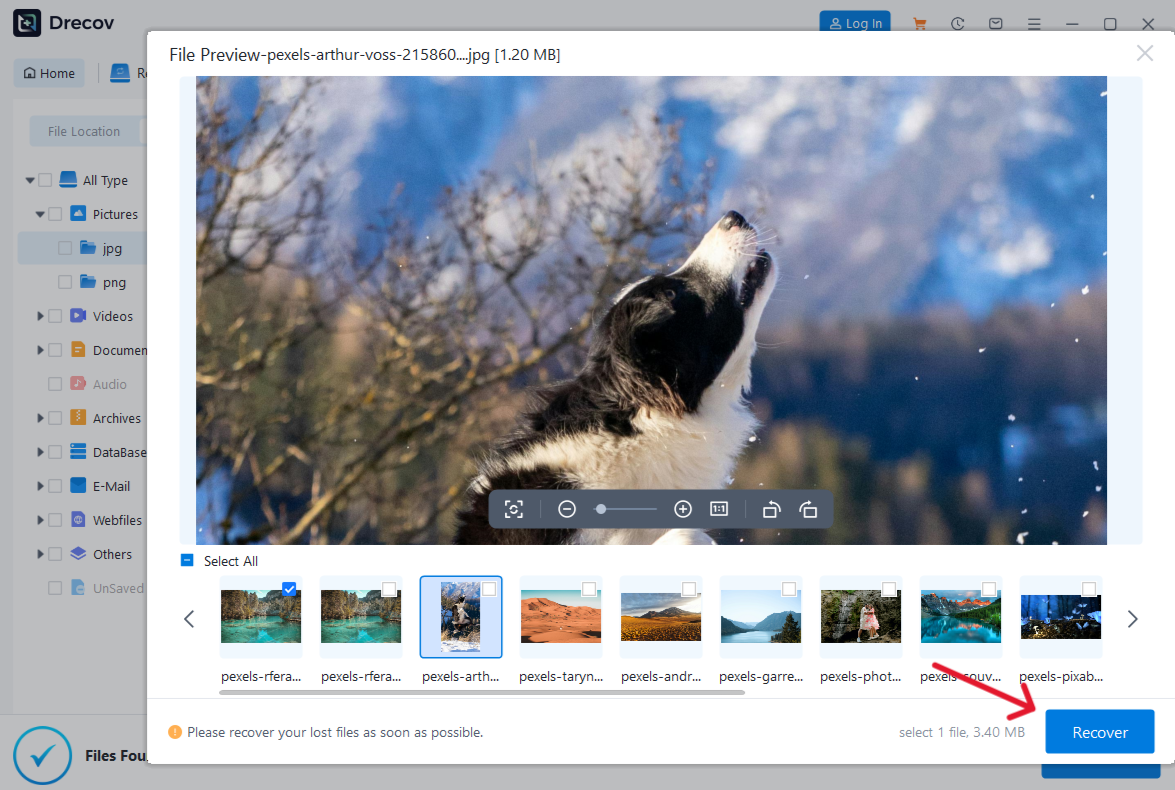
Step 4: Execute Recovery
Select the files you wish to restore and click “Recover.”
Important Point: Always save your recovered files to a different drive than the one you are scanning to avoid data overlap.
ChatGPT 5 Availability by Plan
Free vs Paid Users
OpenAI has made it clear that “Intelligence” is the new currency. Free users in 2026 generally get a taste of GPT-5.3 but are limited to a certain number of messages per day. Paid users (Plus/Pro) enjoy higher limits and access to the reasoning-heavy 5.4 models.
Enterprise and Early Access
If you are part of a corporate “Enterprise” plan, your admin might actually be the reason for chatgpt 5 not showing up. Admins often wait to enable new models until they have cleared internal security audits.
What If ChatGPT 5 Still Doesn’t Appear?
Waiting vs Forcing Access
If you have cleared your cache, updated your app, and verified your Pro subscription, yet the ChatGPT 5 Pro option not appearing in model selector persists, the issue is likely server-side. OpenAI uses “A/B testing” where certain users are intentionally kept on older models to compare performance. In this case, no amount of troubleshooting will help—you simply have to wait for your account to be “bucketed” into the new update.
When to Contact Support
Contact OpenAI support if:
- You are being billed for a Pro plan but only see “GPT-4” or “GPT-5.3 mini.”
- Your account shows a “Subscription Error” message.
- The model selector is completely missing from your interface.
Future Updates and What to Expect
Gradual Feature Expansion
Access to ChatGPT 5 is just the beginning. Throughout 2026, we expect to see “Agentic” features where the AI can take actions in other apps. These features will likely roll out even more slowly than the base model.
Model Updates Beyond GPT-5
OpenAI has shifted toward a continuous delivery model. Instead of waiting years for “GPT-6,” they are releasing incremental updates like 5.5 and 5.6. Staying informed via official blogs is the best way to ensure you aren’t missing out.
Internal Resources for Mastering Your Digital Space
Now that you have optimized your AI access and secured your data with PandaOffice Drecov, you might want to expand your skills. Check out our latest 2026 master guides:
- Browser Management: Learn how to download video from browser Firefox 2026 guide to keep your media library organized.
- External Storage: Master the art of file mobility with our guide on how to transfer photos to USB drive.
- System Stability: If your troubleshooting went too far, learn how to restore computer to an earlier date on Windows.
- Advanced Media Recovery: For specialized needs, read our definitive guide on how to recover video files.
ChatGPT 5 not showing up FAQs
1. Why can’t I see ChatGPT 5 even after updating the app?
OpenAI uses server-side flags to enable features. Even if your software is updated, your account may not have been granted the “flag” for the new model yet.
2. Does ChatGPT 5 require a paid subscription?
While a basic version (5.3 Instant) is often available to free users with limits, the full-power 5.4 Thinking and Pro models typically require a Plus or Pro subscription.
3. Is PandaOffice Drecov safe to use for sensitive data?
Yes, PandaOffice Drecov uses 256-bit SSL encryption and performs read-only scans to ensure your existing data remains untouched and private.
4. How often should I clear my browser cache?
For the best experience with web-based AI tools, clearing your cache once a month or after any major software announcement is recommended.
5. Can a VPN help me get ChatGPT 5 faster?
Sometimes. If the model is currently only available in the US or UK, connecting to a server in those regions via VPN can bypass local rollout delays.
Conclusion
If chatgpt 5 not showing up is causing you stress, remember that you are not alone. The combination of phased rollouts, complex subscription tiers, and local technical glitches creates a perfect storm for missing features. By following the troubleshooting steps outlined above—and keeping PandaOffice Drecov data recovery software handy for those “just in case” moments—you can ensure your transition to the next generation of AI is smooth and secure.
The future of AI is here; sometimes it just takes a few extra clicks (or a cleared cache) to find the door.






