







Ever deleted an Instagram message and instantly wished you could take it back? You’re not alone. Whether it’s an important conversation, a sentimental message, or even just something you need for reference, losing messages can feel like watching a crucial piece of your digital life vanish into thin air.The question remains: can you see recently deleted messages on instagram?
The digital landscape has evolved, but the panic of a “deleted for me” or “unsend” action is still very real. The answer isn’t a simple yes or no—it depends on how the message was deleted, what tools you’ve used, and how quickly you act. In this guide, we will explore the technical reality of Instagram’s data management and provide you with actionable steps to retrieve what you thought was lost.
How Instagram Handles Deleted Messages
Understanding how Instagram treats deleted messages is like understanding the rules of a game—you can’t win if you don’t know how it works behind the scenes. In 2026, Meta’s privacy policies and data retention protocols have become more stringent, making spontaneous recovery more challenging than in previous years.
What Happens When You Delete a Message
When you delete a message or conversation on Instagram, it is immediately removed from your active inbox. However, this doesn’t always mean it’s erased from Instagram’s servers instantly. In some cases, fragments of data may still exist temporarily on Meta’s backup nodes for up to 30 days due to data compliance regulations.
Think of it like shredding a document. The paper still exists as tiny pieces, but you can’t easily put it back together unless you act fast and have the right tools to reconstruct the data.
Difference Between Unsend and Delete
Here’s where things get interesting. Instagram gives you two primary ways to remove messages:
- Delete conversation: This removes the chat history only from your side. The other person still has the full record.
- Unsend message: This removes the message from both sides. It’s a “global” delete.
If you unsend a message, it disappears for everyone in the chat. That makes recovery much harder because it’s not just hidden—it’s actively purged from the active conversation thread.
Does Instagram Have a Recently Deleted Messages Folder?
This is where many people get confused, often searching for a “trash bin” within the app settings.
Comparison with Recently Deleted Photos
Instagram does have a “Recently Deleted” folder—but it is strictly for photos, videos, reels, and stories. If you delete a post, you have 30 days to restore it from your account settings. Naturally, users assume that can you see recently deleted messages on instagram through a similar folder.
Why Messages Are Different
Unfortunately, messages do not have a dedicated recovery folder. Once deleted or unsent, they are not stored in a user-accessible recycle bin. This is because messaging systems are designed for real-time, high-volume communication. Archiving every single deleted DM would require massive server resources and pose significant privacy risks. So, if you’re looking for a hidden “trash” folder for messages—you won’t find one.
Can You Recover Deleted Instagram Messages?
Now for the big question: Is it actually possible to get them back?
Situations Where Recovery Is Possible
You may be able to see those lost chats if:
- You requested an Instagram Data Download before the data was purged.
- Your Notification History captured the message content before it was deleted.
- The other person still has the conversation in their inbox.
- Messages exist in synced platforms like Meta Business Suite.
Situations Where Messages Are Gone Forever
Conversely, messages are likely unrecoverable if:
- You used Vanish Mode, which wipes messages the moment they are read.
- Both parties deleted the conversation months ago.
- The message was unsent and enough time has passed for server-side purging.
Method 1: How to Check Recently Deleted Messages on Instagram via Data Download
This is the most “official” way to retrieve data. Even if a message is gone from your app, it might still reside in the archive that Meta maintains for your account.
- Step 1: Open your Instagram app and go to your Profile.
- Step 2: Tap the three horizontal lines (Menu) in the top right and select Accounts Center.
- Step 3: Navigate to Your Information and Permissions > Download Your Information.
- Step 4: Tap Request a Download. You can choose to download “All available information” or “Some of your information.”
- Step 5: Select Messages from the list of data types. This keeps the file size manageable.
- Step 6: Choose the Date Range (e.g., “Last week” or “All time”) and set the format to JSON (JSON is often easier for recovery tools to parse than HTML).
- Step 7: Hit Submit Request. Instagram will email you once the file is ready, which can take anywhere from a few hours to 48 hours.
Key Point: Once you receive the ZIP file, unzip it on a computer and look for the messages folder. You might find the text of deleted DMs that haven’t been fully overwritten yet.
Method 2: How to Find Recently Deleted Messages on Instagram Using Notification History
If you are an Android user, your phone might have seen the message before you even opened the app. This is a brilliant workaround for how to see recently deleted messages on instagram without needing a server backup.
- Step 1: Open your phone’s Settings.
- Step 2: Go to Notifications and then tap on Advanced Settings.
- Step 3: Look for Notification History and ensure the toggle is turned On.
- Step 4: Scroll through the list of recent notifications. If the Instagram message triggered a notification, the text will often be stored here, even if the sender later “unsent” it.
Warning: This method only works if the “Notification History” feature was enabled before the message was received. It does not record retroactively.
Method 3: How to See Recent Deleted Messages on Instagram via Meta Business Suite
For those who have a professional or business account linked to a Facebook Page, there is a “secret” sync that often saves the day.
- Step 1: Log into the Meta Business Suite on a desktop browser.
- Step 2: Go to the Inbox tab on the left-hand sidebar.
- Step 3: Click on the Instagram Direct icon.
- Step 4: Sometimes, due to the way Meta syncs business data, messages deleted on the mobile app remain visible in the Business Suite archive. Check the Archived or Done folders within this interface.
Method 4: Using PandaOffice Drecov for Deep Data Recovery
If the above methods fail, you might need to move beyond app settings and look at the device storage itself. When an app displays data, it often creates temporary cache files. PandaOffice Drecov is a professional-grade tool designed to scan these deep storage layers to find fragmented files that the OS has marked as “free space.”
⚠ Warning: Install it on a drive different from the one where your data was lost to prevent overwriting.
Step 1: Select the Scan Location
Launch the software and select your mobile device from the drive list. Since Instagram messages are stored in the app’s internal database, you should choose a “Deep Scan” of the internal storage.

Step 2: Analyze the Results
Click Scan. The software will begin reconstructing deleted fragments. While it may not show a perfect “chat bubble” interface, look for .db, .sqlite, or .json files within the Instagram app directory.

Step 3: Preview and Recover
Use the built-in previewer to see if any text blobs contain the conversation you lost.
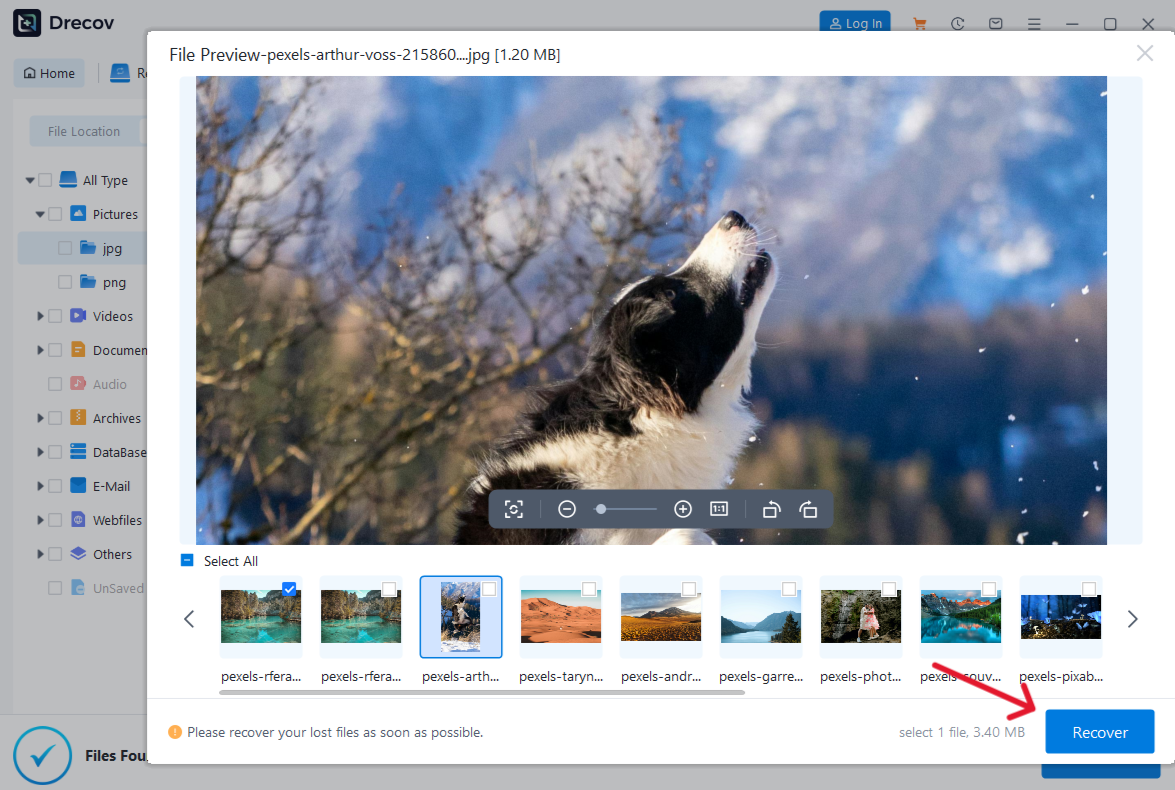
- Key Operation Point: Focus on the “App Data” or “Cache” categories during your search.
- Warning Prompt: Do not install new apps or take more photos while attempting recovery; new data can overwrite the deleted message fragments permanently.
Step 4: Save Locally
Select the relevant files and click Recover to save them to your PC. You can then use a text editor to read the message logs.
You might also want to learn how to remove OneDrive from File Explorer to keep your desktop clean. Furthermore, if your data loss extends to your work files, check out our guide on how to recover overwritten Excel files or learn the best practices to recover deleted files from USB flash drive for a complete security setup.
Method 5: Ask the Other Person (The Simplest Solution)
It sounds obvious, but it is the most reliable way to answer the question: does instagram have recently deleted messages available elsewhere?
- Step 1: Reach out to the person you were talking to.
- Step 2: Explain that you accidentally deleted the chat or lost your data.
- Step 3: Ask them to take a screenshot or copy-paste the specific info you need.
Unless they also deleted the chat, the entire history is still sitting on their phone. This is 100% safe and bypasses all technical hurdles.
Why Instagram Doesn’t Store Deleted Messages Forever
You might wonder—why not just keep deleted messages like emails in a “Trash” folder? The answer comes down to privacy and performance. In 2026, user demand for “right to be forgotten” features is at an all-time high.
- Privacy Compliance: Under laws like GDPR, once a user deletes data, the company must work toward removing it from their active systems.
- Storage Efficiency: With billions of users sending millions of DMs every minute, keeping “ghost” copies of every deleted message would be an astronomical storage cost.
- User Control: Instagram’s “Unsend” feature is marketed as a way to correct mistakes or protect privacy. If recovery were too easy, the feature would lose its purpose.
Comparison Table of Recovery Methods
| Method | Difficulty | Success Rate | Best Use Case |
| Data Download | Medium | Moderate | Retrieving history after accidental deletion. |
| Notification History | Easy | High (Android) | Viewing “unsent” messages. |
| Meta Business Suite | Medium | Low | Business or linked accounts only. |
| PandaOffice Drecov | High | High | Deep recovery of app cache fragments. |
| Asking the Other Party | Easy | Very High | Fastest way to get the content back. |
Tips to Prevent Losing Messages Again
While knowing how to find recently deleted messages on instagram is useful, prevention is always better than a frantic recovery attempt.
- Take Screenshots: If a conversation contains sensitive or important information (like a business agreement or a sentimental memory), screenshot it immediately.
- Enable Email Notifications: Go to Instagram Settings > Notifications > Email Notifications. Sometimes, the content of the DM is sent to your email, creating a permanent backup.
- Regular Backups: Use tools like PandaOffice Drecov to create periodic backups of your phone’s data to your local hard drive.
- Avoid Vanish Mode: Only use Vanish Mode for ephemeral chats that you truly do not mind losing forever.
Recently deleted messages on instagram FAQs
1. Can Instagram staff recover deleted messages for me?
No. Instagram support does not have the authority or the tools to manually retrieve deleted DMs for individual users due to privacy protocols.
2. Is there a time limit for the Data Download method?
Generally, yes. If a message was deleted more than 30 days ago, it is highly unlikely to appear in your data download archive.
3. Are there “hacker” tools that can recover unsent messages?
Be extremely wary. Most websites claiming they can “hack” into Instagram servers to get your messages are scams designed to steal your login credentials. Stick to official methods or local device recovery like PandaOffice Drecov.
4. Does clearing my app cache delete my messages?
No. Clearing the cache only removes temporary files (like images you’ve viewed). Your messages are stored on Instagram’s servers and will reappear once you log back in.
5. What is the most effective way to see an “unsent” message?
The Notification History on Android is the only reliable way to see a message that the sender has officially “unsent” from the chat.
Conclusion
In 2026, the digital footprint we leave is both massive and fragile. While there isn’t a “magic button” inside the app, the answer to can you see recently deleted messages on instagram is a cautious “yes,” provided you use the right strategies. From official data requests to advanced tools like PandaOffice Drecov, there are multiple layers of recovery to explore.






