







Yahoo usually will not show your current password, but you can reset it through Yahoo’s official Sign-in Helper or view a saved password in a browser or password manager on a device you own. Start with recovery phone, backup email, account key, trusted devices, and saved-password checks. Do not use tools that claim they can get Gmail, Facebook, Instagram, or Snapchat passwords for accounts you do not own.
This guide explains safe Yahoo password recovery and separates it from Gmail, Facebook, Instagram, and Snapchat password searches. It also covers how to recover local files after account access or email attachments disappear.
Quick Decision Table For Yahoo Password Recovery
| Situation | Safe Action | Risk To Avoid |
|---|---|---|
| Need Yahoo account access | Use Yahoo Sign-in Helper | Do not trust third-party password reveal tools |
| Password saved in browser | View it through your own password manager | Do not export all passwords casually |
| Recovery phone unavailable | Use backup email or account support | Do not make repeated random attempts |
| Need Gmail or Facebook password | Use those platforms’ official recovery | Do not reuse Yahoo steps blindly |
| Email attachments missing | Check mailbox search, Trash, and local downloads | Do not overwrite local storage |
Can Yahoo Show Your Password?
Yahoo generally protects users by letting them reset access after verification instead of showing the current password. This is normal account security. The user proves ownership through phone, backup email, account key, trusted device, or support options.
A browser or password manager may show a saved Yahoo password after local authentication. That only works on devices you own or manage. Always confirm the domain and username because old entries can remain after password changes.
Searches such as how do I get Gmail password, how do I get my Facebook password, and how do I retrieve my Snapchat password need separate official recovery pages. One account provider cannot reveal another provider’s password.
Method 1: Recover Yahoo Access Officially
Best For: owners who cannot sign in to Yahoo Mail or Yahoo account services.
Tool Used: Yahoo Sign-in Helper, recovery phone, backup email, account key, and trusted device prompts.
Steps
- Open Yahoo Sign-in Helper.
- Enter your Yahoo email address or recovery phone.
- Choose an available verification method.
- Enter the verification code from phone or backup email.
- Create a new strong password if Yahoo offers reset.
- Update the password on mail apps and saved devices.
Risk Level: Low when you use Yahoo’s official recovery page.
Method 2: Check Saved Yahoo Passwords
Best For: users who may have saved the Yahoo password on their own device.
Tool Used: Chrome, Edge, Firefox, iCloud Keychain, Windows Credential Manager, or a dedicated password manager.
Steps
- Open the password manager on a device you own.
- Search for Yahoo or mail.yahoo.com.
- Authenticate with device password, biometric, or master password.
- Confirm the username and domain.
- Use the saved password only if it still works.
- Update or delete stale entries after reset.
Risk Level: Low when you access only your own password store.
Method 3: Recover Yahoo Attachments And Local Downloads
Best For: users who regained account access but still miss files from email or local storage.
Tool Used: Yahoo Mail search, Trash, Downloads, cloud folders, and local file recovery after access returns.
Steps
- Search Yahoo Mail by sender, subject, attachment type, and date.
- Check Trash, Archive, Spam, and custom folders.
- Download important attachments to a computer.
- Search local Downloads and Documents folders.
- Scan accessible storage when files disappeared locally.
- Save recovered files to a different drive.
Risk Level: Low when you restore from mailbox records and avoid writing to the source drive.
Recover Lost Files After Access Returns
When This Recovery Method Applies
Use this method only after you regain lawful access to the account, document, drive, or storage device. PandaOffice Drecov does not find or break passwords. It can help when files disappeared from an accessible drive, SD card, external disk, or decrypted storage after password recovery, account cleanup, device repair, or file deletion.
Best For: downloaded email attachments, PDFs, images, archives, and documents from accessible Windows storage.
Tool Used: PandaOffice Drecov.
Test Environment:
Operating System: Windows 11
Storage Type: Accessible Windows drive, external storage, or removable storage
Problem Scenario: Files or email attachments missing after Yahoo account recovery, downloads cleanup, or local storage loss
Tool Used: PandaOffice Drecov
Steps
- Confirm that Windows can open the target storage after password reset, account recovery, decryption, or device repair.
- Stop saving new files to the same storage source.
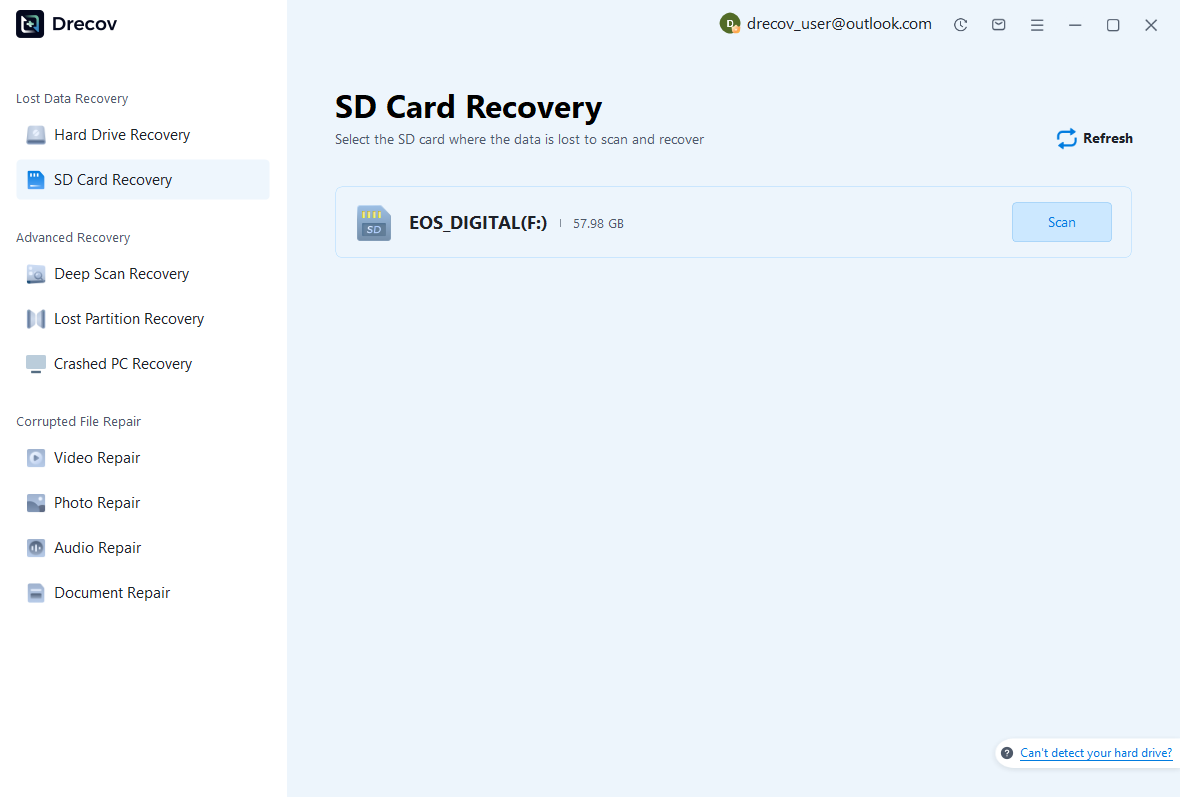
- Open PandaOffice Drecov and choose the drive, partition, SD card, or external storage device that lost files.
- Start the scan and wait for quick scan and deep scan results.
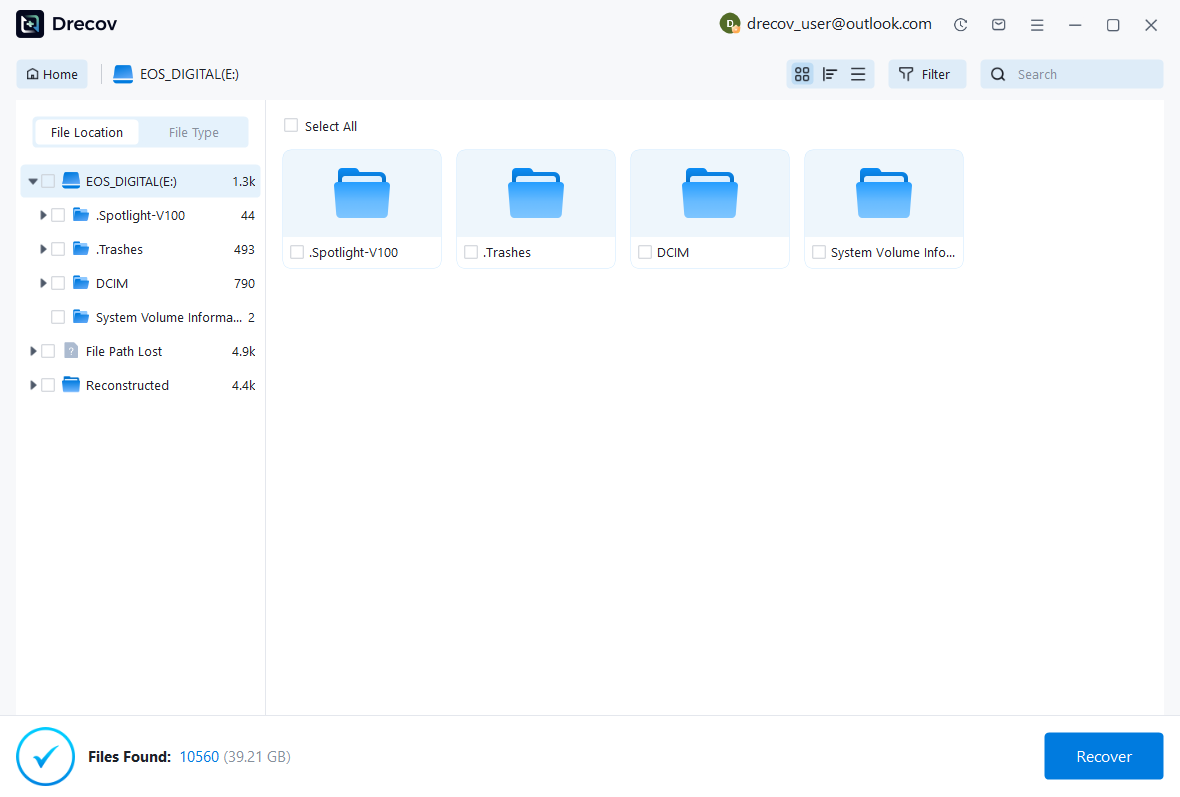
- Filter by documents, images, videos, archives, downloads, or original folders.
- Preview important files before recovery.
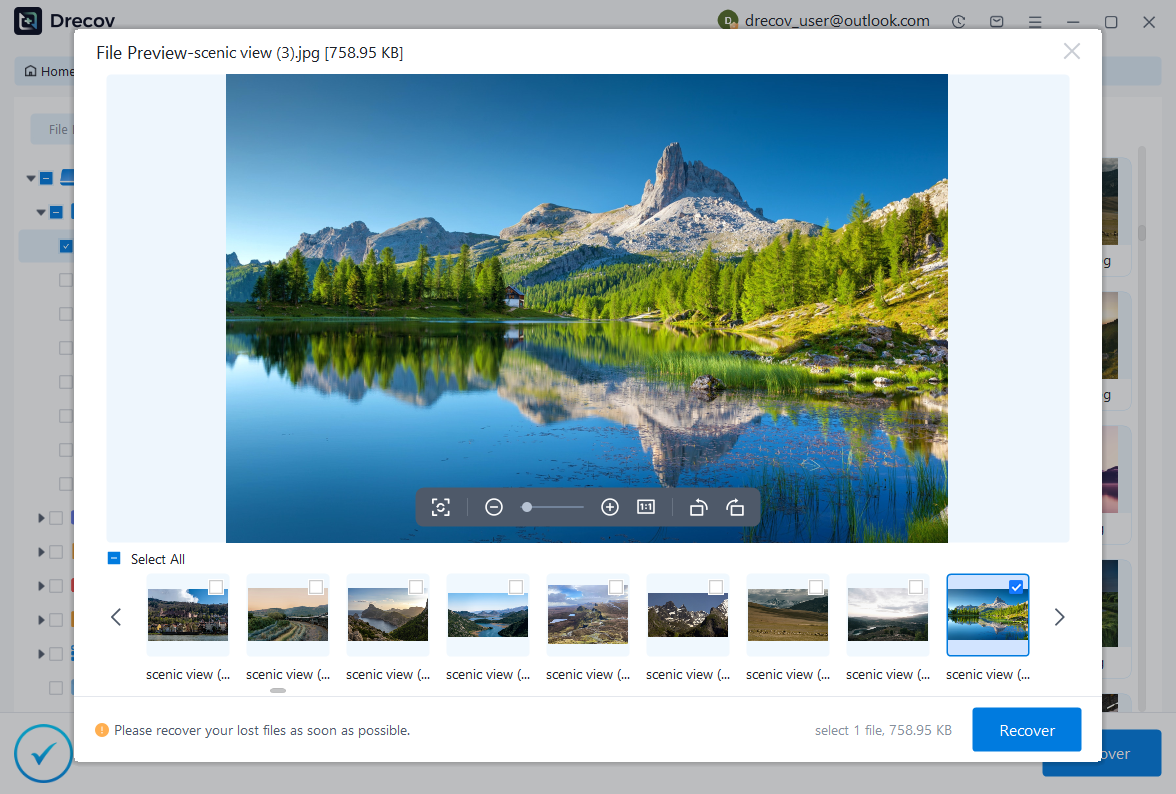
- Recover selected files to another drive, not back to the source storage.
- Open recovered files before deleting scan results or changing the original device.
Risk Level: Low when you save recovered files away from the source storage and avoid new writes during recovery.
Other Account Password Searches
Gmail Password
Gmail password recovery belongs to Google Account recovery. Use recovery email, phone, authenticator prompts, and trusted devices.
Do not expect Yahoo to reveal or reset a Gmail password.
Facebook And Instagram Password
Facebook and Instagram protect users through official reset and identity verification flows. They usually do not display the current password.
Check saved passwords only on your own devices and keep each account password unique.
Snapchat Password
Snapchat password recovery uses recovery phone, email, and support prompts. Avoid third-party password tools that promise account access.
After recovery, update saved passwords and review active sessions.
Safe Password Recovery Workflow For Yahoo password recovery
Start With Ownership And Scope
A password recovery article must start with a safe boundary. Work only on accounts, files, drives, and devices that you own or have explicit permission to manage. The goal is recovery, not unauthorized access. This rule matters for how do i find out my yahoo password searches because users often mix personal account problems, encrypted drives, PDF files, Office workbooks, and social media passwords in one urgent search.
Write down what you need to access before changing anything. A Microsoft account, Yahoo mailbox, Snapchat account, Facebook profile, PDF document, Excel workbook, Windows login, and BitLocker drive all use different recovery systems. One password reset will not unlock every service. Clear scope prevents wasted attempts and protects data.
The first practical question is whether you need the old password or simply need access again. Many services do not reveal the old password. They let you reset it after identity verification. Encrypted drives and protected documents may require the original password, recovery key, owner certificate, or a backup copy.
Check Saved Passwords The Legitimate Way
When you own the device, you can check saved passwords through the browser or password manager. Chrome, Edge, Firefox, Windows Credential Manager, iCloud Keychain, and dedicated password managers may hold saved logins. These tools usually require the device sign-in password, biometric confirmation, or account verification before showing a password.
Use saved-password views carefully. Confirm the website domain before copying anything. A saved password for an old domain, a test account, or a different email address may not match the account you need today. Password managers can also store multiple entries for the same service.
Do not export an entire password vault unless you know where the file will go. Exported password files need strong protection and quick deletion after use. For most users, viewing one saved password or resetting the account is safer than creating a large password export.
Use Official Account Recovery Channels
Official recovery channels give the safest path for Microsoft, Yahoo, Gmail, Facebook, Instagram, Snapchat, and similar services. Use the service’s recovery page, trusted device prompts, backup email, phone verification, authenticator app, recovery codes, or support process. Avoid third-party tools that claim they can reveal someone else’s social media password.
Account providers often protect users by hiding the current password. That is normal. A reset changes the password after verification. Update saved passwords on every device afterward, and sign out of sessions you do not recognize.
When a recovery page asks for proof, provide accurate recent information. Use known devices, familiar locations, previous passwords, recovery codes, billing details, or account activity only when the provider requests them. Guessing wildly can trigger temporary blocks.
Separate File Passwords From Account Passwords
A PDF password, Excel protection password, Word document password, Windows sign-in password, and BitLocker recovery key are not the same. A PDF may have an open password or permissions password. Excel may use sheet protection, workbook protection, or file encryption. BitLocker protects a whole drive. Microsoft and Yahoo passwords protect cloud accounts.
Recover the file first when the file itself disappeared. Then handle the password. A user who forgot the PDF password but also lost the PDF needs two steps: find the file from backup or storage, then use the legitimate password, owner copy, or unprotected backup.
Keep password notes and recovery keys separate from the files they protect. A BitLocker key saved only inside the encrypted drive will not help. A PDF password stored only in a lost email account creates the same problem.
Protect Data Before Reset Or Removal
Password resets can affect synced devices, encrypted files, app sessions, and saved credentials. Before a reset, copy important local files, check backups, and confirm recovery emails or phone numbers. When the case involves BitLocker, save the recovery key before disabling protection. When the case involves a document, preserve the original file before trying repair or conversion.
Do not format a drive, reset a phone, or remove encryption as the first reaction. Those actions may solve access but make file recovery harder. Work from least invasive to most invasive: verify identity, check saved passwords, restore from backup, unlock with a recovery key, copy files, then repair or reset only after data is safe.
After access returns, update your recovery methods. Add a backup email, phone number, authenticator app, recovery codes, printed BitLocker key, and password manager entry. Future recovery should not depend on memory alone.
Verify Access And File Integrity
Access recovery is not complete until you test the actual target. Sign in to the account, open the mailbox, download the attachment, unlock the document, open the drive, or preview the recovered file. A successful password reset does not automatically prove that the missing document or media file still exists.
For files, open the recovered copy in the correct application. PDF files should display all needed pages. Excel files should show the expected sheets and formulas. Drive recovery should return documents, images, archives, or videos that open normally. Account recovery should restore the data you need, not only the login screen.
Create a second backup after verification. Use another drive, secure cloud folder, or password manager. The safest finish is a working file plus a durable access plan.
Detailed Troubleshooting And Prevention Notes
Diagnose The Exact Password Type
Many password problems look similar at first glance. The user sees a lock, a prompt, or a failed sign-in message. The solution changes once you identify the password type. Online accounts use identity verification. Local Windows accounts use sign-in recovery or administrator reset. BitLocker uses a recovery key or protector. PDF and Office files may use document-level encryption or editing restrictions.
For how do i find out my yahoo password, treat the keyword as a starting clue, not the whole diagnosis. Ask which device shows the prompt, which account or file needs access, and whether the user owns the data. This simple triage prevents unsafe or irrelevant instructions.
Record the exact message. Phrases such as recovery key, password incorrect, account locked, encryption, protected view, permissions password, and workbook protection point to different fixes. Accurate wording also helps support teams validate ownership.
Use Read-Only Checks First
Read-only checks reduce risk. Open account recovery pages, view password manager entries, check recovery key records, inspect file properties, and list backup folders before changing anything. These steps gather information without erasing files or changing encryption state.
Riskier steps include reset, remove, decrypt, format, repair, clean, overwrite, and reinstall. Use them only after you copy important files or confirm that backups exist. A calm sequence protects both access and data.
When a command-line step appears in a guide, identify the target first. BitLocker commands must use the correct drive letter. File recovery scans must target the source drive and save results elsewhere. Password resets must target the correct account.
Recover The File Before Changing The Password When Possible
Sometimes the password problem hides a file-loss problem. A user may remember that a PDF had a password, but the file itself disappeared from Downloads. Another user may disable BitLocker and then notice missing folders. Recovering the file and recovering access are related but separate tasks.
Search backups, cloud folders, email attachments, downloads, external drives, and previous versions before attempting aggressive fixes. A clean backup may avoid the password issue entirely when the backup copy has the correct access information or an unlocked version.
When no backup appears, scan accessible storage after legal access returns. Preview files and save them to another drive. Do not save recovered files to the same location that lost data.
Avoid Unsafe Password Advice
A reliable guide should not teach users to break into accounts, bypass encryption, or reveal another person’s password. That kind of advice creates security, legal, and data-loss risk. The safe path uses official recovery channels, owner-controlled password managers, administrator-approved key recovery, or backups.
Be careful with tools that advertise instant password recovery for social media accounts. Most legitimate services never reveal the current password. They verify identity and let the owner create a new one. This design protects users from unauthorized access.
For documents and encrypted drives, keep the original file or drive unchanged while you search for passwords, keys, or backups. A failed attack or forced repair can damage the only copy.
Build A Better Password Storage System
After recovery, set up a password manager and store unique passwords for each service. Add recovery emails, phone numbers, authenticator apps, and recovery codes. Save BitLocker keys outside encrypted drives. Export critical business recovery records through approved company systems.
Use naming conventions for protected files. Include project names, dates, and owner information in folder names so users can find backups later. Do not store passwords in the same folder as the protected file unless a secure password manager protects that note.
Test the system once. Sign in from another device, open the recovery email, locate the recovery key, and confirm that backups contain the expected files. Prevention only works when you verify it before the next emergency.
Know When To Escalate
Escalate when the account belongs to a business, the encrypted drive contains legal or client data, the document has high value, or repeated attempts trigger lockouts. A qualified administrator, platform support team, or data recovery professional can protect evidence and avoid destructive steps.
Bring useful information: account email, device model, drive letter, error message, recovery key ID, backup dates, and proof of ownership. Clear records make legitimate recovery faster.
The best how do i find out my yahoo password article helps users regain access safely while protecting files. It gives a direct answer, avoids unsafe shortcuts, and ends with a backup plan that prevents the same crisis from returning.
Final Checklist Before You Change Anything
Access Checklist
- Confirm that you own the account, file, drive, or device, or that you have permission to recover it.
- Identify whether the prompt belongs to an online account, a local computer, a protected document, or an encrypted drive.
- Check recovery email, phone number, authenticator app, recovery codes, saved passwords, and administrator records.
- Record the exact error message, account email, file name, drive letter, or recovery key ID.
- Stop repeated guesses when the service warns about lockouts or suspicious activity.
Data Protection Checklist
- Copy important visible files before reset, repair, decryption, or cleanup.
- Use cloud Trash, Recycle Bin, File History, OneDrive, email attachments, and local backups before deep scans.
- Run recovery scans only on accessible storage and save results to another healthy drive.
- Keep original files unchanged while testing passwords, keys, or repaired copies.
- Verify recovered documents, PDFs, images, videos, and archives before deleting scan results.
Prevention Checklist
- Store unique passwords in a password manager rather than reusing one password across services.
- Save BitLocker recovery keys, document passwords, and account recovery codes outside the protected storage.
- Keep backup emails and phone numbers current for Microsoft, Yahoo, Gmail, Facebook, Instagram, and Snapchat.
- Test backups from another device so you know the files actually exist.
- Review recovery settings after the how do i find out my yahoo password problem is solved, not months later during another emergency.
This final checklist gives the reader a practical stop point. For Yahoo password recovery, a good result means more than getting past one password prompt. The user should regain access, protect the files, verify the recovered data, and set up a safer recovery path for the next time.
Related Recovery Guides
When the missing item is a TikTok draft or deleted social video, this TikTok video recovery guide covers app-specific checks outside normal password recovery.
For Adobe Illustrator documents, use this Illustrator file recovery guide to handle project files, autosaves, and desktop recovery paths.
If recovered files need a Mac external drive and that drive does not appear, this LaCie hard drive not showing up on Mac guide can help you prepare a safe destination.
When Windows restore points or rollback affect the recovery plan, read how to restore a computer to an earlier date on Windows before changing the computer that may still hold backups.
FAQ
How Do I Find Out My Yahoo Password Without Resetting?
Only a saved password manager or browser entry on your own device may show it. Yahoo usually offers reset, not password reveal.
Can I Get My Facebook Or Instagram Password From Yahoo?
No. Use each service’s official recovery process.
Can File Recovery Help With Yahoo Password Problems?
It cannot recover the Yahoo password, but it can help recover downloaded attachments or local files after access returns.
Conclusion
For how do I find out my Yahoo password, use Yahoo Sign-in Helper or a saved password manager entry on a device you own. Reset access safely, update mail apps, and recover missing attachments from Yahoo Mail, backups, or accessible storage.






