







When working with digital images, you may encounter different file extensions such as JPG, PNG, GIF, and TIFF. Among these formats, TIFF is especially popular in professional photography, graphic design, printing, scanning, and archival industries because it focuses on preserving maximum image quality.
Many users ask what is a TIFF file and why professionals choose this format instead of more common image types. A TIFF file is a high-quality image format designed to store detailed visual information while minimizing quality loss. Unlike formats that prioritize smaller file sizes, TIFF focuses on maintaining accuracy and flexibility.
A tiff file format can store high-resolution images, multiple color channels, metadata, and additional information required for professional workflows. Because of these capabilities, tiff files are often used when image quality is more important than storage efficiency.
However, TIFF images also have some limitations. Their large file sizes can consume significant storage space, and some everyday applications may not support every feature included in a TIFF image.
This guide explains everything you need to know about the tiff file type, including how TIFF works, common uses, advantages and disadvantages, how it compares with other image formats, and what to do if your TIFF images become lost or damaged.
Understanding What a TIFF File Is and How It Works
The Basic Definition and History of TIFF Files
A tiff file (Tagged Image File Format) is a raster image format created to store detailed digital images with high accuracy. It was originally developed in the 1980s to provide a flexible way for computers and scanners to exchange high-quality image data.
Unlike simpler image formats designed mainly for web use, TIFF was created with professional requirements in mind. The format allows images to contain extensive information, including color details, resolution settings, and additional tags that describe image properties.
The structure of a TIFF image is based on a system of tags. These tags store information about how the image should be interpreted, including dimensions, color depth, compression method, and other technical details. This flexible design allows TIFF to support different types of images and workflows.
A .tiff file can contain uncompressed data or use lossless compression methods. This means users can save and edit images repeatedly without experiencing the quality reduction commonly associated with compressed formats.
For example, photographers may capture images in RAW format and convert them into TIFF files during editing because TIFF preserves more visual information than many compressed formats. Similarly, publishing companies often use TIFF images because they maintain sharp details during printing.
Test environment:
- Operating system: Windows 11
- Image viewer: Windows Photos and professional image editing software
- File type tested: Standard .tiff file containing high-resolution image data
Although modern image formats have become more common for online sharing, TIFF remains an important choice whenever image accuracy and long-term preservation are required.
How the TIFF File Format Stores High-Quality Images
The main advantage of the tiff file format is its ability to store detailed image information without significantly reducing quality. While many popular image formats reduce file size through compression that removes some data, TIFF can preserve original image details.
A TIFF image can store images using different color models, including RGB for digital displays and CMYK for professional printing. It can also support grayscale images, making it suitable for documents, medical scans, and historical archives.
Another important feature is the ability to store multiple images inside a single TIFF file. This capability is useful for scanned documents containing multiple pages or professional workflows requiring several image layers.
The format also supports metadata storage. This means a TIFF file can include information such as camera settings, copyright details, image descriptions, and technical properties.
Because of these features, TIFF images are often larger than other common formats. A single high-resolution TIFF image may take hundreds of megabytes depending on the resolution, color depth, and compression settings.
⚠️Warning: Although TIFF files preserve excellent quality, they are not always the best choice for websites or quick sharing because their large size can slow loading times and require more storage space.
Test environment:
- Image resolution: 600 DPI scanned image
- Storage device: Internal SSD
- File comparison: TIFF and compressed image formats
The balance between quality and file size determines whether TIFF is the right option for a specific project.
Why TIFF Files Are Commonly Used in Professional Industries
The reason professionals continue using TIFF files is their ability to maintain image accuracy throughout complex workflows. Industries that require precise visual information often prefer TIFF because it protects details that may be lost in heavily compressed formats.
In photography, TIFF files are commonly used after editing because they preserve color information and allow further adjustments without significant degradation. Professional photographers may save final versions of important images as TIFF files before printing or archiving.
In graphic design, TIFF images provide reliable quality when combining photographs with illustrations, layouts, and other design elements. Designers often choose TIFF when preparing materials for magazines, advertisements, and high-quality printed products.
The printing industry also relies heavily on TIFF because printers require accurate color reproduction. A small loss of detail or incorrect color information can affect the final printed result.
Scientific and medical fields also use TIFF images for storing detailed visual information. For example, scanned documents, research images, and technical diagrams often require formats that maintain every detail.
Test environment:
- Professional workflow: Image editing and print preparation
- Software environment: Desktop image editing application
- Output requirement: High-resolution printing
Although TIFF is not the smallest or fastest image format, its reliability makes it valuable for situations where image quality cannot be compromised.
Key Features That Make TIFF File Type Different from Other Image Formats
Lossless Compression and Image Quality Preservation
One of the defining characteristics of the tiff file type is its ability to preserve image quality through lossless compression. Lossless compression reduces file size while keeping all original image information available.
When editing images repeatedly, maintaining quality is extremely important. Formats such as JPEG often remove certain image details during compression. After multiple editing cycles, these quality losses can become noticeable.
TIFF avoids this problem by keeping more complete image data. This makes it suitable for professional editing workflows where images may go through several modifications before reaching the final version.
A photographer, for example, may adjust exposure, color balance, sharpness, and other settings multiple times. Saving the image as TIFF helps prevent additional quality loss during these changes.
However, the benefit of higher quality comes with increased storage requirements. A TIFF image may occupy much more space than a JPEG image with similar dimensions.
Test environment:
- Original image: High-resolution digital photograph
- Editing process: Multiple save and edit cycles
- Comparison format: TIFF versus JPEG
For users who only need images for social media or casual viewing, TIFF may be unnecessary. But for professional projects, its ability to maintain original details provides significant advantages.
Support for Multiple Layers, Channels, and Metadata
Another reason TIFF remains valuable is its support for advanced image information. Depending on the software and settings used, TIFF files can contain multiple layers, transparency information, and additional metadata.
Layers are especially useful in professional image editing because they allow users to separate different elements of an image. Instead of combining everything into one final picture, editors can continue adjusting individual components.
Color channels are another important feature. TIFF supports different color configurations, allowing it to work effectively in photography, design, and printing environments.
Metadata storage provides additional benefits by allowing users to keep important information inside the image file. This may include author details, copyright information, camera settings, and technical descriptions.
Test environment:
- Software: Professional image editing application
- File tested: Multi-layer TIFF image
- System: Windows desktop environment
Because TIFF is highly flexible, it can adapt to many professional requirements. However, compatibility may vary depending on the application used to open the file.
Some basic image viewers may display only the flattened image and ignore advanced TIFF features. Therefore, users working with complex TIFF files should use applications that fully support the format.
Compatibility and Storage Characteristics of TIFF Files
TIFF files are widely supported across many operating systems and professional applications. Users can open them on Windows, macOS, and Linux systems using various image viewers and editing tools.
Despite broad compatibility, TIFF is not always ideal for general-purpose sharing. The large file size can make uploading, downloading, and transferring images slower compared with smaller formats.
For example, sending dozens of high-resolution TIFF images through email may not be practical because attachment limits are often much smaller than the total file size.
Storage planning is also important when working with many TIFF images. Professional photographers, designers, and organizations often use external drives or network storage systems to manage large collections.
Test environment:
- System tested: Windows 10/11
- Storage: External HDD and SSD
- File collection: Multiple high-resolution TIFF images
For long-term archiving, TIFF remains one of the preferred formats because it preserves detailed image information and has been widely used for decades.
Understanding these storage characteristics helps users decide when TIFF is appropriate and when a smaller format may be more convenient.
Common Uses of TIFF Files in Different Fields
TIFF Files in Photography and Professional Image Editing
Professional photographers often choose tiff files when image quality, editing flexibility, and long-term preservation are more important than file size. Although many cameras initially save images in JPEG or RAW formats, photographers frequently convert finished projects into TIFF because this format preserves more visual details during post-processing.
When editing professional images, repeated adjustments such as exposure correction, color grading, sharpening, and retouching can gradually affect compressed formats. A tiff file format helps reduce this problem because it keeps more original image information during editing and saving.
For example, photographers working on wedding albums, commercial advertisements, landscape photography, or studio portraits may save final versions as TIFF before printing. This ensures that important details, including textures, shadows, and color transitions, remain accurate.
Graphic designers also use TIFF images when combining photographs with illustrations, layouts, and other creative elements. The format provides stable quality for professional projects that require high-resolution output.
Test environment:
- Camera source: Professional digital photography files
- Operating system: Windows 11 workstation
- Editing software: Professional image editing application
- File type tested: High-resolution TIFF image
Although TIFF files are larger than common formats, their ability to preserve image quality makes them valuable for professional workflows.
TIFF File Format Applications in Printing and Publishing
The printing and publishing industries depend on accurate image reproduction, which is why the tiff file type is widely used in professional environments. When images are prepared for magazines, brochures, posters, and commercial materials, maintaining original details is extremely important.
Unlike compressed formats that remove image information to reduce file size, TIFF preserves more complete visual data. This allows printers and designers to achieve clearer results with more accurate colors.
Publishers often use TIFF files during production because the format supports high resolution and different color systems. Professional printing commonly requires CMYK color information, and TIFF works effectively with these requirements.
A .tiff file can also serve as a master copy for future editing. Instead of repeatedly converting images between formats, designers can keep a high-quality original version and create smaller copies when needed.
Test environment:
- Workflow: Commercial printing preparation
- Image source: High-resolution scanned artwork
- Color mode: CMYK TIFF image
- Output requirement: Professional printed materials
Although TIFF requires more storage space, it remains popular because quality loss during printing can create expensive mistakes.
TIFF vs Other Popular Image Formats
Differences Between TIFF and JPEG Files
TIFF and JPEG are two widely used image formats, but they are designed for different purposes. The biggest difference is the balance between image quality and file size.
JPEG uses lossy compression, meaning it removes some image information to create smaller files. This makes JPEG suitable for websites, social media, and everyday image sharing.
A tiff file usually focuses on preserving image details. Because TIFF can use lossless compression, it maintains more original information and performs better in professional editing, printing, and archival workflows.
For example, photographers may upload JPEG versions online while keeping TIFF copies for printing or future modifications.
Test environment:
- Original image: High-resolution photograph
- Compared formats: TIFF and JPEG
- Evaluation: Image quality and storage size
JPEG is more convenient for daily use, while TIFF is better when maximum quality preservation is required.
Differences Between TIFF and PNG Files
TIFF and PNG both support high-quality images, but they are designed for different scenarios.
PNG is commonly used for websites, digital graphics, and images requiring transparent backgrounds. It provides lossless compression while maintaining relatively smaller file sizes.
TIFF is designed more for professional image workflows. A tiff file type can store additional information such as metadata, color channels, and advanced image properties.
Because TIFF stores more information, its file size is usually larger than PNG.
Test environment:
- Operating system: Windows 11
- Files compared: TIFF and PNG images
- Usage scenario: Digital display and professional editing
For online content, PNG is usually more practical. For professional photography and printing, TIFF provides greater flexibility.
How to Open and View a .tiff File on Different Devices
Opening TIFF Files on Windows Computers
Windows users can open a .tiff file with built-in image applications or professional software. Modern Windows versions support many TIFF images without requiring additional tools.
Users can double-click the file or select a compatible application through the “Open With” option. If the default viewer cannot display the image correctly, installing professional image software may provide better compatibility.
Some advanced TIFF features, including layers and metadata, may not appear in basic viewers.
Test environment:
- Operating system: Windows 11
- File tested: High-resolution TIFF image
- Viewing tools: Windows image viewer and editing software
⚠️Warning: Avoid repeatedly converting damaged TIFF files with unknown programs because modifications may make recovery more difficult.
Using Professional Software to Edit TIFF Images
Professional editing applications provide better support for advanced TIFF features. Users can adjust colors, modify layers, retouch images, and prepare files for printing.
Because TIFF preserves detailed image information, many designers and photographers use it as a working format throughout complex editing processes.
Test environment:
- Computer system: Windows desktop workstation
- Image type: Large TIFF file
- Purpose: Professional image editing
Keeping an original backup copy before editing is recommended to avoid accidental damage.
How to Recover Deleted or Lost TIFF Files
Reasons Why TIFF Files Become Lost or Inaccessible
Although TIFF images are known for their reliability and excellent quality, tiff files can still become lost, deleted, or inaccessible because of different storage problems. Since many TIFF images are used for professional photography, printing projects, and digital archives, losing these files can cause significant problems.
One common reason for TIFF loss is accidental deletion. Users may remove important images while organizing folders or cleaning storage devices. Unlike some applications that provide temporary recovery options, deleting files from storage devices often removes the file reference immediately.
Formatting errors are another frequent cause. Users may accidentally format an external hard drive, SD card, or USB device that contains important tiff file format images. Although the files may no longer appear in the folder, the original image data can sometimes remain on the storage device until overwritten.
File system corruption can also make TIFF images unavailable. Sudden power failures, unsafe device removal, interrupted transfers, or storage device errors may damage the structure that helps the operating system locate files.
Test environment:
- Storage device: External HDD containing TIFF images
- Operating system: Windows 11
- Loss situation: Accidental deletion and formatting errors
- File type tested: High-resolution TIFF images
⚠️Warning: After losing TIFF images, avoid saving new files to the same storage device. New data may overwrite the original image information and reduce the possibility of recovery.
Understanding the reason behind TIFF loss helps users choose the correct recovery method. In many cases, quick action can significantly improve the chance of restoring valuable images.
Recover TIFF Files with PandaOffice Drecov
When backup copies are unavailable, recovery software can help users locate deleted or inaccessible image files. A recovery tool works by scanning the storage device and searching for remaining file information that has not been overwritten.
PandaOffice Drecov is a Windows-based recovery solution designed to help users recover lost files from various supported storage devices. It can scan drives, identify recoverable data, and allow users to preview available files before restoring them.
The recovery process generally includes:
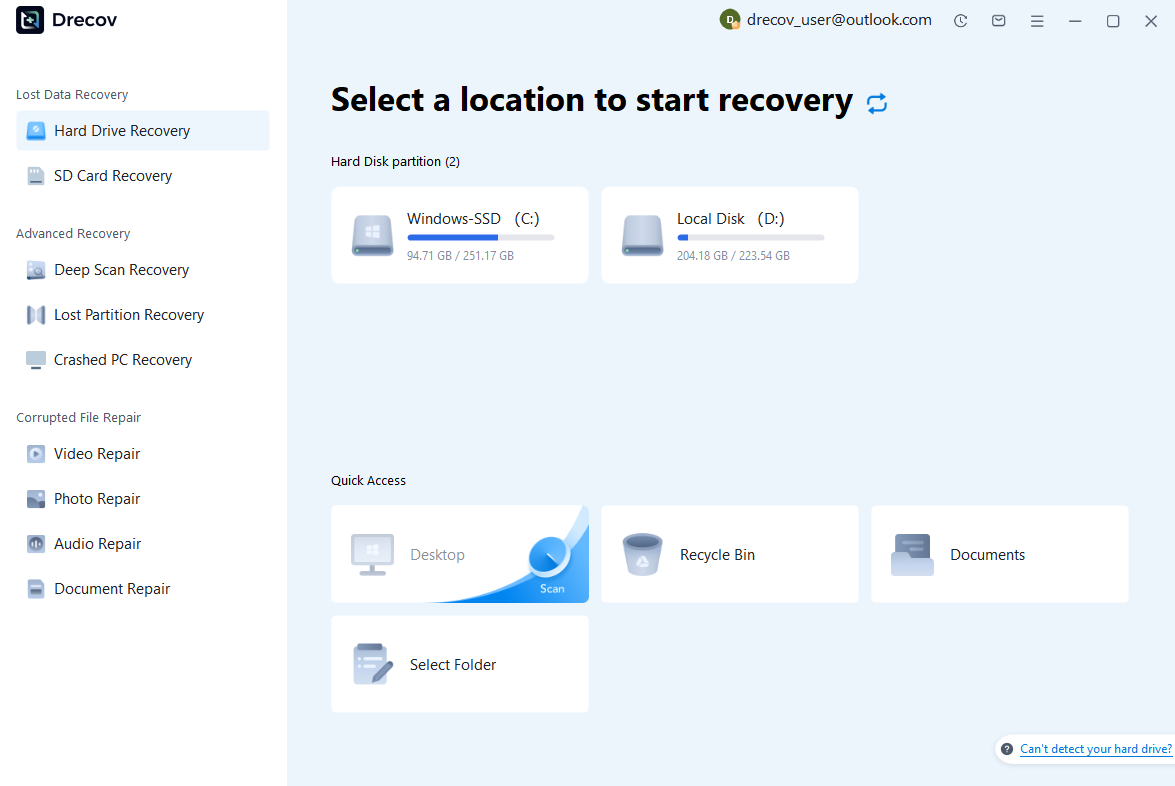
Step 1: Connect the Drive / USB)
Connect your device (SD card, HDD/SSD, or USB drive) to your computer and launch PandaOffice Drecov. Select the target device and start the scan. The software will perform a quick scan and deep scan to detect lost or deleted data.
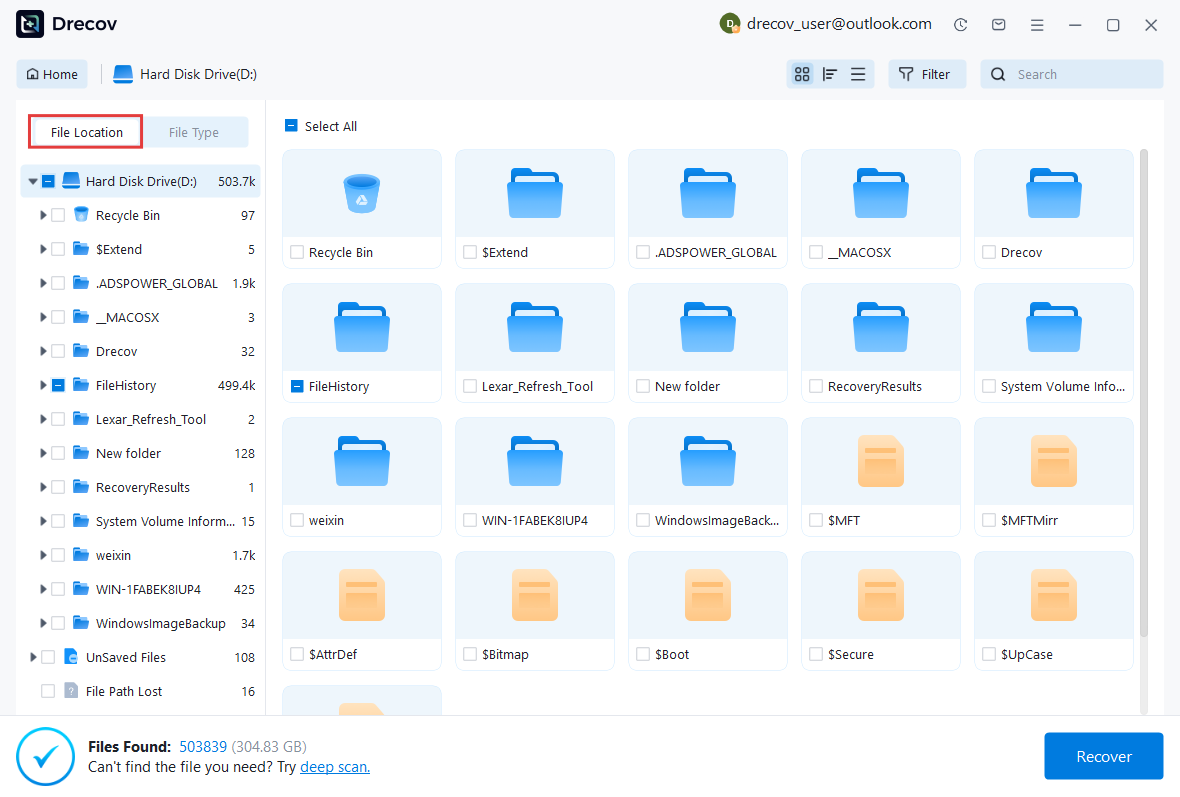
Step 2: Locate and Preview Lost Files
After scanning, browse the detected files and use the preview feature to check recoverable data. You can preview documents (Word, Excel, PDF), photos, and videos to ensure file integrity before recovery.
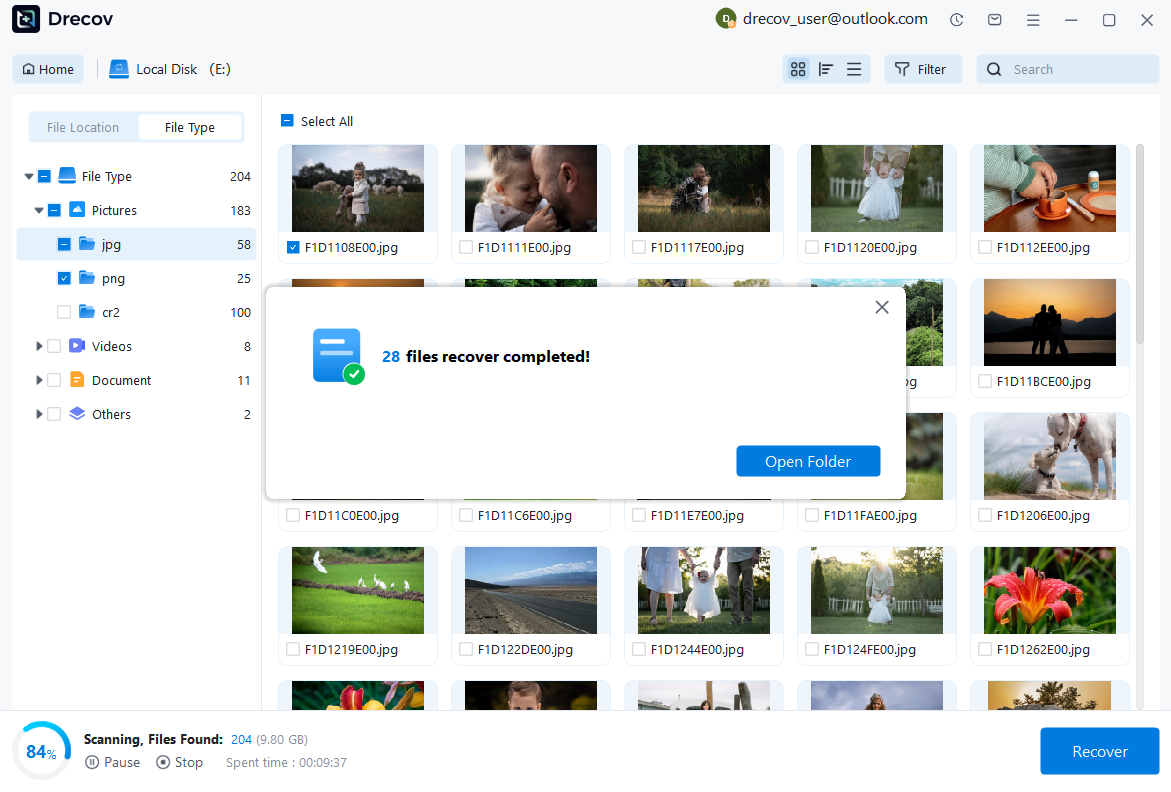
Step 3: Recover and Save to a New Location
Select the files you want to restore and click recover. Save all recovered data to a different drive or location (not the original device) to avoid overwriting lost data.
Some questions you may be interested in:
how to format a hard drive windows 11
how to recover deleted drafts in outlook
what is healthy recovery partition
how to make steam not open on startup
Test environment:
- Operating system: Windows 10/11
- Storage device: External HDD, SSD, or memory card
- File type tested: Deleted TIFF image files
- Recovery destination: Separate internal or external drive
Recovery results depend on several factors, including how long the files have been deleted, whether new data has been written, and the overall condition of the storage device.
For recently deleted TIFF images, recovery software often provides better results because the original file data has not yet been replaced by new content.
Restore TIFF Files from Backup Sources
Before using recovery software, checking existing backups is always a recommended step. If users have previously copied their images to another location, restoring lost files can often be completed quickly and safely.
Many photographers and designers keep backup copies of their projects on external hard drives, cloud storage platforms, or additional computers. These copies can provide an easy solution when original files become unavailable.
For example, users who regularly transfer .tiff file images from a camera or editing workstation may already have duplicate versions stored in another folder. Checking previous project folders, backup drives, and synchronization services may reveal the missing images.
Windows also provides backup features that can help restore earlier versions of files if they were enabled before the data loss occurred.
Test environment:
- Backup source: External hard drive and cloud storage
- Computer system: Windows 11
- File searched: TIFF image archive
- Recovery method: Manual restoration from backup copy
However, backups are only useful if they were created before the files disappeared. If no backup exists, users may need to use another recovery approach.
Creating multiple backups is one of the best ways to protect important image collections. A reliable backup strategy can prevent permanent data loss caused by accidental deletion, hardware failure, or storage corruption.
Frequently Asked Questions About TIFF Files
Are TIFF Files Better Than JPEG Images?
Whether TIFF is better than JPEG depends on how the image will be used. TIFF focuses on preserving maximum image quality, while JPEG focuses on reducing file size and improving convenience.
A tiff file format is often preferred for professional photography, printing, and archival purposes because it keeps more image details and supports advanced editing workflows.
JPEG is usually more suitable for websites, social media, and everyday sharing because smaller files load faster and require less storage space.
For example, a photographer may save an edited master image as TIFF while exporting a smaller JPEG version for online use.
Test environment:
- Image source: High-resolution photograph
- Formats compared: TIFF and JPEG
- Evaluation criteria: Quality retention and storage requirements
The best format depends on whether image quality or file efficiency is the priority.
Can TIFF Files Be Converted to Other Formats?
Yes, TIFF images can usually be converted into other image formats such as JPEG, PNG, or PDF. Conversion may be necessary when users need smaller files or better compatibility with certain applications.
However, users should keep the original TIFF version before conversion. Converting a TIFF image into a compressed format may reduce image quality, especially when using lossy compression.
For professional projects, it is recommended to maintain the original TIFF file and create additional copies in other formats when needed.
Test environment:
- Operating system: Windows 11
- Original file: TIFF image
- Conversion targets: JPEG and PNG formats
Keeping multiple versions allows users to balance quality and convenience for different purposes.
Why Are TIFF Files Larger Than Other Image Types?
TIFF files are usually larger because they store more image information compared with many compressed formats. They can preserve high-resolution details, multiple color channels, metadata, and other image properties.
A single high-quality TIFF image may require significantly more storage space than a similar JPEG image.
This larger size is the trade-off for better quality preservation. Professional users often accept larger file sizes because maintaining accurate image information is more important than saving storage space.
Test environment:
- File types compared: TIFF, JPEG, and PNG
- Storage device: SSD
- Evaluation: File size and image quality
For users who need professional image preservation, the additional storage requirement is often worthwhile.
Conclusion: Understanding the Value of TIFF File Format
Understanding what is a tiff file helps users make better decisions when working with digital images. TIFF remains one of the most reliable formats for professional photography, printing, scanning, and long-term image preservation.
The biggest advantage of TIFF is its ability to maintain excellent image quality while supporting advanced features such as metadata, high resolution, and flexible color management. These characteristics make it valuable for industries where image accuracy is essential.
However, TIFF is not always the best choice for every situation. Its large file size makes it less convenient for websites, online sharing, and storage environments with limited space. Formats such as JPEG and PNG may be more practical for everyday use.
When TIFF images are accidentally deleted or become inaccessible, users should stop writing new data to the storage device and choose an appropriate recovery method. Checking backups should always be the first step, while recovery software can provide assistance when no backup is available.
By understanding the features, advantages, and limitations of the tiff file type, users can better manage their image collections and protect valuable digital assets.





