







Data loss remains a frustrating reality for computer users worldwide. You insert your removable drive into a port, but the operating system suddenly demands a format. This nightmare scenario indicates a serious corrupt flash error. Valuable photos, critical business documents, and years of personal files can seem trapped forever behind raw file systems or unreadable sectors.
Consequently, users panic and try desperate measures that often destroy their data permanently. You need a reliable plan when a corrupted thumb drive threatens your productivity. Fortunately, advanced file rescue utilities offer a safe pathway to retrieve your missing files before you attempt any risky hardware repairs. This comprehensive guide will walk you through the precise steps to recover corrupted usb drive data and safely restore your storage media to full health.
Understanding the Basics of Corrupt Flash
A corrupt flash state occurs when your operating system can no longer read or write data to the storage sectors correctly. This issue stems from file system corruption, sudden power loss during transmission, or physical wear on the memory chips. Meanwhile, the master boot record or the file allocation table becomes unreadable to Windows or macOS.
Common symptoms include error messages stating that the device is not recognized, raw file system designations, or empty directory folders despite used storage space. Furthermore, users often encounter specific system bugs when moving files between platforms. For instance, file errors can cause peripheral issues across different applications on your computer. If you experience system errors while downloading files, you might find answers in this ChatGPT download error fix guide.
PandaOffice Drecov data recovery software serves as a powerful shield against these specific scenarios. It reads raw sectors directly, bypassing the broken operating system instructions. Whether you use your drive for work files or specialized console gaming setups, this tool handles diverse file structures. For example, gamers who configure storage for console emulation can read about proper setups in this PS3 ISO USB installation guide. In addition, if system file corruptions cause software licensing problems on your host machine, check out this Steam no licenses error fix guide.
⚠ Warning: Install it on a drive different from the one where your data was lost to prevent overwriting.
Solutions to Corrupt Flash Issues
Method 1: Reinstall Device Drivers via Device Manager
Sometimes the storage media is perfectly fine, but the system drivers are broken.
- Step 1: Press the Windows Key + X hotkey combination on your keyboard.
- Step 2: Select Device Manager from the power user menu.
- Step 3: Expand the Disk drives category to locate your device.
- Step 4: Right-click your removable storage device and choose Uninstall device.
- Step 5: Disconnect your device, restart your computer, and plug the drive back into a different port.
Method 2: Recover Corrupted Flash Drive Data via PandaOffice Drecov
You must salvage your files before attempting any destructive formatting repairs. PandaOffice Drecov data recovery software stands out as a premier solution for these exact emergencies. This professional tool scans damaged storage architecture to rebuild lost file directories efficiently. Furthermore, it bypasses the logical errors that prevent standard operating systems from reading your media.
⚠ Warning: Install it on a drive different from the one where your data was lost to prevent overwriting.
- Step 1: Connect your damaged storage device to a functioning USB port. Launch the application by double-clicking the desktop shortcut.
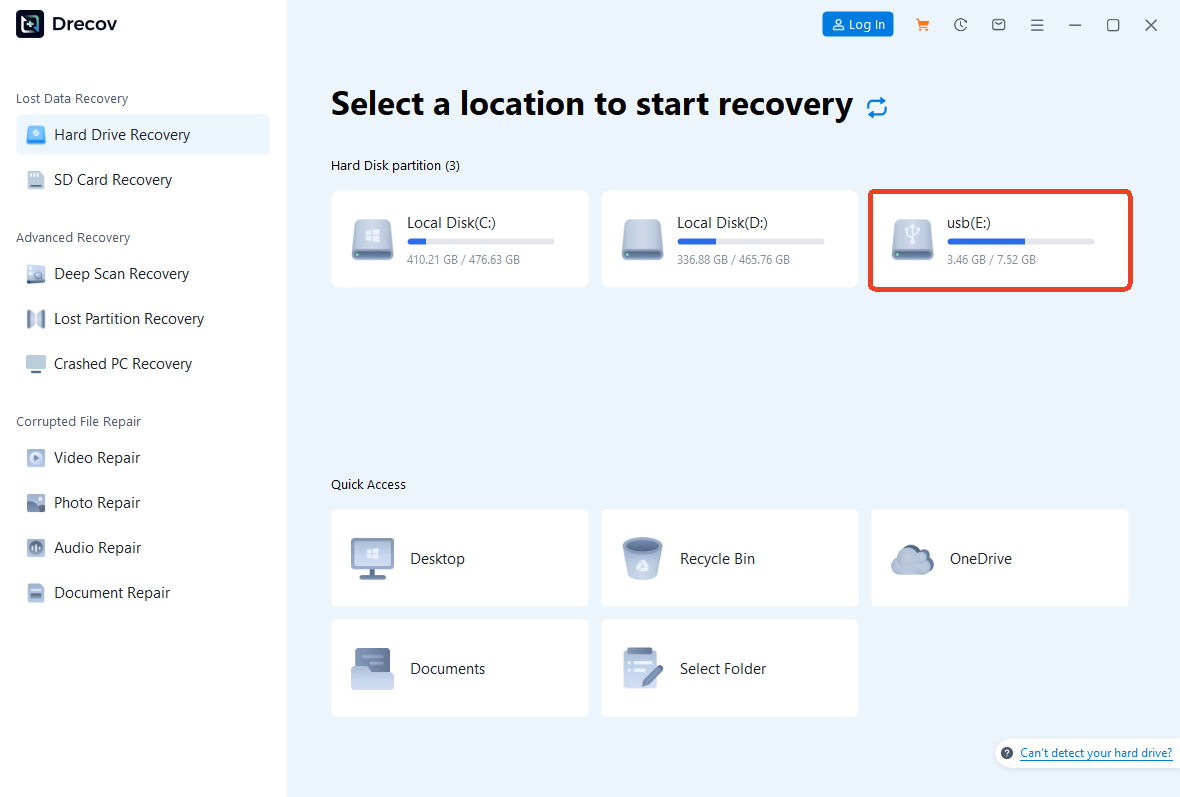
- Step 2: Select the targeted drive from the visual device list on the home dashboard. Click the Scan button to initiate the deep sector analysis.
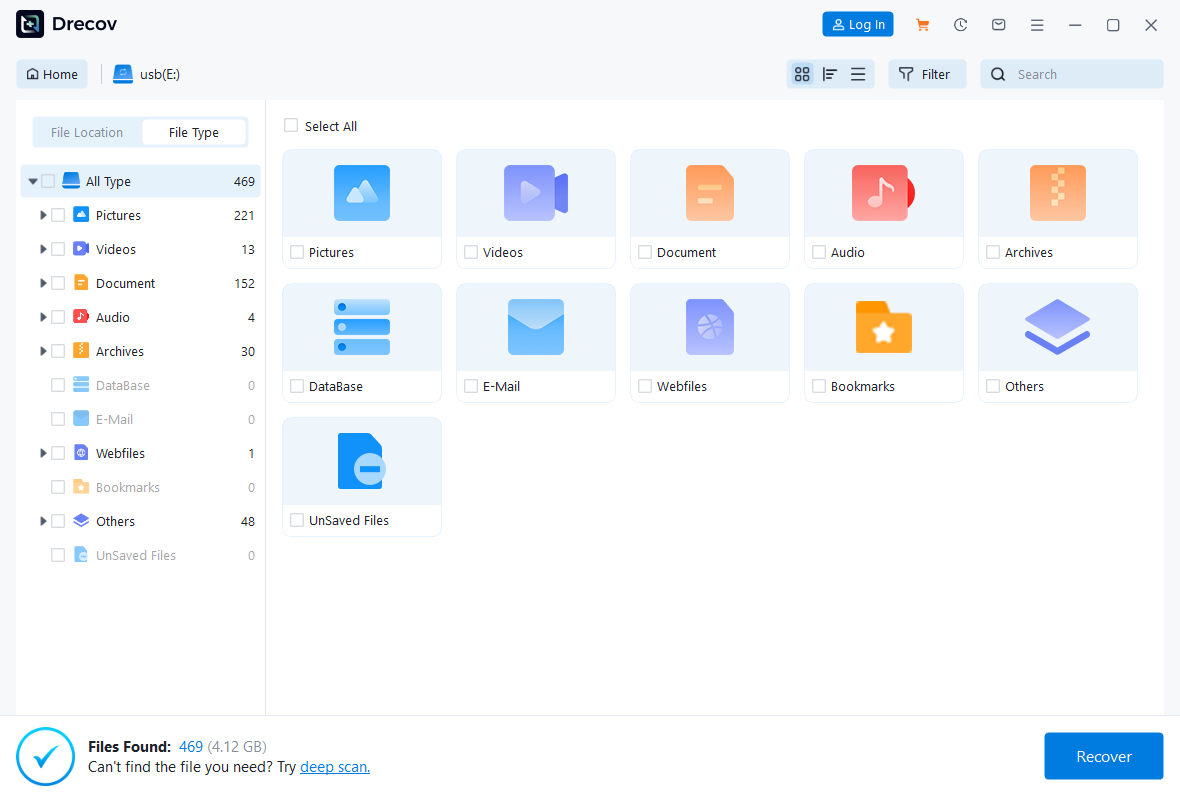
- Step 3: Preview the discovered files within the real-time results panel.

- Step 4: Check the boxes next to the folders you wish to rescue. Click Recover and choose a safe storage path on your local computer hard drive.
Method 3: Use the Windows Error Checking Tool
Windows contains a graphical utility that can fix a corrupted usb flash drive automatically.
- Step 1: Open File Explorer by pressing the Windows Key + E hotkey.
- Step 2: Click on This PC in the left sidebar navigation panel.
- Step 3: Locate the drive under the Devices and drives section.
- Step 4: Right-click the drive icon and select Properties.
- Step 5: Navigate to the Tools tab at the top of the interface.
- Step 5: Click the Check button inside the Error checking box.
- Step 6: Select Scan and repair drive to allow Windows to fix file system anomalies.
Alternative or Complementary Methods
Manual command line utilities offer excellent alternatives when graphical user interfaces fail to resolve file system errors. The Command Prompt provides direct access to disk checking tools that can bypass standard system restrictions. However, you must execute these instructions carefully to protect your operating system files.
To fix your drive using the command line, press the Windows Key, type cmd, and press Control + Shift + Enter to launch the prompt with administrative permissions. Type the command chkdsk E: /f /r into the terminal window. Replace the letter E with the actual drive letter assigned to your storage device. The /f switch instructs the utility to fix errors on the disk, while the /r switch commands it to locate bad sectors and recover readable information.
| Method Name | Pros | Cons |
| PandaOffice Drecov | High data recovery success rate, preserves file names, extremely safe | Requires a local hard drive with free storage space |
| Windows CHKDSK | Built into the OS, completely free, no internet required | Can occasionally overwrite data fragments during repair |
| Disk Management Format | Completely restores storage functionality | Erases all existing files from the media instantly |
Consequently, comparing these methods highlights the importance of recovering your data first. Manual tools like CHKDSK are great for restoring hardware functionality, but they can accidentally destroy loose data fragments. Meanwhile, software deployment remains the safest initial step for valuable assets. For comprehensive details on native repair mechanics, review the official Microsoft CHKDSK documentation.
Tips & Best Practices
- Always Use Safe Ejection: Never pull a storage drive directly out of a port while data transfers are active. Always click the Safely Remove Hardware icon in the system tray first.
- Avoid Direct Editing: Do not open and edit large files directly from your removable storage media. Copy the files to your local desktop, make the necessary edits, and paste them back.
- Monitor Drive Temperature: Excessive heat can damage internal flash memory controllers. Disconnect storage devices that feel hot to the touch.
- Maintain Multi-Location Backups: Use the 3-2-1 backup strategy. Keep three copies of your data across two different media types, with one copy stored in a secure cloud location.
Corrupt Flash FAQs
How to repair corrupted thumb drive without losing data?
You must extract your files using a specialized tool before attempting any repairs. Run PandaOffice Drecov data recovery software to copy your files to a safe location. Once your data is secure, you can format the drive safely using Disk Management.
Can I restore corrupted usb drive functionality for free?
Yes, you can use native Windows tools like the CHKDSK command or the Error Checking utility inside drive properties. These built-in system applications can fix directory errors without requiring third-party purchases.
Why does my computer show a corrupt flash error suddenly?
This error usually happens when a write operation gets interrupted. Sudden power fluctuations, pulling the drive out without unmounting it, or worn-out memory chips can corrupt the file allocation table instantly.
Is it possible to recover corrupted usb drive files if it shows a RAW file system?
Yes, a RAW designation means the operating system no longer recognizes the formatting structure. Advanced scanning applications can read the underlying raw data sectors directly and rebuild your missing files.
How often should I replace a corrupted thumb drive?
If a drive continually drops its connection or suffers from recurring sector errors after a full format, the flash memory components are likely failing physically. You should replace the device immediately to avoid permanent data loss.
Conclusion
Encountering a corrupt flash error is undoubtedly stressful, but it does not mean your files are gone forever. By utilizing structured recovery methods, you can salvage your important digital assets safely. PandaOffice Drecov data recovery software provides the deep scanning power required to rescue files from stubborn storage devices. Always prioritize data extraction before running aggressive command line utility repairs. Finally, embrace proactive file habits, back up your critical items frequently, and invest in reliable storage hardware to keep your digital life secure.






