







Digital content creation moves at an incredible speed. Millions of creators use advanced AI systems to produce high-quality assets. However, a major issue often disrupts this workflow: the unexpected loss of generated files. When local cache folders disappear or browser crashes wipe out temporary downloads, users frequently lose access to their creative outputs.
This technical guide addresses why files disappear during chatgpt image generation workflows. Furthermore, it presents actionable steps to secure your local files. While losing AI-generated assets is highly frustrating, professional utilities like PandaOffice Drecov data recovery software can systematically scan local storage media to restore missing data.
Understanding the Basics of chatgpt image generation
The process of chatgpt image generation relies on cloud-based neural networks that render visual assets based on textual descriptions. Once an image appears on the screen, the web browser caches a local copy. Users can then manually download the file to a local drive.
Common Technical Data Loss Issues
- Browser Cache Eviction: Web browsers automatically clear temporary internet files when the local drive runs low on storage space.
- Accidental Downloads Folder Cleanup: Users often empty their Downloads folder or wipe out their Recycle Bin without realizing critical assets are inside.
- Partition Corruptions: Unexpected operating system crashes or power outages can corrupt local file allocation tables, making stored images unreadable.
To counter these issues, utilizing a specialized utility is paramount. PandaOffice Drecov data recovery software serves as a robust endpoint storage rescue application. The software features an advanced signature-based hardware engine. This allows it to communicate directly with storage controllers via low-level SCSI pass-through commands. Consequently, the utility reads raw sectors even if file partition structures become completely unallocated. It indexes over 500 file extensions, making it highly effective for retrieving missing chatgpt image assets.
Core Use Scenarios for PandaOffice Drecov
- Restoring Cleared Browser Paths: Restores cache files after a browser upgrade or complete history wipe.
- Recovering Formatted Partitions: Wipes away data loss panic by scanning formatted solid-state drives or external drives.
- Removable Storage Retrieval: Rebuilds lost directory structures on external flash memory sticks and SD cards.
Solutions to chatgpt image generation Issues
When a local chatgpt image generator output goes missing, specific manual and automated recovery protocols can safely rebuild your database.
Method 1: Local Browser Cache Extraction
Web browsers keep temporary versions of a chatgpt image within local app directory structures. If you have not cleared your browser data, you can locate these assets manually.
- Step 1: Press the Windows Key + R hotkey combination to launch the Run dialog box.
- Step 2: Type
%localappdata%into the text field and press Enter. - Step 3: Navigate to your browser storage directory. For Google Chrome, the path is
Google\Chrome\User Data\Default\Cache\Cache_Data. - Step 4: Sort files by size or date modified to uncover the raw cached image files.
Method 2: Recovery Method Using PandaOffice Drecov
When manual extraction fails because files were deleted, specialized software provides the highest recovery success rate. Follow these precise instructions to use PandaOffice Drecov data recovery software on your PC.
⚠ Warning: Install it on a drive different from the one where your data was lost to prevent overwriting.
- Step 1: Launch and Configure Privileges
Right-click the application icon on your desktop and select Run as administrator. This step gives the software low-level storage stack access. - Step 2: Define Target Device Location
Navigate the central dashboard interface. Under the Logical Drives tab, highlight the specific drive where your browser downloads are located. For most systems, this is the C drive.

- Step 3: Execute Deep Scan Mode
Click the Deep Scan button in the lower right corner. The processing engine will initiate sector-by-sector data carving to read file headers.

- Step 4: Filter and Filter Media Formats
Utilize the sidebar filter panel. Select Pictures, then refine by specific extensions like PNG or JPEG.
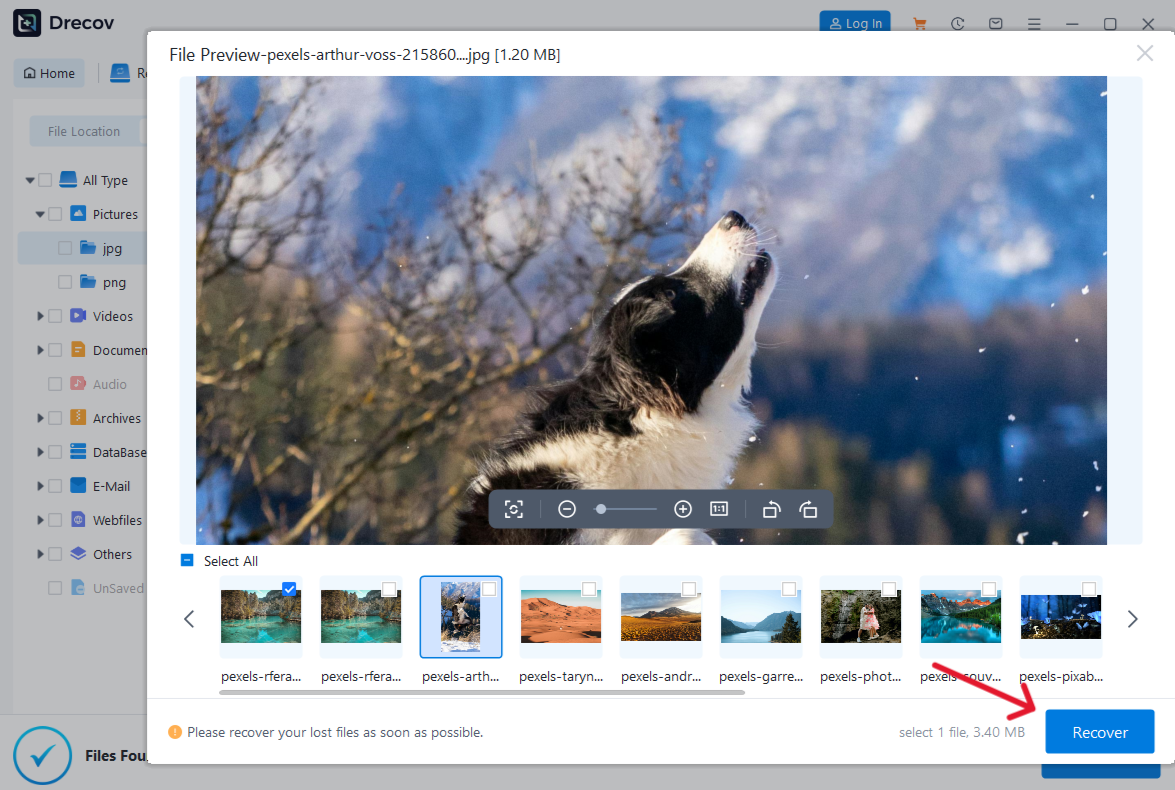
- Step 5: Use Live Preview and Save
Select a file from the list. Press the Spacebar hotkey to launch a live preview window. Verify the visual integrity of the chatgpt ai image generator file. Check the box next to your verified files, click Recover, and select an alternate drive as the target destination to avoid overwriting original data.
For further exploration of directory recovery, you can read about where are Firefox bookmarks stored on your PC to understand how web browsers structure local profile data.
Alternative or Complementary Methods
While PandaOffice Drecov data recovery software delivers automated deep scanning, alternative techniques exist for technical file restoration.
Command Prompt Checkchkdsk Utility
The Windows operating system includes a built-in utility named CHKDSK. This tool can repair file system metadata logic errors on standard internal or external storage media.
- Step 1: Open the Windows search bar, type
cmd, and choose Run as administrator. - Step 2: Type
chkdsk X: /fwhere X represents your target storage volume letter. - Step 3: Allow the system to scan and fix indexing discrepancies.
Comparing Pros and Cons of Recovery Methods
| Recovery Method | Pros | Cons |
|---|---|---|
| PandaOffice Drecov | High sector scanning speed, live file previews, restores raw headers. | Requires a local software installation. |
| Native CHKDSK Command | Free built-in system utility, requires no extra installations. | Cannot recover permanently deleted files, risky on severely corrupted sectors. |
| Legacy Tools (e.g., Recuva) | Simple user interface for simple desktop deletions. | Fails on complex RAW storage blocks, lacks support for modern file system structures. |
If you are dealing with corrupted external components rather than internal drives, refer to this detailed article on how to repair corrupted USB flash drive without losing data or review a complete guide to Toshiba hard disk data recovery to resolve specific external hardware storage issues.
Tips & Best Practices
Maximizing your file rescue efforts requires following strict data management guidelines to ensure files remain completely intact.
Optimizing Recovery Success
Stop utilizing the storage drive immediately after discovering a data loss incident. Writing new files or running background application updates can overwrite unallocated space, destroying the remains of your chatgpt image generator files.
Maintaining Data Integrity
Always save recovered files onto a completely separate physical storage device. If you are rescuing chatgpt image files from your primary local disk drive, save the restored assets to an external solid-state drive or a secure cloud repository.
Pitfalls to Avoid
Avoid downloading unverified partition repair crack tools from suspicious third-party blogs. These utilities frequently contain malware that can permanently corrupt system boot records, making data recovery entirely impossible.
Frequently Asked Questions
Can I retrieve chatgpt image generation files after emptying the Recycle Bin?
Yes. Emptying the Recycle Bin removes the file system pointers, but the raw binary data remains on the disk sectors until new data overwrites it. Utilizing PandaOffice Drecov data recovery software allows you to carve out these file signatures easily.
What causes a chatgpt image file to become corrupted upon download?
File corruption usually occurs due to an interrupted internet connection, browser crash, or unexpected sector writes on a failing hard drive.
Is a deep scan always required for chatgpt ai image generator recovery?
No. A quick scan can locate recently deleted items within minutes. However, a deep scan is highly recommended if the browser cache directories were cleared or the drive partition has structural damage.
Does changing file extensions manually fix chatgpt image generator errors?
No. Changing a file extension does not alter its internal binary structure. If an image file is broken, it requires data carving software to fix its headers.
Can PandaOffice Drecov data recovery software restore images from external drives?
Yes. The utility fully supports cross-platform recovery across internal storage arrays, external SSDs, USB sticks, and digital camera SD cards.
Conclusion
Losing valuable visual assets from your chatgpt image generation session can stall your workflow, but it does not mean your work is gone forever. By acting quickly, avoiding unnecessary drive writes, and using structured system paths, you can maximize your chances of a successful recovery.
For the most reliable results, downloading PandaOffice Drecov data recovery software ensures that advanced sector-level scanning algorithms work to rebuild your missing digital library cleanly. You can complement this approach with a proactive data strategy, such as automated cloud synchronization and regular external drive backups, to safeguard your creative projects against unexpected system errors.






