







How to Recovery Photos from USB? This is a common question when valuable images suddenly disappear from a USB flash drive. USB photo recovery is often possible, even after accidental deletion, formatting, or file system errors. Many users believe that once photos vanish from a USB drive, they are gone forever. In reality, deleted data usually remains on the drive until it is overwritten. This makes timely and correct action critical. In the first moments after data loss, users often panic and try random fixes, which can permanently damage recovery chances. This guide explains usb photo recovery in a clear, step-by-step way for beginners and intermediate users. It covers common causes of photo loss, safe system-level recovery methods on Windows and usb photo recovery mac, and why usb photo recovery software is often the most reliable solution. By the end, you will understand how to recover photos safely and how to avoid future losses.
Why Photos Get Lost from USB Drives
USB flash drives are convenient but fragile storage devices. Photo loss often starts with accidental deletion. Users may remove unwanted files quickly and later realize important images were deleted. This scenario frequently leads to searches for deleted photo recovery software for usb drive solutions. Another common cause is formatting. Formatting a USB drive to fix errors or reuse storage removes file references but does not immediately erase data. This is why usb photo recovery remains possible after formatting.
File system corruption is another major issue. Removing a USB drive without using “Safely Remove Hardware” can corrupt directory structures. Power failures, system crashes, or virus infections may also damage file tables, making photos invisible or unreadable. On macOS, improper ejection often triggers usb photo recovery mac cases.
Physical wear matters too. USB drives have limited write cycles. Over time, memory cells degrade and develop bad sectors. Photos stored in these sectors may disappear or become corrupted. Environmental factors such as heat, moisture, or static electricity accelerate damage.
⚠️Warning: Continuing to use a USB drive after photo loss may overwrite deleted data and reduce recovery success.
Understanding the cause of photo loss helps determine which recovery method is most effective and safest.
Immediate Steps Before USB Photo Recovery
The moment you notice missing photos, stop using the USB drive. Do not copy new files or attempt repairs that write data to the drive. This simple step greatly improves usb photo recovery success rates. Remove the USB drive safely and store it securely.
Next, check whether the photos were backed up. Some users forget they have copies in cloud storage or on another device. If no backup exists, connect the USB drive to a computer using a reliable port. Avoid USB hubs, which may cause connection instability.
If the system asks to format the USB drive, cancel the prompt immediately. Formatting again can overwrite data structures needed for recovery. Also, avoid unknown online tools that claim instant usb photo recovery software free download results. These tools may compromise data privacy or damage files.
⚠️Warning: Never save recovered photos back to the same USB drive.
At this stage, you can begin with system-level recovery options. These methods are free and safe, but they have limitations. If they fail, dedicated usb photo recovery software becomes necessary.
System-Level USB Photo Recovery Methods (Free)
Windows Built-In Recovery Options
Windows offers basic recovery features that may help in simple usb photo recovery scenarios. If File History was enabled, you can restore deleted photos from backups. Insert the USB drive, right-click the folder, and choose “Restore previous versions.” This works best for recently deleted files.
Another option is Windows File Recovery, a free Microsoft command-line tool. It scans USB drives for deleted photos based on file signatures. This tool supports common image formats and can help after accidental deletion. However, it is less effective for formatted or heavily corrupted drives and requires technical confidence.
Pros:
- Free and official Microsoft solution
- Safe for basic recovery
Cons:
- Limited success after formatting
- No preview feature
macOS System Recovery Options
On macOS, Time Machine backups are the primary free option. If the USB drive was included in backups, restoring photos is straightforward. Spotlight search may locate cached image previews, but this is unreliable. For serious cases, usb photo recovery mac often requires specialized tools.
System-level methods are safe starting points but cannot handle complex recovery situations.
Why USB Photo Recovery Software Is More Effective
Dedicated usb photo recovery software scans storage devices at the sector level. Instead of relying on file indexes, it searches for image signatures. This makes it effective for formatted USB drives and corrupted file systems. Best usb photo recovery software solutions can reconstruct directory structures and preview recoverable photos before restoration.
Another advantage is usability. Step-by-step interfaces guide users through scanning, previewing, and saving files. This reduces mistakes that beginners often make. Best free usb photo recovery software options usually allow free scanning and preview, letting users confirm recovery potential before committing.
⚠️Warning: Avoid online-only recovery tools that require uploading files. Privacy risks are high.
Dedicated software also supports multiple file formats, including JPG, PNG, and RAW images. This versatility makes it suitable for cameras, phones, and mixed storage scenarios.
Recommended Solution: PandaOffice Drecov for USB Photo Recovery
When free system tools fail, PandaOffice Drecov provides a reliable and user-friendly usb photo recovery software solution. It supports USB flash drives, external disks, and formatted storage devices. Drecov focuses on read-only scanning, ensuring original data remains untouched during recovery.
3 Steps to Recover Photos from a USB Drive with Drecov
- Connect the USB drive
Insert the USB flash drive into your computer and launch Drecov. Select the USB drive location.
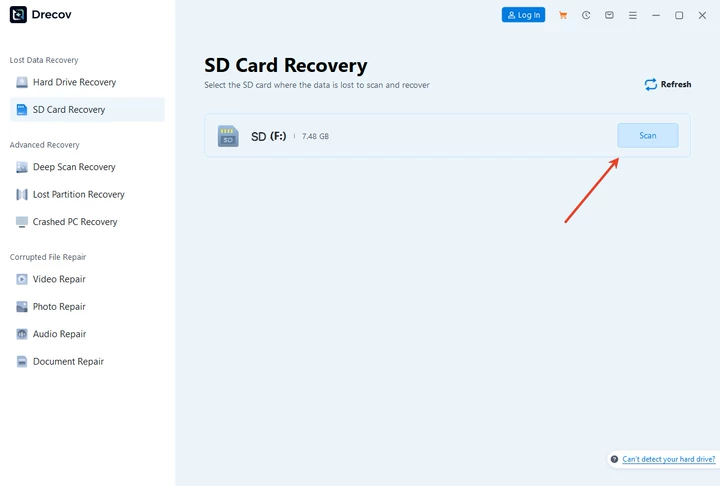
2. Scan for lost photos
Start a deep scan. Drecov analyzes the drive and lists recoverable photos, including those deleted or lost after formatting.

3. Preview and recover safely
Preview images, select the photos you need, and save them to a different drive.

Pros:
- Effective usb photo recovery software free download scanning
- Supports formatted USB drives
- Beginner-friendly interface
Cons:
- Free version may have recovery limits
Drecov offers a balanced solution for users seeking reliable recovery without complex steps.
Comparison: System Recovery vs USB Photo Recovery Software
| Method | Best For | Success Rate | Skill Level |
|---|---|---|---|
| System tools | Recent deletion | Low–Medium | Beginner |
| Microsoft File Recovery | Simple loss | Medium | Intermediate |
| Drecov | Formatting + corruption | High | Beginner |
System methods are safe but limited. Dedicated best usb photo recovery software solutions deliver higher success rates.
FAQs About USB Photo Recovery
What is the best free usb photo recovery software?
The best free usb photo recovery software allows scanning and preview, helping users verify recovery before saving files.
Is usb photo recovery software free download safe to use?
Yes, if downloaded from a trusted source. Avoid unknown online tools.
Can usb photo recovery mac restore photos after formatting?
Yes. Formatting does not erase data immediately, making recovery possible.
Does deleted photo recovery software for usb drive work after corruption?
Yes. Dedicated tools improve recovery chances in corruption cases.
Conclusion: How to Recovery Photos from USB?
Recovering photos from a USB drive is often possible with the right approach. Begin with free system-level options for simple deletions. For formatted or corrupted drives, dedicated usb photo recovery solutions offer better results. PandaOffice Drecov provides a safe and practical option for users who need reliable recovery without technical complexity. By acting quickly and following correct steps, users can restore valuable photos and reduce the risk of permanent data loss. How to Recovery Photos from USB? becomes a manageable task when you use the right tools and methods.






