







Losing photos from a Canon camera can feel devastating, especially when those images capture once-in-a-lifetime moments. Canon photo recovery becomes essential when pictures disappear due to accidental deletion, SD card formatting, or file system errors. Whether you use a PowerShot, EOS DSLR, or models like Canon 550D photo recovery, Canon 60D photo recovery, or Canon 80D photo recovery, understanding how recovery works can greatly improve your chances of success. This guide focuses on canon photo recovery software, safe system-level solutions, and a reliable free recovery path. We explain why photos vanish, what you should do immediately, and how canon deleted photo recovery works step by step. You will also learn how canon photo formatted data recovery differs from simple deletion and which tools handle each scenario best. By the end, you will know when free system tools are enough and when a dedicated canon photo recovery program becomes the smarter choice for complete restoration.
Why Canon Camera Photos Get Lost or Deleted
Digital photos stored on Canon cameras usually sit on SD, SDHC, or SDXC cards. These cards are convenient but fragile. Canon photo recovery software exists because data loss is common and often avoidable. The most frequent cause is accidental deletion. A single press of the delete button or a rushed “Format card?” confirmation can wipe hundreds of photos instantly. Formatting does not always erase data immediately, but it removes file references, which is why canon photo formatted data recovery remains possible if handled correctly.
Another common issue is improper card removal. Disconnecting the camera while it is writing data can corrupt the file system. This corruption may cause the card to appear empty or unreadable. File transfer interruptions, low battery shutdowns, or firmware glitches also contribute. Physical problems such as bad sectors or aging memory chips worsen the situation, especially on heavily used cards.
⚠️Warning: Continuing to shoot new photos after data loss may overwrite deleted files and permanently destroy recovery chances.
Environmental factors also matter. Extreme temperatures, moisture, or dust can damage SD cards. Even using the same card across multiple cameras without reformatting can trigger compatibility errors. Understanding these causes helps you choose the correct canon photo recovery free approach and avoid mistakes that reduce recovery success.
Immediate Actions to Improve Canon Photo Recovery Success
The first minutes after data loss matter most. If your Canon camera shows missing photos, stop using the card immediately. Every new image risks overwriting deleted data blocks. Remove the SD card carefully and store it safely. This simple step alone dramatically increases free canon photo recovery success rates.
Next, avoid reformatting again, even if the camera suggests it. Repeated formatting reduces the chances of canon powershot photo recovery and DSLR recovery alike. Do not attempt random repair utilities or unknown software found online. These may write new data to the card and worsen damage.
Instead, connect the SD card to a computer using a reliable card reader. This minimizes communication errors compared to connecting the camera directly. Ensure your system recognizes the card. If it asks to format, cancel the prompt.
At this stage, you can attempt system-level recovery options. Windows and macOS offer limited but safe tools that may help locate lost files. These methods work best for recently deleted photos rather than deeply corrupted cards. If they fail, specialized canon photo recovery software free solutions become necessary.
⚠️Warning: Never save recovered photos back to the same SD card. Always use a different drive.
System-Level Recovery Methods for Canon Photos (Free)
Using Windows Built-In Tools
Windows offers basic recovery capabilities that may help in mild cases of canon deleted photo recovery. File History and Previous Versions can restore files if backups were enabled before deletion. Insert the SD card, open File Explorer, right-click the card, and check “Restore previous versions.” If a backup exists, you can copy photos back safely.
Another option is Windows File Recovery, a free Microsoft command-line tool. It can scan SD cards for deleted image formats like JPG and CR2. While effective, it requires technical confidence and does not guarantee results on formatted cards. It is best for simple deletions.
Pros:
- Free and official Microsoft tools
- No third-party installation risks
Cons:
- Limited success on formatted or corrupted cards
- Not beginner-friendly
Using macOS Free Recovery Options
Mac users can try Time Machine if the SD card was previously backed up. Spotlight searches may also locate cached image previews. However, macOS system tools rarely succeed with canon photo formatted data recovery because SD cards are often excluded from backups.
System-level solutions are safe starting points, but they cannot handle complex recovery scenarios. When these fail, users often turn to a dedicated canon photo recovery program designed for cameras and memory cards.
Software-Based Canon Photo Recovery: Why Dedicated Tools Work Better
Dedicated canon digital camera photo recovery software scans SD cards sector by sector. Instead of relying on file indexes, it detects file signatures for Canon formats such as JPG, RAW, and CR2. This makes it far more effective for formatted or corrupted cards.
Unlike generic system tools, recovery software understands camera-specific storage patterns. It reconstructs fragmented images and previews recoverable files before restoration. This transparency helps users decide whether recovery is worth proceeding.
⚠️Warning: Avoid unknown or outdated recovery tools that may bundle malware or damage data.
Among available options, it is important to stick to safe solutions. This guide does not recommend competitor products. Instead, it focuses on one reliable and practical choice that balances ease of use with advanced scanning capabilities.
Recommended Solution: PandaOffice Drecov for Canon Photo Recovery
When system tools fail, PandaOffice Drecov stands out as a dependable canon photo recovery software solution. It supports canon photo recovery free scanning, allowing users to preview lost photos before recovery. Drecov works with formatted SD cards, accidental deletion, and corruption scenarios across Canon PowerShot and EOS models.
3 Steps to Recover Canon Photos with Drecov
Download Drecov- Connect the SD card
Insert the Canon memory card into your computer using a card reader. Launch Drecov and select the SD card location.
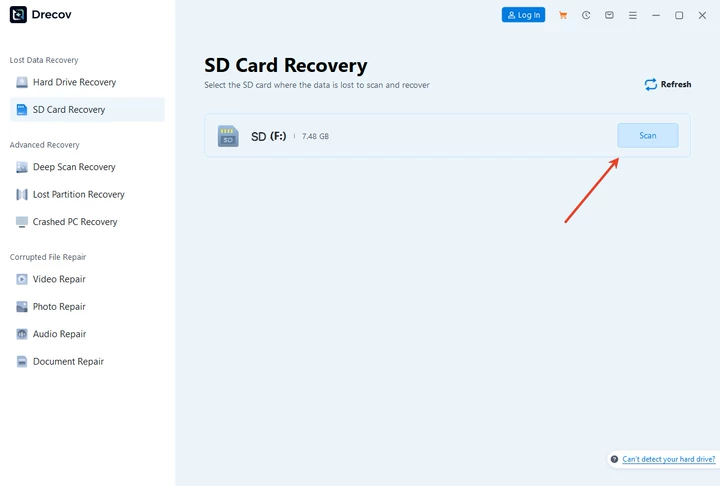
2. Scan for lost photos
Start a deep scan. Drecov analyzes the card and displays recoverable images, including RAW files used in canon 80d photo recovery and similar models.

3. Recover and save safely
Preview photos, select what you need, and save them to a different drive. Never restore to the same SD card.

Pros:
- Beginner-friendly interface
- Effective canon photo formatted data recovery
- Preview before recovery
Cons:
- Free version may have recovery limits
Drecov offers a balanced approach for users who need reliable results without complex steps.
Comparison: System Recovery vs Dedicated Canon Photo Recovery Software
| Method | Best For | Success Rate | Skill Level |
|---|---|---|---|
| System tools | Recently deleted photos | Low to medium | Beginner |
| Microsoft free tools | Simple deletions | Medium | Intermediate |
| Drecov | Deleted + formatted cards | High | Beginner |
System tools are safe but limited. Dedicated canon photo recovery software like Drecov delivers better results, especially after formatting.
FAQs About Canon Photo Recovery
What is the best canon digital camera photo recovery software?
A dedicated tool like Drecov offers better results than system tools, especially for formatted SD cards.
Is canon photo recovery software free available?
Yes. Many tools offer free scanning and preview, including canon photo recovery software free options.
Can I recover photos after formatting my Canon SD card?
Yes. Canon photo formatted data recovery is possible if you stop using the card immediately.
Does free canon photo recovery work for RAW files?
Some tools support RAW formats. Dedicated software improves recovery chances.
Conclusion: Canon Digital Camera Photo Recovery Software | Free Download
Recovering lost Canon photos is possible when you act quickly and use the right tools. Start with system-level options for minor losses, but do not rely on them for serious cases. For reliable results, a dedicated canon photo recovery program becomes essential. PandaOffice Drecov offers a practical balance between simplicity and power, making it suitable for beginners and intermediate users alike. By following safe steps and choosing trusted solutions, you can restore precious images and prevent future losses with confidence. Canon Digital Camera Photo Recovery Software | Free Download remains achievable with the right approach and careful handling.






