







Introduction: Why Secure Folder Photo Loss Is More Common Than You Think
Samsung Secure Folder is designed to give users a private, encrypted space for sensitive photos, videos, and documents. Because of its strong security features, many users assume that anything stored inside Secure Folder is automatically safe and recoverable. Unfortunately, this assumption often leads to panic when photos disappear permanently—especially when there is no backup available.
Photo loss in Secure Folder usually happens unexpectedly. A single tap on “Delete,” a rushed Secure Folder reset, or an SD card issue can cause images to vanish without warning. Since Secure Folder operates independently from the standard Gallery app, deleted photos do not always appear in the system recycle bin or trash folder. This makes recovery feel impossible at first glance.
What makes the situation more complicated is encryption. Secure Folder encrypts its contents using a separate security layer, which prevents casual access but also limits recovery options. However, “permanently deleted” does not always mean the photo data is completely destroyed. In many cases, traces of the files still exist—especially when photos were stored on or synced with an SD card.
This guide focuses on how to recover secure folder photos without backup by understanding how Secure Folder stores data, what happens when photos are deleted, and why sd card recovery software and sd photo recovery software can still play a critical role. If you act quickly and use the correct recovery approach, restoring permanently deleted Secure Folder photos may still be possible.
Problem is my mom is no more and my all photos with my mom i saved in this folder and this was by mistake deleted by me please help me🥺 give me my old photos please —from google help
Understanding Secure Folder and Photo Storage Mechanisms
What Is Secure Folder and How Does It Protect Photos
Secure Folder is a privacy feature available on many Samsung Android devices. It creates an encrypted container within the device, separating private files from the main operating system. Photos saved inside Secure Folder are isolated from the standard Gallery, meaning they cannot be accessed without authentication such as a PIN, password, or biometric verification.
This isolation is achieved through hardware-backed encryption and a separate user profile. From a security perspective, this is highly effective. From a data recovery perspective, however, it creates challenges. When photos are deleted inside Secure Folder, the deletion process happens within the encrypted environment, bypassing common Android recovery mechanisms like the Trash folder.
Another key point is that Secure Folder does not automatically back up its contents unless the user explicitly enables backup or exports files manually. Many users discover this too late, after photos have already been deleted permanently.
Despite these protections, Secure Folder still relies on the device’s underlying storage system. Whether photos are stored in internal memory or written to an SD card, deletion usually only removes file references—not the actual data immediately. This is why understanding storage behavior is essential before attempting recovery.
Where Secure Folder Photos Are Actually Stored
Although Secure Folder feels like a completely separate space, its data is still stored on the device’s physical storage. Photos may reside in encrypted partitions of internal memory or, in some configurations, on an external SD card. The storage location depends on device settings, Android version, and how media storage is configured.
When an SD card is present, many Samsung devices allow media files—even those used by Secure Folder—to be written to external storage. This is particularly important for recovery. SD cards do not use the same aggressive data wiping mechanisms as internal flash memory, making them more recovery-friendly.
If Secure Folder photos were stored on an SD card, deleting them usually marks the storage sectors as “free” without erasing the data immediately. Until those sectors are overwritten, recovery remains possible using specialized sd card recovery software.
This is why identifying whether Secure Folder photos were associated with an SD card is a critical first step. In many successful recovery cases, the SD card becomes the primary target for scanning rather than the phone’s internal memory.
What “Permanently Deleted” Really Means on Android Devices
On Android devices, permanent deletion rarely means instant destruction of data. When a photo is deleted, the operating system removes its reference from the file system, making the space available for reuse. The actual photo data remains physically present until new data overwrites it.
However, Android internal storage uses technologies like TRIM, which actively cleans deleted data to improve performance and security. This significantly reduces recovery chances from internal memory, especially after continued device usage.
SD cards behave differently. Most SD cards do not support TRIM in the same way, which means deleted photo data can remain intact for much longer. This difference explains why sd photo recovery software often has a much higher success rate when scanning SD cards compared to internal storage.
Understanding this distinction helps set realistic expectations. While Secure Folder adds encryption complexity, recovery is still possible if the deleted photos were stored on an SD card and the card has not been heavily reused since deletion.
Common Scenarios That Lead to Secure Folder Photo Loss
Accidental Deletion Inside Secure Folder
Accidental deletion is the most common cause of Secure Folder photo loss. Users often delete photos while organizing files, assuming they can restore them later from a recycle bin. Unfortunately, Secure Folder does not always provide a visible trash folder, especially on older Android versions.
In many cases, users delete multiple photos at once, only realizing the mistake after exiting Secure Folder. Since the deletion occurs within the encrypted environment, standard Android recovery options do not apply. This creates the impression that the photos are gone forever.
The situation becomes worse if the device continues to be used normally after deletion. New photos, app updates, and cached data may overwrite the storage sectors that once held the deleted images. This is why immediate action is essential once accidental deletion is discovered.
If an SD card was involved, stopping device usage and removing the card safely can preserve the deleted data. At this point, sd card recovery software becomes the most practical solution for attempting recovery.
Secure Folder Reset, App Crash, or System Update Failure
Another common scenario involves resetting Secure Folder or experiencing a system failure. Resetting Secure Folder removes all encrypted data associated with it, including photos, videos, and documents. Many users perform a reset to fix access issues, unaware that it permanently deletes stored files.
System updates can also cause unexpected problems. In rare cases, a failed update or app crash can corrupt Secure Folder data, making photos inaccessible or causing them to disappear entirely.
While encryption increases security, it also means that once Secure Folder data is removed, recovery options are limited. However, if photos were synchronized with an SD card before the reset or crash, traces may still exist on external storage.
This is why recovery efforts often focus on the SD card rather than the Secure Folder container itself. Using sd photo recovery software to scan the SD card may reveal recoverable image files even after a Secure Folder reset.
SD Card Removal or Corruption While Linked to Secure Folder
Improper SD card removal is another overlooked cause of photo loss. Removing an SD card without powering off the device or using the “Eject” option can corrupt the file system. When this happens, Secure Folder may lose access to photos stored on the card.
Corruption can make photos invisible or cause them to appear as deleted. In severe cases, the SD card may prompt for formatting when reinserted into a device or computer. Formatting at this stage can make recovery more difficult, but not always impossible.
This scenario highlights the importance of using professional sd card recovery software rather than formatting the card immediately. Even corrupted or unreadable SD cards often still contain intact photo data that can be extracted through deep scanning.
Is It Possible to Recover Secure Folder Photos Without Backup?
Key Factors That Determine Recovery Success
Whether you can recover permanently deleted photos from Secure Folder without a backup depends on several critical factors. The first and most important factor is where the photos were stored. Photos associated with an SD card generally have a much higher recovery success rate than those stored solely in internal memory. This is because SD cards do not aggressively erase deleted data.
The second factor is time. The longer the device continues to operate after deletion, the higher the risk that deleted photo data will be overwritten. Activities such as installing apps, taking new photos, or updating the system all increase the likelihood of permanent data loss.
Another determining factor is storage condition. If the SD card has not been formatted, encrypted again, or physically damaged, recovery chances remain reasonable. Even if the card shows file system errors, data may still be recoverable through deep scanning.
Finally, the recovery method matters. Using reliable sd photo recovery software designed to identify image file signatures significantly improves the chances of success. Understanding these factors helps set realistic expectations and prevents unnecessary actions that could further reduce recovery possibilities.
When Recovery Is No Longer Possible
Although many Secure Folder photo losses are recoverable, some situations permanently destroy the data. One such scenario is complete data overwriting. Once new data occupies the same storage sectors as the deleted photos, recovery becomes impossible, regardless of the software used.
Another irreversible case involves factory resets combined with encryption key removal. When a device is reset and encryption keys are destroyed, Secure Folder data stored in internal memory cannot be decrypted or restored. This is a security feature designed to protect privacy.
Repeated formatting of an SD card also reduces recovery chances. While a single quick format often leaves data intact, multiple formats or full formats overwrite large portions of the card, making recovery extremely unlikely.
Understanding these limitations is important. Attempting recovery in impossible situations can waste time and potentially damage remaining recoverable data. This is why identifying storage type and recent device activity should always come before launching recovery software.
Why SD Card Recovery Has Higher Success Rates
SD cards remain one of the most recoverable storage media for deleted photos. Unlike internal storage, SD cards typically lack TRIM support, meaning deleted data often stays intact until overwritten manually.
Another advantage is removability. An SD card can be taken out of the device and connected directly to a computer, allowing recovery software to scan it in a read-only environment. This minimizes the risk of overwriting data during the recovery process.
For Secure Folder photos, this is particularly useful. Even if Secure Folder itself is reset or inaccessible, photo data previously written to the SD card may still exist independently of the encrypted container.
This is why sd card recovery software is often the most effective solution for users trying to recover secure folder photos without backup. The combination of physical separation and file system behavior significantly improves recovery outcomes.
Preparing for Secure Folder Photo Recovery
Critical Steps to Take Immediately After Photo Loss
The actions taken immediately after discovering photo loss can make or break recovery success. The first step is to stop using the device. Continued usage increases the risk of overwriting deleted data, especially on SD cards.
Next, if an SD card is present, power off the device before removing it. Avoid ejecting the card while the phone is running. Improper removal can cause additional file system damage.
Do not install recovery apps directly on the phone. Installing new applications writes new data to storage, which can overwrite deleted photos. Recovery should always be performed from a separate computer whenever possible.
These precautions preserve the deleted photo data in its current state, giving sd photo recovery software the best chance of finding intact image files during scanning.
How to Safely Remove and Inspect an SD Card
Removing an SD card correctly is essential. Always power off the device first, then gently remove the card to avoid physical damage. Once removed, inspect the card for visible damage such as cracks or bent connectors.
Use a reliable SD card reader to connect the card to a computer. Avoid cheap or unstable adapters, as they can cause read errors during scanning. If the card is not recognized immediately, do not format it, even if prompted.
At this stage, the SD card should be treated as read-only. Do not copy files to it or attempt repairs using system tools. These actions can modify the file system and reduce recovery success.
Proper handling at this stage ensures that sd card recovery software can perform a thorough scan without interference or additional data loss.
How SD Card Recovery Software Works
How sd card recovery software Scans Lost Photos
SD card recovery software works by analyzing storage sectors rather than relying on file system indexes. When photos are deleted, their directory entries are removed, but the raw data often remains.
Recovery tools perform a deep scan that searches for known photo file signatures such as JPEG, PNG, or HEIC headers. This allows the software to locate photos even when file names and folder structures are lost.
Advanced tools also reconstruct fragmented files and preview images before recovery. This preview capability helps users verify whether photos are intact before restoring them.
This scanning approach is particularly effective for Secure Folder photo recovery when the photos were stored on an SD card, as encryption usually does not affect raw image data stored externally.
Differences Between sd photo recovery software and General Tools
Not all recovery tools are optimized for photos. General file recovery tools may focus on documents or archives, missing fragmented or partially overwritten images.
Dedicated sd photo recovery software uses image-specific algorithms that improve recovery accuracy. These tools recognize photo file structures and can rebuild images even when metadata is missing.
Another advantage is selective recovery. Photo-focused tools allow users to filter by image type, resolution, or creation time, making the recovery process more efficient.
For Secure Folder photo recovery, using photo-optimized software significantly increases the likelihood of restoring usable images rather than corrupted files.
Recovering Secure Folder Photos from an SD Card
Step-by-Step: Recovering Photos Using Pandaoffice drecov
Pandaoffice drecov is designed to scan SD cards in a read-only mode, minimizing the risk of data overwriting. After connecting the SD card to a Windows computer, the software scans the card for deleted and lost photo files.
Download DrecovThe scanning process identifies image files based on file signatures rather than file system entries. This allows the software to detect photos even if the SD card is corrupted or formatted.
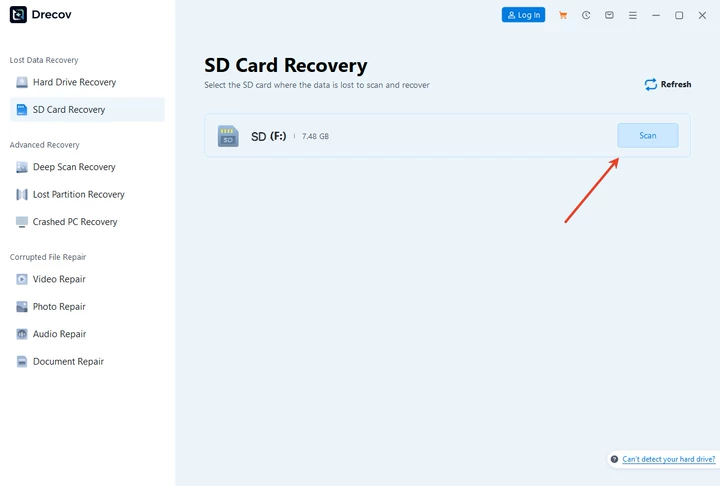
Users can preview recoverable photos before restoring them, ensuring only valid images are selected. Recovered files should always be saved to a different storage device, never back to the same SD card.

This approach makes Pandaoffice drecov suitable for users looking for a practical solution to recover secure folder photos without backup from SD cards.

Why Pandaoffice drecov Is Suitable for Secure Folder Photo Recovery
One of the key strengths of Pandaoffice drecov is its ability to handle encrypted usage scenarios indirectly. While it does not decrypt Secure Folder itself, it can recover raw photo data stored on SD cards.
The software supports deep scanning, photo preview, and selective recovery, which are essential features for Secure Folder recovery attempts. Its Windows compatibility also allows users to perform recovery in a stable environment.
Because Pandaoffice drecov operates in read-only mode during scanning, it reduces the risk of accidental overwriting—an important consideration when dealing with sensitive or irreplaceable photos.
What If Secure Folder Photos Were Stored in Internal Memory?
Limitations of Internal Storage Recovery on Android
Internal storage recovery on modern Android devices is extremely limited due to encryption and TRIM. Once photos are deleted from Secure Folder and TRIM executes, data is usually erased permanently.
Rooting the device does not guarantee recovery and may introduce additional risks. For most users, internal memory recovery without backup is unrealistic.
This limitation highlights why SD card storage remains the most recoverable option for Secure Folder photos.
When SD Card Recovery Is the Only Practical Option
In many cases, Secure Folder photos are automatically moved to an SD card to save internal space. If this setting was enabled, SD card recovery becomes the only viable recovery path.
Understanding storage configuration helps users avoid unnecessary attempts that could worsen data loss. When SD card involvement is confirmed, focusing recovery efforts there yields the best results.
Advanced Secure Folder Photo Recovery Scenarios
Recovering Photos After SD Card Formatting
A quick format usually removes file system references but leaves photo data intact. In such cases, deep scanning with sd card recovery software can still locate deleted images.
Full formats reduce recovery chances but do not always eliminate all data. Success depends on how much new data has been written afterward.
Recovering Photos from a Corrupted or Unreadable SD Card
Even if an SD card appears unreadable, data may still be accessible at the sector level. Recovery software can bypass file system errors and extract photo data directly.
This makes recovery possible even in severe corruption cases, provided the card is not physically damaged.
How to Avoid Losing Secure Folder Photos in the Future
Smart Backup Strategies for Secure Folder
Manual exports, periodic backups, and secure cloud synchronization are the safest ways to protect Secure Folder photos. Relying solely on device storage is risky.
Best Practices for SD Card Usage and Maintenance
Safely eject SD cards, avoid sudden power loss, and replace aging cards. These habits significantly reduce photo loss risk.
Frequently Asked Questions About Secure Folder Photo Recovery
Can I recover Secure Folder photos without root?
Yes, if the photos were stored on an SD card, recovery without root is often possible.
Does factory reset erase Secure Folder photos permanently?
Yes, especially for internal storage, factory reset usually makes recovery impossible.
How long do deleted photos stay recoverable on an SD card?
Until overwritten, which may range from days to months.
Is sd photo recovery software safe to use?
Yes, when used in read-only scanning mode.
What’s the success rate for Secure Folder photo recovery?
It depends on storage type, time, and usage after deletion.
Conclusion: Recovering Secure Folder Photos Is Possible With the Right Approach
Recovering permanently deleted photos from Secure Folder without backup is challenging but not always impossible. Success depends on understanding storage behavior, acting quickly, and using appropriate sd card recovery software.
When SD cards are involved, tools like Pandaoffice drecov offer a realistic recovery path. Prevention, however, remains the most reliable strategy.





