







Losing access to your content due to a deleted channel youtube situation can be a content creator’s worst nightmare. Whether it happens because of accidental deletion, a sudden policy violation, or a malicious channel hack, the loss feels devastating. Fortunately, hope is not entirely lost. In this comprehensive guide, we will explore the best methods to find and restore your missing content. While Google provides native recovery forms for creators, local video assets can also be salvaged. We highly recommend PandaOffice Drecov data recovery software as a premier solution for retrieving the original video files directly from your storage drives.
Understanding the Basics of a Deleted Channel on YouTube
When a deleted channel youtube event occurs, the entire channel page, its video URLs, and playlists disappear from public view. This issue usually stems from three main scenarios: human error, community guideline strikes, or account hijacking.
The primary challenge is that YouTube removes the video watch pages, leaving users with broken links. Consequently, creators struggle to find their unique video identification codes, which are essential for manual recovery requests. Furthermore, creators often realize too late that they do not have local backups of their uploaded content.
This is where PandaOffice Drecov data recovery software becomes invaluable. Drecov is a professional-grade data restoration tool designed to scan deep within your hard drives, external disks, and flash memory. If you originally edited and exported your videos on your computer, Drecov can find those original MP4, MOV, or AVI files even if you emptied them from the Recycle Bin. It works seamlessly across Windows and macOS environments, making it a reliable safety net for content creators.
Solutions for a Deleted Channel on YouTube
Method 1: Appeal the Termination Directly Through Google
If your channel was terminated due to policy violations or a hack, your first step should be filing an official appeal. YouTube sends an email notification when a channel is removed. Inside that email, you will find a specific appeal form link. You must provide your full name, contact email, and the unique URL of your channel to submit the request.
Method 2: Recover Original Video Files via PandaOffice Drecov
When the official appeal fails, or if you accidentally deleted the channel yourself, you must shift your focus to recovering the original local files. PandaOffice Drecov data recovery software specializes in tracking down deleted multimedia assets across various storage devices.
For instance, if you stored your raw footages on a corrupted external drive, you might need to check a how to repair corrupted usb flash drive without losing data guide to ensure your device is readable before scanning. Similarly, if your channel assets were stored on a dedicated Toshiba external drive that suddenly failed, utilizing a complete guide to toshiba hard disk data recovery will help prepare the environment for Drecov. Additionally, creators who keep their research logs or video notes in browser data might want to know where are firefox bookmarks stored on your pc to back up those assets during the recovery process.
⚠ Warning: Install it on a drive different from the one where your data was lost to prevent overwriting.
Follow these step-by-step instructions to use PandaOffice Drecov Version 6.2 for video recovery:
- Step 1: Select the Target Location. Choose the specific local disk, external hard drive, or folder where your exported YouTube videos used to reside.

- Step 2: Run the Deep Scan. Click the Scan button. The software will initiate a Quick Scan followed automatically by a Deep Scan to piece together fragmented video files.

- Step 3: Filter and Preview. Use the file type filter on the left sidebar to select Video, then filter by extensions like MP4 or MKV. Preview the video files to check their integrity.
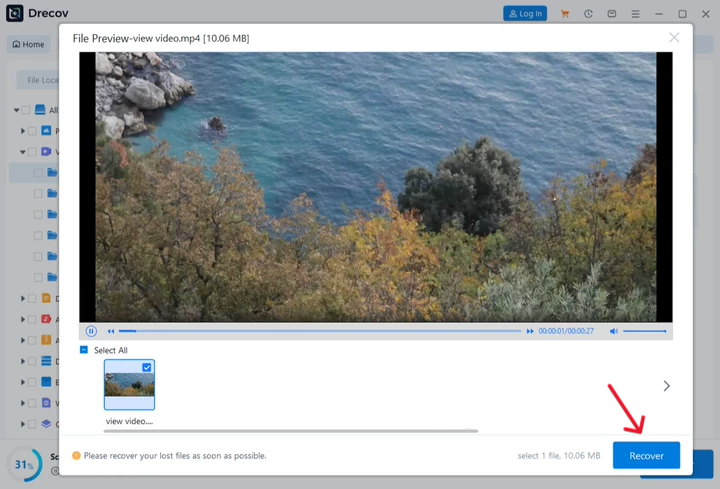
- Step 4: Recover and Save. Select the files you wish to retrieve and click the Recover button. Save the recovered videos onto a completely separate external storage drive to prevent overwriting.
Alternative Methods: How to Find Deleted YouTube Videos
Aside from local file recovery, you can try online tricks to discover how to find deleted youtube videos using digital footprints left on the web.
The Wayback Machine Strategy
The Internet Archive maintains historical records of billions of web pages. If you have the exact URL of your deleted video, you can paste it into the Wayback Machine search bar. Meanwhile, the system will search its database for a cached version of the page, allowing you to view the video title, description, or even stream the original content.
Using Google Search Operators
Sometimes, other websites embed your content before the deletion occurs. You can look for youtube deleted videos by searching for the unique 11-character video ID on Google. Paste the ID into the search bar using quotation marks to find forums, blogs, or social media posts that might host a mirror link or a downloadable copy.
Comparison of Methods
| Recovery Method | Success Rate | Pros | Cons |
| PandaOffice Drecov | High | Restores original high-quality files; works offline | Requires original drive access |
| Wayback Machine | Medium | Completely free; covers find deleted youtube videos queries | Requires the exact original URL |
| Google Search Operators | Low | Quick search process; reveals community mirrors | Highly dependent on external sharing |
Tips & Best Practices for Channel Data Integrity
Maximizing your chances of content survival requires a mix of good technical habits and proactive software utilization.
- Stop Using the Target Drive Immediately: Avoid saving new files, installing new software, or running updates on the drive where the original videos were lost to prevent data overwriting.
- Employ the 3-2-1 Backup Strategy: Keep three copies of your video assets, stored on two different types of media, with one copy located off-site or in cloud storage.
- Avoid Registry Cleaner Software: Do not run automated registry cleaners during a data crisis. Modifications to the Windows registry path
HKEY_LOCAL_MACHINE\SYSTEM\CurrentControlSet\Servicescan destabilize the file system links that recovery tools use. - Utilize Write-Protection Hotkeys: When connecting external drives containing lost video data to a Windows PC, hold down the
Shiftkey to prevent automated synchronization tools from writing new data to the device.
Frequently Asked Questions
How can you watch deleted youtube videos if you do not have the link?
Furthermore, you can check your browser history or your email notifications from YouTube to discover the old watch links. Once you retrieve the link, paste it into an online archive database to see if a backup exists.
What is the most effective youtube deleted video finder tool online?
The Wayback Machine remains the most popular archive tool for finding public pages. However, for physical file recovery on your local machine, PandaOffice Drecov data recovery software serves as the most effective tool to retrieve raw video projects.
Yes, it is possible. Many automated platforms share video links to Twitter or Facebook upon upload. Searching your video title on these platforms might lead you to a valid mirror or cache.
How to recover deleted youtube videos that were deleted years ago?
If the files were on a local drive that has not been heavily written over, Drecov can still perform a deep sector scan to find them. Online archives are less likely to have them unless the video had millions of views.
Can removed youtube channels be restored after a successful copyright appeal?
In addition, if you resolve the copyright strikes through counter-notifications, YouTube will automatically restore the channel along with its view counts and comments.
Conclusion
Dealing with a deleted channel youtube scenario is undoubtedly stressful, but proper recovery workflows can save your digital footprint. Whether you utilize online web archives to discover finding deleted youtube videos or submit formal appeals to Google, you have viable options. For local file losses, deploying PandaOffice Drecov data recovery software ensures that your hard work is never truly gone.






