







Artificial intelligence has entered a new era in 2026, with two dominant players leading the space: Claude 4.5 (by Anthropic) and ChatGPT-5 (by OpenAI). If you’re searching for a clear answer to “compare Claude 4.5 to ChatGPT-5”—which is better?—the reality is more nuanced than a simple winner.
Both models are powerful, versatile, and constantly evolving. However, they excel in different areas—making each one better suited for specific use cases like coding, writing, research, or complex technical tasks like data recovery.
In this comprehensive guide, we’ll break down Claude 4.5 vs ChatGPT-5 across performance, features, pricing, real-world use, and future potential—so you can decide which AI tool is right for your needs.
What Are Claude 4.5 and ChatGPT-5?
Before we compare Claude 4.5 to ChatGPT-5, it’s important to understand what you’re actually evaluating.
Claude 4.5
Claude 4.5 is part of Anthropic’s Claude 4.x family, which includes:
- Opus (high-end reasoning)
- Sonnet (balanced performance)
- Haiku (lightweight, fast)
Claude is known for its strong reasoning, long-context understanding, and safer, more aligned outputs.
ChatGPT-5
ChatGPT-5 belongs to OpenAI’s GPT-5.x series, including:
- GPT-5 (core model)
- GPT-5.2 (latest 2026 iteration)
- Mini/Nano variants
ChatGPT focuses on versatility, speed, usability, and a broad ecosystem of integrations. Importantly, both are model families, not single versions—so comparisons usually reflect their latest iterations.
Core Differences at a Glance
| Feature | Claude 4.5 | ChatGPT-5 |
| Developer | Anthropic | OpenAI |
| Strength | Reasoning & Accuracy | Versatility & Ecosystem |
| Speed | Moderate (Deliberate) | Fast |
| Coding | Excellent (Security-focused) | Very Strong (Agentic) |
| Context | Up to 1M Tokens (Beta) | 400K Tokens (Optimized) |
Performance and Reasoning
When it comes to deep reasoning, Claude 4.5 often takes the lead. Because Anthropic prioritizes “Constitutional AI,” the model provides transparent, step-by-step explanations. It is often described as more “thoughtful” and analytical.
ChatGPT-5, however, is no slouch. It is optimized for consistency and usability, producing accurate answers faster with less prompting. In 2026, many users compare Claude 4.5 to ChatGPT-5 and find that while Claude thinks deeper, ChatGPT acts faster.
Technical Application: Using Claude 4.5 to Repair Corrupted SQL Databases
One of the most impressive feats of 2026 AI is its ability to assist in high-stakes data recovery. When you compare Claude 4.5 to ChatGPT-5 in a technical environment, Claude’s “Extended Thinking” mode proves invaluable for database administrators.
If you are facing a “Suspect” or “Recovery Pending” state in your SQL server, using Claude 4.5 to repair corrupted SQL databases can save hours of manual troubleshooting. Here is how to handle a corrupted .mdf or .ldf file using Claude’s reasoning:
Step 1: Export Error Logs and Metadata
First, do not attempt to write to the corrupted database. Use SQL Server Management Studio (SSMS) to export the error logs. Provide these logs to Claude 4.5.
Step 2: Analysis and Strategy Generation
Ask Claude to analyze the specific error codes (e.g., Msg 823 or 824). Claude 4.5 will provide a risk-assessed plan, typically suggesting the DBCC CHECKDB command sequence.
Step 3: Execute Emergency Mode Repairs
Following the AI’s guidance, set your database to EMERGENCY mode to allow read-only access. Run the following command as advised by the AI:
ALTER DATABASE [YourDB] SET EMERGENCY;
Step 4: Repair with Data Loss
If structural corruption is deep, Claude 4.5 will help you script the REPAIR_ALLOW_DATA_LOSS command, but it will also warn you of the risks.
Warning Prompt: Always create a physical file-level backup of your
.mdfand.ldffiles before executing repair commands that involve data loss.
Professional Software Solutions: PandaOffice Drecov Data Recovery Software
While AI is great for scripting, sometimes the file system itself is damaged, or files have been deleted. In these cases, you need dedicated forensic-grade software. This is where PandaOffice Drecov data recovery software becomes essential.
When users compare Claude 4.5 to ChatGPT-5 for data recovery, they often realize that AI is the “brain,” but tools like PandaOffice Drecov are the “hands.” This software boasts a 99.8% recovery success rate and is designed for users who need a guaranteed result without typing complex code.
⚠ Warning: Do not install the software on the same drive or partition where the data was lost, as this may overwrite your files. Launch the program and grant administrative permissions.
How to Use PandaOffice Drecov for Efficient Recovery
If your files were lost due to formatting, accidental deletion, or a system crash, follow these steps to use PandaOffice Drecov data recovery software.
Step 1: Select the Target Location
Upon opening, you will see a list of internal hard drives (HDD/SSD), external USB drives, and specific folders like the Recycle Bin. Select the drive where your lost data was originally stored.

Step 2: Initiate the Deep Scan
Click the “Scan” button. The software will perform a Quick Scan (for recently deleted files) followed immediately by a Deep Scan. The Deep Scan uses advanced algorithms to reconstruct files from raw data fragments.

Step 3: Preview and Filter
One of the best features of PandaOffice Drecov is the real-time preview. You can double-click on photos, documents, or videos to verify their integrity before finishing the process. Use the search bar to find specific extensions like .docx or .jpg.
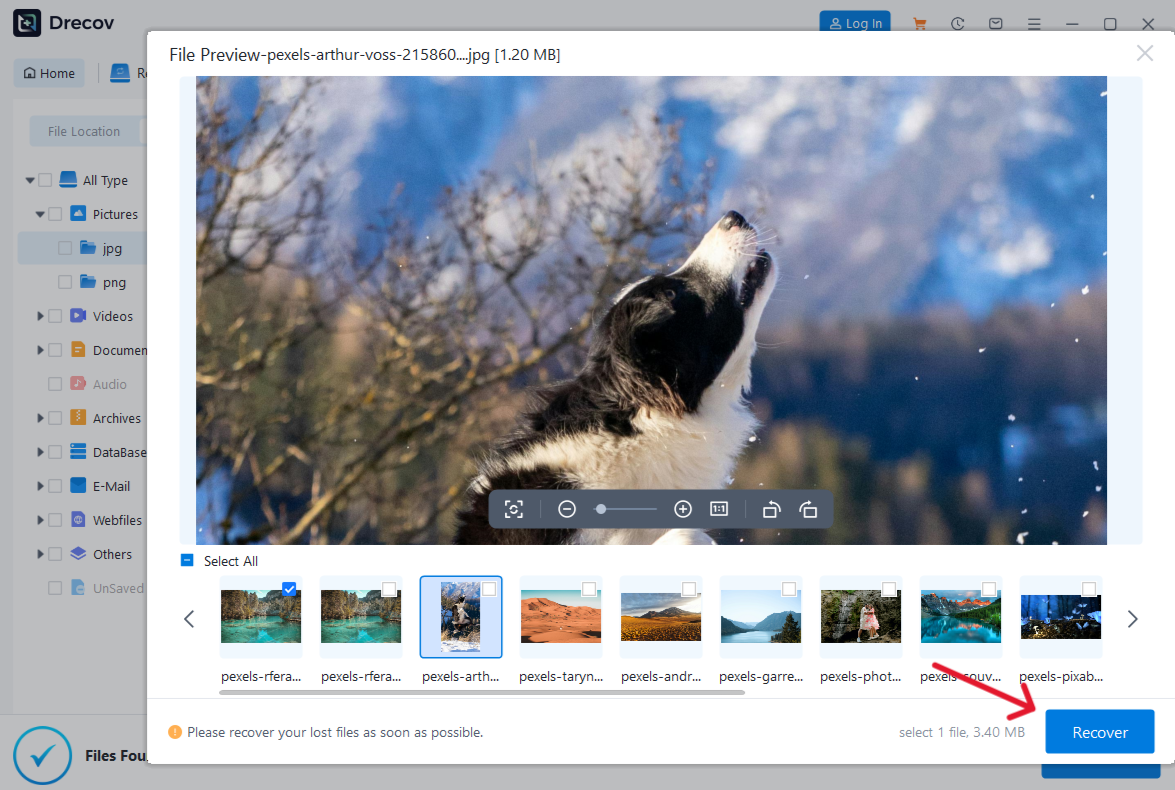
Step 4: Recover and Save
Select the checkboxes for the files you wish to keep and click “Recover”.
Key Operation Point: Choose a destination path that is different from the original location (e.g., save files to an external drive if you are recovering from your local C: drive).
Related Resources for Data Management:
Coding and Content Creation Comparison
Beyond data recovery, most people compare Claude 4.5 to ChatGPT-5 for creative and development work.
Claude 4.5 Coding Strengths
- Better at complex refactoring.
- Produces cleaner, more “human” code comments.
- Stronger adherence to security best practices.
ChatGPT-5 Coding Strengths
- Faster generation of boilerplate code.
- Better integration with live APIs and external web browsing.
- “Agentic” workflows that can run and test code in a sandbox.
In terms of writing, Claude 4.5 feels more like a professional editor—nuanced and expressive. ChatGPT-5 feels like a high-speed marketing expert—structured, clear, and highly efficient at SEO-driven content.
Accuracy and “Hallucinations”
In 2026, the gap in accuracy has narrowed, but differences remain. When we compare Claude 4.5 to ChatGPT-5, Claude is generally more cautious. If it doesn’t know an answer, it is more likely to admit it. ChatGPT-5 is more “confident,” which is great for brainstorming but requires more fact-checking for technical data.
Research from 2026 shows that Claude 4.5 has a lower rate of “hallucinations” in technical documentation, making it the preferred choice for lawyers, doctors, and engineers.
Pricing and Accessibility
ChatGPT-5 remains the most accessible. Its “Plus” plan is $20/month, and it offers a robust free tier. Claude 4.5 also has a free tier, but its “Pro” and “Team” plans are often favored by enterprise users who need the massive 1M token context window for analyzing entire libraries of data.
Compare Claude 4.5 to ChatGPT-5 FAQs
Is Claude 4.5 better than ChatGPT-5 for beginners?
ChatGPT-5 is generally considered more user-friendly due to its conversational flexibility and extensive feature set. However, Claude’s interface is cleaner and often less overwhelming.
Can AI actually fix a physically broken hard drive?
No. If your hard drive is making clicking sounds (mechanical failure), AI cannot fix it. You should use PandaOffice Drecov for logical errors or consult a professional hardware recovery lab.
Which AI is better for SEO writing?
While you should compare Claude 4.5 to ChatGPT-5 based on your style, ChatGPT-5 currently has a slight edge in following strict word counts and keyword density requirements.
Where can I find more info on these models?
You can visit the official Anthropic and OpenAI websites for the latest technical whitepapers.
Conclusion: Which One Should You Choose?
The comparison between Claude 4.5 and ChatGPT-5 highlights a broader truth about AI in 2026: no single model dominates every category.
- Choose Claude 4.5 if you value deep reasoning, handle massive documents, or need help using Claude 4.5 to repair corrupted SQL databases.
- Choose ChatGPT-5 if you want speed, a versatile mobile app, and an ecosystem that connects to all your other tools.
For the most effective data management, many professionals use both: they use Claude 4.5 to architect their data strategy and PandaOffice Drecov data recovery software to ensure their physical files are never truly lost.






