







Accidentally set the camera (Nikon Z7ii) to sequential mode rather than backup and formatted the second card without thinking to check once the other card was transferred safetly to my computer.—From Reddit
Overview of CFexpress Cards and Data Recovery
What Is a CFexpress Card?
A CFexpress card is a high-performance memory card designed for professional cameras, video equipment, and other devices requiring ultra-fast data transfer speeds. These cards, particularly the CFexpress type B card, offer exceptional read and write speeds, making them ideal for 4K or 8K video recording and burst photography.
Unlike standard SD cards, CFexpress cards utilize the PCIe interface, providing significant advantages in performance and durability. However, even high-end best CFexpress type B card models can face data loss issues due to accidental deletion, formatting errors, or card corruption.
To access files on these cards, a CFexpress card reader is usually required. Using a compatible reader ensures fast and reliable data transfer to a computer for recovery or backup purposes.
⚠️Warning: Avoid using the card after data loss to prevent overwriting important files, as this significantly reduces the chances of successful recovery.
Common Causes of Data Loss on CFexpress Cards
Why CFexpress Cards Lose Data
Data loss on CFexpress cards can occur for several reasons, and understanding these helps prevent future problems:
- Accidental Deletion or Formatting – Users may inadvertently format a card or delete essential files while trying to free space. Even professional photographers sometimes face this issue when changing cards quickly during shoots.
- Card Corruption – A CFexpress type B card can become corrupted due to sudden power loss, improper ejection from devices, or firmware errors in cameras. This corruption often makes files inaccessible.
- Physical Damage – Although CFexpress cards are durable, physical damage such as bent pins or cracked casings can prevent proper communication with a CFexpress card reader.
- Software Conflicts or Viruses – Malware or incompatible software can also make a card unreadable, leading to partial or total data loss.
Test Environment:
- Device: Canon EOS R5 with CFexpress card
- Issue: Card became unreadable after abrupt ejection
Understanding these factors helps users take proactive steps to protect their data and recover files efficiently.
Preparation for CFexpress Card Recovery
Initial Checks and Data Safety
Before attempting recovery from a CFexpress card, ensure you have the proper setup:
- Connect the card to a reliable CFexpress card reader. Avoid using built-in laptop readers that may not support the full speed or interface.
- Check if the card is detected by the system. If the card is not recognized, it could indicate corruption or hardware failure.
- Backup remaining accessible data immediately. If the card is partially readable, copy files to a safe location before proceeding with recovery.
For fully inaccessible cards, Pandaoffice Drecov is a powerful tool that can scan and recover files from CFexpress cards. It supports multiple formats including photos, videos, and documents and works with corrupted or formatted cards.
Test Environment:
- Device: Windows 10 PC with a CFexpress card reader
- Scenario: Card inaccessible due to accidental formatting
⚠️Warning: Avoid writing new files to the card during recovery, as this may overwrite lost data.

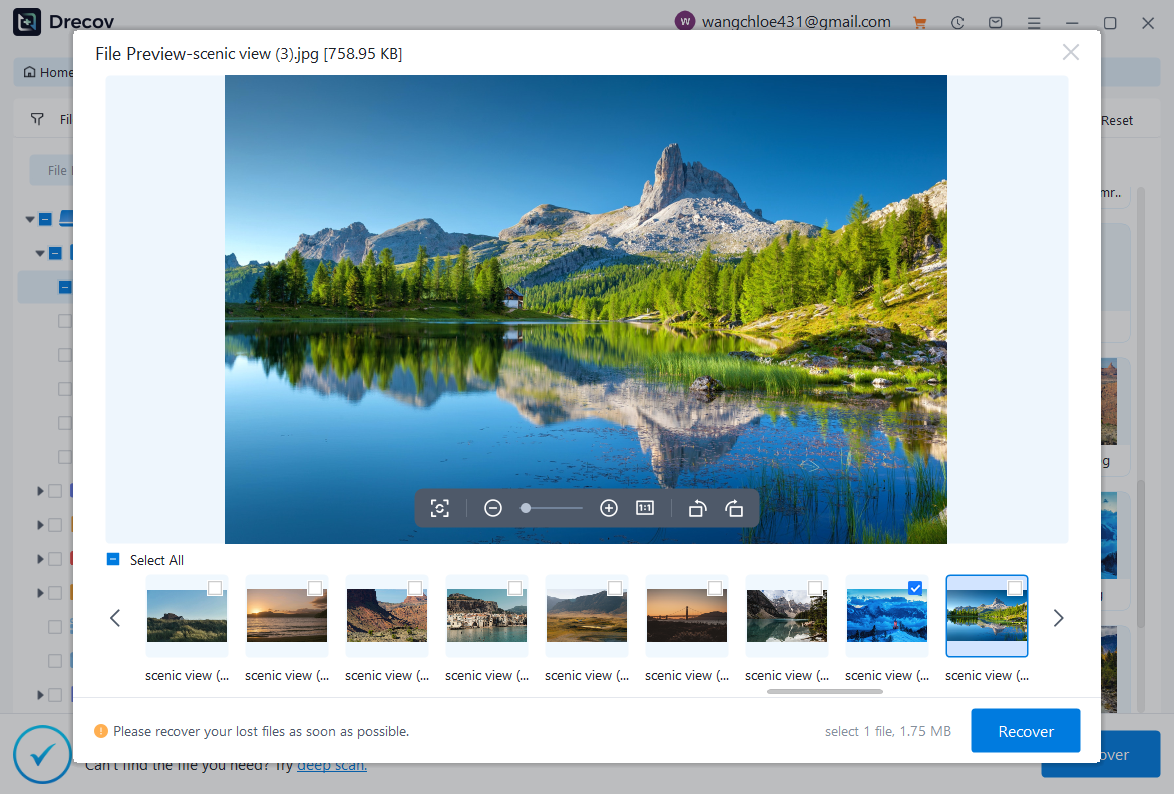
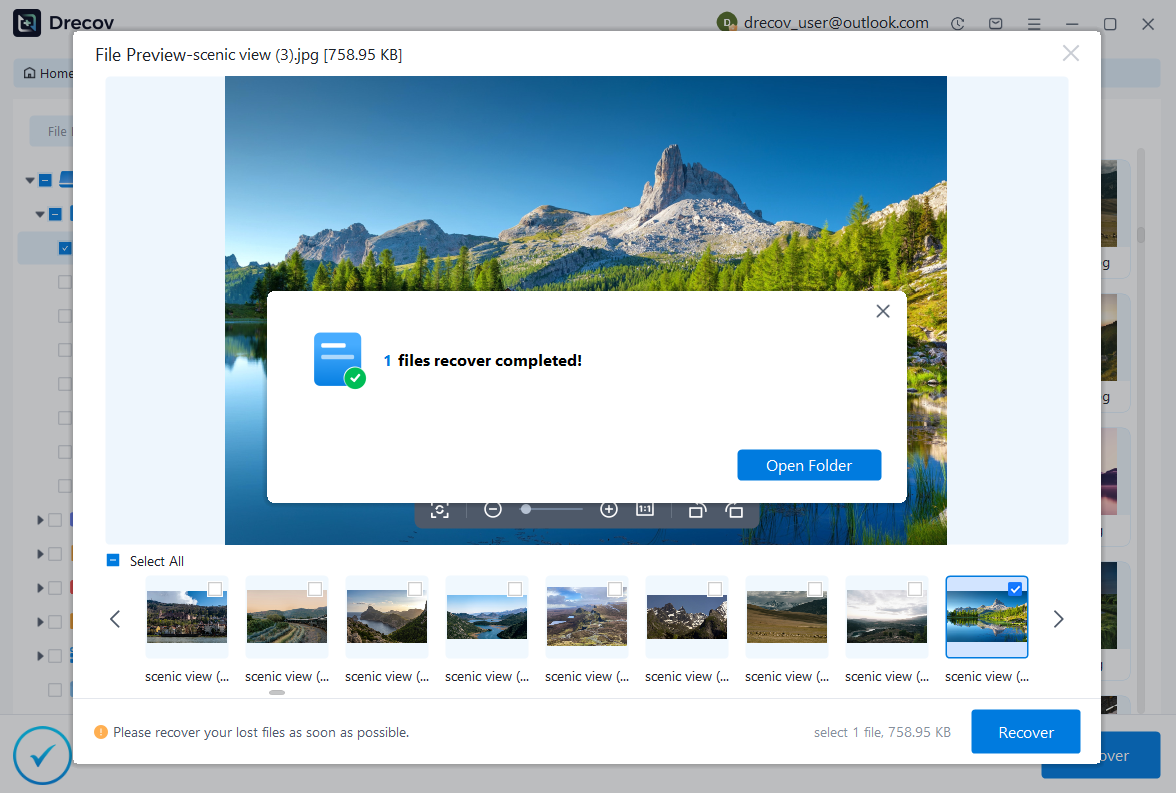
Why Choose PandaOffice Drecov?
When it comes to reliable file data recovery, PandaOffice Drecov offers a balanced combination of performance, ease of use, and broad compatibility. Whether you’ve lost important business files or personal memories, it provides an efficient way to restore data from various loss scenarios, including system crashes, accidental deletion, and formatted drives.
For users looking for advanced Photo Data Recovery Software, PandaOffice Drecov supports a wide range of image formats and storage devices. It can recover high-quality photos from SD cards, cameras, and internal drives while preserving original resolution and file structure. This makes it especially useful for photographers and everyday users alike.
If you are dealing with storage device issues, its external hard drive recovery capability ensures that data can be retrieved from USB drives, HDDs, and SSDs with minimal effort. The software performs deep scans to locate hidden or lost files, even in complex situations like partition loss.
In addition, PandaOffice Drecov excels in Document Recovery, helping users restore essential files such as Word, Excel, and PDFs. It also supports powerpoint recovery, allowing you to retrieve unsaved or deleted presentation files quickly—ideal for professionals working under tight deadlines.
Methods to Recover Files from CFexpress Cards
Method 1 – Use a Professional Recovery Tool
When a CFexpress card is corrupted, software-based recovery is often the most effective solution. Pandaoffice Drecov allows users to scan the card sector by sector and retrieve lost files safely.
Steps include:
- Connect the CFexpress card to a compatible reader and launch Pandaoffice Drecov.
- Select the card from the drive list and start a full scan.
- Preview recoverable files and choose which ones to restore.
- Save recovered files to a different storage location to avoid overwriting.
Test Environment:
- Device: Sony FX6 camera with CFexpress type B card
- Scenario: Card formatted accidentally during a shoot
This method is especially recommended for professional users who cannot afford data loss.
Method 2 – Check the Card on Multiple Devices
Sometimes a CFexpress card appears unreadable on one device but works on another. Try connecting the card to:
- Another computer with a CFexpress card reader
- A camera that supports the same CFexpress type B card
- Different operating systems (Windows vs. Mac)
Test Environment:
- Device: Nikon Z9 with CFexpress card
- Issue: Card unreadable on laptop but detected by camera
This step helps determine whether the issue is card corruption or device incompatibility.
Method 3 – Update or Reinstall Card Reader Drivers
If a CFexpress card reader is malfunctioning, the system may not recognize the card. Updating or reinstalling drivers can resolve this:
- Open Device Manager → locate the card reader → right-click → Update Driver.
- If updating fails, uninstall the driver and restart the computer to reinstall automatically.
Test Environment:
- Device: Windows 11 PC
- Scenario: Card detected on camera but not on computer
This method fixes recognition issues caused by outdated or corrupted drivers.
Method 4 – Use Disk Management to Assign a Drive Letter
A CFexpress card may appear in the system but without a drive letter, making it inaccessible. Assigning a letter can resolve this:
- Open Disk Management → locate the CFexpress card.
- Right-click → Change Drive Letter and Paths → Assign a letter.
- Access the card through File Explorer.
Test Environment:
- Device: Dell laptop with CFexpress card reader
- Issue: Card detected but inaccessible in Windows Explorer
This method works when the system recognizes the card but cannot assign a logical path.
Method 5 – Run CHKDSK for Logical Errors
If a CFexpress card is recognized but contains errors, the Windows CHKDSK utility can repair logical issues:
- Open Command Prompt as administrator.
- Type
chkdsk X: /f(replace X with the card’s drive letter) and press Enter. - Wait for the scan to complete; it repairs file system errors.
Test Environment:
- Device: HP laptop with CFexpress card reader
- Scenario: Card detected as RAW, preventing file access
CHKDSK is effective for minor corruption, but it may not recover deleted files.
⚠️Warning: Avoid using CHKDSK on heavily damaged cards, as it may worsen data loss.
Method 6 – Recover from RAW CFexpress Cards
Sometimes a CFexpress card may show as RAW, indicating severe corruption. Software tools like Pandaoffice Drecov can handle this scenario:
- Launch Pandaoffice Drecov and select the RAW CFexpress card.
- Run a deep scan to retrieve recoverable files.
- Preview files and restore to a safe location.
Test Environment:
- Device: Canon EOS R6 with CFexpress type B card
- Scenario: Card unreadable due to accidental formatting and RAW status
This method recovers photos, videos, and documents from severely corrupted cards.
Method 7 – Try on Mac Computers
CFexpress cards are compatible with macOS, but some issues may be system-specific. Use the following steps:
- Connect the card through a CFexpress card reader.
- Open Disk Utility → Verify and Repair the card.
- If repair fails, use Pandaoffice Drecov for Mac to recover files.
Test Environment:
- Device: MacBook Pro
- Scenario: CFexpress card not recognized after camera update
Mac recovery ensures that users working with high-end cameras can retrieve important media safely.
Method 8 – Check Camera Firmware and Compatibility
Occasionally, a CFexpress type B card may not function properly if the camera firmware is outdated. Updating firmware can resolve recognition errors:
- Visit the camera manufacturer’s support page.
- Download and install the latest firmware version.
- Re-insert the card and check if files are accessible.
Test Environment:
- Device: Nikon Z9
- Scenario: New best CFexpress type B card not detected by camera
Firmware updates improve compatibility and reduce corruption risks.
Method 9 – Avoid Using the Card Until Recovery Is Complete
To prevent overwriting lost data on a CFexpress card, avoid recording new files until recovery is completed.
Test Environment:
- Device: Sony FX6
- Scenario: Card partially overwritten after accidental deletion
Using the card after data loss significantly lowers the chance of successful recovery.
Frequently Asked Questions About CFexpress Card Recovery
What types of files can be recovered from CFexpress cards?
CFexpress cards store various file formats, including RAW photos, JPEGs, videos (MOV, MP4), and documents. Recovery software can retrieve most types as long as data has not been overwritten.
Which CFexpress cards are the most reliable?
The best CFexpress type B card depends on speed and endurance. High-quality cards from trusted brands minimize the risk of corruption and perform consistently in high-demand workflows.
Do all CFexpress card readers work with every card?
No. Ensure your CFexpress card reader supports the card type (A, B, or C) and the PCIe interface. Using an incompatible reader may prevent recognition or cause errors.
Can I recover data from physically damaged CFexpress cards?
Recovery from physically damaged CFexpress cards may require professional services. Minor surface scratches can sometimes be bypassed with software, but severe hardware damage often makes DIY recovery impossible.
Is CFexpress recovery different on Mac vs. Windows?
The process is similar, but macOS may require specific utilities for accessing the file system. Using Pandaoffice Drecov on Mac ensures seamless recovery for professional users.
Conclusion: Ensuring Safe Recovery from CFexpress Cards
Data loss on CFexpress cards can be alarming, but with the right steps, recovery is often possible. Start by checking the card on multiple devices and using a compatible CFexpress card reader. For corrupted or formatted cards, Pandaoffice Drecov provides a reliable solution to recover photos, videos, and documents.
Preventive measures include:
- Regular backups to external storage
- Avoiding abrupt ejections
- Using high-quality best CFexpress type B card for critical workflows
By following these methods, users can safely recover lost files and protect future data on CFexpress cards.
⚠️Warning: Always back up important files before attempting recovery or using the card for new recordings.





