







Understanding What Happens When an SD Card Is Formatted
What “sd card accidentally formatted” really means
When an sd card accidentally formatted, many users assume their data is permanently gone. In reality, formatting typically removes file references rather than erasing the actual data. This means recovery is often still possible if you act quickly.
There are two main types of formatting: quick format and full format. A quick format deletes the file system index, while a full format may overwrite parts of the storage. If you’ve accidentally formatted sd card, your chances of recovery depend on which type occurred and whether new data has been written.
For those dealing with an accidentally formatted micro sd card, the situation is similar regardless of device type—phones, cameras, or computers all follow the same storage principles.
If you’re unsure what to do if i accidentally format my sd card, the most important step is to stop using it immediately. Continued use increases the risk of overwriting recoverable data.
⚠️ Warning: Do not save new files or attempt to reformat the SD card again after data loss.
Common Reasons Behind Accidental SD Card Formatting
Why formatting happens unexpectedly
Understanding why an accidentally formatted sd card occurs can help prevent future data loss and guide recovery strategies.
One of the most common causes is human error. Users may click the wrong option when prompted to format a card, especially when connecting it to a new device. Cameras and smartphones often display formatting requests if they detect compatibility issues.
Another cause is file system corruption. If the SD card becomes corrupted due to improper ejection or power failure, devices may require formatting before access is restored.
Viruses or malware can also trigger formatting prompts or corrupt data structures, leading to an sd card accidentally formatted situation.
Additionally, compatibility issues between different devices may result in unexpected formatting requests.
For users asking what to do if i accidentally format my sd card, identifying the cause helps determine whether recovery tools or system fixes are more appropriate.
⚠️ Warning: Avoid formatting your SD card when prompted unless you are certain backups exist.
How to Recover Data from an Accidentally Formatted SD Card
Method 1: Use Pandaoffice Drecov for Deep Recovery
Test Environment:
- Device: Windows 11 PC
- SD Card: 128GB SanDisk microSD
- Scenario: Quick formatted SD card
If your sd card accidentally formatted, using professional recovery software is often the most effective solution. Pandaoffice Drecov is designed to scan storage devices deeply and reconstruct lost files.
Steps:
- Install Pandaoffice Drecov on your computer.
- Insert the SD card using a card reader.
- Launch the software and select your SD card.
- Start a deep scan to locate lost files.
- Preview recoverable files to verify quality.
- Select the files you want to restore.
- Save them to a different storage device.
This method is highly effective for recovering data from an accidentally formatted micro sd card, especially when files have not been overwritten.

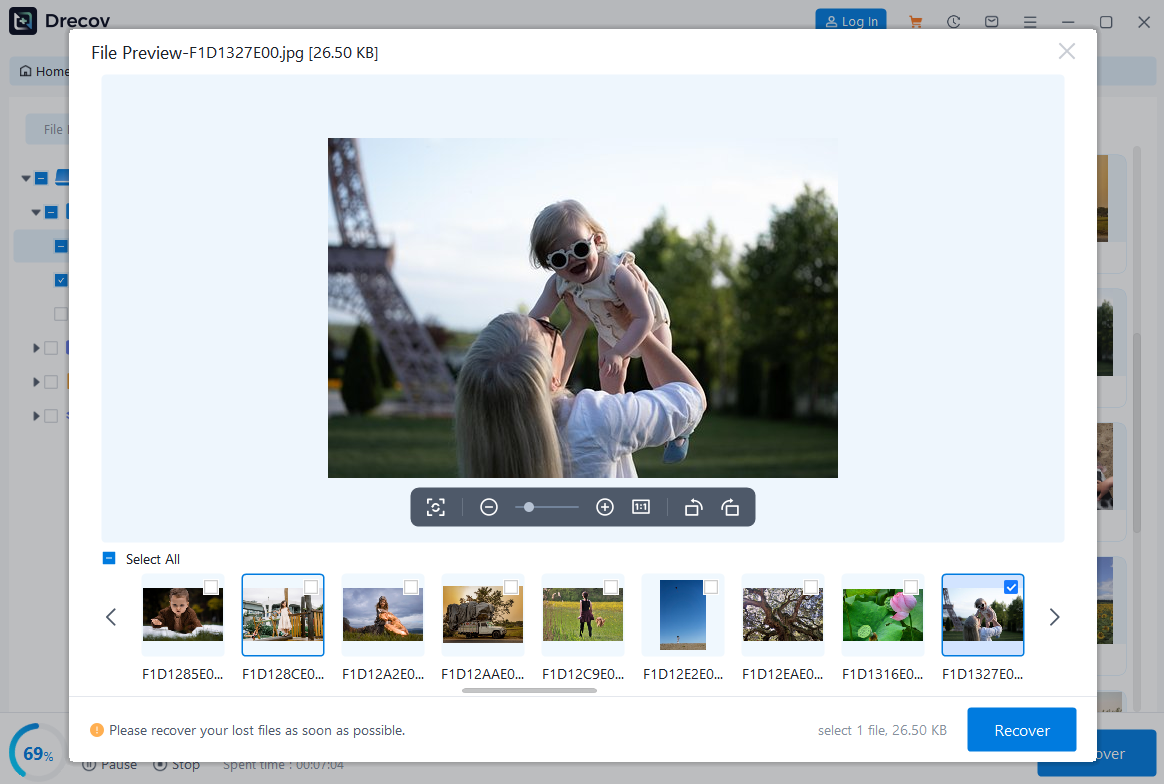

Why Choose PandaOffice Drecov Data Recovery Software?
When it comes to reliable data recovery, PandaOffice Drecov stands out as a powerful, all-in-one solution designed to handle a wide range of data loss scenarios. Whether you’re trying to perform TikTok deleted video recovery, restore files after formatting, or recover important documents, Drecov delivers fast and dependable results.
One of its biggest advantages is versatility. From format data recovery to lost partition recovery, the software can scan deeply and accurately locate files that other tools often miss. Even if your drive has been accidentally formatted or a partition has disappeared, Drecov uses advanced algorithms to reconstruct and retrieve your data with high success rates.
Drecov also supports specialized recovery needs. If you’ve lost important documents, its PDF recovery tool ensures that files retain their original structure and quality. For media users, the audio recovery feature helps restore music, recordings, and other sound files without corruption, making it ideal for both personal and professional use.
Ease of use is another key benefit. The intuitive interface allows beginners to recover files in just a few clicks, while still offering advanced options for more experienced users. Plus, it supports a wide range of storage devices, including HDDs, SSDs, USB drives, and memory cards.
In short, PandaOffice Drecov combines powerful recovery capabilities with user-friendly design, making it a trusted choice for anyone facing data loss.
⚠️ Warning: Do not restore recovered files to the same SD card.
Method 2: Recover Files Using Backup or Cloud Storage
Test Environment:
- Device: Android phone with cloud sync
- SD Card: 64GB Samsung EVO
- Backup Type: Google Photos enabled
If you have backups, recovery becomes much simpler even after an accidentally formatted sd card.
Steps:
- Open your cloud storage or backup service.
- Navigate to the Trash or Recently Deleted section.
- Locate the files you want to restore.
- Select and recover them.
- Save them back to your device.
This method is ideal for users who regularly back up their data and want a quick solution for what to do if i accidentally format my sd card.
Method 3: Use Command Prompt to Attempt File Recovery
Test Environment:
- Device: Windows 10 Desktop
- SD Card: 32GB Kingston
- Issue: Corrupted file system after format
In some cases, system tools can help recover or repair data structures.
Steps:
- Connect the SD card to your computer.
- Open Command Prompt as Administrator.
- Type: chkdsk X: /f
- Replace “X” with your SD card drive letter.
- Press Enter and wait for the scan to complete.
This method may restore accessibility or recover fragments of data from an sd card accidentally formatted.
⚠️ Warning: This method may not recover all files and should be used carefully.
Method 4: Restore Data Using Previous System Backups
Test Environment:
- Device: Windows 11 PC
- SD Card: 64GB Lexar
- Feature: File History enabled
If your system has backup features enabled, you may recover files even after formatting.
Steps:
- Connect the SD card to your computer.
- Open the folder where files were previously stored.
- Right-click and select “Restore previous versions.”
- Choose a backup version.
- Restore the files.
This method works well if your accidentally formatted sd card was previously synced or backed up.
Method 5: Seek Professional Data Recovery Services
Test Environment:
- Scenario: Severe data loss or physical damage
- SD Card: Any capacity
If all methods fail, professional services may help recover data from an accidentally formatted micro sd card.
Steps:
- Stop using the SD card immediately.
- Contact a certified data recovery service.
- Provide details about the formatting incident.
- Allow technicians to perform advanced recovery.
This option is typically used when data is critical and cannot be recovered through software.
Advanced Tips for Recovering an Accidentally Formatted SD Card
Best practices to improve recovery success rate
When dealing with an sd card accidentally formatted, the way you handle the device immediately after the incident plays a major role in recovery success. The most important rule is to avoid any further writing operations on the card. Even small actions like taking new photos or saving files can overwrite recoverable data.
Another important step is to use a reliable card reader instead of connecting the SD card through unstable devices. This ensures a stable connection when scanning an accidentally formatted sd card for lost data.
It is also recommended to perform a deep scan rather than a quick scan when using recovery software. Deep scanning takes more time but can locate fragmented files more effectively, especially on an accidentally formatted micro sd card.
If you’re unsure what to do if i accidentally format my sd card, the safest approach is to immediately stop using it and begin recovery attempts.
Finally, always recover files to a separate storage device, not back onto the SD card itself.
⚠️ Warning: Avoid repeated scanning with multiple tools at the same time, as this may slow down recovery or damage file structures.
Common Mistakes After Formatting an SD Card
Errors that reduce recovery chances
Many users unintentionally reduce their chances of recovering data from an accidentally formatted sd card by making avoidable mistakes.
One of the most serious mistakes is continuing to use the SD card after formatting. Every new file increases the risk of overwriting lost data, making recovery more difficult.
Another common mistake is formatting the card again in hopes of fixing errors. This is especially harmful for users dealing with an sd card accidentally formatted, as repeated formatting can reduce recoverability.
Some users also attempt random free tools without verifying their reliability, which may lead to incomplete recovery or further data corruption.
Additionally, ignoring backups is a major issue. If users had cloud sync enabled, they could quickly recover files instead of relying solely on recovery software.
For those asking what to do if i accidentally format my sd card, avoiding these mistakes is just as important as choosing the right recovery method.
⚠️ Warning: Never install recovery software on the same SD card you are trying to recover from.
Frequently Asked Questions About Accidentally Formatted SD Cards
Can data be recovered after formatting an SD card?
Yes, in many cases data can still be recovered from an sd card accidentally formatted, especially if new data has not overwritten the storage sectors. Recovery success depends on how quickly you act.
Is quick format reversible?
A quick format does not permanently erase files. It only removes file system references, which is why an accidentally formatted sd card can often still be restored using recovery tools.
What is the difference between formatted and deleted files?
Deleted files are removed individually, while formatting removes the entire file structure. However, both scenarios may allow recovery if handled properly.
How long do I have to recover files after formatting?
There is no fixed time limit, but the sooner you act, the better. Continued usage of an accidentally formatted micro sd card reduces recovery chances significantly.
Do I need professional help to recover formatted SD cards?
Not always. Many cases of what to do if i accidentally format my sd card can be resolved using software. However, severe corruption or physical damage may require professional services.
Conclusion: Key Takeaways for SD Card Formatting Recovery
Final thoughts on recovering formatted SD cards
An sd card accidentally formatted can be stressful, especially when important files are lost. However, in many cases, recovery is still possible if proper steps are taken quickly and carefully.
Whether you are dealing with an accidentally formatted sd card or an accidentally formatted micro sd card, the key is to stop using the device immediately and choose the right recovery approach.
Built-in tools, backups, command-line utilities, and professional recovery software all offer different levels of success depending on the situation. For users still wondering what to do if i accidentally format my sd card, the most important step is to act quickly and avoid overwriting data.
By following the methods and precautions outlined in this guide, you can significantly improve your chances of successfully restoring lost files and minimizing permanent data loss in the future.





