







So for some reason my iPhone decided to log me out of my yahoo account. I can’t remember the password and my recovery email address is my mother’s old email which is not accessible. Long story short, I have no way to get into my yahoo account. I have a Gmail account but most emails go to my yahoo address. Is there a way to forward emails that would be sent to my Gmail address without accessing my yahoo account?—from Reddit
Understanding Yahoo Email Recovery and Account Access
Why Yahoo Account Recovery Becomes Necessary
Email accounts often contain important personal and professional information, which makes losing access extremely frustrating. When users forget login credentials or encounter security issues, they usually begin searching for solutions related to yahoo email id recovery or yahoo email password recovery. These recovery procedures allow users to regain access without permanently losing their data.
Several situations may lead to account access problems. The most common one is forgetting the password, especially when accounts are rarely used or accessed on multiple devices. Other scenarios include security breaches, suspicious login attempts, or mistakenly deleting authentication information such as recovery emails or phone numbers.
Yahoo provides several built-in recovery tools designed to verify identity and allow users to reset credentials safely. These tools include password reset links, verification codes, and security checks. When used correctly, they make recovery email yahoo mail password processes relatively straightforward.
However, the difficulty of recovery depends heavily on whether recovery information is still available. If users no longer have access to their recovery email or phone number, the process becomes more complex and may require additional verification.
⚠️Warning: Always ensure you are using Yahoo’s official login or recovery pages to avoid phishing attacks that attempt to steal account credentials.
Understanding the available recovery methods before starting can significantly increase the chances of successful account recovery.
Common Reasons for Losing Access to Yahoo Mail
Forgotten Passwords and Security Credential Issues
One of the most frequent reasons users search for yahoo email password recovery solutions is simple password loss. Over time, users may create multiple accounts with different credentials. Without proper password management, remembering each login becomes difficult.
Another common issue occurs when users update their password but fail to record the new one. As a result, login attempts repeatedly fail, eventually triggering security restrictions.
Some users also encounter problems after clearing browser cookies or switching devices. Saved credentials disappear, and the system requires the original login information again.
Security features such as two-factor authentication can also create complications if the authentication device is no longer available. In these situations, users often try to reset yahoo password without recovery email, especially when older recovery information is no longer valid.
⚠️Warning: Repeated incorrect login attempts may temporarily lock the account, making recovery more difficult.
Proper password management and updated recovery options are essential for avoiding these situations.
Lost Recovery Email or Phone Number
Another major challenge appears when recovery options become outdated. Users may change phone numbers, close secondary email accounts, or lose access to both at the same time.
When recovery information becomes unavailable, the system cannot easily verify identity through standard channels. This is when people start searching for ways to reset yahoo password without recovery email or phone number.
Yahoo’s security system is designed to protect accounts from unauthorized access, so it limits the number of alternative verification methods available. In most cases, users must provide additional proof of ownership such as device history, login locations, or previous account activity.
Sometimes the issue occurs because the recovery email itself was forgotten. In that case, users must first perform yahoo email id recovery before they can attempt password resets.
Although these situations may seem complicated, several alternative approaches still exist. They involve account recovery tools, account key verification, and device-based authentication.
⚠️Warning: Never attempt to bypass account security using unofficial tools or third-party services that promise instant recovery.
Understanding the underlying cause of the login problem will help determine which recovery method is most effective.
Methods to Recover Yahoo Email Password or Account Access
Method 1: Reset Yahoo Password Using the Official Account Recovery Tool
One of the most reliable ways to perform yahoo email password recovery is through Yahoo’s official account recovery page. This method allows users to reset their password by verifying identity using registered recovery options.
Test Environment:
Windows 11, Google Chrome 121, Yahoo Mail Web Version
Steps
- Open the Yahoo sign-in helper page.
- Enter your Yahoo email address or username.
- Click Continue to proceed.
- Choose one of the available verification methods, such as receiving a code via recovery email or phone.
- Enter the verification code sent by Yahoo.
- Create a new password and confirm the change.
Once the process is complete, users can sign back into their account using the updated credentials.
This method is the most straightforward approach because it relies on Yahoo’s built-in security system. If recovery information is still active, the entire process typically takes only a few minutes.
⚠️Warning: Avoid using previously used passwords when creating a new one. Reusing passwords increases the risk of future security breaches.
If this method fails because recovery information is outdated, users may need to explore alternative options described in the following sections.
Method 2: Recover Yahoo Email ID Using Alternate Verification
Sometimes users cannot remember their full Yahoo email address. Without the correct email ID, accessing the account becomes impossible. In this situation, the yahoo email id recovery process can help locate the correct account.
Test Environment:
macOS Sonoma, Safari Browser, Yahoo Account Recovery Page
Steps
- Visit the Yahoo sign-in helper page.
- Select the option indicating that you forgot your email address.
- Enter a recovery phone number or alternate email associated with the account.
- Yahoo will display a list of email IDs linked to that recovery information.
- Select the correct account and proceed to the password reset step.
This method works particularly well for users who created multiple Yahoo accounts but cannot remember which one was used for a specific service.
Once the correct email ID is identified, users can continue with recovery email yahoo mail password procedures to restore account access.
⚠️Warning: Ensure the recovery phone number or email entered matches the one originally linked to the Yahoo account.
This recovery option is especially useful when login credentials are partially forgotten but recovery details remain accessible.
Method 3: Recover Deleted or Lost Email Data with Pandaoffice Drecov
In some situations, the issue is not just password access but missing email files or lost local data associated with Yahoo Mail. When email exports or downloaded mailbox files are accidentally deleted, specialized recovery tools can help retrieve them.
One recommended solution is Pandaoffice Drecov, a professional data recovery program designed to retrieve deleted files from storage devices.
Download DrecovTest Environment:
Windows 10, NTFS file system, 1TB SSD, Pandaoffice Drecov latest version
Steps
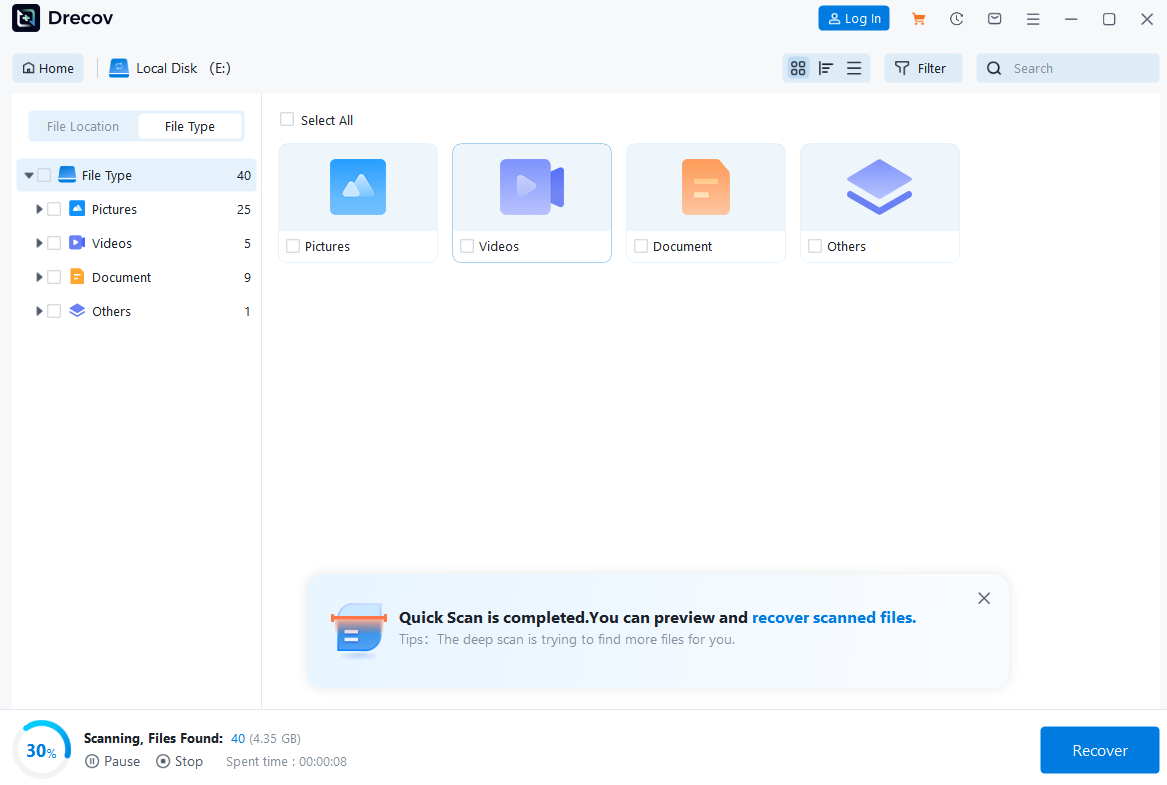
- Install and launch Pandaoffice Drecov on your computer.
- Select the storage location where the email files were previously saved.
- Start a deep scan to locate deleted or lost mailbox data.
- Preview the recovered files once scanning is complete.
- Select the required files and restore them to a secure location.
This method is particularly useful when Yahoo emails were exported to local storage and later deleted accidentally.
Unlike account recovery processes, file recovery focuses on retrieving stored email data rather than resetting login credentials. Pandaoffice Drecov uses advanced scanning algorithms to locate recoverable files even after deletion.


Why Choose Pandaoffice Drecov?
Data loss can occur unexpectedly due to accidental deletion, system crashes, formatting errors, or software failures. Whether you need to restore Windows previous date, perform recover Excel files,or handle deleted PowerPoint recovery, Pandaoffice Drecov provides a reliable and efficient solution designed to restore important documents quickly and safely.
Pandaoffice Drecov is a professional PowerPoint Recovery Software that supports recovery for multiple document types, including Excel spreadsheets, Word documents, and PowerPoint presentations. With advanced scanning technology, the software can detect and recover files even after deletion, formatting, or unexpected system shutdowns. This makes it an ideal tool for users who urgently need Document Recovery from hard drives, SSDs, USB drives, memory cards, and other storage devices.
One of the key advantages of Pandaoffice Drecov is its intelligent deep-scan engine. It carefully analyzes storage sectors to locate lost or hidden files that standard recovery tools often miss. Whether you accidentally deleted a presentation and require deleted PowerPoint recovery, or you lost critical spreadsheets and need to recover Excel files, the software provides fast scanning and high recovery success rates.
The software also features a user-friendly interface that allows beginners and professionals alike to complete recovery tasks in just a few steps. Users can preview recoverable files before restoring them, ensuring that only the needed data is recovered. In situations where files were lost due to system errors, the software can also help recover documents after attempts to restore Windows previous date.
⚠️Warning: Do not install recovery software on the same drive where the lost files were originally stored, as this may overwrite recoverable data.
When used correctly, data recovery tools can restore valuable email archives that would otherwise be permanently lost.
Method 4: Reset Password Using a Trusted Device or Browser Session
Sometimes users are still signed into their Yahoo account on a trusted device even though they cannot remember their password. In this situation, the existing login session can help perform yahoo email password recovery without requiring additional recovery information.
Yahoo stores authentication tokens on devices that have previously logged into the account. These tokens allow the system to recognize trusted devices and provide a faster way to update credentials.
Test Environment:
Windows 11, Microsoft Edge Browser, Previously Logged-In Yahoo Mail Session
Steps
- Open Yahoo Mail on the device that is already signed in.
- Click the Account Settings or profile icon in the top-right corner.
- Navigate to the Account Security section.
- Select Change Password.
- Verify your identity using the current session authentication.
- Create a new password and confirm the change.
Once the password is updated, the account can be accessed from other devices using the new credentials.
This method is extremely useful when users forget their password but still have access through a browser or mobile application.
⚠️Warning: If you are using a public or shared device, log out immediately after updating your password to prevent unauthorized access.
Trusted device authentication can simplify the recovery email yahoo mail password process and eliminate the need for recovery emails or phone numbers.
Method 5: Use Yahoo Account Key for Password-Free Sign-In
Yahoo introduced a security feature called Account Key, which allows users to log in without entering a password. Instead of remembering passwords, the system sends a push notification to a verified mobile device.
If this feature was previously enabled, it can help users regain account access when traditional login methods fail.
Test Environment:
Android 13 Smartphone, Yahoo Mail Mobile App, Active Account Key Feature
Steps
- Open the Yahoo sign-in page on a computer or mobile browser.
- Enter your Yahoo email address and click Continue.
- Choose the option to sign in using Account Key.
- Check your mobile device for a push notification from Yahoo.
- Tap Approve on the notification to verify your identity.
- After successful verification, access your account and update your password if necessary.
Account Key significantly reduces the chances of forgetting passwords because the login process relies on device verification instead of typed credentials.
For users who frequently struggle with password management, this feature offers a convenient alternative to traditional yahoo email password recovery procedures.
However, this method only works if the Account Key feature was enabled before the login issue occurred.
How to Reset Yahoo Password Without Recovery Email
Using Yahoo Sign-In Helper Without Email Access
Many users search for solutions to reset yahoo password without recovery email when they no longer have access to the secondary email address associated with their account.
Yahoo’s sign-in helper tool still offers several identity verification methods even if the recovery email is unavailable. These methods typically rely on phone verification or device recognition.
Test Environment:
Windows 10, Google Chrome Browser, Yahoo Sign-In Helper
Steps
- Visit the Yahoo account recovery page.
- Enter your Yahoo email address.
- Click Continue to begin verification.
- If the recovery email option appears, select Try another way.
- Choose phone verification or device authentication if available.
- Enter the verification code sent by Yahoo.
- Create a new password once identity verification succeeds.
This approach allows users to complete recovery email yahoo mail password procedures even when the recovery email cannot be accessed.
In many cases, the system will automatically prioritize other available verification methods.
⚠️Warning: Make sure the phone number used for verification is the one originally registered with the Yahoo account.
If no alternate recovery options exist, users may need to attempt advanced verification or contact Yahoo support.
Reset Yahoo Password Without Recovery Email or Phone Number
The most difficult situation occurs when users try to reset yahoo password without recovery email or phone number. Without these verification methods, the system has fewer ways to confirm account ownership.
However, Yahoo sometimes allows verification based on device history, login activity, and browser cookies.
Test Environment:
macOS Ventura, Safari Browser, Previously Used Yahoo Login Device
Steps
- Go to the Yahoo account recovery page.
- Enter the Yahoo email address associated with the account.
- Select Try another way when recovery options appear.
- If available, Yahoo will attempt device-based verification.
- Follow on-screen instructions to confirm your identity.
- Once verified, reset the password and restore account access.
This method works best when the recovery attempt is made from a device or network that was previously used to access the account.
Although success is not guaranteed, using a familiar device significantly increases the chances of completing yahoo email id recovery or password reset procedures.
Users who regularly update recovery information will find the process much easier in the future.
FAQ About Yahoo Email Recovery
Can I Recover a Yahoo Account After a Long Period of Inactivity?
Yes, but recovery may depend on whether the account still exists. Yahoo sometimes deactivates accounts that remain inactive for extended periods. If the account has not been permanently deleted, users can attempt yahoo email password recovery through the standard recovery page.
The success of recovery depends largely on whether recovery details such as phone numbers or alternate emails are still valid. If these details are outdated, the system may require additional verification.
Users attempting recovery after long inactivity should try accessing the account from devices or locations previously used to log in.
Maintaining updated recovery information significantly improves the chances of restoring account access.
Is It Possible to Recover Yahoo Emails Without Resetting the Password?
Yes, in certain cases users may still access their emails without performing a full password reset. If the account remains logged in on another device or email client, it may still allow email access.
For example, some users remain signed in on mobile applications or desktop email clients. In these situations, users can review account settings and update the password from within the active session.
However, if no active session exists, password reset procedures become necessary to restore account access.
Users who have exported or backed up their emails locally may also recover stored email files using data recovery tools if the files were deleted accidentally.
Conclusion
Losing access to a Yahoo account can feel stressful, especially when important messages or files are stored inside the mailbox. Fortunately, several solutions exist to help restore access and complete yahoo email id recovery or yahoo email password recovery safely.
The easiest solution is usually Yahoo’s official sign-in helper, which allows users to verify their identity using recovery email addresses, phone numbers, or trusted devices. Features like Account Key and device authentication can also simplify the recovery process.
When recovery information is missing, users may still attempt verification through device history or previous login sessions. While this method is less reliable, it may still work in some cases.
Additionally, if email data stored on a computer becomes lost or deleted, recovery tools such as Pandaoffice Drecov can help retrieve locally saved mailbox files.
To avoid future problems, users should always keep their recovery information updated and enable additional security features. Regularly updating passwords and maintaining backups of important emails will significantly reduce the risk of permanent data loss.
With the right approach and recovery method, most Yahoo account access problems can be resolved successfully.






