







Recover the LyX Document and Its Supporting Sources
To recover LyX documents, preserve the native file and identify whether the missing work is text, document structure, a linked chapter, or an external resource. A .lyx backup can preserve an editable milestone. A LaTeX export can support reconstruction while losing some LyX-specific organization. A PDF can preserve readable output without restoring the original editable source.
Record the document path, LyX version, a distinctive paragraph, and the expected included files. Also note whether the application crashed or a saved document was replaced. Those situations lead to different candidates. Keep the original native file, backup files, and surrounding project directory before trying conversions or changing the document’s location.
Preserve a Complete Document Set
Copy the surviving source tree with its relative paths intact. Include chapters, images, bibliography files, and custom layout resources that belong to the project. A master .lyx file can open while depending on missing external content. Work on a separate copy so an attempted compile or save cannot replace the only useful milestone.
If LyX remains open with useful text, save a separate native document before closing it. Also preserve a readable reference output when practical. The native file supports further editing, while the output helps compare content and layout. Keep their dates and roles clear instead of treating a freshly generated PDF as proof that the entire editable source survived.
Native Route 1: Open an Existing Native Backup
- Locate a backup associated with the intended document, such as an existing .lyx~ candidate.
- Preserve the original backup and copy it to a separate recovery folder.
- Open a usable working copy through LyX, retaining the original extension information in your notes.
- Compare the missing paragraph and save the accepted document under a new name.
LyX can retain a previous native document according to its backup settings. Inspect the actual configured directory and surviving files rather than assuming a universal location. A backup represents the state it preserved, which may predate later work. Compare content instead of choosing a candidate solely because its filename resembles the current document.
Check More Than the First Page
Inspect the incident paragraph, an included chapter, and a distinctive inset or reference. A document can open with familiar introductory text while missing the later section you need. Keep useful alternatives until you understand what each one contributes. Saving a candidate separately prevents the comparison from overwriting another still-useful source.
If the backup contains an earlier paragraph but the current document contains valid later edits, preserve both. Transfer only verified content into a working candidate. Check cross-references and document structure afterward. This is a deliberate combination of surviving states, so record it rather than presenting the result as one untouched historical file.
Native Route 2: Inspect an Autosave or Emergency Candidate
- Preserve the original document and any recovery candidates before repeated reopening.
- Inspect the recovery offered by the appropriate LyX installation.
- Compare the candidate’s text and structure with the last saved document.
- Save an accepted recovery as a separate ordinary native file.
LyX can preserve autosave or emergency information under conditions that depend on the version, settings, and incident. The presence of a recovery offer does not guarantee every final edit survived. Likewise, a recovery filename is not proof of complete content. Compare a distinctive recent sentence and an important structural feature before accepting the candidate.
Keep the Recovery Source Untouched
If a recovery attempt fails to open, preserve the exact candidate and error message. Do not repeatedly overwrite or rename every similar file while guessing. Use working copies and the installed version’s documentation. A version compatibility issue and damaged native content require different investigations, even when both initially prevent a normal open.
Once a recovered document opens, save it separately and reopen a copy. Then inspect the same paragraph and structure again. This tests persistence outside the recovery session. Retain the emergency or autosave source until the ordinary saved document passes that check and the required external resources are available.
Native Route 3: Reconnect Surviving Included Documents
- Identify the missing chapter, image, bibliography, or other external reference.
- Locate the original source in the preserved project directory.
- Correct the relevant path in a working document through supported LyX controls.
- Reopen or compile the copied project and inspect the affected content.
A moved project can produce missing content while the master document remains intact. Reconnecting the original supporting file can restore access without rolling back the whole manuscript. Match the actual chapter or image by content and revision. Another file with the same basename may belong to an earlier paper or a different chapter.
Preserve Relative Directory Relationships
If the project originally used relative paths, copying only the master file can break references. Compare the old and new directory structure before editing every link. Restoring the intended folder relationship may be more reliable than individual path changes. Test a representative chapter and image from the final planned document location.
If a supporting source truly is missing, keep its reference and identify the exact required component. A visible caption does not supply the missing image, and a citation key does not recreate the bibliography database. Record those gaps as separate recovery tasks rather than deleting references to make the document compile cleanly.
Native Route 4: Reconstruct from an Existing LaTeX Source
- Preserve the original LaTeX export and its supporting files.
- Create a separate LyX recovery document using an appropriate supported import.
- Compare text, equations, references, and layout behavior.
- Record LyX-specific structure or custom features that require manual reconstruction.
A LaTeX source can preserve useful manuscript information when the native document is unavailable. Import results depend on the actual source, packages, and LyX support. Do not assume that importing a .tex file recreates every native inset or layout decision. Keep the imported result distinct from a directly recovered .lyx document.
Inspect Equations and References Deliberately
A manuscript can look complete while a mathematical expression, citation, or reference changes during conversion. Compare a distinctive equation and follow a cross-reference to its intended target. A successful import message does not establish semantic accuracy. Use the original source and a trusted output as evidence for the features the manuscript actually needs.
Custom commands and layouts may require separate configuration or manual work. Preserve their original definitions and use legitimate project resources. If you replace a custom structure with a simpler supported one, record the change. The resulting document may be useful for continued writing without being an exact restoration of the earlier native editing model.
Diagnose Missing Content before Replacing the File
Check whether the document is the intended master, whether a child document is selected, and whether the expected section exists in the source. A compilation problem can hide output while the text remains intact. Search a distinctive phrase in the native document and relevant included files before deciding the manuscript data disappeared.
Separate Editing and Compilation Failures
A missing package, class, or external tool can prevent output generation without deleting the manuscript. Preserve the source and inspect the actual compile error. Restore the legitimate environment or dependency as appropriate. Repeatedly importing or rewriting the document can introduce new changes while leaving the original environment problem unresolved.
Conversely, a PDF that still opens may be an older output produced before source loss. Compare its date and content with the intended manuscript milestone. It can support verification or reconstruction, but it does not prove the current native source contains every paragraph that appears in that output.
Inspect Child Documents and Master Relationships
A long manuscript can distribute its content across several native files. Compare the master and child relationship and inspect a chapter that changed near the incident. A recovered master can retain the table of contents while a child source remains missing. Keep the complete source set and its directory context during recovery.
Test a Chapter in the Intended Context
An included document may behave differently when compiled on its own than when included in the master. Compare labels, numbering, citations, and document settings in the intended workflow. A successful standalone open is useful, but it does not establish that the complete manuscript’s references and structure are consistent.
If you reconstruct a missing chapter from another source, keep its origin and conversion decisions in the recovery record. Check that labels do not collide with existing chapters and that references point to the intended material. This makes the accepted manuscript reviewable instead of merely producing an output with the expected page count.
Verify Bibliography Data Separately from Citations
A citation marker in the manuscript can survive while its bibliography entry is absent. Locate the legitimate bibliography source and compare the relevant keys. Then compile the working document through the intended workflow. A visible key or unresolved citation is evidence of a dependency, not a recovered reference record.
Compare a Distinctive Reference
Choose a source with recognizable author, title, and year information and inspect the generated citation and bibliography entry. Also compare the key in the native document. This catches a wrong or older bibliography file that happens to contain similarly named references. Preserve both candidates until you understand the differences.
If you rebuild an entry manually from an authoritative source, record that reconstruction. Do not infer missing bibliographic facts from a partial citation label alone. A useful repaired reference can support continued work while remaining distinguishable from the original bibliography data that did not survive.
Use PDF Output as a Reference with Clear Limits
A PDF can preserve paragraphs, equations, and page appearance useful for reconstruction. It does not automatically retain the native document’s editable structure, macros, or external source organization. Keep the original output unchanged and compare its actual milestone. A newer-looking filename may still contain an older compiled manuscript.
Reconstruct Text without Inventing Hidden Source
If only a PDF survives, recover readable text into a separate working document and review it carefully. Compare symbols, line breaks, hyphenation, and equations against the source image. Mark unreadable material rather than guessing. Rebuilding a native manuscript from output is new editorial work supported by evidence, not direct restoration of every original LyX feature.
For complex equations or tables, retain the reference page beside the reconstruction notes. A visually similar result can still contain a changed mathematical meaning. Choose acceptance checks based on the manuscript’s purpose, and seek a knowledgeable review when a recovered expression cannot be verified confidently from the surviving evidence.
Work through a Crash During Chapter Editing
Suppose LyX closes after you revise an argument and add a cross-reference. Preserve the saved document and all available recovery candidates. Inspect the offered recovery, compare the distinctive paragraph, and test the reference target. Save the best candidate separately rather than overwriting the previous native milestone immediately.
Retain Useful Differences Between Candidates
The backup may preserve a stable chapter structure while the recovery candidate contains newer wording. Keep both and combine only understood differences in a working document. Then inspect labels, included files, and bibliography references. A hybrid manuscript can be useful, but the source of its recovered and reconstructed sections should remain clear.
Reopen the accepted document and compile the intended master. Compare the incident paragraph and a representative unaffected section. This checks both the immediate repair and the wider document context, which can depend on settings or sources outside the chapter that originally appeared damaged.
Inventory the LyX Project by Source Role
List the master document, included chapters, bibliography databases, images, and custom layout resources. Beside each, record the candidate source and whether you verified it. This inventory prevents a recovered master file from being mistaken for a complete manuscript. A chapter’s reference can survive even when its actual source remains unavailable.
Select a Manuscript-Specific Acceptance Sample
Choose a distinctive paragraph, equation, citation, cross-reference, and included chapter. Use the same sample for backups and reconstructions. A generic first-page check can miss the complex feature that mattered to the paper. The sample should reflect how the manuscript is used, not merely the easiest content to display.
For a long document, add a later section affected by text flow or numbering. A missing paragraph near the beginning can shift later material, while a restored chapter can alter references elsewhere. Compare these relationships rather than accepting the expected total page count as proof that the source structure returned intact.
Distinguish Native Backups from Compiled Output
A native backup can preserve editable LyX information at its milestone. A LaTeX export can preserve another representation of the manuscript. A PDF preserves output. Keep these roles separate in the candidate list. Each can contribute to recovery, but they do not provide identical structure or support the same continued editing workflow.
Compare a Backup Against the Incident Timeline
If the missing chapter was created after a backup, that candidate cannot contain it. If only a paragraph changed later, the backup may still provide a useful base. Record those facts before testing multiple similar copies. A file’s transfer date does not reveal which manuscript milestone its content represents.
Keep several useful sources until you know which features each one preserves. An older native file may retain custom layout structure while a later text export contains revised wording. Combining them can be a legitimate reconstruction, but it should happen deliberately in a separate working manuscript with the source of the changes recorded.
Inspect Emergency Candidates without Erasing Evidence
An emergency candidate can be valuable even when its first open fails. Preserve the original bytes and exact error, then test a copy in a compatible environment. Do not keep renaming or resaving the only candidate while guessing. The goal is to identify a readable source, not produce a file that merely passes one opening attempt after undocumented edits.
Separate Format Compatibility from Missing Content
A document from another release may need a supported conversion or a compatible installation. Preserve the original before conversion and compare content afterward. A conversion that succeeds technically can still alter layout behavior or unsupported features. Record the environment and conversion decision so those changes remain distinct from the original incident.
If no native candidate works, preserve the source and move to an appropriate LaTeX or output-based reconstruction. State which features you can recover directly and which require rebuilding. This keeps the acceptance goal realistic without discarding an original that could support a later specialist comparison.
Reconnect Included Chapters through Their Actual Paths
A master can contain the expected inclusion reference while the chapter has moved. Compare the stored path with the legitimate source location and preserve relative directory relationships. Copying only the master into a temporary folder can create missing-file errors that were not present in the original source set.
Verify the Chapter in the Master Context
Open or compile the intended master after reconnecting a chapter. Inspect labels, numbering, and citations relevant to that inclusion. A child document can look correct on its own while behaving differently in the larger manuscript. The recovery needs to preserve the relationship used by the actual writing and publication workflow.
If you replace a missing chapter with a reconstructed source, compare its identifiers and references against the remaining document. Avoid duplicate labels and record manually recreated structure. A readable chapter is useful, but it should not silently disrupt navigation or references elsewhere in the accepted manuscript.
Compare Bibliography Sources with Citation Context
A citation key can remain in the document while the corresponding database entry is missing or different. Inspect the legitimate bibliography source and compare a distinctive reference. Then test the generated citation and bibliography output. This validates both the source data and its relationship to the manuscript.
Preserve Editorial Facts During Reconstruction
When an entry must be rebuilt from an authoritative source, record that process. Do not infer a missing publication year or author list from a short key alone. A reconstructed reference can support continued writing without being the original recovered entry. Keep the distinction visible for later editorial review.
Also compare the bibliography file revision. Two files can share many keys while containing different corrections. A successful compile does not establish that the accepted source uses the intended details. Choose a reference that changed near the incident and inspect its actual generated form rather than judging only the absence of warnings.
Check Equations for Meaning after Import
A converted or reconstructed equation can look close while changing a symbol, subscript, operator, or grouping. Compare a distinctive expression with the trusted source and output. Keep uncertain elements marked until verified. A successful import or compile establishes readability by the software, not mathematical equivalence to the missing manuscript.
Use the Strongest Surviving Representation
A native equation source can provide more precise structure than an image of the printed result. A clear PDF can still help when no source survives, but it may require careful manual reconstruction. Record which representation supplied the accepted expression and seek an appropriate knowledgeable review if the evidence does not support a confident comparison.
Preserve the original reference beside the reconstruction notes. This allows later checks without depending on memory and helps separate recovery from new scientific editing. If you intentionally improve or correct an equation during review, save that as a later manuscript revision rather than presenting the new wording as the recovered historical state.
Diagnose Missing Graphics Independently of the Manuscript
An image reference can survive while its source is absent or damaged. Locate the legitimate original and open a working copy independently. Compare dimensions, content, and any relevant transparency. A small rendered preview in an old output does not establish that the full-quality image needed for the publication survived.
Test the Intended Output Resolution
After reconnecting the image, compile or export the relevant page and inspect it at the scale required by the task. A source that looks acceptable in the editor may be a low-resolution derivative. Record substitutions or extracted images according to their actual quality instead of describing every visible graphic as restoration of the original asset.
If the image was generated by code, preserve that code and its trusted input data too when available. Recomputing a figure is a different route from recovering its saved image. Document the environment and inputs used so a useful new render does not silently replace a historical figure with different assumptions.
Keep Custom Layout Dependencies Reviewable
A document can depend on a class, package, or LyX-specific layout resource from the original environment. Preserve legitimate project resources and inspect the exact failure before rewriting the manuscript. An environment problem can block output while the native text remains intact. Rebuilding paragraphs will not solve a missing dependency.
Save Simplifications as Separate Decisions
If you replace an unavailable custom feature with a simpler supported structure, record the change and preserve the original candidate. The simplified manuscript may be suitable for continued writing while differing from the original editing model. Keeping those versions separate makes later restoration of the intended layout possible if the missing resource becomes available.
Test the Accepted Source Set Independently
Open a copied project from its planned location and run the intended master-document workflow. Check the acceptance paragraph, equation, citation, image, and included chapter. Confirm that no source still depends on a temporary recovery directory. This practical test provides stronger evidence than a single native file opening successfully.
Preserve a Clear Editorial Handoff
Keep the accepted source set, trusted output, required resources, and a brief record of reconstructed material. Another editor should be able to identify what survived directly and what remains uncertain. That record gives the recovered manuscript an assessable starting point for future writing rather than an unexplained collection of files all called final.
When Storage Recovery Can Help LyX Sources
PandaOffice Drecov may help retrieve deleted local native documents, existing backups, emergency candidates, LaTeX exports, or supporting files from readable storage. It cannot recreate text that never reached persistent storage or infer every native structure from a PDF. Prefer surviving native sources first and reduce writes where deleted candidates may remain.
Step 1: Identify the Manuscript’s Source Storage
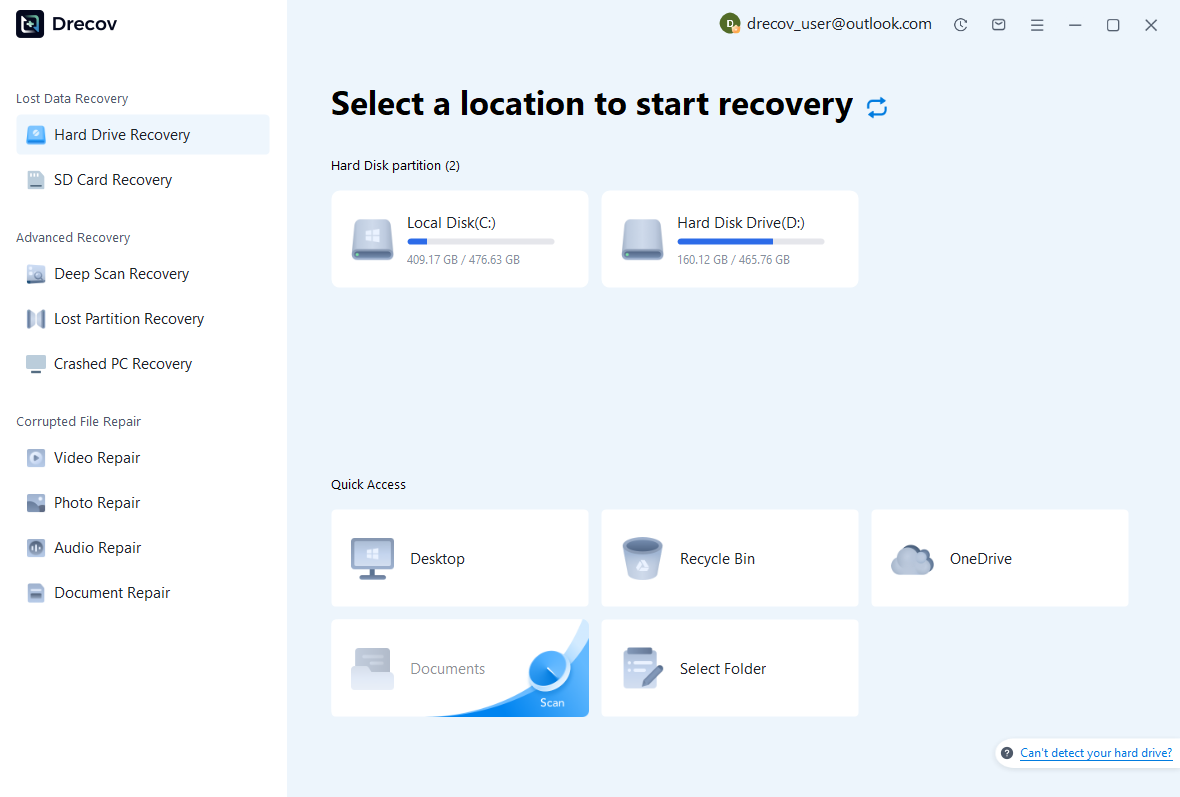
Select the drive or partition that held the master document, included chapters, configured backup directory, or original resources. Record which component each search targets. Keep recovered output on other healthy storage. Assess repeated hardware read failures or disconnections before continuing with a routine software recovery scan.
Step 2: Compare Complete Document Candidates
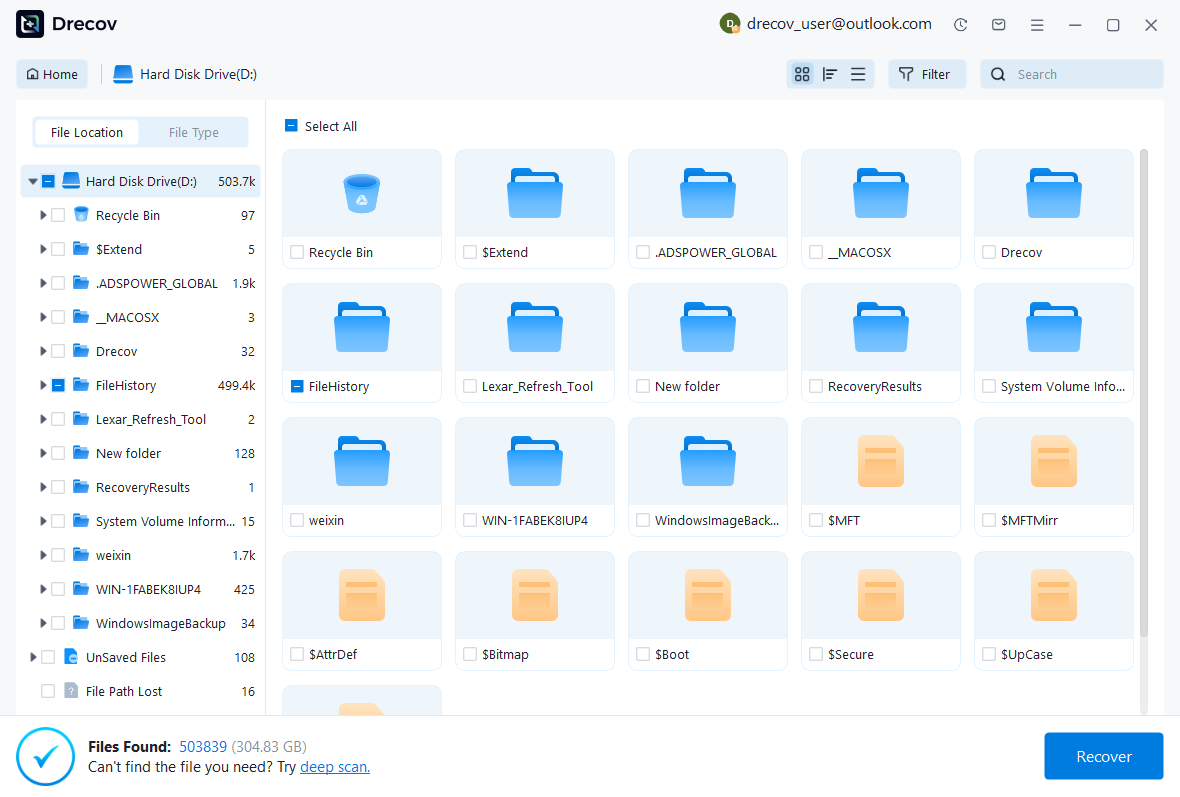
Review available paths, filenames, sizes, dates, and supported previews. Preserve native documents and their related resources as coherent candidate sets. A readable paragraph does not establish that included chapters and bibliography sources survived. Keep alternatives until LyX can inspect a working copy in its intended project context.
Step 3: Restore Elsewhere and Verify the Manuscript
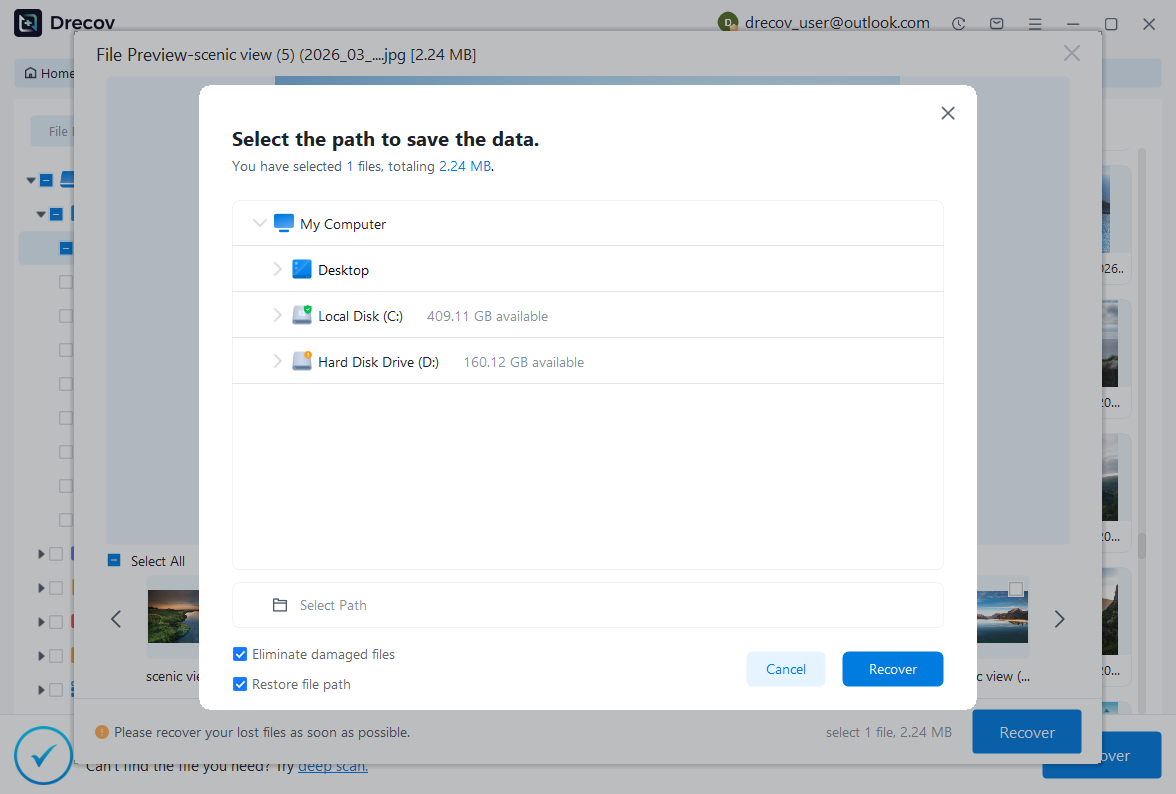
Recover selected files to a separate destination and retain untouched originals. Open a copied native document or assess a controlled import, then compare text, equations, references, included sources, and output. Save and reopen the accepted result. Record reconstructed features and unresolved dependencies before returning the manuscript to ordinary editing.
Keep an Editable and Reproducible Manuscript Milestone
Preserve the accepted native source set, required project resources, a trusted output, and a short recovery record. Test a copied restore through the intended master-document workflow. This gives you a practical route back to continued writing rather than relying only on a compiled document that cannot explain its original editable structure.
Related Recovery Resources
Explore the relevant recovery options: Hard drive recovery, External hard drive recovery.
For another recovery case and its practical checks, read the related recovery guide.
Check the vendor guidance for the installed version: official recovery documentation 1, official recovery documentation 2, official recovery documentation 3.