








Recover the GnuCash Book before Replaying Anything
To recover GnuCash books, first identify the actual book, its storage backend, and the kind of information missing. A dated book backup can preserve a complete earlier state. A transaction log serves a narrower purpose. A lock file does not contain the account data. Therefore, keep these candidates separate instead of trying to open every similarly named file as a replacement book.
Record a distinctive account, a transaction you know disappeared, and the last reliable save. Also note whether the book uses XML-file storage or an SQL backend. This distinction changes the recovery method. A log replay procedure for an XML book should not become a general repair instruction for every GnuCash database.
Preserve the Book and Its Surrounding Files
Close GnuCash and copy the surviving book directory before testing candidates. Include dated backups and logs, keeping their original filenames. Preserve any separate legitimate attachments or source documents you need for verification. Then work on a second copy. This prevents an exploratory save or replay from replacing the only source that still represents the pre-incident state.
If the book remains open with useful information, save a separate native recovery copy through the supported interface. Keep a reference report too when practical. The report can help compare balances and transactions, but it does not replace the editable book. Label the report’s date and scope so you know which state it actually describes.
Native Route 1: Open an Existing Dated Book Backup
- Locate a dated backup associated with the intended book.
- Copy it to a separate recovery directory without changing the original.
- Open the copied backup in a compatible GnuCash installation.
- Save the accepted candidate under a different working filename.
For supported file-based workflows, GnuCash can retain dated complete book backups when you save. Inspect the actual files and their timestamps rather than assuming a backup exists. A backup preserves the state from its own milestone, which may omit later work. Compare the distinctive missing transaction before deciding that the candidate meets your recovery goal.
Compare More Than the Opening Balance
Inspect several relevant accounts and a transaction from before and after the incident. Also compare the expected currency and date context. A book can open successfully while representing another household, another year, or an earlier revision. Familiar account names alone are weak evidence when you have copied a book several times during earlier troubleshooting.
Keep the current book separately until the comparison is complete. An older backup may recover a deleted transaction while losing valid later entries. Decide how to preserve those differences deliberately in a working candidate. Do not overwrite the current book merely because the backup displays a more reassuring total at first glance.
Native Route 2: Inspect a Matching XML Transaction Log
- Preserve the last saved XML book and its associated log files.
- Confirm that the candidate log belongs to that exact book and session.
- On a copied book, use the supported Replay GnuCash .log file import only for suitable simple transactions.
- Compare the restored transactions and related reports before accepting the result.
A transaction log is not a complete book backup. It records certain changes from a session and needs an appropriate saved base. This route does not apply indiscriminately to SQL storage or every business operation. If the missing work involves invoices, bills, payments, or other business structures, avoid treating log replay as a reliable full restoration method.
Match the Log to Its Base
Compare the original book name and session chronology before choosing a log. A log associated with a different backup or test book may describe another sequence of changes. Preserve it as evidence, but do not replay it onto an unrelated base just because its timestamp is recent. The relationship between saved book and log matters more than filename similarity alone.
Inspect the result transaction by transaction around the recovered period. A plausible balance does not establish that every relationship or record is correct. If the replay produces uncertain duplicates or unexpected entries, keep the original and test candidate separate. Return to a coherent complete backup or reconstruct verified missing entries from authoritative records instead of stacking more uncertain replays.
Native Route 3: Reopen the Correct Existing Book
- Check the full path of the book currently open in GnuCash.
- Compare recent-file entries with the intended live filename.
- Open a copied candidate from the correct project location.
- Confirm a distinctive recent transaction and the expected account structure.
An apparent loss can result from opening an older dated backup and then continuing work there. The title bar and full path can expose that situation. Search for the actual live book and useful diverging copies before declaring the latest data deleted. A longer filename containing several timestamps can be a clue that work continued in a backup copy.
Keep Diverging Books Distinct
If two books contain different useful changes, preserve both with clear source labels. Compare their actual transactions and chronology before deciding on a recovery approach. Do not combine them by copying internal database fragments or importing every available export at once. That can create duplicates while hiding which source supplied a particular record.
For a small difference, reconstruct only the verified missing information in a separate accepted book using the application’s normal workflow. Keep the source evidence and a short record of the changes. This is controlled reconstruction, not automatic historical recovery. The distinction helps you assess remaining uncertainty and explain the result later.
Native Route 4: Restore a Backend-Appropriate Complete Backup
- Identify whether the book uses XML, SQLite, or another supported SQL backend.
- Locate a consistent existing backup appropriate to that storage type.
- Restore a copied candidate through the relevant supported workflow.
- Open it in GnuCash and compare the incident-specific records.
SQL-backed books need a backup strategy appropriate to their backend. Do not assume that nearby .log files provide a supported general rollback mechanism. For a server database, preserve the legitimate database backup and use its documented restore procedure. For a local database file, preserve a consistent closed copy rather than mixing files from unrelated sessions.
Preserve the Original Backend State
A conversion to another storage format changes the working artifact. If conversion becomes necessary for a legitimate recovery investigation, perform it on a copy and document it. Keep the untouched source. A successfully converted book can still omit information or represent an earlier milestone, so compare the content after conversion rather than judging success by the new file’s existence.
Also inspect the compatibility of the application version used for the test. An upgrade can change how a book is stored or read. Preserve the earlier candidate before any conversion or migration. This keeps version compatibility from becoming confused with the original data loss and gives you a clear point of comparison if a new problem appears.
Distinguish Lock Files from Book Data
A leftover lock warning after a crash does not establish that the book itself is missing. GnuCash uses lock-related files to coordinate access; those files are not complete copies of your accounts. Confirm that another legitimate session is not still using the book before taking any action related to the lock. Preserve the actual data candidate first.
Investigate the Warning in Context
Record the exact message and the book path. A second running instance, another user, or a stale lock can produce different access situations. Follow the application’s supported guidance for the specific condition. Do not delete arbitrary files with a familiar extension while you are still unsure which file contains the live book.
If the book opens after resolving an access issue, inspect the target transaction and save a separate accepted copy. Access restoration and data restoration are different outcomes. A successful open can reveal that no transaction was lost, or it can reveal a genuine missing period that still requires a backup comparison.
Use Reports as Verification Evidence
Choose reports that correspond to the records affected by the incident. Compare dates, account selection, and filtering before interpreting a difference. A report with another period can look inconsistent even when the underlying transactions survive. Keep the report configuration with your comparison notes so the result remains repeatable.
Check Individual Transactions Behind a Total
A matching total can hide an omitted entry balanced by another error. Inspect a few distinctive transactions, their dates, amounts, accounts, and descriptions against independent evidence. This is a data-integrity check, not a recommendation to change financial treatment. The recovery should reproduce verified records rather than invent adjustments to force a balance to match.
If you reconstruct a missing transaction from an authoritative record, label that work in the recovery notes. Preserve the original evidence and the pre-reconstruction book. A useful working result can still differ from the exact historical file, especially when memo text, attachments, or other context did not survive.
Treat Business Records as More Than Balance Changes
Business features can maintain relationships beyond the visible transaction amounts. A replay or partial reconstruction that restores a balance may leave those relationships incomplete. Prefer a coherent complete book backup for these cases and inspect the relevant application structures. Do not treat a simple transaction-log success message as proof that invoices and payments returned correctly.
Compare Relationships Explicitly
Where relevant, inspect the actual invoice or bill record, its associated transaction, and the expected application status. Preserve uncertain candidates and obtain appropriate application-specific help before accepting a complicated partial recovery. A reliable restoration claim needs evidence about the relationships the task depends on, not merely a familiar figure in an account register.
If a complete source does not survive, document the remaining gap and reconstruct only what independent records support through the normal application workflow. Keep reconstructed information distinct from directly restored information. This makes later review possible and avoids presenting an inferred business state as if it came intact from a backup.
Work through a Crash During Simple Entry
Suppose a crash occurs after several ordinary transactions but before the next save of an XML book. Preserve the last saved book, its dated backup, and the corresponding session log. Compare the saved state first. If the missing entries fit the supported simple-log recovery conditions, test the matching log on a copied book and inspect the exact recovered entries.
Reject an Unclear Replay Result
If the candidate creates duplicates or does not match the known session, stop using that test copy. Keep it as evidence and return to the untouched base. Do not repeatedly replay logs until the balance looks right. Select another coherent candidate or reconstruct the verified missing entries from authoritative records, preserving the uncertainty and source information.
After accepting a result, save it under a clear new filename and reopen a copy. Compare the same transaction sample and report configuration again. This checks persistence as well as the initial recovery operation. Retain the original base and logs until the accepted book passes the review you actually need.
Work through an Older Backup Opened by Mistake
Imagine that the current book appears to lack a week of work, but its filename contains an old timestamp. Preserve it and inspect the recent-file history and expected live directory. Another copy may contain the missing week. Compare distinctive transactions rather than assuming the timestamped file is authoritative because it was the one you opened today.
Preserve Valid Work from Both Copies
The older copy may now contain new entries you made after the accidental switch. Keep both books and list the actual differences. Reconstruct a controlled accepted state only after comparing the records and chronology. Record which information came from which source so a later reviewer can distinguish the recovery from ordinary ongoing entry work.
Build a Book-Recovery Inventory before Choosing a Candidate
List each surviving book with its full path, storage type, approximate milestone, and the distinctive record it contains. Keep dated backups, live books, and test copies in separate rows. This inventory helps explain why two plausible files disagree. The newest filesystem timestamp can reflect a copy operation, while an older-looking candidate may contain the last valid transaction sequence you need.
Identify a Specific Recovery Period
Choose a small period around the incident and list several records you can verify independently. Include a transaction before the loss and one expected afterward. This establishes a boundary for comparison. It is more useful than saying that a week is missing, because the apparent gap may reflect a report filter, a wrong book, or work entered into another copy.
Compare the same period in each candidate using consistent account and date settings. Record which records actually appear rather than relying on totals from differently configured reports. A clear comparison can reveal a useful native backup without any replay or reconstruction. It can also show that the current book contains valid later work you should preserve before accepting an older source.
Distinguish a Filtered View from Missing Transactions
A register or report can hide information through its selected period and filters. Check those controls before rolling back the book. Search for a distinctive description or another reliable nonambiguous detail. If the transaction exists elsewhere in the same book, investigate its account and date context rather than assuming the data was deleted from storage.
Keep View Changes Separate from Record Changes
Adjust the view in a working context and compare the underlying transaction. Do not edit dates or accounts merely to make an entry appear in the expected report. That would change the data instead of diagnosing the display. Record the setting that explained the apparent absence so the same misunderstanding does not prompt another recovery attempt later.
If the record truly is absent, preserve the current book and move to a coherent backup comparison. The absence of one entry does not establish that every account needs rollback. A narrower reconstruction from authoritative evidence may preserve useful later information, but it should remain a deliberate decision with its source recorded.
Match XML Logs with a Written Timeline
For a suitable XML-book investigation, note the saved base, session start, and the log associated with that session. Keep the original names and a copied test set. The purpose is to establish a specific relationship, not to sort all logs by date and replay them automatically. A log from another diverging book can describe changes that do not belong on the chosen base.
Stop When Business Structures Are Involved
If the relevant session includes business actions, avoid treating a simple log replay as a general rescue procedure. The visible balance and the application’s business relationships are different things. Prefer a complete consistent backup and appropriate application-specific review. A transaction that looks correct in a register may still have an incomplete relationship to another business record.
This boundary also applies when you cannot determine what the log session contained. Preserve the evidence instead of experimenting on the live book. A cautious decision to use a complete backup or documented manual reconstruction is more reliable than accepting an uncertain replay because its final total resembles an expected figure.
Review a Replayed Candidate Against Independent Records
If a supported simple-log test is appropriate, compare the result with the transaction sample you prepared. Inspect dates, descriptions, amounts, account assignments, and unexpected duplicates. Keep the test output separate from the saved base. A replay-completed message establishes that an operation ran, not that it reconstructed the exact session you intended.
Check for Duplicate or Misplaced Entries
An entry can appear twice or belong to another account while leaving a broader total plausible. Compare individual identities and the surrounding sequence. If the result is unclear, retain the test copy and return to the untouched source. Do not remove entries speculatively until the figures look familiar; that would make the recovery harder to audit.
Record which transactions you accepted and which remained uncertain without inventing historical details. A memo or attachment may not survive even when the transaction amount does. Keeping those limits visible lets you continue with a usable book while distinguishing directly restored data from information reconstructed afterward.
Assess a Complete Backup by Its Actual Scope
A backup can preserve the native book while excluding external receipts, statements, or other linked evidence. Identify which supporting files the current task needs and verify them separately. A book that opens correctly may still leave a required attachment unavailable. Preserve the relationship information rather than deleting broken references to make the working copy look cleaner.
Test Supporting Documents Independently
Open a representative copied document in its appropriate application and compare a distinctive page or date. A filename alone does not establish that the correct evidence survived. Keep the original candidate unchanged while testing. If another document substitutes for the missing source, label that substitution instead of implying it came from the native book backup.
For a large archive, sample different periods and file types that matter to the incident. Record the scope of your check. A successful sample supports the tested material; it does not prove every attachment is complete. Keep an unresolved list so important gaps remain visible during continued work.
Handle Diverging Books without a Blind Overwrite
Suppose the original live book contains most recent work, while a dated copy contains entries made after someone opened the wrong file. Preserve both and compare the actual differences. Do not choose one solely by its path or timestamp. The accepted result may require reconstructing verified missing information through normal GnuCash entry workflows in a separate working book.
Keep a Source Record for Each Reconstruction
Use nonambiguous transaction details and the authoritative supporting record to document what you recreated. Preserve the pre-reconstruction book. This makes it possible to review the accepted result and identify which values came directly from a native source versus later re-entry. Avoid changing unrelated records while the immediate recovery remains under comparison.
If the differences are complex, define a limited acceptance goal before proceeding. Recovering a usable set of ordinary entries and restoring a complete historical business state are different tasks. The evidence and review needed for one should not become an unsupported claim about the other.
Preserve Backend Consistency During Copying
For a file-backed candidate, prefer a stable closed copy rather than copying files while the application changes them. For a server backend, use the legitimate consistent backup mechanism for that database. A directory full of individually recent files does not necessarily represent a coherent database state, and mixing components from different moments can create another problem.
Record Any Storage Conversion
If you convert a copied book for a legitimate investigation, keep the untouched original and note the input format and application version. Compare content afterward. A successful conversion does not establish that every relationship remained correct or that the resulting file reflects the original incident milestone. Treat conversion as an additional step with its own checks.
Keep the accepted native or backend-specific result separate from failed experiments. A clear source set and recovery record are more useful than several files all renamed final. The next person should be able to identify the verified book and understand which original candidates remain relevant to unresolved questions.
Test the Accepted Book as an Actual Restore
Open a copied accepted milestone in the intended application environment. Compare the incident transactions, the consistent report configuration, and a representative unrelated account. This checks both the target recovery and the wider context. A file that merely opens has not yet demonstrated that it supports the bookkeeping task you need to resume.
Preserve the Evidence of Acceptance
Keep the source milestone, comparison period, known gaps, and supporting records in a short recovery note. Then retain a consistent backup outside the active working copy through your chosen protection arrangement. The practical test is whether that preserved set can reproduce the verified book, not simply whether a backup process reports that it copied a file.
When Storage Recovery Can Help GnuCash Files
PandaOffice Drecov may help retrieve deleted local books, dated backups, logs, or legitimate supporting records from readable storage. It cannot invent transactions that never reached persistent storage or turn a lock file into a complete book. Prefer coherent existing backups and the correct live book first, and reduce writes where deleted candidates may remain.
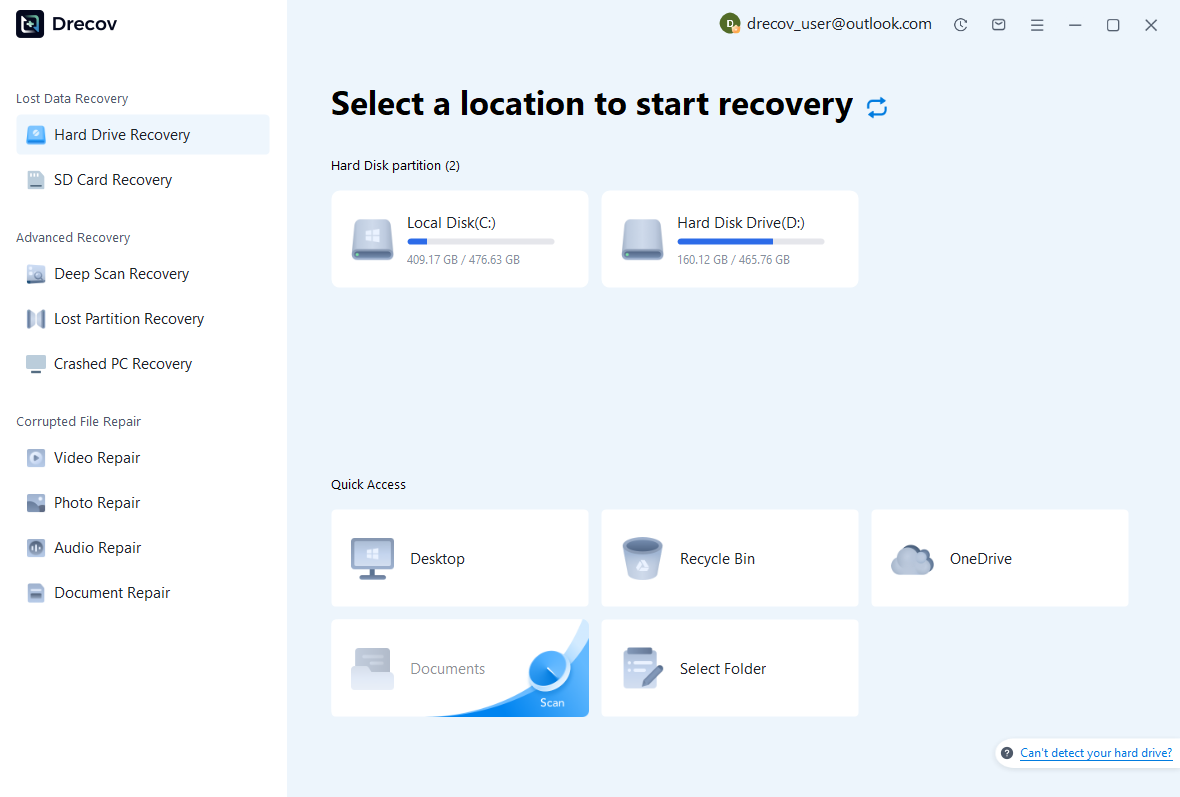
Step 1: Identify the Book’s Actual Storage
Select the drive or partition that held the local book, its backup directory, or supporting records. Distinguish a local database from a server-backed source. Keep recovered output on other healthy storage. If the source reports repeated hardware read errors or disconnections, assess that condition before proceeding with a routine software recovery scan.
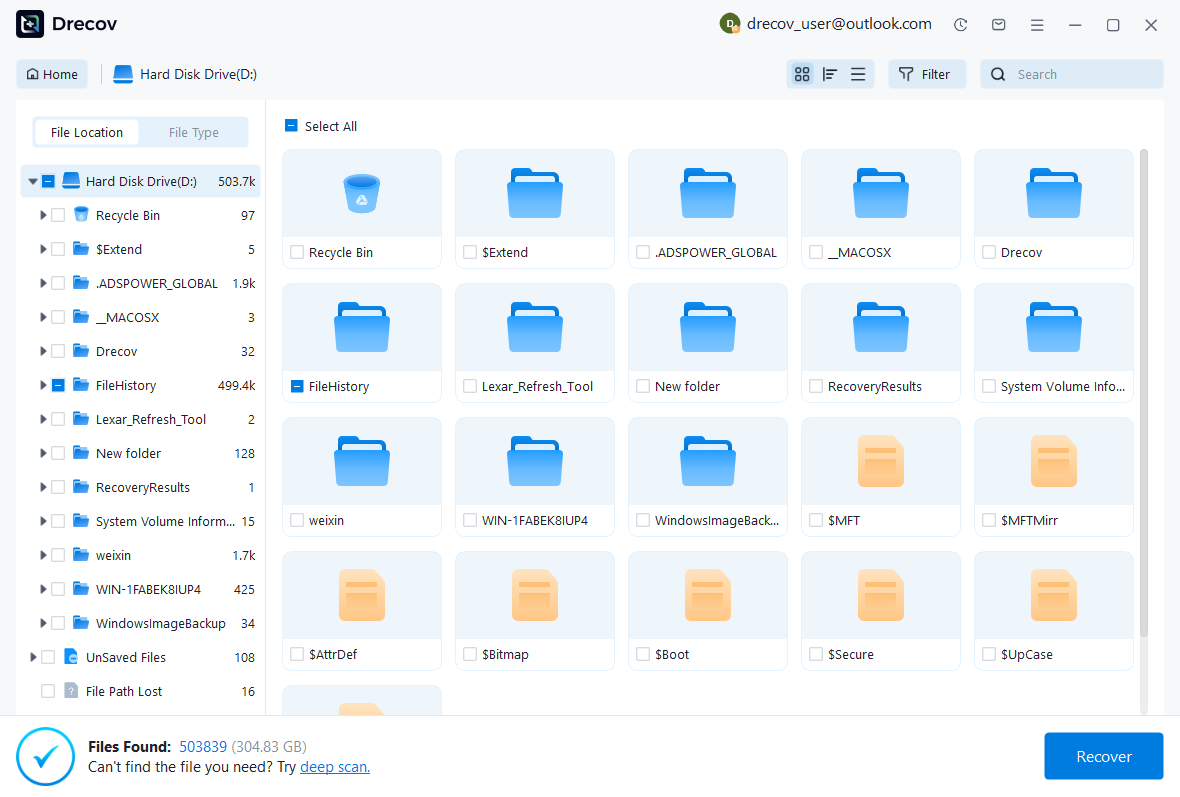
Step 2: Compare Coherent Book Candidates
Review available paths, names, dates, sizes, and supported previews. Preserve complete plausible books and their associated logs without merging unrelated sessions. Recognizable transaction text does not prove a candidate contains a complete consistent book. Keep alternatives until GnuCash can open a working copy and you can inspect the relevant records.
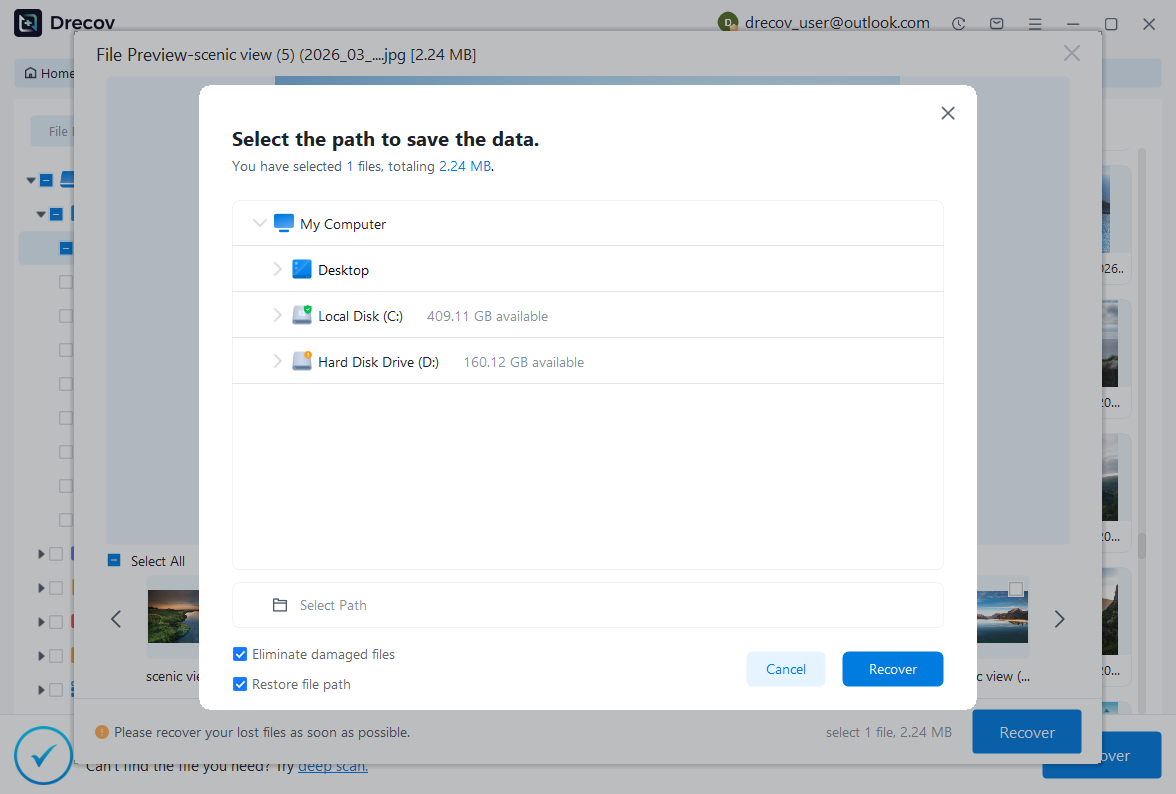
Step 3: Restore Elsewhere and Verify Records
Recover selected files to a separate destination and retain an untouched source set. Open a copied complete book through the appropriate backend workflow, then compare the incident transactions, accounts, and reports. Use log replay only within its verified conditions. Record reconstructed information and unresolved relationships before accepting the restored working book.
Preserve a Testable Book Milestone
Keep the accepted native book or consistent backend backup, its recovery record, and the independent evidence used for verification. Test a copied restore with a distinctive transaction and report. This provides a practical route back to a known data state rather than relying on a directory of backups whose contents nobody has checked.
Related Recovery Resources
Explore the relevant recovery options: Hard drive recovery, External hard drive recovery.
For another recovery case and its practical checks, read the related recovery guide.
Check the vendor guidance for the installed version: official recovery documentation 1, official recovery documentation 2, official recovery documentation 3.