







The other day I finished a shoot, and finally got around to downloading the files today. During the move process, Windows informed me it was having read issues, and then informed me the card must be formatted. I immediately canceled the transfer, denied the format request, and removed the card. Every other computer I have thrown at it has given me the prompt to format. I denied each time and have since locked the card with the write protect slider.—From Reddit
Introduction to SD Card Audio Recovery
Understanding Audio File Loss on SD Cards
Losing audio files from an SD card is a common issue that affects users ranging from casual smartphone owners to professional audio engineers. Whether it’s voice recordings, music files, interviews, or sound effects, these files can disappear unexpectedly due to deletion, formatting, or corruption. This is where sd card audio recovery becomes essential.
SD cards are widely used in devices like cameras, smartphones, drones, and audio recorders. Despite their convenience, they are vulnerable to data loss. Once audio files are deleted, they are not immediately erased from the storage medium. Instead, the system marks the space as available, making sd card audio file recovery possible if action is taken quickly.
Modern recovery techniques allow users to retrieve lost data efficiently using specialized tools. Some users even look for sd recovery free audio solutions or free online audio and video recovery sd card options, depending on urgency and accessibility.
This guide will walk you through the causes, solutions, and best practices for recovering deleted audio files while ensuring your data remains safe throughout the process.
Why Audio Files Get Deleted or Lost from SD Cards
Common Causes of SD Card Audio File Loss
Understanding the reasons behind data loss can significantly improve your chances of successful sd card audio recovery. There are several typical scenarios where audio files may disappear:
Accidental deletion is the most common cause. Users often delete files unintentionally while managing storage. Formatting the SD card without backing up files is another major reason, especially when switching devices.
File system corruption can occur due to improper ejection or sudden power loss. When this happens, audio files may become inaccessible or appear missing. Virus or malware attacks can also damage stored data, leading to partial or complete loss.
Physical damage to the SD card is another factor. While less common, exposure to water, heat, or bending can corrupt stored data. Additionally, compatibility issues between devices may cause files to become unreadable.
⚠️Warning: Continuing to use an SD card after data loss may overwrite recoverable files, reducing recovery success rates.
Recognizing these causes helps you choose the right sd card audio recovery software and apply appropriate recovery methods effectively.
Best Methods for SD Card Audio File Recovery
Method 1: Use Professional SD Card Audio Recovery Software (Recommended)
When it comes to reliable recovery, using dedicated sd card audio recovery software is the most effective approach. Tools like Pandaoffice Drecov provide advanced scanning algorithms that can locate and restore deleted audio files with high accuracy.
This method is suitable for cases involving accidental deletion, formatting, or corruption. It supports multiple audio formats such as MP3, WAV, AAC, and more.
Download DrecovTest Environment:
- Device: Windows 11 PC
- SD Card: 64GB SanDisk microSD
- Scenario: Deleted audio recordings from a voice recorder
Steps to recover audio files:
- Install and launch Pandaoffice Drecov on your computer.
- Insert the SD card using a card reader.
- Select the SD card from the available drives.
- Start scanning (quick scan + deep scan).
- Preview recoverable audio files.
- Select and restore files to a different location.
This solution is ideal for users searching for sd card audio recovery software free download, as many tools offer trial versions.

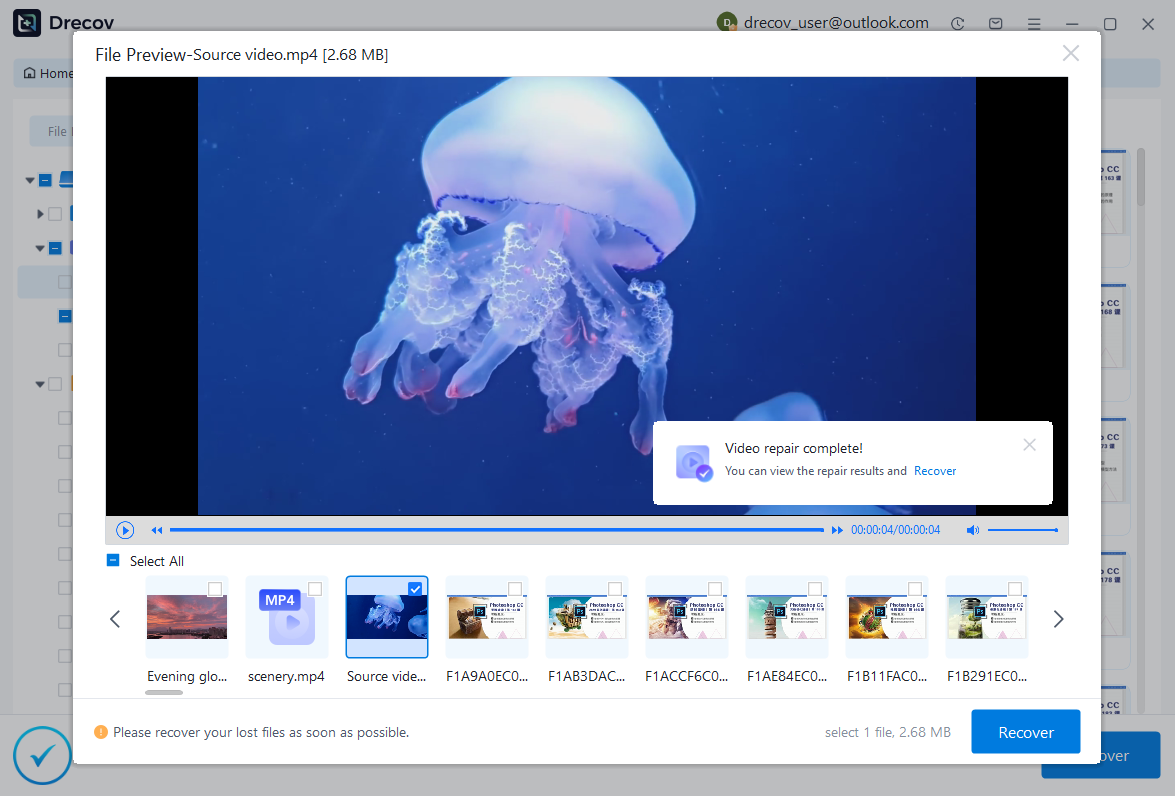

Why Choose PandaOffice Drecov?
When it comes to reliable file data recovery, PandaOffice Drecov offers a balanced combination of performance, ease of use, and broad compatibility. Whether you’ve lost important business files or personal memories, it provides an efficient way to restore data from various loss scenarios, including system crashes, accidental deletion, and formatted drives.
For users looking for advanced Photo Data Recovery Software, PandaOffice Drecov supports a wide range of image formats and storage devices. It can recover high-quality photos from SD cards, cameras, and internal drives while preserving original resolution and file structure. This makes it especially useful for photographers and everyday users alike.
If you are dealing with storage device issues, its external hard drive recovery capability ensures that data can be retrieved from USB drives, HDDs, and SSDs with minimal effort. The software performs deep scans to locate hidden or lost files, even in complex situations like partition loss.
In addition, PandaOffice Drecov excels in Document Recovery, helping users restore essential files such as Word, Excel, and PDFs. It also supports powerpoint recovery, allowing you to retrieve unsaved or deleted presentation files quickly—ideal for professionals working under tight deadlines.
With an intuitive interface, preview functionality, and powerful scanning modes, PandaOffice Drecov simplifies the recovery process while maintaining high success rates.
⚠️Warning: Never save recovered files back to the same SD card to avoid overwriting.
Method 2: Recover Audio Files Using Backup Services
If you have previously backed up your SD card data, recovery becomes much easier. Cloud storage platforms or local backups can help restore lost audio files without the need for specialized tools.
Many users overlook this method, but it is one of the safest ways to perform sd recovery free audio without risking further data loss.
Test Environment:
- Device: Android smartphone
- Backup Tool: Google Drive
- Scenario: Deleted audio files synced before removal
Steps:
- Log in to your backup account.
- Navigate to the audio or media folder.
- Locate the deleted files.
- Download or restore them to your device.
This method is quick and risk-free, especially when dealing with important recordings. However, it only works if backups were created beforehand.
⚠️Warning: Always verify that backup synchronization is enabled to avoid permanent loss.
Method 3: Use File History or Previous Versions (Windows)
Windows users can take advantage of built-in features like File History or Previous Versions to restore deleted audio files. This method works if the SD card data was previously accessed and backed up on the system.
It is a practical option for users who do not want to rely on third-party sd card audio recovery software.
Test Environment:
- Device: Windows 10 laptop
- Feature: File History enabled
- Scenario: Audio files copied from SD card to PC and deleted
Steps:
- Connect the SD card to your computer.
- Right-click the folder where audio files were stored.
- Select “Restore previous versions.”
- Choose a version before deletion.
- Restore the files.
This method is effective for recovering earlier versions of files but may not work if File History was not enabled beforehand.
Method 4: Recover Audio Files via Command Prompt (CMD)
Command Prompt can help recover hidden or inaccessible audio files caused by file system issues. While it is not a full sd card audio file recovery solution, it can restore visibility to files that are still present.
Test Environment:
- Device: Windows PC
- SD Card: 32GB microSD
- Scenario: Audio files hidden due to virus infection
Steps:
- Connect the SD card to your PC.
- Open Command Prompt as administrator.
- Type:
attrib -h -r -s /s /d X:\*.* - Replace “X” with your SD card drive letter.
- Press Enter and wait for the process to complete.
This method works best when files are hidden rather than deleted.
⚠️Warning: Incorrect commands may affect other files, so proceed carefully.
Is Free Online Audio and Video Recovery for SD Cards Reliable?
Evaluating Free Online Recovery Tools
Many users search for free online audio and video recovery sd card solutions due to convenience. These tools typically allow file uploads and attempt to recover lost data via cloud-based processing.
While they may work for minor corruption issues, they come with limitations. File size restrictions, slow processing speeds, and privacy concerns are common drawbacks.
Uploading sensitive audio files to online platforms may expose personal or confidential information. Additionally, these tools often lack deep scanning capabilities required for complete sd card audio recovery.
For simple recovery needs, online tools can be helpful. However, for serious data loss, offline sd card audio recovery software remains the better option.
FAQ About SD Card Audio Recovery
Can I Recover Audio Files After Formatting an SD Card?
Yes, it is possible to recover audio files after formatting, especially if the data has not been overwritten. Using reliable sd card audio recovery software increases your chances significantly. Quick formatting does not erase data permanently, making recovery feasible.
What Is the Best Free Solution for SD Recovery Audio?
There are several options available, including trial versions of recovery tools and backup-based recovery methods. While users often search for sd recovery free audio, the effectiveness depends on the situation. Professional tools usually provide better results compared to completely free solutions.
Method 5: Restore Audio Files from Recycle Bin or Trash
Sometimes, deleted audio files from an SD card may temporarily reside in the Recycle Bin (Windows) or Trash (Mac), especially if the deletion occurred while the card was connected to a computer. This is one of the simplest forms of sd card audio recovery, requiring no additional tools.
Test Environment:
- Device: Windows 11 PC
- Scenario: Audio files deleted after copying SD card content to desktop
Steps:
- Open the Recycle Bin on your computer.
- Search for the deleted audio files by name or format.
- Right-click the file and select “Restore.”
- The file will return to its original location.
This method is extremely quick and safe, but it only works if files were deleted through the operating system rather than directly from the SD card device.
⚠️Warning: Files removed using “Shift + Delete” will bypass the Recycle Bin and cannot be restored this way.
Method 6: Recover Audio Files Using Data Recovery Services
If your SD card is physically damaged or severely corrupted, professional recovery services may be necessary. These services use specialized hardware and techniques to retrieve inaccessible data.
This approach is often considered when software-based sd card audio file recovery methods fail.
Test Environment:
- Device: Physically damaged SD card (not detected by PC)
- Scenario: Water-damaged storage card containing important recordings
Steps:
- Stop using the SD card immediately.
- Contact a certified data recovery service provider.
- Send the SD card for diagnosis.
- Review the recovery report and approve the process.
- Receive recovered audio files on a new storage device.
Although effective, this method can be expensive and time-consuming. It is best reserved for critical data loss situations.
⚠️Warning: Avoid attempting DIY physical repairs, as this may permanently damage the card.
How to Improve SD Card Audio Recovery Success Rate
Best Practices Before and After Data Loss
Improving your chances of successful sd card audio recovery depends largely on how you handle the situation immediately after data loss.
First, stop using the SD card as soon as you notice missing files. Continued usage increases the risk of overwriting deleted audio data. Second, avoid installing recovery software directly onto the SD card. Always use a separate storage device.
It is also recommended to use reliable sd card audio recovery software free download options that support deep scanning. These tools can detect traces of deleted files that basic methods cannot.
Regular backups are another key factor. By maintaining updated copies of your audio files, you can reduce reliance on recovery tools altogether.
Additionally, ensure your SD card is used properly. Always eject it safely and avoid using it across incompatible devices.
Following these practices ensures better outcomes when attempting sd recovery free audio and reduces the likelihood of permanent data loss.
How to Prevent Audio File Loss on SD Cards
Simple Tips to Protect Your Audio Data
Prevention is always better than recovery. While sd card audio recovery solutions are effective, avoiding data loss altogether is the ideal approach.
Start by backing up your audio files regularly. Use both cloud storage and external drives for redundancy. This ensures that even if one source fails, your data remains accessible.
Avoid removing the SD card while files are being transferred. Interruptions during read/write operations can corrupt data. Always use the “Safely Remove Hardware” option.
Formatting your SD card periodically can help maintain performance, but ensure all files are backed up before doing so. Using high-quality SD cards from reputable brands also reduces the risk of failure.
Install antivirus software on your devices to prevent malware-related data loss. Viruses can hide or delete audio files without warning.
For users searching for free online audio and video recovery sd card options, remember that prevention eliminates the need for recovery in most cases.
By adopting these habits, you can significantly reduce the chances of losing valuable audio files.
More FAQs About SD Card Audio Recovery
Can I Recover Audio Files from a Corrupted SD Card?
Yes, recovering audio files from a corrupted SD card is possible in many cases. Specialized sd card audio recovery software can scan the storage and retrieve accessible data. If the corruption is severe, professional services may be required.
Is It Safe to Use Free SD Card Audio Recovery Software?
Free tools can be useful for basic recovery needs. However, not all of them provide reliable results. When choosing sd recovery free audio tools, ensure they come from trusted sources and offer preview functionality before recovery.
What Audio Formats Can Be Recovered?
Most recovery tools support a wide range of formats, including MP3, WAV, AAC, FLAC, and more. Advanced sd card audio file recovery solutions can even restore partially corrupted files.
How Long Does SD Card Audio Recovery Take?
The duration depends on the size of the SD card and the scanning method used. Quick scans may take a few minutes, while deep scans for sd card audio recovery software free download tools can take several hours.
Conclusion: Recover and Protect Your Audio Files Effectively
Key Takeaways for SD Card Audio Recovery
Recovering deleted audio files from an SD card is entirely possible with the right approach and tools. Whether you use professional sd card audio recovery software, backup solutions, or built-in system features, each method offers unique advantages depending on the situation.
For best results, act quickly after data loss and avoid using the affected SD card. Tools designed for sd card audio file recovery provide the highest success rates, especially when dealing with accidental deletion or formatting.
While some users explore free online audio and video recovery sd card options, offline solutions are generally more secure and effective. Combining recovery strategies with preventive measures ensures long-term data safety.
Ultimately, the key to successful sd card audio recovery lies in preparation, quick action, and choosing the right recovery method. By following the steps outlined in this guide, you can confidently restore lost audio files and safeguard your data in the future.






