







Understanding Instagram Password Reset and Email Recovery
Instagram accounts are usually connected with an email address or phone number, which helps users recover access when they forget their login credentials. Losing access to an account can happen for many reasons, including forgetting the password, changing email addresses, losing access to an old phone number, or experiencing suspicious account activity.
Many users search for how to reset password on instagram because they need a reliable way to regain control of their account. The recovery process depends on whether you still have access to the email address or phone number linked to Instagram. If you can access one of these recovery options, resetting your password is usually quick. However, if both methods are unavailable, additional verification steps may be required.
It is important to understand that Instagram does not provide a direct option to display your existing password. For security reasons, passwords are encrypted and cannot be viewed. Instead, users must create a new password through Instagram’s official recovery process.
The email connected to Instagram plays an important role because it receives password reset links and security notifications. If your email account is also inaccessible, you may need to recover the email first before changing your Instagram password.
⚠️Warning: Avoid websites or services that claim they can reveal Instagram passwords. These services are often unsafe and may attempt to steal account information.
Why You May Need to Reset Your Instagram Password
There are several situations where resetting an Instagram password becomes necessary. The most common reason is simply forgetting the password after not logging in for a long period. Many users rely on automatic login features and may not remember their credentials when switching devices.
Another common reason is security concerns. If you notice unusual login activity, unknown devices accessing your account, or unexpected password changes, resetting your password can help protect your profile.
Users may also need a password reset after losing access to their recovery email. For example, an Instagram account created years ago may still be connected to an email address that is no longer used. In this situation, users often search for how to reset password instagram without email because they need alternative recovery options.
Before starting the recovery process, confirm that you still know your Instagram username, previous email address, or phone number. Having account information available can make verification easier.
Resetting a password is not the same as retrieving the original password. Instagram does not store passwords in a readable format, so the only available solution is creating a new one.
Difference Between Instagram Password Reset and Email Password Recovery
Instagram password recovery and email password recovery are related but separate processes. Your email account works as a recovery channel for Instagram, but it has its own independent password system.
For example, if your Instagram account uses a Gmail address and you cannot access that email, recovering Gmail access should happen before trying to reset Instagram credentials. Searching how to reset password in gmail app can help users restore access to their email account through official Gmail recovery options.
On the other hand, if you still have access to your email but forgot your Instagram password, you only need to request a password reset link from Instagram.
The same principle applies to other stored passwords. Some users confuse account password recovery with recovering passwords from files. For example, searches such as how to retrieve excel password relate to unlocking protected documents and are unrelated to online account recovery.
Understanding these differences prevents users from following incorrect recovery steps. Each platform manages security independently, and recovery must be completed through the official system connected to that account.
How to Reset Password on Instagram Through Official Recovery Options
Instagram provides several built-in methods for users who cannot log in. The easiest option is using the “Forgot password” feature, which allows account owners to receive a recovery link through their registered email address or phone number.
This method is recommended because it uses Instagram’s official security system. It does not require third-party tools, and it helps protect your account from unauthorized access.
The exact steps may vary slightly depending on whether you use the Instagram mobile app or website. However, the overall recovery process remains similar.
Users looking for how to reset your password on instagram should first try the standard recovery method before using advanced options.
Reset Instagram Password Using Email Address
Test environment:
- Device tested: Android smartphone
- Application: Instagram mobile app
- Account condition: Active account with accessible email address
- Network: Stable Wi-Fi connection
If your Instagram account is connected to an email address that you can access, resetting your password is straightforward.
Open the Instagram app and go to the login page. Select the option for forgotten password or trouble logging in. Instagram will ask you to provide account information, such as your username, email address, or phone number.
Enter the email address connected to your account. Instagram will send a password reset message containing a recovery link.
Open your email application and find the message from Instagram. Select the recovery link and follow the instructions to create a new password.
When choosing a new password, use a combination of letters, numbers, and symbols. Avoid using passwords that are easy to guess, such as birthdays or simple combinations.
After completing the reset process, log in again using your new password. You may also review account security settings and remove unknown devices.
This method works best when you still control the registered email account. If the email address is unavailable, you will need to use another recovery method.
Reset Instagram Password Using Phone Number
Test environment:
- Device tested: iPhone
- Application: Instagram app
- Account condition: Phone number linked to Instagram
- Verification method: SMS recovery code
A phone number can also be used to recover an Instagram account. This option is helpful when users no longer remember their password but still have access to the registered mobile number.
Open Instagram and select the password recovery option from the login screen. Enter your username or phone number associated with the account.
Instagram will provide recovery choices. Select the option to receive a code through SMS.
Check your phone messages and enter the verification code provided by Instagram. After verification, you can create a new password and regain access to your account.
Make sure the phone number is active and able to receive messages. If the number has been disconnected or transferred to another person, this recovery method may not work.
For better account security, update your contact information after logging in. Keeping a current email address and phone number connected to Instagram reduces future recovery difficulties.
How to Reset Instagram Password Without Email or Phone Number
Losing access to both email and phone number makes account recovery more complicated. However, Instagram provides additional verification options for users who can prove account ownership.
Many users search for how to retrieve instagram password without email when they no longer have access to their original recovery information. In this situation, the goal is not to retrieve the old password but to verify identity and create a new one.
Instagram may request additional details, such as previous account information, device verification, or identity confirmation. The available options depend on the account situation.
Use Instagram Account Recovery Request
Test environment:
- Device tested: Windows laptop
- Browser tested: Google Chrome
- Account condition: No access to email or phone number
When normal recovery options fail, users can submit an account recovery request through Instagram’s login assistance page.
Start by entering your username and selecting the option indicating that you cannot access the available recovery methods.
Instagram may ask additional questions to confirm ownership. Provide accurate information connected with your account history.
If your account contains personal photos or videos, Instagram may request identity verification steps. Follow the instructions carefully and provide only information requested by the official platform.
Recovery approval time varies depending on account conditions. Avoid submitting repeated requests with conflicting information because this may slow down the verification process.
This method does not guarantee immediate access, but it is the safest option when standard password reset methods are unavailable.
How to Reset Instagram Password Without Email or Phone Number
When users lose access to both their registered email address and phone number, recovering an Instagram account requires additional verification. Unlike normal password resets, there is no simple reset link that can be delivered automatically. Instagram needs to confirm that the person requesting access is the legitimate account owner.
Many people search for how to reset password instagram without email because they changed email accounts, lost access to old phone numbers, or created an account years ago with outdated recovery information. In these situations, the best approach is using Instagram’s built-in account recovery process and providing accurate account details.
Before starting recovery, prepare information that may help confirm ownership, such as your Instagram username, previous passwords you remember, the approximate account creation period, connected devices, and any original email addresses or phone numbers previously used.
Avoid using unofficial password recovery services. Instagram passwords are protected through security encryption, and third-party websites cannot legitimately reveal or recover them.
⚠️Warning: Never provide your Instagram login details or verification codes to unknown websites or individuals claiming to recover your account.
Verify Your Identity Through Instagram Support
Test environment:
- Device tested: Android smartphone
- Application tested: Instagram mobile app
- Account condition: No access to registered email and phone number
- Recovery status: Standard reset options unavailable
If you cannot receive recovery messages, Instagram may provide an identity verification option. This process helps determine whether you are the actual account owner.
Start by opening Instagram and selecting the account recovery option from the login screen. Enter your username and choose the option indicating that you cannot access the listed recovery methods.
Instagram may ask you to provide additional information. Depending on your account type and history, this may include confirming previous account details or completing identity verification.
Follow every instruction carefully and make sure the information you provide matches your account history. Incorrect information may cause delays or prevent successful recovery.
After submitting the request, monitor your available contact methods for updates. If Instagram confirms ownership, you can create a new password and regain access.
This method is especially useful for older accounts where the original email address is no longer available. However, recovery results depend on whether Instagram can verify sufficient ownership information.
Many Instagram users rely on Gmail as their account recovery email. If the Gmail account itself cannot be accessed, resetting Instagram credentials may become impossible because password reset messages are sent to that email address.
In this situation, recovering Gmail access should be completed first. Once you regain control of your email account, you can return to Instagram and request a new password reset link.
The Gmail recovery process is separate from Instagram. Google manages email security independently, and Instagram cannot change or recover your Gmail password.
Users often search for how to reset password in gmail app when they cannot access their email account through a mobile device. The Gmail application provides built-in recovery options that help users verify ownership and create a new password.
Reset Gmail Password Through the Gmail App
Test environment:
- Device tested: Android phone
- Application tested: Gmail mobile app
- Account condition: Gmail account accessible through recovery verification
- Internet connection: Stable mobile network
If your Instagram recovery email uses Gmail and you forgot the Gmail password, you can start recovery directly through the Gmail app.
Open the Gmail application and select your account login screen. Enter your Gmail address and choose the password recovery option.
Google may request verification through several methods, including a recovery phone number, backup email address, previously used passwords, or a trusted device.
Complete the verification steps provided by Google. Once your identity is confirmed, create a new Gmail password.
After successfully accessing your Gmail account, return to Instagram and request another password reset email.
Keeping recovery information updated is important. Add a current phone number and secondary email address to your Gmail account to make future recovery easier.
This method restores access to the email account but does not directly change your Instagram password. Instagram recovery must still be completed separately.
Recover Access to Your Email Account Before Resetting Instagram Password
Test environment:
- Device tested: Windows desktop computer
- Browser tested: Chrome
- Email service tested: Gmail web access
- Account condition: Recovery information available
If the Gmail mobile app does not provide enough recovery options, you can try recovering your email account through a web browser.
Open the official Gmail recovery page and enter the email address connected to Instagram. Follow the verification instructions provided by Google.
You may be asked about previous passwords, account creation details, or devices previously used to access the account.
After successful verification, update your Gmail password and confirm that you can send and receive emails normally.
Once email access has been restored, use Instagram’s password reset feature again.
This approach is often more effective because recovering the connected email account restores the main communication channel between Instagram and the account owner.
How to Retrieve Instagram Password When Recovery Methods Fail
Sometimes users cannot access their Instagram account because recovery emails are unavailable, phone numbers have changed, or previous login information has been forgotten.
It is important to understand that Instagram does not provide a feature to display your current password. Instead, users must create a new password through account verification.
If you previously saved your login information on a personal device, checking stored passwords may help. Modern browsers and password managers often save credentials with user permission.
For users managing many passwords, confusion between different accounts is common. For example, recovering a document password such as how to retrieve excel password requires completely different methods from recovering an online account.
Check Saved Passwords on Your Devices
Test environment:
- Device tested: Windows 11 laptop
- Browser tested: Google Chrome
- Account condition: Previously saved Instagram login information
Many users enable automatic password saving when logging into websites. If you selected the save password option previously, your browser may contain your Instagram credentials.
In Chrome, open password management settings and search for Instagram-related saved entries. Windows users can also check stored credentials through supported password management features.
If your password is found, use it to log in and immediately update your security settings.
After accessing your account, consider changing the password to a stronger combination and enabling two-factor authentication.
This method only works if the password was previously saved. It cannot recover passwords that were never stored on the device.
Recover Lost Account Information from Backup Records
Test environment:
- Device tested: Windows PC
- Storage locations tested: Local folders and external drive
- File types reviewed: Text files, documents, password notes
Some users store account information in personal records, password managers, or backup files. Searching your own storage locations may help locate previously saved login details.
Check trusted locations where you normally store important information. These may include password management applications, encrypted notes, or personal backup folders.
For users who lost important files containing account records because of accidental deletion or storage problems, file recovery software may help restore missing documents.
PandaOffice Drecov is a Windows-based recovery tool designed to help recover deleted or lost files from supported storage devices, including internal drives, SSDs, and external storage media.
To recover lost documents, install PandaOffice Drecov on a Windows computer, select the location where the files were stored, scan for recoverable data, preview available results, and restore important files to another location.
Steps
- Confirm that Windows can open the target storage after password reset, account recovery, decryption, or device repair.
- Stop saving new files to the same storage source.
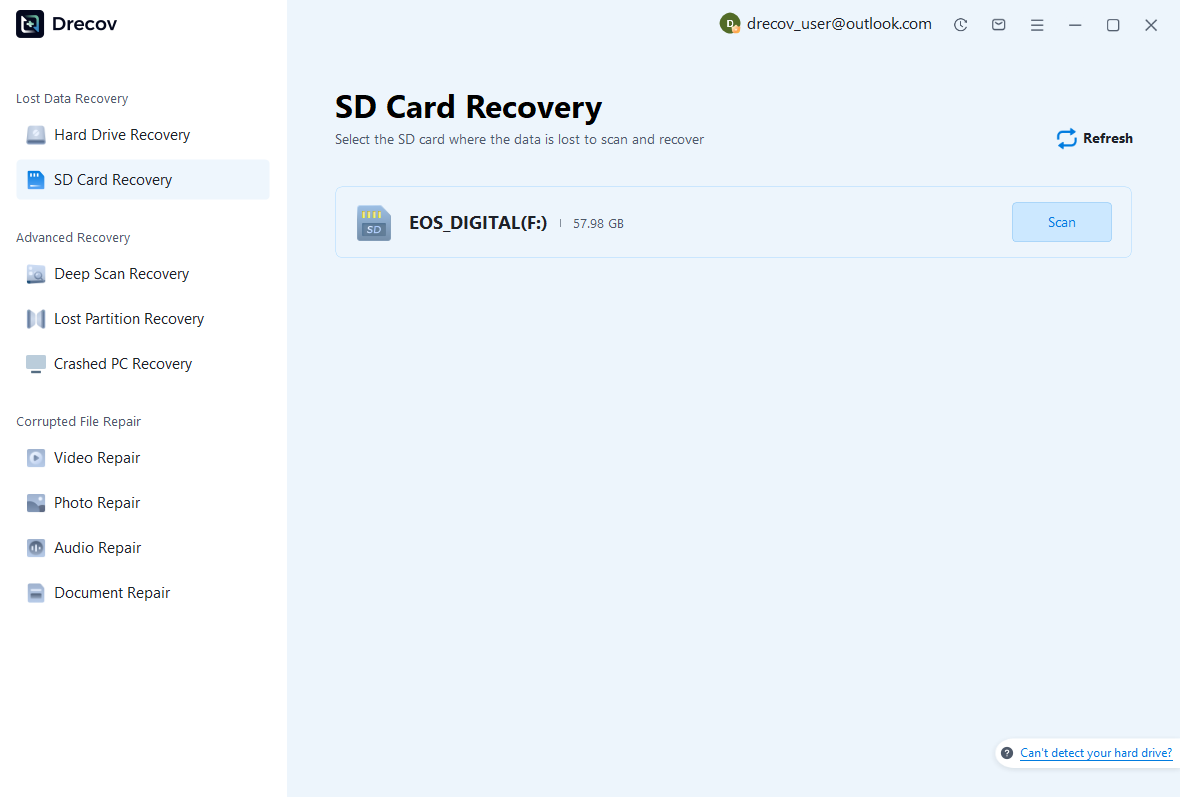
- Open PandaOffice Drecov and choose the drive, partition, SD card, or external storage device that lost files.
- Start the scan and wait for quick scan and deep scan results.
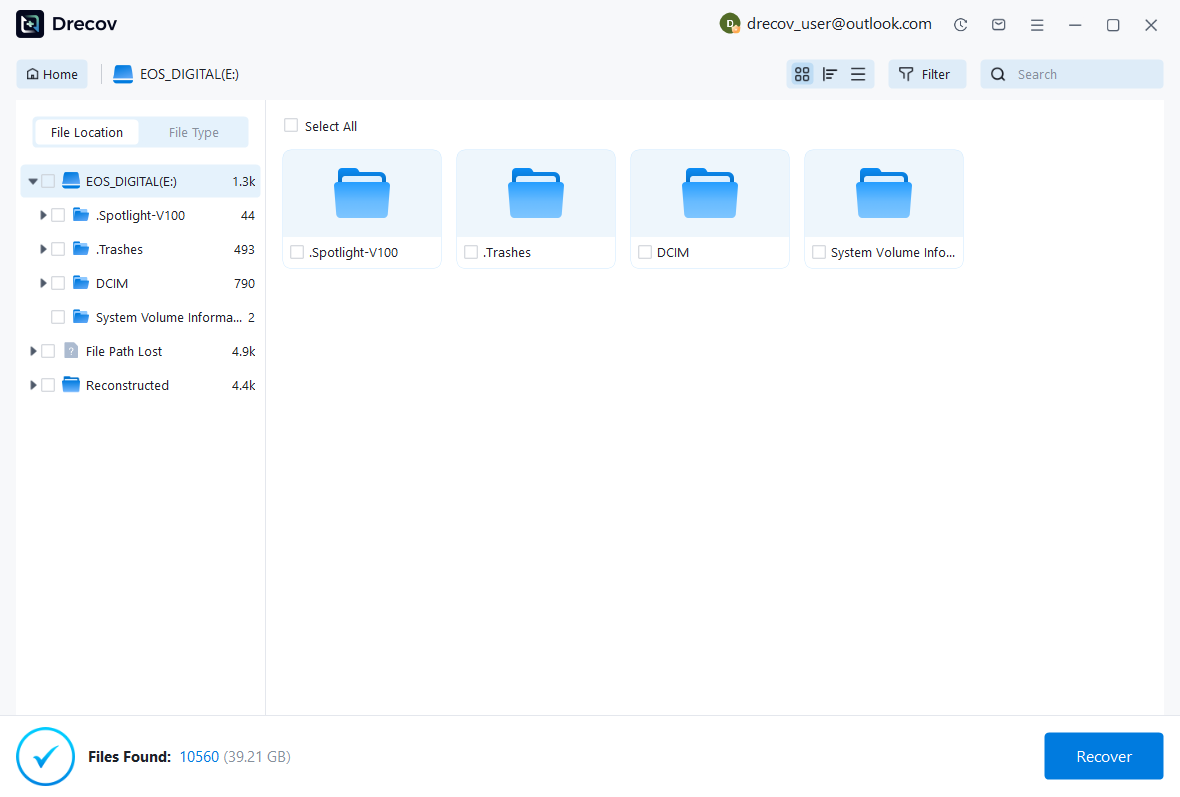
- Filter by documents, images, videos, archives, downloads, or original folders.
- Preview important files before recovery.
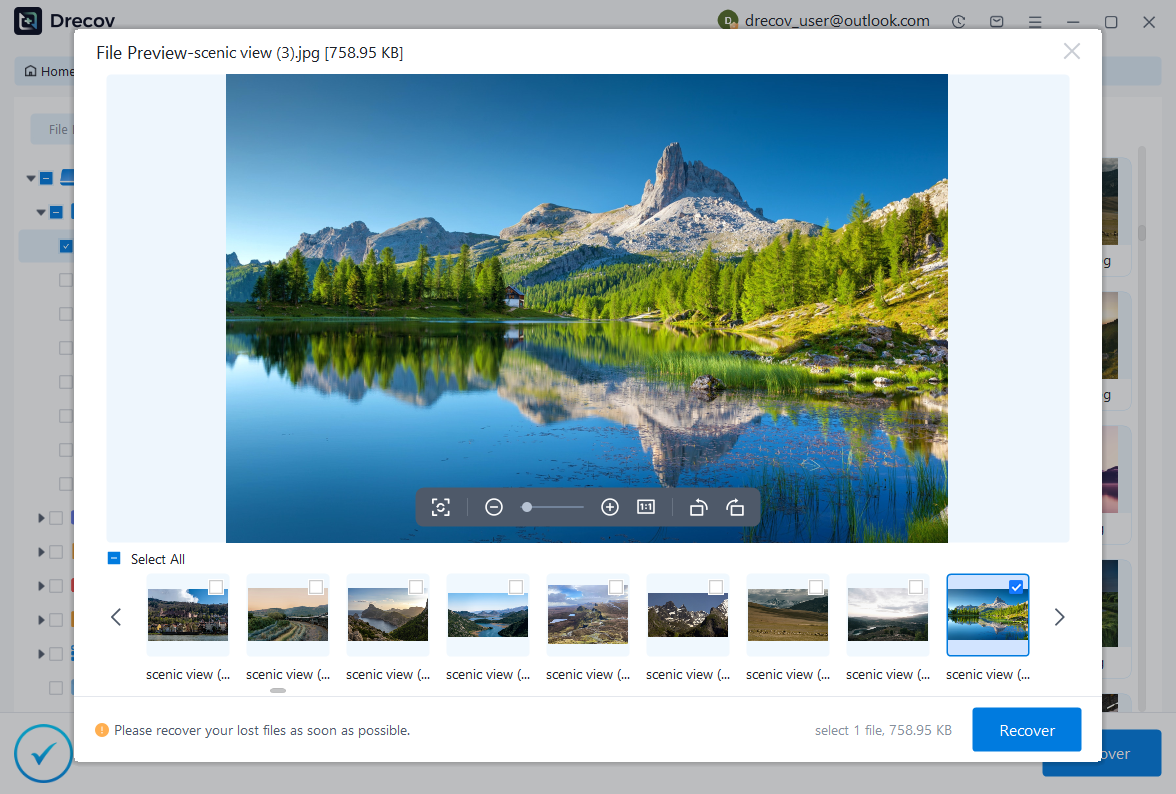
- Recover selected files to another drive, not back to the source storage.
- Open recovered files before deleting scan results or changing the original device.
Risk Level: Low when you save recovered files away from the source storage and avoid new writes during recovery.
This method helps recover lost information files, but it does not reveal Instagram passwords. Online account passwords must always be recovered through official account recovery methods.
Common Problems When Resetting Instagram Password
Even after following the correct recovery process, users may encounter problems when trying to reset their Instagram password. These issues can happen because of incorrect account information, email delivery problems, outdated contact details, or security restrictions.
Understanding common recovery problems can help users choose the right solution instead of repeatedly submitting unsuccessful requests.
Instagram Reset Link Not Working
Test environment:
- Device tested: iPhone
- Application tested: Instagram app
- Recovery method: Email reset link
Sometimes users receive a password reset email, but the link does not open or shows an error message.
This can happen if the link has expired, multiple reset requests were created, or the email application does not properly open the recovery page.
Try requesting a new reset link and use the latest message received from Instagram. Avoid clicking older recovery emails because they may no longer be valid.
You can also try opening the link through a different browser or device.
Unable to Receive Password Reset Email
Test environment:
- Device tested: Android phone
- Email provider tested: Gmail
- Account condition: Email linked to Instagram
If the reset email does not arrive, first check your spam or junk folder. Sometimes security emails are filtered automatically.
Confirm that you entered the correct email address or username. A small spelling mistake can prevent the recovery message from being delivered.
If the email account itself cannot be accessed, recover the email account before continuing.
Account Recovery Request Is Rejected
Test environment:
- Device tested: Desktop browser
- Recovery method: Instagram verification request
A recovery request may fail if Instagram cannot verify account ownership.
Make sure the information submitted matches your account history. Avoid guessing random details because inconsistent information may reduce the chance of approval.
Frequently Asked Questions About Instagram Password Recovery
Can I find my old Instagram password?
No. Instagram does not display existing passwords. If you forget your password, you must create a new one through official recovery methods.
Can I reset Instagram password without email access?
Yes. If you cannot access your email, you may use phone verification or Instagram’s account recovery process.
How long does Instagram password recovery take?
The time depends on the verification method. Standard email or SMS recovery is usually quick, while identity verification may take longer.
Is it safe to use password recovery websites?
No. Only use Instagram’s official recovery options. Websites claiming to reveal passwords are unsafe.
Final Thoughts on How to Reset Your Password on Instagram
Knowing how to reset your password on instagram helps you regain account access when login information is forgotten or recovery details have changed.
The easiest solution is using your connected email address or phone number. If those options are unavailable, Instagram provides account verification methods to confirm ownership.
If your recovery email is inaccessible, restore access to that email account first. For Gmail users, learning how to reset password in gmail app can help recover the email channel needed for Instagram recovery.
Remember that online account passwords cannot be retrieved like document passwords. Instagram protects user credentials through encryption, so the correct approach is always creating a new password through official recovery methods.
Keeping recovery information updated, using strong passwords, and enabling additional security features can reduce the risk of losing account access in the future.





