







To cancel a ChatGPT subscription, use the platform that billed you: ChatGPT web billing, Apple App Store, Google Play, or ChatGPT Business workspace billing. Uninstalling the app does not cancel a subscription. Cancel at least 24 hours before the next billing date, then confirm that renewal is turned off.
Start by checking the receipt or billing statement so you know which platform controls the subscription. Cancel there, keep the confirmation, and verify the renewal date. Deleting your ChatGPT account is a separate action and is not the safest first step when your goal is only to stop future charges.
Find Where Your ChatGPT Subscription Was Purchased
According to OpenAI’s latest cancellation guidelines, stopping auto-renewal directly depends on your original payment provider. Subscriptions activated on chatgpt.com require management within your online account settings. Conversely, plans initiated via iOS need to be canceled through Apple’s native subscription menu. For Android users, Google Play handles all recurring charges for purchases made in their store. Finally, self-service ChatGPT Business tiers are administered through dedicated workspace billing configurations.
| Where you paid | Where to cancel | What to verify |
|---|---|---|
| chatgpt.com | ChatGPT account settings and Billing | Plan status, next billing date, and cancellation confirmation |
| Apple App Store | iPhone, iPad, or Apple account subscriptions | ChatGPT shows no active renewal in Apple subscriptions |
| Google Play | Google Play subscriptions for the purchasing Google account | The correct Google account has cancellation confirmed |
| ChatGPT Business self-service | Workspace settings and Billing | Workspace owner or billing admin has access |
Cancel a Subscription Purchased on ChatGPT.com
Sign in to the ChatGPT account that owns the paid plan. Open the account menu, go to Settings, then Billing. Choose the cancel option under the current plan and follow the confirmation steps. If the paid plan does not appear, check whether you are signed in to the wrong ChatGPT account or whether Apple or Google billed the subscription instead.
After cancellation, keep a record of the confirmation and next billing date. OpenAI states that cancellation stops future renewals but does not automatically refund previous charges. Paid features may remain available until the current billing period ends.
Cancel ChatGPT Plus or Pro on iPhone or iPad
If Apple billed the subscription, cancel it through Apple, not inside ChatGPT web billing. Open iOS Settings, select your Apple ID name, open Subscriptions, choose ChatGPT, and cancel the subscription. If the cancel button is missing but an expiration date appears, the subscription may already be canceled.
Deleting a ChatGPT account does not reliably cancel an Apple-managed subscription. Cancel through Apple before deleting an account if you plan to leave the service entirely.
Cancel ChatGPT Through Google Play
Open the Google Play Store app or Google Play subscriptions page using the Google account that purchased ChatGPT. Select ChatGPT, choose Cancel subscription, and follow the prompts. If you cannot find it, check other Google accounts on the same device and compare them with your purchase receipt.
If ChatGPT does not appear in Google Play subscriptions, confirm that Google Play is signed in with the account shown on the purchase receipt. Also check whether the plan was bought on chatgpt.com instead. Do not rely on uninstalling the app—the subscription remains active until the billing platform confirms cancellation.
Cancel a Self-Service ChatGPT Business Subscription
For ChatGPT Business, sign in to the workspace, open Workspace settings, go to Billing, select Manage plan, and cancel the subscription. If you do not see billing controls, ask the workspace owner or billing administrator. Enterprise and Edu plans may require organization-managed support rather than the self-service path.
Confirm the Cancellation Actually Worked
Do not stop after clicking the first cancel button. Confirm that renewal is off in the platform that billed you, check the next billing date, and save the confirmation email or screenshot. If you canceled less than 24 hours before renewal, the next charge may already be in process.
If you see another charge later, look for duplicate subscriptions under another ChatGPT account, Apple account, Google account, or workspace. For subscriptions billed directly by ChatGPT or Google Play, OpenAI says refund requests can be made through OpenAI Support while signed in to the relevant account. Apple refund requests go through Apple.
Protect Your Files Before Closing or Deleting an Account
If you plan to delete your ChatGPT account after cancellation, export or download important files first. OpenAI’s current file guidance says uploaded and created files can be stored in ChatGPT Library on supported plans, and data exports may include sensitive account information. Download what you need and store it securely before removing account access.
If exported records, receipts, screenshots, or downloaded files are later deleted from a Windows computer, PandaOffice Drecov can help with logical local file recovery on PCs, USB drives, SD cards, memory cards, hard drives, SSDs, and external drives. Use it only after checking account and cloud copies first.
⚠ Warning: Install it on a drive different from the one where your data was lost to prevent overwriting.
Step 1: Open Drecov and select the original storage location
Select the drive or folder where the ChatGPT export, receipt, or screenshot was saved. Do not install recovery software onto the same partition that contained the missing file.

Step 2: Start Quick Scan and filter for the missing file type
Use Quick Scan first, then filter by ZIP, PDF, image, document, or email file type. Check dates and file names before recovery.

Step 3: Use Deep Scan if Quick Scan is not enough
If the device is stable and Quick Scan does not find the file, continue with Deep Scan. Stop DIY attempts if the device disconnects, reports severe read errors, or shows signs of physical damage.
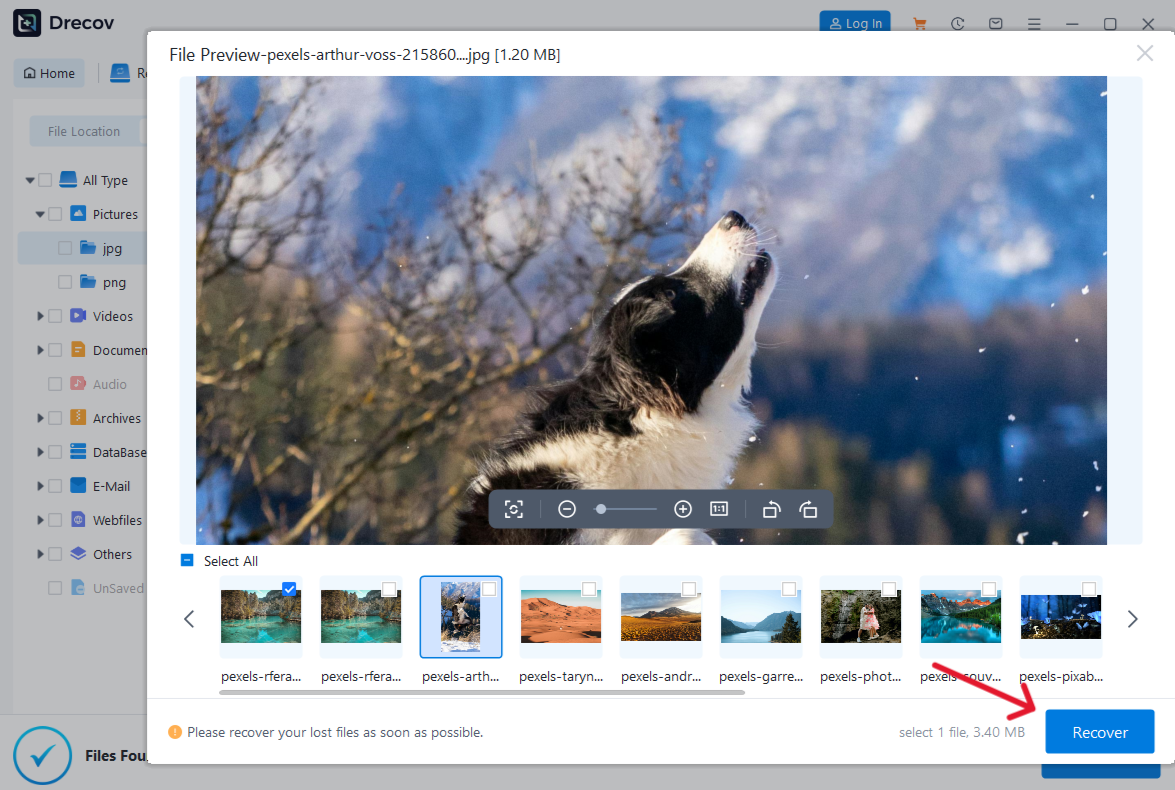
Step 4: Preview and recover to another healthy device
Preview files where possible and recover selected items to a separate healthy drive. Verify the recovered export or receipt. If needed, check the Drecov folder or Recovery folder.
Related Guides & Helpful Resources
Canceling your subscription smoothly depends on managing the right billing path from the start. If you need dedicated walkthroughs for a specific setup, use these targeted reference guides:
- Official cancellation help: Check OpenAI’s cancellation instructions if your billing platform is unclear or you no longer have access to the account.
- Backup & File Management: Before finalizing your cancellation or closing an account, check our troubleshooting steps for ChatGPT data export and download issues to ensure all past exports and receipts are safely saved off-line.
⚠ Warning: Install it on a drive different from the one where your data was lost to prevent overwriting.
Cancel ChatGPT subscription FAQs
Does uninstalling ChatGPT cancel my subscription?
No. OpenAI’s cancellation guidance says uninstalling the app does not cancel the subscription. Cancel through the platform where you purchased it.
How do I cancel ChatGPT Plus?
Use the billing platform that charged you. ChatGPT web purchases are canceled in ChatGPT Billing settings. Apple and Google Play purchases are canceled through their subscription settings.
Will cancellation give me a refund?
Cancellation stops future renewal, but it does not automatically refund prior charges. Refund handling depends on where the subscription was purchased and local eligibility rules.
Why can’t I find my ChatGPT subscription?
You may be signed in to the wrong ChatGPT, Apple, or Google account. Check the purchase receipt and search every account that could have been used to buy the plan.
Should the mobile cancellation page be redirected?
Not yet. First reposition it as a short platform-specific support page and add a prominent link back to this main cancellation guide. Consider redirects only after GSC and backlink review.
Conclusion
Before leaving the billing page, confirm three things: the correct account was used, auto-renewal is off, and the cancellation date is recorded. Cancel at least 24 hours before renewal when possible, and keep the confirmation email or screenshot until the final billing period ends.
If you later delete a locally downloaded export, receipt, or screenshot, first check Recycle Bin, backups, and cloud copies. PandaOffice Drecov may help recover a locally deleted file when the original storage has not been overwritten; it cannot restore server-side ChatGPT data or reverse an account deletion.
⚠ Warning: Install it on a drive different from the one where your data was lost to prevent overwriting.






