







Can I Recovery Photos after Format? This is one of the most common questions users ask after accidentally formatting an SD card, phone storage, or external drive. The good news is that format photo recovery is often possible if the right steps are taken early. Formatting does not usually erase photo data immediately. Instead, it removes file references and marks storage space as reusable. Until new data overwrites that space, photo recovery after format remains achievable. Many users panic and repeatedly format the device or keep using it, which significantly lowers recovery success. This article explains, step by step, how formatted photo recovery works, why photos disappear, and which methods are safe and effective. It covers system-level recovery options, Microsoft’s free tools, and practical recovery techniques for cameras, SD cards, computers, and mobile devices. Finally, it introduces one recommended solution for users who need deeper recovery results. By understanding the process and acting correctly, format photo recovery can move from a stressful question to a manageable solution.
What Happens When You Format a Device with Photos?
Formatting a storage device does not work the way many people imagine. When you format an SD card, USB drive, or phone storage, the system deletes the file allocation table. This table tells the system where photos are stored. The photo data itself often remains intact on the storage medium. This is why photo recovery after format is possible in many cases.
There are two main types of formatting. A quick format removes file references but leaves data blocks untouched. A full format may scan for errors and overwrite some sectors, reducing recovery chances. Most consumer devices perform a quick format by default, especially cameras and Android phones. This behavior increases the success rate of best photo recovery after format methods.
However, formatting is only one part of the problem. What happens after formatting matters more. If users continue taking photos, installing apps, or copying files, new data may overwrite the old photo sectors. Once overwritten, recovery becomes impossible.
⚠️Warning: Do not use the formatted device until recovery is complete.
Understanding this mechanism helps users choose recovery methods wisely and avoid actions that permanently erase data.
Common Causes of Photo Loss after Formatting
Photo loss after formatting often starts with a simple mistake. Users may format an SD card inside a camera to fix an error message. Others may reset a phone to free space, leading to recovery photo after format android scenarios. In many cases, users are unaware that formatting deletes access to photos.
Another cause is system prompts. Operating systems sometimes ask users to format a device when file system errors occur. Clicking “Format” feels like the easiest solution, but it triggers the need for format photo recovery. Virus infections and corrupted partitions can also lead to formatting prompts.
Human error is not the only factor. Power outages during file transfer can corrupt storage structures. Cameras or phones with low battery may shut down mid-write, forcing users to reformat. Faulty SD cards and aging flash memory increase the risk of corruption.
⚠️Warning: Repeated formatting reduces recovery success.
By identifying why formatting occurred, users can choose safer recovery paths and prevent the same issue in the future.
Immediate Actions to Improve Photo Recovery after Format
The first minutes after formatting are critical. Stop using the device immediately. Do not take new photos, install apps, or save files. This preserves the data blocks needed for photo recovery after format. Remove the SD card or disconnect the device safely.
Next, determine where the formatted photos were stored. Was it an SD card, internal phone storage, USB drive, or external hard disk? This helps select the correct recovery method. Check for backups. Cloud services, external drives, or old computers may contain copies.
Avoid online tools that require uploading files from a formatted device. These tools rarely work and may compromise privacy. Also, avoid random “repair” utilities that write data to the storage device.
⚠️Warning: Never recover files back to the same formatted device.
Once these precautions are taken, users can begin recovery using system-level tools or dedicated recovery software.
System-Level Methods for Photo Recovery after Format (Free)
Using Windows Built-In Tools and Microsoft Free Software
Windows offers limited but safe recovery options. If the formatted photos were backed up using File History, restoring them is straightforward. Navigate to Control Panel → File History → Restore personal files. Choose the backup version and restore photos.
Microsoft also provides Windows File Recovery, a free command-line tool available from the Microsoft Store.
This tool scans storage devices for deleted files by file signature. It can help with format photo recovery on SD cards and USB drives, but it requires technical knowledge and does not repair corrupted photos.
Pros:
- Free and official
- Safe to use
Cons:
- Limited success on formatted drives
- No preview feature
macOS and Android System Options
On macOS, Time Machine backups are the primary free option. For Android, Google Photos backups may restore images automatically. These system-level methods work only if backups existed before formatting.
Why Dedicated Photo Recovery Software Works Better
System tools rely on backups or basic scanning. Dedicated recovery software performs deep sector-level scans. It identifies photo signatures such as JPG, PNG, and RAW formats. This approach significantly improves best photo recovery after format success rates.
Another advantage is preview capability. Users can see recoverable photos before restoring them. This prevents wasted effort and helps confirm whether recovery is possible. Dedicated tools also handle fragmented files better, which is common after formatting.
⚠️Warning: Avoid unknown recovery tools that modify original data.
For complex scenarios, such as recovery photo after format android without backups, dedicated software becomes essential.
Recommended Solution: PandaOffice Drecov for Format Photo Recovery
When system methods fail, PandaOffice Drecov offers a reliable solution for format photo recovery. It supports SD cards, USB drives, external disks, and formatted partitions. Drecov uses read-only scanning to protect original data and supports deep recovery for formatted storage.
3 Steps to Recover Photos after Format with Drecov
Download Drecov- Connect the formatted device
Insert the SD card or connect the storage device to your computer. Launch Drecov and select the formatted location.
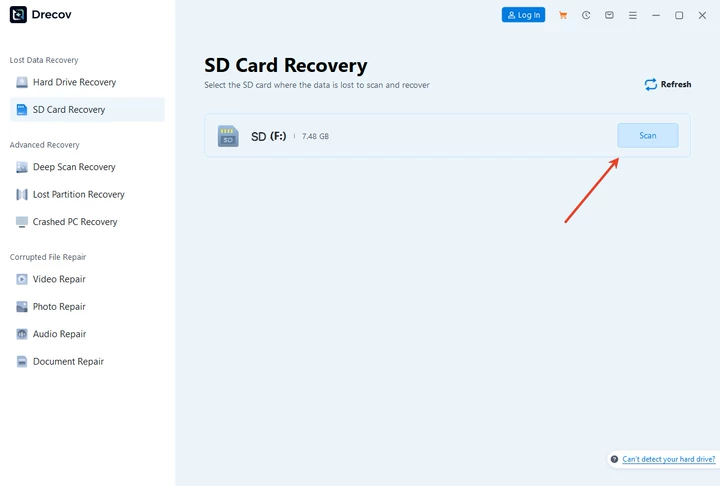
2. Scan for lost photos
Start a deep scan. Drecov analyzes the device and lists recoverable photos.

3. Preview and recover safely
Preview images and save recovered photos to a different drive.

Pros:
- Effective photo recovery after format
- Beginner-friendly interface
- Supports multiple photo formats
Cons:
- Free version may have recovery limits
Drecov balances simplicity and recovery depth, making it suitable for most users.
Comparison: System Recovery vs Dedicated Recovery Software
| Method | Best For | Success Rate | Skill Level |
|---|---|---|---|
| System backups | Backed-up photos | High | Beginner |
| Microsoft tools | Simple format | Medium | Intermediate |
| Drecov | Format + corruption | High | Beginner |
System methods are safe but limited. Dedicated tools offer better results in real-world scenarios.
FAQs about Photo Recovery after Format
What is the best photo recovery after format method?
The best photo recovery after format approach combines immediate action and dedicated recovery software.
Can I perform recovery photo after format android without a backup?
Yes. Dedicated recovery software can scan formatted storage if data is not overwritten.
Is format photo recovery always possible?
No. Overwritten data cannot be recovered.
Are free tools enough for photo recovery after format?
Free tools work in limited cases. Complex scenarios need dedicated solutions.
Conclusion: Can I Recovery Photos after Format?
Recovering photos after formatting is often possible if you act quickly and choose the right method. Start with system-level recovery options and backups when available. For deeper recovery needs, dedicated format photo recovery software offers higher success rates. PandaOffice Drecov provides a safe and practical solution for users facing formatted storage devices. By following correct steps and avoiding common mistakes, photo recovery after format becomes achievable rather than impossible. Can I Recovery Photos after Format? Yes, with timely action and the right tools, valuable photos can often be restored.






