







Can ChatGPT edit videos is a useful question for creators, marketers, teachers, students, and small business teams. The answer depends on what you mean by edit. ChatGPT can help plan a video, improve a script, create captions, suggest cuts, organize a shot list, and prepare publishing copy. However, normal ChatGPT is not a full video editor. It does not replace a timeline, frame accurate trimming, color correction, audio mixing, transitions, subtitles, export presets, or project file management. The OpenAI Sora video guide describes video generation and editing features for supported users, including remixing, blending, looping, and downloading video output. For regular footage on your computer, you still need a video editor such as Premiere Pro, Final Cut, DaVinci Resolve, CapCut, iMovie, or another timeline tool.
The larger practical risk is local file loss. Video work often involves source clips, exports, audio tracks, captions, thumbnails, project files, and downloaded assets. If a source clip disappears, stop saving new files to the same drive. Check simple locations first. If the clip was deleted or lost from a card, USB drive, hard drive, or external disk, PandaOffice Drecov data recovery software can scan the original location before new writes overwrite recoverable data.
Quick Answer for Can ChatGPT Edit Videos
ChatGPT can help with planning, scripting, review, captions, YouTube descriptions, chapter lists, thumbnails, and editing decisions. It can suggest where a video should open, which sections feel repetitive, how to shorten a transcript, and how to turn one long recording into several short clips.
ChatGPT alone is not a timeline editor. Use Sora when your account supports OpenAI video generation or video editing features. Use a local editor when you need exact cuts, transitions, audio levels, color work, or final exports.
If video files go missing during the workflow, treat that as a recovery task. Search project folders, Downloads, Desktop, Recycle Bin, recent files, and cloud sync. If the file is still missing, scan the original storage with PandaOffice Drecov and recover to a different drive.
What ChatGPT Can Do for Video Editing
ChatGPT is strongest before and around the actual edit. It can turn a rough idea into a clear production plan. For a tutorial, it can outline scenes, screen actions, captions, and callouts. For a product demo, it can recommend a hook, feature order, and closing message.
It can also help with platform adaptation. You can ask for a YouTube description, TikTok caption, Instagram Reel hook, LinkedIn post, or short title list. If you provide a transcript, ChatGPT can suggest chapters, pull quotes, and short clips.
Where it helps less is direct footage manipulation. It cannot guarantee exact frame cuts from text alone. It cannot repair a lost source clip. It cannot act as your only backup. If a video file disappears from local storage, a chat response will not restore that original file.
What ChatGPT Cannot Reliably Do Alone
ChatGPT cannot replace a professional editing timeline. It cannot promise exact frame control, consistent audio mastering, or final export quality. It also cannot directly edit a YouTube video inside your account unless you use other tools and provide the right files.
It also cannot solve rights, consent, and privacy issues for you. If a video contains clients, students, private records, copyrighted media, or personal footage, review permissions before uploading or processing anything.
Most importantly, ChatGPT cannot prevent local overwrite. If a clip was deleted from the same drive where you keep exporting new versions, every new write may reduce recovery chances. Stop the editing workflow first, then recover.
ChatGPT, Sora, and Video Editing Software Compared
| Task | Best tool | Why it fits | File safety note |
|---|---|---|---|
| Write a script | ChatGPT | Fast structure and tone options | Save script copies |
| Plan scene order | ChatGPT | Good for outlines and checklists | Keep clips organized |
| Generate video | Sora | Built for video creation | Download important outputs |
| Remix generated video | Sora | Supports video specific actions | Store exports clearly |
| Trim real footage | Video editor | Timeline control is needed | Duplicate the project |
| Add subtitles | Editor plus ChatGPT | ChatGPT can refine text | Back up subtitle files |
| Recover deleted clips | PandaOffice Drecov | Scans local storage | Save recovered files elsewhere |
The best workflow often combines tools. ChatGPT helps you think and write. Sora can generate or edit supported video outputs. A video editor handles assembly. Drecov helps when local files disappear.
How to Use ChatGPT for Video Editing Without Losing Files
Create a project folder before you ask ChatGPT for help. Add subfolders for source footage, audio, project files, exports, captions, thumbnails, and notes.
Next, describe the goal of the video. Include audience, platform, length, tone, must keep points, and must avoid points. Ask ChatGPT for a scene plan before opening the editor. If you have a transcript, ask ChatGPT to identify weak openings, repeated ideas, and strong short clip moments.
When you move into the editor, use copies. Do not convert or overwrite your only source clip. Duplicate the project before major changes. Keep originals untouched until the final version is published and backed up.
If the workflow includes downloads from ChatGPT, Sora, or other online tools, save those outputs to the project folder immediately. For download issues, this ChatGPT download fix may help.
When Video Files Go Missing During a ChatGPT Workflow
A missing video file may not be permanently gone. It may be in Downloads, a cloud folder, a project cache, a renamed folder, or Recycle Bin. Search by file type such as MP4, MOV, AVI, MKV, WEBM, WAV, MP3, SRT, and VTT. Sort by date modified. Open Recent files in your editor.
If you cannot find the bin quickly on Windows, use this Recycle Bin Recovery guide. Also check cloud storage deleted files and version history.
Be careful with SD cards and USB drives. Do not record new footage, format the card, or copy new files to it after loss. Removable media can be overwritten quickly.
Recover Lost Videos with PandaOffice Drecov
PandaOffice Drecov data recovery software helps recover local files from PCs, hard drives, USB drives, SD cards, and external disks. It is useful for deleted clips, missing exports, lost project folders, quick formats, RAW drive errors, and interrupted transfers.
⚠ Warning: Install it on a drive different from the one where your data was lost to prevent overwriting.
Use it as soon as simple checks fail. Avoid downloading, exporting, or cleaning the affected drive before scanning.
- Step 1. Open PandaOffice Drecov and choose the location or path where the files were lost. Start scanning that location.

- Step 2. Let Quick Scan finish, then continue with Deep Scan if the file does not appear.

- Step 3. Filter for video, audio, subtitle, archive, and project file formats.
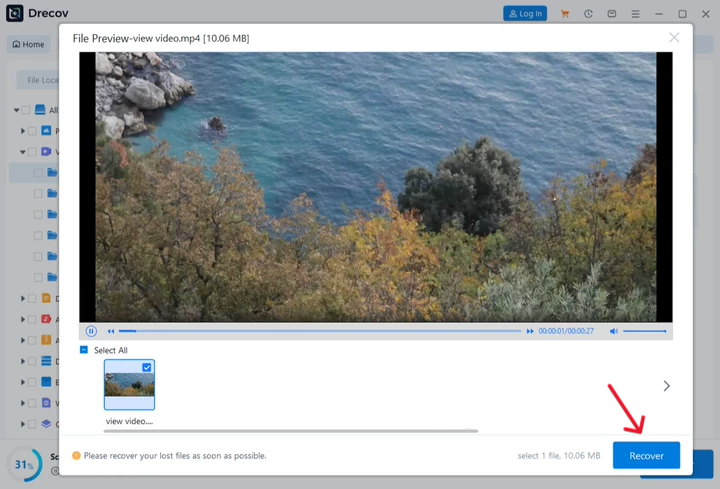
- Step 4. Preview files when possible and compare size, date, and path.
- Step 5. Recover selected files to a different healthy drive.
Do not save recovered files back to the original card or drive. After recovery, check the chosen destination for a Drecov or Recovery folder if the files are not where you expected.
Use Sora and ChatGPT Outputs More Safely
If you use Sora, download important results instead of leaving them only in an online library. Use clear names such as product demo draft one or tutorial final vertical.
Separate source footage from generated assets. That makes editing cleaner, protects original files, and supports clearer publishing.
FAQ About ChatGPT and Video Editing
Can ChatGPT edit a video file for me
ChatGPT can help plan edits and improve scripts, but normal ChatGPT is not a full timeline editor.
Can ChatGPT edit YouTube videos
It can help with titles, chapters, descriptions, scripts, and shorts plans. It cannot directly edit a video inside YouTube without separate tools.
Can ChatGPT Plus edit videos
Feature access can vary. Check your current ChatGPT and Sora interfaces before planning a workflow around a specific tool.
Can I recover a deleted video after editing
Often, yes, if the storage has not been overwritten. Stop using the affected drive and scan it with PandaOffice Drecov.
Why recover to a different drive
Saving recovered files to the original drive may overwrite other recoverable data.
Conclusion
Can ChatGPT edit videos has a practical answer. ChatGPT can improve planning, scripts, captions, and publishing copy. Sora can help with supported video generation and editing features. A timeline editor is still needed for precise local footage work.
Protect your files before editing. Use project folders, copies, clear names, and backups. If a video disappears, stop writing to the affected storage and use PandaOffice Drecov to recover the file safely.






