







Artificial intelligence has rapidly evolved over the past few years, and tools like ChatGPT have become essential for content creation, research, and productivity. One of the most frequently asked questions today is: can chatgpt analyze videos? With the growing popularity of video content across platforms like YouTube, TikTok, and online courses, understanding how AI interacts with video data is more important than ever.
In this comprehensive guide, we will explore whether can chatgpt analyze videos, how it works with video-related data, its limitations, and the best ways to use it effectively. By the end of this article, you will have a clear understanding of how to leverage ChatGPT for video analysis tasks.
What Does It Mean to Analyze Videos?
Before answering the question “can chatgpt analyze videos,” it’s important to clarify what video analysis actually involves. Video analysis typically includes:
- Understanding visual elements (objects, people, scenes)
- Interpreting audio (speech, music, tone)
- Extracting text (subtitles, captions)
- Identifying actions or events
- Summarizing content
Traditional video analysis requires processing both visual frames and audio streams, often using specialized AI models like computer vision and speech recognition systems.
Can ChatGPT Analyze Videos Directly?
The short answer is: can chatgpt analyze videos directly? As of 2026, the answer has moved from a “no” to a “sometimes.” While earlier versions were strictly text-based, the latest multimodal models like GPT-5.2 and GPT-4o have introduced native capabilities that allow users to upload files for processing. However, it does not “watch” a video in real-time like a human; instead, it samples frames and audio to reconstruct the context.
How to Upload Video to ChatGPT for Analysis
If you are using the latest version of the interface, you can now provide video files directly to the model. This is a game-changer for researchers and creators who need quick insights without manual transcription.
- Step 1: Open the ChatGPT interface on your desktop or mobile app. Ensure you are using a version that supports multimodal uploads (usually available for Plus, Team, or Enterprise users).
- Step 2: Locate the attachment icon (often a paperclip or a “+” sign) in the message bar.
- Step 3: Select the video file from your local storage. Common supported formats include MP4, MOV, and AVI.
- Step 4: Once the file is attached, type a specific prompt. For example: “Summarize the key events in this video” or “Extract the text from the slides shown in this presentation.”
- Step 5: Press Enter. The AI will process the frames and audio to provide a text-based response.
Warning: Large files (over 500MB) may fail to upload or process correctly. It is always better to trim your video to the specific segment you need analyzed to ensure the highest accuracy.
Video File Corrupted After Upload to AI
A common frustration in 2026 is finding that your video file corrupted after upload to ai. This often happens due to interrupted network connections, server-side processing errors, or header damage during the packet transfer. When this occurs, the original file on your hard drive might remain intact, but the version stored in your “Recent Uploads” or temporary cache becomes unreadable.
If you encounter a “File Format Not Recognized” or “Playback Error” after an upload attempt, follow these recovery steps to restore your data:
- Step 1: Check the Cache. Sometimes the browser or app holds a partial version of the file. Clear your browser cache and try re-uploading from the original source.
- Step 2: Use VLC Media Player for Repair. If the file on your local drive was somehow affected during the move, open VLC, go to Media > Convert/Save, add the corrupted file, and choose a new profile (e.g., Video – H.264 + MP3). This can often rebuild the file header.
- Step 3: Professional File Reconstruction. If the video was lost or deleted during a failed transfer, you will need a dedicated recovery tool to piece back the fragmented data.
PandaOffice Drecov Data Recovery Software: The Ultimate Solution
When standard repairs fail, PandaOffice Drecov data recovery software is the industry standard for retrieving and repairing corrupted media. Whether you lost a video due to a system crash while asking can chatgpt analyze videos or your SD card was formatted by mistake, Drecov offers a 99.8% success rate.
⚠ Warning: Install it on a drive different from the one where your data was lost to prevent overwriting.
Steps to Recover and Repair Videos with Drecov
- Step 1: Select the Drive. Launch the program and select the specific drive or partition (e.g., C: drive, External USB, or SD Card) where the video was originally stored.

- Step 2: Deep Scan. Click the “Scan” button. The software will perform a “Deep Scan” to find fragmented video files. You can use the filter tool to specifically look for
.mp4or.movextensions.

- Step 3: Preview and Repair. Once the scan is complete, Drecov allows you to preview the files. If the video is damaged, use the built-in “Video Repair” module to fix frame drops or header issues.
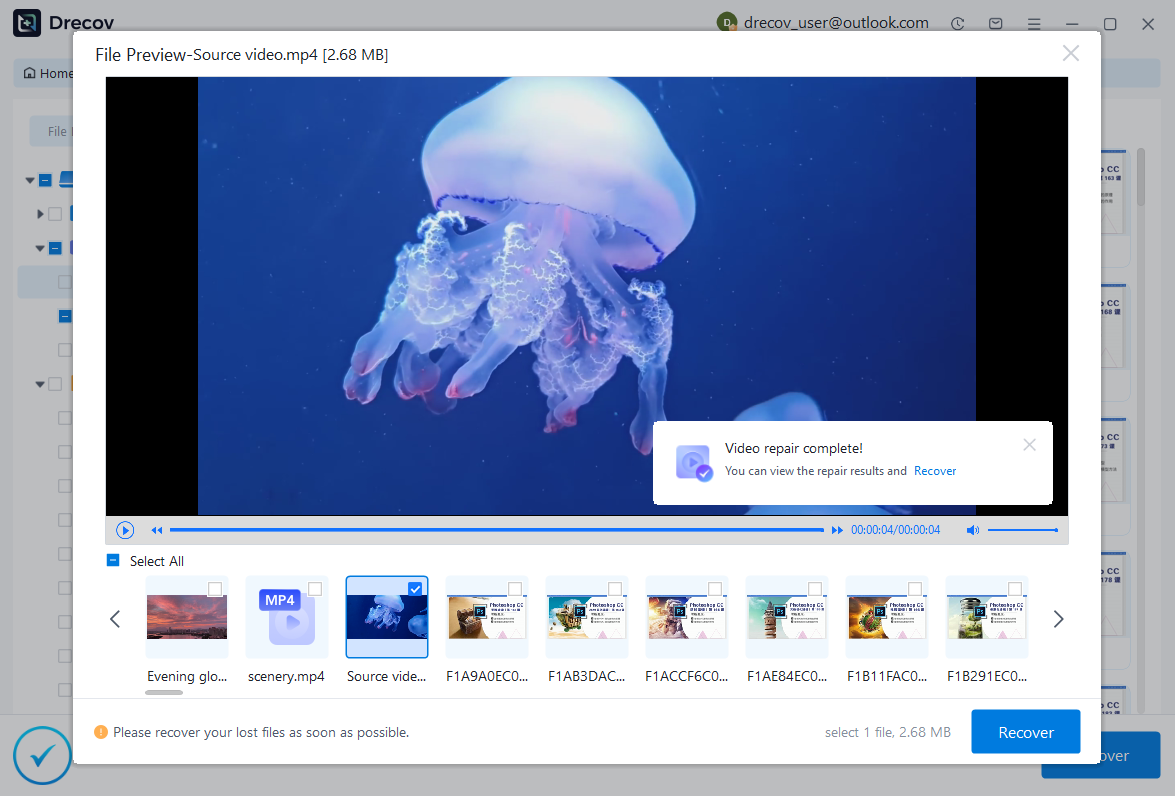
- Step 4: Secure Recovery. Select the files you want and click “Recover”. Always save the recovered files to a different storage device for safety.
Key Point: Avoid performing any “Disk Cleanup” or “Defragmentation” after a file goes missing, as this permanently destroys the data Drecov needs to find.
After restoring your files, you might find these guides helpful for other common digital tasks:
- Learn how to download video from browser Firefox 2026 guide to save your content locally before analysis.
- How to repair USB drive and recover data step-by-step if your transfer media fails.
- How to delete recently closed tabs in seconds to keep your workspace clean after a long research session.
How ChatGPT Can Analyze Videos Indirectly
Although the question “can chatgpt analyze videos” is now answered by direct uploads, indirect methods remain more reliable for long-form content like 2-hour webinars.
1. Video Transcripts
If you provide a transcript, ChatGPT can:
- Summarize the content
- Extract key points
- Identify themes and topics
- Rewrite or simplify the information
2. Subtitles and Captions
By analyzing subtitles (SRT or VTT files), ChatGPT can:
- Translate content into different languages
- Improve grammar and clarity
- Generate summaries or highlights
Practical Use Cases for Video Analysis
- Content Summarization: Creators and students can upload a transcript and ask ChatGPT to summarize long lectures or create study notes.
- YouTube SEO Optimization: ChatGPT can help generate keyword-rich titles and write engaging descriptions.
- Educational Support: Students use it to break down complex topics from video lectures or generate quizzes based on video content.
Limitations of AI Video Analysis
While we’ve established that can chatgpt analyze videos, it’s not without flaws:
- No Real-Time Understanding: It cannot “watch” a live stream as it happens.
- Context Limits: It may struggle with videos longer than 30-60 minutes depending on your subscription tier.
- Visual Nuance: It might miss subtle emotional cues or background details that a human would notice.
Best Practices for Using ChatGPT with Videos
To get the most out of ChatGPT for video-related tasks, follow these tips:
- Provide Detailed Transcripts: The more accurate the text, the better the insights.
- Use Clear Prompts: Instead of “what’s this?”, try “Summarize this video in 5 bullet points focused on marketing strategy.”
- Verify Results: AI can “hallucinate” details, so always cross-check critical data.
Conclusion
So, can chatgpt analyze videos? Yes, but the efficiency depends on the method you choose. Whether you are using the native how to upload video to chatgpt for analysis workflow or relying on transcripts, AI is a powerful ally. However, technology is prone to errors, and if you find your video file corrupted after upload to ai, tools like PandaOffice Drecov data recovery software are essential for ensuring your hard work isn’t lost forever.
By mastering both the AI tools for analysis and the data recovery tools for protection, you become a truly efficient digital professional.






