







Best Corrupted Photo Recovery Software Free Download is a topic many users search for after discovering that precious images have suddenly become unreadable, distorted, or missing. Corrupted photo recovery is no longer a niche technical task. It affects everyday users who rely on phones, cameras, SD cards, and external drives. Whether the issue is gallery deleted photo recovery, accidental deletion, or severe file corruption after formatting a storage device, understanding how recovery works is the first step toward success. In the first moments after photo loss, users often panic and make mistakes that permanently reduce recovery chances. This guide explains what photo corruption really means, why it happens, and how corrupted photo recovery free methods can help in real-world scenarios. You will learn safe system-level solutions, Microsoft’s free recovery tools, and why dedicated corrupted photo recovery software is often the most reliable path. By following a clear, step-by-step approach, even beginners can perform delete photo recovery and restore images safely without risking further damage.
Understanding Photo Corruption and Photo Loss Problems
Photo corruption occurs when an image file exists but cannot be opened, displays errors, or shows visual artifacts. This is different from simple deletion. In photo corrupted recovery, the file structure is damaged, not just removed. Users often encounter this issue after formatting an SD card, experiencing a sudden power loss, or disconnecting a device improperly. Cameras, smartphones, and computers all rely on file systems to store image data. When these systems break, photos may appear gray, half-loaded, or completely inaccessible.
Another common scenario is gallery deleted photo recovery on phones or memory cards. Users delete images accidentally or clear storage space without backups. Formatting an SD card worsens the situation because it removes file references in bulk. However, formatting does not immediately erase the data blocks. This is why corrupted photo recovery online free searches are so popular. Many users hope for a quick fix, but not all online tools are safe or effective.
⚠️Warning: Continuing to use the storage device after corruption can overwrite image data and make recovery impossible.
Understanding whether your issue is deletion, corruption, or formatting helps you choose the correct recovery method. Each scenario requires a different approach and level of tool support.
Common Causes of Corrupted and Deleted Photos
Data loss rarely happens without a reason. One of the most common causes is formatting a memory card by mistake. Users often format SD cards to fix camera errors, unaware that this action triggers the need for corrupted photo recovery. Another frequent cause is file transfer interruption. Removing a USB cable or SD card while files are being written can corrupt images instantly.
Virus infections and system crashes also damage photo files. On Windows systems, improper shutdowns may break file allocation tables, leading to corrupt photo recovery scenarios. On mobile devices, system updates or app crashes can result in delete photo recovery needs, especially when gallery databases become inconsistent.
Physical issues matter too. Aging SD cards develop bad sectors. When images are saved to damaged areas, corruption occurs silently. Over time, more files become unreadable. Environmental factors such as heat, moisture, or static electricity accelerate this damage.
⚠️Warning: Repeated formatting or repair attempts can reduce free corrupted photo recovery success rates.
By identifying the cause, users can avoid repeating the same mistake and choose recovery tools that match the severity of the problem.
System-Level Recovery Methods for Corrupted Photos (Free)
Using Built-In Windows Recovery Options
Windows provides basic tools that can help with corrupted photo recovery free scenarios. File History and Previous Versions allow users to restore photos if backups were enabled before loss. This method is safe and works well for recently deleted images, especially for gallery deleted photo recovery on external drives.
Another option is Windows File Recovery, a free Microsoft command-line tool. It scans storage devices for deleted or corrupted files by file signature. This method supports common photo formats and can help with delete photo recovery after accidental deletion. However, it requires technical knowledge and may not repair corrupted image structures fully.
Pros:
- Free and official Microsoft tools
- No risk of malware
Cons:
- Limited success on formatted cards
- No preview for corrupted images
macOS Free Recovery Options
Mac users can rely on Time Machine backups if available. Spotlight searches may locate cached image previews. These methods help in mild corruption cases but fail in deep photo corrupted recovery scenarios.
System tools are a safe starting point, but their limitations make them unsuitable for serious corruption.
Why Dedicated Corrupted Photo Recovery Software Works Better
Dedicated corrupted photo recovery software uses advanced scanning algorithms to locate image data at the sector level. Unlike system tools, it does not rely solely on file indexes. This makes it effective for formatted SD cards and damaged file systems. Free corrupted photo recovery software often includes preview features, allowing users to verify recoverable images before restoring them.
Another advantage is format support. Professional tools recognize JPG, PNG, HEIC, and RAW formats. This matters when dealing with partially damaged photos. Some tools can rebuild file headers, which is critical in corrupted photo recovery online scenarios where images exist but cannot open.
⚠️Warning: Avoid unknown online recovery sites that require uploading personal photos. Data privacy risks are high.
Dedicated software also simplifies the process. Step-by-step interfaces guide beginners through scanning, previewing, and saving recovered files safely. This reduces user error and improves success rates significantly.
Recommended Solution: PandaOffice Drecov for Corrupted Photo Recovery
When free system tools fail, PandaOffice Drecov offers a reliable solution for corrupted photo recovery and formatted storage devices. It supports SD cards, USB drives, and internal disks. Drecov focuses on safe scanning without modifying original data, making it suitable for beginners and intermediate users.
3 Steps to Recover Corrupted Photos with Drecov
Download Drecov- Connect the storage device
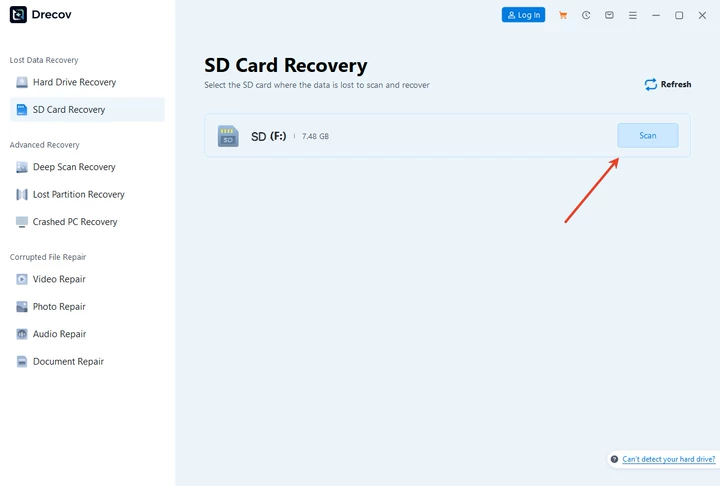
Insert the SD card or connect the drive to your computer. Launch Drecov and select the target location.
2. Scan for corrupted and deleted photos
Start a deep scan. Drecov analyzes the device and lists recoverable images, including corrupted ones.

3. Preview and recover safely
Preview photos, select what you need, and save them to a different drive.

Pros:
- Effective corrupted photo recovery software free download scanning
- Supports formatted SD cards
- Beginner-friendly interface
Cons:
- Free version may have recovery limits
Drecov provides a balanced approach between ease of use and recovery depth.
Comparison: Free System Recovery vs Dedicated Software
| Method | Best Use Case | Success Rate | Skill Level |
|---|---|---|---|
| System tools | Simple deletion | Low–Medium | Beginner |
| Microsoft File Recovery | Recent deletion | Medium | Intermediate |
| Drecov | Corruption + formatting | High | Beginner |
System methods are safe but limited. Dedicated best corrupted photo recovery software solutions deliver higher success rates.
FAQs About Corrupted Photo Recovery
What is the best corrupted photo recovery software?
The best corrupted photo recovery software combines deep scanning, preview, and safe recovery, such as Drecov.
Is there free corrupted photo recovery software available?
Yes. Many tools offer free corrupted photo recovery software scanning and preview options.
Can corrupted photo recovery software free download fix formatted SD cards?
Yes. Formatting does not erase data immediately, making recovery possible.
Does corrupted photo recovery online free work safely?
Online tools are risky. Offline software is safer for privacy and success.
Conclusion: Best Corrupted Photo Recovery Software Free Download
Losing photos to corruption or deletion is stressful, but recovery is often possible with the right approach. Start with free system-level methods, especially for simple deletion cases. For deeper damage, dedicated corrupted photo recovery software offers better results. PandaOffice Drecov provides a practical, user-friendly solution for formatted SD cards and damaged photo files. By acting quickly and choosing safe tools, users can restore valuable images confidently. Best Corrupted Photo Recovery Software Free Download remains achievable when recovery steps are followed carefully and responsibly.






