






Identify Which Part of the Tiled Map Is Missing
A Tiled map can open with blank or incorrect tiles even when its map data remains intact. The map may refer to an external tileset, and that tileset may refer to an image that moved. Another incident can remove layer data or object information from the map itself. Start by separating these relationships before replacing files or rebuilding terrain that may already survive.
For example, a project copied without its external tileset can retain tile placements while lacking the information needed to render them. Reconnecting the exact original tileset and image may restore the view. By contrast, selecting an unrelated atlas with a similar name can display plausible but wrong terrain. Preserve the map and all accessible companions first, then identify which relationship actually broke.
Preserve the Map and Its Resource Tree
Copy the native map, external tilesets, images, templates, and relevant project files into a separate recovery location while keeping their relative structure. Record the Tiled version and the original root folder. If useful unsaved changes remain open, save a separate native map before closing. Avoid overwriting the only damaged map while testing resource paths or experimenting with another atlas.
Keep source images and exported game files separate in your inventory. An export can preserve some usable map information without retaining every native editing detail. A screenshot can help validate appearance but does not recreate object properties or layer structure. Identify what each surviving artifact actually contains so you can choose between repairing references, restoring native data, and reconstructing a partial map.
Free Method 1: Reconnect the Original External Tileset
Inspect the missing-resource message and the tileset source reference in the preserved map workflow. Locate the actual external tileset through a complete existing project copy or its original folder. Use the supported interface to reconnect a verified candidate on a trial map. Compare the expected tiles and properties before accepting it. A matching basename alone does not establish that the tileset belongs to the map revision.
External tilesets can include important settings beyond the atlas image, such as collision information, animation, properties, and object alignment. Keep the native tileset when available rather than replacing it with a newly created one that merely uses the same picture. Restoring the picture alone can recover appearance while leaving gameplay-relevant information missing. Inspect the actual dependent data before declaring the map complete.
Compare Tile Identity and Atlas Layout
The same-looking atlas can change between versions if rows, columns, spacing, or margins differ. Existing tile references can then render the wrong parts of the image. Compare dimensions and layout with a known complete project or reference. A visually plausible grass tile in one location does not prove that every indexed tile still corresponds to its original meaning throughout the map. For the storage-level causes behind this step, use the Hard drive recovery.
If you must use a different atlas, treat remapping as reconstruction in a new copy. Preserve the recovered native map and original candidate resources unchanged. Record which tiles or properties need deliberate reassignment. This prevents a new art replacement from being mistaken for accurate restoration of the historical tileset relationship, especially when the map feeds a game whose collision or terrain rules depend on tile identity.
Free Method 2: Restore the Referenced Image and Folder Paths
If the external tileset exists but its image is missing, locate the exact source image or a trustworthy identical copy. Preserve its original filename and compare dimensions and recognizable content. Reconnect it through the supported tileset workflow on a copy. A replacement image with the same filename can still use a different tile layout and silently change many cells, so inspect actual content before broad acceptance.
Review relative paths after a project move. A map and tileset copied together can still lose an image stored elsewhere. Restore the coherent folder relationship when a complete earlier tree survives. Do not flatten every resource into one directory without understanding references. Keeping the original structure can repair several relationships at once while preserving context that manual path edits might otherwise obscure.
- Preserve the native map and all accessible tileset and image companions.
- Identify whether the broken reference targets a tileset or its source image.
- Reconnect a verified original candidate in a copied project structure.
- Inspect tile appearance, properties, and representative map locations before acceptance.
Distinguish Missing Images from Layer Visibility
A layer can appear absent because it is hidden, has different opacity, sits outside the current view, or uses an unexpected offset. Inspect the layer controls and map orientation before treating blank terrain as deleted data. Preserve the current trial before changing settings. A visibility repair can reveal intact content without replacing any source file or restoring an earlier map version.
Check several layers independently. A background can conceal missing foreground work, and a correctly rendered tile layer does not prove that an object or image layer survived. Compare the expected structure with a known version or project design note. Inventory each missing element by type so your recovery plan addresses actual data loss rather than assuming the map’s entire content belongs to one uniform tile grid.
Free Method 3: Compare Existing Native or Versioned Maps
If the map data itself is missing or damaged, inspect actual saved native copies and repository revisions. Use a separate checkout or copied folder rather than resetting the active project. Keep each map with the matching tileset and image versions where possible. A coherent historical tree can be a more reliable baseline than individually newer resources that never belonged together.
Open a trial candidate and compare specific locations: a recently edited room, an important collision boundary, an object spawn, and a custom property. Do not judge recovery only by map dimensions or a familiar overview. An older map can render correctly while omitting the exact gameplay change you need. Keep useful candidates separate until you understand their structural and semantic differences.
Use Format Knowledge to Assess Partial Candidates
Tiled documents its native map representations and their fields. That guidance can help you inspect a copied candidate for expected layers, tileset references, and object data. Do not hand-edit the sole original to make it parse. Work on a duplicate and preserve the raw file. A well-formed XML or JSON document can still contain incomplete or incorrect map information. For the exact application behavior, consult the official recovery documentation.
If you recover only a fragment, identify what it represents before merging. A layer-data segment without the associated encoding or dimensions can be difficult to interpret correctly. Keep uncertain fragments labelled and compare them with an intact related version. Repairing syntax may make a file open, but it does not prove that omitted terrain, properties, or objects have returned. Separate structural repair from actual content recovery.
Verify Object Layers and Custom Properties
Objects can carry gameplay information that a map screenshot does not show. Inspect important object positions, names, types or classes, shapes, and custom properties according to the project. Check whether references to templates or other resources still resolve. A map that looks visually complete can fail in the game because a spawn point, collision shape, or property value is missing or belongs to another revision.
Compare actual property meaning, not merely the number of fields. A recovered object can use an old schema or value convention that the current game no longer expects. Preserve the historical candidate and make adaptations in a separate accepted trial. Record which content was recovered and which changed for compatibility. This gives both the artist and programmer a clearer basis for reviewing the result.
If the project uses object templates or shared definitions, include them in the recovery inventory. A native map may refer to information outside its own file. Restore the matching legitimate definitions before manually duplicating objects as a workaround. A placeholder can make an editor warning disappear while omitting the intended properties and relationships that the game relies on.
Test a representative object in its normal project context. Confirm that its geometry and custom values match the intended role. If a template changed after the map backup, decide whether you need a coherent historical set or a documented adaptation to the current definition. Do not silently mix unrelated states simply because they share a filename. The accepted map should have relationships you can explain and reproduce.
Inspect Infinite Maps and Chunk Boundaries
An infinite map can contain content distributed across chunks rather than one obvious rectangular data block. Inspect the areas that mattered to the project, including regions far from the origin. A familiar central view can look complete while another region is absent. Record the expected occupied areas and compare them with the actual recovered candidate through Tiled’s supported navigation and layer inspection.
For partial data, preserve chunk coordinates and associated dimensions rather than treating every recovered sequence as a standalone row. Incorrect interpretation can shift terrain or scramble placement. If you reconstruct a region from a screenshot, keep that work separate and note its limits. Visual reconstruction cannot automatically restore hidden object properties, exact tile identities, or gameplay metadata that the native source originally held. A comparable recovery case with useful validation checks is Recover Unity Projects: Scenes, Meta Files, and Missing Asset References.
Preserve Encodings and Transform Flags
Native map data can use supported encodings or compression, and tile values can represent more than a simple visible atlas position. Consult the format documentation before interpreting raw values. Do not perform global numeric replacements in a damaged file to make its picture look closer to memory. Such changes can alter transformations or references in ways that only appear later during game loading.
Use the application to verify recovered content whenever possible. If you inspect raw data on a copy, retain its original representation and document any conversion. A converted text file that parses is not automatically equivalent to the native candidate. Compare representative transformed tiles and important layers after reopening, then test the accepted output in the game’s normal loading path when that is part of the project.
Compare Native Maps with Game Exports
An existing exported map may help recover useful information when the editable native file is unavailable. Inspect what the particular export contains and whether Tiled supports opening it in your workflow. Do not assume every runtime format preserves all editing metadata. Keep the export unchanged and save any reconstructed native map under a new name with a note identifying its source and missing features.
A game screenshot or playable build can guide reconstruction, but neither generally provides a complete editable map with original properties and resource relationships. Use those artifacts as references, not proof that the native project survived. Prioritize irreplaceable object placements and hand-authored logic when deciding what to rebuild. Keep uncertain details visible so a later reviewer can distinguish recovered evidence from new design choices.
Validate through the Game’s Actual Loader
Once the map appears correct in Tiled, test it through the appropriate controlled game or tool workflow. Check tile rendering, object interpretation, collision, and relevant custom properties. An editor can display a map successfully while the runtime expects a different export version or property convention. Confirm the actual project’s requirements rather than changing the recovered content to satisfy an unrelated generic sample loader.
Keep environment adaptation separate from map restoration. If the current game needs a new field or export setting, record that as a new compatibility change. Preserve the recovered baseline and test representative gameplay locations. A successful startup is an early checkpoint, not proof that every trigger, collision boundary, and distant map region survived correctly. Focus validation on the specific work affected by the incident.
Test Saving and Relocation before Resuming Editing
Save the accepted map under a new native filename in a coherent copied project tree. Reopen it and inspect the same tile, object, and property checkpoints. This tests whether the useful recovery survives a normal save-and-load cycle. Keep raw candidates unchanged until the accepted copy is durable. A correct-looking initial view can still depend on resources at an old temporary path. When the missing project was stored on a portable device, also review the External hard drive recovery.
Then test the project from a separate normal location when practical. Confirm that its tileset and image references do not silently resolve through the original folder. Preserve the needed relative relationships and document genuine external dependencies. A portable recovery set should remain useful after the damaged source becomes unavailable, rather than working only because your current workstation can still see a forgotten resource directory.
Recognize Storage Loss Beyond the Editor
If several unrelated project resources fail to read or the device disconnects, investigate storage condition before repeated imports and exports. Preserve readable files and avoid writing large new trials to the affected volume. An editor error can reflect an unreadable source image or map file rather than a flaw in the map format. The preservation approach should match the device condition.
On a healthy source with a recent deletion, file recovery can offer additional map or image candidates after existing project copies have been checked. On storage that already overwrote or discarded deleted data, results may be limited. No native relink command can recreate absent art or hand-authored object properties from an empty reference. Keep the recovery claim tied to actual surviving content and tested relationships.
Compare Tile Identity before Repairing Many Cells
Imagine an atlas gained a new row while retaining its old filename. A recovered map can then render recognizable terrain in incorrect places because the tile indexing relationship changed. Compare the actual atlas version, dimensions, margins, and spacing before editing map cells. Reconnecting the correct original image can solve the relationship more faithfully than repainting hundreds of cells against a mismatched replacement.
Choose several distinctive tiles to validate the mapping: a corner, an animated detail, and a transformed tile. Inspect their properties as well as their appearance. If you deliberately migrate to another atlas, preserve the recovered original tree and record the remapping as new work. This keeps an art upgrade separate from the evidence that established which historical map content actually survived.
Validate Hidden Gameplay Information
A recovered object layer can contain invisible triggers and collision boundaries that a screenshot cannot prove. Inspect their shapes, positions, and custom values through the native workflow. Test one important interaction in the actual game loader. An editor view that looks complete is weaker evidence than a controlled test showing that the accepted object still has its intended gameplay role.
If the runtime uses an exported format, preserve the accepted native source before changing export settings. Compare the runtime’s requirements with the project version you recovered. A new compatibility field or changed property convention belongs in a separate documented adaptation. This helps programmers and artists review the recovery without assuming that every adjustment came directly from an intact historical file. The vendor also documents the relevant backup or restore workflow in its official recovery documentation.
For a map larger than the first screen, inspect representative distant regions and any chunk boundaries relevant to the loss. A central room can survive while another area is missing. Record actual occupied regions and compare them with design notes or a known build. Keep uncertain reconstruction separate from recovered layout, especially when screenshots cannot reveal exact tile identities or object metadata.
After acceptance, save the map with its matching tilesets, images, and templates in a coherent tree. Test a copy away from the original path and verify one shared definition. This confirms that the source relationship remains usable when the old folder is unavailable. Keep raw resources until the relocation and runtime checks pass, then protect the accepted set independently before continuing map design.
When Deleted-File Recovery May Help
PandaOffice Drecov may help search for an actually deleted map, external tileset, image, or saved project copy on readable storage. It does not automatically reconstruct Tiled’s resource relationships or guarantee repair of damaged layer data. Use native path checks and coherent existing versions first. Those routes can preserve more useful context than isolated files whose names merely resemble the original project.
Before scanning, identify the missing native or resource files and their original locations. Keep recovered outputs on another healthy destination. Check relevant format support in your installed edition and retain plausible non-previewable map candidates for application testing. A recovered atlas image can be valuable, but it does not establish that the matching map layout and object metadata also survived.
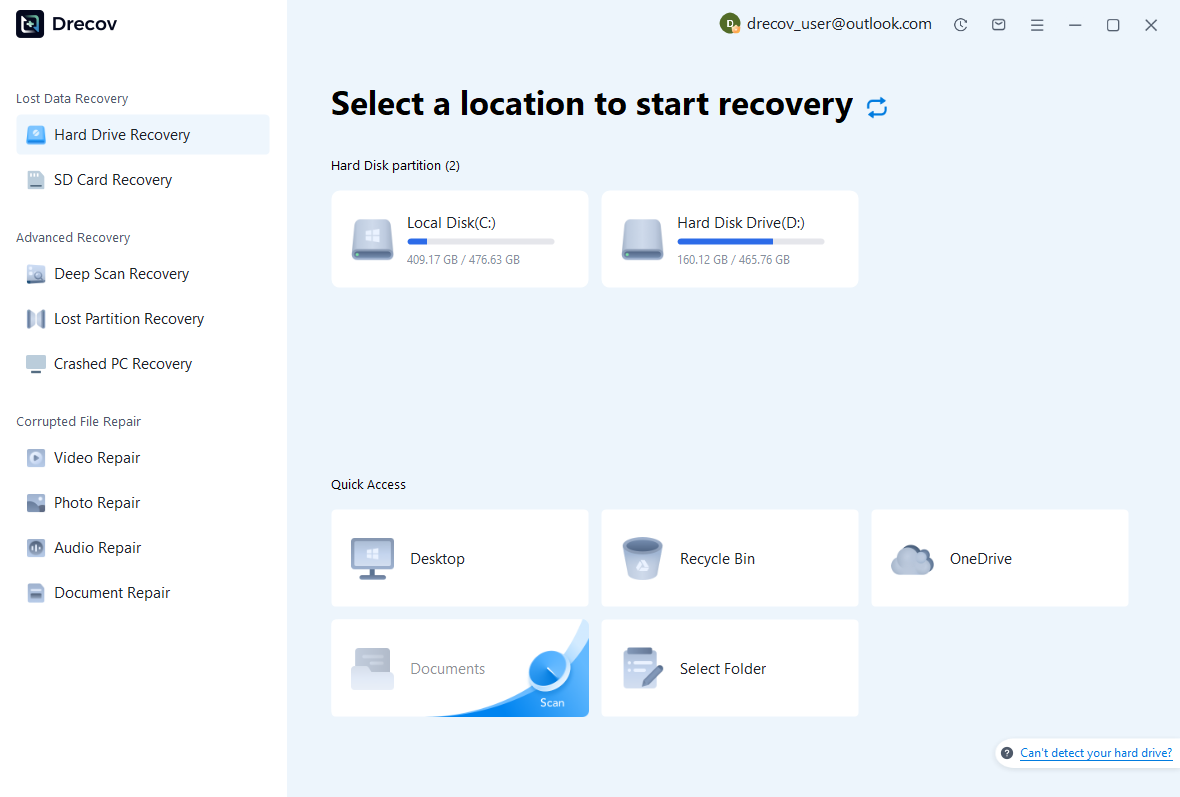
Step 1: Select the Volume Holding the Missing Map Resources
Choose the storage that held the actual map, tileset, or image. If resources lived elsewhere from the project, record those locations as separate targets. Avoid installing recovery software or exporting new game builds onto the affected volume. Confirm device identity through the original path and capacity, and reserve another healthy destination for candidates and your resource-relationship inventory.
Step 2: Compare Native Files and Resource Candidates
Review available names, paths, dates, sizes, and supported previews. Preserve competing map and tileset versions separately. Compare source-image dimensions and layout after recovery rather than choosing by basename alone. Retain associated templates and project definitions when they survive. A visually familiar atlas and a native map file become useful together only after you verify their identities and expected relationships. Before changing the only candidate, compare the procedure with the official recovery documentation.
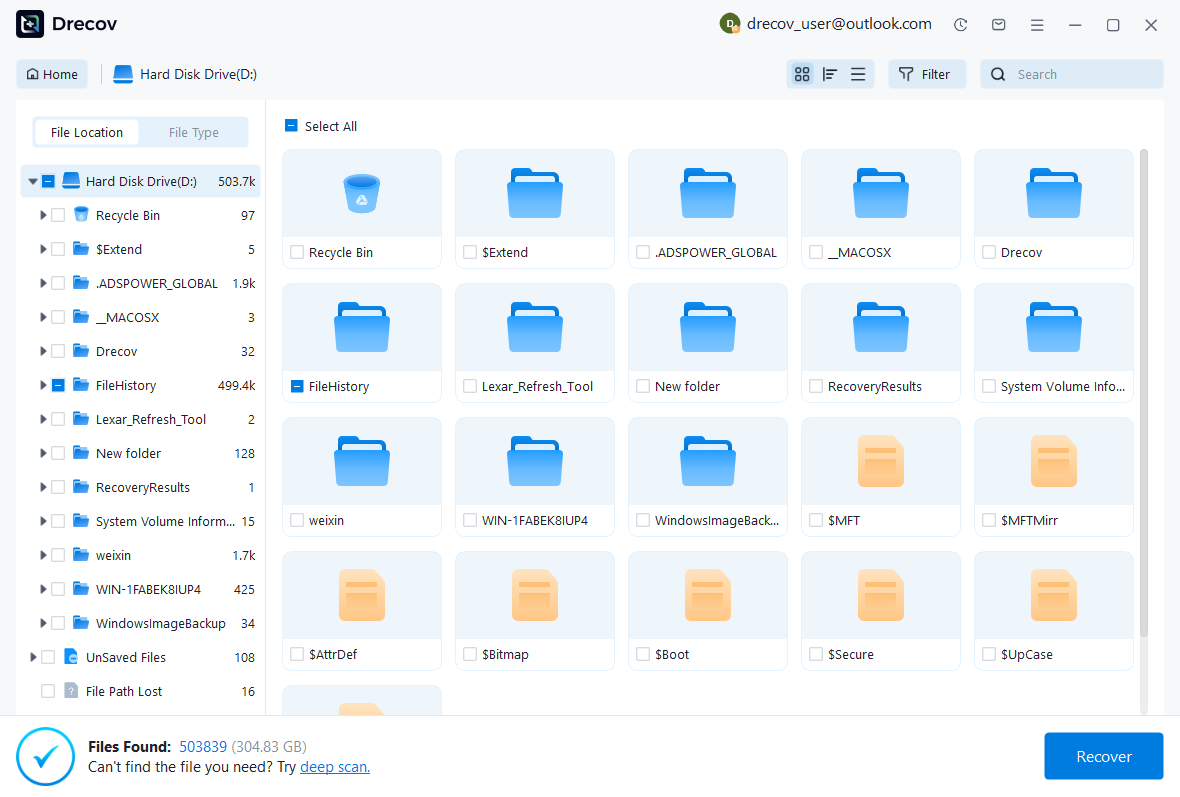
Step 3: Recover Elsewhere and Validate a Coherent Copy
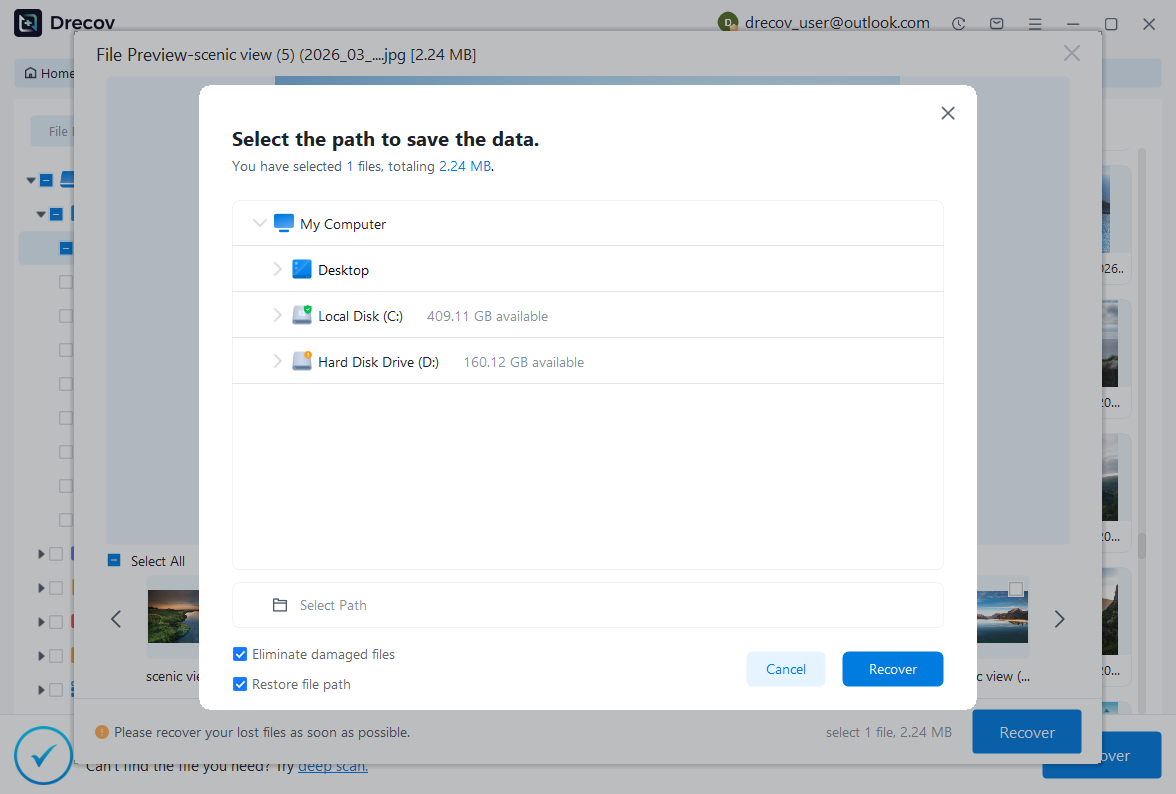
Save candidates to the separate destination, then assemble a trial project from copies while retaining the original structure. Reconnect verified resources, inspect representative tiles and objects, and save a new accepted map. Reopen it and test the relevant runtime workflow. Keep raw recovered candidates unchanged until both editor content and project behavior meet the recovery goal, with reconstruction clearly documented.
Preserve a Map Set You Can Explain
Record which native candidate supplied the map, which tileset and image versions belong with it, and which object or terrain regions you rebuilt. Include unresolved resource dependencies explicitly. This gives you a reviewable accepted baseline and a practical list of remaining work. Preserve the complete useful tree independently before continuing design or removing old candidate resources from the active project.
- Confirm map identity, layer structure, orientation, and important occupied regions.
- Verify matching tilesets, source images, templates, objects, and custom properties.
- Reopen a fresh copy and test representative content through the real project loader.
- Back up the coherent resource tree and document reconstructed or missing details.
Protect Maps and Resource Identities Together
Use version control or deliberate complete project copies for native maps and their companions. Include external tilesets, source art, and shared definitions that live outside the obvious map folder. Keep a visual reference for comparison, but retain native data when editability and gameplay properties matter. An image of the map preserves appearance while omitting many relationships needed for future changes.
Finally, test one complete copied map from another location. Inspect a transformed tile, an object property, and a distant region before exporting or loading it normally. This exposes missing paths and mismatched atlas versions before a real incident. A verified map backup should preserve the structure and meaning of the project, not merely enough pictures to make its first screen look familiar.