







Confirm That You Are Using a File-Based Graph
Logseq has different storage models, and recovery instructions for a file-based graph should not be applied automatically to a database graph. This guide concerns graphs whose notes exist as ordinary Markdown or Org files in a folder. Identify your actual workflow first. A database export, local database backup, and a folder of page files are different kinds of evidence and need different supported restoration procedures.
For a file graph, missing notes can reflect the wrong graph folder, a moved file, an overwritten page, or a deleted source document. A broken block reference can also make content seem absent even when its source survives. Record the graph path, application version, and incident time. Preserve readable data before reindexing, clearing application state, or changing synchronization behavior.
Preserve Live Notes and the Complete Graph Folder
If useful text remains visible, copy it to a separate safe document or export it through an appropriate supported workflow before refreshing. Preserve the accessible graph folder, including pages, journals, assets, configuration, and actual backup material. Keep their structure intact. A collection of page files without its attachments and relationships may recover words while losing important context and the ability to navigate the notes properly.
If another device holds the desired state, preserve it independently before allowing synchronization changes to propagate. Avoid editing both devices while you compare versions. A newer timestamp can represent an accidental overwrite rather than the best note. Keep each surviving source separate and record where it came from. The goal is an accepted coherent graph, not immediate agreement between devices on an unverified replacement.
Free Method 1: Inspect the Actual Page and Journal Files
Search the correct graph folder for a distinctive phrase from the missing note. Check both pages and journal locations, and inspect actual file contents rather than only the application’s search results. A note can survive on disk while the application shows another graph or an outdated view. Preserve the file before changing its name or editing it so you retain a reliable comparison source.
Confirm the correct graph through its full path and recognizable content. Similar graph names can belong to separate experiments or older copies. A cloud-synchronized folder can also differ from the path you expected after moving computers. If you find the note in another existing graph, copy the useful evidence separately before merging. Do not combine whole folders indiscriminately merely because their top-level names match.
Separate Search and Index Problems from Source Loss
If the source file contains the intended note but the application does not show it correctly, investigate supported graph and indexing behavior after preserving the data. Reindexing reads existing source; it does not recreate a deleted page. Keep that limit clear. A successful index refresh can restore access to surviving content, while an absent source file still needs a real backup or another recovery source.
Check page naming and namespaces before assuming a source mismatch. A page title shown in the application can relate to filesystem names through version-specific conventions. Use actual contents and supported behavior to identify the note. Avoid bulk renaming during diagnosis, because names and properties may help connect recovered files to their original context. Preserve the raw graph before any organization changes. For the storage-level causes behind this step, use the Word document recovery.
Free Method 2: Inspect Existing BAK Copies
File-based Logseq workflows can create backup material under the graph’s logseq/bak area during certain operations. Inspect what actually exists in the preserved graph. This is not a guarantee that every edit or every page has a complete history. Compare candidates around the incident by content, not only by date, and keep raw backup files unchanged while you extract useful versions.
Open a candidate copy as text and compare the specific missing blocks. Check properties and identifiers along with visible prose. A backup can contain the desired sentence but represent an older surrounding structure. Save the useful candidate separately before deciding whether to restore a complete file or merge selected blocks. Avoid replacing the active graph while multiple devices are still changing the same note.
- Confirm a file-based graph and preserve its complete accessible source tree.
- Search real page and journal files for the intended content before changing the index.
- Inspect existing backup candidates and compare the missing blocks and their context.
- Restore or merge reviewed material on a trial copy, then verify links and attachments.
Restore the Smallest Coherent Note State
Suppose an older page contains a missing decision while today’s page includes valid follow-up tasks. Keep both and compare the relevant blocks. A selective merge can recover the decision without removing later work. Preserve its nested structure, properties, and associated reference identifiers where applicable. Copying words alone can break references that depend on the original block identity.
If you reconstruct an identifier or reorganize blocks, record that as a new repair. Do not invent a historical identity merely to make one broken reference disappear. Inspect other uses before changing a shared target. A recovered block can have several incoming references, so a local-looking edit can affect navigation elsewhere in the graph. Keep the raw candidate available until representative references resolve as intended.
Free Method 3: Use an Existing Versioned Graph Copy
If you already versioned the file graph with Git or another deliberate history workflow, inspect the relevant committed state in a separate working location. Do not reset the active graph and discard uncommitted notes. A repository revision can provide a coherent baseline, but it may omit recent changes that never reached a commit. Compare it with backup files and surviving device states before accepting a result.
Check whether the repository includes actual assets or only page text. A restored graph can show links while attachments remain missing. Also verify ignored files and any large-file handling used by the workflow. Keep the recovered source tree complete enough for the note’s purpose, and record what the environment must supply. A commit identifier alone is not evidence that every image or PDF was protected.
Treat Cloud History as a Conditional Extra Source
If you previously used a service that exposes real page or file history under your legitimate account, inspect the actual retained candidates. This can be useful, but availability and retention depend on the service and plan. Signing up after the incident does not create earlier versions. Preserve a useful remote candidate separately before replacing local files or changing synchronization settings. For the exact application behavior, consult the official recovery documentation.
A paid synchronization feature should not be described as universally free recovery. The no-additional-cost approach here relies on data and access you already have. Keep cloud-only history distinct from local BAK files and repository states. Each source can preserve different content, and a candidate still needs inspection for meaningful text, block relationships, and the correct graph context before it becomes the accepted version.
Verify Block References and Page Relationships
After restoring content, inspect important block references, page links, properties, and nested outlines. A note can look complete in isolation while references elsewhere point to a missing or duplicated target. Test representative incoming and outgoing links. Use the actual expected relationship rather than accepting any page with a similar title. This is especially important when several candidates contain overlapping copies of the same note.
If the recovery introduced duplicate pages or blocks, preserve the pre-cleanup graph before resolving them. Compare identifiers and content deliberately. Deleting a duplicate-looking block by visible text alone can remove the target used by other notes. Keep a short mapping of which source supplied the accepted block and which obsolete copy you remove. That record makes graph cleanup reviewable instead of turning it into another uncertain loss.
Inspect Journals and Date Context
A recovered journal entry needs its date and surrounding context as well as its wording. Compare the expected day, linked tasks, and neighboring entries. A file copied from another graph can use a different naming convention or represent another time period. Preserve the source filename and content before normalization. Do not move entries into a date simply because their text seems broadly related to that day.
For tasks, inspect status, scheduling information, and references to later updates. Restoring an older task block can reintroduce an already completed action or remove a valid follow-up. Recovery should preserve the historical evidence while keeping the accepted current state clear. If you merge old and new task information, record the decision so another reader understands which parts are recovered history and which reflect your present reconciliation.
Recover Attachments with Their Actual Notes
A file graph can refer to images, PDFs, and other assets stored beside its page files. Check the actual target for important attachments after recovery. A link icon or filename is not proof that the file opens fully. Preserve candidate assets and compare their contents with the note. A similarly named PDF can belong to another edition and make references misleading even when the link resolves.
Keep the folder relationship intact where possible. If assets moved, repair the accepted copy deliberately rather than rewriting all links in the only surviving graph. Test a representative image and a multi-page document before broad acceptance. If an attachment remains missing, list it explicitly. A recovered page with its prose intact can still be only a partial result when its supporting evidence did not survive.
Check PDF Annotation Context
If your notes refer to a PDF page or annotation, verify the exact source document and page mapping. An updated PDF can insert pages or change content while keeping the same filename. A recovered reference may therefore point to the wrong passage. Compare the actual quotation or diagram and preserve the original candidate document when available before reconnecting a different edition. A comparable recovery case with useful validation checks is Recover Joplin Notes: Revisions, JEX Archives, and Missing Attachments.
Do not silently rewrite a citation from memory to make a broken link look complete. Keep uncertain references visible and use legitimate source material to resolve them. A reconstructed citation can be useful, but it is a new editorial repair rather than recovered original evidence. This distinction matters when the graph supports research, compliance notes, or another task where precise attribution and context are important.
Prevent Synchronization from Overwriting the Trial
Before replacing a file with an accepted candidate, understand which process currently synchronizes the graph. Preserve all useful states and avoid simultaneous edits during reconciliation. Follow the supported workflow for the service you actually use. Do not combine several synchronization systems casually while diagnosing conflicting note versions, because that can make it harder to identify which process changed the file.
After the accepted graph is coherent, resume ordinary synchronization deliberately and compare the actual content in the appropriate authorized view. A green status icon is useful information, but it does not prove that the desired historical paragraph is present. Check the note and its key relationships. If the wrong state returns, preserve the observed difference and investigate the synchronization source rather than repeating unrecorded manual replacements.
Keep Database-Graph Recovery Separate
Database graphs have their own storage and backup behavior. Do not apply file-graph BAK instructions, Markdown renaming, or source-folder reindex assumptions automatically to them. If you identify a database graph, preserve its actual supported backups or exports and consult the version-specific documentation. The presence of familiar page names does not make its internal storage interchangeable with ordinary page files.
Likewise, importing a file graph into another storage model is a migration, not proof of complete historical recovery. Export and import capabilities can preserve different kinds of metadata and relationships. Keep an unchanged accepted source before attempting conversion and verify what transfers. This guide’s file-level methods should remain scoped to the file-based evidence they actually examine rather than promising recovery across every Logseq architecture.
Use Exports and Published Copies with Known Limits
An existing export or published copy can preserve useful readable material when native file history is incomplete. Inspect what it contains and keep it unchanged as evidence. It may omit hidden properties, original block identifiers, local attachments, or later edits. Continuing from that source can be practical reconstruction, but it should not be described as restoring the exact original editable graph state.
If you reconstruct from a reading export, prioritize irreplaceable information and its source context. Keep new notes distinct until review and label uncertain wording. A polished reconstructed page can conceal a missing historical detail if its origin is not recorded. Preserve the best available native fragments alongside the export so a later recovery can use them without confusing new organization work with original source data. When the missing project was stored on a portable device, also review the Hard drive recovery.
Test the Accepted Graph Independently
Open a copied accepted graph through a supported workflow and inspect the same page, journal, and attachment checkpoints. Confirm that useful notes remain present after the application reads the source again. Test important links and a representative task relationship. This shows whether the recovery is durable beyond an initial live view or an editor cache that happened to contain useful text once.
Keep the accepted copy in a normal protected location and retain raw candidates separately. If some content remains partial, create a concise inventory rather than leaving uncertain fragments mixed with the current working notes. This gives you a clear endpoint and a practical reconstruction plan. A useful recovered graph should support the tasks that matter, with its remaining limitations visible to the person who will rely on it.
Recognize Storage Problems before More Graph Writes
If unrelated files fail to read or the device disconnects, preserve readable data before repeated reindexing and synchronization experiments. Avoid generating new large exports on the affected source volume. The issue may extend beyond Logseq’s display or graph settings. Choose a preservation approach appropriate to the condition of the storage rather than assuming every missing note is an indexing problem.
For a healthy source with a recent deletion of real page files, a targeted scan may add candidates after existing backups and versions have been checked. On storage that has overwritten or discarded deleted blocks, recovery can be limited. No reindex operation can recreate absent source text from its former links alone. Keep claims tied to actual retained files, backups, and inspected note content.
Reconcile an Older Decision Block with Newer Tasks
A recovered page can restore the original decision while an active journal contains later follow-up work. Compare their relationship before replacing a complete source file. Keep both candidates and identify which blocks form a coherent current note. Preserve relevant identifiers and nested structure when they are supported by the actual evidence. Copying only the visible wording can break references that other pages use to explain the decision.
If you reorganize the accepted material, preserve a raw recovered baseline first. Record new page moves or identifier repairs separately. This makes the result reviewable and helps distinguish recovery from ordinary knowledge-base cleanup. A familiar-looking page can otherwise conceal that a later task became detached from its historical context or that a duplicated block displaced the target of existing references.
Verify Attachment Editions and Annotation Targets
A PDF with the correct name can still represent another edition. Compare page count and a distinctive passage before reconnecting note references. An inserted page can shift annotations while leaving the link technically functional. Keep the original recovered attachment candidate unchanged and document any deliberate replacement. A resolving link is only an access check, not proof that the note now points to the intended evidence.
For reconstructed citations or diagrams, make uncertain details visible. Use legitimate original sources to resolve them where possible, and preserve the recovered wording separately. A new clean summary can be useful while remaining different from the original note. This matters when the graph supports research or records a decision whose exact historical phrasing and supporting document should not be silently replaced by a plausible reconstruction. The vendor also documents the relevant backup or restore workflow in its official recovery documentation.
Test a File Graph without Assuming Database Semantics
Open the accepted copy as the actual file-based graph you recovered. Inspect real page files, an incoming block reference, and a journal date. Do not rely on a migration into a different storage model as your only validation. A conversion can change metadata or available features, so preserve the accepted native source before any optional migration and compare what the converted result actually retains.
After the native trial passes, protect the complete useful graph and record genuine external dependencies. Keep synchronization reconciliation distinct from source acceptance. Verify actual content after normal sync rather than relying solely on a status indicator. A clear accepted graph plus a separate raw recovery archive reduces the risk of another overwrite and gives future work an understandable starting point with any remaining gaps explicitly listed.
When Deleted-File Recovery May Help
PandaOffice Drecov may help search for an actually deleted file-graph page, journal, attachment, or existing backup on readable storage. It does not retrieve arbitrary cloud-only history or reconstruct database-graph semantics automatically. Check the correct graph path, actual source files, BAK material, and existing versioned copies first. Those sources can preserve more useful context than isolated fragments from a broad file scan.
Before scanning, identify the missing source files and original storage locations. Keep recovered outputs on another healthy destination and avoid new writes to the affected source. Check support for the relevant text and attachment formats in your installed edition. A candidate with a recognizable note title can still belong to another graph or revision, so preserve competing versions and compare their actual content.
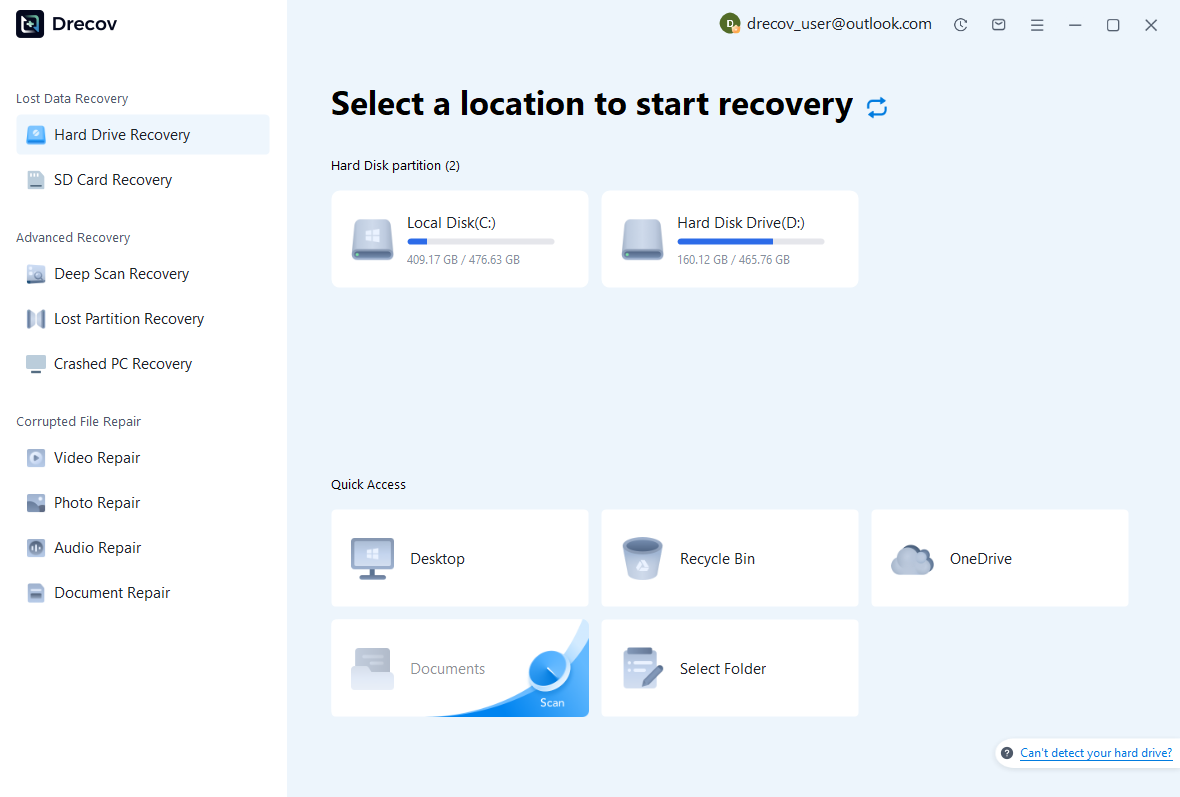
Step 1: Select the Volume Holding the File Graph
Choose the storage that held the actual page, journal, asset, or backup folder. If attachments lived elsewhere, record that separate target. Confirm the original graph path and device identity. Avoid installing recovery software or writing trial exports onto the affected volume, and reserve another healthy destination for candidates and your inventory of page and attachment relationships.
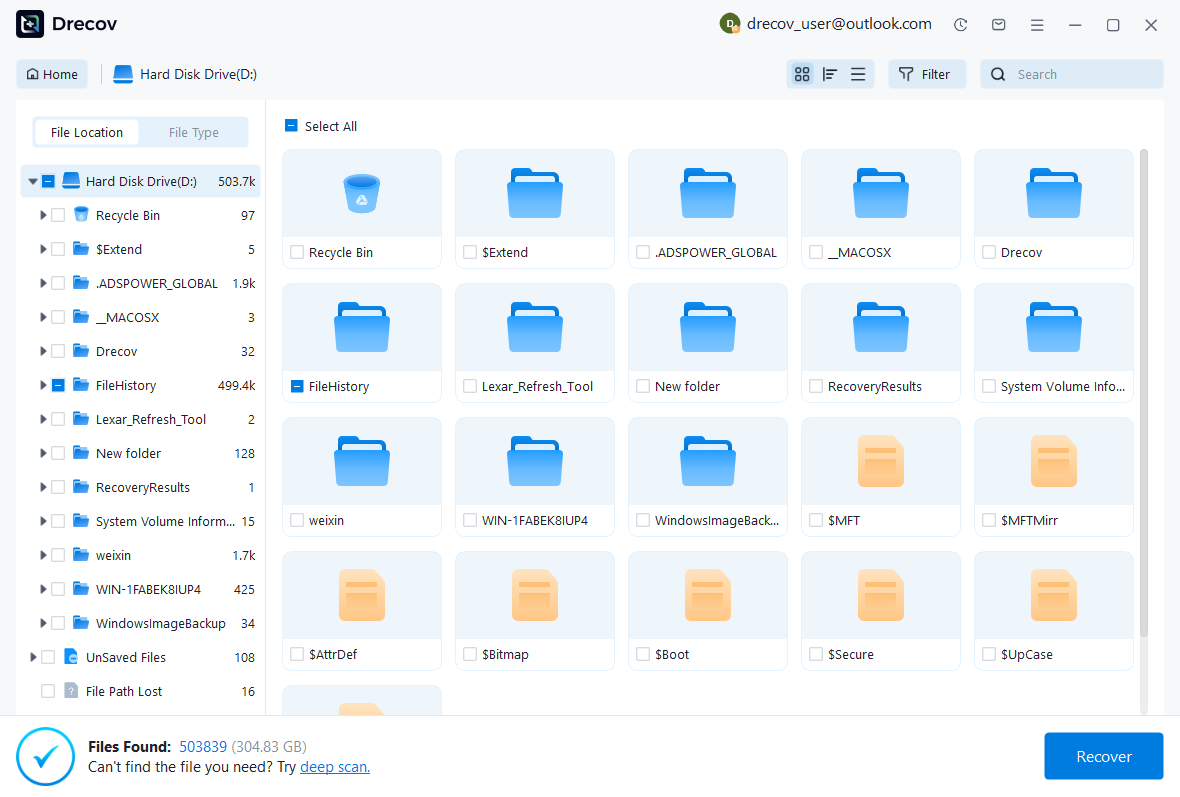
Step 2: Compare Text and Attachment Candidates
Review available names, paths, dates, sizes, and supported previews. Search recognizable phrases when possible and retain useful competing versions. Compare properties and identifiers as well as prose after recovery. A matching page title does not prove the correct block relationships survived. Keep attachments linked to their candidate context until you verify which source document belongs with the recovered note. Before changing the only candidate, compare the procedure with the official recovery documentation.
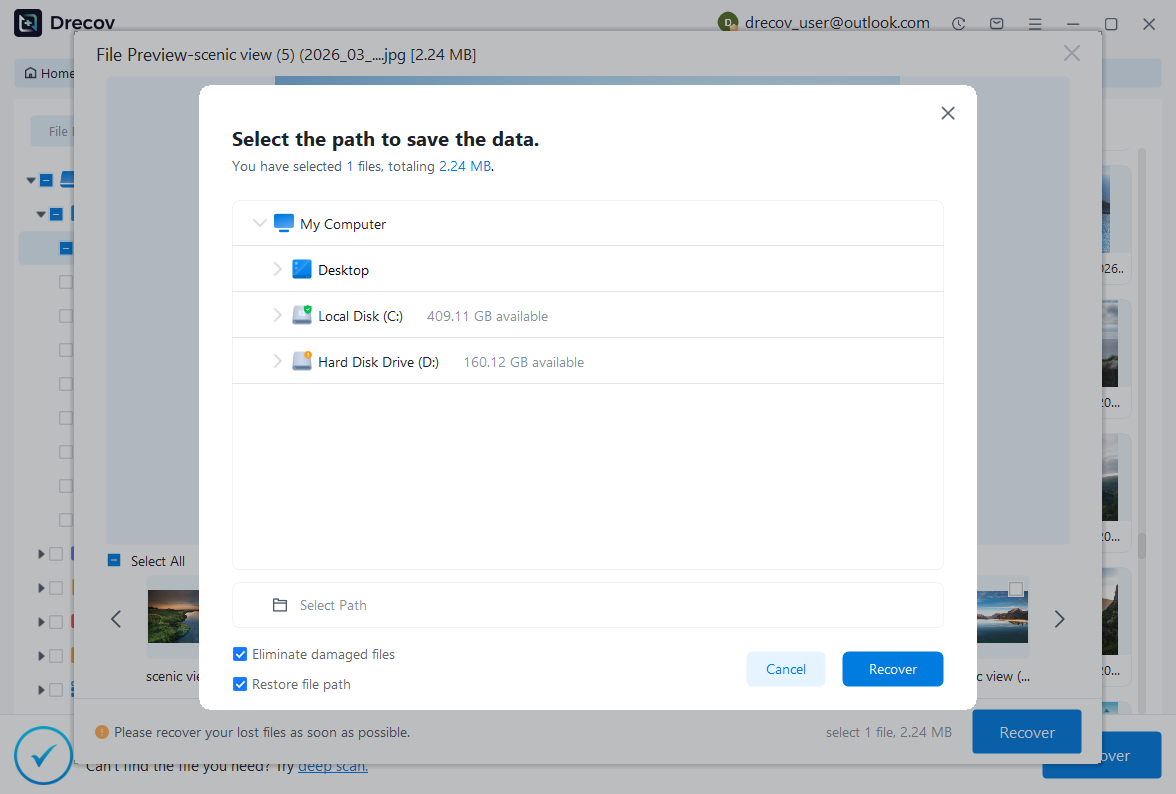
Step 3: Recover Elsewhere and Verify a Trial Graph
Save candidates to the separate destination and assemble a copied file graph without altering raw evidence. Inspect pages, journals, block references, and important attachments through the supported application workflow. Save any deliberate merge or reconstruction separately and test the accepted graph after reopening. A successful file copy alone does not establish that the complete note system or intended current task state returned.
Preserve an Accepted Information Baseline
Record which source supplied each important recovered page and which content you reconstructed. Include missing attachments or uncertain identifiers explicitly. Protect the accepted graph independently before resuming ordinary edits or cleaning candidate files. This creates a reviewable endpoint and prevents future confusion between recovered history, an older alternate graph, and a newly organized continuation of the notes.
- Confirm the file-based storage model and correct graph location.
- Verify meaningful text, journal dates, block relationships, tasks, and attachments.
- Reopen an accepted graph copy and inspect representative references and document targets.
- Preserve a verified independent copy and document unresolved or reconstructed information.
Make Future Note Protection Verifiable
Protect the complete graph relationship, including attachments and configuration needed for interpretation. Use deliberate version checkpoints or independent backups appropriate to your workflow. Treat synchronization and application BAK files as useful sources with actual limits, not as proof that every historical state exists. Keep exports as reading aids while retaining native source when identifiers and editability matter.
Finally, test restoration of one harmless note and an attachment from your independent copy. Verify an incoming block reference and the correct journal context afterward. This makes your recovery assumptions concrete before an incident. A tested graph backup should preserve the information and its connections, not merely enough filenames for the application to show a familiar list of pages.