







Separate LaTeX Source from Its Compiled Output
A LaTeX project contains editable source and dependencies that produce a PDF. Losing the TEX file is different from losing the compiled document, bibliography, or figures. A readable PDF can preserve the final appearance while omitting comments, macros, and the original project structure. Start by naming the missing item and preserving all surviving files before cleaning auxiliary output or rebuilding the project.
For example, a main source file can survive while an included chapter is missing. Another project may contain every chapter but lack its bibliography database or custom class. An editor session can also hold unsaved text that never reached the expected file. Record the editor, main document path, compilation environment, and last known good state so you can choose a recovery route that fits the actual evidence.
Preserve the Open Editor and Complete Project Tree
If useful source remains visible in TeXstudio or another editor, save a separate recovery copy before closing, reloading, or rebuilding. Include related open files and record their intended paths. Preserve the accessible project folder with figures, bibliography files, classes, styles, and configuration. A copy of the main TEX file alone may be insufficient to reproduce a document that relies on external chapter and resource files.
Keep the current PDF and compilation logs as reference evidence, but do not treat them as substitutes for source. Save the raw folder unchanged and conduct trials on copies. Avoid cleanup commands that remove auxiliary files while those files may still help identify dependencies or document structure. Their information can be useful even though they generally do not recreate the complete original source.
Free Method 1: Find Surviving TEX and Included Files
Search the actual project folder and existing complete copies for a distinctive phrase or command from the missing document. Confirm the intended main file rather than opening a similarly named experiment. A project can use several TEX files with one main document controlling compilation. Inspect include and input relationships on a preserved copy to see whether the missing text belongs to a separate chapter that still exists elsewhere.
Check the editor’s recent-file information as a location clue, not as a source backup. A listed filename can point to a moved or unavailable file without containing its text. If the source exists in another folder, copy the coherent related tree rather than moving your only surviving files during diagnosis. Preserve the original paths in a note so relative figure and bibliography references remain understandable.
Distinguish a Missing File from a Compilation Error
A failed build does not prove source loss. Missing packages, an unavailable class, or a changed engine can prevent a complete project from compiling. Read the first meaningful error and identify the actual missing dependency. Preserve source before changing commands or deleting generated data. A document that fails in a new environment may still be recoverable simply by restoring the legitimate expected toolchain.
Conversely, a cached PDF can remain readable after a source file disappeared. Check the file timestamps and actual TEX content rather than assuming the viewer reflects the current project state. A successful earlier output is useful validation evidence, but it does not establish that the source you have now includes every paragraph, equation, or figure that produced that PDF. For the storage-level causes behind this step, use the Word document recovery.
Free Method 2: Compare Existing Editor or Manual Backup Copies
Inspect actual backup files created by your editor settings, deliberate copies, or an existing project archive. Their names and behavior vary, so do not assume one universal backup extension or autosave history. Preserve candidates before opening them and compare their contents around the incident. A later backup can already contain an accidental overwrite, while an older file may preserve the missing chapter.
If an editor offers a retained recovery state, inspect it through the supported workflow for that installed version and save useful source separately. Enabling a setting now does not create an earlier unsaved document. Keep current source and recovery candidates distinct. A temporary retained buffer can be valuable, but it should become an ordinary named file before you rely on it for the next compilation or editing session.
- Save useful open source buffers and preserve the complete accessible project folder.
- Locate actual source, included chapters, and existing backup candidates by content and path.
- Compare the missing section with current source before selecting or merging a version.
- Save the accepted source separately and verify its bibliography, figures, and compilation context.
Restore a Coherent Section Rather Than an Entire Old Project
Suppose an older chapter contains a deleted proof while today’s project includes valid corrections elsewhere. Preserve both versions and recover the smallest coherent unit that contains the proof and its dependencies. Include relevant labels, macros, and references. Copying only visible prose can leave undefined commands or citations that prevent the accepted source from reproducing the intended document.
If the proof’s notation changed later, record any adaptation as new editing work. A recovered historical argument and a revised current presentation can both be useful, but they are not identical evidence. Keep raw candidates unchanged until review confirms the combined meaning. This is particularly important for scientific material, where a small symbol or assumption can change the validity of a result even though the document still compiles.
Free Method 3: Use an Existing Versioned Project
If you already use a repository or a service with retained project history, inspect an actual earlier revision under your legitimate access. Export or check out a separate copy rather than resetting the active project. Availability and retention depend on the workflow and account used beforehand. A new subscription or repository created after the incident cannot contain historical source that was never stored there.
Compare the complete revision, including bibliography databases, figures, classes, and build configuration. A repository containing only TEX files can restore prose while leaving required resources absent. Check ignored files and large-file handling. Keep the accepted project coherent before merging later changes. A slightly older complete source tree can be more reproducible than individually newer fragments with incompatible commands or figure versions.
Keep Cloud History Costs and Limits Clear
A no-additional-cost recovery route uses copies and access you already possess. It does not mean every online editor, history feature, or storage plan is free. Inspect what your current environment actually offers and preserve useful candidates separately. Do not promise unlimited historical retention or assume that a service can reconstruct an unsaved local file it never received.
If another collaborator holds a legitimate complete copy, compare its actual contents through your normal authorized process. Keep the version identity and source clear. A similarly titled shared project may represent another revision or manuscript branch. Recovering from it can be useful, but its changes need review before they replace the current document, especially when authors have edited different sections independently. For the exact application behavior, consult the official recovery documentation.
Recover Bibliography Data as a Separate Source
A bibliography database can contain citation metadata that the main source references by key. Preserve surviving BIB files and compare keys used by the document. A compiled bibliography output may preserve readable entries while omitting parts of the original database or source organization. Keep it as evidence, but do not label it a complete recovered bibliography database without inspecting what actually survived.
If you reconstruct an entry from a compiled reference list, verify its details against a legitimate original source. Do not invent a DOI, page range, or author name to make compilation succeed. Mark uncertain fields and keep reconstructed entries separate until review. A document with no missing-citation warning can still contain inaccurate references, so technical success and scholarly accuracy need separate checks.
Check Citation Engines and Styles
A recovered project may expect a particular bibliography tool and style. Record the original environment before changing it. A new build configuration can alter ordering and formatting even when the BIB content is correct. Compare the expected citations and reference list with the known output, and keep any deliberate style migration separate from recovering the source that produced the historical document.
Inspect a few representative citation cases, including repeated citations, multi-author entries, and references with special characters. A partial database can compile while dropping fields or displaying incorrect capitalization. Preserve the recovered raw data and make corrections in a separate accepted copy. This gives you both an authentic recovery source and a reviewed bibliography suitable for current use.
Restore Figures and Their Exact Versions
Inspect figure references and locate the actual source images or drawings. Compare dimensions, labels, and scientific content rather than relying only on filenames. A chart with the same name can represent another experiment or an earlier dataset. Keep candidate figures linked to their source context until you confirm which belongs to the recovered manuscript revision.
Preserve vector or editable figure sources separately from rendered images when they survive. A PDF figure can remain suitable for the manuscript while its underlying plotting data or drawing document is missing. State that limit clearly. Recovering a usable figure for publication does not automatically restore every source asset needed to revise the figure later, and those two needs may require different protection workflows.
Verify Relative Paths and Included Chapters
A project that works in its original folder can fail after copying because it relies on files outside that tree. Inspect include, graphics, and bibliography paths in the accepted source. Preserve genuine external dependencies or adapt the copied project deliberately. Do not silently rely on an old absolute path that another computer or collaborator cannot access.
Test the accepted copy from a separate normal location when practical. Confirm that the main document finds the intended chapter and figure versions without reading unrelated historical files. This exposes hidden dependencies before you call the recovery complete. A familiar-looking PDF built through accidental old paths is weaker evidence than a reproducible project whose source relationships you can explain. A comparable recovery case with useful validation checks is Recover LyX Documents: Backup Files, Emergency Saves, and LaTeX Sources.
Understand Auxiliary-File Recovery Limits
Compilation creates auxiliary files that can record labels, citations, table-of-contents material, file dependencies, and diagnostics. These can help identify missing structure or validate parts of a recovered project. They do not generally contain the complete editable TEX source. Preserve them as clues before cleanup, but do not promise a universal conversion from auxiliary output back to the original document.
For instance, a table-of-contents file may help reconstruct chapter headings while omitting the paragraphs beneath them. A label record can identify an equation reference without preserving the proof text. Use that evidence narrowly and label new reconstruction. A source file rebuilt from scattered clues may be useful, but it should not be described as an unchanged original simply because the resulting PDF resembles a previous output.
Treat PDF Extraction as Reconstruction
A surviving PDF can preserve readable prose, equations, and layout, but extracting its text does not restore original macros, comments, source organization, or all mathematical structure. Keep the PDF unchanged and inspect extracted material carefully. Columns, hyphenation, symbols, and reading order can introduce errors. Rebuilding TEX from it is a new source-writing task guided by surviving output.
For equations, compare every important operator, subscript, superscript, and grouping. A small extraction error can alter meaning while remaining visually plausible. Use original research notes or other legitimate evidence where available. Keep uncertain regions visible and seek the appropriate subject review before relying on a reconstructed derivation. A successful compilation of newly written TEX does not prove that the historical argument returned exactly.
Compile a Recovered Project Conservatively
Review recovered source and build commands before running them. Use an appropriate controlled environment, especially if candidates include unfamiliar macros or scripts. Do not enable unrestricted command execution merely to make an old project compile. Identify the actual required tool and dependency first. Recovering authentic files does not automatically establish that every historical build action remains appropriate on your current computer.
Start with the intended main document and the expected engine. Read the first meaningful error and resolve source or environment issues deliberately. Avoid making broad edits simply to silence a long cascade of messages caused by one missing input. Keep a short record of changes made during validation, separating actual recovered content from compatibility repairs introduced to reproduce the document in a different environment.
Compare the New PDF with Known Evidence
After compilation, inspect the output as a document rather than relying only on a successful exit. Check page count, important sections, equations, citations, figures, and cross-references. A document can compile while omitting an included chapter or using the wrong figure version. Compare recognizable checkpoints across the beginning, middle, and end, especially the section affected by the original loss. When the missing project was stored on a portable device, also review the Hard drive recovery.
If pagination differs, determine whether the cause is a changed environment or genuinely different content. Font and package differences can alter layout without deleting text. Conversely, missing paragraphs can hide within a superficially similar page count. Use actual text and figure identity to judge recovery. Preserve the known historical PDF and the newly compiled output separately so later review can revisit those differences.
Keep Technical Repair Separate from Editorial Revision
Once the source is usable, resist mixing unrelated rewriting into the recovery checkpoint. Save the reviewed baseline first. A focused record of restored chapters, bibliography, and figures is easier to assess than a large change combining recovery with new arguments and formatting. You can then continue ordinary editing with confidence about which content actually survived and which material you still need to reconstruct.
For collaborative work, preserve clear version identity before returning the result to the normal project workflow. Inspect the final differences and identify missing or newly rebuilt sections explicitly. A polished manuscript can conceal uncertainty if the recovery history is undocumented. A concise source note helps coauthors review the meaningful changes without assuming that every historical macro, citation, and figure source returned intact.
Verify the Destination Can Save Reliably
If the loss followed an interrupted save or storage-full event, test a normal healthy destination with disposable source before relying on it. Save, reopen, and compile a small harmless project. This separates a destination problem from corruption in the recovered manuscript. Do not keep overwriting valuable candidates on a path that still fails or silently redirects files unexpectedly.
Then perform the same save-and-reopen check on the accepted project copy. Confirm the intended main file and inspect the actual saved source. Keep raw candidates unchanged until the result is durable. A useful editor buffer or one successful PDF build is not enough if the accepted source cannot survive an ordinary close and reopen from its final protected location.
Recover a Chapter Together with Its Argument
A recovered proof or derivation can depend on definitions introduced in another chapter. Compare those assumptions before merging an older section into current source. Preserve the original candidate and inspect notation, labels, and referenced results. A document can compile while combining incompatible definitions from different manuscript versions. Validate the mathematical or scientific meaning separately from the technical build result.
If you adapt notation or rebuild a missing transition, record that as new editorial work. Keep the recovered passage available for comparison and seek the appropriate subject review when needed. A polished replacement should not hide uncertainty about the original argument. This makes the accepted manuscript useful while distinguishing authentic recovered text from changes required to create a coherent current document.
Compare Figure Data and Rendered Artifacts
A recovered chart image can be sufficient to reproduce a paper while its source dataset or plotting script remains missing. Inventory those assets separately and record what future editing remains possible. Compare labels, units, and actual plotted content with the manuscript revision, not just the image filename. A familiar-looking chart from another experiment can be more misleading than an obviously absent figure. The vendor also documents the relevant backup or restore workflow in its official recovery documentation.
If only a rendered figure survives, preserve it unchanged and document the limitation. Recreating the plot from inferred values is reconstruction, not recovery of original data. Keep any new dataset or drawing under a separate name and explain its source. This protects the integrity of the accepted manuscript and helps future collaborators understand which assets support exact reproduction and which need additional original evidence.
Verify a Clean Build without Losing Useful Clues
Keep the original auxiliary files and historical PDF before testing a clean controlled build. They can provide dependency and reference clues even though they do not generally recreate the complete source. Build the copied accepted tree through the intended engine and inspect the actual output. Compare the affected chapter, a cross-reference, a citation, and a figure rather than trusting page count alone.
After the build passes, save the source, necessary dependencies, and environment note independently. Retain the historical PDF as a comparison reference and the new output as evidence of the accepted project. List any reconstructed section or unavailable figure source explicitly. This creates a clear stopping point based on reproducible content and honest limits, rather than a successful command that may still have used forgotten files outside the protected source tree.
When Deleted-File Recovery May Help
PandaOffice Drecov may help search for actually deleted TEX source, bibliography data, figures, or existing project backups on readable storage. It cannot infer the original macros and comments from a compiled PDF or guarantee reconstruction of an unsaved buffer that never reached storage. Check live source, included files, actual backups, and existing version history first because those sources preserve richer project context.
Before scanning, stop unnecessary writes to the affected volume and keep recovered outputs on another healthy destination. Identify the missing files and original paths. Check format support in your installed edition, including non-previewable text or custom source formats. A candidate with a familiar title or extension still needs content and compilation checks before you can accept it as part of the intended manuscript.
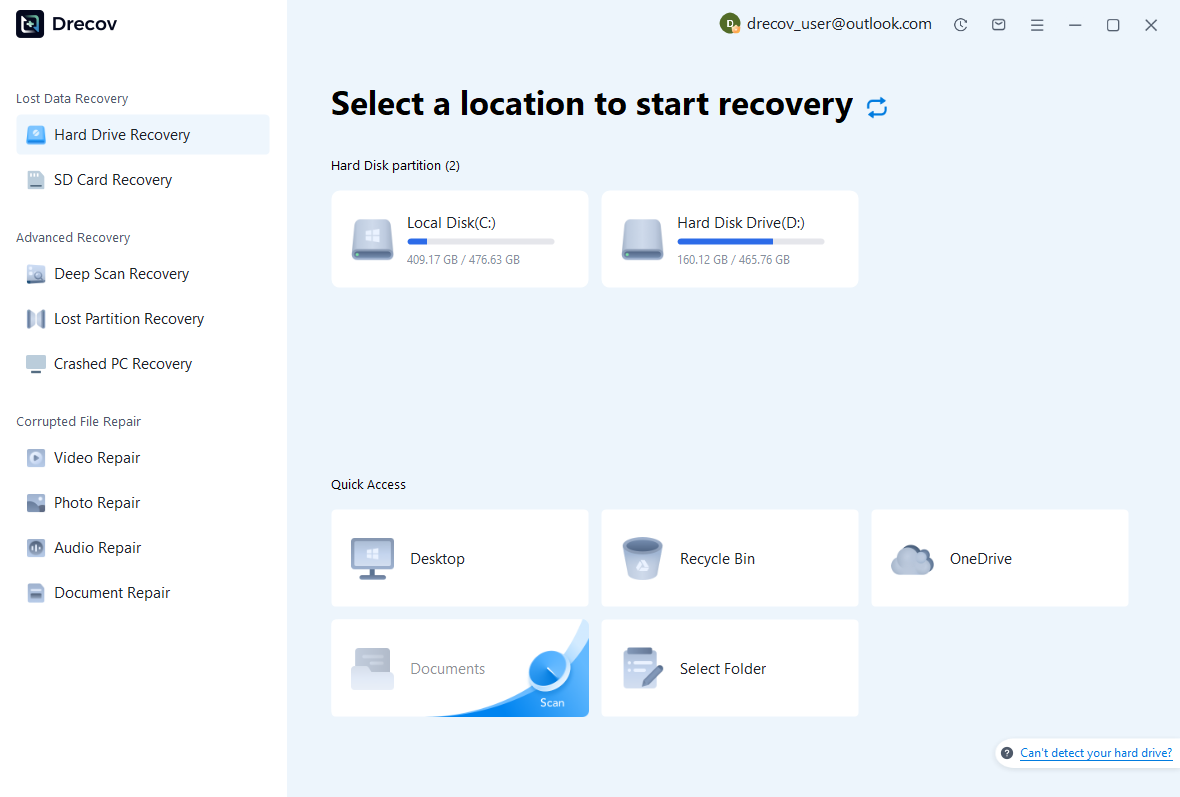
Step 1: Select the Volume with the Missing Source Tree
Choose the storage containing the actual TEX file, chapter, bibliography, or figure. If resources lived outside the project folder, record those targets separately. Avoid installing recovery software or generating new compilation output on the affected volume. Confirm device identity through the original path and capacity, then reserve a separate healthy destination for candidates and your project-relationship inventory.
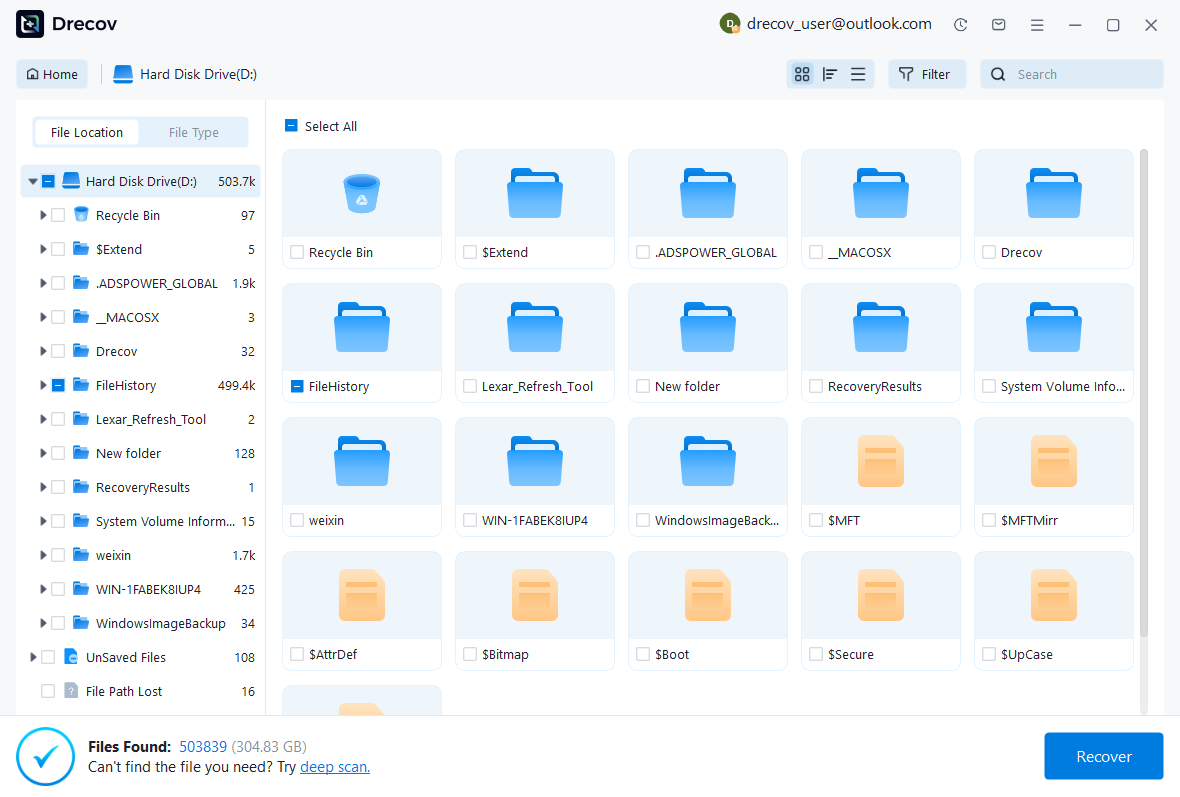
Step 2: Compare Source and Dependency Candidates
Review available paths, names, dates, sizes, and supported previews. Keep competing manuscript revisions and associated resources separate. Search distinctive source phrases where possible, and inspect labels, commands, and document boundaries after recovery. A newer candidate may reflect an interrupted save. An older coherent tree can be more useful than a collection of fragments that parse individually but never belonged to the same manuscript version. Before changing the only candidate, compare the procedure with the official recovery documentation.
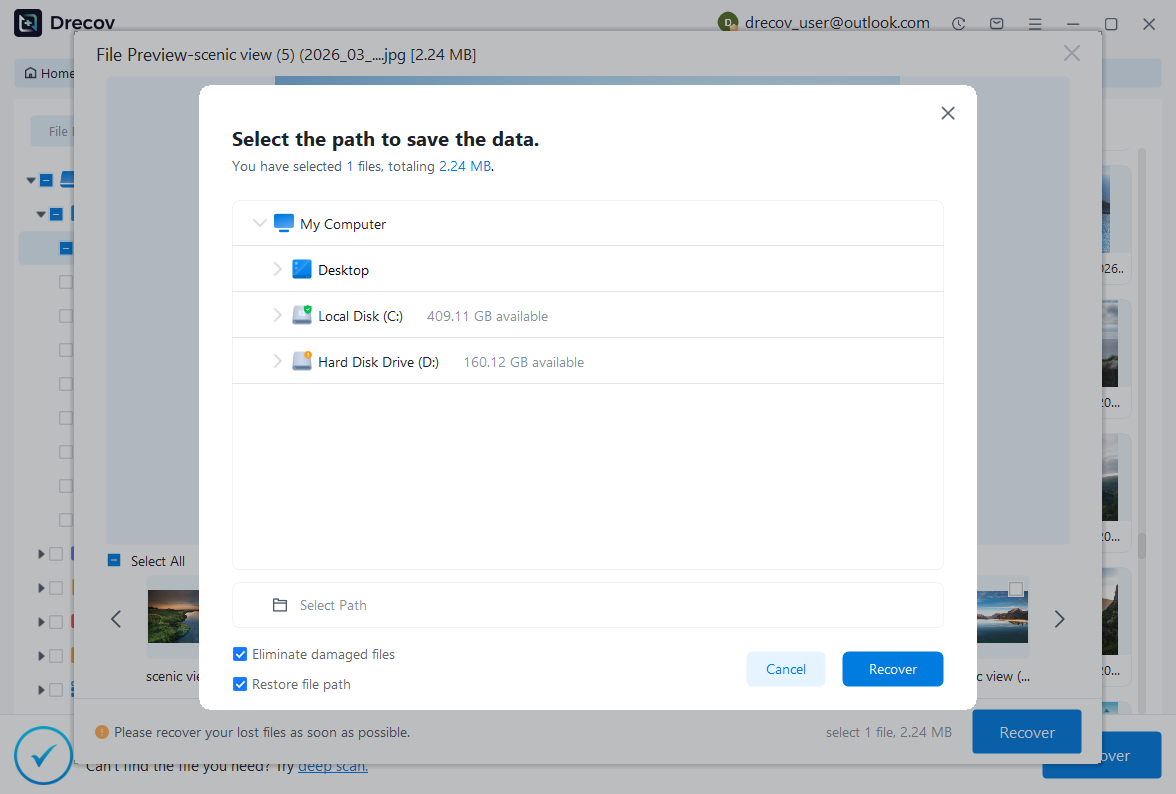
Step 3: Recover Elsewhere and Validate a Copied Project
Save candidates to the separate destination and use copies for merging and controlled compilation. Verify the main file, included chapters, bibliography, and figures before building. Inspect the resulting PDF against known evidence and save a fresh accepted source tree. Keep raw recovered files unchanged until the content and relationships pass review, with reconstructed text and environment adaptations identified clearly.
Preserve a Reproducible Accepted Manuscript
Record which source versions supplied the accepted document and which sections you rebuilt from output or notes. Include missing figure sources and uncertain references explicitly. Preserve the complete useful tree independently before continuing editorial work or cleaning auxiliary evidence. This gives you a dependable baseline based on reproducible content rather than a familiar PDF whose editable source relationships remain uncertain.
- Confirm the intended main document and complete included source sections.
- Verify bibliography data, figures, labels, macros, and relevant environment requirements.
- Reopen the saved project and inspect a controlled build against known document checkpoints.
- Protect the accepted source tree and document partial recovery or reconstruction honestly.
Protect Source, Dependencies, and Outputs Differently
Keep editable TEX, bibliography databases, and figure sources in a deliberate backup or version workflow. Preserve the compiled PDF as a reading and validation reference, while recognizing its different recovery value. Record important toolchain assumptions when reproducibility matters. A file list or successful historical output alone does not establish that every source needed for future revisions is protected.
Finally, test restoration of one small complete project from an independent copy. Open its main source, follow an included chapter, compile it safely, and inspect a citation and figure. This exposes missing paths and unprotected dependencies before an incident. A verified LaTeX backup should support continued editing and reproduction, not merely provide a document you can read after its original source has disappeared.