






Recover the Calibre library rather than just its book list
To recover a Calibre library, first locate the original library folder and preserve it as a complete set. A blank book list can mean that Calibre opened another library, not that your ebooks disappeared. Therefore, compare the selected library path with the folders that actually contain your books before rebuilding the database or adding everything into a new collection.
A Calibre library includes ebook formats, covers, and catalog information. Its metadata.db file describes the collection, while individual book folders may contain metadata.opf files that support a limited database rebuild. Those pieces have different roles. Recovering the catalog does not recreate a missing EPUB, and finding an EPUB does not restore every custom column or saved search from the original library.
Record the missing content precisely
Write down whether you lost the entire book list, selected titles, tags, custom columns, or actual ebook files. Then identify a few known books by title, author, and format. These examples give you a content check for recovery candidates. A library with a familiar name can still be an old copy that lacks the specific reading material or catalog work you need.
Close Calibre normally before making an ordinary filesystem copy of its library where practical. Then preserve the whole directory and its subfolders. Do not reorganize author and title folders by hand during diagnosis, because Calibre manages that structure. A separate preserved copy gives you a stable source while you test the selected library, database rebuild, or re-import routes.
Free route 1: switch to the correct existing library
- Note the library path currently selected in Calibre.
- Locate the complete existing library folder that contains your known books and metadata.db.
- Use the library menu’s Switch/create library control to select that existing library.
- Compare known books, formats, tags, and custom columns before making new changes.
This route is appropriate after moving a folder, changing a user account, or selecting the wrong library. It restores access to content that still exists. It does not retrieve deleted files. Also select the top-level library directory rather than one author’s subfolder, since the application needs the catalog and managed book structure together.
Check filters before assuming books are absent
Clear a restrictive search and inspect whether a virtual library limits the visible titles. Then search for a known author or title in the intended full collection. A filter can hide existing books without changing the underlying library. Conversely, finding an entry does not establish that its ebook format remains available, so inspect the actual formats associated with a representative title.
If several libraries have similar names, compare a distinctive recent addition and a known custom column. Record the path of the correct candidate. Do not merge libraries simply to eliminate uncertainty about which one is current. First establish what each contains, then plan any deliberate consolidation separately from recovering access to the original collection.
Free route 2: reopen a complete existing library copy
- Find an existing copy of the whole Calibre library from a known milestone.
- Preserve that source and place a working copy in a separate test location.
- Select the copied library through Calibre’s normal library interface.
- Compare catalog fields and open representative ebook formats before accepting it.
A complete library copy can preserve more than a reconstructed catalog. However, its age matters. Check whether it includes a recent book, a corrected author name, and the custom information you rely on. A backup can be structurally valid while predating important additions. Keep the current damaged source while evaluating what newer content it might still supply.
Inspect several formats independently
A single title can contain EPUB, PDF, or other formats. Open the formats you actually need and inspect a passage beyond the first page. A cover or metadata entry can survive while the book file is missing or damaged. Also compare file sizes and expected editions as clues, but let the actual reading content determine whether the recovered format is useful.
For a book with several editions, inspect the title page and a distinctive chapter. Similar filenames do not establish identical content. Keep useful candidates separately until you choose the intended edition. This prevents a recovery that restores the book list but silently substitutes an older or incomplete text for the version you meant to preserve.
Free route 3: rebuild the catalog from surviving OPF data
- Preserve a complete copy of the affected library before attempting maintenance.
- Confirm that ebook folders and existing metadata.opf files survive.
- Use Library maintenance and Restore database on the working library copy.
- Inspect the rebuilt catalog and document information that the surviving OPF files did not restore.
A rebuild uses metadata that already exists in the library’s book folders. It cannot infer every lost catalog setting. Saved searches, user categories, conversion settings, and other database-level information may not return through this route. Therefore, prefer a verified complete library copy when available, and treat rebuilding as a distinct recovery with explicit limitations.
Compare the fields that matter to your workflow
Check title, author, series, tags, cover, and any relevant custom fields against known examples. Then inspect whether each catalog entry points to the expected ebook formats. A completed maintenance operation only establishes that the process finished. The content checks show whether the rebuilt collection supports your actual browsing, reading, and organization needs.
If an OPF is older than a later catalog edit, the rebuild may restore the older value. Keep a note of such differences rather than assuming the reconstructed database represents the final historical state. You can correct verified fields afterward in a new milestone, but those corrections are new catalog work based on evidence, not direct recovery of the missing database.
Free route 4: re-add surviving ebook files into a new library
- Create a separate empty recovery library through Calibre’s supported interface.
- Add copies of surviving ebook files that you can identify and open.
- Review duplicates, editions, metadata, and associated formats deliberately.
- Keep the new collection separate from the original library and label it as reconstruction.
This route can rescue access to reading content when no usable catalog remains. However, re-adding files does not reconstruct every original record relationship or custom setting. Do not add files manually inside an existing managed library directory. Use the application’s import controls so that the new library structure remains consistent with its database.
Avoid accidental duplicate editions
Compare author, title, edition, and format before merging records. Two files with the same title can contain different editions, while two differently named files can contain the same text. Preserve both until you establish their roles. A smaller collection of verified records is more useful than a large import whose duplicates and missing formats remain unexplained.
If a legally obtained original remains available from your own device or authorized download source, preserve that file as another content candidate. This can replace a missing ebook without restoring the original Calibre metadata. Keep those roles distinct and avoid claiming that a newly downloaded book recovers the catalog work you had previously attached to it.
Diagnose a title that appears but will not open
Inspect the formats listed for that record and the expected file location through Calibre’s interface. Then compare the actual ebook file in a preserved copy. A visible catalog entry can outlive its format, while a moved or unavailable storage location can make an intact format inaccessible. Record the exact error before deciding whether you need path correction, file replacement, or deleted-file recovery.
Separate a reading problem from a catalog problem
Try a verified copy of the ebook in an appropriate reader without modifying the original. If it opens there, investigate the Calibre context or format handling. If the file itself fails, compare another known copy or edition. Rebuilding metadata.db will not repair every damaged EPUB or PDF, so choose a route that targets the missing information.
Also inspect whether the file is fully available locally. A visible name in a synchronized folder can represent unavailable content rather than a complete ebook. Confirm that the actual bytes are present before diagnosing corruption. Keep the library in a supported stable storage arrangement while testing, and preserve the original source before making migration changes.
Reconcile an older catalog with newer books
A useful recovery may combine a clean older library with ebook files that survive from later additions. Start by preserving both sources. Then identify the specific newer titles and import copies through the application rather than merging managed directories manually. Compare duplicates and metadata afterward, keeping the older source unchanged as a reference.
Preserve useful metadata without inventing history
For each reconstructed title, record whether its metadata came from an OPF, embedded book information, or manual correction. A title and author can be recoverable while your personal tags remain missing. State that gap. This helps you resume organization work without treating inferred values as if they came from the original database.
Inspect custom columns and saved searches in the accepted baseline before adding new records. If an older library preserves those settings, it may provide a better foundation than a fresh database rebuild. Compare the actual workflow you need, such as browsing a series or filtering a reading category, then choose the candidate that minimizes verified reconstruction work.
Use a small acceptance sample before a full catalog cleanup
Choose books that cover your main formats, a recent addition, and a record with distinctive metadata. Open each and inspect the relevant catalog fields. Then test a normal search and library switch. These checks reveal different failure modes without requiring you to read every book before deciding whether the library is a useful recovery baseline.
Review incomplete results explicitly
If one format remains missing, keep its catalog entry only with a clear note that the content still needs replacement. Likewise, a recovered ebook with uncertain edition information should remain separate from the accepted record until you compare it. Making these gaps visible prevents an apparently complete book count from concealing missing reading content.
After corrections, close and reopen the accepted library and repeat the representative checks. This confirms that the saved catalog and formats work outside the previous session. Then preserve a complete copy of that verified milestone. A folder containing only metadata.db is not the same as a complete library backup with its ebook formats and supporting files.
Compare a Calibre recovery with the way you use the library
Choose acceptance examples that represent your real collection rather than only its book count. Include a recent addition, a series entry, a book with multiple formats, and a record with personal organization. Then inspect those examples in each candidate. A reconstructed list can contain the expected number of titles while attaching the wrong format or losing the field that you use to find them. This comparison helps you select a useful baseline and estimate the catalog work that remains.
Inspect series information and custom organization
For a series, compare the title, sequence position, and actual edition of a few neighboring books. A metadata source can preserve the series name while omitting a corrected position. Then inspect a relevant custom column or saved search in a complete-library candidate. If a database rebuild does not restore that configuration, keep the limitation explicit. Recreating it may be straightforward, but it is a new configuration task rather than evidence that the old database survived.
Also compare personal tags with metadata embedded in the ebook itself. Publisher information may identify the title and author without containing your reading categories or annotations. Do not assume that re-importing a book will restore those personal decisions. Preserve any OPF or complete catalog candidate that can supply them. If you manually recreate a verified value, note its source so the accepted collection does not mix inferred information with recovered fields without explanation.
Inspect the library folder without reorganizing it manually
Use the original directory structure as evidence while choosing a recovery route. The managed author and title folders can help identify surviving formats, covers, and OPF files. However, moving or renaming those folders by hand can separate them from the catalog’s expectations. Keep filesystem inspection read-only on the preserved source, and perform ordinary catalog corrections through Calibre in the working recovery. This protects useful relationships while letting you understand what remains on disk.
Resolve a book entry with several candidate files
Suppose one record should contain an EPUB and a PDF, but the recovered folder contains several similar files. Open copies and compare their title pages, chapter structure, and distinctive content. Then associate the verified formats through the application’s controls. Do not choose a file solely because its name contains the book title. A cover image, sample chapter, or reduced preview can share that text without supplying the complete reading format you need.
If the intended book folder is absent but another authorized source supplies the ebook, add that source deliberately into the recovery library. Record that the content came from a replacement copy. This can restore reading access while leaving original personal metadata unresolved. Keeping those outcomes separate gives you a clear list of remaining work and prevents a successful import from becoming an unsupported claim of complete library restoration.
Plan a database rebuild around its known information limit
Before choosing Restore database, compare a complete-library candidate with the surviving per-book metadata. A complete older library can preserve useful catalog configuration even if it lacks a few recent books. A rebuild from OPF files may restore more current per-book fields while omitting settings that lived only in the database. Evaluate those tradeoffs with your acceptance examples. The best route is the one that preserves the information you actually need with the least uncertain reconstruction.
Keep a rebuild log that helps later correction
Record the source library copy, the rebuild date, and a few representative field comparisons. Then list missing custom settings or questionable values. This need not be a technical diary of every click. Its purpose is to show what the maintenance process supplied and what you corrected afterward. If another candidate later reveals a more accurate value, the note helps you compare it without guessing which fields in the accepted catalog were historical and which were newly inferred.
After the rebuild, inspect formats as well as record text. A clean title and author do not prove that the associated book opens fully. Read a passage from the middle or end of a representative file, and compare any unusual layout or embedded images that matter. This small content check exposes a truncated ebook that might otherwise remain hidden behind a restored catalog entry and a recognizable cover.
Reconcile newer additions through the supported import workflow
When an older complete library is the strongest baseline, identify the specific additions that came later. Preserve those book files and any useful metadata separately, then import copies into the working recovery. Inspect duplicates before merging records. This targeted approach is easier to review than copying newer author folders into the older managed directory and hoping the database discovers the intended relationships. It also leaves the older source available if a later merge decision proves wrong.
Compare edition and conversion output before merging
A newer file may be a converted format of an existing book or a different edition. Inspect its contents and provenance before associating it with an older record. For a conversion, compare chapter navigation, special characters, images, and the end of the text. A playable or readable file can still have conversion defects. Keep an original format where available rather than allowing a recovered conversion to become the only source for future editing or reading.
Also inspect whether a recovered cover belongs to the intended edition. A visually familiar cover is a useful identification clue, but it is not a complete edition check. Compare the actual title page and publication details when those distinctions matter. This prevents a tidy-looking catalog from concealing mismatched content and gives the accepted recovery a more reliable basis than filenames and thumbnails alone.
Validate a portable library copy after recovery
Create a complete copy of the accepted working library through an appropriate backup process, then open that copy in a separate test location. Inspect the same books and metadata used during candidate comparison. This checks that the result does not depend on an accidental path or an original folder left available on your workstation. Keep the test separate from the preserved evidence and avoid making it the only remaining copy of the recovered collection.
Preserve configuration according to its actual role
Library content and application configuration are related but separate. A complete library can preserve books and catalog information while some plugins or interface preferences require other preservation. Document the settings that matter to your workflow and follow the application’s supported guidance. Do not overwrite a working configuration with an unrelated old folder merely to make the interface look familiar. First establish a usable recovered library, then restore optional environment details deliberately.
Finish with a practical inventory: accepted library path, representative formats checked, catalog fields verified, and remaining missing books or settings. That inventory turns a partial recovery into a useful next-work plan. You can resume reading verified titles while continuing to replace one missing format or rebuild a personal category. Clear limits keep the recovered collection trustworthy and prevent an impressive book count from standing in for actual content verification.
Review reading access after catalog reconstruction
After accepting the library, test ordinary reading tasks rather than only catalog browsing. Open a representative ebook, use its chapter navigation, and inspect a passage containing images or unusual characters where relevant. Then compare another format of the same title if you use one. This confirms that the recovered collection supports practical reading and does not merely display restored metadata around an incomplete or mismatched format.
Keep missing-format work separate from organization cleanup
If a title’s metadata is valid but its ebook remains missing, record that specific gap before correcting unrelated tags or covers. You can continue catalog work while seeking a verified replacement source, but a tidy entry should not imply that the content is available. Preserve the original candidate and identify which edition or format is still needed. This makes the remaining recovery task concrete and prevents a later import from silently substituting another book version.
For a handover, provide the accepted library path and a short list of the representative books checked. Then identify any custom configuration that requires separate preservation. A clear source record is more useful than several folders labelled backup without an explanation of their content. It lets the next user open the intended collection and understand what still needs replacement or reconstruction.
When deleted-file recovery can help a Calibre library
PandaOffice Drecov may help retrieve deleted saved ebook formats, an existing library database, or OPF files from readable storage. It cannot recreate missing text from a catalog entry or reconstruct unsaved personal tags that never reached disk. Try the native library and rebuild routes first, and reduce writes to the affected location while assessing storage recovery.
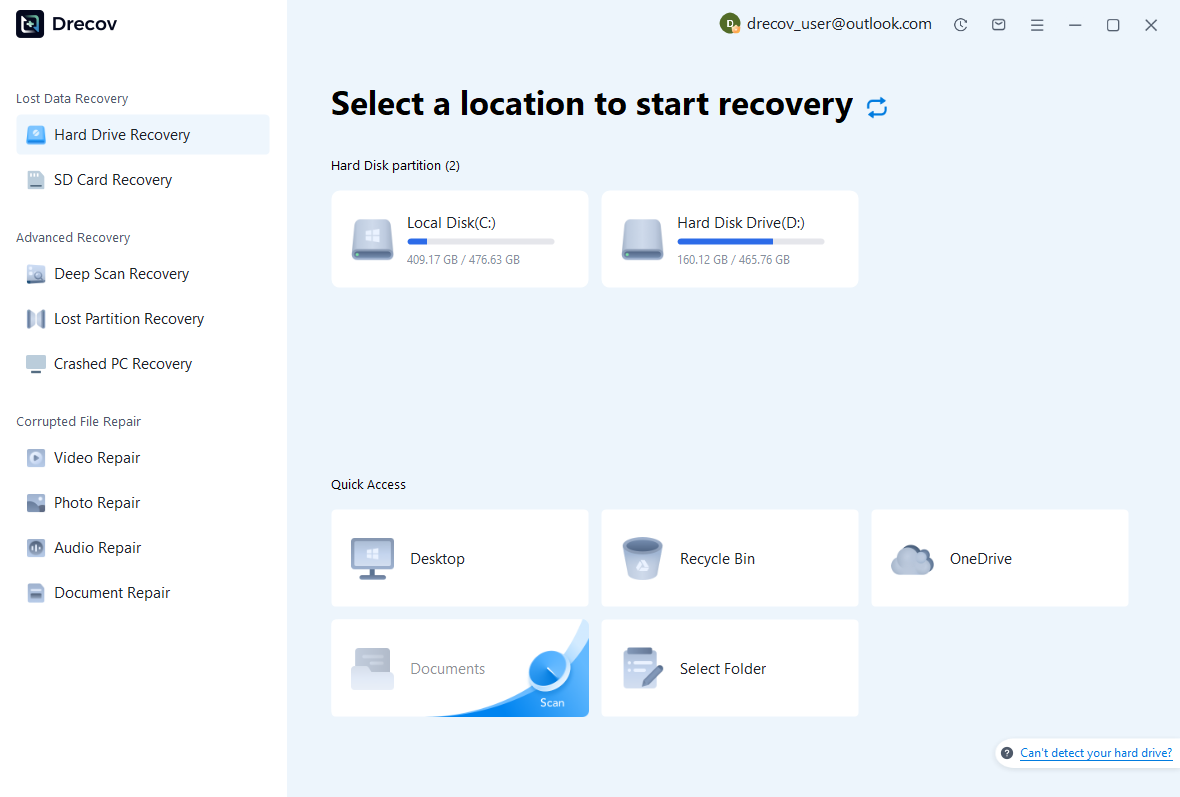
Step 1: identify the library’s actual storage
Select the drive or partition that held the complete library or the particular missing formats. Record the original directory structure and whether another library copy existed elsewhere. Keep recovery output on separate healthy storage. If the source repeatedly disconnects or reports hardware read failures, assess that condition before treating it as a routine deleted-file search.
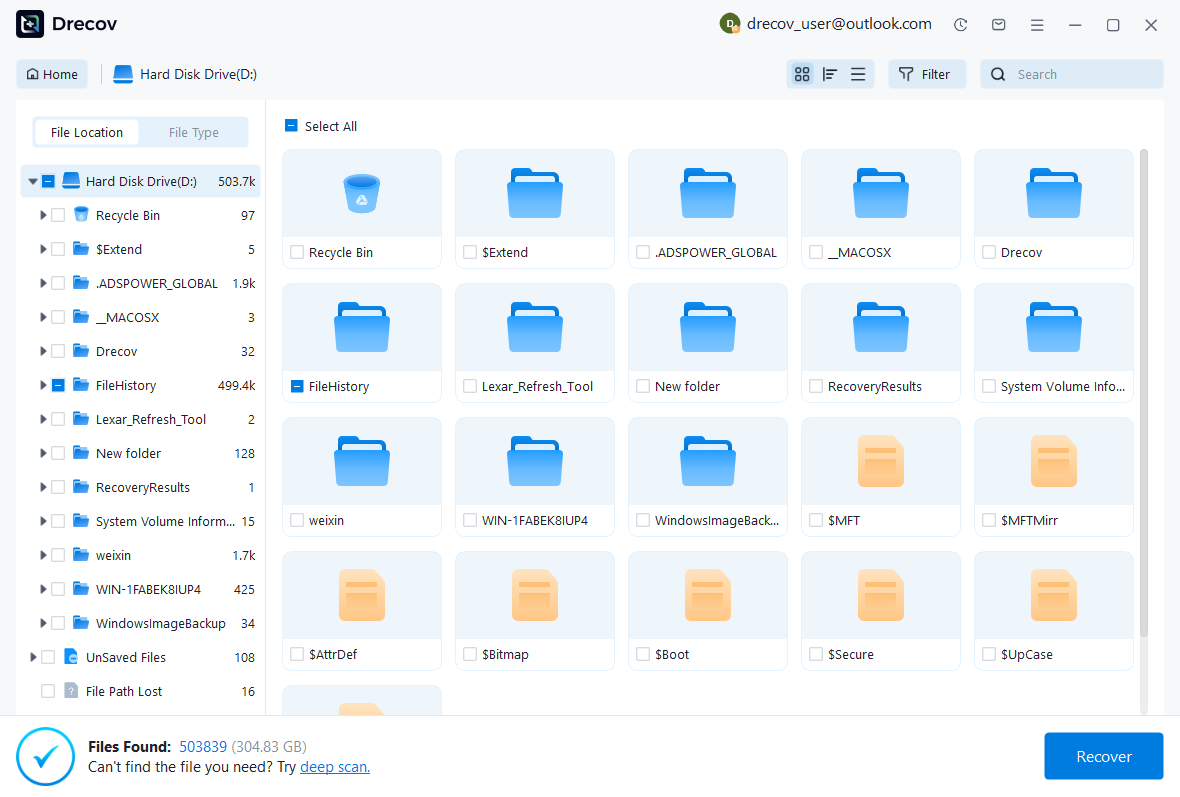
Step 2: compare books and catalog candidates
Review available paths, filenames, dates, sizes, and supported previews. Preserve useful database and OPF candidates together with associated book formats when possible. A recognizable cover does not establish that the full ebook survived. Keep several plausible editions or revisions when necessary and inspect their actual contents after recovery.
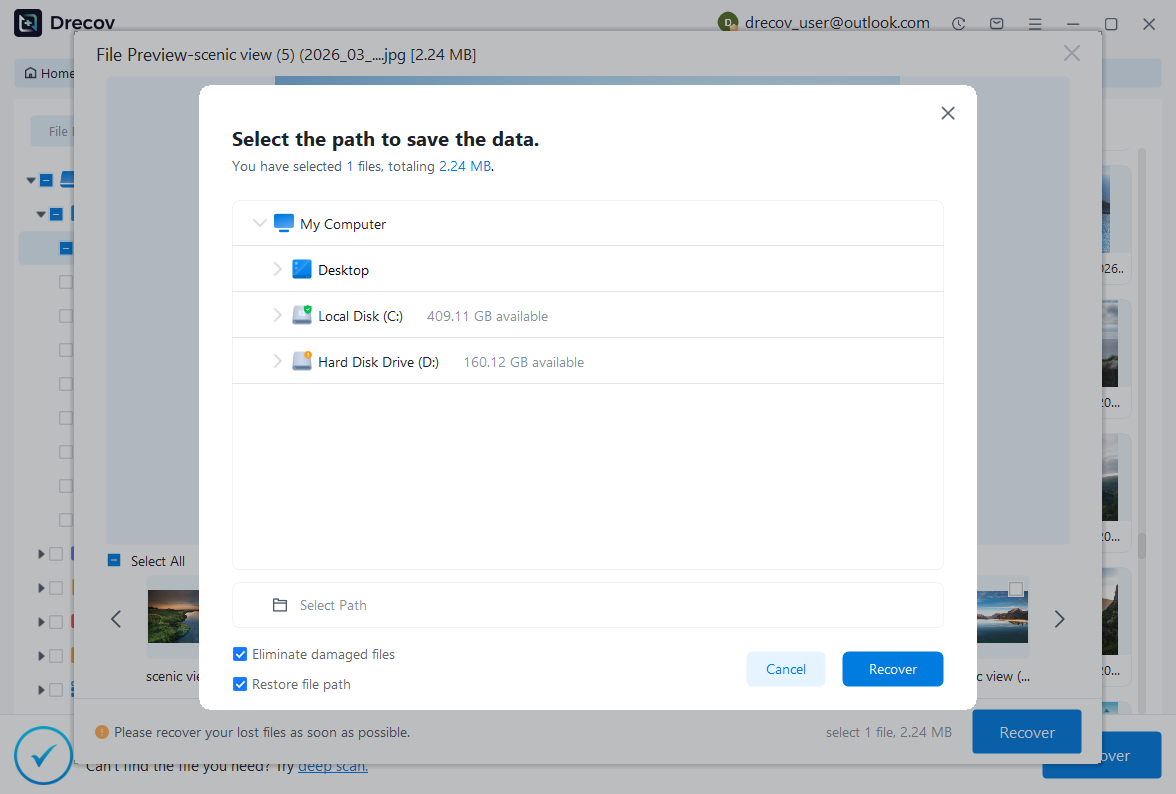
Step 3: restore elsewhere and open a working library
Recover selected files to a separate destination and preserve an untouched recovered set. Then test a working copy through Calibre’s supported library interface. Compare known books, metadata, and formats, using a rebuild or controlled re-import only where appropriate. Keep incomplete candidates separate from the accepted collection so they cannot overwrite useful recovered material.
Keep the recovered collection identifiable
Save a short note with the accepted library path, source copy, rebuild decision, and remaining missing formats. Then retain a complete verified library copy separately from rejected candidates. This gives the next reading or catalog task a reliable starting point rather than several similarly named folders whose contents and age remain uncertain.
Test the protection as an actual library restore
Use a disposable or copied library to test your backup process. Open it through Calibre, inspect a custom field, and read representative formats. Then confirm which configuration settings require separate preservation. A practical restore test shows what your protection really supplies and prevents a catalog-only copy from becoming the assumed recovery plan for the whole collection.
Related recovery resources
Explore the relevant recovery options: Hard drive recovery, External hard drive recovery.
For another recovery case and its practical checks, read the related recovery guide.
Check the vendor guidance for the installed version: official recovery documentation 1, official recovery documentation 2.